tinyobjloader
v1.0.6

File File Single Wavefront OBJ Loader ที่เขียนด้วย C ++ 03 ไม่มีการพึ่งพายกเว้น C ++ STL สามารถแยกวิเคราะห์รูปหลายเหลี่ยมได้มากกว่า 10 เมตรด้วยหน่วยความจำและเวลาปานกลาง
tinyobjloader นั้นดีสำหรับการฝัง .OBJ โหลดเดอร์ไปยัง (ไฟส่องสว่างทั่วโลก) ของคุณ ;-)
หากคุณกำลังมองหาเวอร์ชัน C99 โปรดดู https://github.com/syoyo/tinyobjloader-c
เราขอแนะนำให้ใช้สาขา master ( main ) ผู้สมัครที่ปล่อย V2.0 ฟีเจอร์ส่วนใหญ่เกือบจะแข็งแกร่งและเสถียร (งานที่เหลือสำหรับการเปิดตัว v2.0 คือการขัด C ++ และ Python API และแก้ไขรหัสสามเหลี่ยมในตัว)
เราได้เปิดตัวเวอร์ชันใหม่ v1.0.0 เมื่อวันที่ 20 ส.ค. 2016 รุ่นเก่ามีให้บริการเป็น v0.9.x สาขา https://github.com/syoyo/tinyobjloader/tree/v0.9.x
python นอกจากนี้ยังดู https://pypi.org/project/tinyobjloader/) รุ่นเก่าก่อนหน้านี้มีอยู่ในสาขา v0.9.x
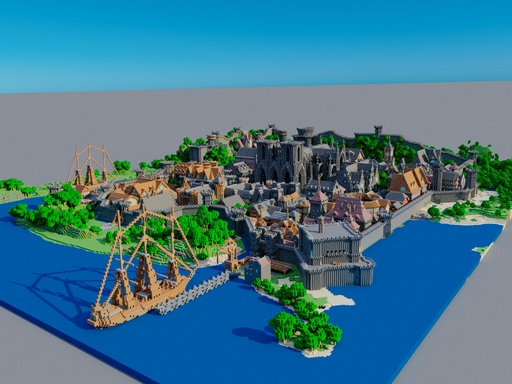
TinyObjjloader สามารถโหลดฉากรูปสามเหลี่ยม 6m ได้สำเร็จ http://casual-effects.com/data/index.html
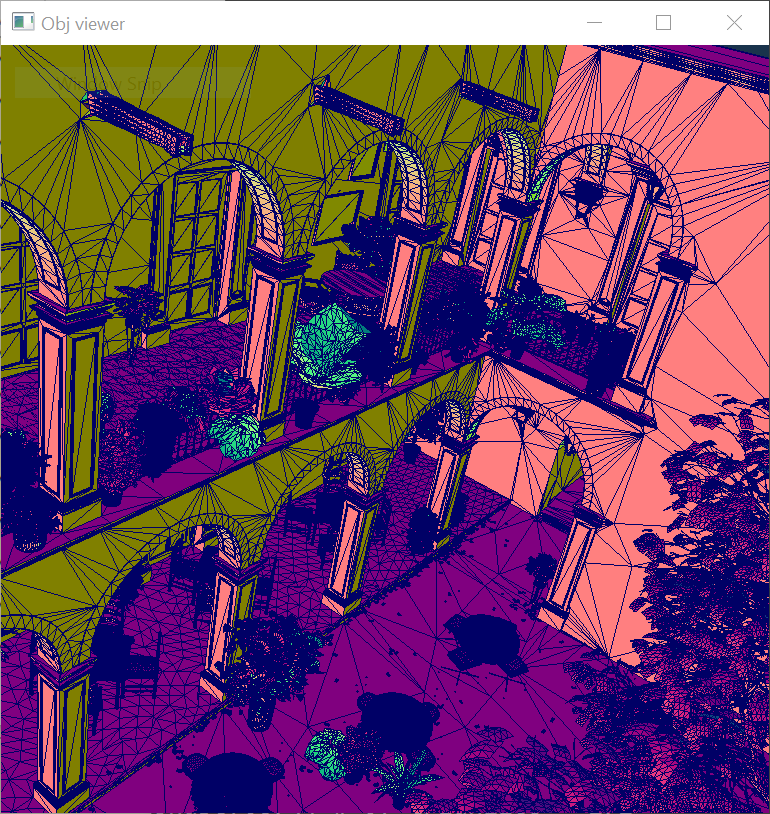
TinyObjjloader ใช้งานได้สำเร็จ ...
TINYOBJLOADER_USE_DOUBLE ขอบคุณ noma - เครื่องยนต์ 3 มิติพร้อมกราฟิกที่ทันสมัย
pythonf ) l ) p ) TinyObjjloader ได้รับใบอนุญาตภายใต้ใบอนุญาต MIT
ตัวเลือกหนึ่งคือการคัดลอกไฟล์ส่วนหัวลงในโครงการของคุณและเพื่อให้แน่ใจว่ามีการกำหนด TINYOBJLOADER_IMPLEMENTATION อย่างแน่นอนหนึ่งครั้ง
แม้ว่าจะไม่ใช่วิธีที่แนะนำ แต่คุณสามารถดาวน์โหลดและติดตั้ง TinyObjjloader โดยใช้ตัวจัดการการพึ่งพา VCPKG:
 git clone https://github.com/Microsoft/vcpkg.git
cd vcpkg
./bootstrap-vcpkg.sh
./vcpkg integrate install
./vcpkg install tinyobjloader
พอร์ต TinyObJJloader ใน VCPKG ได้รับการปรับปรุงให้ทันสมัยโดยสมาชิกในทีม Microsoft และผู้สนับสนุนชุมชน หากเวอร์ชันล้าสมัยโปรดสร้างปัญหาหรือดึงคำขอบนที่เก็บ VCPKG
attrib_t มีอาร์เรย์เดียวและเชิงเส้นของข้อมูลจุดสุดยอด (ตำแหน่งปกติและ texcoord)
 attrib_t::vertices => 3 floats per vertex

       v[0]        v[1]        v[2]        v[3]               v[n-1]
  +-----------+-----------+-----------+-----------+      +-----------+
  | x | y | z | x | y | z | x | y | z | x | y | z | .... | x | y | z |
  +-----------+-----------+-----------+-----------+      +-----------+

attrib_t::normals => 3 floats per vertex

       n[0]        n[1]        n[2]        n[3]               n[n-1]
  +-----------+-----------+-----------+-----------+      +-----------+
  | x | y | z | x | y | z | x | y | z | x | y | z | .... | x | y | z |
  +-----------+-----------+-----------+-----------+      +-----------+

attrib_t::texcoords => 2 floats per vertex

       t[0]        t[1]        t[2]        t[3]               t[n-1]
  +-----------+-----------+-----------+-----------+      +-----------+
  |  u  |  v  |  u  |  v  |  u  |  v  |  u  |  v  | .... |  u  |  v  |
  +-----------+-----------+-----------+-----------+      +-----------+

attrib_t::colors => 3 floats per vertex(vertex color. optional)

       c[0]        c[1]        c[2]        c[3]               c[n-1]
  +-----------+-----------+-----------+-----------+      +-----------+
  | x | y | z | x | y | z | x | y | z | x | y | z | .... | x | y | z |
  +-----------+-----------+-----------+-----------+      +-----------+
แต่ละ shape_t::mesh_t ไม่มีข้อมูลจุดสุดยอด แต่มีดัชนีอาร์เรย์เป็น attrib_t ดู loader_example.cc สำหรับรายละเอียดเพิ่มเติม
mesh_t::indices => array of vertex indices.

  +----+----+----+----+----+----+----+----+----+----+     +--------+
  | i0 | i1 | i2 | i3 | i4 | i5 | i6 | i7 | i8 | i9 | ... | i(n-1) |
  +----+----+----+----+----+----+----+----+----+----+     +--------+

Each index has an array index to attrib_t::vertices, attrib_t::normals and attrib_t::texcoords.

mesh_t::num_face_vertices => array of the number of vertices per face(e.g. 3 = triangle, 4 = quad , 5 or more = N-gons).


  +---+---+---+        +---+
  | 3 | 4 | 3 | ...... | 3 |
  +---+---+---+        +---+
    |   |   |            |
    |   |   |            +-----------------------------------------+
    |   |   |                                                      |
    |   |   +------------------------------+                       |
    |   |                                  |                       |
    |   +------------------+               |                       |
    |                      |               |                       |
    |/                     |/              |/                      |/

 mesh_t::indices

  |    face[0]   |       face[1]     |    face[2]   |     |      face[n-1]           |
  +----+----+----+----+----+----+----+----+----+----+     +--------+--------+--------+
  | i0 | i1 | i2 | i3 | i4 | i5 | i6 | i7 | i8 | i9 | ... | i(n-3) | i(n-2) | i(n-1) |
  +----+----+----+----+----+----+----+----+----+----+     +--------+--------+--------+
โปรดทราบว่าเมื่อธงรูป triangulate เป็นจริงใน tinyobj::LoadObj() , num_face_vertices ทั้งหมดเต็มไปด้วย 3 (สามเหลี่ยม)
ตอนนี้ TinyObjjloader ใช้ real_t สำหรับประเภทข้อมูลจุดลอยตัว ค่าเริ่มต้นคือ float(32bit) คุณสามารถเปิดใช้งานความแม่นยำ double(64bit) โดยใช้ TINYOBJLOADER_USE_DOUBLE define
เมื่อคุณเปิดใช้งาน triangulation (เปิดใช้งานค่าเริ่มต้น), TinyObjloader สามเหลี่ยมรูปหลายเหลี่ยม (ใบหน้าที่มี 4 จุดยอดขึ้นไป)
รหัสสามเหลี่ยมในตัวอาจทำงานได้ไม่ดีในรูปหลายเหลี่ยม
คุณสามารถกำหนด TINYOBJLOADER_USE_MAPBOX_EARCUT เพื่อการวิเคราะห์ที่แข็งแกร่งโดยใช้ mapbox/earcut.hpp สิ่งนี้ต้องใช้คอมไพเลอร์ C ++ 11 และคุณต้องคัดลอก mapbox/earcut.hpp ไปยังโครงการของคุณ หากคุณมีไฟล์ mapbox/earcut.hpp ของคุณเองที่อยู่ในโครงการของคุณคุณสามารถกำหนด TINYOBJLOADER_DONOT_INCLUDE_MAPBOX_EARCUT เพื่อให้ mapbox/earcut.hpp ไม่รวมอยู่ใน tiny_obj_loader.h
# define TINYOBJLOADER_IMPLEMENTATION // define this in only *one* .cc
// Optional. define TINYOBJLOADER_USE_MAPBOX_EARCUT gives robust triangulation. Requires C++11
// #define TINYOBJLOADER_USE_MAPBOX_EARCUT
# include " tiny_obj_loader.h "

std::string inputfile = " cornell_box.obj " ;
tinyobj:: attrib_t attrib;
std::vector<tinyobj:: shape_t > shapes;
std::vector<tinyobj:: material_t > materials;

std::string warn;
std::string err;

bool ret = tinyobj::LoadObj(&attrib, &shapes, &materials, &warn, &err, inputfile.c_str());

if (!warn.empty()) {
  std::cout << warn << std::endl;
}

if (!err.empty()) {
  std::cerr << err << std::endl;
}

if (!ret) {
  exit ( 1 );
}

// Loop over shapes
for ( size_t s = 0 ; s < shapes.size(); s++) {
  // Loop over faces(polygon)
  size_t index_offset = 0 ;
  for ( size_t f = 0 ; f < shapes[s]. mesh . num_face_vertices . size (); f++) {
    size_t fv = size_t (shapes[s]. mesh . num_face_vertices [f]);

    // Loop over vertices in the face.
    for ( size_t v = 0 ; v < fv; v++) {
      // access to vertex
      tinyobj:: index_t idx = shapes[s]. mesh . indices [index_offset + v];

      tinyobj:: real_t vx = attrib. vertices [ 3 * size_t (idx. vertex_index )+ 0 ];
      tinyobj:: real_t vy = attrib. vertices [ 3 * size_t (idx. vertex_index )+ 1 ];
      tinyobj:: real_t vz = attrib. vertices [ 3 * size_t (idx. vertex_index )+ 2 ];

      // Check if `normal_index` is zero or positive. negative = no normal data
      if (idx. normal_index >= 0 ) {
        tinyobj:: real_t nx = attrib. normals [ 3 * size_t (idx. normal_index )+ 0 ];
        tinyobj:: real_t ny = attrib. normals [ 3 * size_t (idx. normal_index )+ 1 ];
        tinyobj:: real_t nz = attrib. normals [ 3 * size_t (idx. normal_index )+ 2 ];
      }

      // Check if `texcoord_index` is zero or positive. negative = no texcoord data
      if (idx. texcoord_index >= 0 ) {
        tinyobj:: real_t tx = attrib. texcoords [ 2 * size_t (idx. texcoord_index )+ 0 ];
        tinyobj:: real_t ty = attrib. texcoords [ 2 * size_t (idx. texcoord_index )+ 1 ];
      }
      // Optional: vertex colors
      // tinyobj::real_t red   = attrib.colors[3*size_t(idx.vertex_index)+0];
      // tinyobj::real_t green = attrib.colors[3*size_t(idx.vertex_index)+1];
      // tinyobj::real_t blue  = attrib.colors[3*size_t(idx.vertex_index)+2];
    }
    index_offset += fv;

    // per-face material
    shapes[s]. mesh . material_ids [f];
  }
}
# define TINYOBJLOADER_IMPLEMENTATION // define this in only *one* .cc
// Optional. define TINYOBJLOADER_USE_MAPBOX_EARCUT gives robust triangulation. Requires C++11
// #define TINYOBJLOADER_USE_MAPBOX_EARCUT
# include " tiny_obj_loader.h "


std::string inputfile = " cornell_box.obj " ;
tinyobj::ObjReaderConfig reader_config;
reader_config.mtl_search_path = " ./ " ; // Path to material files

tinyobj::ObjReader reader;

if (!reader.ParseFromFile(inputfile, reader_config)) {
  if (!reader. Error (). empty ()) {
      std::cerr << " TinyObjReader: " << reader. Error ();
  }
  exit ( 1 );
}

if (!reader.Warning().empty()) {
  std::cout << " TinyObjReader: " << reader. Warning ();
}

auto & attrib = reader.GetAttrib();
auto & shapes = reader.GetShapes();
auto & materials = reader.GetMaterials();

// Loop over shapes
for ( size_t s = 0 ; s < shapes.size(); s++) {
  // Loop over faces(polygon)
  size_t index_offset = 0 ;
  for ( size_t f = 0 ; f < shapes[s]. mesh . num_face_vertices . size (); f++) {
    size_t fv = size_t (shapes[s]. mesh . num_face_vertices [f]);

    // Loop over vertices in the face.
    for ( size_t v = 0 ; v < fv; v++) {
      // access to vertex
      tinyobj:: index_t idx = shapes[s]. mesh . indices [index_offset + v];
      tinyobj:: real_t vx = attrib. vertices [ 3 * size_t (idx. vertex_index )+ 0 ];
      tinyobj:: real_t vy = attrib. vertices [ 3 * size_t (idx. vertex_index )+ 1 ];
      tinyobj:: real_t vz = attrib. vertices [ 3 * size_t (idx. vertex_index )+ 2 ];

      // Check if `normal_index` is zero or positive. negative = no normal data
      if (idx. normal_index >= 0 ) {
        tinyobj:: real_t nx = attrib. normals [ 3 * size_t (idx. normal_index )+ 0 ];
        tinyobj:: real_t ny = attrib. normals [ 3 * size_t (idx. normal_index )+ 1 ];
        tinyobj:: real_t nz = attrib. normals [ 3 * size_t (idx. normal_index )+ 2 ];
      }

      // Check if `texcoord_index` is zero or positive. negative = no texcoord data
      if (idx. texcoord_index >= 0 ) {
        tinyobj:: real_t tx = attrib. texcoords [ 2 * size_t (idx. texcoord_index )+ 0 ];
        tinyobj:: real_t ty = attrib. texcoords [ 2 * size_t (idx. texcoord_index )+ 1 ];
      }

      // Optional: vertex colors
      // tinyobj::real_t red   = attrib.colors[3*size_t(idx.vertex_index)+0];
      // tinyobj::real_t green = attrib.colors[3*size_t(idx.vertex_index)+1];
      // tinyobj::real_t blue  = attrib.colors[3*size_t(idx.vertex_index)+2];
    }
    index_offset += fv;

    // per-face material
    shapes[s]. mesh . material_ids [f];
  }
}
Loader .OBJ แบบมัลติเธรดที่ได้รับการปรับให้เหมาะสมมีให้บริการที่ experimental/ ไดเรกทอรี หากคุณต้องการให้ประสิทธิภาพแน่นอนโหลดข้อมูล. obj ตัวโหลดที่ดีที่สุดนี้จะเหมาะกับวัตถุประสงค์ของคุณ โปรดทราบว่าตัวโหลดที่ดีที่สุดใช้เธรด C ++ 11 และทำการตรวจสอบข้อผิดพลาดน้อยลง แต่อาจใช้งานได้มากที่สุด
นี่คือผลลัพธ์มาตรฐานบางอย่าง เวลาถูกวัดบน MacBook 12 (ต้นปี 2559, Core M5 1.2GHz)
$ python -m pip install tinyobjloader
ดู Python/sample.py ตัวอย่างเช่นการใช้การผูก Python ของ TinyObjjloader
Cibuildwheels + การอัปโหลด Twine สำหรับเหตุการณ์การติดแท็กแต่ละครั้งได้รับการจัดการในการกระทำของ GitHub และ Cirrus CI (ARM Builds)
black to Python ( python/sample.py )release ยืนยันการสร้าง CI ก็โอเคv (เช่น v2.1.0 )git push --tags การทดสอบหน่วยมีให้ในไดเรกทอรี tests ดู tests/README.md สำหรับรายละเอียด







