tinyobjloader
v1.0.6

Chargeur OBJ de front à fichier unique minuscule mais puissant écrit en C ++ 03. Aucune dépendance sauf pour C ++ STL. Il peut analyser plus de 10 m de polygones avec une mémoire et un temps modérés.
tinyobjloader est bon pour l'intégration .Obj Loader à votre rendu (Global Illumination) ;-)
Si vous recherchez la version C99, veuillez consulter https://github.com/syoyo/tinyobjloller-c.
Nous vous recommandons d'utiliser la succursale master ( main ). Son candidat à libération v2.0. La plupart des fonctionnalités sont désormais presque robustes et stables (la tâche restante pour la version V2.0 est le polissage C ++ et Python et corriger le code de triangulation intégré).
Nous avons publié une nouvelle version v1.0.0 le 20 août 2016. La version ancienne est disponible sous le nom de v0.9.x Branch https://github.com/syoyo/tinyobjloader/tree/v0.9.x
python . Voir également https://pypi.org/project/tinyobjloller/) La vieille version précédente est disponible dans la branche v0.9.x
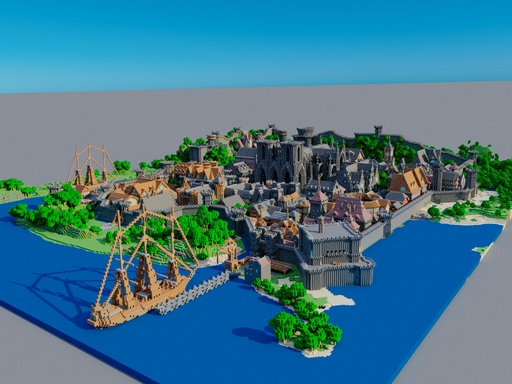
Tinyobjloader peut charger avec succès la scène des triangles de 6 m de Rungholt. http://casual-effects.com/data/index.html
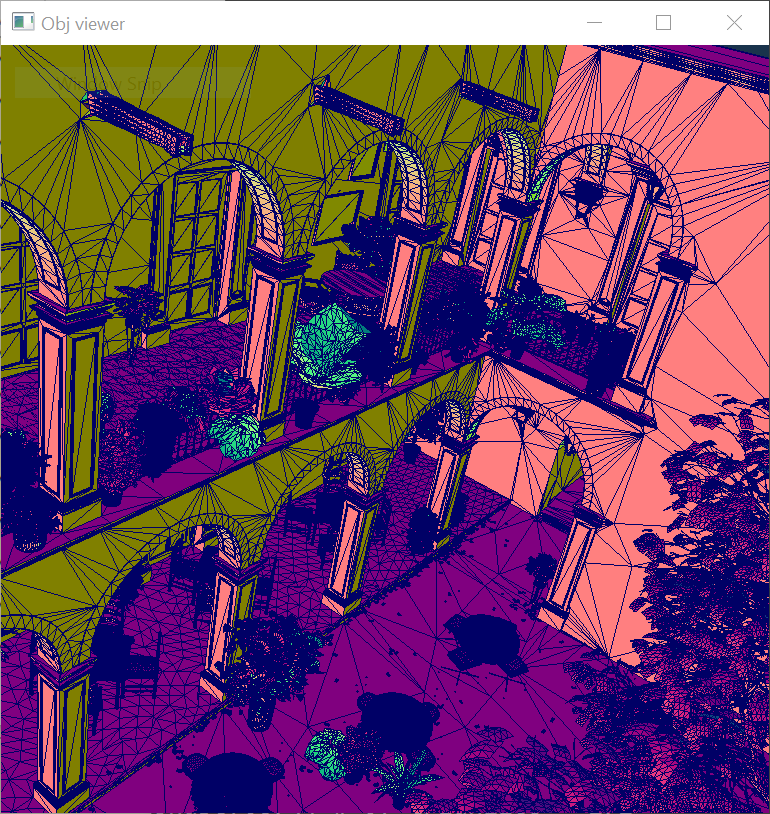
Tinyobjloader est utilisé avec succès dans ...
TINYOBJLOADER_USE_DOUBLE grâce à NOMA - moteur 3D avec graphiques modernes
python .f ) l ) p ) Tinyobjloader est sous licence MIT.
Une option consiste à copier simplement le fichier d'en-tête dans votre projet et à vous assurer que TINYOBJLOADER_IMPLEMENTATION est défini exactement une fois.
Bien que ce ne soit pas une manière recommandée, vous pouvez télécharger et installer TinyObJloader à l'aide du gestionnaire de dépendance VCPKG:
 git clone https://github.com/Microsoft/vcpkg.git
cd vcpkg
./bootstrap-vcpkg.sh
./vcpkg integrate install
./vcpkg install tinyobjloader
Le port Tinyobjloader de VCPKG est tenu à jour par les membres de l'équipe Microsoft et les contributeurs communautaires. Si la version est obsolète, veuillez créer une demande de problème ou d'extraction sur le référentiel VCPKG.
attrib_t contient un tableau unique et linéaire de données de sommet (position, normal et texcoord).
 attrib_t::vertices => 3 floats per vertex

       v[0]        v[1]        v[2]        v[3]               v[n-1]
  +-----------+-----------+-----------+-----------+      +-----------+
  | x | y | z | x | y | z | x | y | z | x | y | z | .... | x | y | z |
  +-----------+-----------+-----------+-----------+      +-----------+

attrib_t::normals => 3 floats per vertex

       n[0]        n[1]        n[2]        n[3]               n[n-1]
  +-----------+-----------+-----------+-----------+      +-----------+
  | x | y | z | x | y | z | x | y | z | x | y | z | .... | x | y | z |
  +-----------+-----------+-----------+-----------+      +-----------+

attrib_t::texcoords => 2 floats per vertex

       t[0]        t[1]        t[2]        t[3]               t[n-1]
  +-----------+-----------+-----------+-----------+      +-----------+
  |  u  |  v  |  u  |  v  |  u  |  v  |  u  |  v  | .... |  u  |  v  |
  +-----------+-----------+-----------+-----------+      +-----------+

attrib_t::colors => 3 floats per vertex(vertex color. optional)

       c[0]        c[1]        c[2]        c[3]               c[n-1]
  +-----------+-----------+-----------+-----------+      +-----------+
  | x | y | z | x | y | z | x | y | z | x | y | z | .... | x | y | z |
  +-----------+-----------+-----------+-----------+      +-----------+
Chaque shape_t::mesh_t ne contient pas de données de sommet mais contient l'index du tableau à attrib_t . Voir loader_example.cc pour plus de détails.
mesh_t::indices => array of vertex indices.

  +----+----+----+----+----+----+----+----+----+----+     +--------+
  | i0 | i1 | i2 | i3 | i4 | i5 | i6 | i7 | i8 | i9 | ... | i(n-1) |
  +----+----+----+----+----+----+----+----+----+----+     +--------+

Each index has an array index to attrib_t::vertices, attrib_t::normals and attrib_t::texcoords.

mesh_t::num_face_vertices => array of the number of vertices per face(e.g. 3 = triangle, 4 = quad , 5 or more = N-gons).


  +---+---+---+        +---+
  | 3 | 4 | 3 | ...... | 3 |
  +---+---+---+        +---+
    |   |   |            |
    |   |   |            +-----------------------------------------+
    |   |   |                                                      |
    |   |   +------------------------------+                       |
    |   |                                  |                       |
    |   +------------------+               |                       |
    |                      |               |                       |
    |/                     |/              |/                      |/

 mesh_t::indices

  |    face[0]   |       face[1]     |    face[2]   |     |      face[n-1]           |
  +----+----+----+----+----+----+----+----+----+----+     +--------+--------+--------+
  | i0 | i1 | i2 | i3 | i4 | i5 | i6 | i7 | i8 | i9 | ... | i(n-3) | i(n-2) | i(n-1) |
  +----+----+----+----+----+----+----+----+----+----+     +--------+--------+--------+
Notez que lorsque le drapeau triangulate est vrai dans tinyobj::LoadObj() , num_face_vertices sont tous remplis de 3 (triangle).
TinyObJloader utilise désormais real_t pour le type de données de points flottants. La valeur par défaut est float(32bit) . Vous pouvez activer double(64bit) en utilisant TINYOBJLOADER_USE_DOUBLE Define.
Lorsque vous activez triangulation (la valeur par défaut est activée), les polygones triangulés TinyObJloader (faces avec 4 sommets ou plus).
Le code de triangulation intégré peut ne pas fonctionner bien sous une forme de polygone.
Vous pouvez définir TINYOBJLOADER_USE_MAPBOX_EARCUT pour une triangulation robuste à l'aide mapbox/earcut.hpp . Cela nécessite cependant le compilateur C ++ 11. Et vous devez copier mapbox/earcut.hpp à votre projet. Si vous avez votre propre fichier mapbox/earcut.hpp inclus dans votre projet, vous pouvez définir TINYOBJLOADER_DONOT_INCLUDE_MAPBOX_EARCUT pour que mapbox/earcut.hpp ne soit pas inclus à l'intérieur de tiny_obj_loader.h .
# define TINYOBJLOADER_IMPLEMENTATION // define this in only *one* .cc
// Optional. define TINYOBJLOADER_USE_MAPBOX_EARCUT gives robust triangulation. Requires C++11
// #define TINYOBJLOADER_USE_MAPBOX_EARCUT
# include " tiny_obj_loader.h "

std::string inputfile = " cornell_box.obj " ;
tinyobj:: attrib_t attrib;
std::vector<tinyobj:: shape_t > shapes;
std::vector<tinyobj:: material_t > materials;

std::string warn;
std::string err;

bool ret = tinyobj::LoadObj(&attrib, &shapes, &materials, &warn, &err, inputfile.c_str());

if (!warn.empty()) {
  std::cout << warn << std::endl;
}

if (!err.empty()) {
  std::cerr << err << std::endl;
}

if (!ret) {
  exit ( 1 );
}

// Loop over shapes
for ( size_t s = 0 ; s < shapes.size(); s++) {
  // Loop over faces(polygon)
  size_t index_offset = 0 ;
  for ( size_t f = 0 ; f < shapes[s]. mesh . num_face_vertices . size (); f++) {
    size_t fv = size_t (shapes[s]. mesh . num_face_vertices [f]);

    // Loop over vertices in the face.
    for ( size_t v = 0 ; v < fv; v++) {
      // access to vertex
      tinyobj:: index_t idx = shapes[s]. mesh . indices [index_offset + v];

      tinyobj:: real_t vx = attrib. vertices [ 3 * size_t (idx. vertex_index )+ 0 ];
      tinyobj:: real_t vy = attrib. vertices [ 3 * size_t (idx. vertex_index )+ 1 ];
      tinyobj:: real_t vz = attrib. vertices [ 3 * size_t (idx. vertex_index )+ 2 ];

      // Check if `normal_index` is zero or positive. negative = no normal data
      if (idx. normal_index >= 0 ) {
        tinyobj:: real_t nx = attrib. normals [ 3 * size_t (idx. normal_index )+ 0 ];
        tinyobj:: real_t ny = attrib. normals [ 3 * size_t (idx. normal_index )+ 1 ];
        tinyobj:: real_t nz = attrib. normals [ 3 * size_t (idx. normal_index )+ 2 ];
      }

      // Check if `texcoord_index` is zero or positive. negative = no texcoord data
      if (idx. texcoord_index >= 0 ) {
        tinyobj:: real_t tx = attrib. texcoords [ 2 * size_t (idx. texcoord_index )+ 0 ];
        tinyobj:: real_t ty = attrib. texcoords [ 2 * size_t (idx. texcoord_index )+ 1 ];
      }
      // Optional: vertex colors
      // tinyobj::real_t red   = attrib.colors[3*size_t(idx.vertex_index)+0];
      // tinyobj::real_t green = attrib.colors[3*size_t(idx.vertex_index)+1];
      // tinyobj::real_t blue  = attrib.colors[3*size_t(idx.vertex_index)+2];
    }
    index_offset += fv;

    // per-face material
    shapes[s]. mesh . material_ids [f];
  }
}
# define TINYOBJLOADER_IMPLEMENTATION // define this in only *one* .cc
// Optional. define TINYOBJLOADER_USE_MAPBOX_EARCUT gives robust triangulation. Requires C++11
// #define TINYOBJLOADER_USE_MAPBOX_EARCUT
# include " tiny_obj_loader.h "


std::string inputfile = " cornell_box.obj " ;
tinyobj::ObjReaderConfig reader_config;
reader_config.mtl_search_path = " ./ " ; // Path to material files

tinyobj::ObjReader reader;

if (!reader.ParseFromFile(inputfile, reader_config)) {
  if (!reader. Error (). empty ()) {
      std::cerr << " TinyObjReader: " << reader. Error ();
  }
  exit ( 1 );
}

if (!reader.Warning().empty()) {
  std::cout << " TinyObjReader: " << reader. Warning ();
}

auto & attrib = reader.GetAttrib();
auto & shapes = reader.GetShapes();
auto & materials = reader.GetMaterials();

// Loop over shapes
for ( size_t s = 0 ; s < shapes.size(); s++) {
  // Loop over faces(polygon)
  size_t index_offset = 0 ;
  for ( size_t f = 0 ; f < shapes[s]. mesh . num_face_vertices . size (); f++) {
    size_t fv = size_t (shapes[s]. mesh . num_face_vertices [f]);

    // Loop over vertices in the face.
    for ( size_t v = 0 ; v < fv; v++) {
      // access to vertex
      tinyobj:: index_t idx = shapes[s]. mesh . indices [index_offset + v];
      tinyobj:: real_t vx = attrib. vertices [ 3 * size_t (idx. vertex_index )+ 0 ];
      tinyobj:: real_t vy = attrib. vertices [ 3 * size_t (idx. vertex_index )+ 1 ];
      tinyobj:: real_t vz = attrib. vertices [ 3 * size_t (idx. vertex_index )+ 2 ];

      // Check if `normal_index` is zero or positive. negative = no normal data
      if (idx. normal_index >= 0 ) {
        tinyobj:: real_t nx = attrib. normals [ 3 * size_t (idx. normal_index )+ 0 ];
        tinyobj:: real_t ny = attrib. normals [ 3 * size_t (idx. normal_index )+ 1 ];
        tinyobj:: real_t nz = attrib. normals [ 3 * size_t (idx. normal_index )+ 2 ];
      }

      // Check if `texcoord_index` is zero or positive. negative = no texcoord data
      if (idx. texcoord_index >= 0 ) {
        tinyobj:: real_t tx = attrib. texcoords [ 2 * size_t (idx. texcoord_index )+ 0 ];
        tinyobj:: real_t ty = attrib. texcoords [ 2 * size_t (idx. texcoord_index )+ 1 ];
      }

      // Optional: vertex colors
      // tinyobj::real_t red   = attrib.colors[3*size_t(idx.vertex_index)+0];
      // tinyobj::real_t green = attrib.colors[3*size_t(idx.vertex_index)+1];
      // tinyobj::real_t blue  = attrib.colors[3*size_t(idx.vertex_index)+2];
    }
    index_offset += fv;

    // per-face material
    shapes[s]. mesh . material_ids [f];
  }
}
Le chargeur .OBJ multi-thread optimisé est disponible au répertoire experimental/ . Si vous voulez que les performances absolues chargent les données .OBJ, ce chargeur optimisé s'adaptera à votre objectif. Notez que le chargeur optimisé utilise le thread C ++ 11 et qu'il fait moins de vérifications d'erreur mais peut fonctionner la plupart des données .OBJ.
Voici quelques résultats de référence. Le temps est mesuré sur MacBook 12 (début 2016, Core M5 1,2 GHz).
$ python -m pip install tinyobjloader
Voir Python / Sample.py Par exemple Utilisation de la liaison Python de TinyObJloader.
CibuildWheels + Tine Téléchargement pour chaque événement de balise GIT est géré dans les actions GitHub et Cirrus CI (Builds ARM).
black sur Python ( python/sample.py )release . Confirmer CI Build est OK.v (par exemple v2.1.0 )git push --tags Des tests unitaires sont fournis dans le répertoire tests . Voir tests/README.md pour plus de détails.







