php bing ai
1.2

새로운 기능 : 채팅에서 이미지를 보냅니다

이것은 채팅 (GPT-4) 및 Image Creator (Dall-E)를 포함하여 Bing AI 의 비공식 PHP 클라이언트입니다.
composer require maximerenou/bing-ai
이 데모 프로그램은 채팅과 이미지 제작자를 모두 사용합니다.
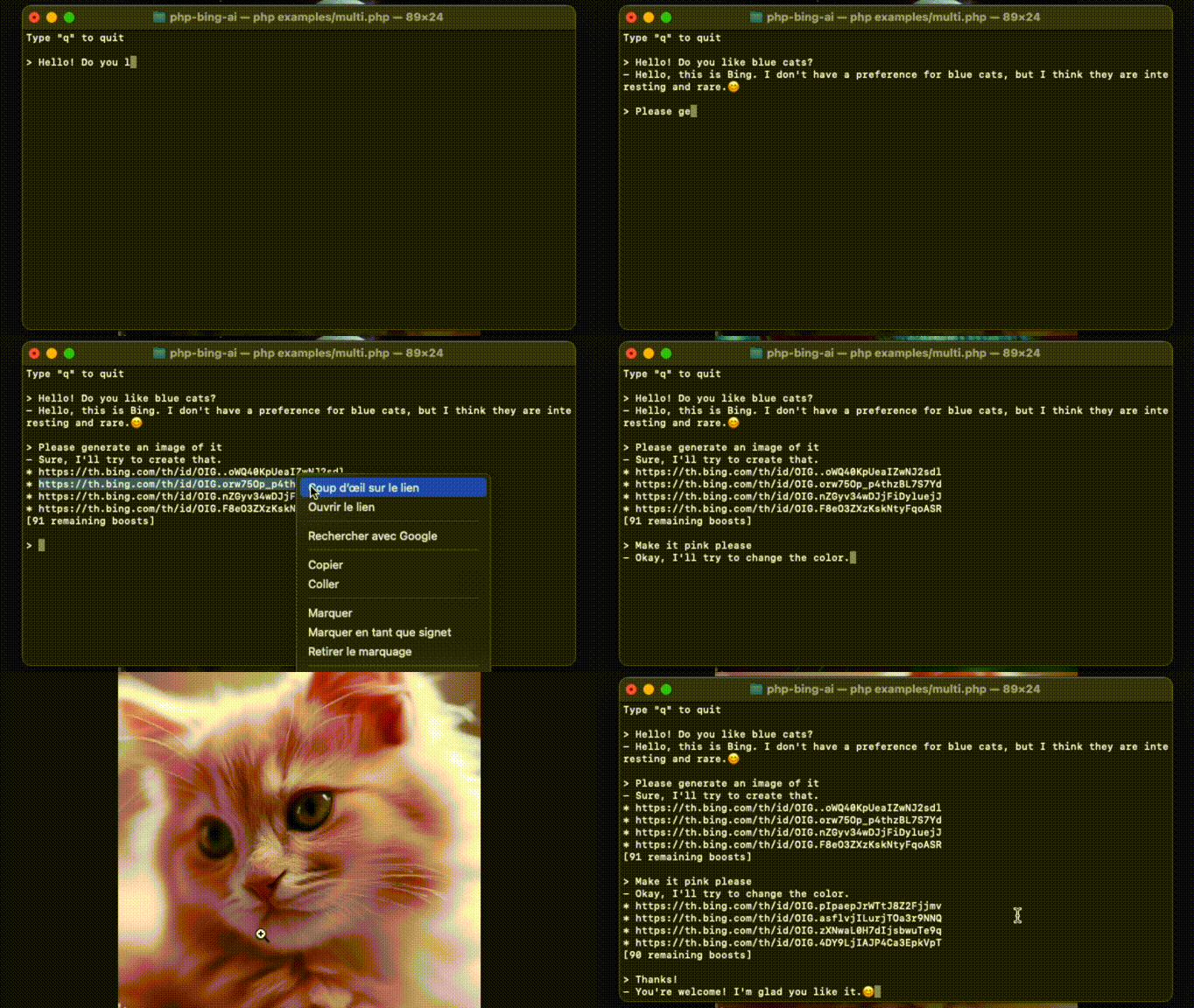
출처 : examples/multi.php .
먼저 bing.com에 로그인하고 _U 쿠키를 가져와야합니다.
쿠키를 사용하기 전에 Bing 채팅에 첫 번째 메시지를 보내십시오 (Captcha Bypass).
 use MaximeRenou  BingAI  BingAI ;

// $cookie - your "_U" cookie from bing.com
$ ai = new BingAI ( $ cookie );
$ valid = $ ai -> checkCookie (); 데모 :이 repo, 편집 및 실행 examples/chat.php 복제하십시오.
 use MaximeRenou  BingAI  BingAI ;
use MaximeRenou  BingAI  Chat  Prompt ;

// $cookie - your "_U" cookie from bing.com
$ ai = new BingAI ( $ cookie );

$ conversation = $ ai -> createChatConversation ();

// $text - Text-only version of Bing's answer
// $cards - Message objects array
list ( $ text , $ cards ) = $ conversation -> ask ( new Prompt ( " Hello World " ));
$cards에는 Bing AI와 교환 된 모든 "메시지"가 포함되어 있습니다. 텍스트 (프롬프트 또는 답변), 신호, 제안, 이미지 생성 요청 등이 될 수 있습니다.Message.php확인하여 형식에 대해 자세히 알아보십시오.
메시지에 이미지를 첨부 할 수 있습니다.
 $ prompt = new Prompt ( " How cute is this animal? " );
$ prompt -> withImage ( ' /path/to/panda.png ' );
//or: $prompt->withImage($raw_image_data, true);

$ conversation -> ask ( $ prompt , ...);
시도해보십시오!
examples/chat.php와 함께 메시지 끝에$image입력하십시오.
실시간 진행을 얻기 위해 두 번째 인수로 기능을 전달할 수 있습니다.
 // $text - Incomplete text version
// $cards - Incomplete messages fleet
list ( $ final_text , $ final_cards ) = $ conversation -> ask ( $ prompt , function ( $ text , $ cards ) {
    echo $ text ;
}); $ conversation = $ ai -> createChatConversation ()
-> withLocation ( $ latitude , $ longitude , $ radius ) // Optional
-> withPreferences ( ' fr-FR ' , ' fr-FR ' , ' FR ' ); // Optional use MaximeRenou BingAI Chat Tone ;
$ conversation = $ ai -> createChatConversation ()
-> withTone (Tone::Creative); // Optional
// Choices:
// Tone::Balanced (default)
// Tone::Creative
// Tone::Precise이전 대화를 재개하려면 식별자를 검색 할 수 있습니다.
 // Get current identifiers
$ identifiers = $ conversation -> getIdentifiers ();

// ...
// Resume conversation with $identifiers parameter, and number of previous questions asked
$ conversation = $ ai -> resumeChatConversation ( $ identifiers , 1 ); $ subject = " Internet memes " ;
$ tone = ' funny ' ;
$ type = ' blog post ' ;
$ length = ' short ' ;
$ prompt = new Prompt ( " Please write a * $ length * * $ type * in a * $ tone * style about ` $ subject `. Please wrap the $ type in a markdown codeblock. " );
$ conversation -> ask ( $ prompt -> withoutCache (), ...)"이미 작성했습니다 [...]"와 같은 답변을 방지하려면
withoutCache()프롬프트에 대한 캐시를 비활성화 할 수 있습니다.
Bing은 대화 당 메시지 수를 제한하고 있습니다. 모든 상호 작용 후에 getRemainingMessages() 호출하여 모니터링 할 수 있습니다.
 $ remaining = $ conversation -> getRemainingMessages ();

if ( $ remaining === 0 ) {
    // You reached the limit
}
모든 상호 작용 후에도 대화에서 쫓겨 났는지 확인해야합니다.
 if ( $ conversation -> kicked ()) {
    // You have been kicked, you should start a new conversation
}
두 확인을 다음과 결합 할 수 있습니다.
 if ( $ conversation -> ended ()) {
    // You reached the limit or have been kicked
} 데모 :이 repo, 편집 및 실행 examples/images.php 복제하십시오.
 use MaximeRenou  BingAI  BingAI ;

// $cookie - your "_U" cookie from bing.com
$ ai = new BingAI ( $ cookie );

$ creator = $ ai -> createImages ( " A 3D teddy bear " );

$ creator -> wait ();

// Finally, get images URLs
if (! $ creator -> hasFailed ()) {
    $ images = $ creator -> getImages ();
}
모든 "부스트"를 소비 한 후 이미지 생성이 느려질 수 있습니다. 남은 부스트를 알기 위해 아래 섹션을 확인하십시오.
 $ creator = $ ai -> getImageCreator ();

$ remaining_boosts = $ creator -> getRemainingBoosts (); $ prompt = " A 3D teddy bear " ;
$ creator = $ ai -> createImages ( $ prompt );
$ generation_id = $ creator -> getGenerationId ();
// ...
$ creator = $ ai -> getImageCreator ();
$ creator -> resume ( $ generation_id , $ prompt ); do {
sleep ( 1 );
} while ( $ creator -> isGenerating ());bing.com 외부에서 Bing AI를 사용하면 Bing 용어를 위반할 수 있습니다. 자신의 위험에 따라 사용하십시오. Bing은 Microsoft의 상표입니다.







