php bing ai
1.2

新機能:チャットで画像を送信します

これは、 Chat(GPT-4)やImage Creator(Dall-E)を含むBing AIの非公式のPHPクライアントです。
composer require maximerenou/bing-ai
このデモプログラムは、チャットと画像作成者の両方を使用します。
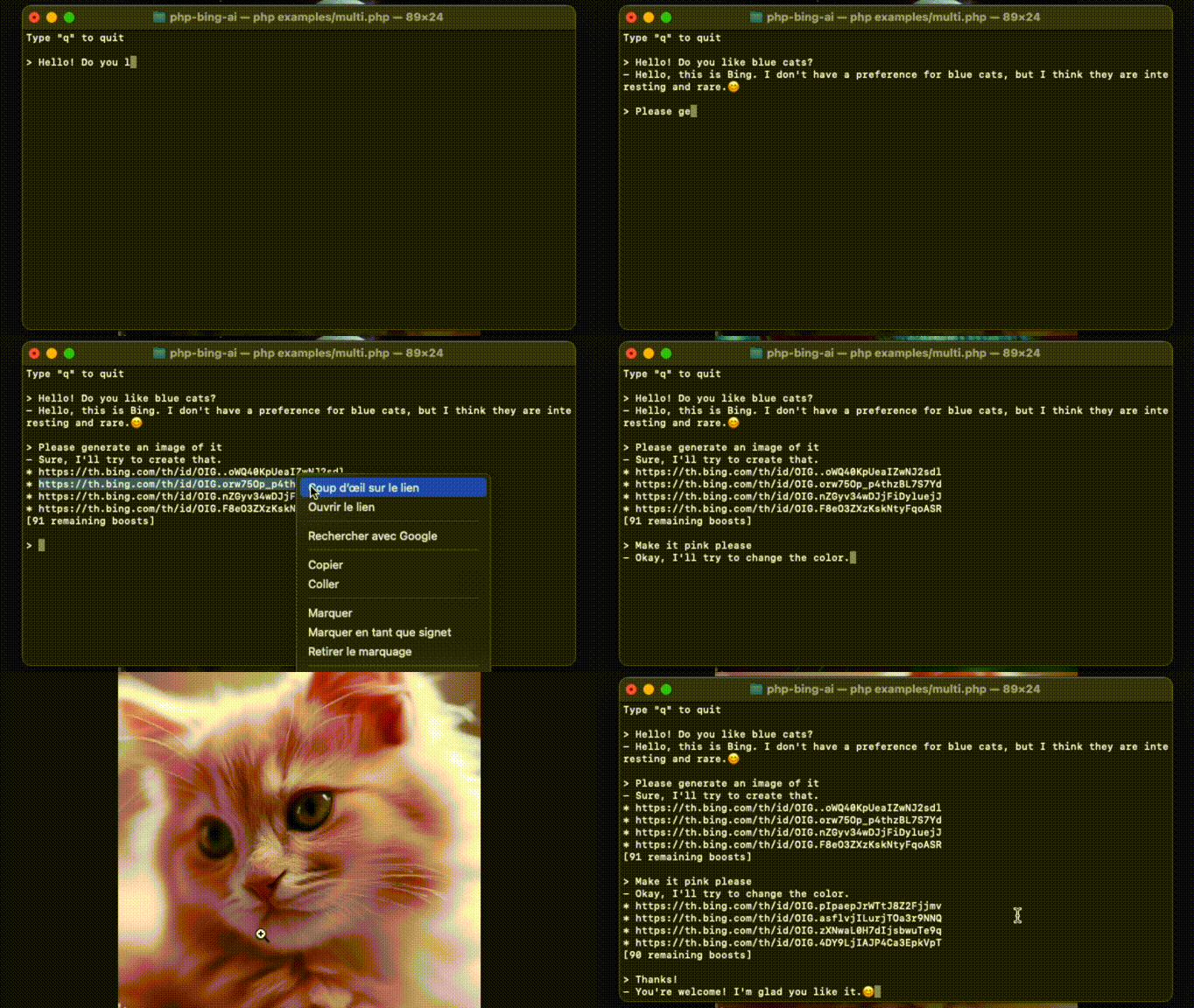
出典: examples/multi.php 。
まず、bing.comにサインインして_Uクッキーを入手する必要があります。
cookie(captcha bypass)を使用する前に、Bingチャットに最初のメッセージを送信するようにしてください
 use MaximeRenou  BingAI  BingAI ;

// $cookie - your "_U" cookie from bing.com
$ ai = new BingAI ( $ cookie );
$ valid = $ ai -> checkCookie ();デモ:このリポジトリ、編集および実行のexamples/chat.phpをクローンします。
 use MaximeRenou  BingAI  BingAI ;
use MaximeRenou  BingAI  Chat  Prompt ;

// $cookie - your "_U" cookie from bing.com
$ ai = new BingAI ( $ cookie );

$ conversation = $ ai -> createChatConversation ();

// $text - Text-only version of Bing's answer
// $cards - Message objects array
list ( $ text , $ cards ) = $ conversation -> ask ( new Prompt ( " Hello World " ));
$cardsは、Bing AIと交換されるすべての「メッセージ」が含まれています。テキスト(プロンプトまたは回答)、信号、提案、画像生成リクエストなどです。Message.phpをチェックして、その形式の詳細を確認してください。
メッセージに画像を添付できます。
 $ prompt = new Prompt ( " How cute is this animal? " );
$ prompt -> withImage ( ' /path/to/panda.png ' );
//or: $prompt->withImage($raw_image_data, true);

$ conversation -> ask ( $ prompt , ...);
試してみてください!
examples/chat.phpでメッセージの最後に$imageを入力します。
リアルタイムの進行を取得するために、2番目の引数として関数を渡すことができます。
 // $text - Incomplete text version
// $cards - Incomplete messages fleet
list ( $ final_text , $ final_cards ) = $ conversation -> ask ( $ prompt , function ( $ text , $ cards ) {
    echo $ text ;
}); $ conversation = $ ai -> createChatConversation ()
-> withLocation ( $ latitude , $ longitude , $ radius ) // Optional
-> withPreferences ( ' fr-FR ' , ' fr-FR ' , ' FR ' ); // Optional use MaximeRenou BingAI Chat Tone ;
$ conversation = $ ai -> createChatConversation ()
-> withTone (Tone::Creative); // Optional
// Choices:
// Tone::Balanced (default)
// Tone::Creative
// Tone::Precise以前の会話を再開したい場合は、その識別子を取得できます。
 // Get current identifiers
$ identifiers = $ conversation -> getIdentifiers ();

// ...
// Resume conversation with $identifiers parameter, and number of previous questions asked
$ conversation = $ ai -> resumeChatConversation ( $ identifiers , 1 ); $ subject = " Internet memes " ;
$ tone = ' funny ' ;
$ type = ' blog post ' ;
$ length = ' short ' ;
$ prompt = new Prompt ( " Please write a * $ length * * $ type * in a * $ tone * style about ` $ subject `. Please wrap the $ type in a markdown codeblock. " );
$ conversation -> ask ( $ prompt -> withoutCache (), ...)「私はすでに[...]を書いている」などの回答を防ぐために、
withoutCache()を使用してプロンプトのキャッシュを無効にすることができます。
Bingは、会話ごとにメッセージ数を制限しています。相互作用のたびにgetRemainingMessages()呼び出すことで監視できます。
 $ remaining = $ conversation -> getRemainingMessages ();

if ( $ remaining === 0 ) {
    // You reached the limit
}
すべての相互作用の後、会話から蹴られたかどうかを確認する必要があります。
 if ( $ conversation -> kicked ()) {
    // You have been kicked, you should start a new conversation
}
両方のチェックを組み合わせることができます:
 if ( $ conversation -> ended ()) {
    // You reached the limit or have been kicked
}デモ:このレポをクローンし、edit and run examples/images.php 。
 use MaximeRenou  BingAI  BingAI ;

// $cookie - your "_U" cookie from bing.com
$ ai = new BingAI ( $ cookie );

$ creator = $ ai -> createImages ( " A 3D teddy bear " );

$ creator -> wait ();

// Finally, get images URLs
if (! $ creator -> hasFailed ()) {
    $ images = $ creator -> getImages ();
}
すべての「ブースト」を消費すると、画像生成が遅くなる可能性があります。残りのブーストに注意するには、以下のセクションを確認してください。
 $ creator = $ ai -> getImageCreator ();

$ remaining_boosts = $ creator -> getRemainingBoosts (); $ prompt = " A 3D teddy bear " ;
$ creator = $ ai -> createImages ( $ prompt );
$ generation_id = $ creator -> getGenerationId ();
// ...
$ creator = $ ai -> getImageCreator ();
$ creator -> resume ( $ generation_id , $ prompt ); do {
sleep ( 1 );
} while ( $ creator -> isGenerating ());Bing.com以外でBing AIを使用すると、Bing用語に違反する場合があります。あなた自身の責任でそれを使用してください。 BingはMicrosoftの商標です。







