php bing ai
1.2

Nueva característica: enviar imágenes en el chat

Este es un cliente PHP no oficial para Bing AI , incluidos Chat (GPT-4) y Creator de imágenes (Dall-E) .
composer require maximerenou/bing-ai
Este programa de demostración utiliza el creador de chat e imagen:
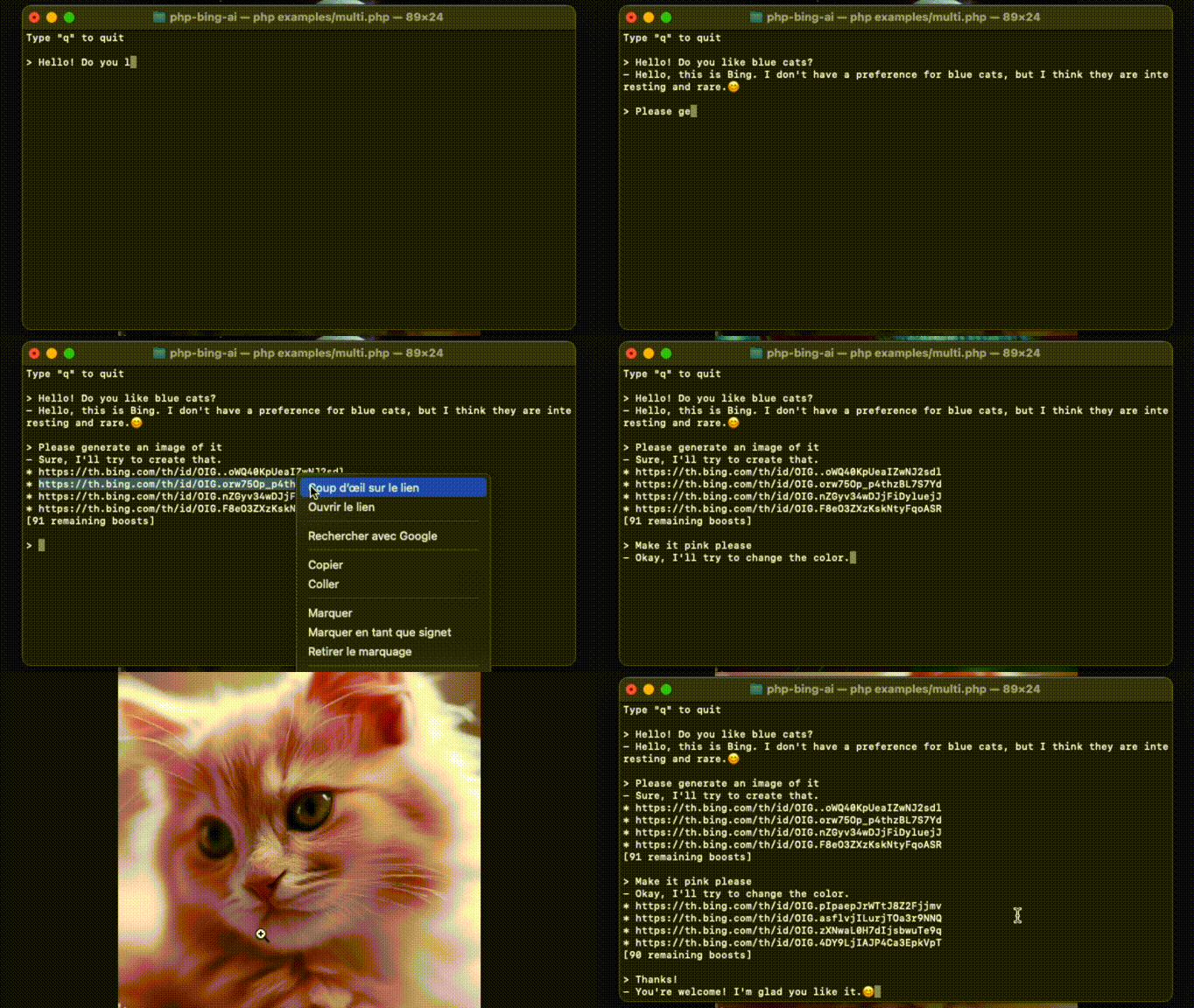
Fuente: examples/multi.php .
Primero, debe iniciar sesión en Bing.com y obtener su cookie _U .
❗ Asegúrese de enviar un primer mensaje a Bing Chat antes de usar su cookie (Captcha Bypass)
 use MaximeRenou  BingAI  BingAI ;

// $cookie - your "_U" cookie from bing.com
$ ai = new BingAI ( $ cookie );
$ valid = $ ai -> checkCookie (); Demo : Clone este repositorio, edición y ejecución examples/chat.php .
 use MaximeRenou  BingAI  BingAI ;
use MaximeRenou  BingAI  Chat  Prompt ;

// $cookie - your "_U" cookie from bing.com
$ ai = new BingAI ( $ cookie );

$ conversation = $ ai -> createChatConversation ();

// $text - Text-only version of Bing's answer
// $cards - Message objects array
list ( $ text , $ cards ) = $ conversation -> ask ( new Prompt ( " Hello World " ));
$cardscontienen todos los "mensajes" intercambiados con Bing Ai. Puede ser texto (aviso o respuesta), señales, sugerencias, solicitudes de generación de imágenes, etc. VerifiqueMessage.phppara obtener más información sobre su formato.
Puede adjuntar una imagen a su mensaje:
 $ prompt = new Prompt ( " How cute is this animal? " );
$ prompt -> withImage ( ' /path/to/panda.png ' );
//or: $prompt->withImage($raw_image_data, true);

$ conversation -> ask ( $ prompt , ...);
¡Pruébalo! Escriba
$imageal final de su mensaje conexamples/chat.php.
Puede pasar una función como segundo argumento para obtener progresión en tiempo real:
 // $text - Incomplete text version
// $cards - Incomplete messages fleet
list ( $ final_text , $ final_cards ) = $ conversation -> ask ( $ prompt , function ( $ text , $ cards ) {
    echo $ text ;
}); $ conversation = $ ai -> createChatConversation ()
-> withLocation ( $ latitude , $ longitude , $ radius ) // Optional
-> withPreferences ( ' fr-FR ' , ' fr-FR ' , ' FR ' ); // Optional use MaximeRenou BingAI Chat Tone ;
$ conversation = $ ai -> createChatConversation ()
-> withTone (Tone::Creative); // Optional
// Choices:
// Tone::Balanced (default)
// Tone::Creative
// Tone::PreciseSi desea reanudar una conversación anterior, puede recuperar sus identificadores:
 // Get current identifiers
$ identifiers = $ conversation -> getIdentifiers ();

// ...
// Resume conversation with $identifiers parameter, and number of previous questions asked
$ conversation = $ ai -> resumeChatConversation ( $ identifiers , 1 ); $ subject = " Internet memes " ;
$ tone = ' funny ' ;
$ type = ' blog post ' ;
$ length = ' short ' ;
$ prompt = new Prompt ( " Please write a * $ length * * $ type * in a * $ tone * style about ` $ subject `. Please wrap the $ type in a markdown codeblock. " );
$ conversation -> ask ( $ prompt -> withoutCache (), ...)Para evitar respuestas como "Ya he escrito [...]", puede deshabilitar la caché para su mensaje con
withoutCache().
Bing está limitando el recuento de mensajes por conversaciones. Puede monitorearlo llamando getRemainingMessages() después de cada interacción.
 $ remaining = $ conversation -> getRemainingMessages ();

if ( $ remaining === 0 ) {
    // You reached the limit
}
Después de cada interacción, también debe verificar si ha sido expulsado de la conversación:
 if ( $ conversation -> kicked ()) {
    // You have been kicked, you should start a new conversation
}
Puede combinar ambos cheques con:
 if ( $ conversation -> ended ()) {
    // You reached the limit or have been kicked
} Demo : Clone este repositorio, editar y ejecutar examples/images.php .
 use MaximeRenou  BingAI  BingAI ;

// $cookie - your "_U" cookie from bing.com
$ ai = new BingAI ( $ cookie );

$ creator = $ ai -> createImages ( " A 3D teddy bear " );

$ creator -> wait ();

// Finally, get images URLs
if (! $ creator -> hasFailed ()) {
    $ images = $ creator -> getImages ();
}
La generación de imágenes puede volverse más lenta después de consumir todos sus "aumentos". Consulte la sección a continuación para mantenerse al tanto de sus aumentos restantes.
 $ creator = $ ai -> getImageCreator ();

$ remaining_boosts = $ creator -> getRemainingBoosts (); $ prompt = " A 3D teddy bear " ;
$ creator = $ ai -> createImages ( $ prompt );
$ generation_id = $ creator -> getGenerationId ();
// ...
$ creator = $ ai -> getImageCreator ();
$ creator -> resume ( $ generation_id , $ prompt ); do {
sleep ( 1 );
} while ( $ creator -> isGenerating ());El uso de Bing Ai fuera de Bing.com puede violar los términos de Bing. Úselo bajo su propio riesgo. Bing es una marca registrada de Microsoft.







