php bing ai
1.2

New feature: send images in chat

This is an unofficial PHP client for Bing AI, including Chat (GPT-4) and Image Creator (DALL-E).
composer require maximerenou/bing-ai
This demo program uses both Chat and Image Creator:
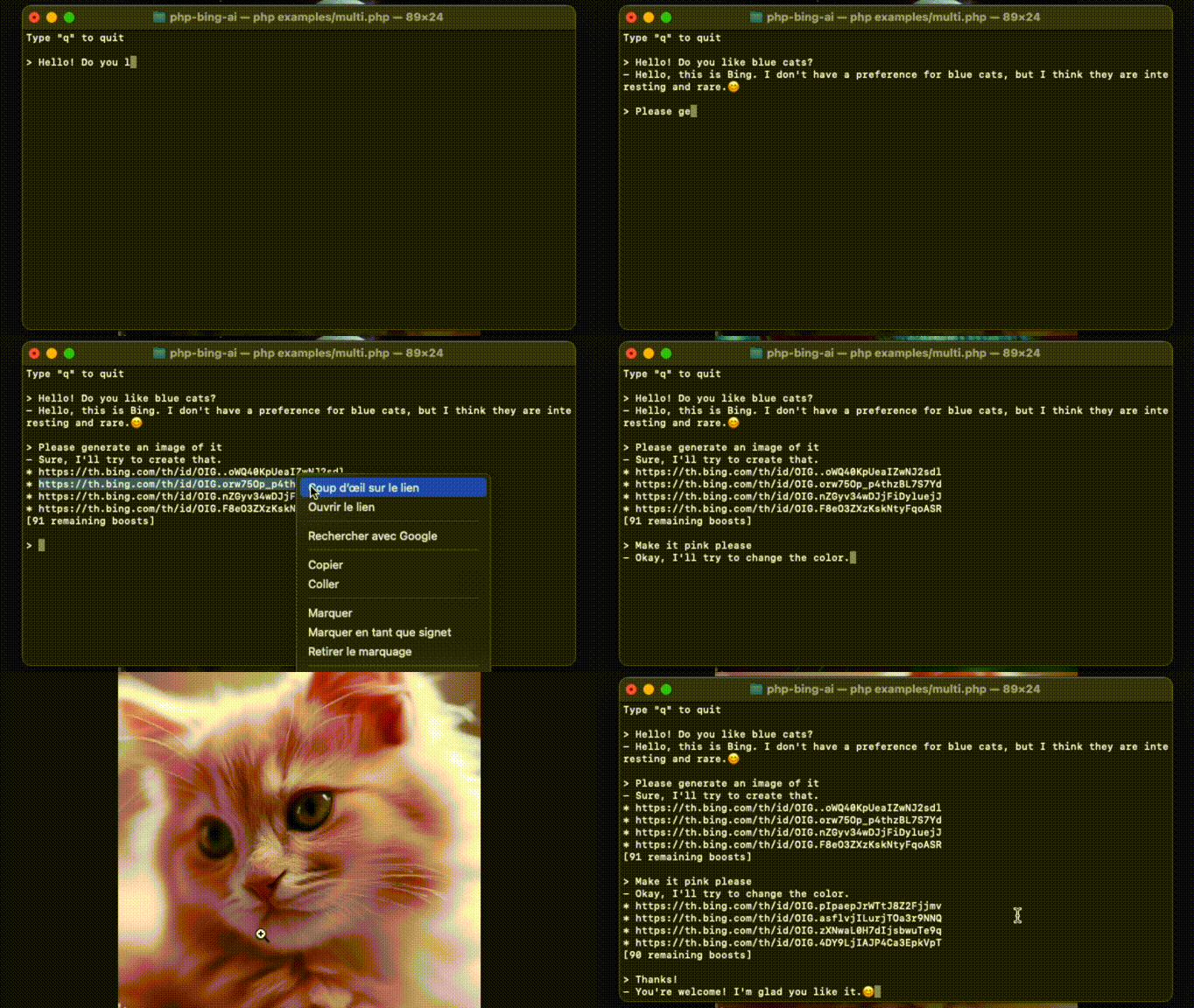
Source: examples/multi.php.
First, you need to sign in on bing.com and get your _U cookie.
❗ Make sure you send a first message to Bing Chat before using your cookie (CAPTCHA bypass)
use MaximeRenouBingAIBingAI;

// $cookie - your "_U" cookie from bing.com
$ai = new BingAI($cookie);
$valid = $ai->checkCookie();Demo: clone this repo, edit and run examples/chat.php.
use MaximeRenouBingAIBingAI;
use MaximeRenouBingAIChatPrompt;

// $cookie - your "_U" cookie from bing.com
$ai = new BingAI($cookie);

$conversation = $ai->createChatConversation();

// $text - Text-only version of Bing's answer
// $cards - Message objects array
list($text, $cards) = $conversation->ask(new Prompt("Hello World"));
$cardscontains all "messages" exchanged with Bing AI. It can be text (prompt or answer), signals, suggestions, image generation requests, etc. CheckMessage.phpto learn more about its format.
You may attach an image to your message:
$prompt = new Prompt("How cute is this animal?");
$prompt->withImage('/path/to/panda.png');
//or: $prompt->withImage($raw_image_data, true);

$conversation->ask($prompt, ...);
Try it! Type
$imageat the end of your message withexamples/chat.php.
You may pass a function as second argument to get real-time progression:
// $text - Incomplete text version
// $cards - Incomplete messages fleet
list($final_text, $final_cards) = $conversation->ask($prompt, function ($text, $cards) {
    echo $text;
});$conversation = $ai->createChatConversation()
->withLocation($latitude, $longitude, $radius) // Optional
->withPreferences('fr-FR', 'fr-FR', 'FR'); // Optionaluse MaximeRenouBingAIChatTone;
$conversation = $ai->createChatConversation()
->withTone(Tone::Creative); // Optional
// Choices:
// Tone::Balanced (default)
// Tone::Creative
// Tone::PreciseIf you want to resume a previous conversation, you can retrieve its identifiers:
// Get current identifiers
$identifiers = $conversation->getIdentifiers();

// ...
// Resume conversation with $identifiers parameter, and number of previous questions asked
$conversation = $ai->resumeChatConversation($identifiers, 1);$subject = "Internet memes";
$tone = 'funny';
$type = 'blog post';
$length = 'short';
$prompt = new Prompt("Please write a *$length* *$type* in a *$tone* style about `$subject`. Please wrap the $type in a markdown codeblock.");
$conversation->ask($prompt->withoutCache(), ...)To prevent answers like "I have already written [...]", you can disable cache for your prompt with
withoutCache().
Bing is limiting messages count per conversations. You can monitor it by calling getRemainingMessages() after every interaction.
$remaining = $conversation->getRemainingMessages();

if ($remaining === 0) {
    // You reached the limit
}
After every interaction, you should also check if you have been kicked from the conversation:
if ($conversation->kicked()) {
    // You have been kicked, you should start a new conversation
}
You may combine both checks with:
if ($conversation->ended()) {
    // You reached the limit or have been kicked
}Demo: clone this repo, edit and run examples/images.php.
use MaximeRenouBingAIBingAI;

// $cookie - your "_U" cookie from bing.com
$ai = new BingAI($cookie);

$creator = $ai->createImages("A 3D teddy bear");

$creator->wait();

// Finally, get images URLs
if (! $creator->hasFailed()) {
    $images = $creator->getImages();
}
Image generation can become slower after consuming all of your "boosts". Check the section below to stay aware of your remaining boosts.
$creator = $ai->getImageCreator();

$remaining_boosts = $creator->getRemainingBoosts();$prompt = "A 3D teddy bear";
$creator = $ai->createImages($prompt);
$generation_id = $creator->getGenerationId();
// ...
$creator = $ai->getImageCreator();
$creator->resume($generation_id, $prompt);do {
sleep(1);
} while ($creator->isGenerating());Using Bing AI outside bing.com may violate Bing terms. Use it at your own risk. Bing is a trademark of Microsoft.







