react native font demo
1.0.0

iOS fontStyle Android 모두에서 사용자 정의 글꼴 fontWeight 와 함께 글꼴 서체 수정자를 사용할 수 있습니다.
 < Text style = { {
  fontFamily : "Raleway" ,
  fontWeight : "100" ,
  style : "italic"
} } >
  Hello world!
</ Text >
< Text style = { {
  fontFamily : "Raleway" ,
  fontWeight : "bold" ,
  style : "normal"
} } >
  Hello world !
< / Text >
이 예에서는 Raleway Font 제품군을 등록 할 것입니다. 물론이 방법은 모든 TTF 글꼴과 함께 작동합니다.
임시 폴더에서 추출 된 전체 Raleway 글꼴 패밀리가 필요합니다. 즉 :
Raleway-Thin.ttf (100)Raleway-ThinItalic.ttfRaleway-ExtraLight.ttf (200)Raleway-ExtraLightItalic.ttfRaleway-Light.ttf (300)Raleway-LightItalic.ttfRaleway-Regular.ttf (400)Raleway-Italic.ttfRaleway-Medium.ttf (500)Raleway-MediumItalic.ttfRaleway-SemiBold.ttf (600)Raleway-SemiBoldItalic.ttfRaleway-Bold.ttf (700)Raleway-BoldItalic.ttfRaleway-ExtraBold.ttf (800)Raleway-ExtraBoldItalic.ttfRaleway-Black.ttf (900)Raleway-BlackItalic.ttf 해당 파일이 이제 /tmp/raleway/ 에 저장되어 있다고 가정합니다.
이 단계를 수행하려면 시스템에 OTFINFO를 설치해야합니다. 많은 Linux 배포판이 제공됩니다. MacOS에서는 LCDF-Typetools Brew 패키지를 통해 설치하십시오.
otfinfo --family Raleway-Regular.ttf "Raleway"를 인쇄해야합니다. 이 값은 Android 설정을 위해 유지되어야합니다. 이 이름은 React fontFamily 스타일로 사용됩니다.
react-native init FontDemo
cd FontDemoAndroid의 경우 XML 글꼴을 사용하여 기본 글꼴 패밀리의 변형을 정의 할 것입니다.
비고 :이 절차는 Commit FD6386A07EB75A8EC16B1384A3E5827DEA520B64 (2019 년 5 월 7 일) 이후 React Native에서 사용할 수 있으며
ReactFontManager::addCustomFont메소드가 추가되었습니다.
mkdir android/app/src/main/res/font
cp /tmp/raleway/ * .ttf android/app/src/main/res/font
Android 자산 이름 제한을 준수하기 위해이 규칙에 따라 글꼴 파일의 이름을 바꿔야합니다.
- _ ;아래의 bash 스크립트를 사용할 수 있습니다 (글꼴 폴더를 첫 번째 인수로 제공하십시오).
 #! /bin/bash
# fixfonts.sh

typeset folder= " $1 "
if [[ -d " $folder " && ! -z " $folder " ]] ; then
  pushd " $folder " ;
  for file in * .ttf ; do
    typeset normalized= " ${file // - / _} " ;
    normalized= " ${normalized,,} " ;
    mv " $file " " $normalized "
  done
  popd
fi
./fixfonts.sh /path/to/root/FontDemo/android/app/src/main/res/font 아래 콘텐츠로 android/app/src/main/res/font/raleway.xml 파일을 만듭니다. 기본적으로, 우리는 지원하려는 fontStyle / fontWeight 조합 당 하나의 항목을 만들고 해당 자산 이름을 등록해야합니다.
<? xml version = " 1.0 " encoding = " utf-8 " ?>
< font-family xmlns : app = " http://schemas.android.com/apk/res-auto " >
    < font app : fontStyle = " normal " app : fontWeight = " 100 " app : font = " @font/raleway_thin " />
    < font app : fontStyle = " italic " app : fontWeight = " 100 " app : font = " @font/raleway_thinitalic " />
    < font app : fontStyle = " normal " app : fontWeight = " 200 " app : font = " @font/raleway_extralight " />
    < font app : fontStyle = " italic " app : fontWeight = " 200 " app : font = " @font/raleway_extralightitalic " />
    < font app : fontStyle = " normal " app : fontWeight = " 300 " app : font = " @font/raleway_light " />
    < font app : fontStyle = " italic " app : fontWeight = " 300 " app : font = " @font/raleway_lightitalic " />
    < font app : fontStyle = " normal " app : fontWeight = " 400 " app : font = " @font/raleway_regular " />
    < font app : fontStyle = " italic " app : fontWeight = " 400 " app : font = " @font/raleway_italic " />
    < font app : fontStyle = " normal " app : fontWeight = " 500 " app : font = " @font/raleway_medium " />
    < font app : fontStyle = " italic " app : fontWeight = " 500 " app : font = " @font/raleway_mediumitalic " />
    < font app : fontStyle = " normal " app : fontWeight = " 600 " app : font = " @font/raleway_semibold " />
    < font app : fontStyle = " italic " app : fontWeight = " 600 " app : font = " @font/raleway_semibolditalic " />
    < font app : fontStyle = " normal " app : fontWeight = " 700 " app : font = " @font/raleway_bold " />
    < font app : fontStyle = " italic " app : fontWeight = " 700 " app : font = " @font/raleway_bolditalic " />
    < font app : fontStyle = " normal " app : fontWeight = " 800 " app : font = " @font/raleway_extrabold " />
    < font app : fontStyle = " italic " app : fontWeight = " 800 " app : font = " @font/raleway_extrabolditalic " />
    < font app : fontStyle = " normal " app : fontWeight = " 900 " app : font = " @font/raleway_black " />
    < font app : fontStyle = " italic " app : fontWeight = " 900 " app : font = " @font/raleway_blackitalic " />
</ font-family > android/app/src/main/java/com/fontdemo/MainApplication.java 에서는 onCreate 메소드 내에서 방금 만든 자산과 글꼴 패밀리 이름을 바인딩하십시오.
켈 다른 글꼴을 등록하는 경우 "Raleway"를 이전 단계에서 찾은 이름으로 바꾸십시오 (Font Family Name 찾기).
 --- a/android/app/src/main/java/com/fontdemo/MainApplication.java
+++ b/android/app/src/main/java/com/fontdemo/MainApplication.java
@@ -7,6 +7,7 @@ import com.facebook.react.ReactApplication;
 import com.facebook.react.ReactInstanceManager;
 import com.facebook.react.ReactNativeHost;
 import com.facebook.react.ReactPackage;
+ import com.facebook.react.views.text.ReactFontManager;
 import com.facebook.soloader.SoLoader;
 import java.lang.reflect.InvocationTargetException;
 import java.util.List;
@@ -43,6 +44,7 @@ public class MainApplication extends Application implements ReactApplication {
   @Override
   public void onCreate() {
     super.onCreate();
+    ReactFontManager.getInstance().addCustomFont(this, "Raleway", R.font.raleway);
     SoLoader.init(this, /* native exopackage */ false);
     initializeFlipper(this, getReactNativeHost().getReactInstanceManager());
   }
React Native 0.73+
 --- a/android/app/src/main/java/com/fontdemo/MainApplication.kt
+++ b/android/app/src/main/java/com/fontdemo/MainApplication.kt
import com.facebook.react.ReactApplication
import com.facebook.react.ReactHost
import com.facebook.react.ReactNativeHost
import com.facebook.react.ReactPackage
+ import com.facebook.react.common.assets.ReactFontManager
import com.facebook.react.defaults.DefaultNewArchitectureEntryPoint.load
import com.facebook.react.defaults.DefaultReactHost.getDefaultReactHost
import com.facebook.react.defaults.DefaultReactNativeHost


  override fun onCreate() {
    super.onCreate()
+    ReactFontManager.getInstance().addCustomFont(this, "Raleway", R.font.raleway);
    SoLoader.init(this, false)
    if (BuildConfig.IS_NEW_ARCHITECTURE_ENABLED) {
      // If you opted-in for the New Architecture, we load the native entry point for this app.
      load()
    }
    ReactNativeFlipper.initializeFlipper(this, reactNativeHost.reactInstanceManager)
  }
iOS에서는 상황이 훨씬 쉬워집니다. 우리는 기본적으로 React Native 자산 링크 기능을 사용하면됩니다. 이 방법을 사용하려면 첫 번째 단계에서 검색된 글꼴 패밀리 이름을 fontFamily 스타일 속성으로 사용해야합니다.
mkdir -p assets/fonts
cp /tmp/raleway/ * .ttf assets/fonts
react-native.config.js 를 추가하십시오 module . exports = {
project : {
ios : { } ,
android : { } ,
} ,
iosAssets : [ './assets/fonts' ] ,
} ; # react-native >= 0.69
npx react-native-asset
# otherwise
react-native link| iOS | 기계적 인조 인간 |
|---|---|
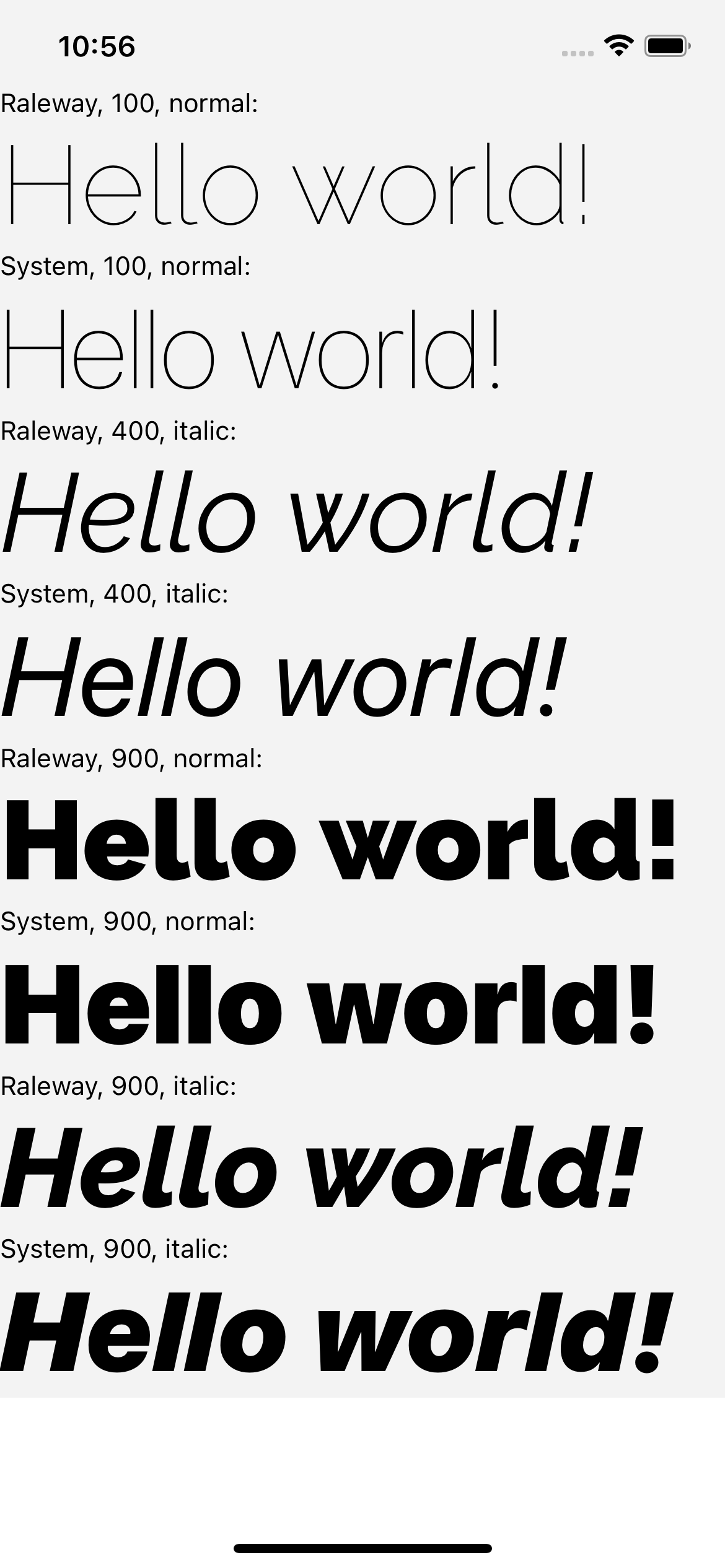 | 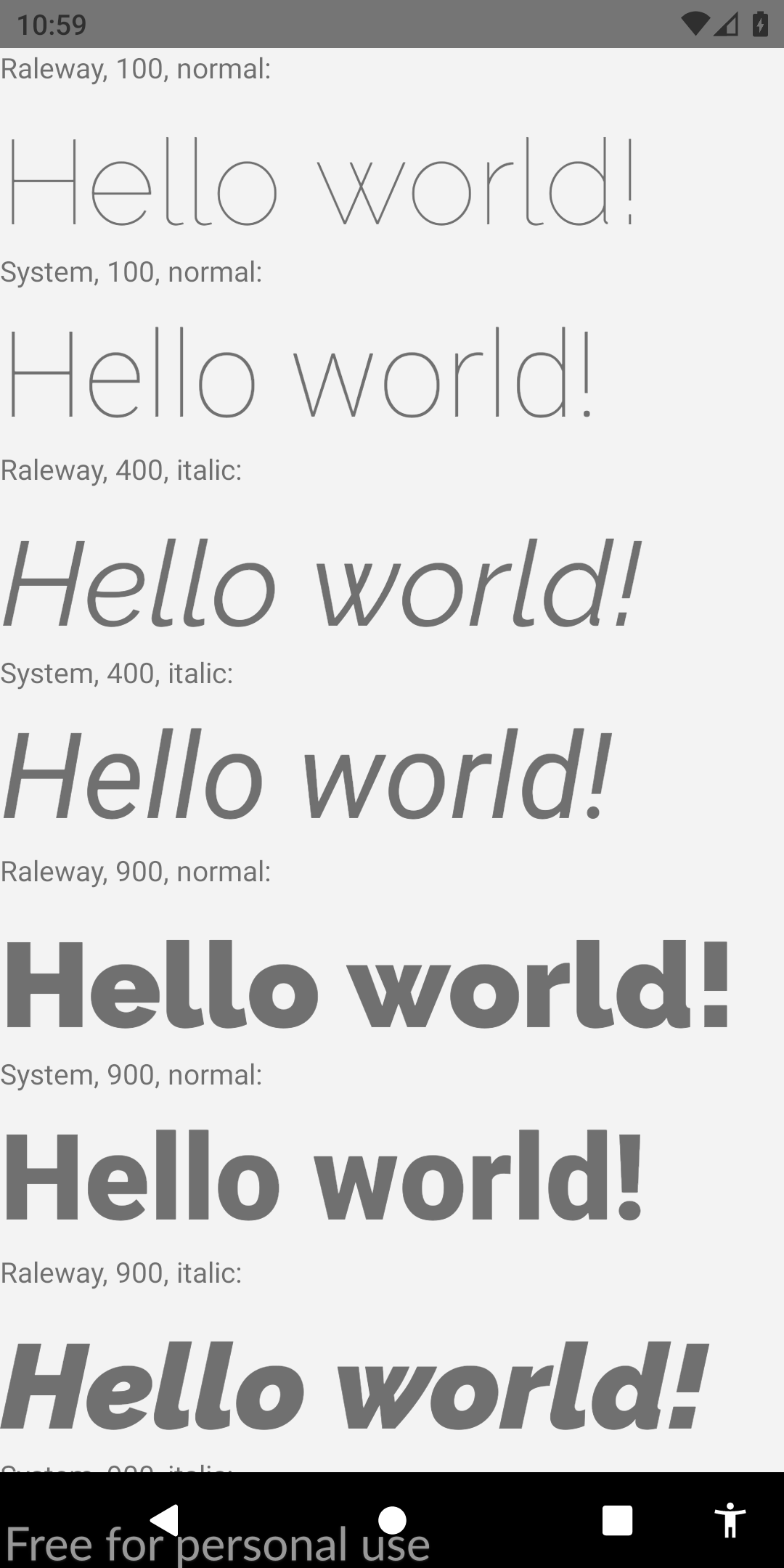 |
이 안내서가 관련성이 있다면이 stackoverflow 답변을 발전시켜 주셔서 감사합니다. 또한 커뮤니티 가이 솔루션을 찾는 데 도움이됩니다. 건배!








