torchmetrics
Minor patch release


분산 된 확장 가능한 파이터 애플리케이션을위한 머신 러닝 메트릭.
토치 메트릭 란? • 메트릭 구현 • 내장 메트릭 • 문서 • 커뮤니티 • 라이센스

PYPI에서 간단한 설치
pip install torchmetricsConda를 사용하여 설치하십시오
conda install -c conda-forge torchmetrics소스에서 PIP
 # with git
pip install git+https://github.com/Lightning-AI/torchmetrics.git@release/stable
아카이브에서 PIP
pip install https://github.com/Lightning-AI/torchmetrics/archive/refs/heads/release/stable.zip전문 지표에 대한 추가 의존성 :
pip install torchmetrics[audio]
pip install torchmetrics[image]
pip install torchmetrics[text]
pip install torchmetrics[all]  # install all of the above
최신 개발자 버전을 설치하십시오
pip install https://github.com/Lightning-AI/torchmetrics/archive/master.zipTorchmetrics는 100 개 이상의 Pytorch Metrics 구현 모음이며 사용하기 쉬운 API로 사용자 지정 메트릭을 생성합니다. 그것은 제공 :
Pytorch 모델 또는 Pytorch Lightning과 함께 Torchmetrics를 사용하여 다음과 같은 추가 기능을 즐길 수 있습니다.
모듈 기반 메트릭에는 장치의 축적 및 동기화를 자동화하는 내부 메트릭 상태 (Pytorch 모듈의 매개 변수와 유사)가 포함되어 있습니다!
CPU, 단일 GPU 또는 멀티 GPU에서 실행할 수 있습니다!
단일 GPU/CPU 사례의 경우 :
 import torch

# import our library
import torchmetrics

# initialize metric
metric = torchmetrics . classification . Accuracy ( task = "multiclass" , num_classes = 5 )

# move the metric to device you want computations to take place
device = "cuda" if torch . cuda . is_available () else "cpu"
metric . to ( device )

n_batches = 10
for i in range ( n_batches ):
    # simulate a classification problem
    preds = torch . randn ( 10 , 5 ). softmax ( dim = - 1 ). to ( device )
    target = torch . randint ( 5 , ( 10 ,)). to ( device )

    # metric on current batch
    acc = metric ( preds , target )
    print ( f"Accuracy on batch { i } : { acc } " )

# metric on all batches using custom accumulation
acc = metric . compute ()
print ( f"Accuracy on all data: { acc } " )
여러 GPU 또는 다중 노드를 사용할 때 모듈 메트릭 사용량은 동일하게 유지됩니다.
 import os
import torch
import torch . distributed as dist
import torch . multiprocessing as mp
from torch import nn
from torch . nn . parallel import DistributedDataParallel as DDP
import torchmetrics


def metric_ddp ( rank , world_size ):
    os . environ [ "MASTER_ADDR" ] = "localhost"
    os . environ [ "MASTER_PORT" ] = "12355"

    # create default process group
    dist . init_process_group ( "gloo" , rank = rank , world_size = world_size )

    # initialize model
    metric = torchmetrics . classification . Accuracy ( task = "multiclass" , num_classes = 5 )

    # define a model and append your metric to it
    # this allows metric states to be placed on correct accelerators when
    # .to(device) is called on the model
    model = nn . Linear ( 10 , 10 )
    model . metric = metric
    model = model . to ( rank )

    # initialize DDP
    model = DDP ( model , device_ids = [ rank ])

    n_epochs = 5
    # this shows iteration over multiple training epochs
    for n in range ( n_epochs ):
        # this will be replaced by a DataLoader with a DistributedSampler
        n_batches = 10
        for i in range ( n_batches ):
            # simulate a classification problem
            preds = torch . randn ( 10 , 5 ). softmax ( dim = - 1 )
            target = torch . randint ( 5 , ( 10 ,))

            # metric on current batch
            acc = metric ( preds , target )
            if rank == 0 :  # print only for rank 0
                print ( f"Accuracy on batch { i } : { acc } " )

        # metric on all batches and all accelerators using custom accumulation
        # accuracy is same across both accelerators
        acc = metric . compute ()
        print ( f"Accuracy on all data: { acc } , accelerator rank: { rank } " )

        # Resetting internal state such that metric ready for new data
        metric . reset ()

    # cleanup
    dist . destroy_process_group ()


if __name__ == "__main__" :
    world_size = 2  # number of gpus to parallelize over
    mp . spawn ( metric_ddp , args = ( world_size ,), nprocs = world_size , join = True )
자신의 메트릭을 구현하는 것은 torch.nn.Module . 간단히 말하면, 서브 클래스 torchmetrics.Metric 및 update 및 compute 방법을 구현하십시오.
 import torch
from torchmetrics import Metric


class MyAccuracy ( Metric ):
    def __init__ ( self ):
        # remember to call super
        super (). __init__ ()
        # call `self.add_state`for every internal state that is needed for the metrics computations
        # dist_reduce_fx indicates the function that should be used to reduce
        # state from multiple processes
        self . add_state ( "correct" , default = torch . tensor ( 0 ), dist_reduce_fx = "sum" )
        self . add_state ( "total" , default = torch . tensor ( 0 ), dist_reduce_fx = "sum" )

    def update ( self , preds : torch . Tensor , target : torch . Tensor ) -> None :
        # extract predicted class index for computing accuracy
        preds = preds . argmax ( dim = - 1 )
        assert preds . shape == target . shape
        # update metric states
        self . correct += torch . sum ( preds == target )
        self . total += target . numel ()

    def compute ( self ) -> torch . Tensor :
        # compute final result
        return self . correct . float () / self . total


my_metric = MyAccuracy ()
preds = torch . randn ( 10 , 5 ). softmax ( dim = - 1 )
target = torch . randint ( 5 , ( 10 ,))

print ( my_metric ( preds , target )) torch.nn 과 유사하게 대부분의 메트릭에는 모듈 기반 및 기능 버전이 있습니다. 기능 버전은 입력으로 Torch.tensors를 가져 가서 해당 메트릭을 Torch.tensor로 반환하는 간단한 Python 기능입니다.
 import torch

# import our library
import torchmetrics

# simulate a classification problem
preds = torch . randn ( 10 , 5 ). softmax ( dim = - 1 )
target = torch . randint ( 5 , ( 10 ,))

acc = torchmetrics . functional . classification . multiclass_accuracy (
    preds , target , num_classes = 5
)총 토치 메트릭에는 100 개 이상의 메트릭이 포함되어 있으며 다음 도메인을 다룹니다.
각 도메인은 pip install torchmetrics[audio] , pip install torchmetrics['image'] 등으로 설치할 수있는 몇 가지 추가 종속성이 필요할 수 있습니다.
머신 러닝 알고리즘에서 무슨 일이 일어나고 있는지 이해하는 데 도움이되는 메트릭의 시각화가 중요 할 수 있습니다. Torchmetrics에는 .plot 메소드를 통해 거의 모든 모듈 식 메트릭에 대한 PIP 설치 TorchMetrics [Visual]을 사용하여 내장 플롯 지원 ( pip install torchmetrics[visual] )가 내장되어 있습니다. 메트릭을 간단하게 시각화하려면이 방법을 호출하십시오!
 import torch
from torchmetrics . classification import MulticlassAccuracy , MulticlassConfusionMatrix

num_classes = 3

# this will generate two distributions that comes more similar as iterations increase
w = torch . randn ( num_classes )
target = lambda it : torch . multinomial (( it * w ). softmax ( dim = - 1 ), 100 , replacement = True )
preds = lambda it : torch . multinomial (( it * w ). softmax ( dim = - 1 ), 100 , replacement = True )

acc = MulticlassAccuracy ( num_classes = num_classes , average = "micro" )
acc_per_class = MulticlassAccuracy ( num_classes = num_classes , average = None )
confmat = MulticlassConfusionMatrix ( num_classes = num_classes )

# plot single value
for i in range ( 5 ):
    acc_per_class . update ( preds ( i ), target ( i ))
    confmat . update ( preds ( i ), target ( i ))
fig1 , ax1 = acc_per_class . plot ()
fig2 , ax2 = confmat . plot ()

# plot multiple values
values = []
for i in range ( 10 ):
    values . append ( acc ( preds ( i ), target ( i )))
fig3 , ax3 = acc . plot ( values )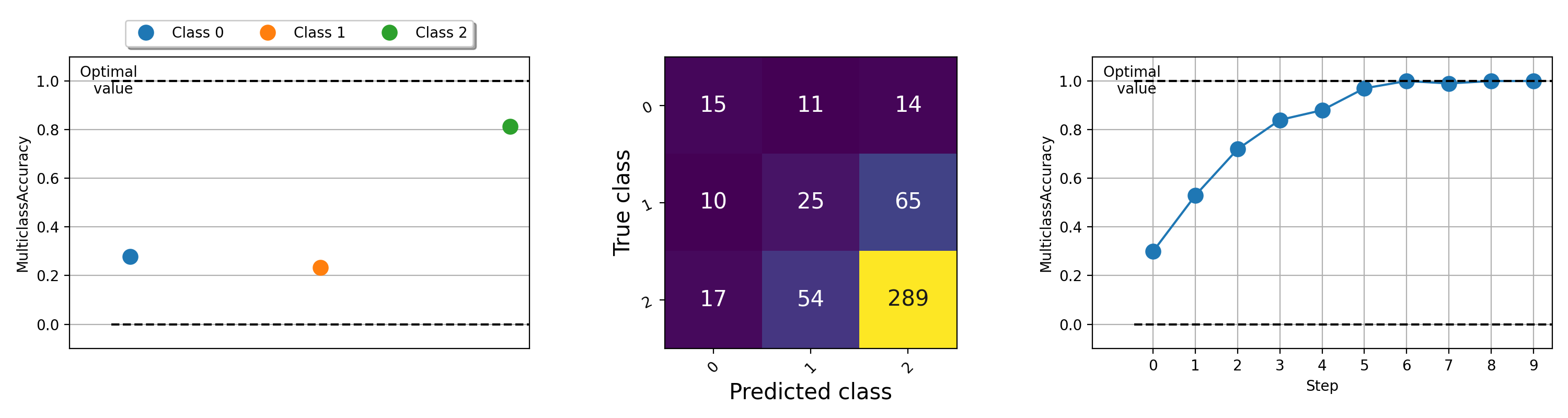
다른 메트릭을 플로팅하는 예는이 예제 파일을 실행해보십시오.
Lightning + Torchmetrics 팀은 더 많은 메트릭을 추가하기 위해 열심히 일하고 있습니다. 그러나 우리는 새로운 메트릭을 제출하고 기존 메트릭을 개선하기 위해 당신과 같은 놀라운 기고자를 찾고 있습니다!
기고자가되는 데 도움을 받으려면 불화에 가입하십시오!
도움이나 질문을 위해 Discord에서 거대한 커뮤니티에 가입하십시오!
우리는 오픈 소스 소프트웨어의 강력한 유산을 계속하게되어 기쁩니다. Caffe, Theano, Keras, Pytorch, Torchbearer, Ignite, Sklearn 및 Fast.ai에서 수년에 걸쳐 영감을 얻었습니다.
이 프레임 워크를 인용하려면 Github의 내장 인용 옵션을 사용 하여이 파일을 기반으로 Bibtex 또는 APA 스타일 인용을 생성하십시오 (그러나 좋아하는 경우에만).
이 저장소에 나열된 Apache 2.0 라이센스를 관찰하십시오. 또한 번개 프레임 워크는 특허 출원 중입니다.








