YOLOv6
v6-Segmentation

Anglais | 简体中文
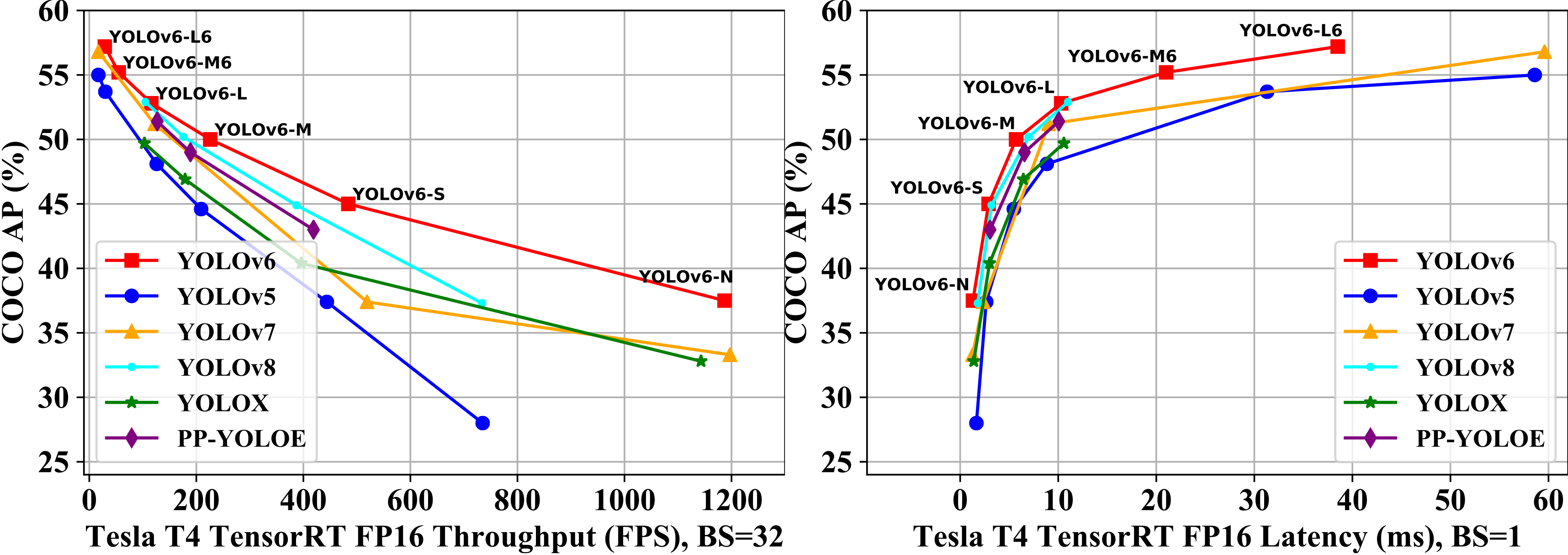
Mise en œuvre du papier:
| Modèle | Taille | cartographie 0,5: 0,95 | Vitesse T4 TRT FP16 B1 (FPS) | Vitesse T4 TRT FP16 B32 (FPS) | Paramètres (M) | Flops (G) |
|---|---|---|---|---|---|---|
| Yolov6-n | 640 | 37.5 | 779 | 1187 | 4.7 | 11.4 |
| Yolov6-s | 640 | 45.0 | 339 | 484 | 18.5 | 45.3 |
| Yolov6-m | 640 | 50.0 | 175 | 226 | 34.9 | 85.8 |
| Yolov6-l | 640 | 52.8 | 98 | 116 | 59.6 | 150.7 |
| Yolov6-n6 | 1280 | 44.9 | 228 | 281 | 10.4 | 49.8 |
| Yolov6-s6 | 1280 | 50.3 | 98 | 108 | 41.4 | 198.0 |
| Yolov6-m6 | 1280 | 55.2 | 47 | 55 | 79.6 | 379.5 |
| Yolov6-l6 | 1280 | 57.2 | 26 | 29 | 140.4 | 673.4 |
| Modèle | Taille | cartographie 0,5: 0,95 | Vitesse T4 TRT FP16 B1 (FPS) | Vitesse T4 TRT FP16 B32 (FPS) | Paramètres (M) | Flops (G) |
|---|---|---|---|---|---|---|
| Yolov6-n | 640 | 35,9 300E 36,3 400E | 802 | 1234 | 4.3 | 11.1 |
| Yolov6-t | 640 | 40,3 300E 41.1 400E | 449 | 659 | 15.0 | 36.7 |
| Yolov6-s | 640 | 43,5 300E 43.8 400E | 358 | 495 | 17.2 | 44.2 |
| Yolov6-m | 640 | 49.5 | 179 | 233 | 34.3 | 82.2 |
| Yolov6-l-relu | 640 | 51.7 | 113 | 149 | 58.5 | 144.0 |
| Yolov6-l | 640 | 52.5 | 98 | 121 | 58.5 | 144.0 |
| Modèle | Taille | Précision | cartographie 0,5: 0,95 | Vitesse T4 TRT B1 (FPS) | Vitesse T4 TRT B32 (FPS) |
|---|---|---|---|---|---|
| Yolov6-n RepoTt | 640 | Int8 | 34.8 | 1114 | 1828 |
| Yolov6-n | 640 | FP16 | 35.9 | 802 | 1234 |
| YOLOV6-T RepoTt | 640 | Int8 | 39.8 | 741 | 1167 |
| Yolov6-t | 640 | FP16 | 40.3 | 449 | 659 |
| Yolov6-S RepoTt | 640 | Int8 | 43.3 | 619 | 924 |
| Yolov6-s | 640 | FP16 | 43.5 | 377 | 541 |
| Modèle | Taille | cartographie 0,5: 0,95 | SM8350 (MS) | MT6853 (MS) | SDM660 (MS) | Paramètres (M) | Flops (G) |
|---|---|---|---|---|---|---|---|
| Yolov6lite-s | 320 * 320 | 22.4 | 7.99 | 11.99 | 41.86 | 0,55 | 0,56 |
| Yolov6lite-m | 320 * 320 | 25.1 | 9.08 | 13.27 | 47,95 | 0,79 | 0,67 |
| Yolov6lite-l | 320 * 320 | 28.0 | 11.37 | 16.20 | 61.40 | 1.09 | 0,87 |
| Yolov6lite-l | 320 * 192 | 25.0 | 7.02 | 9.66 | 36.13 | 1.09 | 0,52 |
| Yolov6lite-l | 224 * 128 | 18.9 | 3.63 | 4.99 | 17.76 | 1.09 | 0,24 |
git clone https://github.com/meituan/YOLOv6
cd YOLOv6
pip install -r requirements.txtVeuillez vous référer à Train Coco DataSet.
GPU unique
 # P5 models
python tools/train.py --batch 32 --conf configs/yolov6s_finetune.py --data data/dataset.yaml --fuse_ab --device 0
# P6 models
python tools/train.py --batch 32 --conf configs/yolov6s6_finetune.py --data data/dataset.yaml --img 1280 --device 0
Multi GPU (mode DDP recommandé)
 # P5 models
python -m torch.distributed.launch --nproc_per_node 8 tools/train.py --batch 256 --conf configs/yolov6s_finetune.py --data data/dataset.yaml --fuse_ab --device 0,1,2,3,4,5,6,7
# P6 models
python -m torch.distributed.launch --nproc_per_node 8 tools/train.py --batch 128 --conf configs/yolov6s6_finetune.py --data data/dataset.yaml --img 1280 --device 0,1,2,3,4,5,6,7 ├── coco
│ ├── annotations
│ │ ├── instances_train2017.json
│ │ └── instances_val2017.json
│ ├── images
│ │ ├── train2017
│ │ └── val2017
│ ├── labels
│ │ ├── train2017
│ │ ├── val2017
│ ├── LICENSE
│ ├── README.txt
Yolov6 prend en charge différents modes de résolution d'entrée. Pour plus de détails, voir comment définir la taille de l'entrée.
Si votre processus de formation est corrompu, vous pouvez reprendre la formation
 # single GPU training.
python tools/train.py --resume

# multi GPU training.
python -m torch.distributed.launch --nproc_per_node 8 tools/train.py --resume
La commande ci-dessus trouvera automatiquement le dernier point de contrôle dans le répertoire YOLOV6, puis reprendra le processus de formation.
Vous pouvez également spécifier un chemin de contrôle de contrôle vers --resume paramètre par
 # remember to replace /path/to/your/checkpoint/path to the checkpoint path which you want to resume training.
--resume /path/to/your/checkpoint/path
Cela reprendra à partir du point de contrôle spécifique que vous fournissez.
Reproduire la carte sur l'ensemble de données CoCo Val2017 avec une résolution 640 × 640 ou 1280x1280
 # P5 models
python tools/eval.py --data data/coco.yaml --batch 32 --weights yolov6s.pt --task val --reproduce_640_eval
# P6 models
python tools/eval.py --data data/coco.yaml --batch 32 --weights yolov6s6.pt --task val --reproduce_640_eval --img 1280Tout d'abord, téléchargez un modèle pré-entraîné à partir de la version Yolov6 ou utilisez votre modèle formé pour faire l'inférence.
Deuxièmement, exécutez l'inférence avec tools/infer.py
 # P5 models
python tools/infer.py --weights yolov6s.pt --source img.jpg / imgdir / video.mp4
# P6 models
python tools/infer.py --weights yolov6s6.pt --img 1280 1280 --source img.jpg / imgdir / video.mp4
Si vous souhaitez inférer sur une caméra locale ou une caméra Web, vous pouvez courir:
 # P5 models
python tools/infer.py --weights yolov6s.pt --webcam --webcam-addr 0
# P6 models
python tools/infer.py --weights yolov6s6.pt --img 1280 1280 --webcam --webcam-addr 0
webcam-addr peut être l'ID de numéro de caméra local ou l'adresse RTSP.
Formation Yolov6 avec Amazon Sagemaker: Yolov6-Sagemaker d'Ashwincc
Yolov6 NCNN Android App Demo: NCNN-Android-Yolov6 de Feigechuanshu
Yolov6 onnxruntime / mnn / tnn c ++: yolov6-or, yolov6-mnn et yolov6-tnn de Deftruth
Yolov6 Tensorrt Python: Yolov6-Tensorrt-Python de Linaom1214
Yolov6 Tensorrt Windows C ++: Yolort de Wei Zeng
Demo web yolov6 sur les espaces étreintes avec Gradio.
Demo interactif sur Dagshub avec rationalisation
Tutoriel: comment former Yolov6 sur un ensemble de données personnalisé
Tutoriel YouTube: Comment former Yolov6 sur un ensemble de données personnalisé
Démo de l'inférence de Yolov6 sur Google Colab
Article de blog: Détection d'objet Yolov6 - Explication du papier et inférence
Si vous avez des questions, bienvenue pour rejoindre notre groupe WeChat pour discuter et échanger.