AWS AI Photo Album Web Application
AWS AI Photo Album Web Application - Support Voice Search

Page de connexion: https://s3.amazonaws.com/cc3-bucket2/apigateway-js-sdk/album.html
Télécharger des photos
Recherchez des photos par des mots clés, les énoncés sont:
Les balises sont les mots clés à rechercher
Montrez-moi des photos {Tag_A}.
Trouver des photos {tag_a}
Rechercher {tag_a} Photos
Montrez-moi des photos avec {tag_a} et {tag_b}
Rechercher {Tag_A} et {tag_b} Photos
Trouver {tag_a} et {tag_b} Photos
{tag_a}
{tag_a} et {tag_b}
Montre-moi des photos avec {tag_a} et {tag_b} et {tag_c}
{tag_a} et {tag_b} et {tag_c}
Montre-moi {tag_a} et {tag_b} Photos
Affichez les résultats de recherche en frontend.
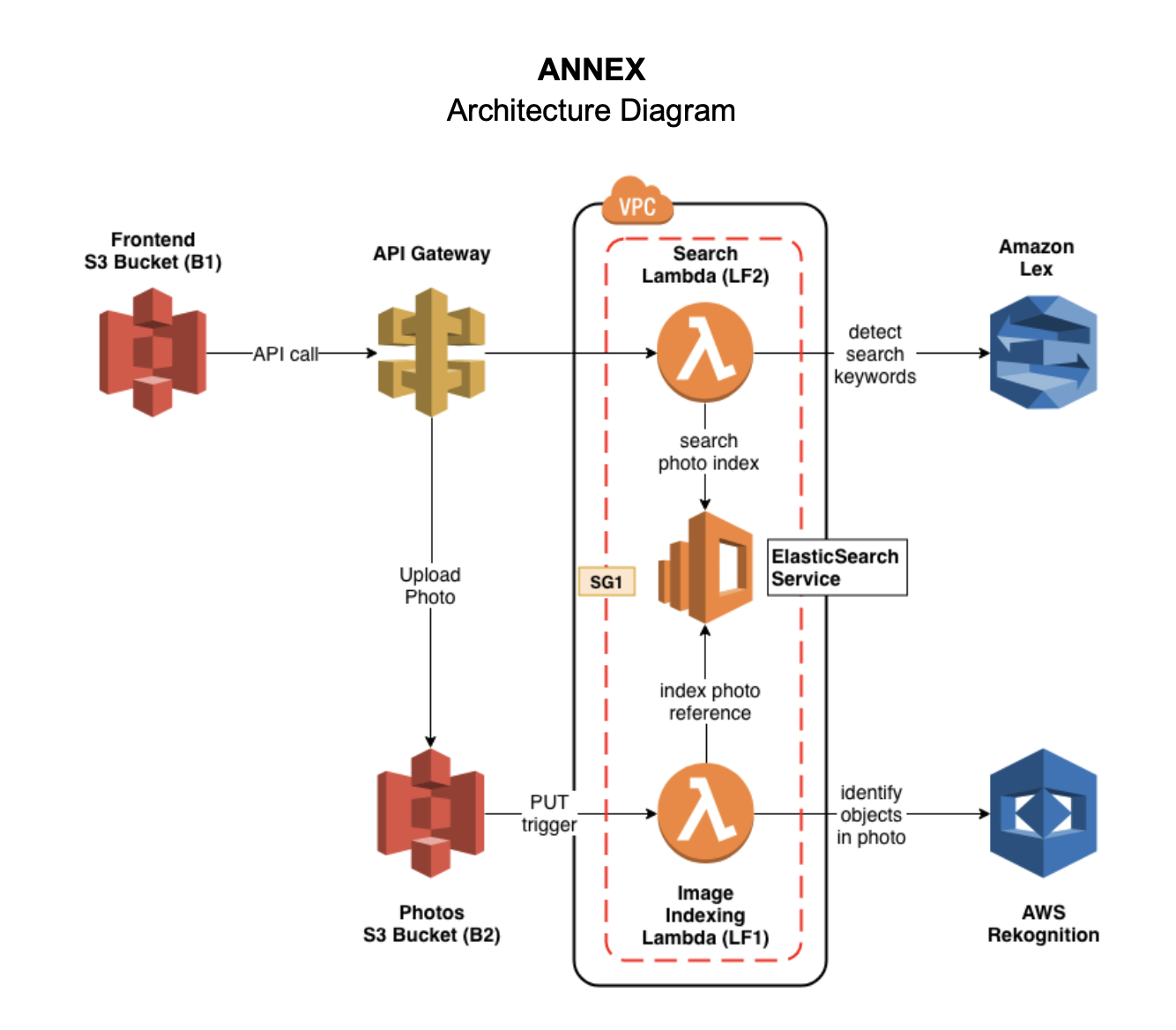
Créez un domaine ElasticSearch appelé photos ( E1 ) sous un groupe de sécurité SG1 et déployez le service dans un VPC.
Étant donné que la fonction lambda doit utiliser le service Rekognition et ce service appartient à un site Web public, nous devons donc configurer le VPC par défaut pour ajouter un sous-réseau privé sous le VPC.
Créez une instance EC2 pour utiliser la ligne de commande ou Postman pour tester la recherche Elastics dans VPC.
Démarrez l'EC2:
ssh -i " cctest.pem " [email protected] Utilisation curl pour réaliser le POST et GET l'action dans Elasticsearch.
Rechercher un index
curl https://vpc-photos-rsjxyzqwdjlisyiem3w4iwldya.us-east-1.es.amazonaws.com/photos/Photo/_search ? q=dogCréer un nouvel index
curl -d ' {"objectKey": "1.png", "bucket": "cc3-photos", "createdTimestamp": "2019-05-08 06:30:09", "labels": ["Pet", "Canine", "Puppy", "Dog", "Animal", "Mammal", "Golden Retriever", "Plant", "Grass"]} ' -H " Content-Type: application/json " -X POST https://vpc-photos-rsjxyzqwdjlisyiem3w4iwldya.us-east-1.es.amazonaws.com/photos/Photocc3-photos ( B1 ) S3 pour stocker les photosuploadPhoto et se connecter avec la fonction lambda.Deux fonctions lambda sont à l'intérieur du même VPC qu'Elasticsearch et toutes les fonctions Lambda ont le même groupe de sécurité qu'ElasticsEcrh.
index-photos ( LF1 )search-photos ( LF2 )$GET la méthode.PUT /photosGET /search?q={query text} < html >
< style type =" text/css " >
#search{
width: 80%;
margin: auto;
display: block;
text-align: center;
margin-top: 50px;
}
#searchin{
float: left;
width: 90%;
height: 30px;
}
#btngo{
float: left;
width: 10%;
height: 30px;
background-color: #333;
color: white;
border: none;
font-weight: bold;
}
#list{
padding: 0;
list-style-type: none;
display: none;
position: absolute;
z-index: 9999;
width: 80%;
margin-top: 30px;
max-height: 120px;
overflow: hidden;
overflow-y: scroll;
}
#list > li{
text-align: left;
padding: 5px;
display: none;
}
#list > li:hover{
background-color: #eee;
}
</ style >
< head >
< title > Photo Album </ title >
< link rel =" stylesheet " href =" https://stackpath.bootstrapcdn.com/bootstrap/4.3.1/css/bootstrap.min.css " integrity =" sha384-ggOyR0iXCbMQv3Xipma34MD+dH/1fQ784/j6cY/iJTQUOhcWr7x9JvoRxT2MZw1T " crossorigin =" anonymous " >
<!------ Include the above in your HEAD tag ---------->
< style type =" text/css " >
/* Container */
.container{
margin: 0 auto;
border: 0px solid black;
width: 50%;
height: 250px;
border-radius: 3px;
background-color: ghostwhite;
text-align: center;
}
/* Preview */
.preview{
width: 100px;
height: 100px;
border: 1px solid black;
margin: 0 auto;
background: white;
}
.preview img{
display: none;
}
/* Button */
.button{
border: 0px;
background-color: deepskyblue;
color: white;
padding: 5px 15px;
margin-left: 10px;
}
</ style >
</ head >
< body >
< div class =" container " >
< form method =" post " action ="" enctype =" multipart/form-data " id =" myform " >
< div class =' preview ' >
< img src ="" id =" img " width =" 100 " height =" 100 " >
</ div >
< div >
< input type =" file " id =" file " name =" file " />
< input type =" button " class =" button " value =" Upload " id =" but_upload " >
</ div >
</ form >
</ div >
< div id =" search " >
< div id =" container1 " >
< input type =" text " id =" searchin " placeholder =" Search... " />
< button id =" btngo " class =" btn btn-primary " type =" button " > Search </ button >
</ div >
<!-- <div id="container2">
<ul id="list" >
<li href="http://www.google.it">Google</li>
<li href="http://www.yahoo.it">Yahoo</li>
<li href="http://www.amazon.it">Amazon</li>
</ul>
</div> -->
</ div >
</ body >
< script
src =" https://code.jquery.com/jquery-3.4.1.min.js "
integrity =" sha256-CSXorXvZcTkaix6Yvo6HppcZGetbYMGWSFlBw8HfCJo= "
crossorigin =" anonymous " > </ script >
< script src =" https://code.jquery.com/jquery-3.3.1.slim.min.js " integrity =" sha384-q8i/X+965DzO0rT7abK41JStQIAqVgRVzpbzo5smXKp4YfRvH+8abtTE1Pi6jizo " crossorigin =" anonymous " > </ script >
< script src =" https://cdnjs.cloudflare.com/ajax/libs/popper.js/1.14.7/umd/popper.min.js " integrity =" sha384-UO2eT0CpHqdSJQ6hJty5KVphtPhzWj9WO1clHTMGa3JDZwrnQq4sF86dIHNDz0W1 " crossorigin =" anonymous " > </ script >
< script src =" https://stackpath.bootstrapcdn.com/bootstrap/4.3.1/js/bootstrap.min.js " integrity =" sha384-JjSmVgyd0p3pXB1rRibZUAYoIIy6OrQ6VrjIEaFf/nJGzIxFDsf4x0xIM+B07jRM " crossorigin =" anonymous " > </ script >
< script src =" https://unpkg.com/axios/dist/axios.min.js " > </ script >
< script type =" text/javascript " src =" lib/axios/dist/axios.standalone.js " > </ script >
< script type =" text/javascript " src =" lib/CryptoJS/rollups/hmac-sha256.js " > </ script >
< script type =" text/javascript " src =" lib/CryptoJS/rollups/sha256.js " > </ script >
< script type =" text/javascript " src =" lib/CryptoJS/components/hmac.js " > </ script >
< script type =" text/javascript " src =" lib/CryptoJS/components/enc-base64.js " > </ script >
< script type =" text/javascript " src =" lib/url-template/url-template.js " > </ script >
< script type =" text/javascript " src =" lib/apiGatewayCore/sigV4Client.js " > </ script >
< script type =" text/javascript " src =" lib/apiGatewayCore/apiGatewayClient.js " > </ script >
< script type =" text/javascript " src =" lib/apiGatewayCore/simpleHttpClient.js " > </ script >
< script type =" text/javascript " src =" lib/apiGatewayCore/utils.js " > </ script >
< script type =" text/javascript " src =" apigClient.js " > </ script >
< script type =" text/javascript " >
function showImage ( src , width , height , alt ) {
var img = document . createElement ( "img" ) ;
img . src = src ;
img . width = width ;
img . height = height ;
img . alt = alt ;
} ;
// upload photos
$ ( document ) . ready ( function ( ) {
$ ( "#but_upload" ) . click ( function ( ) {
// var fd = new FormData();
var files = $ ( '#file' ) [ 0 ] . files [ 0 ] ;
// fd.append('file',files);
// console.log("Uncomment to upload!!")
// console.log(fd)
console . log ( files )
console . log ( files . type )
console . log ( files . name )
let config = {
headers : { 'Content-Type' : files . type , "X-Api-Key" : "V3PD7IU9fo5emUn60jNIl3OQUJsbC2k75Lvl7tRK" , }
} ;
url = 'https://tg0swa682e.execute-api.us-east-1.amazonaws.com/test1/upload/cc3-photos/' + files . name
axios . put ( url , files , config ) . then ( response => {
// console.log(response.data)
alert ( "Upload successful!!" ) ;
} )
} ) ;
} ) ;
/*** Connect with API Gateway ***/
var apigClient = apigClientFactory . newClient ( ) ;
// after clcik the search button, show the search result
$ ( '#btngo' ) . click ( function ( ) {
query = $ ( '#searchin' ) . val ( ) ;
params = { q : query } ;
apigClient . searchGet ( params , { } , { } )
. then ( function ( result ) {
//This is where you would put a success callback
console . log ( result ) ;
// 这里写showImage的函数
let img_list = result . data
for ( var i = 0 ; i < img_list . length ; i ++ ) {
img_url = img_list [ i ] ;
new_img = document . createElement ( 'img' ) ;
new_img . src = img_url ;
document . body . appendChild ( new_img ) ;
}
} ) . catch ( function ( result ) {
//This is where you would put an error callback
console . log ( result ) ;
} ) ;
} ) ;
</ script >
</ html >






