AWS AI Photo Album Web Application
AWS AI Photo Album Web Application - Support Voice Search

Halaman login: https://s3.amazonaws.com/cc3-bucket2/apigateway-js-sdk/album.html
Unggah foto
Cari foto dengan kata kunci, ucapannya adalah:
Tag adalah kata kunci untuk mencari
Tunjukkan foto {tag_a}.
Temukan {tag_a} foto
Cari {tag_a} foto
Tunjukkan foto dengan {tag_a} dan {tag_b}
Cari {tag_a} dan {tag_b} foto
Temukan {tag_a} dan {tag_b} foto
{tag_a}
{tag_a} dan {tag_b}
Tunjukkan foto dengan {tag_a} dan {tag_b} dan {tag_c}
{tag_a} dan {tag_b} dan {tag_c}
Tampilkan saya {tag_a} dan {tag_b} foto
Tampilkan hasil pencarian di frontend.
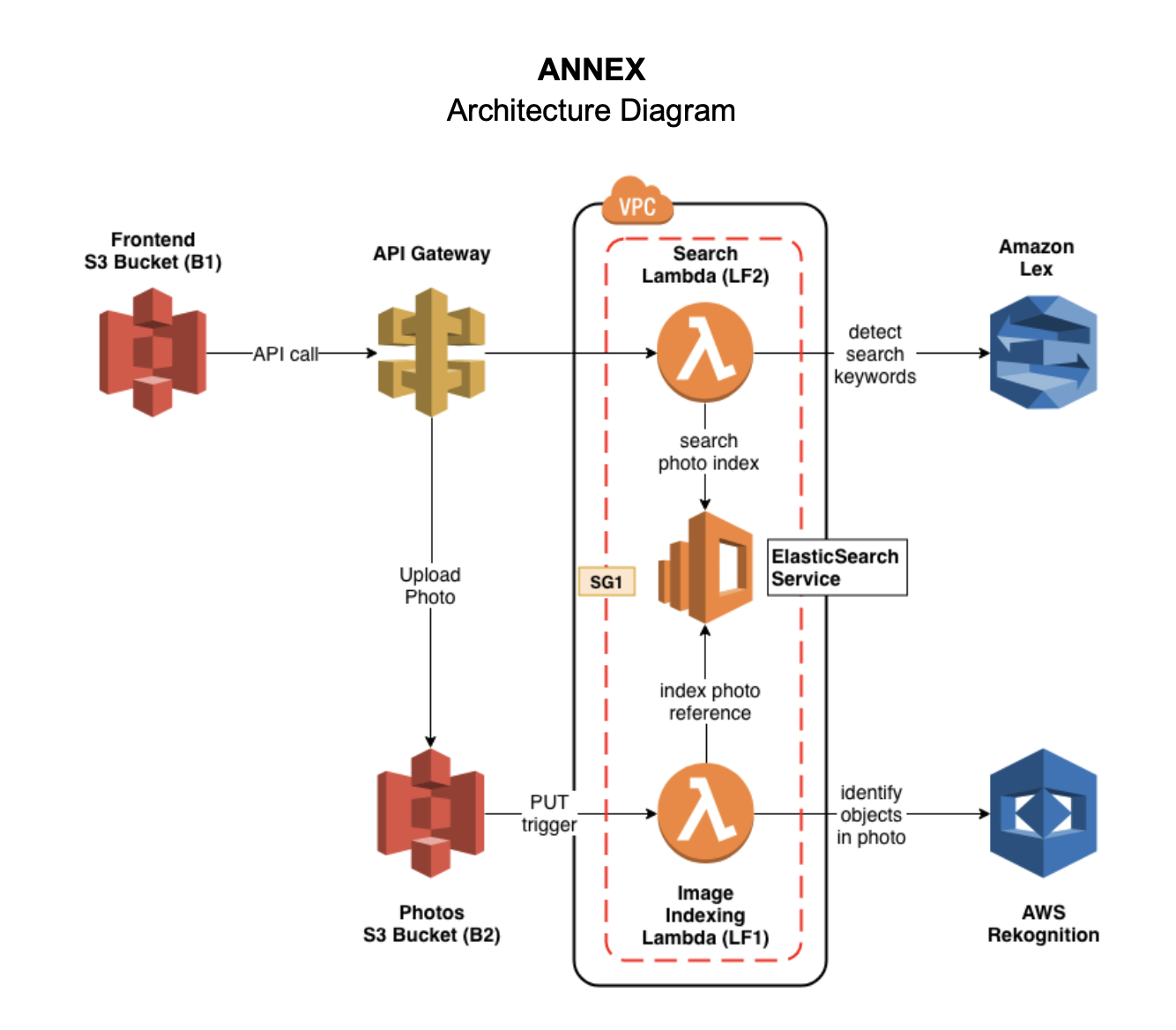
Buat domain Elasticsearch yang disebut photos ( E1 ) di bawah grup keamanan SG1 dan sebarkan layanan di dalam VPC.
Karena fungsi Lambda perlu menggunakan layanan Rekognition dan layanan ini milik situs web publik, jadi kami harus mengkonfigurasi VPC default untuk menambahkan subnet pribadi di bawah VPC.
Buat instance EC2 untuk menggunakan baris perintah atau tukang pos untuk menguji Elasticsearch di VPC.
Mulai EC2:
ssh -i " cctest.pem " [email protected] Menggunakan curl untuk memenuhi POST dan GET tindakan di Elasticsearch.
Cari indeks
curl https://vpc-photos-rsjxyzqwdjlisyiem3w4iwldya.us-east-1.es.amazonaws.com/photos/Photo/_search ? q=dogBuat indeks baru
curl -d ' {"objectKey": "1.png", "bucket": "cc3-photos", "createdTimestamp": "2019-05-08 06:30:09", "labels": ["Pet", "Canine", "Puppy", "Dog", "Animal", "Mammal", "Golden Retriever", "Plant", "Grass"]} ' -H " Content-Type: application/json " -X POST https://vpc-photos-rsjxyzqwdjlisyiem3w4iwldya.us-east-1.es.amazonaws.com/photos/Photocc3-photos ( B1 ) untuk menyimpan fotouploadPhoto pemicu put trigger dan sambungkan dengan fungsi lambda.Dua fungsi Lambda berada di dalam VPC yang sama dengan Elasticsearch dan semua fungsi Lambda memiliki grup keamanan yang sama dengan ElasticseCrH.
index-photos ( LF1 )search-photos ( LF2 )$GET Method.PUT /photosGET /search?q={query text} < html >
< style type =" text/css " >
#search{
width: 80%;
margin: auto;
display: block;
text-align: center;
margin-top: 50px;
}
#searchin{
float: left;
width: 90%;
height: 30px;
}
#btngo{
float: left;
width: 10%;
height: 30px;
background-color: #333;
color: white;
border: none;
font-weight: bold;
}
#list{
padding: 0;
list-style-type: none;
display: none;
position: absolute;
z-index: 9999;
width: 80%;
margin-top: 30px;
max-height: 120px;
overflow: hidden;
overflow-y: scroll;
}
#list > li{
text-align: left;
padding: 5px;
display: none;
}
#list > li:hover{
background-color: #eee;
}
</ style >
< head >
< title > Photo Album </ title >
< link rel =" stylesheet " href =" https://stackpath.bootstrapcdn.com/bootstrap/4.3.1/css/bootstrap.min.css " integrity =" sha384-ggOyR0iXCbMQv3Xipma34MD+dH/1fQ784/j6cY/iJTQUOhcWr7x9JvoRxT2MZw1T " crossorigin =" anonymous " >
<!------ Include the above in your HEAD tag ---------->
< style type =" text/css " >
/* Container */
.container{
margin: 0 auto;
border: 0px solid black;
width: 50%;
height: 250px;
border-radius: 3px;
background-color: ghostwhite;
text-align: center;
}
/* Preview */
.preview{
width: 100px;
height: 100px;
border: 1px solid black;
margin: 0 auto;
background: white;
}
.preview img{
display: none;
}
/* Button */
.button{
border: 0px;
background-color: deepskyblue;
color: white;
padding: 5px 15px;
margin-left: 10px;
}
</ style >
</ head >
< body >
< div class =" container " >
< form method =" post " action ="" enctype =" multipart/form-data " id =" myform " >
< div class =' preview ' >
< img src ="" id =" img " width =" 100 " height =" 100 " >
</ div >
< div >
< input type =" file " id =" file " name =" file " />
< input type =" button " class =" button " value =" Upload " id =" but_upload " >
</ div >
</ form >
</ div >
< div id =" search " >
< div id =" container1 " >
< input type =" text " id =" searchin " placeholder =" Search... " />
< button id =" btngo " class =" btn btn-primary " type =" button " > Search </ button >
</ div >
<!-- <div id="container2">
<ul id="list" >
<li href="http://www.google.it">Google</li>
<li href="http://www.yahoo.it">Yahoo</li>
<li href="http://www.amazon.it">Amazon</li>
</ul>
</div> -->
</ div >
</ body >
< script
src =" https://code.jquery.com/jquery-3.4.1.min.js "
integrity =" sha256-CSXorXvZcTkaix6Yvo6HppcZGetbYMGWSFlBw8HfCJo= "
crossorigin =" anonymous " > </ script >
< script src =" https://code.jquery.com/jquery-3.3.1.slim.min.js " integrity =" sha384-q8i/X+965DzO0rT7abK41JStQIAqVgRVzpbzo5smXKp4YfRvH+8abtTE1Pi6jizo " crossorigin =" anonymous " > </ script >
< script src =" https://cdnjs.cloudflare.com/ajax/libs/popper.js/1.14.7/umd/popper.min.js " integrity =" sha384-UO2eT0CpHqdSJQ6hJty5KVphtPhzWj9WO1clHTMGa3JDZwrnQq4sF86dIHNDz0W1 " crossorigin =" anonymous " > </ script >
< script src =" https://stackpath.bootstrapcdn.com/bootstrap/4.3.1/js/bootstrap.min.js " integrity =" sha384-JjSmVgyd0p3pXB1rRibZUAYoIIy6OrQ6VrjIEaFf/nJGzIxFDsf4x0xIM+B07jRM " crossorigin =" anonymous " > </ script >
< script src =" https://unpkg.com/axios/dist/axios.min.js " > </ script >
< script type =" text/javascript " src =" lib/axios/dist/axios.standalone.js " > </ script >
< script type =" text/javascript " src =" lib/CryptoJS/rollups/hmac-sha256.js " > </ script >
< script type =" text/javascript " src =" lib/CryptoJS/rollups/sha256.js " > </ script >
< script type =" text/javascript " src =" lib/CryptoJS/components/hmac.js " > </ script >
< script type =" text/javascript " src =" lib/CryptoJS/components/enc-base64.js " > </ script >
< script type =" text/javascript " src =" lib/url-template/url-template.js " > </ script >
< script type =" text/javascript " src =" lib/apiGatewayCore/sigV4Client.js " > </ script >
< script type =" text/javascript " src =" lib/apiGatewayCore/apiGatewayClient.js " > </ script >
< script type =" text/javascript " src =" lib/apiGatewayCore/simpleHttpClient.js " > </ script >
< script type =" text/javascript " src =" lib/apiGatewayCore/utils.js " > </ script >
< script type =" text/javascript " src =" apigClient.js " > </ script >
< script type =" text/javascript " >
function showImage ( src , width , height , alt ) {
var img = document . createElement ( "img" ) ;
img . src = src ;
img . width = width ;
img . height = height ;
img . alt = alt ;
} ;
// upload photos
$ ( document ) . ready ( function ( ) {
$ ( "#but_upload" ) . click ( function ( ) {
// var fd = new FormData();
var files = $ ( '#file' ) [ 0 ] . files [ 0 ] ;
// fd.append('file',files);
// console.log("Uncomment to upload!!")
// console.log(fd)
console . log ( files )
console . log ( files . type )
console . log ( files . name )
let config = {
headers : { 'Content-Type' : files . type , "X-Api-Key" : "V3PD7IU9fo5emUn60jNIl3OQUJsbC2k75Lvl7tRK" , }
} ;
url = 'https://tg0swa682e.execute-api.us-east-1.amazonaws.com/test1/upload/cc3-photos/' + files . name
axios . put ( url , files , config ) . then ( response => {
// console.log(response.data)
alert ( "Upload successful!!" ) ;
} )
} ) ;
} ) ;
/*** Connect with API Gateway ***/
var apigClient = apigClientFactory . newClient ( ) ;
// after clcik the search button, show the search result
$ ( '#btngo' ) . click ( function ( ) {
query = $ ( '#searchin' ) . val ( ) ;
params = { q : query } ;
apigClient . searchGet ( params , { } , { } )
. then ( function ( result ) {
//This is where you would put a success callback
console . log ( result ) ;
// 这里写showImage的函数
let img_list = result . data
for ( var i = 0 ; i < img_list . length ; i ++ ) {
img_url = img_list [ i ] ;
new_img = document . createElement ( 'img' ) ;
new_img . src = img_url ;
document . body . appendChild ( new_img ) ;
}
} ) . catch ( function ( result ) {
//This is where you would put an error callback
console . log ( result ) ;
} ) ;
} ) ;
</ script >
</ html >






