AWS AI Photo Album Web Application
AWS AI Photo Album Web Application - Support Voice Search

Login Page: https://s3.amazonaws.com/cc3-bucket2/apiGateway-js-sdk/album.html
Upload photos
Search photos by keywords, the utterances are:
tags are the keywords to search
Show me {tag_a} photos.
FInd {tag_a} photos
Search {tag_a} photos
Show me photos with {tag_a} and {tag_b}
Search {tag_a} and {tag_b} photos
Find {tag_a} and {tag_b} photos
{tag_a}
{tag_a} and {tag_b}
Show me photos with {tag_a} and {tag_b} and {tag_c}
{tag_a} and {tag_b} and {tag_c}
Show me {tag_a} and {tag_b} photos
Display the search results in frontend.
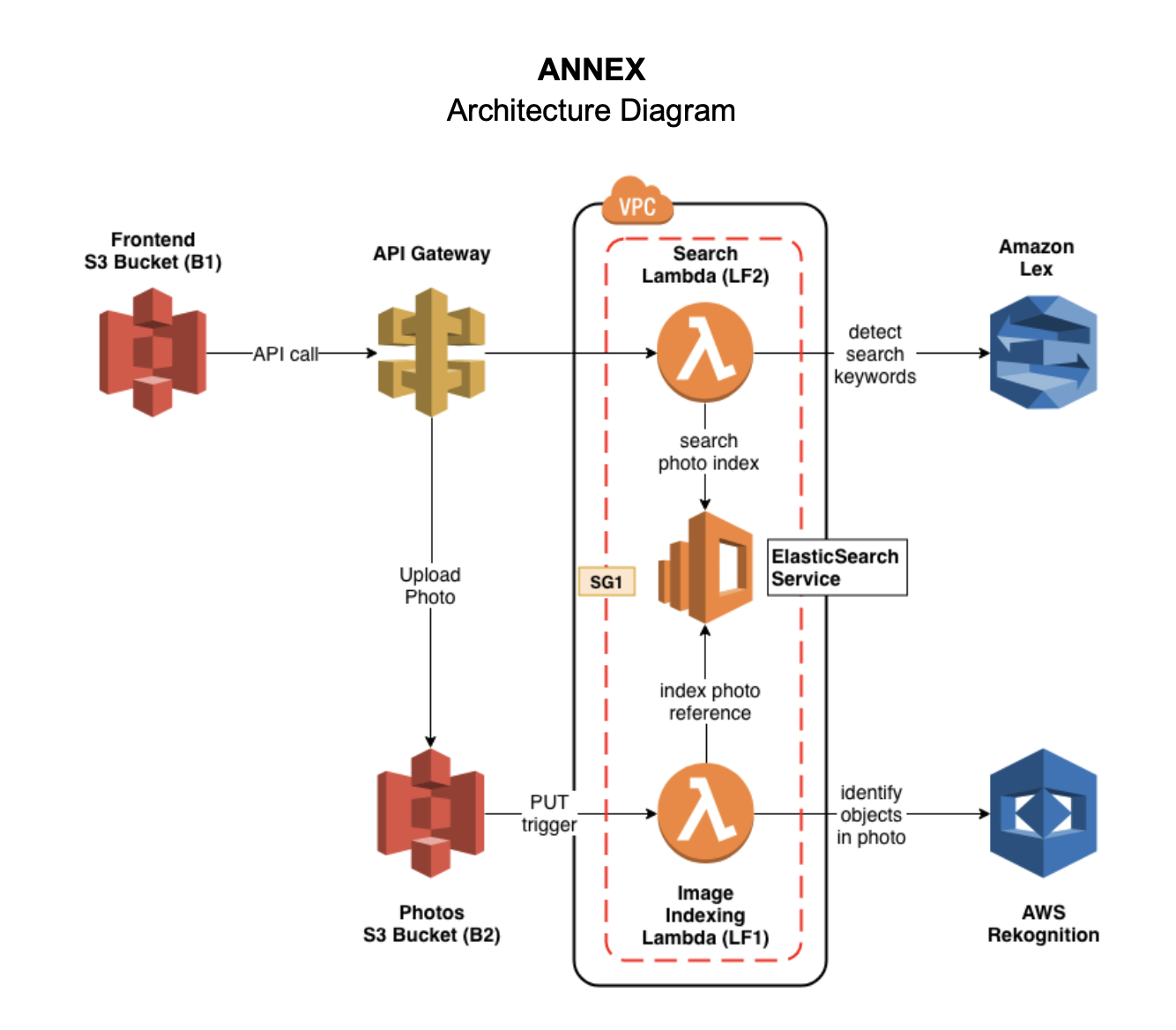
Create a ElasticSearch domain called photos (E1) under a Security Group SG1 and deploy the service inside a VPC.
Since lambda function needs to use Rekognition service and this service belongs to a public website, so we have to configure the default VPC to add a private subnet under the VPC.
Create a EC2 instance to use command line or Postman to test the ElasticSearch in VPC.
Start the EC2:
ssh -i "cctest.pem" [email protected]Using curl to fulfill the POST and GET action in ElasticSearch.
Search an index
curl https://vpc-photos-rsjxyzqwdjlisyiem3w4iwldya.us-east-1.es.amazonaws.com/photos/Photo/_search?q=dogCreate a new index
curl -d '{"objectKey": "1.png", "bucket": "cc3-photos", "createdTimestamp": "2019-05-08 06:30:09", "labels": ["Pet", "Canine", "Puppy", "Dog", "Animal", "Mammal", "Golden Retriever", "Plant", "Grass"]}' -H "Content-Type: application/json" -X POST https://vpc-photos-rsjxyzqwdjlisyiem3w4iwldya.us-east-1.es.amazonaws.com/photos/Photocc3-photos (B1) to store the photosuploadPhoto and connect with lambda function.Two Lambda functions are inside the same VPC as ElasticSearch and all the lambda functions have the same security group as ElasticSeacrh.
index-photos (LF1)
search-photos (LF2)
$GET method.PUT /photos
GET /search?q={query text}
<html>

<style type="text/css">

#search{
    width: 80%;
    margin: auto;
    display: block;
    text-align: center;
    margin-top: 50px;
}

#searchin{
    float: left;
    width: 90%;
    height: 30px;
}

#btngo{
    float: left;
    width: 10%;
    height: 30px;
    background-color: #333;
    color: white;
    border: none;
    font-weight: bold;
}

#list{
     padding: 0;
     list-style-type: none;
     display: none;
     position: absolute;
     z-index: 9999;
     width: 80%;
     margin-top: 30px;
     max-height: 120px;
     overflow: hidden;
     overflow-y: scroll;
}

#list > li{
     text-align: left;
     padding: 5px;
     display: none;
}

#list > li:hover{
      background-color: #eee;
}
</style>

<head>
    <title>Photo Album</title>
    <link rel="stylesheet" href="https://stackpath.bootstrapcdn.com/bootstrap/4.3.1/css/bootstrap.min.css" integrity="sha384-ggOyR0iXCbMQv3Xipma34MD+dH/1fQ784/j6cY/iJTQUOhcWr7x9JvoRxT2MZw1T" crossorigin="anonymous">

    <!------ Include the above in your HEAD tag ---------->
    <style type="text/css">
        /* Container */
        .container{
        margin: 0 auto;
        border: 0px solid black;
        width: 50%;
        height: 250px;
        border-radius: 3px;
        background-color: ghostwhite;
        text-align: center;
        }
        /* Preview */
        .preview{
        width: 100px;
        height: 100px;
        border: 1px solid black;
        margin: 0 auto;
        background: white;
        }

        .preview img{
        display: none;
        }
        /* Button */
        .button{
        border: 0px;
        background-color: deepskyblue;
        color: white;
        padding: 5px 15px;
        margin-left: 10px;
        }
    </style>
</head>

<body>
    <div class="container">
        <form method="post" action="" enctype="multipart/form-data" id="myform">
            <div class='preview'>
                <img src="" id="img" width="100" height="100">
            </div>
            <div >
                <input type="file" id="file" name="file"/>
                <input type="button" class="button" value="Upload" id="but_upload">
            </div>
        </form>
    </div>


    <div id="search">
        <div id="container1">
            <input type="text" id="searchin" placeholder="Search..."/>
            <button id="btngo" class="btn btn-primary" type="button">Search</button>
        </div>
<!--         <div id="container2">
            <ul id="list" >
                <li href="http://www.google.it">Google</li>
                <li href="http://www.yahoo.it">Yahoo</li>
                <li href="http://www.amazon.it">Amazon</li>
            </ul>
        </div> -->
    </div>

</body>

<script
  src="https://code.jquery.com/jquery-3.4.1.min.js"
  integrity="sha256-CSXorXvZcTkaix6Yvo6HppcZGetbYMGWSFlBw8HfCJo="
  crossorigin="anonymous"></script>
<script src="https://code.jquery.com/jquery-3.3.1.slim.min.js" integrity="sha384-q8i/X+965DzO0rT7abK41JStQIAqVgRVzpbzo5smXKp4YfRvH+8abtTE1Pi6jizo" crossorigin="anonymous"></script>
<script src="https://cdnjs.cloudflare.com/ajax/libs/popper.js/1.14.7/umd/popper.min.js" integrity="sha384-UO2eT0CpHqdSJQ6hJty5KVphtPhzWj9WO1clHTMGa3JDZwrnQq4sF86dIHNDz0W1" crossorigin="anonymous"></script>
<script src="https://stackpath.bootstrapcdn.com/bootstrap/4.3.1/js/bootstrap.min.js" integrity="sha384-JjSmVgyd0p3pXB1rRibZUAYoIIy6OrQ6VrjIEaFf/nJGzIxFDsf4x0xIM+B07jRM" crossorigin="anonymous"></script>

<script src="https://unpkg.com/axios/dist/axios.min.js"></script>
<script type="text/javascript" src="lib/axios/dist/axios.standalone.js"></script>
<script type="text/javascript" src="lib/CryptoJS/rollups/hmac-sha256.js"></script>
<script type="text/javascript" src="lib/CryptoJS/rollups/sha256.js"></script>
<script type="text/javascript" src="lib/CryptoJS/components/hmac.js"></script>
<script type="text/javascript" src="lib/CryptoJS/components/enc-base64.js"></script>
<script type="text/javascript" src="lib/url-template/url-template.js"></script>
<script type="text/javascript" src="lib/apiGatewayCore/sigV4Client.js"></script>
<script type="text/javascript" src="lib/apiGatewayCore/apiGatewayClient.js"></script>
<script type="text/javascript" src="lib/apiGatewayCore/simpleHttpClient.js"></script>
<script type="text/javascript" src="lib/apiGatewayCore/utils.js"></script>
<script type="text/javascript" src="apigClient.js"></script>

<script type="text/javascript">

    function showImage(src, width, height, alt) {
        var img = document.createElement("img");
        img.src = src;
        img.width = width;
        img.height = height;
        img.alt = alt;
    };

    // upload photos
    $(document).ready(function(){

        $("#but_upload").click(function(){

            // var fd = new FormData();
            var files = $('#file')[0].files[0];
            // fd.append('file',files);
            // console.log("Uncomment to upload!!")
            // console.log(fd)
            console.log(files)
            console.log(files.type)
            console.log(files.name)

            let config = {
                headers:{'Content-Type': files.type , "X-Api-Key":"V3PD7IU9fo5emUn60jNIl3OQUJsbC2k75Lvl7tRK", }
            };

            url = 'https://tg0swa682e.execute-api.us-east-1.amazonaws.com/test1/upload/cc3-photos/' + files.name
            axios.put(url,files,config).then(response=>{
                // console.log(response.data)
                alert("Upload successful!!");
            })


        });
    });


    /*** Connect with API Gateway ***/
    var apigClient = apigClientFactory.newClient();


    // after clcik the search button, show the search result
    $('#btngo').click(function(){
        query = $('#searchin').val();
        params = {q: query};
        apigClient.searchGet(params, {}, {})
            .then(function(result){
            //This is where you would put a success callback
            console.log(result);
            // 这里写showImage的函数
            let img_list = result.data
            for (var i = 0; i < img_list.length; i++) {
                img_url = img_list[i];
                new_img = document.createElement('img');
                new_img.src = img_url;
                document.body.appendChild(new_img);
            }

            }).catch(function(result){
            //This is where you would put an error callback
            console.log(result);
            });

    });

</script>

</html>






