AWS AI Photo Album Web Application
AWS AI Photo Album Web Application - Support Voice Search

Página de inicio de sesión: https://s3.amazonaws.com/cc3-bucket2/apigateway-js-sdk/album.html
Subir fotos
Fotos de búsqueda por palabras clave, las expresiones son:
Las etiquetas son las palabras clave para buscar
Muéstrame las fotos {tag_a}.
Encontrar {tag_a} fotos
Buscar fotos {tag_a}
Muéstrame fotos con {tag_a} y {tag_b}
Buscar fotos {tag_a} y {tag_b}
Encontrar {tag_a} y {tag_b} fotos
{tag_a}
{tag_a} y {tag_b}
Muéstrame fotos con {tag_a} y {tag_b} y {tag_c}
{tag_a} y {tag_b} y {tag_c}
Muéstrame {Tag_a} y {Tag_b} fotos
Muestre los resultados de búsqueda en frontend.
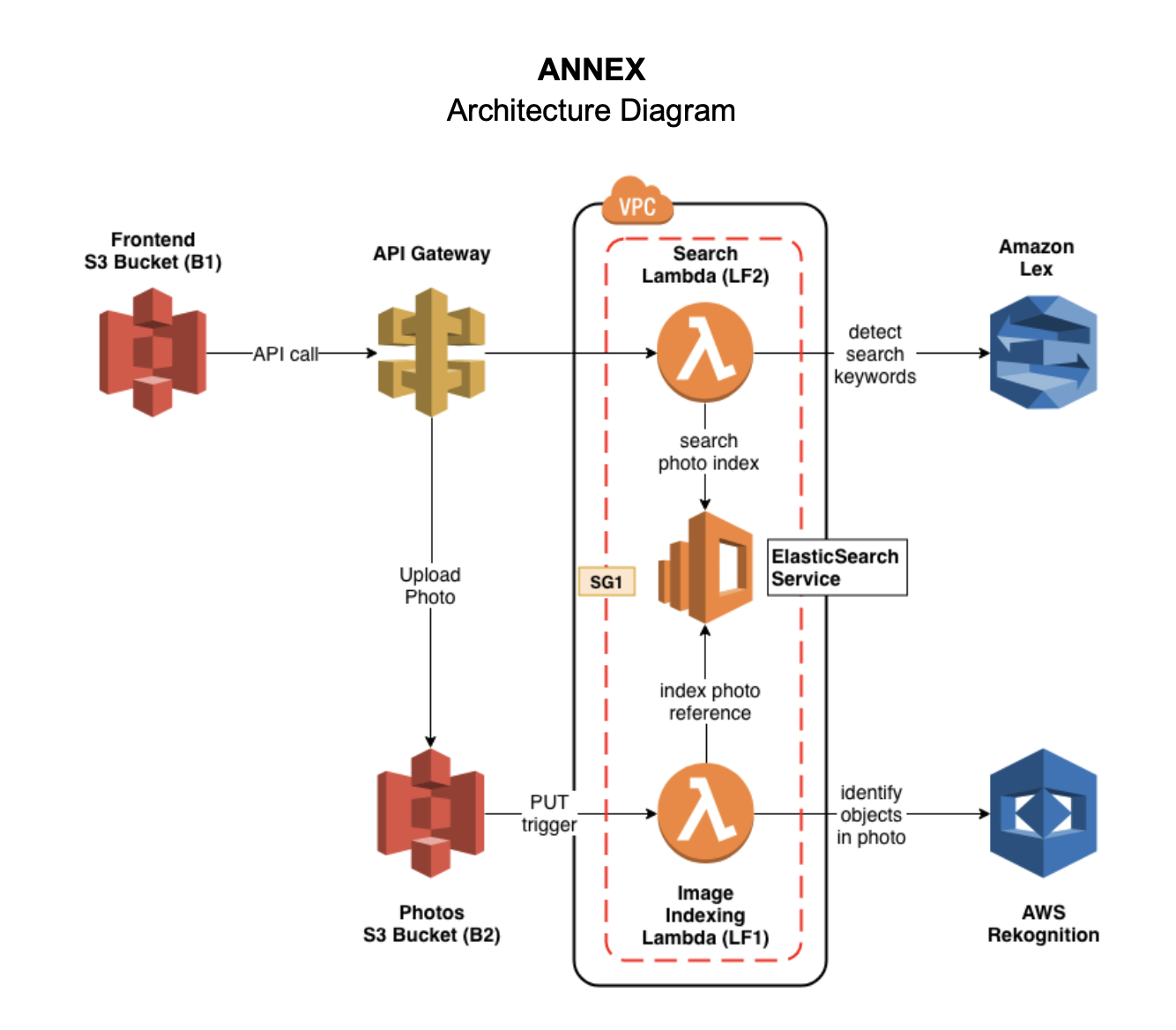
Cree un dominio Elasticsearch llamado photos ( E1 ) bajo un grupo de seguridad SG1 e implemente el servicio dentro de una VPC.
Dado que la función Lambda necesita usar el servicio Rekognition y este servicio pertenece a un sitio web público, por lo que tenemos que configurar el VPC predeterminado para agregar una subred privada bajo el VPC.
Cree una instancia de EC2 para usar la línea de comandos o postman para probar elasticsearch en VPC.
Comience el EC2:
ssh -i " cctest.pem " [email protected] Usar curl para cumplir con la POST y GET acción en Elasticsearch.
Buscar un índice
curl https://vpc-photos-rsjxyzqwdjlisyiem3w4iwldya.us-east-1.es.amazonaws.com/photos/Photo/_search ? q=dogCrear un nuevo índice
curl -d ' {"objectKey": "1.png", "bucket": "cc3-photos", "createdTimestamp": "2019-05-08 06:30:09", "labels": ["Pet", "Canine", "Puppy", "Dog", "Animal", "Mammal", "Golden Retriever", "Plant", "Grass"]} ' -H " Content-Type: application/json " -X POST https://vpc-photos-rsjxyzqwdjlisyiem3w4iwldya.us-east-1.es.amazonaws.com/photos/Photocc3-photos ( B1 ) para almacenar las fotosuploadPhoto activación y conecte con la función Lambda.Dos funciones Lambda están dentro de la misma VPC que Elasticsearch y todas las funciones de Lambda tienen el mismo grupo de seguridad que Elasticseacrh.
index-photos ( LF1 )search-photos ( LF2 )$GET Method.PUT /photosGET /search?q={query text} < html >
< style type =" text/css " >
#search{
width: 80%;
margin: auto;
display: block;
text-align: center;
margin-top: 50px;
}
#searchin{
float: left;
width: 90%;
height: 30px;
}
#btngo{
float: left;
width: 10%;
height: 30px;
background-color: #333;
color: white;
border: none;
font-weight: bold;
}
#list{
padding: 0;
list-style-type: none;
display: none;
position: absolute;
z-index: 9999;
width: 80%;
margin-top: 30px;
max-height: 120px;
overflow: hidden;
overflow-y: scroll;
}
#list > li{
text-align: left;
padding: 5px;
display: none;
}
#list > li:hover{
background-color: #eee;
}
</ style >
< head >
< title > Photo Album </ title >
< link rel =" stylesheet " href =" https://stackpath.bootstrapcdn.com/bootstrap/4.3.1/css/bootstrap.min.css " integrity =" sha384-ggOyR0iXCbMQv3Xipma34MD+dH/1fQ784/j6cY/iJTQUOhcWr7x9JvoRxT2MZw1T " crossorigin =" anonymous " >
<!------ Include the above in your HEAD tag ---------->
< style type =" text/css " >
/* Container */
.container{
margin: 0 auto;
border: 0px solid black;
width: 50%;
height: 250px;
border-radius: 3px;
background-color: ghostwhite;
text-align: center;
}
/* Preview */
.preview{
width: 100px;
height: 100px;
border: 1px solid black;
margin: 0 auto;
background: white;
}
.preview img{
display: none;
}
/* Button */
.button{
border: 0px;
background-color: deepskyblue;
color: white;
padding: 5px 15px;
margin-left: 10px;
}
</ style >
</ head >
< body >
< div class =" container " >
< form method =" post " action ="" enctype =" multipart/form-data " id =" myform " >
< div class =' preview ' >
< img src ="" id =" img " width =" 100 " height =" 100 " >
</ div >
< div >
< input type =" file " id =" file " name =" file " />
< input type =" button " class =" button " value =" Upload " id =" but_upload " >
</ div >
</ form >
</ div >
< div id =" search " >
< div id =" container1 " >
< input type =" text " id =" searchin " placeholder =" Search... " />
< button id =" btngo " class =" btn btn-primary " type =" button " > Search </ button >
</ div >
<!-- <div id="container2">
<ul id="list" >
<li href="http://www.google.it">Google</li>
<li href="http://www.yahoo.it">Yahoo</li>
<li href="http://www.amazon.it">Amazon</li>
</ul>
</div> -->
</ div >
</ body >
< script
src =" https://code.jquery.com/jquery-3.4.1.min.js "
integrity =" sha256-CSXorXvZcTkaix6Yvo6HppcZGetbYMGWSFlBw8HfCJo= "
crossorigin =" anonymous " > </ script >
< script src =" https://code.jquery.com/jquery-3.3.1.slim.min.js " integrity =" sha384-q8i/X+965DzO0rT7abK41JStQIAqVgRVzpbzo5smXKp4YfRvH+8abtTE1Pi6jizo " crossorigin =" anonymous " > </ script >
< script src =" https://cdnjs.cloudflare.com/ajax/libs/popper.js/1.14.7/umd/popper.min.js " integrity =" sha384-UO2eT0CpHqdSJQ6hJty5KVphtPhzWj9WO1clHTMGa3JDZwrnQq4sF86dIHNDz0W1 " crossorigin =" anonymous " > </ script >
< script src =" https://stackpath.bootstrapcdn.com/bootstrap/4.3.1/js/bootstrap.min.js " integrity =" sha384-JjSmVgyd0p3pXB1rRibZUAYoIIy6OrQ6VrjIEaFf/nJGzIxFDsf4x0xIM+B07jRM " crossorigin =" anonymous " > </ script >
< script src =" https://unpkg.com/axios/dist/axios.min.js " > </ script >
< script type =" text/javascript " src =" lib/axios/dist/axios.standalone.js " > </ script >
< script type =" text/javascript " src =" lib/CryptoJS/rollups/hmac-sha256.js " > </ script >
< script type =" text/javascript " src =" lib/CryptoJS/rollups/sha256.js " > </ script >
< script type =" text/javascript " src =" lib/CryptoJS/components/hmac.js " > </ script >
< script type =" text/javascript " src =" lib/CryptoJS/components/enc-base64.js " > </ script >
< script type =" text/javascript " src =" lib/url-template/url-template.js " > </ script >
< script type =" text/javascript " src =" lib/apiGatewayCore/sigV4Client.js " > </ script >
< script type =" text/javascript " src =" lib/apiGatewayCore/apiGatewayClient.js " > </ script >
< script type =" text/javascript " src =" lib/apiGatewayCore/simpleHttpClient.js " > </ script >
< script type =" text/javascript " src =" lib/apiGatewayCore/utils.js " > </ script >
< script type =" text/javascript " src =" apigClient.js " > </ script >
< script type =" text/javascript " >
function showImage ( src , width , height , alt ) {
var img = document . createElement ( "img" ) ;
img . src = src ;
img . width = width ;
img . height = height ;
img . alt = alt ;
} ;
// upload photos
$ ( document ) . ready ( function ( ) {
$ ( "#but_upload" ) . click ( function ( ) {
// var fd = new FormData();
var files = $ ( '#file' ) [ 0 ] . files [ 0 ] ;
// fd.append('file',files);
// console.log("Uncomment to upload!!")
// console.log(fd)
console . log ( files )
console . log ( files . type )
console . log ( files . name )
let config = {
headers : { 'Content-Type' : files . type , "X-Api-Key" : "V3PD7IU9fo5emUn60jNIl3OQUJsbC2k75Lvl7tRK" , }
} ;
url = 'https://tg0swa682e.execute-api.us-east-1.amazonaws.com/test1/upload/cc3-photos/' + files . name
axios . put ( url , files , config ) . then ( response => {
// console.log(response.data)
alert ( "Upload successful!!" ) ;
} )
} ) ;
} ) ;
/*** Connect with API Gateway ***/
var apigClient = apigClientFactory . newClient ( ) ;
// after clcik the search button, show the search result
$ ( '#btngo' ) . click ( function ( ) {
query = $ ( '#searchin' ) . val ( ) ;
params = { q : query } ;
apigClient . searchGet ( params , { } , { } )
. then ( function ( result ) {
//This is where you would put a success callback
console . log ( result ) ;
// 这里写showImage的函数
let img_list = result . data
for ( var i = 0 ; i < img_list . length ; i ++ ) {
img_url = img_list [ i ] ;
new_img = document . createElement ( 'img' ) ;
new_img . src = img_url ;
document . body . appendChild ( new_img ) ;
}
} ) . catch ( function ( result ) {
//This is where you would put an error callback
console . log ( result ) ;
} ) ;
} ) ;
</ script >
</ html >






