pgsql search
1.0.0


Currrent and planned features:
This project uses pixi to manage dependencies and environments.
If you're on Linux or macOS, you can install pixi using the following commands:
curl -fsSL https://pixi.sh/install.sh | bashThen clone the repository:
git clone https://github.com/dnth/pgsql-search.git
cd pgsql-search
Install the project:
pixi installThis should install all the dependencies of the project including PostgreSQL, CUDA, PyTorch, and pgvector into a virtual environment.
Tip
Why pixi and not uv?
We are using PostgreSQL database in this project and it's not installable directly via uv or pip. But PostgreSQL is installable via conda.
Instead of using conda, we use pixi to manage the environment and dependencies. Plus, pixi uses uv under the hood to pull Python packages. This gives us the speed of uv for Python packages and the flexibility of conda for system level dependencies.
Start the local database server:
pixi run configure-dbThis initializes the database and starts the server. You should see a folder named mylocal_db in your current directory. This folder contains the database files.
Once the database is set up, let's run the quickstart script:
pixi run quickstartThis script will load a dataset with images and captions, create a database, insert the dataset into the database, and run a full text search and print the results.
If everything goes well, you should see the results printed in the terminal.
Currently, we only support Hugging Face datasets. Let's load a dataset with images and captions.
from pgsql_search.loader import HuggingFaceDatasets

ds = HuggingFaceDatasets("UCSC-VLAA/Recap-COCO-30K") # Load the dataset
ds.save_images("../data/images") # Save the images to a local folder
ds = ds.select_columns(["image_filepath", "caption"]) # Select the columns we want to use
ds.dataset is a Hugging Face Dataset object. You are free to perform any operations supported by the datasets package.
ds.datasetDataset({
features: ['image_filepath', 'caption'],
num_rows: 30504
})
From ds.dataset we see that we have 30504 rows in the dataset with 2 columns: image_filepath and caption. Now we can create a database and insert the dataset into the database.
from pgsql_search.database import PostgreSQLDatabase, ColumnType

PostgreSQLDatabase.create_database("my_database")
Insert the dataset into the database:
df = ds.dataset.to_pandas()

with PostgreSQLDatabase("my_database") as db:
    db.initialize_table("image_metadata")
    db.add_column("image_filepath", ColumnType.TEXT, nullable=False)
    db.add_column("caption", ColumnType.TEXT, nullable=True)

    db.insert_dataframe(df)
Once completed, we can run a full text search on the database.
from pgsql_search.database import PostgreSQLDatabase

query = "man in a yellow shirt"

with PostgreSQLDatabase("my_database") as db:
    res = db.full_text_search(
        query=query,
        table_name="image_metadata",
        search_column="caption",
        num_results=10
    )
The output is a pandas DataFrame with the results and query.
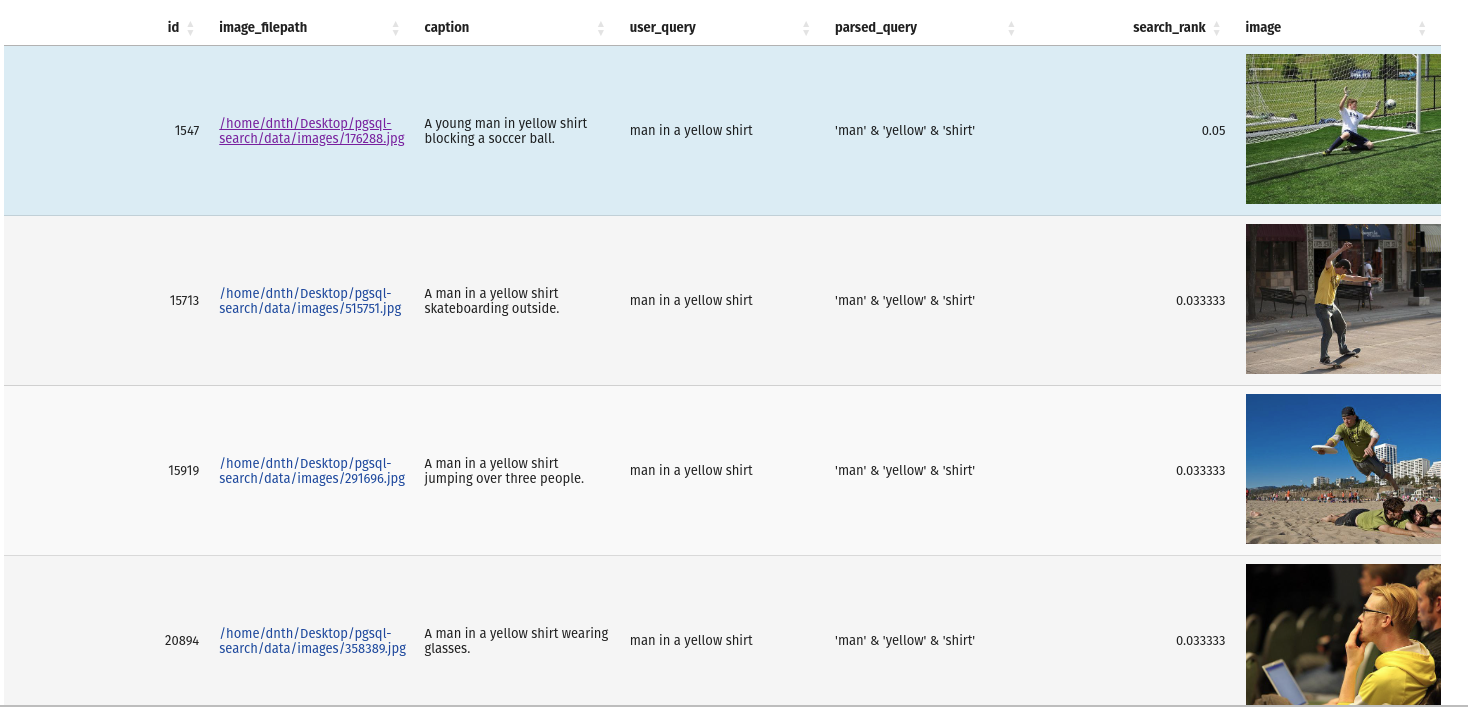
If you'd like to inspect the database, you can do so with the following command:
pixi run inspect-dbThis will open an interactive terminal to inspect the database.
If you want to stop the database server, you can do so with the following command:
pixi run stop-dbAnd to remove the database entirely:
pixi run remove-dbpixi run -e test pytest




