GepotServer
1.0.0

This project is a server-side implementation for the flash game "Classic 8-Ball Multiplayer", found at https://www.speeleiland.nl/classic-8-ball-multiplayer.htm.
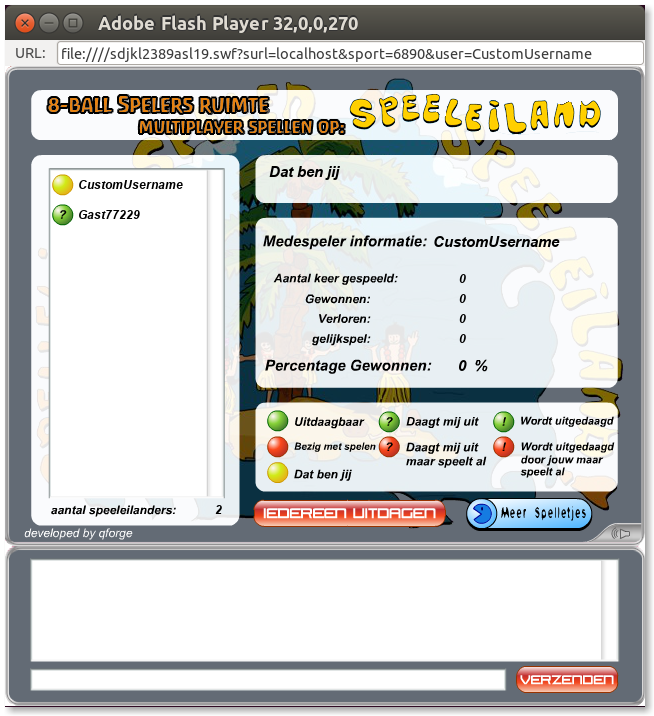
Open the project in MonoDevelop or Visual Studio and click run. Currently there are no binaries provided.
This has been tested under Mono 6.12, but it should run on much earlier versions of both Mono and .NET.
The swf file is not provided in this repository. It can be downloaded from here.
The standalone Flash Player first needs to be allowed to connect to the internet. Unfortunately, clicking the "Settings" button in the prompt simply opens a 404 page, meaning it can not be configured that way.
Instead, .minerva can be used. A live instance of it can be found at https://mariani.life/projects/minerva/.
settings.sol file.
On Linux, it is located at
~/.macromedia/Flash_Player/macromedia.com/support/flashplayer/sys/settings.sol.If it doesn't exist, make sure you have ran
flashplayerat least once.
crossdomainAllow from the left panel.YES.crossdomainAlways.settings.sol file at the same location.It might be possible to distribute a preconfigured settings.sol with a specific domain name allowed only, however this has not been investigated.
Once this has been configured, the game can now be ran using the standalone flashplayer binary.
Either navigate to the path containing the swf using a terminal and run
flashplayer "file:///$PWD/sdjkl2389asl19.swf?surl=localhost&sport=6890&user=Desired%20Username"
or open the standalone Flash Player and manually fill in the URL with the required parameters.







