com.rest.huggingface
1.0.0

A non-official HuggingFace RESTful client for the Unity Game Engine.
I am not affiliated with HuggingFace and an account with api access is required.
All copyrights, trademarks, logos, and assets are the property of their respective owners.
Requires Unity 2021.3 LTS or higher.
The recommended installation method is though the unity package manager and OpenUPM.
Package Manager
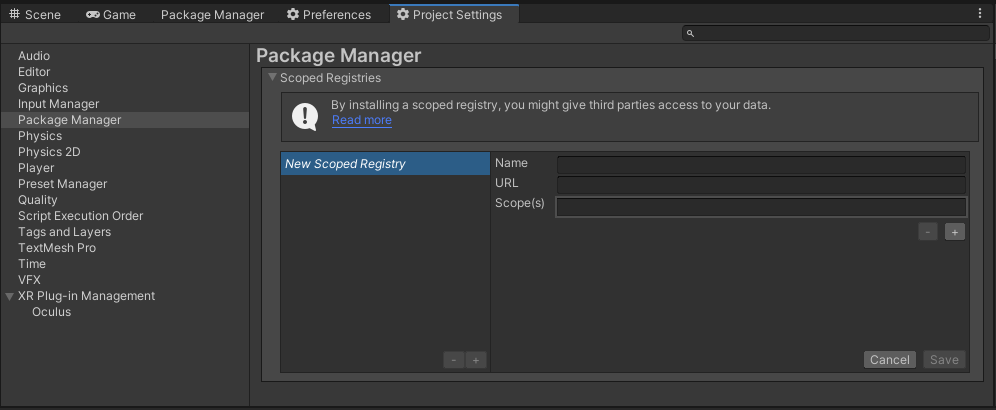
OpenUPM
https://package.openupm.com
com.rest.huggingfacecom.utilitiesMy Registries
HuggingFace packagehttps://github.com/RageAgainstThePixel/com.rest.huggingface.git#upm
Note: this repo has dependencies on other repositories! You are responsible for adding these on your own.
There are 4 ways to provide your API keys, in order of precedence:
var api = new HuggingFaceClient("yourApiKey");Or create a HuggingFaceAuthentication object manually
var api = new HuggingFaceClient(new HuggingFaceAuthentication("yourApiKey"));You can save the key directly into a scriptable object that is located in the Assets/Resources folder.
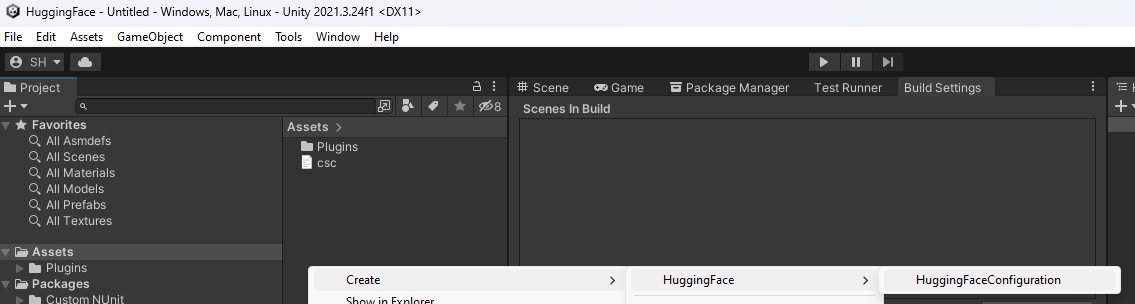
You can create a new one by using the context menu of the project pane and creating a new HuggingFaceConfiguration scriptable object.
Attempts to load api keys from a configuration file, by default .huggingface in the current directory, optionally traversing up the directory tree or in the user's home directory.
To create a configuration file, create a new text file named .huggingface and containing the line:
{
  "apiKey": "yourApiKey",
}
You can also load the file directly with known path by calling a static method in Authentication:
var api = new HuggingFaceClient(new HuggingFaceAuthentication().LoadFromDirectory("your/path/to/.huggingface"));;Use your system's environment variables specify an api key to use.
HUGGING_FACE_API_KEY for your api key.var api = new HuggingFaceClient(new HuggingFaceAuthentication().LoadFromEnvironment());TODO
TODO





