mp4viewer
v0.1.2

MP4Viewer ist ein in Python geschriebener MP4 -Metadatenanalysator (ISO -Basis -Mediendatei -Format). Sie können es verwenden, um die Metadaten von MP4 -Dateien auf der Shell, einem neuen GTK -basierten Fenster, zu analysieren oder es als JSON -Datei zu speichern. Die Definitionen der im Code verwendeten Strukturen finden Sie in der öffentlich verfügbarer Standard (Es kann nicht mehr heruntergeladen werden) ISO/IEC 14496-12 - ISO -Basis -Mediendatei -Format.
pip install --upgrade mp4viewer

python3 -m mp4viewer [-h] [-o {stdout,gui,json}] [-e] [-c {on,off}] file.mp4./parse.sh [-h] [-o {stdout,gui,json}] [-e] [-c {on,off}] file.mp4 positional arguments:
input_file Location of the ISO bmff file (mp4)
options:
-h, --help show this help message and exit
-o {stdout,gui,json}, --output {stdout,gui,json}
Specify the output format. Please note that pygtk is required for `gui`.
-c {on,off}, --color {on,off}
Toggle colors in console based output; on by default.
-j JSON_PATH, --json JSON_PATH
Path to the json file where the output should be saved. If this is specified, the json output will be generated and written to this file even if the requested output format is not
json. If the output format is json and this argument is not specified, the json object will be written to the current directory using "$PWD/$(basename input_file).mp4viewer.json"
-e, --expand-arrays Do not truncate long arrays
--debug Used for internal debugging
--latex Generate latex-in-markdown for github README
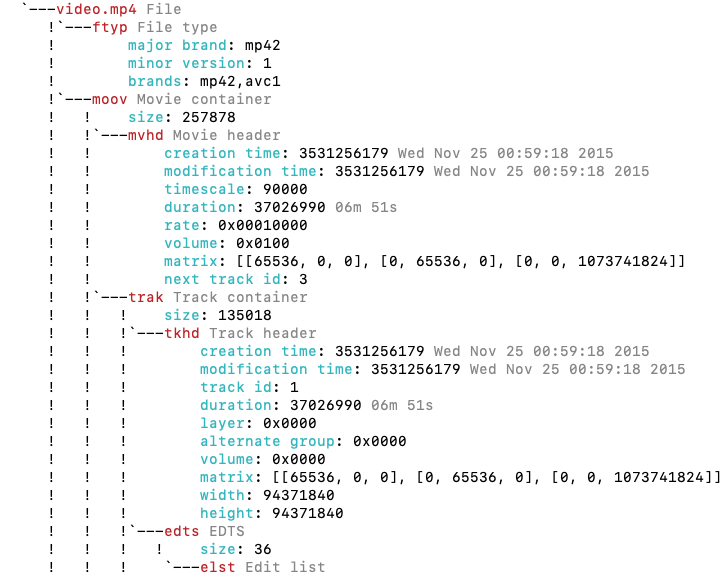
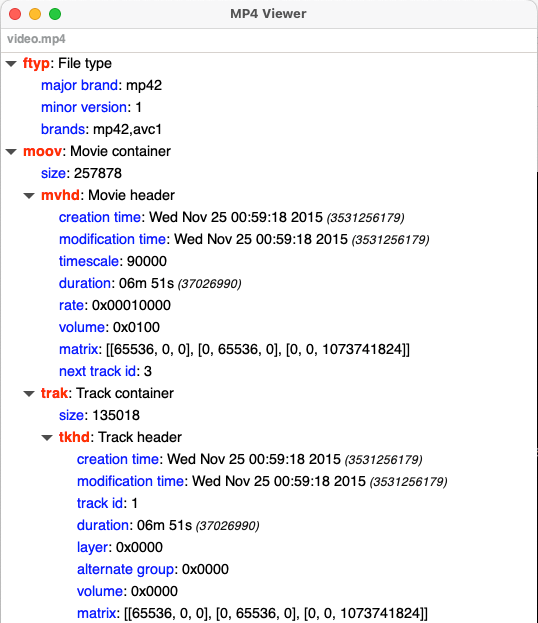
MP4Viewer verwendet GTK im Grafikmodus und benötigt PYGTK3 zum Anzeigen von Ergebnissen in einem Fenster. Dies kommt normalerweise mit den neuesten Versionen von Ubuntu vorinstalliert.
Auf dieser Seite finden Sie mehr ähnliche MP4 -Tools







