speech training recorder
1.0.0

簡單的GUI應用程序可以幫助記錄從給定文本提示的音頻,用於培訓語音識別或語音綜合。
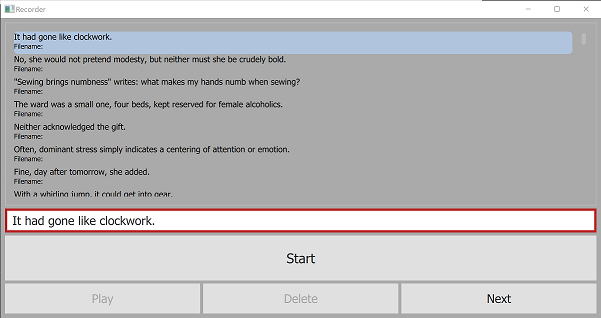
給定一個包含提示的文本文件,此應用程序將選擇一個隨機選擇和訂購,顯示它們要由用戶指示,並分別記錄DASTITATION AUDIO和METADATA到.wav文件和recorder.tsv文件。您可以選擇以前的錄音來播放它,刪除並/或重新錄製。
要求:
requirements.txt git clone https://github.com/daanzu/speech-training-recorder.git
cd speech-training-recorder
mkdir ../audio_data
pip install -r requirements.txt
python3 recorder.py -p prompts/timit.txt
 usage: recorder.py [-h] [-p PROMPTS_FILENAME] [-d SAVE_DIR] [-c PROMPTS_COUNT]
                   [-l PROMPT_LEN_SOFT_MAX] [-o]

Given a text file containing prompts, this app will choose a random selection
and ordering of them, display them to be dictated by the user, and record the
dictation audio and metadata to a `.wav` file and `recorder.tsv` file
respectively.

optional arguments:
  -h, --help            show this help message and exit
  -p PROMPTS_FILENAME, --prompts_filename PROMPTS_FILENAME
                        file containing prompts to choose from
  -d SAVE_DIR, --save_dir SAVE_DIR
                        where to save .wav & recorder.tsv files (default:
                        ../audio_data)
  -c PROMPTS_COUNT, --prompts_count PROMPTS_COUNT
                        number of prompts to select and display (default: 100)
  -l PROMPT_LEN_SOFT_MAX, --prompt_len_soft_max PROMPT_LEN_SOFT_MAX
  -o, --ordered         present prompts in order, as opposed to random
                        (default: False)
有關提示文件的可接受格式,請參見prompts/目錄:最簡單的是rainbow_passage.txt 。







