speech training recorder
1.0.0

연설 인식 또는 음성 합성과 함께 사용하기 위해 주어진 텍스트 프롬프트에서 오디오를 기록하는 데 도움이되는 간단한 GUI 응용 프로그램.
프롬프트가 포함 .wav 텍스트 recorder.tsv 이 주어지면이 앱은 임의의 선택 및 주문을 선택하고 사용자가 지시하도록 표시하며 각각. 이전 녹음을 선택하여 다시 재생하고 삭제 한 후/또는 다시 녹음 할 수 있습니다.
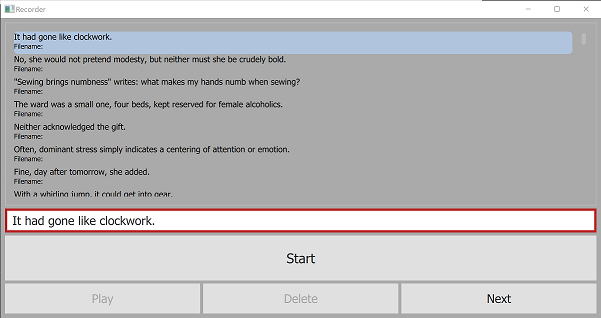
요구 사항 :
requirements.txt 참조하십시오 git clone https://github.com/daanzu/speech-training-recorder.git
cd speech-training-recorder
mkdir ../audio_data
pip install -r requirements.txt
python3 recorder.py -p prompts/timit.txt
 usage: recorder.py [-h] [-p PROMPTS_FILENAME] [-d SAVE_DIR] [-c PROMPTS_COUNT]
                   [-l PROMPT_LEN_SOFT_MAX] [-o]

Given a text file containing prompts, this app will choose a random selection
and ordering of them, display them to be dictated by the user, and record the
dictation audio and metadata to a `.wav` file and `recorder.tsv` file
respectively.

optional arguments:
  -h, --help            show this help message and exit
  -p PROMPTS_FILENAME, --prompts_filename PROMPTS_FILENAME
                        file containing prompts to choose from
  -d SAVE_DIR, --save_dir SAVE_DIR
                        where to save .wav & recorder.tsv files (default:
                        ../audio_data)
  -c PROMPTS_COUNT, --prompts_count PROMPTS_COUNT
                        number of prompts to select and display (default: 100)
  -l PROMPT_LEN_SOFT_MAX, --prompt_len_soft_max PROMPT_LEN_SOFT_MAX
  -o, --ordered         present prompts in order, as opposed to random
                        (default: False)
프롬프트 파일에 대한 허용 가능한 형식은 prompts/ 디렉토리를 참조하십시오. 가장 간단한 것은 rainbow_passage.txt 입니다.







