speech training recorder
1.0.0

指定されたテキストプロンプトから指示されたオーディオを記録するのに役立つ簡単なGUIアプリケーション、トレーニング音声認識または音声合成に使用します。
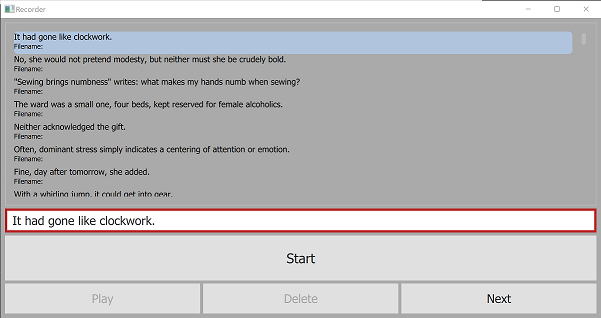
プロンプトを含むテキストファイルが与えられた場合、このアプリはランダムな選択とそれらの注文を選択し、ユーザーが指示するように表示し、Dictation AudioとMetadataをそれぞれ.wavファイルとrecorder.tsvファイルに記録します。以前の録音を選択して再生し、削除したり、再録音したりできます。
要件:
requirements.txt参照してください git clone https://github.com/daanzu/speech-training-recorder.git
cd speech-training-recorder
mkdir ../audio_data
pip install -r requirements.txt
python3 recorder.py -p prompts/timit.txt
 usage: recorder.py [-h] [-p PROMPTS_FILENAME] [-d SAVE_DIR] [-c PROMPTS_COUNT]
                   [-l PROMPT_LEN_SOFT_MAX] [-o]

Given a text file containing prompts, this app will choose a random selection
and ordering of them, display them to be dictated by the user, and record the
dictation audio and metadata to a `.wav` file and `recorder.tsv` file
respectively.

optional arguments:
  -h, --help            show this help message and exit
  -p PROMPTS_FILENAME, --prompts_filename PROMPTS_FILENAME
                        file containing prompts to choose from
  -d SAVE_DIR, --save_dir SAVE_DIR
                        where to save .wav & recorder.tsv files (default:
                        ../audio_data)
  -c PROMPTS_COUNT, --prompts_count PROMPTS_COUNT
                        number of prompts to select and display (default: 100)
  -l PROMPT_LEN_SOFT_MAX, --prompt_len_soft_max PROMPT_LEN_SOFT_MAX
  -o, --ordered         present prompts in order, as opposed to random
                        (default: False)
プロンプトファイルの許容できる形式については、 prompts/ディレクトリを参照してください。最も簡単なのはrainbow_passage.txtです。







