actions gh pages
v4.0.0


筆記
另請參見GitHub官方GitHub頁面行動。
這是一個github操作,將靜態文件部署到github頁面。該部署動作可以與靜態站點生成器簡單合併。 (Hugo,Mkdocs,Gatsby,MDBook,Next,Nuxt等。)
下一個示例步驟將部署到遠程gh-pages分支的./public目錄。
- name : Deploy
  uses : peaceiris/actions-gh-pages@v4
  with :
    github_token : ${{ secrets.GITHUB_TOKEN }}
    publish_dir : ./public
對於GitHub動作的新手:請注意, GITHUB_TOKEN不是個人訪問令牌。 github動作跑步者會自動創建一個GITHUB_TOKEN秘密,以在您的工作流程中進行身份驗證。因此,您可以在沒有任何配置的情況下立即開始部署。
支持三個令牌。
| 令牌 | 私人倉庫 | 公共倉庫 | 協定 | 設定 |
|---|---|---|---|---|
github_token | ✅️ | ✅️ | https | 不必要 |
deploy_key | ✅️ | ✅️ | SSH | 必要的 |
personal_token | ✅️ | ✅️ | https | 必要的 |
注意:實際上, GITHUB_TOKEN可用於部署到github頁面,但仍有一些局限性。對於第一個部署,我們需要在“存儲庫設置”選項卡上選擇gh-pages分支或其他分支。參見使用GITHUB_TOKEN第一次部署
所有動作跑步者:Linux(Ubuntu),MacOS和Windows都得到支持。
| 跑步 | github_token | deploy_key | personal_token |
|---|---|---|---|
| Ubuntu-22.04 | ✅️ | ✅️ | ✅️ |
| Ubuntu-20.04 | ✅️ | ✅️ | ✅️ |
| ubuntu-latest | ✅️ | ✅️ | ✅️ |
| macos-latest | ✅️ | ✅️ | ✅️ |
| Windows-Latest | ✅️ | (2) | ✅️ |
✅️github企業服務器受到2.22.6的支持。
請注意,跑步者創建的GITHUB_TOKEN可能本質上沒有在GHES上推出/發布特權。您可能需要為目標存儲庫寫入/請求具有寫入權限的技術用戶。
github_tokendeploy_keypersonal_tokenpublish_branchpublish_dirdestination_direxclude_assetscnameenable_jekyllallow_empty_commitkeep_filesexternal_repositoryforce_orphanGITHUB_TOKEN部署添加您的工作流文件.github/workflows/gh-pages.yml ,然後將其推到遠程默認分支。
這是雨果的示例工作流程。
 name : GitHub Pages

on :
  push :
    branches :
      - main  # Set a branch name to trigger deployment
  pull_request :

jobs :
  deploy :
    runs-on : ubuntu-22.04
    permissions :
      contents : write
    concurrency :
      group : ${{ github.workflow }}-${{ github.ref }}
    steps :
      - uses : actions/checkout@v3
        with :
          submodules : true  # Fetch Hugo themes (true OR recursive)
          fetch-depth : 0    # Fetch all history for .GitInfo and .Lastmod

      - name : Setup Hugo
        uses : peaceiris/actions-hugo@v2
        with :
          hugo-version : ' 0.110.0 '

      - name : Build
        run : hugo --minify

      - name : Deploy
        uses : peaceiris/actions-gh-pages@v4
        # If you're changing the branch from main,
        # also change the `main` in `refs/heads/main`
        # below accordingly.
        if : github.ref == 'refs/heads/main'
        with :
          github_token : ${{ secrets.GITHUB_TOKEN }}
publish_dir : ./public| 動作日誌概述 | github頁面日誌 |
|---|---|
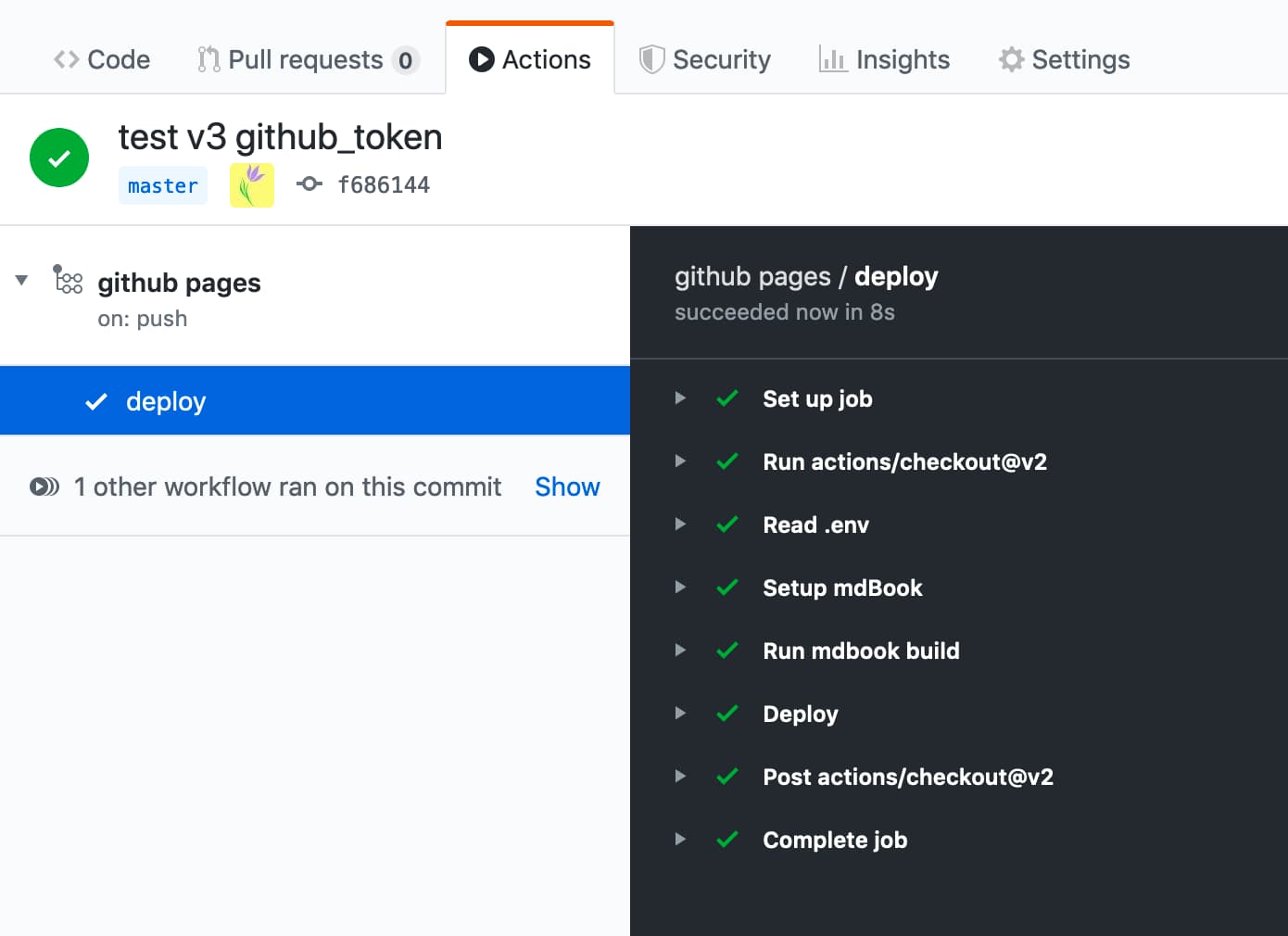 | 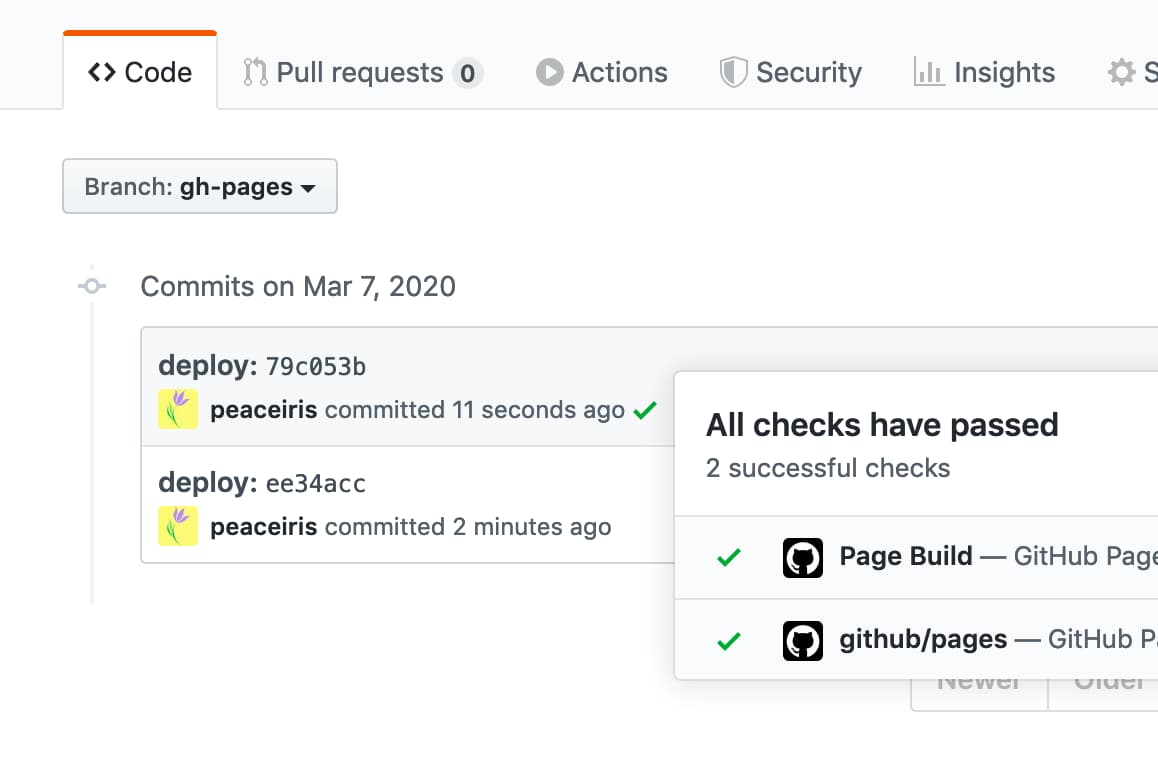 |
github_token此選項適用於GITHUB_TOKEN ,而不是個人訪問令牌。
github動作跑步者會自動創建一個GITHUB_TOKEN秘密,以在您的工作流程中使用。您可以在工作流程中使用GITHUB_TOKEN來驗證。
- name : Deploy
  uses : peaceiris/actions-gh-pages@v4
  with :
    github_token : ${{ secrets.GITHUB_TOKEN }}
publish_dir : ./public有關GITHUB_TOKEN的更多詳細信息:自動令牌身份驗證-Github文檔
deploy_key讀取創建SSH部署密鑰,創建SSH部署密鑰,然後按以下內容設置deploy_key選項。
- name : Deploy
  uses : peaceiris/actions-gh-pages@v4
  with :
    deploy_key : ${{ secrets.ACTIONS_DEPLOY_KEY }}
publish_dir : ./publicpersonal_token生成個人訪問令牌( repo ),並將其添加到PERSONAL_TOKEN的秘密中,它與ACTIONS_DEPLOY_KEY一樣起作用。
- name : Deploy
  uses : peaceiris/actions-gh-pages@v4
  with :
    personal_token : ${{ secrets.PERSONAL_TOKEN }}
publish_dir : ./publicpublish_branch設置一個分支名稱作為github頁面分支。默認值為gh-pages 。
- name : Deploy
  uses : peaceiris/actions-gh-pages@v4
  with :
    github_token : ${{ secrets.GITHUB_TOKEN }}
publish_branch : your-branch # default: gh-pagespublish_dir部署到GitHub頁面的源目錄。默認值是public 。默認情況下,只有此DIR的內容被推到GHIB gh-pages分支。
- name : Deploy
  uses : peaceiris/actions-gh-pages@v4
  with :
    github_token : ${{ secrets.GITHUB_TOKEN }}
publish_dir : ./out # default: publicdestination_dir此功能在Beta上。歡迎任何反饋在第324頁
出版分支的目的地子目錄。默認值為空。
- name : Deploy
  uses : peaceiris/actions-gh-pages@v4
  with :
    github_token : ${{ secrets.GITHUB_TOKEN }}
destination_dir : subdirexclude_assets此功能在Beta上。歡迎任何反饋在第163期
設置文件或目錄以排除出版資產。默認值為.github 。值應用逗號分開。
- name : Deploy
  uses : peaceiris/actions-gh-pages@v4
  with :
    github_token : ${{ secrets.GITHUB_TOKEN }}
exclude_assets : ' .github,exclude-file1,exclude-file2 '將exclude_assets設置為空,以將.github目錄包括在部署資產中。
- name : Deploy
  uses : peaceiris/actions-gh-pages@v4
  with :
    deploy_key : ${{ secrets.ACTIONS_DEPLOY_KEY }}   # Recommended for this usage
    # personal_token: ${{ secrets.PERSONAL_TOKEN }} # An alternative
    # github_token: ${{ secrets.GITHUB_TOKEN }}     # This does not work for this usage
exclude_assets : ' ' exclude_assets選項支持GLOG模式。
- name : Deploy
  uses : peaceiris/actions-gh-pages@v4
  with :
    github_token : ${{ secrets.GITHUB_TOKEN }}
exclude_assets : ' .github,exclude-file.txt,exclude-dir/**.txt 'cname要添加CNAME文件,我們可以設置cname選項。另外,將您的CNAME文件放入您的publish_dir中。 (例如public/CNAME )
有關CNAME文件的更多詳細信息,請閱讀官方文檔:為您的github頁面管理一個自定義域-Github文檔
- name : Deploy
  uses : peaceiris/actions-gh-pages@v4
  with :
    github_token : ${{ secrets.GITHUB_TOKEN }}
    publish_dir : ./public
cname : github.comenable_jekyll如果您希望github頁面使用靜態站點生成器jekyll處理您的站點,請將enable_jekyll設置為true。
默認情況下,此操作向GitHub頁面發出信號,表明該站點不應使用Jekyll處理。這是通過在發布分支上添加一個空的.nojekyll文件來完成的。當該文件已經存在時,此操作無濟於事。
繞過Jekyll使部署更快,如果您部署以下劃線開頭的文件或目錄,則是必要的,因為Jekyll認為它們是特殊的資源,並且不將其複製到最終站點。您只需要在要部署jekyll驅動的網站並讓github頁面進行jekyll處理時,將enable_jekyll設置為true。
- name : Deploy
  uses : peaceiris/actions-gh-pages@v4
  with :
    github_token : ${{ secrets.GITHUB_TOKEN }}
    publish_dir : ./public
enable_jekyll : true有關.nojekyll的更多詳細信息:繞過github頁面上的jekyll -github博客
allow_empty_commit默認情況下,當沒有文件更改時,將不會生成提交。如果要允許一個空提交,請將可選參數allow_empty_commit設置為true 。
例如:
- name : Deploy
  uses : peaceiris/actions-gh-pages@v4
  with :
    github_token : ${{ secrets.GITHUB_TOKEN }}
    publish_dir : ./public
allow_empty_commit : truekeep_files默認情況下,將刪除發布分支中的現有文件(或僅在destination_dir中)將被刪除。如果您希望操作添加新文件,但請將現有文件保持不變,請將可選參數keep_files設置為true 。
請注意,在大多數情況下,使用靜態站點生成器的用戶不需要此選項。請重新考慮您的項目結構和構建腳本,或在啟用此標誌之前使用靜態站點生成器的內置功能。
例如:
- name : Deploy
  uses : peaceiris/actions-gh-pages@v4
  with :
    github_token : ${{ secrets.GITHUB_TOKEN }}
    publish_dir : ./public
    keep_files : true
使用V3,此選項不支持使用force_orphan選項。下一個主要版本(版本4)將支持這一點。查看問題#455
external_repository默認情況下,您的文件將發佈到正在運行此操作的存儲庫中。如果要在github上發佈到另一個存儲庫,請將環境變量external_repository設置為<username>/<external-repository> 。
例如:
- name : Deploy
  uses : peaceiris/actions-gh-pages@v4
  with :
    deploy_key : ${{ secrets.ACTIONS_DEPLOY_KEY }}
    external_repository : username/external-repository
    publish_branch : your-branch  # default: gh-pages
publish_dir : ./public您可以使用deploy_key或personal_token 。當您使用deploy_key時,將私鑰設置為包括此操作的存儲庫,並將您的公鑰設置為外部存儲庫。
請注意, GITHUB_TOKEN無權訪問外部存儲庫。請創建一個個人訪問令牌,並將其設置為personal_token ,例如personal_token: ${{ secrets.PERSONAL_TOKEN }} 。
用例:
GitHub免費計劃帳戶不能在私人存儲庫中使用GitHub頁面。要使您的源內容私有並使用GitHub頁面部署,您可以使用此選項將網站從私有存儲庫部署到公共存儲庫。
peaceiris/homepage :一個私人存儲庫與external_repository: peaceiris/peaceiris.github.iopeaceiris/peaceiris.github.io :使用github頁面的公共存儲庫force_orphan我們可以設置force_orphan: true選項。這使您只能使用最新的提交製作發布分支。
- name : Deploy
  uses : peaceiris/actions-gh-pages@v4
  with :
    github_token : ${{ secrets.GITHUB_TOKEN }}
    publish_dir : ./public
force_orphan : true設置自定義git config user.name和git config user.email 。始終使用同一用戶創建提交。
- name : Deploy
  uses : peaceiris/actions-gh-pages@v4
  with :
    github_token : ${{ secrets.GITHUB_TOKEN }}
    publish_dir : ./public
    user_name : ' github-actions[bot] '
user_email : ' github-actions[bot]@users.noreply.github.com ' 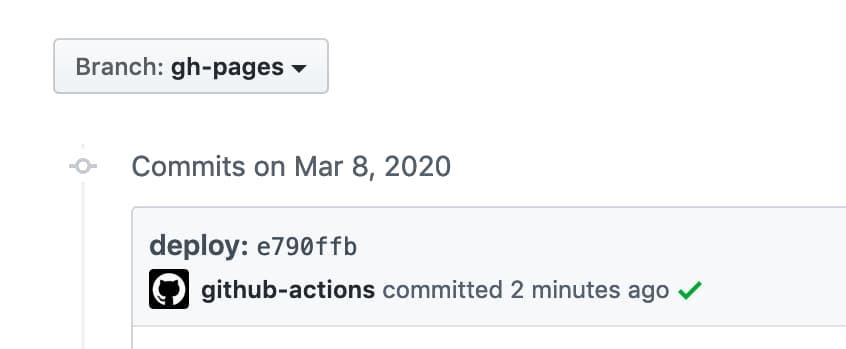
設置自定義提交消息。當我們使用消息docs: Update some post時,將使用消息docs: Update some post ${GITHUB_SHA} 。
- name : Deploy
  uses : peaceiris/actions-gh-pages@v4
  with :
    github_token : ${{ secrets.GITHUB_TOKEN }}
    publish_dir : ./public
commit_message : ${{ github.event.head_commit.message }} 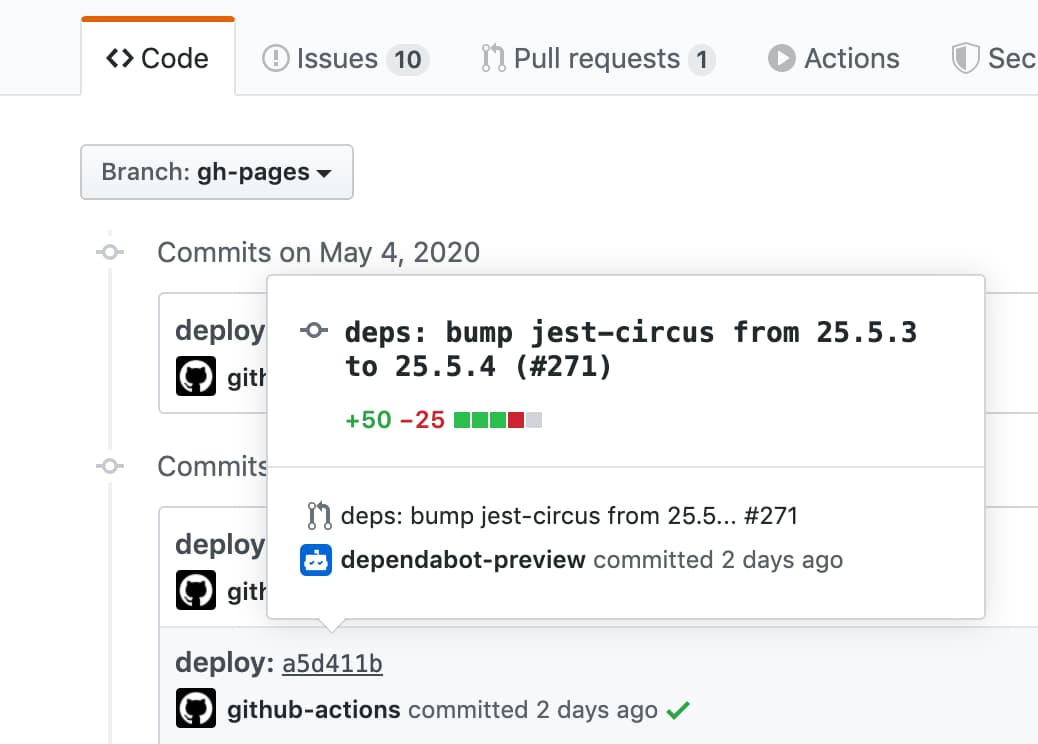
要設置無觸發提交哈希的完整自定義提交消息,請使用full_commit_message選項而不是commit_message選項。
- name : Deploy
  uses : peaceiris/actions-gh-pages@v4
  with :
    github_token : ${{ secrets.GITHUB_TOKEN }}
    publish_dir : ./public
full_commit_message : ${{ github.event.head_commit.message }}這是一個示例工作流程。
 name : GitHub Pages

on :
  push :
    branches :
      - main
    tags :
      - ' v*.*.* '

jobs :
  deploy :
    runs-on : ubuntu-22.04
    permissions :
      contents : write
    concurrency :
      group : ${{ github.workflow }}-${{ github.ref }}
    steps :
      - uses : actions/checkout@v3

      - name : Some build

      - name : Prepare tag
        id : prepare_tag
        if : startsWith(github.ref, 'refs/tags/')
        run : |
          echo "DEPLOY_TAG_NAME=deploy-${TAG_NAME}" >> "${GITHUB_OUTPUT}"

      - name : Deploy
        uses : peaceiris/actions-gh-pages@v4
        with :
          github_token : ${{ secrets.GITHUB_TOKEN }}
          publish_dir : ./public
          tag_name : ${{ steps.prepare_tag.outputs.DEPLOY_TAG_NAME }}
          tag_message : ' Deployment ${{ github.ref_name }} '
在本地機器上命令。
$ # On a main branch
$ git tag -a " v1.2.3 " -m " Release v1.2.3 "
$ git push origin " v1.2.3 "

$ # After deployment
$ git fetch origin
$ git tag
deploy-v1.2.3  # Tag on the gh-pages branch
v1.2.3 # Tag on the main branch使用以下命令生成部署密鑰。
ssh-keygen -t rsa -b 4096 -C " $( git config user.email ) " -f gh-pages -N " "您將獲得2個文件:
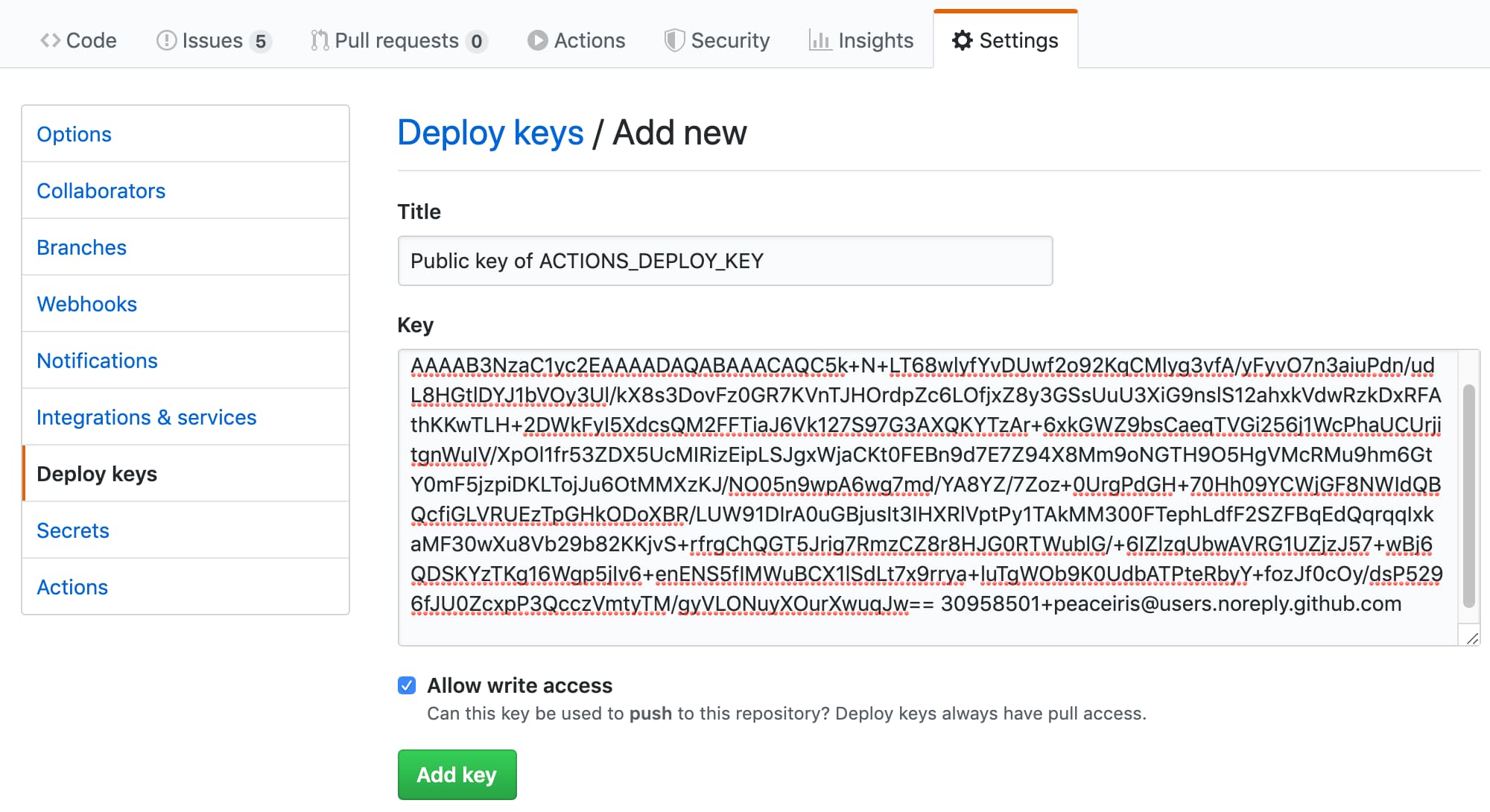
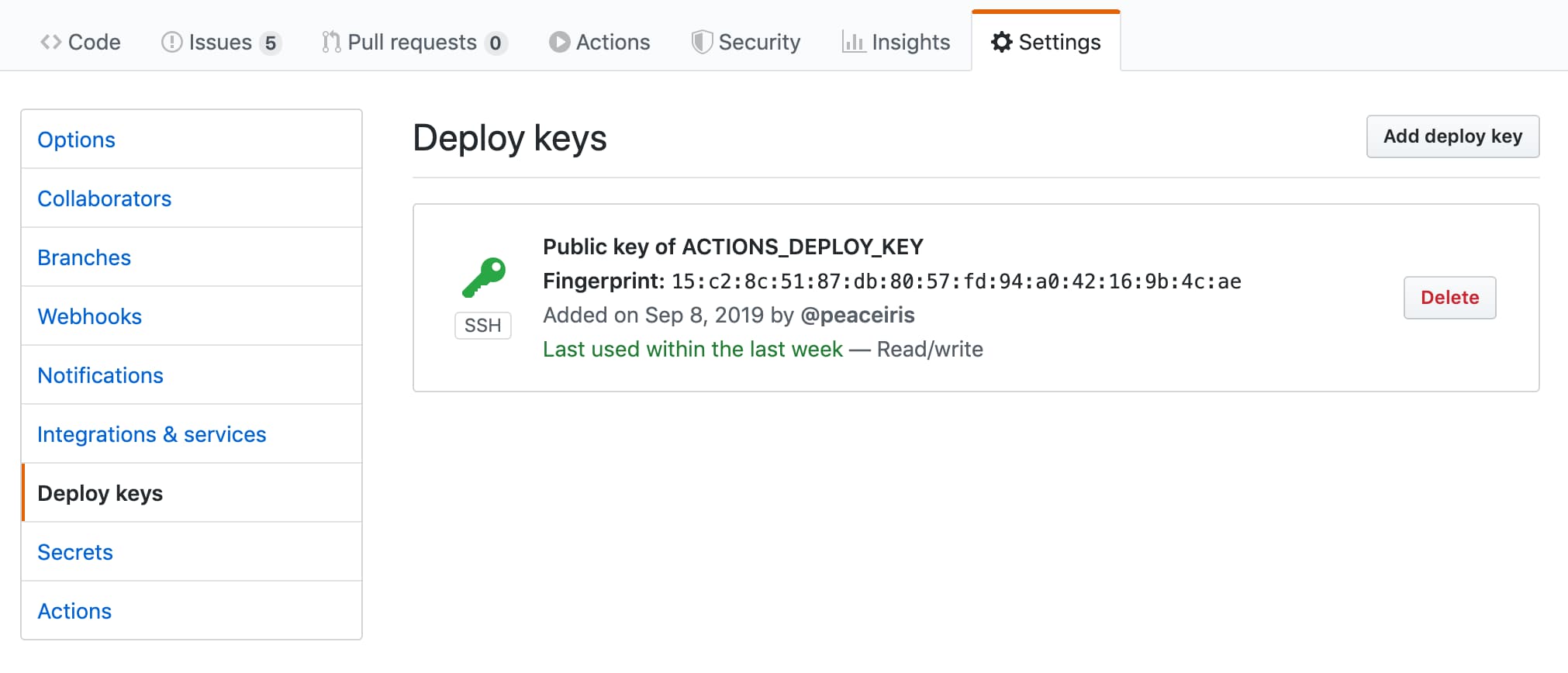
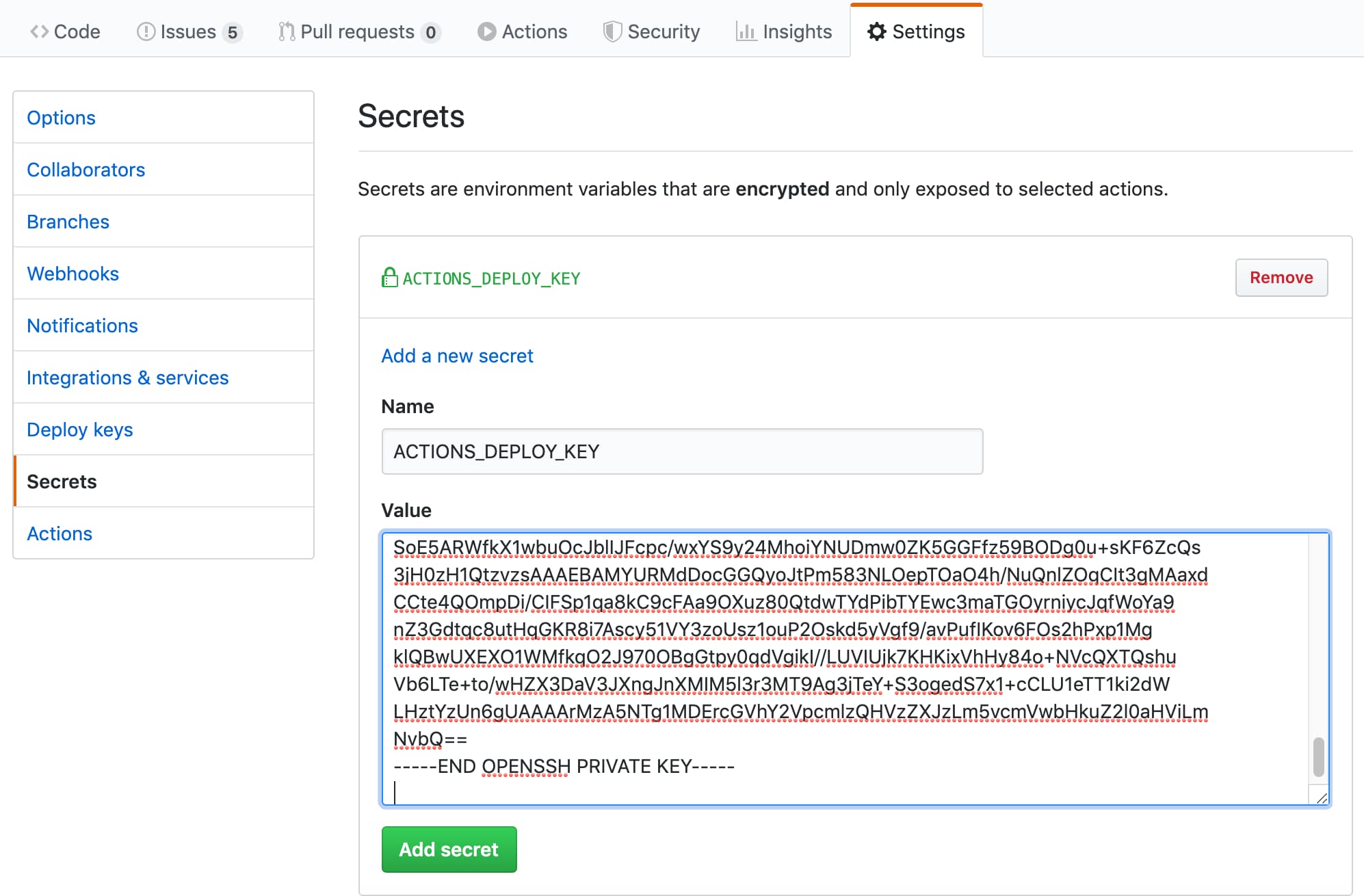
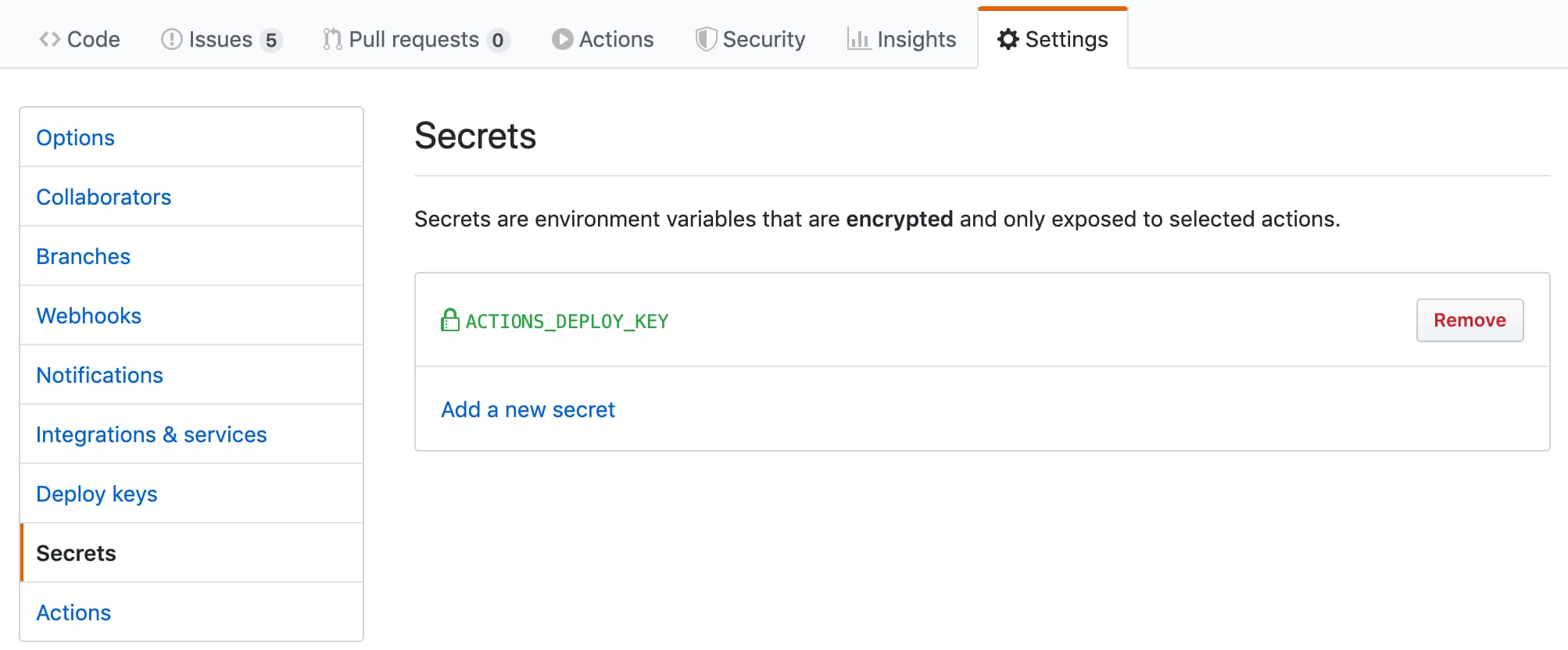
gh-pages.pub是公鑰gh-pages是私鑰接下來,轉到存儲庫設置
ACTIONS_DEPLOY_KEY| 添加您的公鑰 | 成功 |
|---|---|
 |  |
| 添加您的私鑰 | 成功 |
|---|---|
 |  |
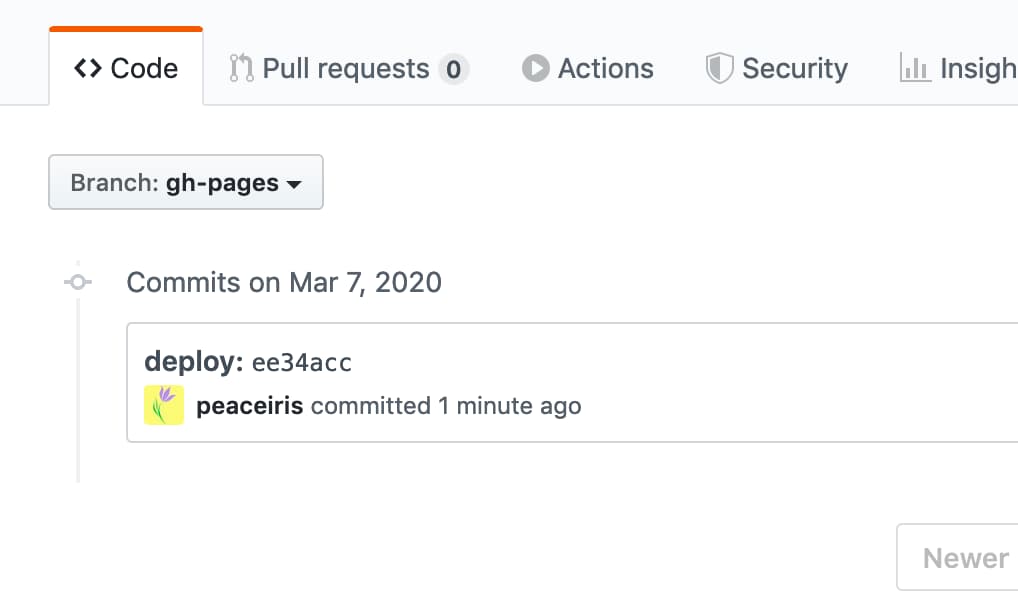
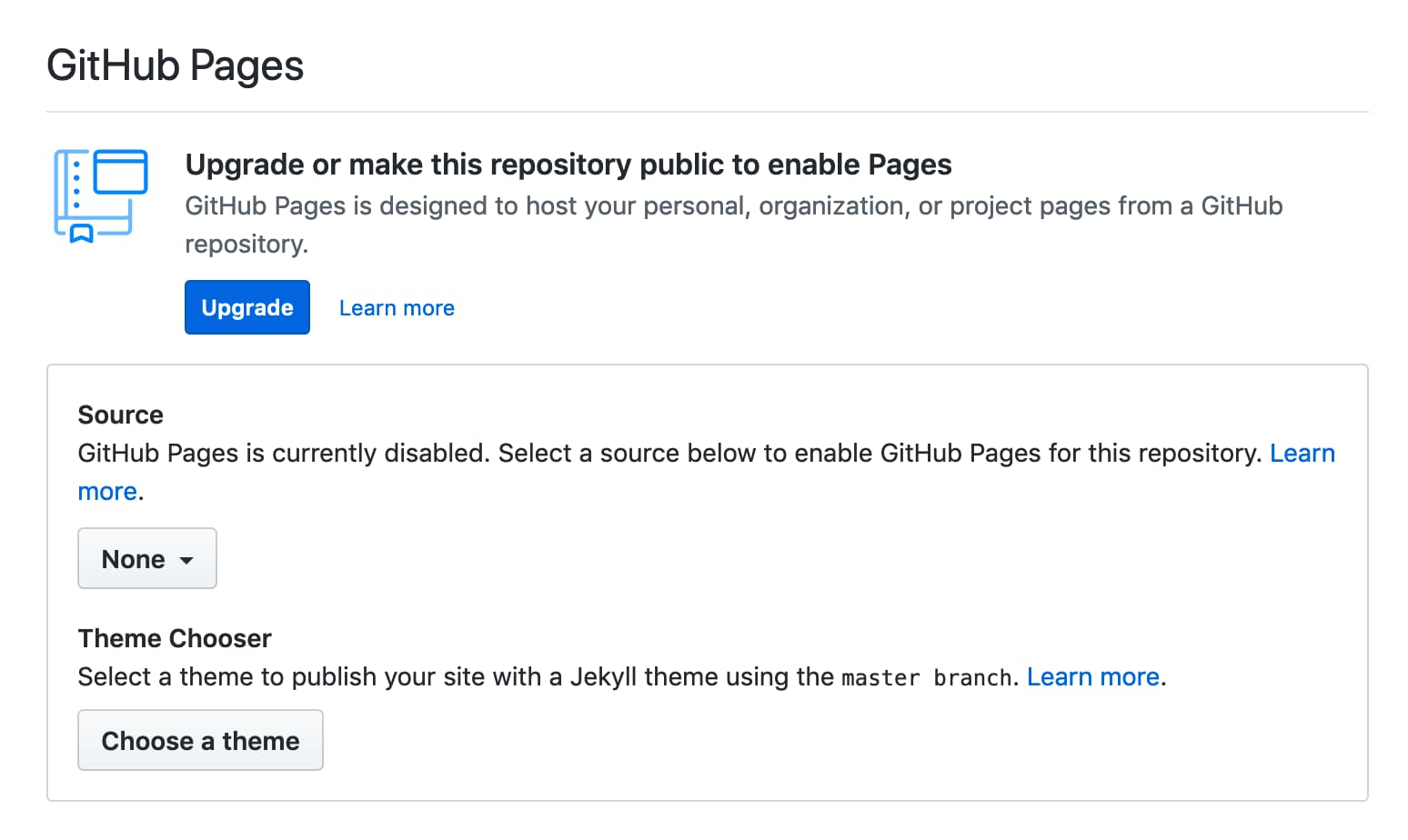
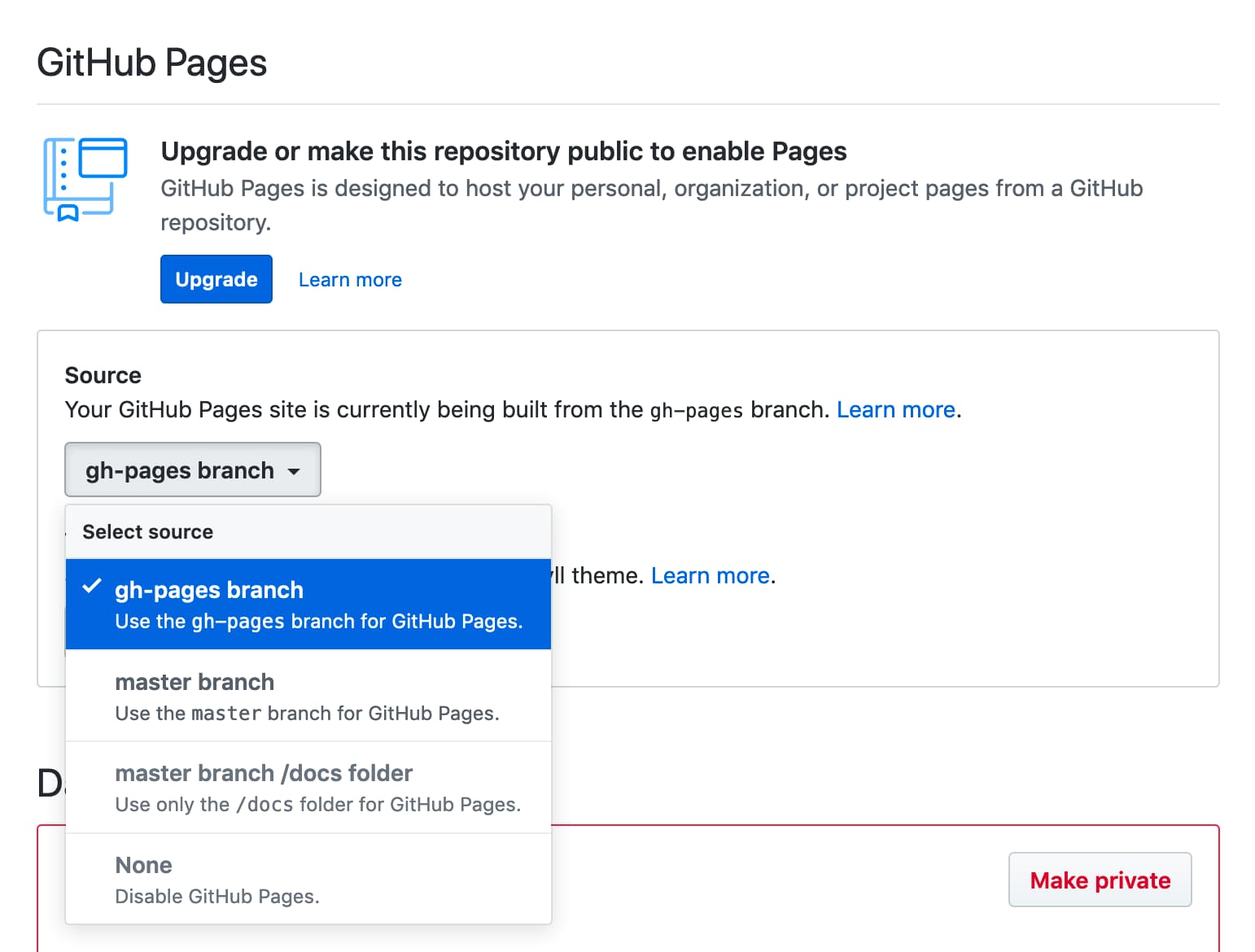
GITHUB_TOKEN部署GITHUB_TOKEN具有第一個部署的局限性,因此我們必須在“存儲庫設置”選項卡上選擇GitHub頁面分支。之後,像以下圖片一樣進行第二部部署。
| 首先部署失敗了 | 轉到“設置”選項卡 |
|---|---|
 |  |
| 選擇分支 | 再次部署並成功 |
|---|---|
 | |
如果操作未能按下以下錯誤推動提交或標記:
/usr/bin/git push origin gh-pages
remote: Write access to repository not granted.
fatal: unable to access 'https://github.com/username/repository.git/': The requested URL returned error: 403
Error: Action failed with "The process '/usr/bin/git' failed with exit code 128"請在工作流/作業中添加寫入permissions.contents 。
 permissions :
contents : write另外,您可以通過選擇讀取和寫入權限來配置默認的GITHUB_TOKEN權限。
我們建議您將此動作的最新版本用於穩定的CI/CD。觀看此存儲庫(僅發布)以檢查此操作的最新版本很有用。
為了進行連續更新,我們可以使用GitHub本機依賴關係。這是機器人的示例配置。配置文件位於.github/dependabot.yml中。
 version : 2
updates :
- package-ecosystem : " github-actions "
  directory : " / "
  schedule :
    interval : " daily "
  labels :
  - " CI/CD "
  commit-message :
    prefix : ci
有關依賴關係的更多詳細信息,請參見官方文檔:保持依賴關係自動更新 - github文檔
對於定期部署,我們可以設置on.schedule工作流觸發器。請參閱預定事件|觸發工作流的事件-Github文檔
對於手動部署,我們可以設置on.workflow_dispatch工作流觸發器。請參閱手動事件workflow_dispatch |觸發工作流的事件-Github文檔
 name : GitHub Pages

on :
  push :
    branches :
      - main
  schedule :
    - cron : " 22 22 * * * "
  workflow_dispatch :

jobs :
  deploy :
    runs-on : ubuntu-22.04
    permissions :
      contents : write
    concurrency :
      group : ${{ github.workflow }}-${{ github.ref }}
    steps :
...參見支持:HashREF禁用/損壞與GitHub Actions安全性最佳實踐的執行? ·問題#712·Peaceiris/Actions-GH頁面
我們的項目僅在創建發行版時才能建立並提供構建資產。這是為了防止用戶使用特定分支(如主)執行此操作。例如,如果我們在主要分支機構中維護構建資產,並且用戶使用此操作如下,那麼包括破壞更改在內的主要版本將破壞用戶的CI工作流程。
- uses : peaceiris/actions-gh-pages@main # Bad example!
  with :
    github_token : ${{ secrets.GITHUB_TOKEN }}
    publish_dir : ./public
在此項目中,一定的標籤(例如V3)保證不包含破壞變化。但是,我們建議使用標籤或提交哈希進行工作流的穩定性。
- uses : peaceiris/[email protected] # tag: Better
  with :
    github_token : ${{ secrets.GITHUB_TOKEN }}
    publish_dir : ./public
- uses : peaceiris/actions-gh-pages@373f7f263a76c20808c831209c920827a82a2847 # commit hash of v3.9.3: Best!
with :
github_token : ${{ secrets.GITHUB_TOKEN }}
publish_dir : ./public為了驗證發布資產,我們可以使用以下命令。
git clone https://github.com/peaceiris/actions-gh-pages.git
cd ./actions-gh-pages
git checkout v3.9.3
nvm install
nvm use
npm i -g npm
npm ci
npm run build
git diff ./lib/index.js # We will get zero exit codehexo,vuepress,反應靜態,網格,創建反應應用等。在推動工作流程之前,請檢查輸出目錄的位置。例如, create-react-app需要將publish_dir設置為./build
前提:依賴項由package.json和package-lock.json管理
 name : GitHub Pages

on :
  push :
    branches :
      - main
  pull_request :

jobs :
  deploy :
    runs-on : ubuntu-22.04
    permissions :
      contents : write
    concurrency :
      group : ${{ github.workflow }}-${{ github.ref }}
    steps :
      - uses : actions/checkout@v3

      - name : Setup Node
        uses : actions/setup-node@v3
        with :
          node-version : ' 14 '

      - name : Cache dependencies
        uses : actions/cache@v3
        with :
          path : ~/.npm
          key : ${{ runner.os }}-node-${{ hashFiles('**/package-lock.json') }}
          restore-keys : |
            ${{ runner.os }}-node-

      - run : npm ci
      - run : npm run build

      - name : Deploy
        uses : peaceiris/actions-gh-pages@v4
        if : github.ref == 'refs/heads/main'
        with :
          github_token : ${{ secrets.GITHUB_TOKEN }}
publish_dir : ./public蓋茨比(Gatsby.js)項目的一個示例
 name : GitHub Pages

on :
  push :
    branches :
      - main
  pull_request :

jobs :
  deploy :
    runs-on : ubuntu-22.04
    permissions :
      contents : write
    concurrency :
      group : ${{ github.workflow }}-${{ github.ref }}
    steps :
      - uses : actions/checkout@v3

      - name : Setup Node
        uses : actions/setup-node@v3
        with :
          node-version : ' 14 '

      - name : Cache dependencies
        uses : actions/cache@v3
        with :
          path : ~/.npm
          key : ${{ runner.os }}-node-${{ hashFiles('**/package-lock.json') }}
          restore-keys : |
            ${{ runner.os }}-node-

      - run : npm ci
      - run : npm run format
      - run : npm run test
      - run : npm run build

      - name : Deploy
        uses : peaceiris/actions-gh-pages@v4
        if : github.ref == 'refs/heads/main'
        with :
          github_token : ${{ secrets.GITHUB_TOKEN }}
publish_dir : ./public使用Create-Next-App的Next.js(React.js)項目的一個示例
 name : GitHub Pages

on :
  push :
    branches :
      - main
  pull_request :

jobs :
  deploy :
    runs-on : ubuntu-22.04
    permissions :
      contents : write
    concurrency :
      group : ${{ github.workflow }}-${{ github.ref }}
    steps :
      - uses : actions/checkout@v3

      - name : Setup Node
        uses : actions/setup-node@v3
        with :
          node-version : ' 14 '

      - name : Get yarn cache
        id : yarn-cache
        run : echo "YARN_CACHE_DIR=$(yarn cache dir)" >> "${GITHUB_OUTPUT}"

      - name : Cache dependencies
        uses : actions/cache@v3
        with :
          path : ${{ steps.yarn-cache.outputs.YARN_CACHE_DIR }}
          key : ${{ runner.os }}-yarn-${{ hashFiles('**/yarn.lock') }}
          restore-keys : |
            ${{ runner.os }}-yarn-

      - run : yarn install --frozen-lockfile
      - run : yarn build
      - run : yarn export

      - name : Deploy
        uses : peaceiris/actions-gh-pages@v4
        if : github.ref == 'refs/heads/main'
        with :
          github_token : ${{ secrets.GITHUB_TOKEN }}
publish_dir : ./outnuxt.js(vue.js)項目的一個示例
 name : GitHub Pages

on :
  push :
    branches :
      - main
  pull_request :

jobs :
  deploy :
    runs-on : ubuntu-22.04
    permissions :
      contents : write
    concurrency :
      group : ${{ github.workflow }}-${{ github.ref }}
    steps :
      - uses : actions/checkout@v3

      - name : Setup Node
        uses : actions/setup-node@v3
        with :
          node-version : ' 14 '

      - name : Cache dependencies
        uses : actions/cache@v3
        with :
          path : ~/.npm
          key : ${{ runner.os }}-node-${{ hashFiles('**/package-lock.json') }}
          restore-keys : |
            ${{ runner.os }}-node-

      - run : npm ci
      - run : npm test
      - run : npm run generate

      - name : deploy
        uses : peaceiris/actions-gh-pages@v4
        if : github.ref == 'refs/heads/main'
        with :
          github_token : ${{ secrets.GITHUB_TOKEN }}
publish_dir : ./distDocusaurus的示例工作流程。
npx @docusaurus/init@next init website classic對於創建一個新的Docusaurus項目很有用。
 # .github/workflows/deploy.yml

name : GitHub Pages

on :
  push :
    branches :
      - main
    paths :
      - ' .github/workflows/deploy.yml '
      - ' website/** '
  pull_request :

jobs :
  deploy :
    runs-on : ubuntu-22.04
    permissions :
      contents : write
    concurrency :
      group : ${{ github.workflow }}-${{ github.ref }}
    defaults :
      run :
        working-directory : website
    steps :
      - uses : actions/checkout@v3

      - name : Setup Node
        uses : actions/setup-node@v3
        with :
          node-version : ' 14 '

      - name : Get yarn cache
        id : yarn-cache
        run : echo "YARN_CACHE_DIR=$(yarn cache dir)" >> "${GITHUB_OUTPUT}"

      - name : Cache dependencies
        uses : actions/cache@v3
        with :
          path : ${{ steps.yarn-cache.outputs.YARN_CACHE_DIR }}
          key : ${{ runner.os }}-website-${{ hashFiles('**/yarn.lock') }}
          restore-keys : |
            ${{ runner.os }}-website-

      - run : yarn install --frozen-lockfile
      - run : yarn build

      - name : Deploy
        uses : peaceiris/actions-gh-pages@v4
        if : github.ref == 'refs/heads/main'
        with :
          github_token : ${{ secrets.GITHUB_TOKEN }}
publish_dir : ./website/build鵜鶘,mkdocs,sphinx等。
前提:依賴項由requirements.txt管理。
 name : GitHub Pages

on :
  push :
    branches :
      - main
  pull_request :

jobs :
  deploy :
    runs-on : ubuntu-22.04
    permissions :
      contents : write
    concurrency :
      group : ${{ github.workflow }}-${{ github.ref }}
    steps :
      - uses : actions/checkout@v3

      - name : Setup Python
        uses : actions/setup-python@v3
        with :
          python-version : ' 3.8 '

      - name : Upgrade pip
        run : |
          # install pip=>20.1 to use "pip cache dir"
          python3 -m pip install --upgrade pip

      - name : Get pip cache dir
        id : pip-cache
        run : echo "dir=$(pip cache dir)" >> $GITHUB_OUTPUT

      - name : Cache dependencies
        uses : actions/cache@v3
        with :
          path : ${{ steps.pip-cache.outputs.dir }}
          key : ${{ runner.os }}-pip-${{ hashFiles('**/requirements.txt') }}
          restore-keys : |
            ${{ runner.os }}-pip-

      - name : Install dependencies
        run : python3 -m pip install -r ./requirements.txt

      - run : mkdocs build

      - name : Deploy
        uses : peaceiris/actions-gh-pages@v4
        if : github.ref == 'refs/heads/main'
        with :
          github_token : ${{ secrets.GITHUB_TOKEN }}
publish_dir : ./site示例GitHub操作工作流程將Rust-Lang/MDBook網站部署到GitHub頁面。
 name : GitHub Pages

on :
  push :
    branches :
      - main
  pull_request :

jobs :
  deploy :
    runs-on : ubuntu-22.04
    permissions :
      contents : write
    concurrency :
      group : ${{ github.workflow }}-${{ github.ref }}
    steps :
      - uses : actions/checkout@v3

      - name : Setup mdBook
        uses : peaceiris/actions-mdbook@v1
        with :
          mdbook-version : ' 0.4.8 '
          # mdbook-version: 'latest'

      - run : mdbook build

      - name : Deploy
        uses : peaceiris/actions-gh-pages@v4
        if : github.ref == 'refs/heads/main'
        with :
          github_token : ${{ secrets.GITHUB_TOKEN }}
publish_dir : ./book提示:您可能想發布魯特多克斯。並使用MD文檔的相對鏈接,並通過mdbook對其進行檢查。然後,根據文檔,您可以將./target/doc/放在./book/src dir之前,然後再mdbook build ,然後最終會進入./book/html/和github頁面。
Flutter Web項目的示例工作流程。
 name : GitHub Pages

on :
  push :
    branches :
      - main
  pull_request :

jobs :
  deploy :
    runs-on : ubuntu-22.04
    permissions :
      contents : write
    concurrency :
      group : ${{ github.workflow }}-${{ github.ref }}
    steps :
      - uses : actions/checkout@v3

      - name : Setup Flutter
        run : |
          git clone https://github.com/flutter/flutter.git --depth 1 -b beta _flutter
          echo "${GITHUB_WORKSPACE}/_flutter/bin" >> ${GITHUB_PATH}

      - name : Install
        run : |
          flutter config --enable-web
          flutter pub get

      - name : Build
        run : flutter build web

      - name : Deploy
        uses : peaceiris/actions-gh-pages@v4
        if : github.ref == 'refs/heads/main'
        with :
          github_token : ${{ secrets.GITHUB_TOKEN }}
publish_dir : ./build/web榆樹的示例工作流程。
 name : GitHub Pages

on :
  push :
    branches :
      - main
  pull_request :

jobs :
  deploy :
    runs-on : ubuntu-22.04
    permissions :
      contents : write
    concurrency :
      group : ${{ github.workflow }}-${{ github.ref }}
    steps :
      - uses : actions/checkout@v3

      - name : Setup Node
        uses : actions/setup-node@v3
        with :
          node-version : ' 14 '

      - name : Setup Elm
        run : npm install elm --global

      - name : Make
        run : elm make --optimize src/Main.elm

      - name : Move files
        run : |
          mkdir ./public
          mv ./index.html ./public/
        # If you have non-minimal setup with some assets and separate html/js files,
        # provide --output=<output-file> option for `elm make` and remove this step

      - name : Deploy
        uses : peaceiris/actions-gh-pages@v4
        if : github.ref == 'refs/heads/main'
        with :
          github_token : ${{ secrets.GITHUB_TOKEN }}
publish_dir : ./publicJohnsundell/發布的示例工作流程。
 name : GitHub Pages

on :
  push :
    branches :
      - main
  pull_request :

jobs :
  deploy :
    runs-on : macos-latest
    concurrency :
      group : ${{ github.workflow }}-${{ github.ref }}
    steps :
      - uses : actions/checkout@v3

      - uses : actions/cache@v3
        with :
          path : |
            ~/Publish_build
            .build
          key : ${{ runner.os }}-spm-${{ hashFiles('**/Package.resolved') }}
          restore-keys : |
            ${{ runner.os }}-spm-

      - name : Setup JohnSundell/Publish
        run : |
          cd ${HOME}
          export PUBLISH_VERSION="0.7.0"
          git clone https://github.com/JohnSundell/Publish.git
          cd ./Publish && git checkout ${PUBLISH_VERSION}
          mv ~/Publish_build .build || true
          swift build -c release
          cp -r .build ~/Publish_build || true
          echo "${HOME}/Publish/.build/release" >> ${GITHUB_PATH}

      - run : publish-cli generate

      - name : Deploy to GitHub Pages
        uses : peaceiris/actions-gh-pages@v4
        if : github.ref == 'refs/heads/main'
        with :
          github_token : ${{ secrets.GITHUB_TOKEN }}
          publish_dir : ./Output






