actions gh pages
v4.0.0


Catatan
Lihat juga Tindakan Halaman GitHub Pejabat GitHub terlebih dahulu.
Ini adalah tindakan GitHub untuk menggunakan file statis Anda ke halaman GitHub . Tindakan penyebaran ini dapat digabungkan secara sederhana dan bebas dengan generator situs statis. (Hugo, mkdocs, gatsby, mdbook, selanjutnya, nuxt, dan sebagainya.)
Langkah contoh berikutnya akan menggunakan ./public Directory ke cabang gh-pages jarak jauh.
- name : Deploy
  uses : peaceiris/actions-gh-pages@v4
  with :
    github_token : ${{ secrets.GITHUB_TOKEN }}
    publish_dir : ./public
Untuk pemula dari tindakan GitHub: Perhatikan bahwa GITHUB_TOKEN bukan token akses pribadi. Pelari Tindakan GitHub secara otomatis membuat rahasia GITHUB_TOKEN untuk mengotentikasi dalam alur kerja Anda. Jadi, Anda dapat mulai menggunakan segera tanpa konfigurasi.
Tiga token didukung.
| Token | Repo pribadi | Repo publik | Protokol | Pengaturan |
|---|---|---|---|---|
github_token | ✅️ | ✅️ | Https | Tidak perlu |
deploy_key | ✅️ | ✅️ | Ssh | Diperlukan |
personal_token | ✅️ | ✅️ | Https | Diperlukan |
Catatan: Sebenarnya, GITHUB_TOKEN bekerja untuk digunakan ke halaman GitHub tetapi masih memiliki beberapa keterbatasan. Untuk penyebaran pertama, kita perlu memilih cabang gh-pages atau cabang lain pada tab Pengaturan Repositori. Lihat penempatan pertama dengan GITHUB_TOKEN
Semua pelari tindakan: Linux (Ubuntu), macOS, dan Windows didukung.
| MUNGKIN | github_token | deploy_key | personal_token |
|---|---|---|---|
| Ubuntu-22.04 | ✅️ | ✅️ | ✅️ |
| Ubuntu-20.04 | ✅️ | ✅️ | ✅️ |
| ubuntu-latest | ✅️ | ✅️ | ✅️ |
| macos-latest | ✅️ | ✅️ | ✅️ |
| Windows-Latest | ✅️ | (2) | ✅️ |
✅️ Github Enterprise Server didukung di atas 2.22.6 .
Perhatikan bahwa GITHUB_TOKEN yang dibuat oleh runner mungkin tidak secara inheren memiliki hak istimewa dorong/publikasi pada GHES. Anda mungkin perlu membuat/meminta pengguna teknis dengan izin tulis ke repositori target Anda.
github_tokendeploy_keypersonal_tokenpublish_branchpublish_dirdestination_direxclude_assetscnameenable_jekyllallow_empty_commitkeep_filesexternal_repositoryforce_orphanGITHUB_TOKEN Tambahkan file alur kerja Anda .github/workflows/gh-pages.yml dan dorong ke cabang default jarak jauh Anda.
Berikut adalah contoh alur kerja untuk Hugo.
 name : GitHub Pages

on :
  push :
    branches :
      - main  # Set a branch name to trigger deployment
  pull_request :

jobs :
  deploy :
    runs-on : ubuntu-22.04
    permissions :
      contents : write
    concurrency :
      group : ${{ github.workflow }}-${{ github.ref }}
    steps :
      - uses : actions/checkout@v3
        with :
          submodules : true  # Fetch Hugo themes (true OR recursive)
          fetch-depth : 0    # Fetch all history for .GitInfo and .Lastmod

      - name : Setup Hugo
        uses : peaceiris/actions-hugo@v2
        with :
          hugo-version : ' 0.110.0 '

      - name : Build
        run : hugo --minify

      - name : Deploy
        uses : peaceiris/actions-gh-pages@v4
        # If you're changing the branch from main,
        # also change the `main` in `refs/heads/main`
        # below accordingly.
        if : github.ref == 'refs/heads/main'
        with :
          github_token : ${{ secrets.GITHUB_TOKEN }}
publish_dir : ./public| Tindakan Log Tindakan | Log Halaman GitHub |
|---|---|
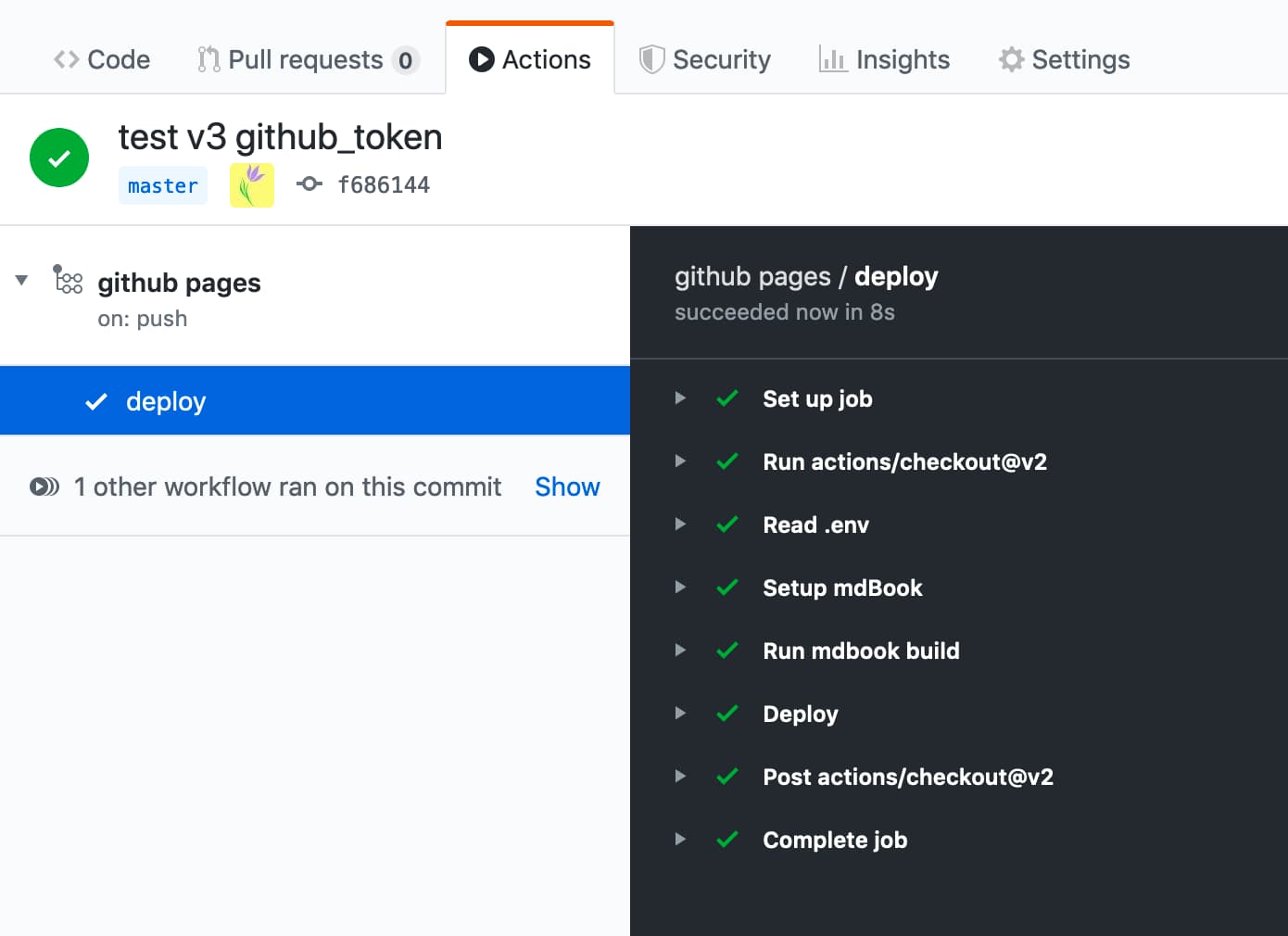 | 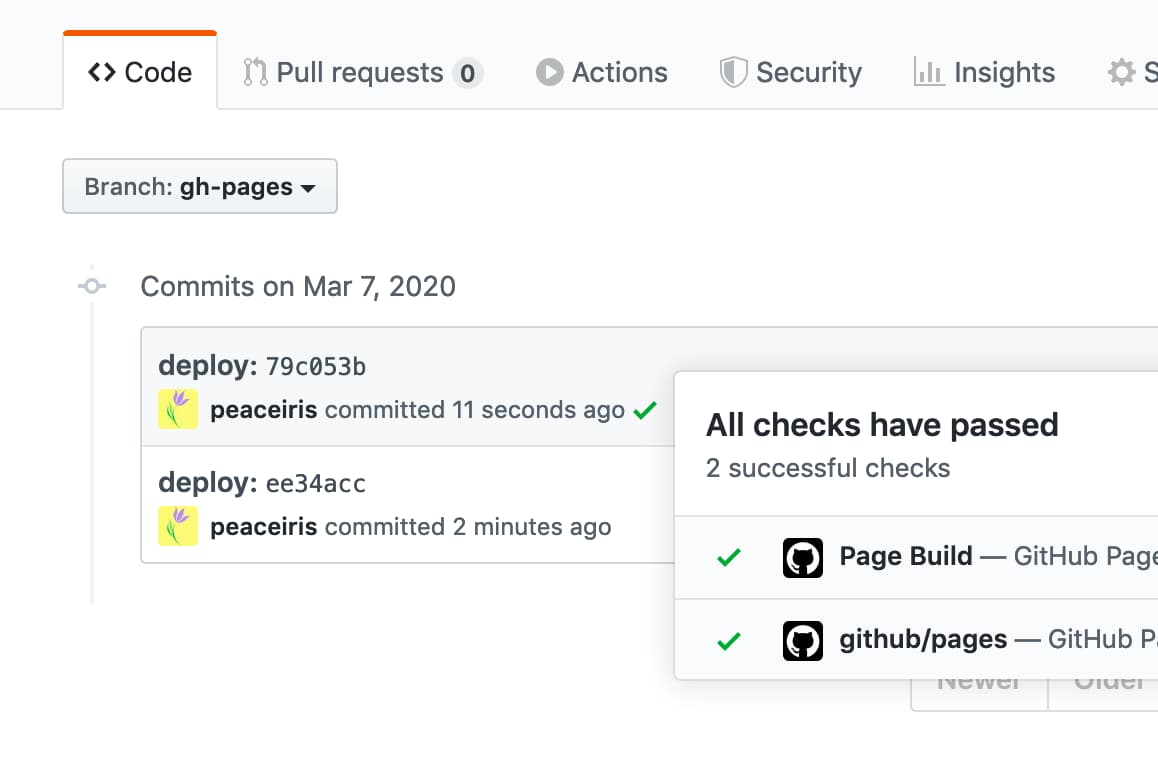 |
github_token Opsi ini untuk GITHUB_TOKEN , bukan token akses pribadi.
Pelari Tindakan GitHub secara otomatis membuat rahasia GITHUB_TOKEN untuk digunakan dalam alur kerja Anda. Anda dapat menggunakan GITHUB_TOKEN untuk mengotentikasi dalam menjalankan alur kerja.
- name : Deploy
  uses : peaceiris/actions-gh-pages@v4
  with :
    github_token : ${{ secrets.GITHUB_TOKEN }}
    publish_dir : ./public
Untuk detail lebih lanjut tentang GITHUB_TOKEN : Otentikasi Token Otomatis - Dokumen GitHub
deploy_key Baca Buat Kunci Deploy SSH, Buat tombol Deploy SSH Anda, dan atur opsi deploy_key seperti berikut ini.
- name : Deploy
  uses : peaceiris/actions-gh-pages@v4
  with :
    deploy_key : ${{ secrets.ACTIONS_DEPLOY_KEY }}
publish_dir : ./publicpersonal_token Hasilkan token akses pribadi ( repo ) dan tambahkan ke rahasia sebagai PERSONAL_TOKEN , berfungsi serta ACTIONS_DEPLOY_KEY .
- name : Deploy
  uses : peaceiris/actions-gh-pages@v4
  with :
    personal_token : ${{ secrets.PERSONAL_TOKEN }}
publish_dir : ./publicpublish_branch Tetapkan nama cabang untuk digunakan sebagai cabang halaman github. Standarnya adalah gh-pages .
- name : Deploy
  uses : peaceiris/actions-gh-pages@v4
  with :
    github_token : ${{ secrets.GITHUB_TOKEN }}
publish_branch : your-branch # default: gh-pagespublish_dir Direktori Sumber untuk digunakan ke halaman GitHub. Standarnya adalah public . Hanya isi dir ini didorong ke cabang halaman gitub, gh-pages secara default.
- name : Deploy
  uses : peaceiris/actions-gh-pages@v4
  with :
    github_token : ${{ secrets.GITHUB_TOKEN }}
publish_dir : ./out # default: publicdestination_dirFitur ini ada di beta. Umpan balik apa pun diterima di edisi #324
Subdirektori tujuan di cabang penerbitan. Standarnya kosong.
- name : Deploy
  uses : peaceiris/actions-gh-pages@v4
  with :
    github_token : ${{ secrets.GITHUB_TOKEN }}
destination_dir : subdirexclude_assetsFitur ini ada di beta. Umpan balik apa pun diterima di edisi #163
Atur file atau direktori untuk dikecualikan dari aset penerbitan. Standarnya adalah .github . Nilai harus dibagi dengan koma.
- name : Deploy
  uses : peaceiris/actions-gh-pages@v4
  with :
    github_token : ${{ secrets.GITHUB_TOKEN }}
    exclude_assets : ' .github,exclude-file1,exclude-file2 '
Tetapkan exclude_assets untuk kosong untuk memasukkan direktori .github ke aset penyebaran.
- name : Deploy
  uses : peaceiris/actions-gh-pages@v4
  with :
    deploy_key : ${{ secrets.ACTIONS_DEPLOY_KEY }}   # Recommended for this usage
    # personal_token: ${{ secrets.PERSONAL_TOKEN }} # An alternative
    # github_token: ${{ secrets.GITHUB_TOKEN }}     # This does not work for this usage
    exclude_assets : ' '
Opsi exclude_assets mendukung pola Glob.
- name : Deploy
  uses : peaceiris/actions-gh-pages@v4
  with :
    github_token : ${{ secrets.GITHUB_TOKEN }}
exclude_assets : ' .github,exclude-file.txt,exclude-dir/**.txt 'cname Untuk menambahkan file CNAME , kami dapat mengatur opsi cname . Atau, masukkan file CNAME Anda ke publish_dir Anda. (misalnya public/CNAME )
Untuk detail lebih lanjut tentang file CNAME , baca dokumentasi resmi: Mengelola domain khusus untuk situs GitHub Pages Anda - Github Documents
- name : Deploy
  uses : peaceiris/actions-gh-pages@v4
  with :
    github_token : ${{ secrets.GITHUB_TOKEN }}
    publish_dir : ./public
cname : github.comenable_jekyll Jika Anda ingin halaman github untuk memproses situs Anda dengan generator situs statis jekyll, atur enable_jekyll ke true.
Secara default, tindakan ini menandakan halaman GitHub bahwa Situs tidak boleh diproses dengan Jekyll. Ini dilakukan dengan menambahkan file .nojekyll kosong di cabang penerbitan Anda. Ketika file itu sudah ada, tindakan ini tidak melakukan apa -apa.
Melewati Jekyll membuat penyebaran lebih cepat dan diperlukan jika Anda menggunakan file atau direktori yang dimulai dengan garis bawah, karena Jekyll menganggap ini sebagai sumber daya khusus dan tidak menyalinnya ke situs akhir. Anda hanya perlu mengatur enable_jekyll ke true ketika Anda ingin menggunakan situs web bertenaga jekyll dan membiarkan halaman github melakukan pemrosesan jekyll.
- name : Deploy
  uses : peaceiris/actions-gh-pages@v4
  with :
    github_token : ${{ secrets.GITHUB_TOKEN }}
    publish_dir : ./public
    enable_jekyll : true
Untuk detail lebih lanjut tentang .nojekyll : Melewati jekyll di halaman github - blog github
allow_empty_commit Secara default, komit tidak akan dihasilkan ketika tidak ada file berubah. Jika Anda ingin mengizinkan komit kosong, atur parameter opsional allow_empty_commit menjadi true .
Misalnya:
- name : Deploy
  uses : peaceiris/actions-gh-pages@v4
  with :
    github_token : ${{ secrets.GITHUB_TOKEN }}
    publish_dir : ./public
allow_empty_commit : truekeep_files Secara default, file yang ada di cabang publikasi (atau hanya di destination_dir jika diberikan) akan dihapus. Jika Anda ingin tindakan menambahkan file baru tetapi membuat yang sudah ada tidak tersentuh, atur parameter opsional keep_files ke true .
Perhatikan bahwa pengguna yang menggunakan generator situs statis tidak memerlukan opsi ini dalam banyak kasus. Harap pertimbangkan kembali struktur proyek Anda dan membuat skrip, atau gunakan fitur bawaan dari generator situs statis sebelum Anda mengaktifkan bendera ini.
Misalnya:
- name : Deploy
  uses : peaceiris/actions-gh-pages@v4
  with :
    github_token : ${{ secrets.GITHUB_TOKEN }}
    publish_dir : ./public
    keep_files : true
Dengan V3, opsi ini tidak mendukung bekerja dengan opsi Force_orphan. Rilis utama berikutnya (versi 4) akan mendukung ini. Lihat masalah #455
external_repository Secara default, file Anda diterbitkan ke repositori yang menjalankan tindakan ini. Jika Anda ingin mempublikasikan ke repositori lain di GitHub, atur variabel lingkungan external_repository ke <username>/<external-repository> .
Misalnya:
- name : Deploy
  uses : peaceiris/actions-gh-pages@v4
  with :
    deploy_key : ${{ secrets.ACTIONS_DEPLOY_KEY }}
    external_repository : username/external-repository
    publish_branch : your-branch  # default: gh-pages
    publish_dir : ./public
Anda dapat menggunakan deploy_key atau personal_token . Saat Anda menggunakan deploy_key , atur kunci pribadi Anda ke repositori yang mencakup tindakan ini dan atur kunci publik Anda ke repositori eksternal Anda.
Perhatikan bahwa GITHUB_TOKEN tidak memiliki izin untuk mengakses repositori eksternal. Harap buat token akses pribadi dan atur ke personal_token seperti personal_token: ${{ secrets.PERSONAL_TOKEN }} .
Gunakan kasing:
Akun paket gratis GitHub tidak dapat menggunakan halaman GitHub di repositori pribadi. Untuk membuat konten sumber Anda pribadi dan menggunakannya dengan halaman GitHub, Anda dapat menggunakan situs Anda dari repositori pribadi ke repositori publik menggunakan opsi ini.
peaceiris/homepage : Repositori pribadi yang menjalankan tindakan ini dengan external_repository: peaceiris/peaceiris.github.iopeaceiris/peaceiris.github.io : Sebuah repositori publik menggunakan halaman githubforce_orphan Kita dapat mengatur opsi force_orphan: true . Ini memungkinkan Anda untuk membuat cabang publikasi Anda hanya dengan komit terbaru.
- name : Deploy
  uses : peaceiris/actions-gh-pages@v4
  with :
    github_token : ${{ secrets.GITHUB_TOKEN }}
    publish_dir : ./public
force_orphan : true Setel User Custom git config user.name dan git config user.email . Komit selalu dibuat dengan pengguna yang sama.
- name : Deploy
  uses : peaceiris/actions-gh-pages@v4
  with :
    github_token : ${{ secrets.GITHUB_TOKEN }}
    publish_dir : ./public
    user_name : ' github-actions[bot] '
user_email : ' github-actions[bot]@users.noreply.github.com ' 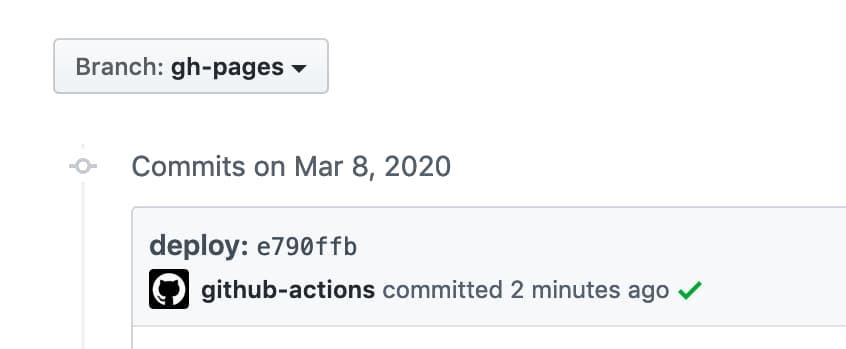
Tetapkan pesan komit khusus. Saat kami membuat komit dengan docs: Update some post , komit penempatan akan dihasilkan dengan docs: Update some post ${GITHUB_SHA} .
- name : Deploy
  uses : peaceiris/actions-gh-pages@v4
  with :
    github_token : ${{ secrets.GITHUB_TOKEN }}
    publish_dir : ./public
commit_message : ${{ github.event.head_commit.message }} 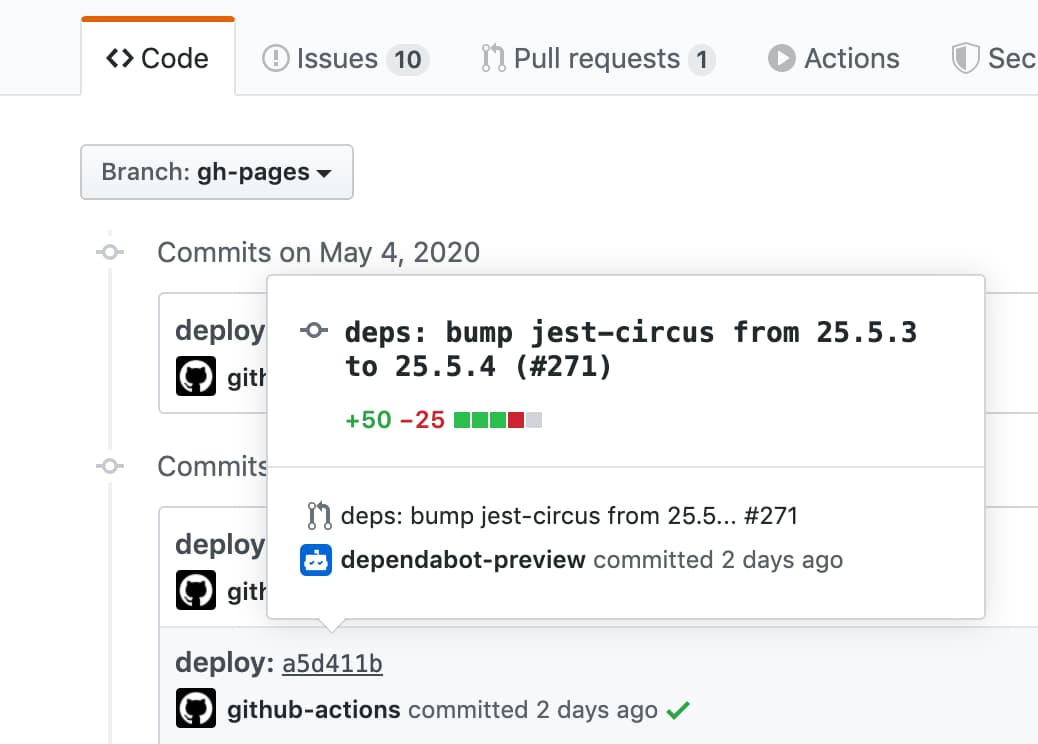
Untuk mengatur pesan komit khusus tanpa hash komit yang dipicu, gunakan opsi full_commit_message alih -alih opsi commit_message .
- name : Deploy
  uses : peaceiris/actions-gh-pages@v4
  with :
    github_token : ${{ secrets.GITHUB_TOKEN }}
    publish_dir : ./public
full_commit_message : ${{ github.event.head_commit.message }}Berikut adalah contoh alur kerja.
 name : GitHub Pages

on :
  push :
    branches :
      - main
    tags :
      - ' v*.*.* '

jobs :
  deploy :
    runs-on : ubuntu-22.04
    permissions :
      contents : write
    concurrency :
      group : ${{ github.workflow }}-${{ github.ref }}
    steps :
      - uses : actions/checkout@v3

      - name : Some build

      - name : Prepare tag
        id : prepare_tag
        if : startsWith(github.ref, 'refs/tags/')
        run : |
          echo "DEPLOY_TAG_NAME=deploy-${TAG_NAME}" >> "${GITHUB_OUTPUT}"

      - name : Deploy
        uses : peaceiris/actions-gh-pages@v4
        with :
          github_token : ${{ secrets.GITHUB_TOKEN }}
          publish_dir : ./public
          tag_name : ${{ steps.prepare_tag.outputs.DEPLOY_TAG_NAME }}
          tag_message : ' Deployment ${{ github.ref_name }} '
Perintah pada mesin lokal.
$ # On a main branch
$ git tag -a " v1.2.3 " -m " Release v1.2.3 "
$ git push origin " v1.2.3 "

$ # After deployment
$ git fetch origin
$ git tag
deploy-v1.2.3  # Tag on the gh-pages branch
v1.2.3 # Tag on the main branchHasilkan kunci penyebaran Anda dengan perintah berikut.
ssh-keygen -t rsa -b 4096 -C " $( git config user.email ) " -f gh-pages -N " "Anda akan mendapatkan 2 file:
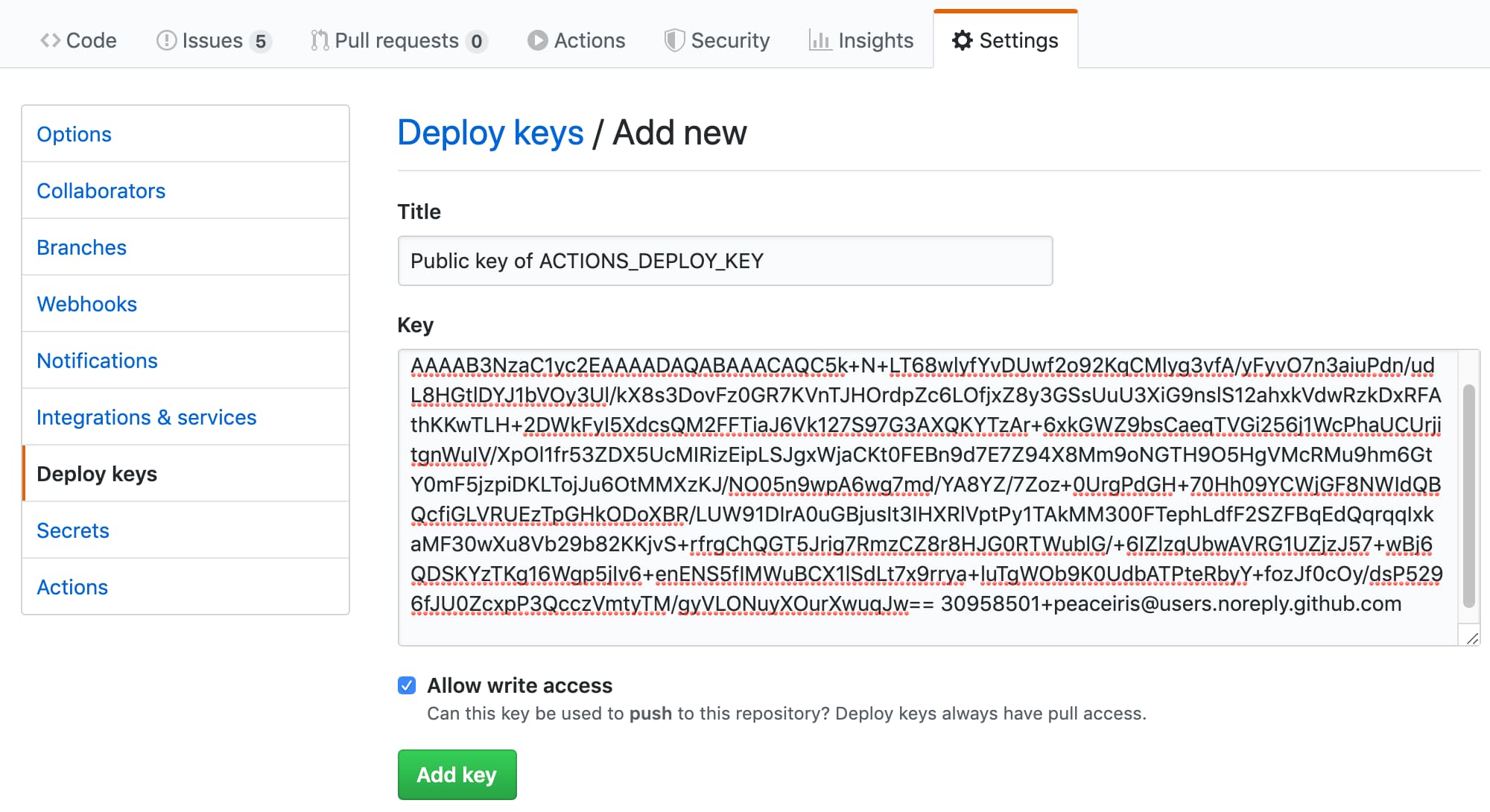
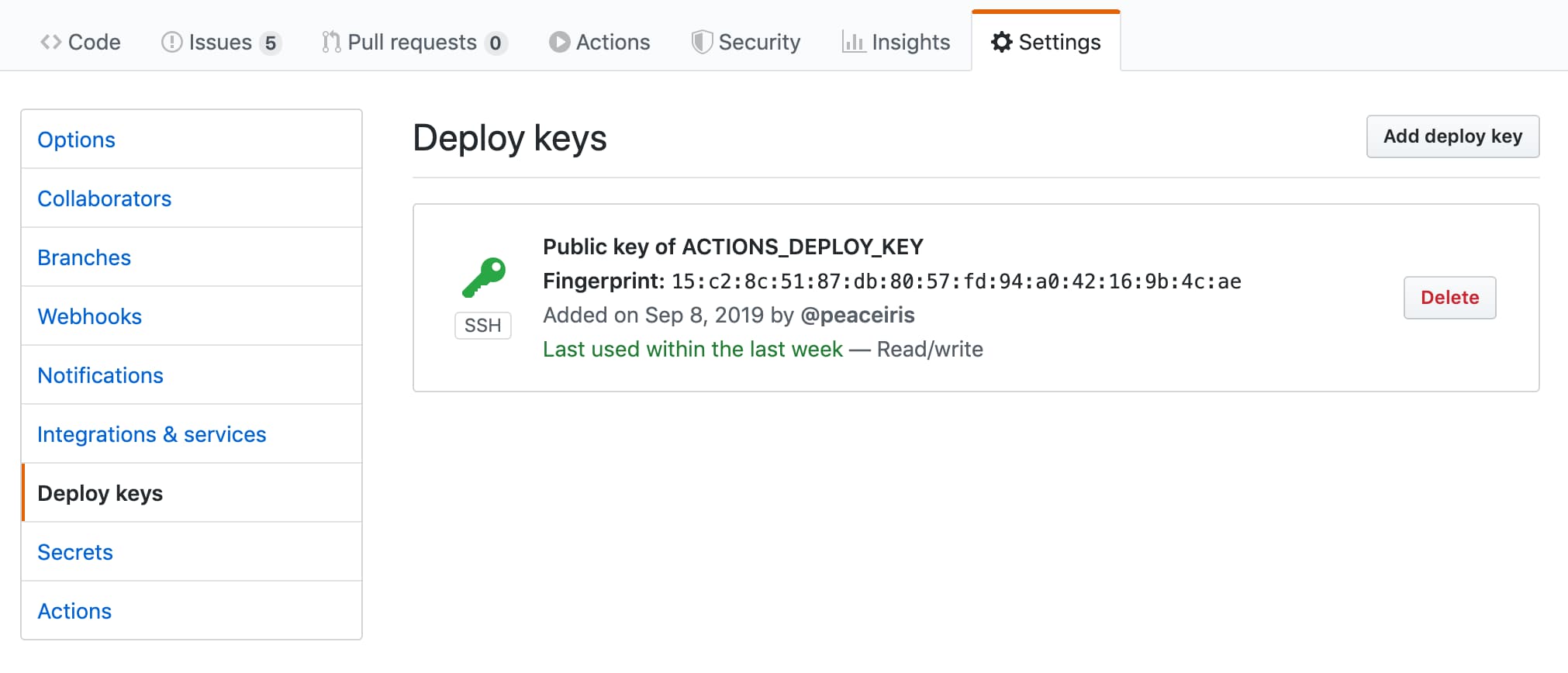
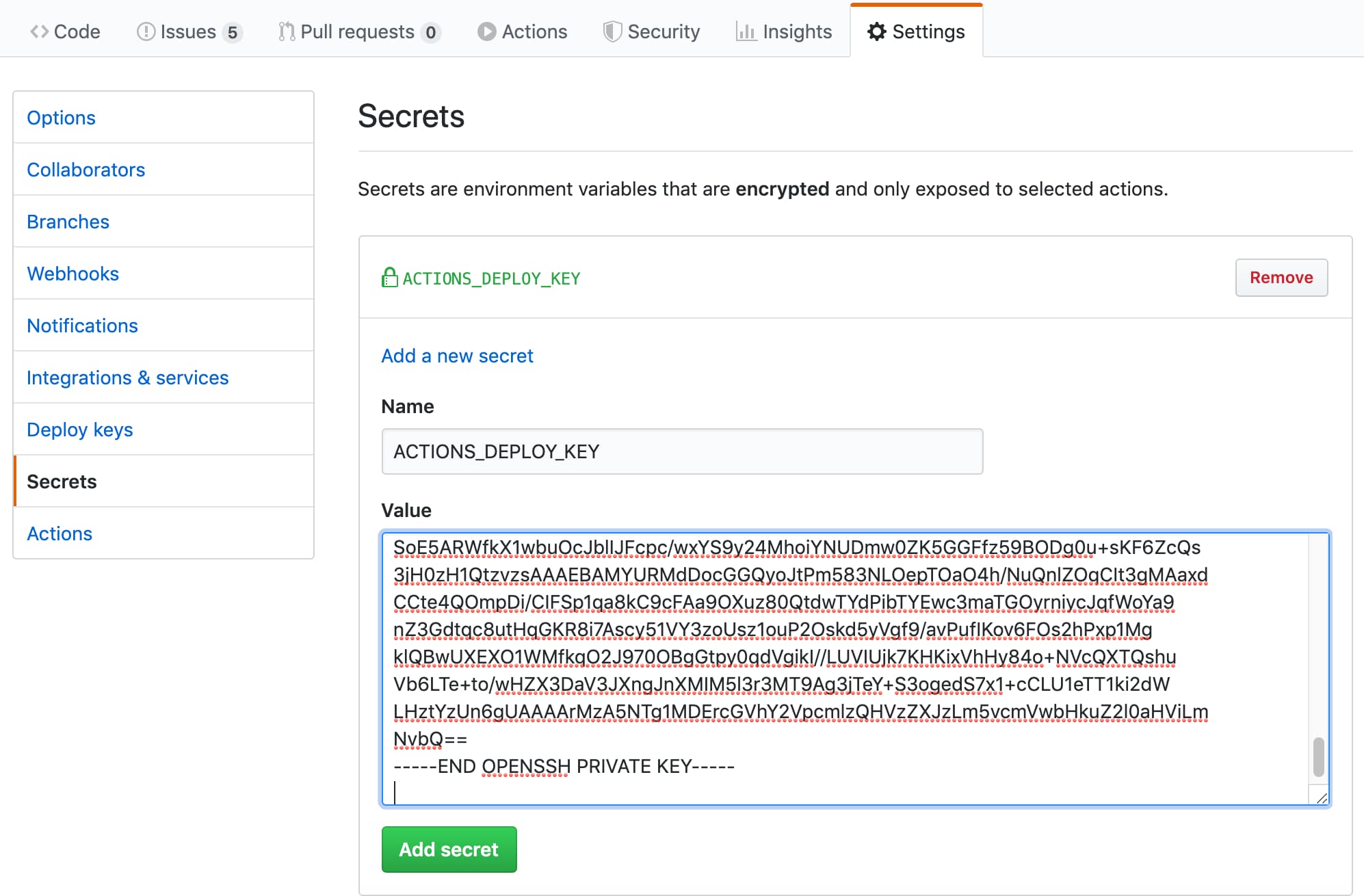
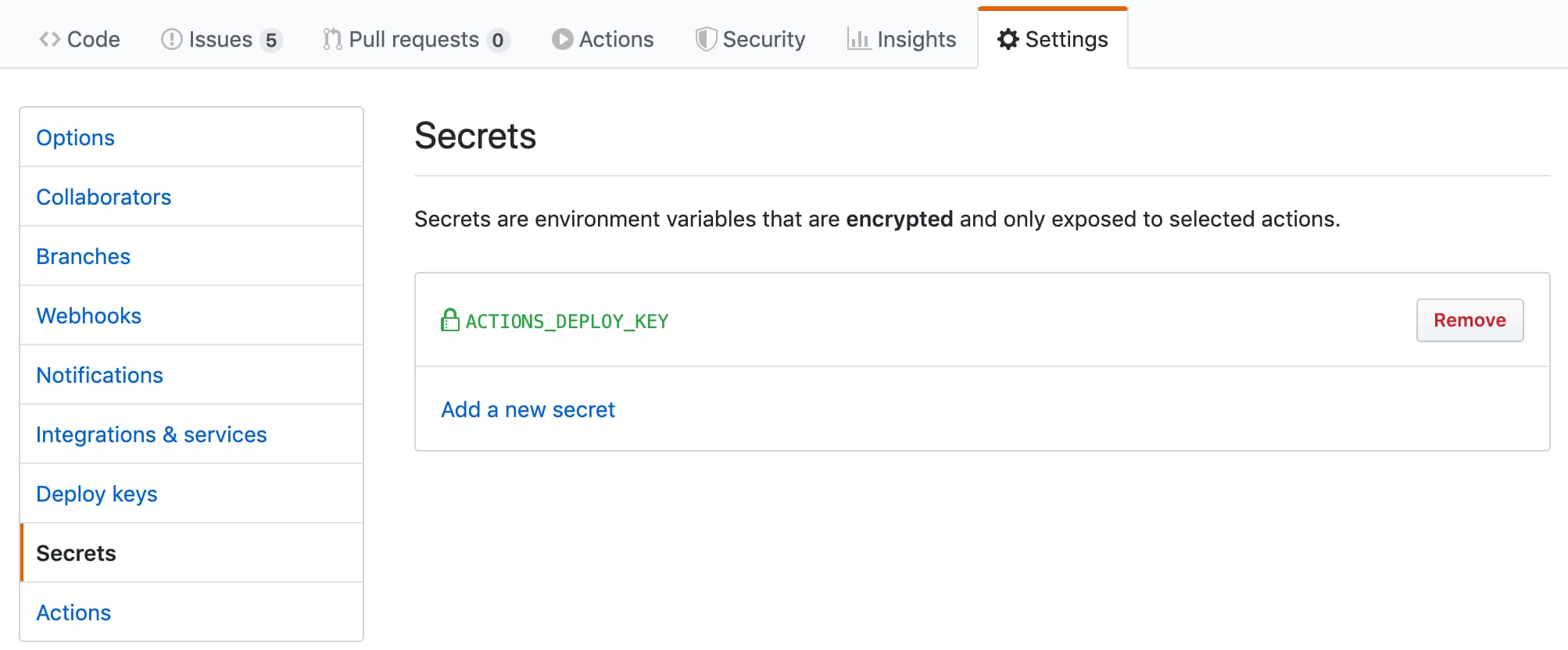
gh-pages.pub adalah kunci publikgh-pages adalah kunci pribadiSelanjutnya, buka pengaturan repositori
ACTIONS_DEPLOY_KEY| Tambahkan Kunci Publik Anda | Kesuksesan |
|---|---|
 |  |
| Tambahkan Kunci Pribadi Anda | Kesuksesan |
|---|---|
 |  |
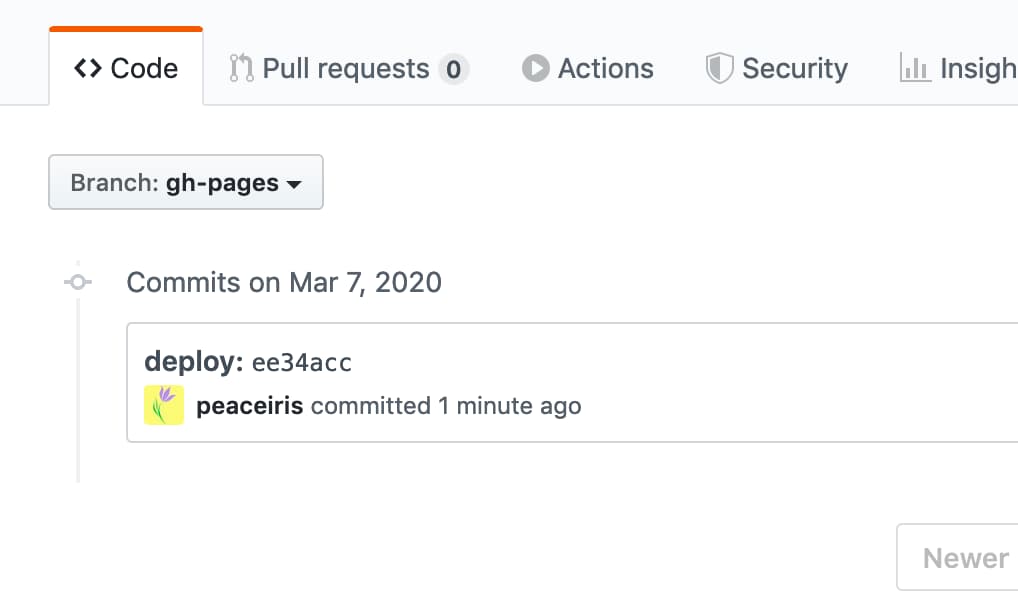
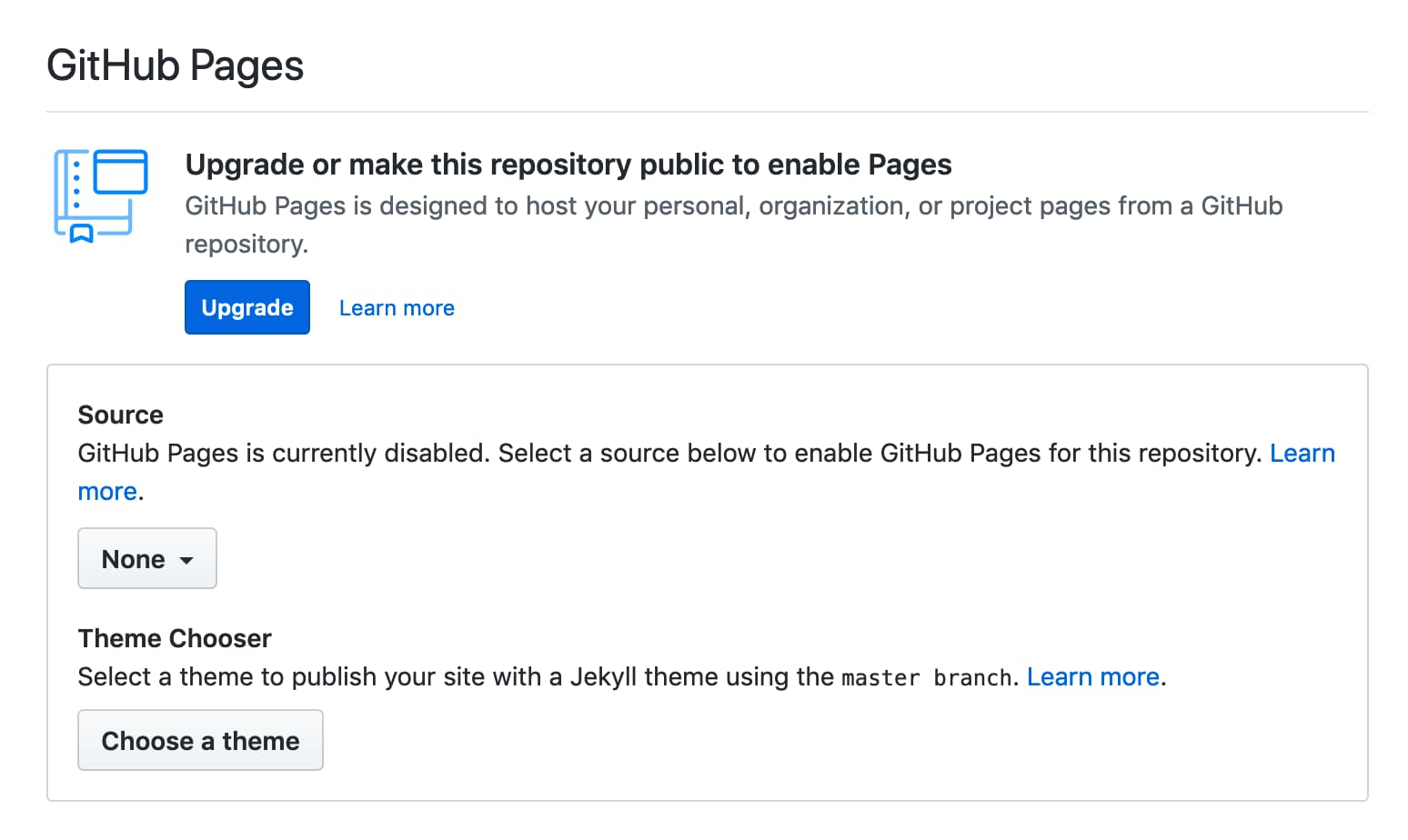
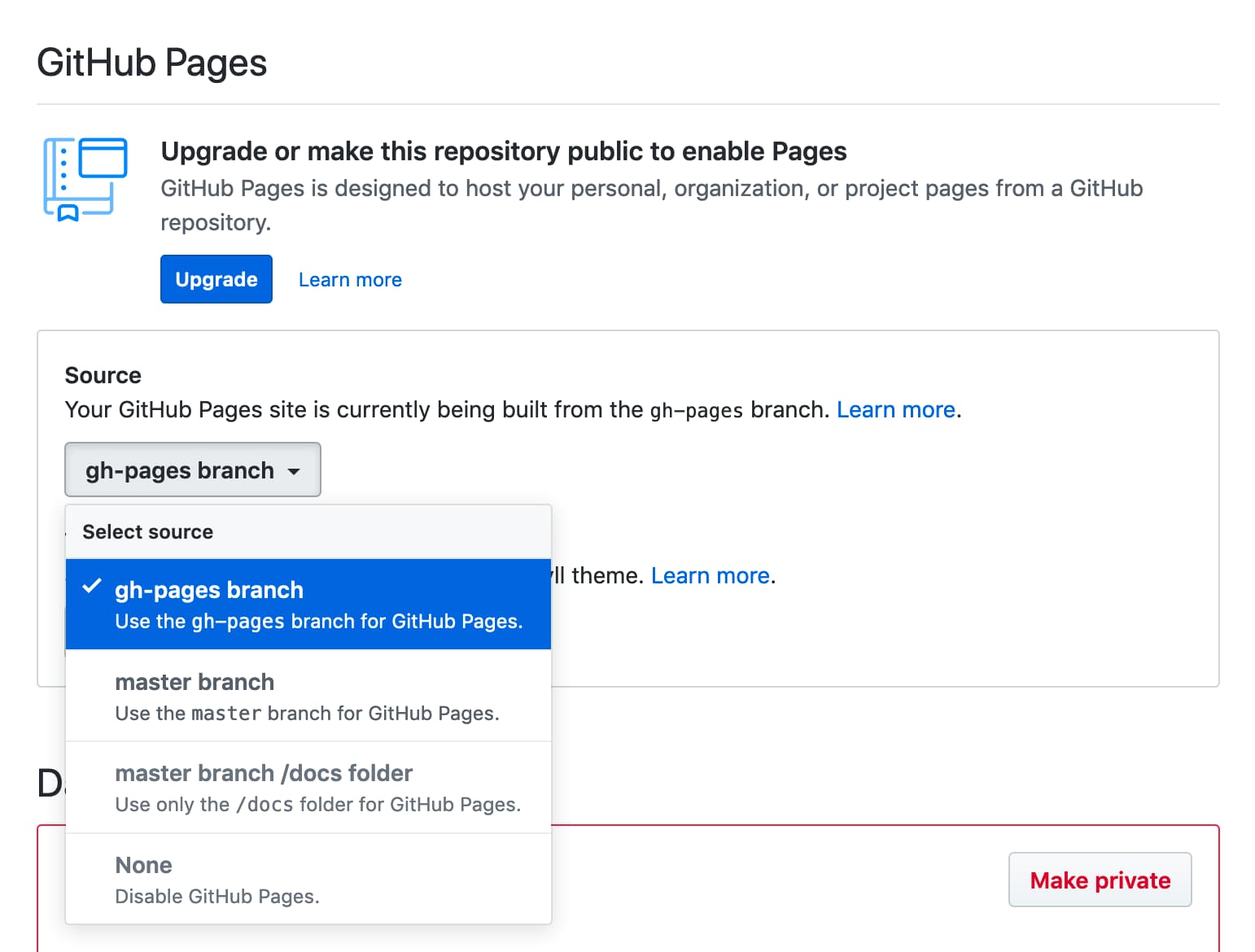
GITHUB_TOKEN GITHUB_TOKEN memiliki batasan untuk penyebaran pertama sehingga kita harus memilih cabang halaman GitHub pada tab Pengaturan Repositori. Setelah itu, lakukan penyebaran kedua seperti gambar -gambar berikut.
| Penerapan pertama gagal | Buka tab Pengaturan |
|---|---|
 |  |
| Pilih Cabang | Menyebarkan lagi dan berhasil |
|---|---|
 | |
Jika tindakan gagal mendorong komit atau tag dengan kesalahan berikut:
/usr/bin/git push origin gh-pages
remote: Write access to repository not granted.
fatal: unable to access 'https://github.com/username/repository.git/': The requested URL returned error: 403
Error: Action failed with "The process '/usr/bin/git' failed with exit code 128"
Harap tambahkan izin tulis ke permissions.contents dalam alur kerja/pekerjaan.
 permissions :
  contents : write
Atau, Anda dapat mengonfigurasi izin GITHUB_TOKEN default dengan memilih izin baca dan tulis.
Kami menyarankan Anda untuk menggunakan rilis terbaru dan spesifik dari tindakan ini untuk CI/CD yang stabil. Berguna untuk menonton repositori ini (hanya rilis) untuk memeriksa rilis terbaru dari tindakan ini.
Untuk pembaruan berkelanjutan, kita dapat menggunakan GitHub Native Dependabot. Berikut adalah contoh konfigurasi bot. File konfigurasi terletak di .github/dependabot.yml .
 version : 2
updates :
- package-ecosystem : " github-actions "
  directory : " / "
  schedule :
    interval : " daily "
  labels :
  - " CI/CD "
  commit-message :
    prefix : ci
Lihat dokumentasi resmi untuk detail lebih lanjut tentang Dependabot: Menjaga Ketergantungan Anda Diperbarui Secara Otomatis - Dokumen GitHub
Untuk menyebarkan secara teratur, kami dapat mengatur pemicu alur on.schedule . Lihat Acara Terjadwal | Acara yang Memicu Alur Kerja - Dokumen GitHub
Untuk menggunakan secara manual, kami dapat mengatur pemicu alur kerja on.workflow_dispatch . Lihat acara manual workflow_dispatch | Acara yang Memicu Alur Kerja - Dokumen GitHub
 name : GitHub Pages

on :
  push :
    branches :
      - main
  schedule :
    - cron : " 22 22 * * * "
  workflow_dispatch :

jobs :
  deploy :
    runs-on : ubuntu-22.04
    permissions :
      contents : write
    concurrency :
      group : ${{ github.workflow }}-${{ github.ref }}
    steps :
...lih. Dukungan: Eksekusi dari Hashref Disabled/Broken vs Github Tindakan Keamanan Praktik Terbaik? · Masalah #712 · Peaceiris/Actions-GH-halaman
Proyek kami membangun dan menyediakan aset build hanya saat membuat rilis. Ini untuk mencegah pengguna melakukan tindakan ini dengan cabang tertentu (seperti Main). Misalnya, jika kami mempertahankan aset build di cabang utama dan pengguna menggunakan tindakan ini sebagai berikut, rilis utama termasuk perubahan perubahan akan merusak alur kerja CI dari pengguna secara diam -diam.
- uses : peaceiris/actions-gh-pages@main # Bad example!
  with :
    github_token : ${{ secrets.GITHUB_TOKEN }}
    publish_dir : ./public
Dalam proyek ini, tag utama (misalnya V3) dijamin tidak mengandung perubahan. Tapi, kami sarankan menggunakan tag atau hash komit untuk stabilitas alur kerja Anda.
- uses : peaceiris/[email protected] # tag: Better
  with :
    github_token : ${{ secrets.GITHUB_TOKEN }}
    publish_dir : ./public
- uses : peaceiris/actions-gh-pages@373f7f263a76c20808c831209c920827a82a2847 # commit hash of v3.9.3: Best!
with :
github_token : ${{ secrets.GITHUB_TOKEN }}
publish_dir : ./publicUntuk memverifikasi aset rilis, kita dapat menggunakan perintah berikut.
git clone https://github.com/peaceiris/actions-gh-pages.git
cd ./actions-gh-pages
git checkout v3.9.3
nvm install
nvm use
npm i -g npm
npm ci
npm run build
git diff ./lib/index.js # We will get zero exit code hexo, vuepress, react-static, gridsome, create-react-app dan sebagainya. Silakan periksa di mana direktori output Anda sebelum mendorong alur kerja Anda. misalnya create-react-app membutuhkan publish_dir untuk diatur ke ./build
Premis: Ketergantungan dikelola oleh package.json dan package-lock.json
 name : GitHub Pages

on :
  push :
    branches :
      - main
  pull_request :

jobs :
  deploy :
    runs-on : ubuntu-22.04
    permissions :
      contents : write
    concurrency :
      group : ${{ github.workflow }}-${{ github.ref }}
    steps :
      - uses : actions/checkout@v3

      - name : Setup Node
        uses : actions/setup-node@v3
        with :
          node-version : ' 14 '

      - name : Cache dependencies
        uses : actions/cache@v3
        with :
          path : ~/.npm
          key : ${{ runner.os }}-node-${{ hashFiles('**/package-lock.json') }}
          restore-keys : |
            ${{ runner.os }}-node-

      - run : npm ci
      - run : npm run build

      - name : Deploy
        uses : peaceiris/actions-gh-pages@v4
        if : github.ref == 'refs/heads/main'
        with :
          github_token : ${{ secrets.GITHUB_TOKEN }}
publish_dir : ./publicContoh untuk proyek Gatsby (Gatsby.js) dengan Gatsby-Starter-Blog
 name : GitHub Pages

on :
  push :
    branches :
      - main
  pull_request :

jobs :
  deploy :
    runs-on : ubuntu-22.04
    permissions :
      contents : write
    concurrency :
      group : ${{ github.workflow }}-${{ github.ref }}
    steps :
      - uses : actions/checkout@v3

      - name : Setup Node
        uses : actions/setup-node@v3
        with :
          node-version : ' 14 '

      - name : Cache dependencies
        uses : actions/cache@v3
        with :
          path : ~/.npm
          key : ${{ runner.os }}-node-${{ hashFiles('**/package-lock.json') }}
          restore-keys : |
            ${{ runner.os }}-node-

      - run : npm ci
      - run : npm run format
      - run : npm run test
      - run : npm run build

      - name : Deploy
        uses : peaceiris/actions-gh-pages@v4
        if : github.ref == 'refs/heads/main'
        with :
          github_token : ${{ secrets.GITHUB_TOKEN }}
publish_dir : ./publicContoh untuk proyek Next.js (React.js) dengan create-next-app
 name : GitHub Pages

on :
  push :
    branches :
      - main
  pull_request :

jobs :
  deploy :
    runs-on : ubuntu-22.04
    permissions :
      contents : write
    concurrency :
      group : ${{ github.workflow }}-${{ github.ref }}
    steps :
      - uses : actions/checkout@v3

      - name : Setup Node
        uses : actions/setup-node@v3
        with :
          node-version : ' 14 '

      - name : Get yarn cache
        id : yarn-cache
        run : echo "YARN_CACHE_DIR=$(yarn cache dir)" >> "${GITHUB_OUTPUT}"

      - name : Cache dependencies
        uses : actions/cache@v3
        with :
          path : ${{ steps.yarn-cache.outputs.YARN_CACHE_DIR }}
          key : ${{ runner.os }}-yarn-${{ hashFiles('**/yarn.lock') }}
          restore-keys : |
            ${{ runner.os }}-yarn-

      - run : yarn install --frozen-lockfile
      - run : yarn build
      - run : yarn export

      - name : Deploy
        uses : peaceiris/actions-gh-pages@v4
        if : github.ref == 'refs/heads/main'
        with :
          github_token : ${{ secrets.GITHUB_TOKEN }}
publish_dir : ./outContoh untuk proyek nuxt.js (vue.js) dengan create-nuxt-app
 name : GitHub Pages

on :
  push :
    branches :
      - main
  pull_request :

jobs :
  deploy :
    runs-on : ubuntu-22.04
    permissions :
      contents : write
    concurrency :
      group : ${{ github.workflow }}-${{ github.ref }}
    steps :
      - uses : actions/checkout@v3

      - name : Setup Node
        uses : actions/setup-node@v3
        with :
          node-version : ' 14 '

      - name : Cache dependencies
        uses : actions/cache@v3
        with :
          path : ~/.npm
          key : ${{ runner.os }}-node-${{ hashFiles('**/package-lock.json') }}
          restore-keys : |
            ${{ runner.os }}-node-

      - run : npm ci
      - run : npm test
      - run : npm run generate

      - name : deploy
        uses : peaceiris/actions-gh-pages@v4
        if : github.ref == 'refs/heads/main'
        with :
          github_token : ${{ secrets.GITHUB_TOKEN }}
publish_dir : ./distContoh alur kerja untuk Docusaurus.
npx @docusaurus/init@next init website classic berguna untuk membuat proyek docUSaurus baru.
 # .github/workflows/deploy.yml

name : GitHub Pages

on :
  push :
    branches :
      - main
    paths :
      - ' .github/workflows/deploy.yml '
      - ' website/** '
  pull_request :

jobs :
  deploy :
    runs-on : ubuntu-22.04
    permissions :
      contents : write
    concurrency :
      group : ${{ github.workflow }}-${{ github.ref }}
    defaults :
      run :
        working-directory : website
    steps :
      - uses : actions/checkout@v3

      - name : Setup Node
        uses : actions/setup-node@v3
        with :
          node-version : ' 14 '

      - name : Get yarn cache
        id : yarn-cache
        run : echo "YARN_CACHE_DIR=$(yarn cache dir)" >> "${GITHUB_OUTPUT}"

      - name : Cache dependencies
        uses : actions/cache@v3
        with :
          path : ${{ steps.yarn-cache.outputs.YARN_CACHE_DIR }}
          key : ${{ runner.os }}-website-${{ hashFiles('**/yarn.lock') }}
          restore-keys : |
            ${{ runner.os }}-website-

      - run : yarn install --frozen-lockfile
      - run : yarn build

      - name : Deploy
        uses : peaceiris/actions-gh-pages@v4
        if : github.ref == 'refs/heads/main'
        with :
          github_token : ${{ secrets.GITHUB_TOKEN }}
publish_dir : ./website/buildPelican, MKDOCS, Sphinx, dan sebagainya.
Premis: Ketergantungan dikelola oleh requirements.txt
 name : GitHub Pages

on :
  push :
    branches :
      - main
  pull_request :

jobs :
  deploy :
    runs-on : ubuntu-22.04
    permissions :
      contents : write
    concurrency :
      group : ${{ github.workflow }}-${{ github.ref }}
    steps :
      - uses : actions/checkout@v3

      - name : Setup Python
        uses : actions/setup-python@v3
        with :
          python-version : ' 3.8 '

      - name : Upgrade pip
        run : |
          # install pip=>20.1 to use "pip cache dir"
          python3 -m pip install --upgrade pip

      - name : Get pip cache dir
        id : pip-cache
        run : echo "dir=$(pip cache dir)" >> $GITHUB_OUTPUT

      - name : Cache dependencies
        uses : actions/cache@v3
        with :
          path : ${{ steps.pip-cache.outputs.dir }}
          key : ${{ runner.os }}-pip-${{ hashFiles('**/requirements.txt') }}
          restore-keys : |
            ${{ runner.os }}-pip-

      - name : Install dependencies
        run : python3 -m pip install -r ./requirements.txt

      - run : mkdocs build

      - name : Deploy
        uses : peaceiris/actions-gh-pages@v4
        if : github.ref == 'refs/heads/main'
        with :
          github_token : ${{ secrets.GITHUB_TOKEN }}
publish_dir : ./siteContoh alur kerja tindakan github untuk menggunakan situs rust-lang/mdbook ke halaman github.
 name : GitHub Pages

on :
  push :
    branches :
      - main
  pull_request :

jobs :
  deploy :
    runs-on : ubuntu-22.04
    permissions :
      contents : write
    concurrency :
      group : ${{ github.workflow }}-${{ github.ref }}
    steps :
      - uses : actions/checkout@v3

      - name : Setup mdBook
        uses : peaceiris/actions-mdbook@v1
        with :
          mdbook-version : ' 0.4.8 '
          # mdbook-version: 'latest'

      - run : mdbook build

      - name : Deploy
        uses : peaceiris/actions-gh-pages@v4
        if : github.ref == 'refs/heads/main'
        with :
          github_token : ${{ secrets.GITHUB_TOKEN }}
          publish_dir : ./book
Petunjuk: Anda mungkin ingin menerbitkan RustDocs Anda. Dan gunakan tautan relatif untuk itu dari dokumen MD, dan minta mereka diperiksa oleh mdbook . Kemudian, menurut dokumen, Anda dapat menempatkan ./target/doc/ ke ./book/src Dir sebelum Anda mdbook build dan kemudian akan berakhir di ./book/html/ dan di halaman github Anda.
Contoh alur kerja untuk Proyek Web Flutter.
 name : GitHub Pages

on :
  push :
    branches :
      - main
  pull_request :

jobs :
  deploy :
    runs-on : ubuntu-22.04
    permissions :
      contents : write
    concurrency :
      group : ${{ github.workflow }}-${{ github.ref }}
    steps :
      - uses : actions/checkout@v3

      - name : Setup Flutter
        run : |
          git clone https://github.com/flutter/flutter.git --depth 1 -b beta _flutter
          echo "${GITHUB_WORKSPACE}/_flutter/bin" >> ${GITHUB_PATH}

      - name : Install
        run : |
          flutter config --enable-web
          flutter pub get

      - name : Build
        run : flutter build web

      - name : Deploy
        uses : peaceiris/actions-gh-pages@v4
        if : github.ref == 'refs/heads/main'
        with :
          github_token : ${{ secrets.GITHUB_TOKEN }}
publish_dir : ./build/webContoh alur kerja untuk ELM.
 name : GitHub Pages

on :
  push :
    branches :
      - main
  pull_request :

jobs :
  deploy :
    runs-on : ubuntu-22.04
    permissions :
      contents : write
    concurrency :
      group : ${{ github.workflow }}-${{ github.ref }}
    steps :
      - uses : actions/checkout@v3

      - name : Setup Node
        uses : actions/setup-node@v3
        with :
          node-version : ' 14 '

      - name : Setup Elm
        run : npm install elm --global

      - name : Make
        run : elm make --optimize src/Main.elm

      - name : Move files
        run : |
          mkdir ./public
          mv ./index.html ./public/
        # If you have non-minimal setup with some assets and separate html/js files,
        # provide --output=<output-file> option for `elm make` and remove this step

      - name : Deploy
        uses : peaceiris/actions-gh-pages@v4
        if : github.ref == 'refs/heads/main'
        with :
          github_token : ${{ secrets.GITHUB_TOKEN }}
publish_dir : ./publicContoh alur kerja untuk Johnsundell/Publish.
 name : GitHub Pages

on :
  push :
    branches :
      - main
  pull_request :

jobs :
  deploy :
    runs-on : macos-latest
    concurrency :
      group : ${{ github.workflow }}-${{ github.ref }}
    steps :
      - uses : actions/checkout@v3

      - uses : actions/cache@v3
        with :
          path : |
            ~/Publish_build
            .build
          key : ${{ runner.os }}-spm-${{ hashFiles('**/Package.resolved') }}
          restore-keys : |
            ${{ runner.os }}-spm-

      - name : Setup JohnSundell/Publish
        run : |
          cd ${HOME}
          export PUBLISH_VERSION="0.7.0"
          git clone https://github.com/JohnSundell/Publish.git
          cd ./Publish && git checkout ${PUBLISH_VERSION}
          mv ~/Publish_build .build || true
          swift build -c release
          cp -r .build ~/Publish_build || true
          echo "${HOME}/Publish/.build/release" >> ${GITHUB_PATH}

      - run : publish-cli generate

      - name : Deploy to GitHub Pages
        uses : peaceiris/actions-gh-pages@v4
        if : github.ref == 'refs/heads/main'
        with :
          github_token : ${{ secrets.GITHUB_TOKEN }}
          publish_dir : ./Output






