actions gh pages
v4.0.0


注記
Githubの公式Githubページアクションもご覧ください。
これは、静的ファイルをgithubページに展開するためのgithubアクションです。この展開アクションは、静的サイトジェネレーターと簡単かつ自由に組み合わせることができます。 (Hugo、Mkdocs、Gatsby、Mdbook、Next、Nuxtなど。)
次の例のステップは./public publicディレクトリをリモートgh-pagesブランチに展開します。
- name : Deploy
  uses : peaceiris/actions-gh-pages@v4
  with :
    github_token : ${{ secrets.GITHUB_TOKEN }}
    publish_dir : ./public
GitHubアクションの初心者の場合: GITHUB_TOKEN個人的なアクセストークンではないことに注意してください。 GitHubアクションランナーは、ワークフローで認証するためにGITHUB_TOKEN秘密を自動的に作成します。そのため、構成なしですぐに展開を開始できます。
3つのトークンがサポートされています。
| トークン | プライベートレポ | パブリックレポ | プロトコル | 設定 |
|---|---|---|---|---|
github_token | ✅✅️ | ✅✅️ | https | 不要 |
deploy_key | ✅✅️ | ✅✅️ | SSH | 必要 |
personal_token | ✅✅️ | ✅✅️ | https | 必要 |
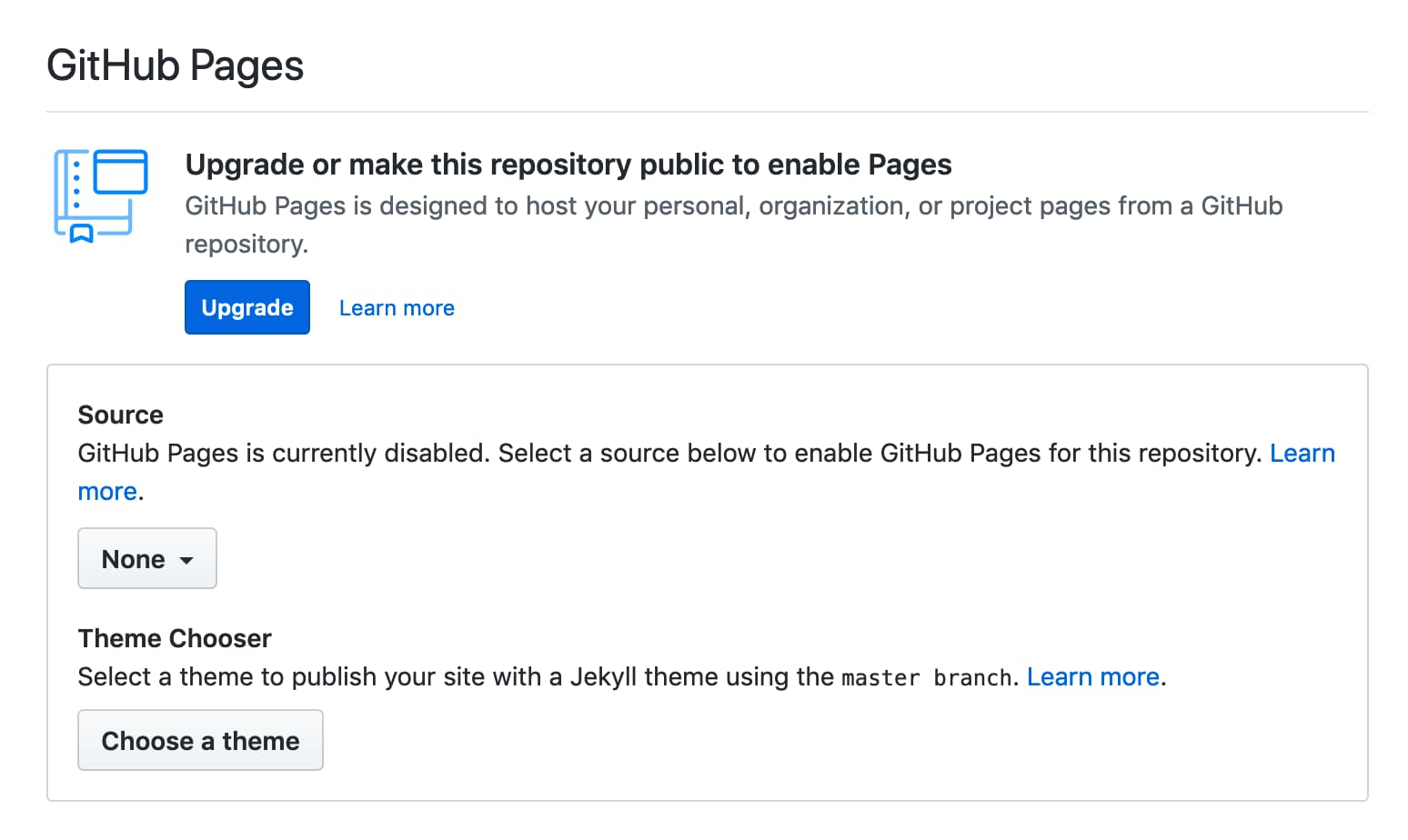
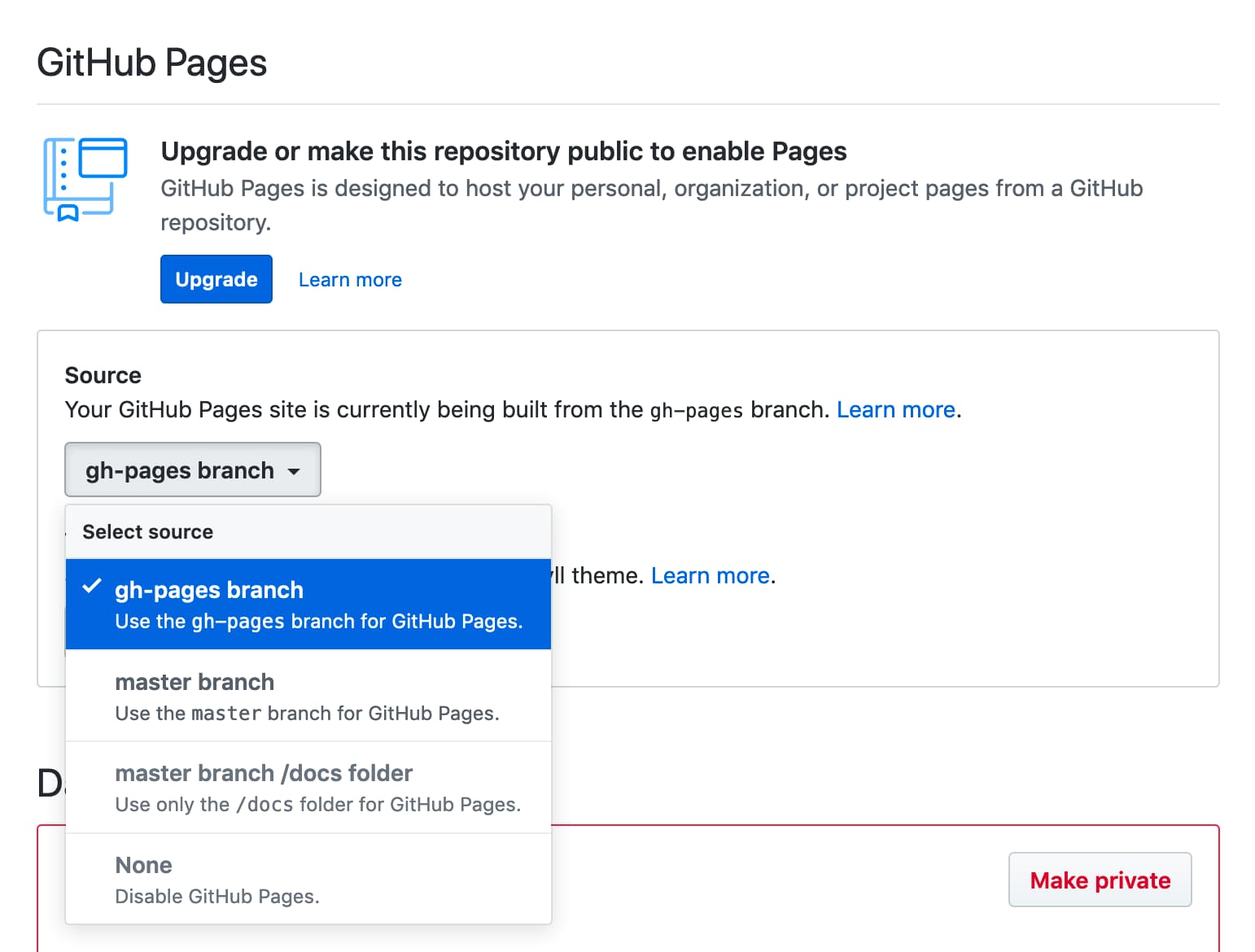
注:実際、 GITHUB_TOKEN githubページに展開するために機能しますが、まだいくつかの制限があります。最初の展開では、[リポジトリ設定]タブでgh-pagesブランチまたは別のブランチを選択する必要があります。 GITHUB_TOKENの最初の展開を参照してください
すべてのアクションランナー:Linux(Ubuntu)、MacOS、およびWindowsがサポートされています。
| runs-on | github_token | deploy_key | personal_token |
|---|---|---|---|
| ubuntu-22.04 | ✅✅️ | ✅✅️ | ✅✅️ |
| ubuntu-20.04 | ✅✅️ | ✅✅️ | ✅✅️ |
| ubuntu-latest | ✅✅️ | ✅✅️ | ✅✅️ |
| macos-latest | ✅✅️ | ✅✅️ | ✅✅️ |
| Windows-Latest | ✅✅️ | (2) | ✅✅️ |
Github Enterprise Serverは2.22.6を超えてサポートされています。
ランナーによって作成されたGITHUB_TOKEN 、GHEに本質的にプッシュ/公開の特権を持っていない可能性があることに注意してください。ターゲットリポジトリへの書き込みアクセス許可を備えた技術ユーザーを作成/要求する必要がある場合があります。
github_tokenを設定しますdeploy_keyを設定しますpersonal_tokenを設定しますpublish_branch設定しますpublish_dirdestination_dirへの展開exclude_assetscnameを追加しますenable_jekyll有効にしますallow_empty_commitkeep_filesしますexternal_repositoryに展開しますforce_orphanを強制しますGITHUB_TOKENを使用した最初の展開ワークフローファイル.github/workflows/gh-pages.ymlを追加し、リモートデフォルトブランチにプッシュします。
これがヒューゴのワークフローの例です。
 name : GitHub Pages

on :
  push :
    branches :
      - main  # Set a branch name to trigger deployment
  pull_request :

jobs :
  deploy :
    runs-on : ubuntu-22.04
    permissions :
      contents : write
    concurrency :
      group : ${{ github.workflow }}-${{ github.ref }}
    steps :
      - uses : actions/checkout@v3
        with :
          submodules : true  # Fetch Hugo themes (true OR recursive)
          fetch-depth : 0    # Fetch all history for .GitInfo and .Lastmod

      - name : Setup Hugo
        uses : peaceiris/actions-hugo@v2
        with :
          hugo-version : ' 0.110.0 '

      - name : Build
        run : hugo --minify

      - name : Deploy
        uses : peaceiris/actions-gh-pages@v4
        # If you're changing the branch from main,
        # also change the `main` in `refs/heads/main`
        # below accordingly.
        if : github.ref == 'refs/heads/main'
        with :
          github_token : ${{ secrets.GITHUB_TOKEN }}
publish_dir : ./public| アクションログの概要 | githubページログ |
|---|---|
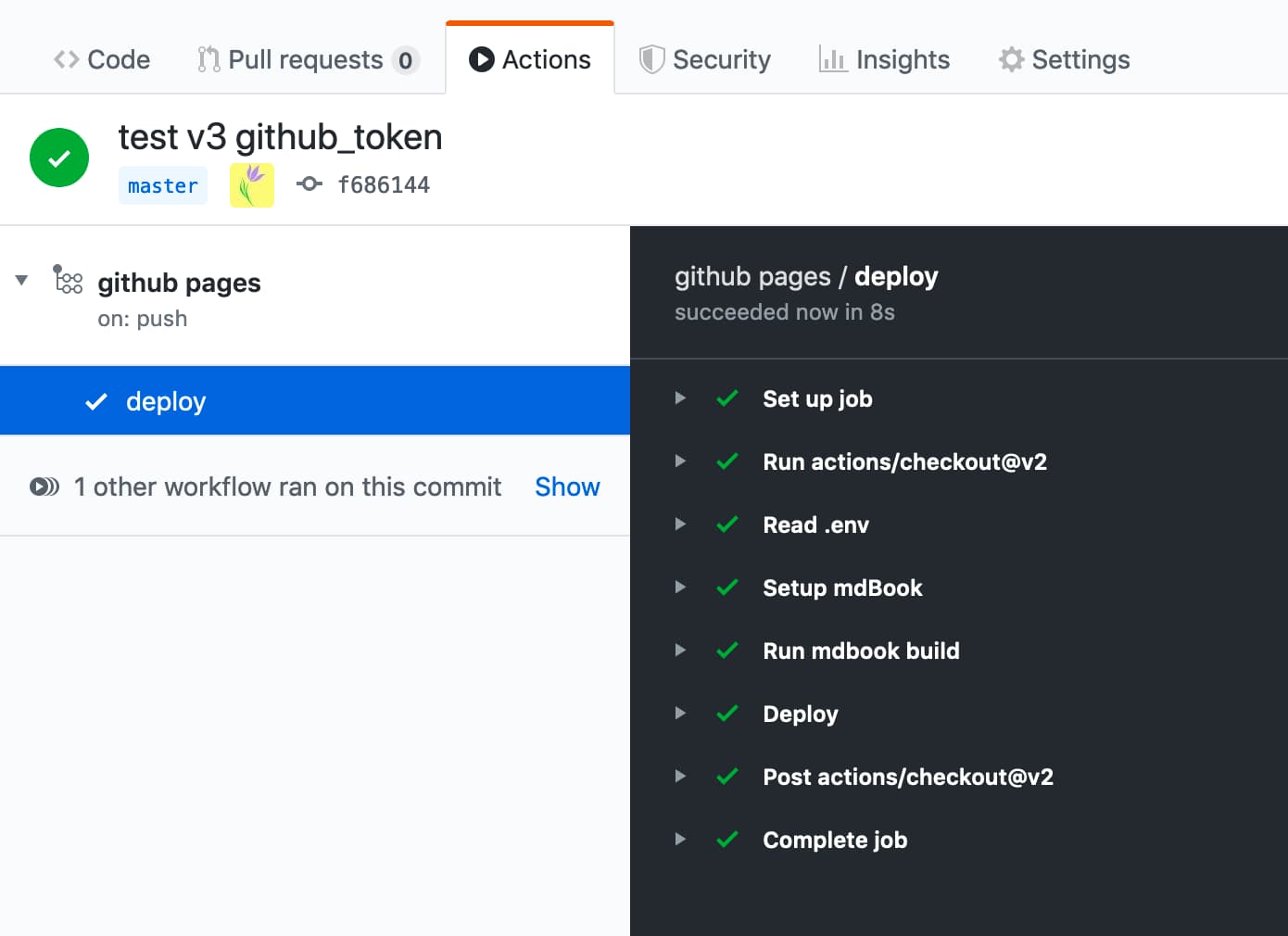 | 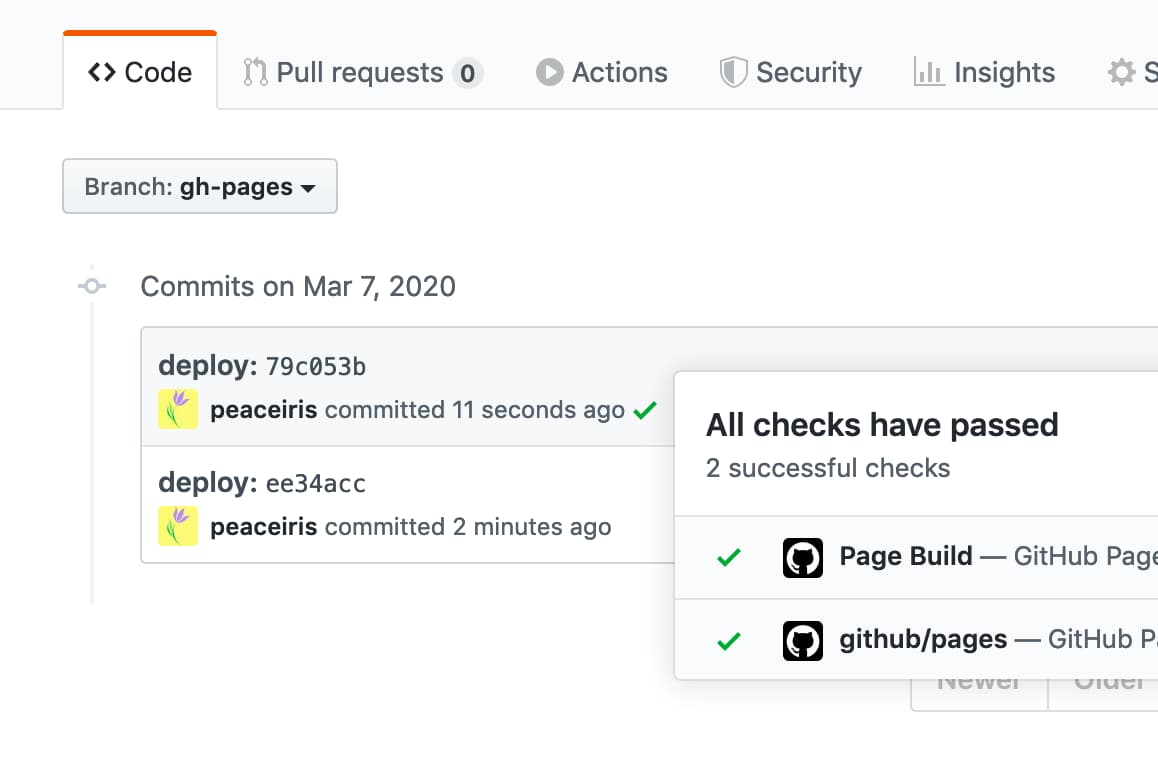 |
github_tokenを設定しますこのオプションは、個人的なアクセストークンではなく、 GITHUB_TOKEN用です。
GitHubアクションランナーは、ワークフローで使用するGITHUB_TOKEN秘密を自動的に作成します。 GITHUB_TOKENを使用して、ワークフローの実行で認証できます。
- name : Deploy
  uses : peaceiris/actions-gh-pages@v4
  with :
    github_token : ${{ secrets.GITHUB_TOKEN }}
publish_dir : ./public GITHUB_TOKENの詳細:自動トークン認証-Githubドキュメント
deploy_keyを設定しますSSHデプロイキーの作成を読み、SSH Deployキーを作成し、次のようにdeploy_keyオプションを設定します。
- name : Deploy
  uses : peaceiris/actions-gh-pages@v4
  with :
    deploy_key : ${{ secrets.ACTIONS_DEPLOY_KEY }}
publish_dir : ./publicpersonal_tokenを設定しますPersonal Access Token( repo )を生成し、 PERSONAL_TOKENとしてSecrets ACTIONS_DEPLOY_KEY追加します。
- name : Deploy
  uses : peaceiris/actions-gh-pages@v4
  with :
    personal_token : ${{ secrets.PERSONAL_TOKEN }}
publish_dir : ./publicpublish_branch設定しますGitHub Pages Branchとして使用するブランチ名を設定します。デフォルトはgh-pagesです。
- name : Deploy
  uses : peaceiris/actions-gh-pages@v4
  with :
    github_token : ${{ secrets.GITHUB_TOKEN }}
publish_branch : your-branch # default: gh-pagespublish_dir GitHubページに展開するソースディレクトリ。デフォルトはpublicています。この監督のコンテンツのみが、デフォルトではgh-pagesのgithubページブランチにプッシュされます。
- name : Deploy
  uses : peaceiris/actions-gh-pages@v4
  with :
    github_token : ${{ secrets.GITHUB_TOKEN }}
publish_dir : ./out # default: publicdestination_dirへの展開この機能はベータ版です。フィードバックは、第3224号で大歓迎です
出版ブランチの宛先サブディレクトリ。デフォルトは空です。
- name : Deploy
  uses : peaceiris/actions-gh-pages@v4
  with :
    github_token : ${{ secrets.GITHUB_TOKEN }}
destination_dir : subdirexclude_assetsこの機能はベータ版です。フィードバックは、第163号で大歓迎です
公開資産から除外するファイルまたはディレクトリを設定します。デフォルトは.githubです。値はコンマで分割する必要があります。
- name : Deploy
  uses : peaceiris/actions-gh-pages@v4
  with :
    github_token : ${{ secrets.GITHUB_TOKEN }}
exclude_assets : ' .github,exclude-file1,exclude-file2 ' deploymentアセットに.githubディレクトリを含めるために、 exclude_assets空に設定します。
- name : Deploy
  uses : peaceiris/actions-gh-pages@v4
  with :
    deploy_key : ${{ secrets.ACTIONS_DEPLOY_KEY }}   # Recommended for this usage
    # personal_token: ${{ secrets.PERSONAL_TOKEN }} # An alternative
    # github_token: ${{ secrets.GITHUB_TOKEN }}     # This does not work for this usage
exclude_assets : ' ' exclude_assetsオプションは、グローブパターンをサポートしています。
- name : Deploy
  uses : peaceiris/actions-gh-pages@v4
  with :
    github_token : ${{ secrets.GITHUB_TOKEN }}
exclude_assets : ' .github,exclude-file.txt,exclude-dir/**.txt 'cnameを追加しますCNAMEファイルを追加するには、 cnameオプションを設定できます。または、 CNAMEファイルをpublish_dirに入れます。 (例: public/CNAME )
CNAMEファイルの詳細については、公式ドキュメントをお読みください:githubページサイトのカスタムドメインの管理サイト-github docs
- name : Deploy
  uses : peaceiris/actions-gh-pages@v4
  with :
    github_token : ${{ secrets.GITHUB_TOKEN }}
    publish_dir : ./public
cname : github.comenable_jekyll有効にします静的サイトジェネレーターJekyllを使用してGitHubページにサイトを処理する場合は、 enable_jekyll trueに設定します。
デフォルトでは、このアクションはGitHubページに合図し、サイトがJekyllで処理されないことを示しています。これは、公開ブランチに空の.nojekyllファイルを追加することによって行われます。そのファイルがすでに存在する場合、このアクションは何もしません。
Jekyllをバイパスすると、展開が速くなり、アンダースコアから始まるファイルまたはディレクトリを展開する場合に必要です。これは、これらを特別なリソースと見なし、最終サイトにコピーしないためです。 Jekyllを搭載したWebサイトを展開し、GithubページにJekyll Processingを実行させる場合、 enable_jekyll Trueに設定する必要があります。
- name : Deploy
  uses : peaceiris/actions-gh-pages@v4
  with :
    github_token : ${{ secrets.GITHUB_TOKEN }}
    publish_dir : ./public
enable_jekyll : true .nojekyll詳細については、GithubページでJekyllのバイパス-Githubブログ
allow_empty_commitデフォルトでは、ファイルが変更されない場合、コミットは生成されません。空のコミットを許可する場合は、オプションのパラメーターallow_empty_commitをtrueに設定します。
例えば:
- name : Deploy
  uses : peaceiris/actions-gh-pages@v4
  with :
    github_token : ${{ secrets.GITHUB_TOKEN }}
    publish_dir : ./public
allow_empty_commit : truekeep_filesしますデフォルトでは、パブリッシュブランチ内の既存のファイル(または指定されている場合はdestination_dirでのみ)が削除されます。アクションを新しいファイルに追加したいが、既存のファイルのままにしておきたい場合は、オプションのパラメーターkeep_files trueに設定します。
静的サイトジェネレーターを使用しているユーザーは、ほとんどの場合、このオプションは必要ないことに注意してください。このフラグを有効にする前に、プロジェクト構造とビルディングスクリプトを再考するか、静的サイトジェネレーターの組み込み機能を使用してください。
例えば:
- name : Deploy
  uses : peaceiris/actions-gh-pages@v4
  with :
    github_token : ${{ secrets.GITHUB_TOKEN }}
    publish_dir : ./public
    keep_files : true
V3を使用すると、このオプションはForce_orphanオプションの操作をサポートしていません。次の主要なリリース(バージョン4)がこれをサポートします。問題#455を参照してください
external_repositoryに展開しますデフォルトでは、ファイルはこのアクションを実行しているリポジトリに公開されます。 Githubの別のリポジトリに公開する場合は、環境変数のexternal_repository <username>/<external-repository>に設定します。
例えば:
- name : Deploy
  uses : peaceiris/actions-gh-pages@v4
  with :
    deploy_key : ${{ secrets.ACTIONS_DEPLOY_KEY }}
    external_repository : username/external-repository
    publish_branch : your-branch  # default: gh-pages
publish_dir : ./public deploy_keyまたはpersonal_tokenを使用できます。 deploy_keyを使用する場合、このアクションを含むリポジトリに秘密鍵を設定し、公開キーを外部リポジトリに設定します。
GITHUB_TOKENには、外部リポジトリにアクセスする許可がないことに注意してください。 Personal Access Tokenを作成し、 personal_token: ${{ secrets.PERSONAL_TOKEN }}のようにpersonal_tokenに設定してください。
使用事例:
GitHubフリープランアカウントでは、プライベートリポジトリ内のGitHubページを使用できません。ソースコンテンツをプライベートにし、GitHubページで展開するには、このオプションを使用してプライベートリポジトリからパブリックリポジトリにサイトを展開できます。
peaceiris/homepage : external_repository: peaceiris/peaceiris.github.iopeaceiris/peaceiris.github.io :githubページを使用した公開リポジトリforce_orphanを強制しますforce_orphan: trueオプションを設定できます。これにより、最新のコミットのみでパブリッシュブランチを作成できます。
- name : Deploy
  uses : peaceiris/actions-gh-pages@v4
  with :
    github_token : ${{ secrets.GITHUB_TOKEN }}
    publish_dir : ./public
force_orphan : trueカスタムgit config user.nameとgit config user.emailを設定します。コミットは常に同じユーザーで作成されます。
- name : Deploy
  uses : peaceiris/actions-gh-pages@v4
  with :
    github_token : ${{ secrets.GITHUB_TOKEN }}
    publish_dir : ./public
    user_name : ' github-actions[bot] '
user_email : ' github-actions[bot]@users.noreply.github.com ' 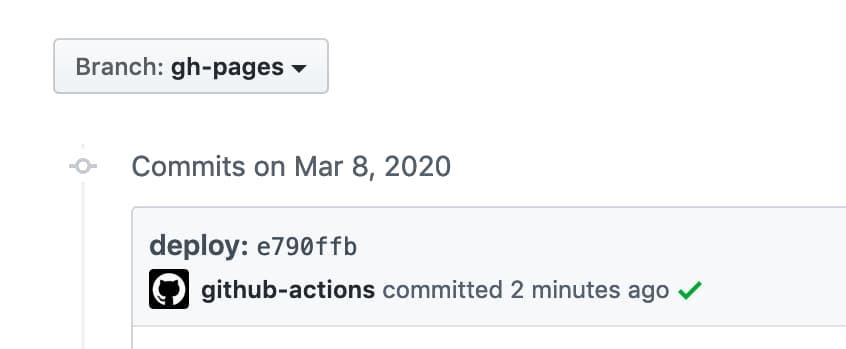
カスタムコミットメッセージを設定します。メッセージdocs: Update some post 、展開コミットはメッセージdocs: Update some post ${GITHUB_SHA} 。
- name : Deploy
  uses : peaceiris/actions-gh-pages@v4
  with :
    github_token : ${{ secrets.GITHUB_TOKEN }}
    publish_dir : ./public
commit_message : ${{ github.event.head_commit.message }} 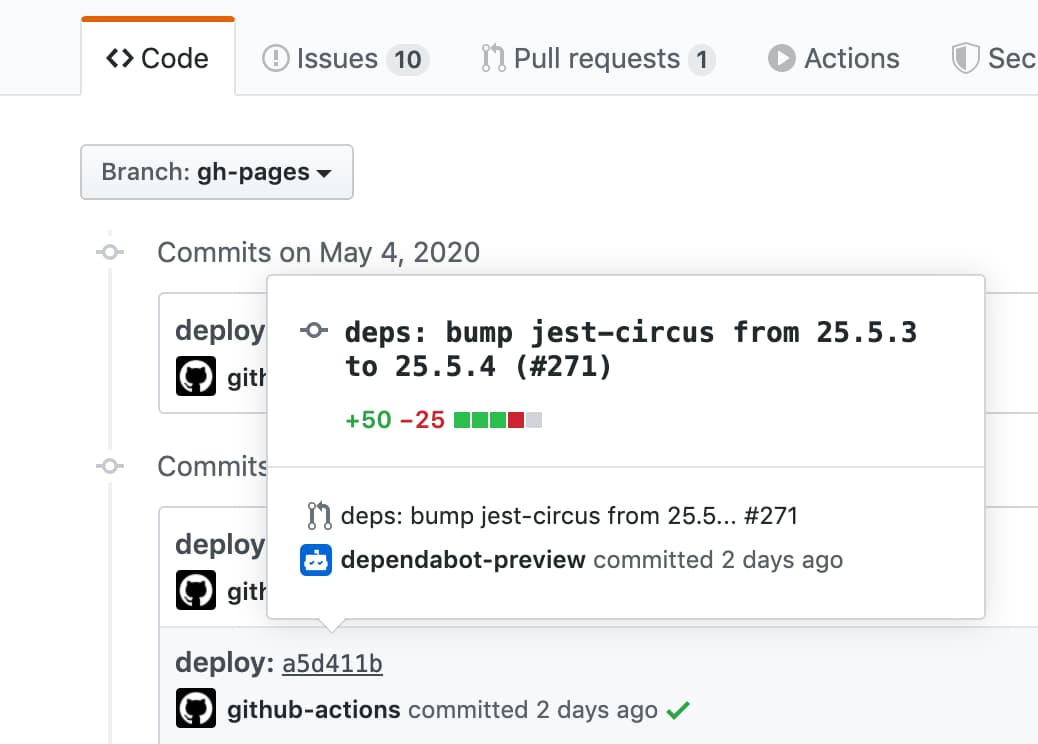
トリガーされたコミットハッシュなしで完全なカスタムコミットメッセージを設定するには、 commit_messageオプションの代わりにfull_commit_messageオプションを使用します。
- name : Deploy
  uses : peaceiris/actions-gh-pages@v4
  with :
    github_token : ${{ secrets.GITHUB_TOKEN }}
    publish_dir : ./public
full_commit_message : ${{ github.event.head_commit.message }}これがワークフローの例です。
 name : GitHub Pages

on :
  push :
    branches :
      - main
    tags :
      - ' v*.*.* '

jobs :
  deploy :
    runs-on : ubuntu-22.04
    permissions :
      contents : write
    concurrency :
      group : ${{ github.workflow }}-${{ github.ref }}
    steps :
      - uses : actions/checkout@v3

      - name : Some build

      - name : Prepare tag
        id : prepare_tag
        if : startsWith(github.ref, 'refs/tags/')
        run : |
          echo "DEPLOY_TAG_NAME=deploy-${TAG_NAME}" >> "${GITHUB_OUTPUT}"

      - name : Deploy
        uses : peaceiris/actions-gh-pages@v4
        with :
          github_token : ${{ secrets.GITHUB_TOKEN }}
          publish_dir : ./public
          tag_name : ${{ steps.prepare_tag.outputs.DEPLOY_TAG_NAME }}
          tag_message : ' Deployment ${{ github.ref_name }} '
ローカルマシンでのコマンド。
$ # On a main branch
$ git tag -a " v1.2.3 " -m " Release v1.2.3 "
$ git push origin " v1.2.3 "

$ # After deployment
$ git fetch origin
$ git tag
deploy-v1.2.3  # Tag on the gh-pages branch
v1.2.3 # Tag on the main branch次のコマンドで展開キーを生成します。
ssh-keygen -t rsa -b 4096 -C " $( git config user.email ) " -f gh-pages -N " "2つのファイルが表示されます。
gh-pages.pubは公開キーですgh-pagesは秘密鍵です次に、リポジトリ設定に移動します
ACTIONS_DEPLOY_KEY| 公開キーを追加します | 成功 |
|---|---|
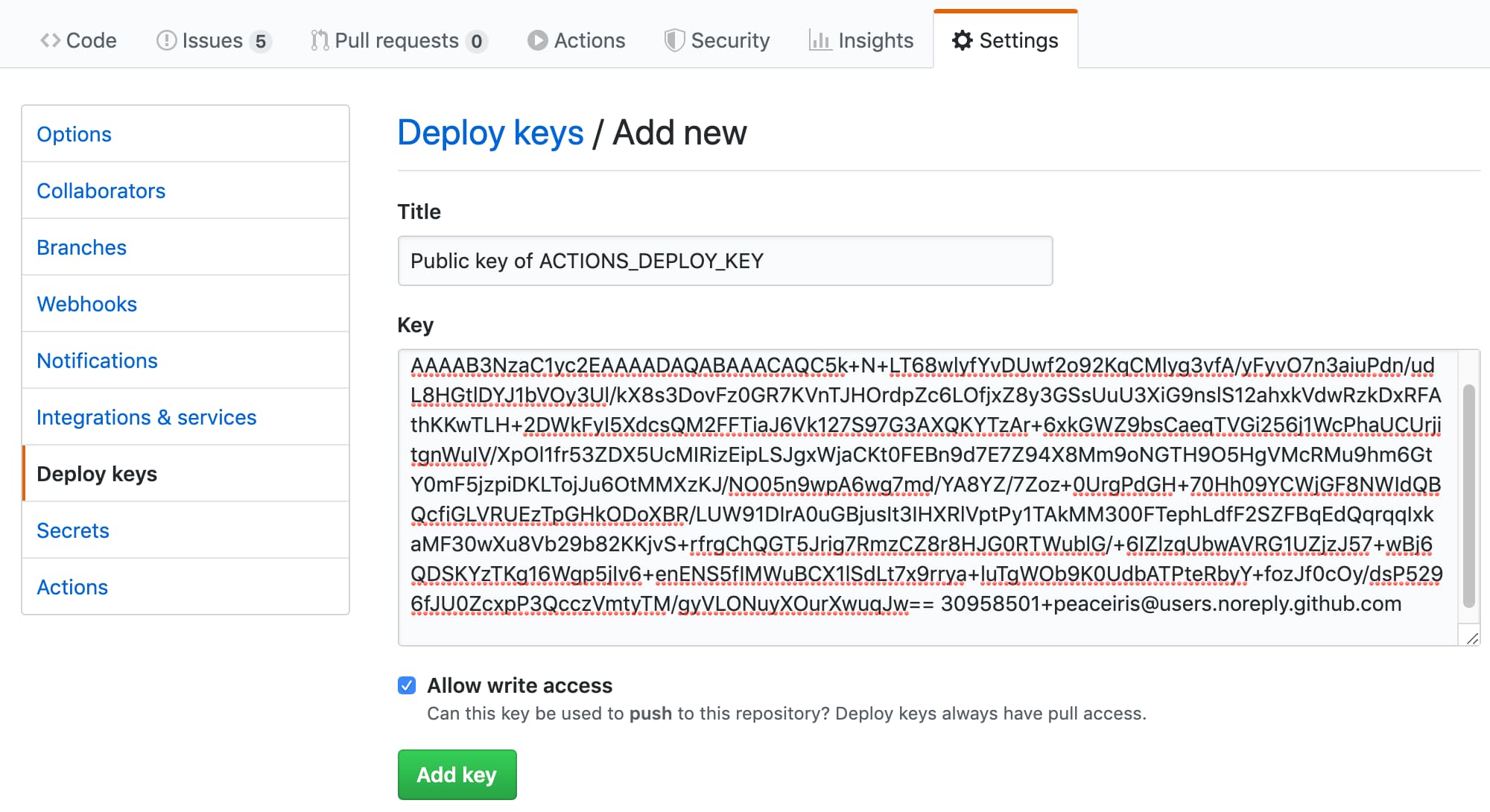 | 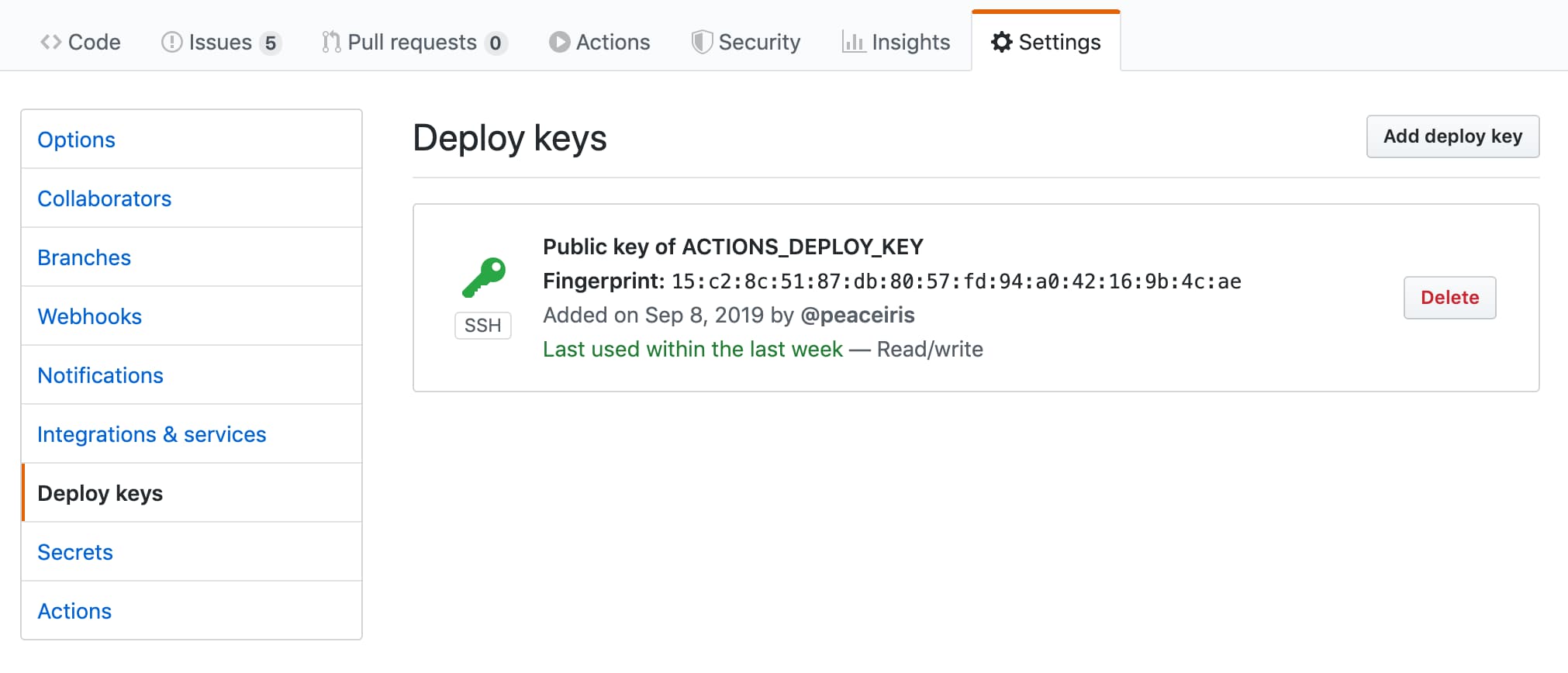 |
| 秘密鍵を追加します | 成功 |
|---|---|
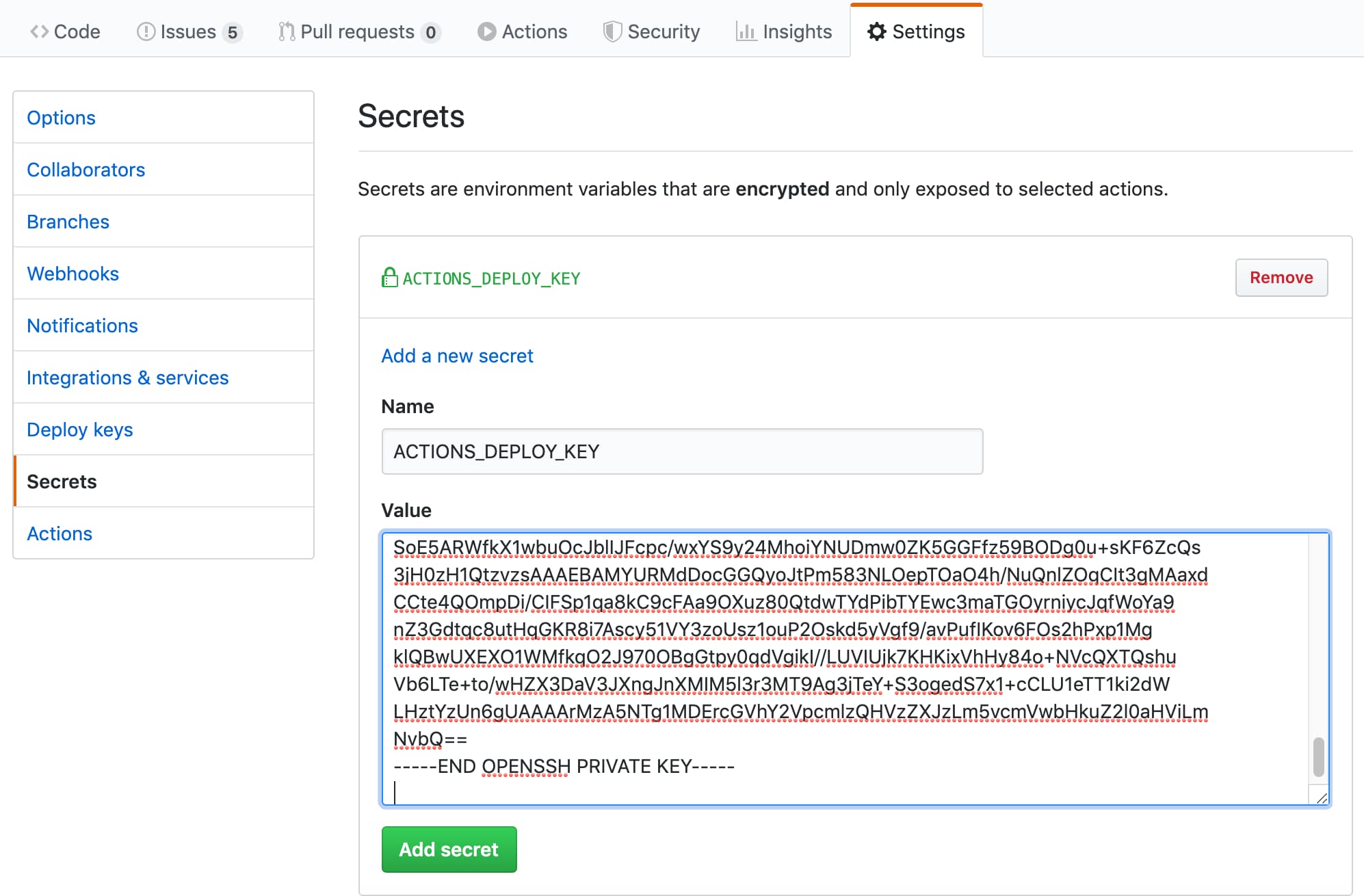 | 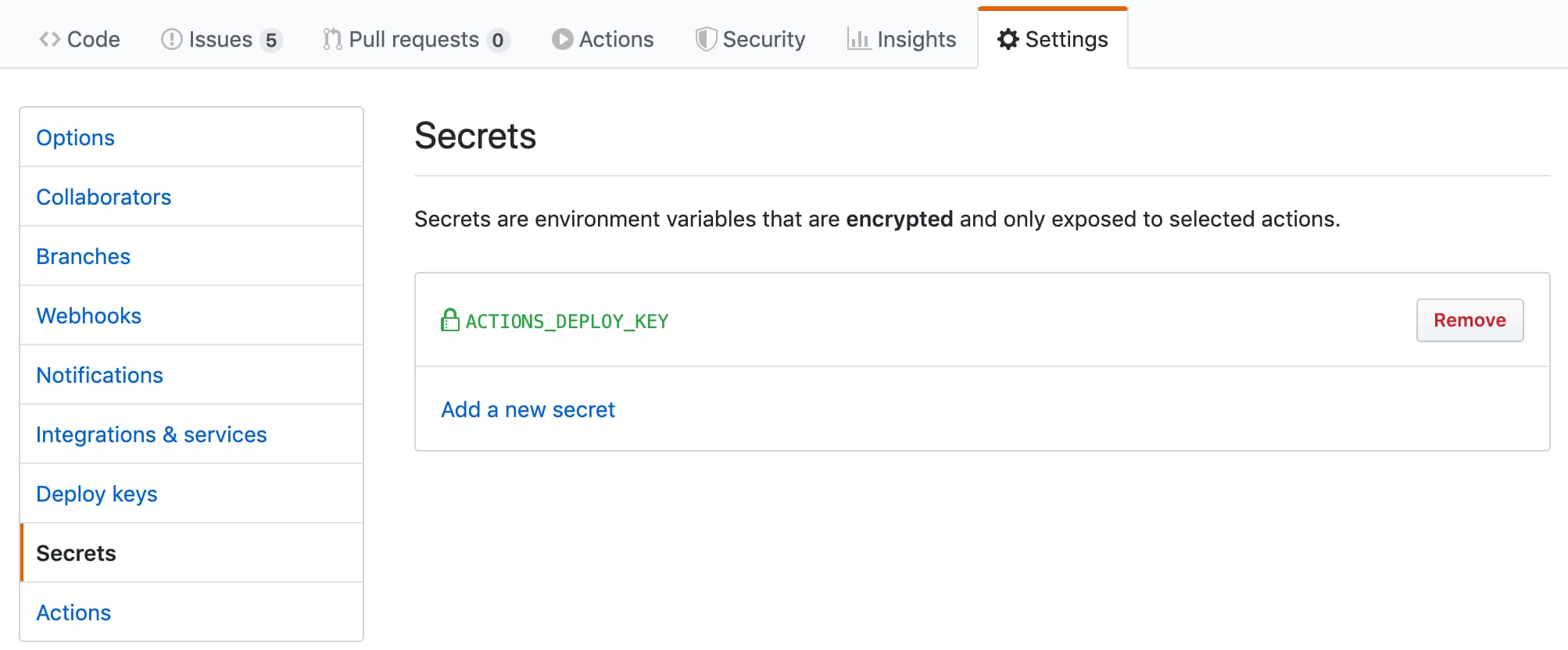 |
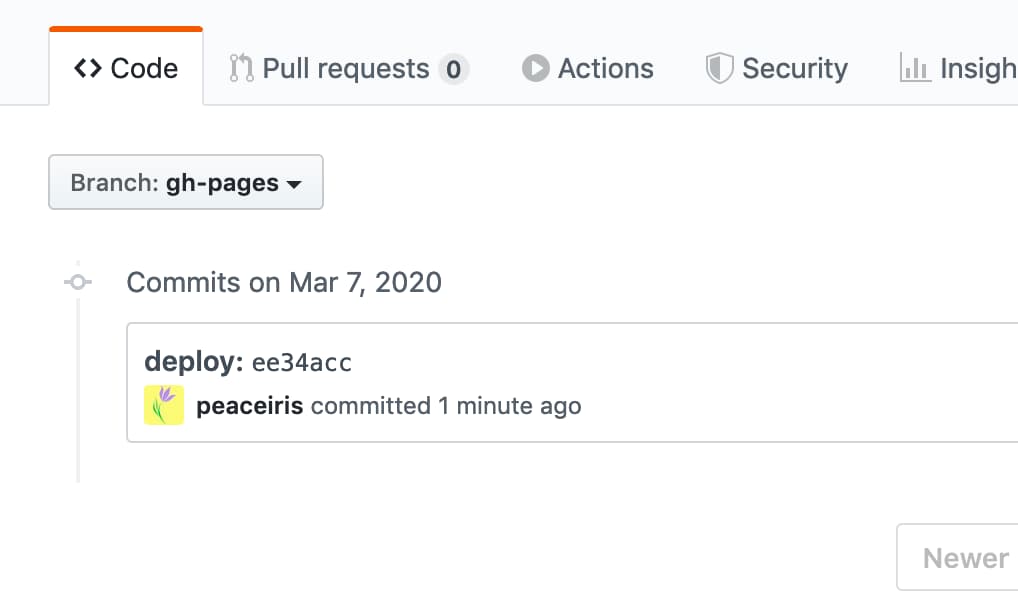
GITHUB_TOKENを使用した最初の展開GITHUB_TOKENは最初の展開の制限があるため、[リポジトリ設定]タブで[githubページ]ブランチを選択する必要があります。その後、次の写真のように2番目の展開を行います。
| 最初の展開は失敗しました | [設定]タブに移動します |
|---|---|
 |  |
| [ブランチ]を選択します | 再び展開して成功します |
|---|---|
 | |
次のエラーでアクションがコミットまたはタグをプッシュできない場合:
/usr/bin/git push origin gh-pages
remote: Write access to repository not granted.
fatal: unable to access 'https://github.com/username/repository.git/': The requested URL returned error: 403
Error: Action failed with "The process '/usr/bin/git' failed with exit code 128"ワークフロー/ジョブのpermissions.contentsに書き込み許可を追加してください。
 permissions :
contents : writeまたは、読み取り許可を選択して、デフォルトのGITHUB_TOKENアクセス許可を構成することもできます。
安定したCI/CDのこのアクションの最新かつ具体的なリリースを使用することをお勧めします。このリポジトリ(リリースのみ)を視聴して、このアクションの最新リリースを確認すると便利です。
継続的な更新には、GitHubネイティブDepenabotを使用できます。以下は、ボットの例です。構成ファイルは.github/dependabot.ymlにあります。
 version : 2
updates :
- package-ecosystem : " github-actions "
  directory : " / "
  schedule :
    interval : " daily "
  labels :
  - " CI/CD "
  commit-message :
    prefix : ci
Dependabotの詳細については、公式ドキュメントを参照してください。依存関係を自動的に更新する-Githubドキュメント
定期的に展開するために、 on.scheduleワークフロートリガーを設定できます。スケジュールされたイベントを参照してください|ワークフローをトリガーするイベント-GitHubドキュメント
手動で展開するために、 on.workflow_dispatchワークフロートリガーを設定できます。手動イベントworkflow_dispatch |を参照してくださいワークフローをトリガーするイベント-GitHubドキュメント
 name : GitHub Pages

on :
  push :
    branches :
      - main
  schedule :
    - cron : " 22 22 * * * "
  workflow_dispatch :

jobs :
  deploy :
    runs-on : ubuntu-22.04
    permissions :
      contents : write
    concurrency :
      group : ${{ github.workflow }}-${{ github.ref }}
    steps :
...cf.サポート:Hashref Disabled/Broken vs Github Actions Security Best Practiceからの実行?・Issue#712・Peaceiris/Action-Gh-Pages
当社のプロジェクトは、リリースを作成するときにのみ、構築資産を構築および提供します。これは、ユーザーが特定のブランチ(メインなど)でこのアクションを実行することを防ぐためです。たとえば、メインブランチでビルドアセットを維持し、ユーザーが次のようにこのアクションを使用している場合、Breakingの変更を含む主要なリリースは、ユーザーのCIワークフローを静かに壊します。
- uses : peaceiris/actions-gh-pages@main # Bad example!
  with :
    github_token : ${{ secrets.GITHUB_TOKEN }}
    publish_dir : ./public
このプロジェクトでは、主要なタグ(V3)には、壊れた変更が含まれていないことが保証されています。ただし、ワークフローの安定性にタグまたはコミットハッシュを使用することをお勧めします。
- uses : peaceiris/[email protected] # tag: Better
  with :
    github_token : ${{ secrets.GITHUB_TOKEN }}
    publish_dir : ./public
- uses : peaceiris/actions-gh-pages@373f7f263a76c20808c831209c920827a82a2847 # commit hash of v3.9.3: Best!
with :
github_token : ${{ secrets.GITHUB_TOKEN }}
publish_dir : ./publicリリース資産を確認するために、次のコマンドを使用できます。
git clone https://github.com/peaceiris/actions-gh-pages.git
cd ./actions-gh-pages
git checkout v3.9.3
nvm install
nvm use
npm i -g npm
npm ci
npm run build
git diff ./lib/index.js # We will get zero exit codeHexo、Vuepress、React-Static、Gridsome、Create-React-Appなど。ワークフローをプッシュする前に、出力ディレクトリがどこにあるかを確認してください。たとえば、 create-react-app publish_dir ./buildに設定する必要があります
前提:依存関係は、 package.jsonとpackage-lock.jsonによって管理されます
 name : GitHub Pages

on :
  push :
    branches :
      - main
  pull_request :

jobs :
  deploy :
    runs-on : ubuntu-22.04
    permissions :
      contents : write
    concurrency :
      group : ${{ github.workflow }}-${{ github.ref }}
    steps :
      - uses : actions/checkout@v3

      - name : Setup Node
        uses : actions/setup-node@v3
        with :
          node-version : ' 14 '

      - name : Cache dependencies
        uses : actions/cache@v3
        with :
          path : ~/.npm
          key : ${{ runner.os }}-node-${{ hashFiles('**/package-lock.json') }}
          restore-keys : |
            ${{ runner.os }}-node-

      - run : npm ci
      - run : npm run build

      - name : Deploy
        uses : peaceiris/actions-gh-pages@v4
        if : github.ref == 'refs/heads/main'
        with :
          github_token : ${{ secrets.GITHUB_TOKEN }}
publish_dir : ./publicGatsby-Starter-Blogを使用したGatsby(Gatsby.js)プロジェクトの例
 name : GitHub Pages

on :
  push :
    branches :
      - main
  pull_request :

jobs :
  deploy :
    runs-on : ubuntu-22.04
    permissions :
      contents : write
    concurrency :
      group : ${{ github.workflow }}-${{ github.ref }}
    steps :
      - uses : actions/checkout@v3

      - name : Setup Node
        uses : actions/setup-node@v3
        with :
          node-version : ' 14 '

      - name : Cache dependencies
        uses : actions/cache@v3
        with :
          path : ~/.npm
          key : ${{ runner.os }}-node-${{ hashFiles('**/package-lock.json') }}
          restore-keys : |
            ${{ runner.os }}-node-

      - run : npm ci
      - run : npm run format
      - run : npm run test
      - run : npm run build

      - name : Deploy
        uses : peaceiris/actions-gh-pages@v4
        if : github.ref == 'refs/heads/main'
        with :
          github_token : ${{ secrets.GITHUB_TOKEN }}
publish_dir : ./publiccreate-next-appを使用したnext.js(React.js)プロジェクトの例
 name : GitHub Pages

on :
  push :
    branches :
      - main
  pull_request :

jobs :
  deploy :
    runs-on : ubuntu-22.04
    permissions :
      contents : write
    concurrency :
      group : ${{ github.workflow }}-${{ github.ref }}
    steps :
      - uses : actions/checkout@v3

      - name : Setup Node
        uses : actions/setup-node@v3
        with :
          node-version : ' 14 '

      - name : Get yarn cache
        id : yarn-cache
        run : echo "YARN_CACHE_DIR=$(yarn cache dir)" >> "${GITHUB_OUTPUT}"

      - name : Cache dependencies
        uses : actions/cache@v3
        with :
          path : ${{ steps.yarn-cache.outputs.YARN_CACHE_DIR }}
          key : ${{ runner.os }}-yarn-${{ hashFiles('**/yarn.lock') }}
          restore-keys : |
            ${{ runner.os }}-yarn-

      - run : yarn install --frozen-lockfile
      - run : yarn build
      - run : yarn export

      - name : Deploy
        uses : peaceiris/actions-gh-pages@v4
        if : github.ref == 'refs/heads/main'
        with :
          github_token : ${{ secrets.GITHUB_TOKEN }}
publish_dir : ./outcreate-nuxt-appを使用したnuxt.js(vue.js)プロジェクトの例
 name : GitHub Pages

on :
  push :
    branches :
      - main
  pull_request :

jobs :
  deploy :
    runs-on : ubuntu-22.04
    permissions :
      contents : write
    concurrency :
      group : ${{ github.workflow }}-${{ github.ref }}
    steps :
      - uses : actions/checkout@v3

      - name : Setup Node
        uses : actions/setup-node@v3
        with :
          node-version : ' 14 '

      - name : Cache dependencies
        uses : actions/cache@v3
        with :
          path : ~/.npm
          key : ${{ runner.os }}-node-${{ hashFiles('**/package-lock.json') }}
          restore-keys : |
            ${{ runner.os }}-node-

      - run : npm ci
      - run : npm test
      - run : npm run generate

      - name : deploy
        uses : peaceiris/actions-gh-pages@v4
        if : github.ref == 'refs/heads/main'
        with :
          github_token : ${{ secrets.GITHUB_TOKEN }}
publish_dir : ./distDocusaurusのワークフローの例。
npx @docusaurus/init@next init website classic新しいdocusaurusプロジェクトを作成するのに役立ちます。
 # .github/workflows/deploy.yml

name : GitHub Pages

on :
  push :
    branches :
      - main
    paths :
      - ' .github/workflows/deploy.yml '
      - ' website/** '
  pull_request :

jobs :
  deploy :
    runs-on : ubuntu-22.04
    permissions :
      contents : write
    concurrency :
      group : ${{ github.workflow }}-${{ github.ref }}
    defaults :
      run :
        working-directory : website
    steps :
      - uses : actions/checkout@v3

      - name : Setup Node
        uses : actions/setup-node@v3
        with :
          node-version : ' 14 '

      - name : Get yarn cache
        id : yarn-cache
        run : echo "YARN_CACHE_DIR=$(yarn cache dir)" >> "${GITHUB_OUTPUT}"

      - name : Cache dependencies
        uses : actions/cache@v3
        with :
          path : ${{ steps.yarn-cache.outputs.YARN_CACHE_DIR }}
          key : ${{ runner.os }}-website-${{ hashFiles('**/yarn.lock') }}
          restore-keys : |
            ${{ runner.os }}-website-

      - run : yarn install --frozen-lockfile
      - run : yarn build

      - name : Deploy
        uses : peaceiris/actions-gh-pages@v4
        if : github.ref == 'refs/heads/main'
        with :
          github_token : ${{ secrets.GITHUB_TOKEN }}
publish_dir : ./website/buildペリカン、Mkdocs、スフィンクスなど。
前提:依存関係はrequirements.txtによって管理されます
 name : GitHub Pages

on :
  push :
    branches :
      - main
  pull_request :

jobs :
  deploy :
    runs-on : ubuntu-22.04
    permissions :
      contents : write
    concurrency :
      group : ${{ github.workflow }}-${{ github.ref }}
    steps :
      - uses : actions/checkout@v3

      - name : Setup Python
        uses : actions/setup-python@v3
        with :
          python-version : ' 3.8 '

      - name : Upgrade pip
        run : |
          # install pip=>20.1 to use "pip cache dir"
          python3 -m pip install --upgrade pip

      - name : Get pip cache dir
        id : pip-cache
        run : echo "dir=$(pip cache dir)" >> $GITHUB_OUTPUT

      - name : Cache dependencies
        uses : actions/cache@v3
        with :
          path : ${{ steps.pip-cache.outputs.dir }}
          key : ${{ runner.os }}-pip-${{ hashFiles('**/requirements.txt') }}
          restore-keys : |
            ${{ runner.os }}-pip-

      - name : Install dependencies
        run : python3 -m pip install -r ./requirements.txt

      - run : mkdocs build

      - name : Deploy
        uses : peaceiris/actions-gh-pages@v4
        if : github.ref == 'refs/heads/main'
        with :
          github_token : ${{ secrets.GITHUB_TOKEN }}
publish_dir : ./sitegithubアクションワークフローの例Rust-lang/mdbookサイトをGithubページに展開します。
 name : GitHub Pages

on :
  push :
    branches :
      - main
  pull_request :

jobs :
  deploy :
    runs-on : ubuntu-22.04
    permissions :
      contents : write
    concurrency :
      group : ${{ github.workflow }}-${{ github.ref }}
    steps :
      - uses : actions/checkout@v3

      - name : Setup mdBook
        uses : peaceiris/actions-mdbook@v1
        with :
          mdbook-version : ' 0.4.8 '
          # mdbook-version: 'latest'

      - run : mdbook build

      - name : Deploy
        uses : peaceiris/actions-gh-pages@v4
        if : github.ref == 'refs/heads/main'
        with :
          github_token : ${{ secrets.GITHUB_TOKEN }}
          publish_dir : ./book
ヒント:Rustdocsを公開することができます。また、MDドキュメントから相対的なリンクを使用し、 mdbookでチェックしてもらいます。次に、ドキュメントによれば、 mdbook build前に./target/doc/を./book/src dirに配置すると、 ./book/html/ html/とgithubページになります。
Flutter Webプロジェクトのワークフローの例。
 name : GitHub Pages

on :
  push :
    branches :
      - main
  pull_request :

jobs :
  deploy :
    runs-on : ubuntu-22.04
    permissions :
      contents : write
    concurrency :
      group : ${{ github.workflow }}-${{ github.ref }}
    steps :
      - uses : actions/checkout@v3

      - name : Setup Flutter
        run : |
          git clone https://github.com/flutter/flutter.git --depth 1 -b beta _flutter
          echo "${GITHUB_WORKSPACE}/_flutter/bin" >> ${GITHUB_PATH}

      - name : Install
        run : |
          flutter config --enable-web
          flutter pub get

      - name : Build
        run : flutter build web

      - name : Deploy
        uses : peaceiris/actions-gh-pages@v4
        if : github.ref == 'refs/heads/main'
        with :
          github_token : ${{ secrets.GITHUB_TOKEN }}
publish_dir : ./build/webELMのワークフローの例。
 name : GitHub Pages

on :
  push :
    branches :
      - main
  pull_request :

jobs :
  deploy :
    runs-on : ubuntu-22.04
    permissions :
      contents : write
    concurrency :
      group : ${{ github.workflow }}-${{ github.ref }}
    steps :
      - uses : actions/checkout@v3

      - name : Setup Node
        uses : actions/setup-node@v3
        with :
          node-version : ' 14 '

      - name : Setup Elm
        run : npm install elm --global

      - name : Make
        run : elm make --optimize src/Main.elm

      - name : Move files
        run : |
          mkdir ./public
          mv ./index.html ./public/
        # If you have non-minimal setup with some assets and separate html/js files,
        # provide --output=<output-file> option for `elm make` and remove this step

      - name : Deploy
        uses : peaceiris/actions-gh-pages@v4
        if : github.ref == 'refs/heads/main'
        with :
          github_token : ${{ secrets.GITHUB_TOKEN }}
publish_dir : ./publicJohnsundell/Publishのワークフローの例。
 name : GitHub Pages

on :
  push :
    branches :
      - main
  pull_request :

jobs :
  deploy :
    runs-on : macos-latest
    concurrency :
      group : ${{ github.workflow }}-${{ github.ref }}
    steps :
      - uses : actions/checkout@v3

      - uses : actions/cache@v3
        with :
          path : |
            ~/Publish_build
            .build
          key : ${{ runner.os }}-spm-${{ hashFiles('**/Package.resolved') }}
          restore-keys : |
            ${{ runner.os }}-spm-

      - name : Setup JohnSundell/Publish
        run : |
          cd ${HOME}
          export PUBLISH_VERSION="0.7.0"
          git clone https://github.com/JohnSundell/Publish.git
          cd ./Publish && git checkout ${PUBLISH_VERSION}
          mv ~/Publish_build .build || true
          swift build -c release
          cp -r .build ~/Publish_build || true
          echo "${HOME}/Publish/.build/release" >> ${GITHUB_PATH}

      - run : publish-cli generate

      - name : Deploy to GitHub Pages
        uses : peaceiris/actions-gh-pages@v4
        if : github.ref == 'refs/heads/main'
        with :
          github_token : ${{ secrets.GITHUB_TOKEN }}
          publish_dir : ./Output






