actions gh pages
v4.0.0


메모
Github 공식 Github 페이지 행동도 먼저 참조하십시오.
정적 파일을 GitHub 페이지 에 배포하는 GitHub 작업 입니다. 이 배포 동작은 정적 사이트 생성기와 간단하고 자유롭게 결합 할 수 있습니다. (Hugo, Mkdocs, Gatsby, Mdbook, Next, Nuxt 등.)
다음 예제 단계는 ./public directory를 원격 gh-pages 브랜치에 배포합니다.
- name : Deploy
  uses : peaceiris/actions-gh-pages@v4
  with :
    github_token : ${{ secrets.GITHUB_TOKEN }}
    publish_dir : ./public
Github 행동의 초보자의 경우 : GITHUB_TOKEN 은 개인 액세스 토큰이 아닙니다 . GitHub Actions Runner는 자동으로 GITHUB_TOKEN 비밀을 생성하여 워크 플로에서 인증합니다. 따라서 구성없이 즉시 배포 할 수 있습니다.
3 개의 토큰이 지원됩니다.
| 토큰 | 개인 레포 | 공개 레포 | 규약 | 설정 |
|---|---|---|---|---|
github_token | ✅️ | ✅️ | HTTPS | 불필요한 |
deploy_key | ✅️ | ✅️ | SSH | 필요한 |
personal_token | ✅️ | ✅️ | HTTPS | 필요한 |
참고 : 실제로 GITHUB_TOKEN 은 GitHub 페이지에 배포하기 위해 작동하지만 여전히 일부 제한 사항이 있습니다. 첫 번째 배치의 경우 저장소 설정 탭에서 gh-pages 브랜치 또는 다른 분기를 선택해야합니다. GITHUB_TOKEN 으로 첫 번째 배포를 참조하십시오
모든 액션 러너 : Linux (Ubuntu), MacOS 및 Windows가 지원됩니다.
| 실행 | github_token | deploy_key | personal_token |
|---|---|---|---|
| 우분투 -22.04 | ✅️ | ✅️ | ✅️ |
| 우분투 -20.04 | ✅️ | ✅️ | ✅️ |
| 우분투-라이트 | ✅️ | ✅️ | ✅️ |
| 마코스-라이트 | ✅️ | ✅️ | ✅️ |
| Windows-Latest | ✅️ | (2) | ✅️ |
✅️ Github Enterprise Server는 2.22.6 이상으로 지원됩니다.
러너가 만든 GITHUB_TOKEN 은 본질적으로 GHE에 대한 푸시/게시 권한을 가질 수 없습니다. 대상 저장소에 쓰기 권한을 가진 기술 사용자를 생성/요청해야 할 수도 있습니다.
github_token 설정합니다deploy_key 설정합니다personal_token 설정하십시오publish_branch 설정하십시오publish_dirdestination_dir 에 배포exclude_assetscname 추가합니다enable_jekyllallow_empty_commitkeep_filesexternal_repository _repository에 배포됩니다force_orphanGITHUB_TOKEN 과 함께 첫 번째 배포 워크 플로 파일 .github/workflows/gh-pages.yml 추가하고 원격 기본 분기로 푸시하십시오.
Hugo의 예제 워크 플로입니다.
 name : GitHub Pages

on :
  push :
    branches :
      - main  # Set a branch name to trigger deployment
  pull_request :

jobs :
  deploy :
    runs-on : ubuntu-22.04
    permissions :
      contents : write
    concurrency :
      group : ${{ github.workflow }}-${{ github.ref }}
    steps :
      - uses : actions/checkout@v3
        with :
          submodules : true  # Fetch Hugo themes (true OR recursive)
          fetch-depth : 0    # Fetch all history for .GitInfo and .Lastmod

      - name : Setup Hugo
        uses : peaceiris/actions-hugo@v2
        with :
          hugo-version : ' 0.110.0 '

      - name : Build
        run : hugo --minify

      - name : Deploy
        uses : peaceiris/actions-gh-pages@v4
        # If you're changing the branch from main,
        # also change the `main` in `refs/heads/main`
        # below accordingly.
        if : github.ref == 'refs/heads/main'
        with :
          github_token : ${{ secrets.GITHUB_TOKEN }}
publish_dir : ./public| 작업 로그 개요 | Github 페이지 로그 |
|---|---|
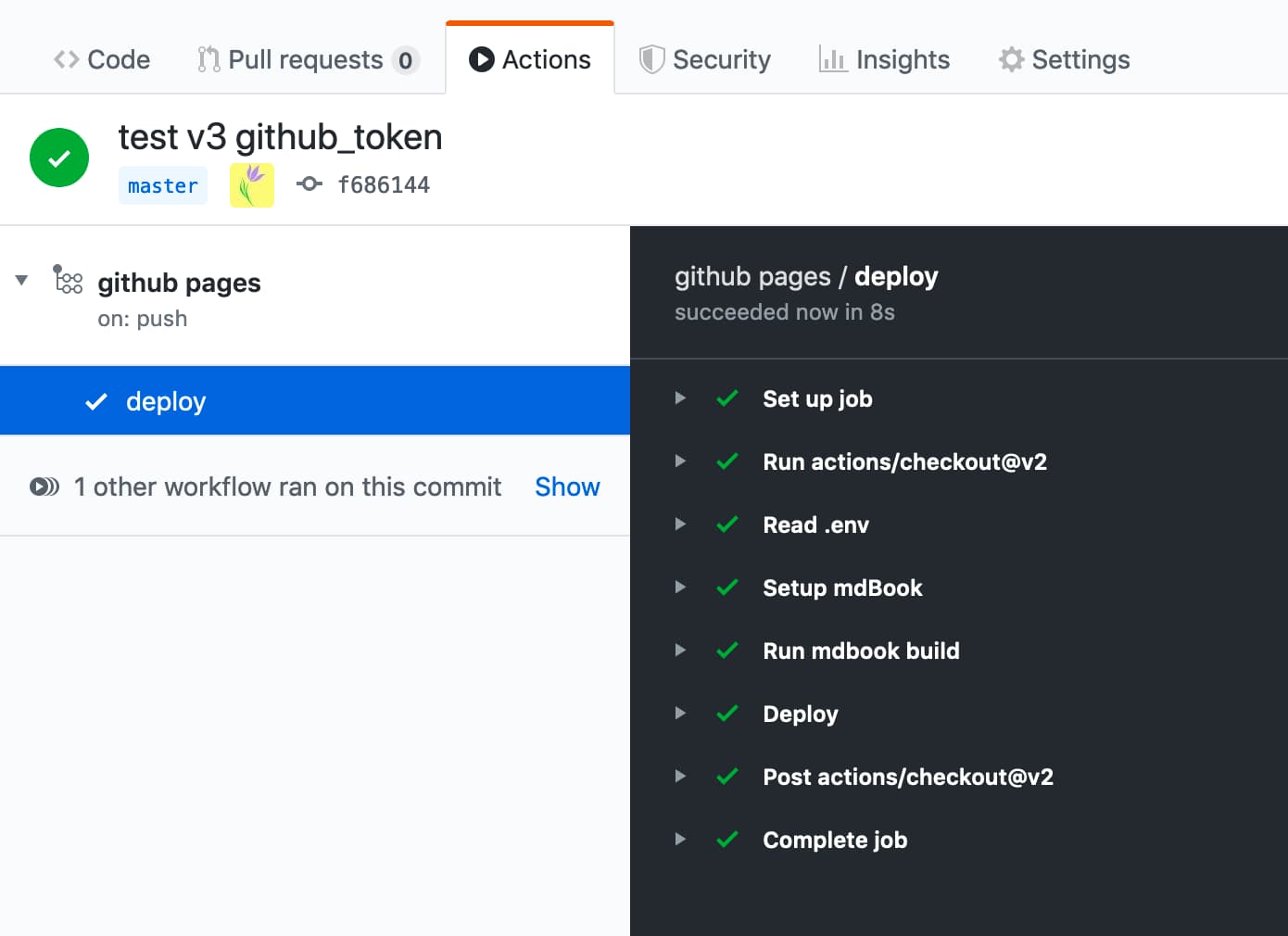 | 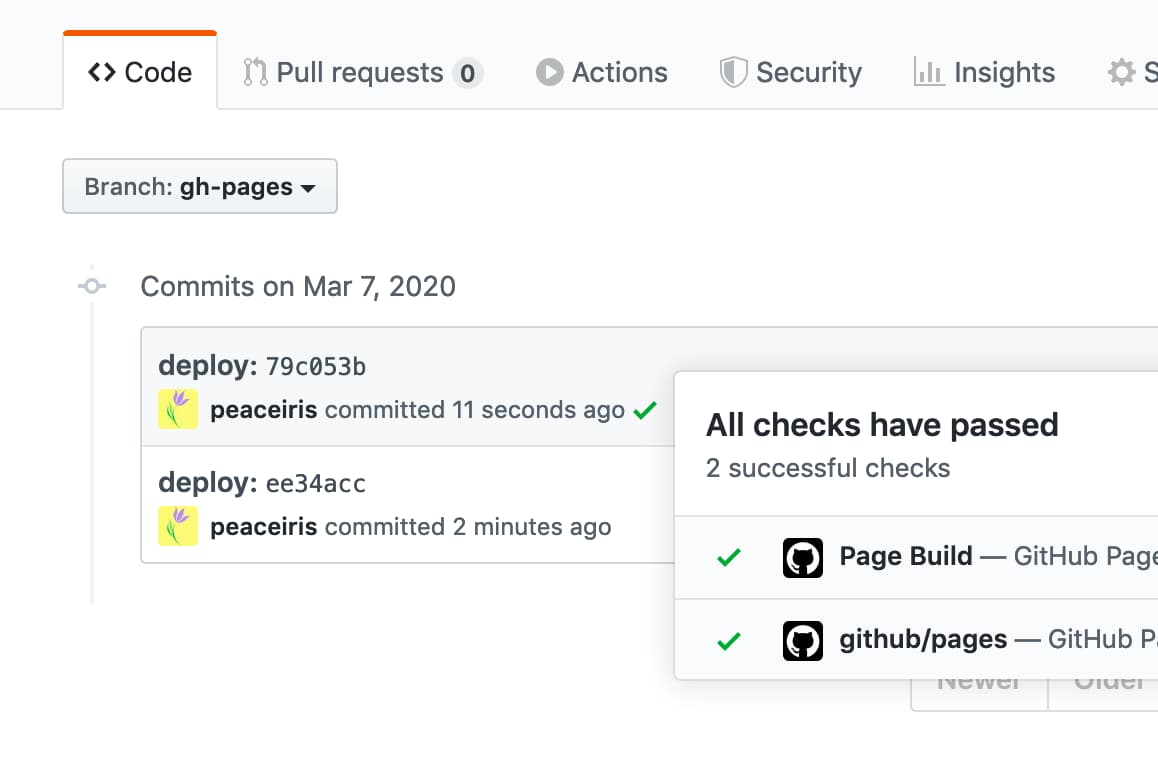 |
github_token 설정합니다 이 옵션은 개인 액세스 토큰이 아닌 GITHUB_TOKEN 용입니다.
GitHub Actions Runner는 워크 플로에서 사용할 GITHUB_TOKEN 비밀을 자동으로 생성합니다. GITHUB_TOKEN 사용하여 워크 플로 실행에서 인증 할 수 있습니다.
- name : Deploy
  uses : peaceiris/actions-gh-pages@v4
  with :
    github_token : ${{ secrets.GITHUB_TOKEN }}
    publish_dir : ./public
GITHUB_TOKEN 에 대한 자세한 내용 : 자동 토큰 인증 -Github 문서
deploy_key 설정합니다 ssh 배포 키 생성을 읽고 SSH 배포 키를 만들고 다음과 같은 deploy_key 옵션을 설정하십시오.
- name : Deploy
  uses : peaceiris/actions-gh-pages@v4
  with :
    deploy_key : ${{ secrets.ACTIONS_DEPLOY_KEY }}
publish_dir : ./publicpersonal_token 설정하십시오 개인 액세스 토큰 ( repo )을 생성하고 PERSONAL_TOKEN 과 같이 비밀에 추가하면 ACTIONS_DEPLOY_KEY 뿐만 아니라 작동합니다.
- name : Deploy
  uses : peaceiris/actions-gh-pages@v4
  with :
    personal_token : ${{ secrets.PERSONAL_TOKEN }}
publish_dir : ./publicpublish_branch 설정하십시오 GitHub 페이지 지점으로 사용할 지점 이름을 설정하십시오. 기본값은 gh-pages 입니다.
- name : Deploy
  uses : peaceiris/actions-gh-pages@v4
  with :
    github_token : ${{ secrets.GITHUB_TOKEN }}
publish_branch : your-branch # default: gh-pagespublish_dir GitHub 페이지에 배포 할 소스 디렉토리. 기본값은 public 됩니다. 이 DIR의 내용 만 기본적으로 Github Pages Branch, gh-pages 로 푸시됩니다.
- name : Deploy
  uses : peaceiris/actions-gh-pages@v4
  with :
    github_token : ${{ secrets.GITHUB_TOKEN }}
publish_dir : ./out # default: publicdestination_dir 에 배포이 기능은 베타에 있습니다. 문제 #324에서 모든 피드백을 환영합니다
출판 지점의 대상 하위 디렉토리. 기본값이 비어 있습니다.
- name : Deploy
  uses : peaceiris/actions-gh-pages@v4
  with :
    github_token : ${{ secrets.GITHUB_TOKEN }}
destination_dir : subdirexclude_assets이 기능은 베타에 있습니다. 이슈 #163에서 모든 피드백을 환영합니다
게시 자산에서 제외 할 파일 또는 디렉토리를 설정하십시오. 기본값은 .github 입니다. 값은 쉼표로 분할해야합니다.
- name : Deploy
  uses : peaceiris/actions-gh-pages@v4
  with :
    github_token : ${{ secrets.GITHUB_TOKEN }}
    exclude_assets : ' .github,exclude-file1,exclude-file2 '
배포 자산에 .github 디렉토리를 포함시키기 위해 exclude_assets 비워 지도록 설정하십시오.
- name : Deploy
  uses : peaceiris/actions-gh-pages@v4
  with :
    deploy_key : ${{ secrets.ACTIONS_DEPLOY_KEY }}   # Recommended for this usage
    # personal_token: ${{ secrets.PERSONAL_TOKEN }} # An alternative
    # github_token: ${{ secrets.GITHUB_TOKEN }}     # This does not work for this usage
    exclude_assets : ' '
exclude_assets 옵션은 글로벌 패턴을 지원합니다.
- name : Deploy
  uses : peaceiris/actions-gh-pages@v4
  with :
    github_token : ${{ secrets.GITHUB_TOKEN }}
exclude_assets : ' .github,exclude-file.txt,exclude-dir/**.txt 'cname 추가합니다 CNAME 파일을 추가하기 위해 cname 옵션을 설정할 수 있습니다. 또는 CNAME 파일을 publish_dir 에 넣으십시오. (예 : public/CNAME )
CNAME 파일에 대한 자세한 내용은 공식 설명서를 읽으십시오 : GitHub 페이지 사이트의 사용자 정의 도메인 관리 -Github Docs
- name : Deploy
  uses : peaceiris/actions-gh-pages@v4
  with :
    github_token : ${{ secrets.GITHUB_TOKEN }}
    publish_dir : ./public
cname : github.comenable_jekyll GitHub 페이지가 정적 사이트 생성기 Jekyll로 사이트를 처리하려면 enable_jekyll true로 설정하십시오.
기본적 으로이 조치는 사이트를 Jekyll로 처리하지 않아야한다는 Github 페이지에 신호를 보냅니다. 게시 지점에 빈 .nojekyll 파일을 추가하여 수행됩니다. 해당 파일이 이미 존재하면이 조치는 아무것도하지 않습니다.
Jekyll을 우회하면 배포가 더 빨라지고 밑줄로 시작하는 파일 또는 디렉토리를 배포하는 경우 Jekyll이이를 특수 리소스로 간주하고 최종 사이트에 복사하지 않기 때문에 필요합니다. jekyll 기반 웹 사이트를 배포하고 Github 페이지가 Jekyll 프로세싱을 수행하도록하려면 enable_jekyll true로 설정하면됩니다.
- name : Deploy
  uses : peaceiris/actions-gh-pages@v4
  with :
    github_token : ${{ secrets.GITHUB_TOKEN }}
    publish_dir : ./public
    enable_jekyll : true
.nojekyll 에 대한 자세한 내용 : Github 페이지에서 Jekyll을 우회하는 것 - Github 블로그
allow_empty_commit 기본적으로 파일이 변경되지 않으면 커밋이 생성되지 않습니다. 빈 커밋을 허용하려면 옵션 매개 변수 allow_empty_commit true 로 설정하십시오.
예를 들어:
- name : Deploy
  uses : peaceiris/actions-gh-pages@v4
  with :
    github_token : ${{ secrets.GITHUB_TOKEN }}
    publish_dir : ./public
allow_empty_commit : truekeep_files 기본적으로 게시 브랜치의 기존 파일 (또는 주어진 경우 destination_dir 에서만)이 제거됩니다. 조치가 새 파일을 추가 할 수 있지만 기존 파일을 그대로 두지 않으려면 옵션 매개 변수 keep_files true 로 설정하십시오.
정적 사이트 생성기를 사용하는 사용자는 대부분의 경우이 옵션이 필요하지 않습니다. 이 플래그를 활성화하기 전에 프로젝트 구조 및 빌딩 스크립트를 재고하거나 정적 사이트 생성기의 내장 기능을 사용하십시오.
예를 들어:
- name : Deploy
  uses : peaceiris/actions-gh-pages@v4
  with :
    github_token : ${{ secrets.GITHUB_TOKEN }}
    publish_dir : ./public
    keep_files : true
V3의 경우이 옵션은 Force_orphan 옵션으로 작업하는 데 도움이되지 않습니다. 다음 주요 릴리스 (버전 4)가이를 지원합니다. 문제 #455를 참조하십시오
external_repository _repository에 배포됩니다 기본적으로 파일은이 작업을 실행하는 저장소에 게시됩니다. github의 다른 저장소에 게시하려면 환경 변수 external_repository <username>/<external-repository> 으로 설정하십시오.
예를 들어:
- name : Deploy
  uses : peaceiris/actions-gh-pages@v4
  with :
    deploy_key : ${{ secrets.ACTIONS_DEPLOY_KEY }}
    external_repository : username/external-repository
    publish_branch : your-branch  # default: gh-pages
    publish_dir : ./public
deploy_key 또는 personal_token 사용할 수 있습니다. deploy_key 사용하는 경우 개인 키를이 작업을 포함하는 저장소로 설정하고 공개 키를 외부 저장소로 설정하십시오.
GITHUB_TOKEN 외부 리포지토리에 액세스 할 수있는 권한이 없습니다. 개인 액세스 토큰을 만들어 personal_token: ${{ secrets.PERSONAL_TOKEN }} 과 같은 personal_token 으로 설정하십시오.
유스 케이스 :
GitHub 프리 플랜 계정은 개인 저장소에서 github 페이지를 사용할 수 없습니다. 소스 컨텐츠를 비공개로 만들고 GitHub 페이지로 배포하려면이 옵션을 사용하여 개인 저장소에서 공개 저장소로 사이트를 배포 할 수 있습니다.
peaceiris/homepage : external_repository: peaceiris/peaceiris.github.iopeaceiris/peaceiris.github.io : github 페이지를 사용한 공개 저장소force_orphan force_orphan: true 옵션을 설정할 수 있습니다. 이를 통해 최신 커밋만으로 게시 지점을 만들 수 있습니다.
- name : Deploy
  uses : peaceiris/actions-gh-pages@v4
  with :
    github_token : ${{ secrets.GITHUB_TOKEN }}
    publish_dir : ./public
force_orphan : true 사용자 정의 git config user.name 및 git config user.email 설정하십시오. 커밋은 항상 같은 사용자로 만들어집니다.
- name : Deploy
  uses : peaceiris/actions-gh-pages@v4
  with :
    github_token : ${{ secrets.GITHUB_TOKEN }}
    publish_dir : ./public
    user_name : ' github-actions[bot] '
user_email : ' github-actions[bot]@users.noreply.github.com ' 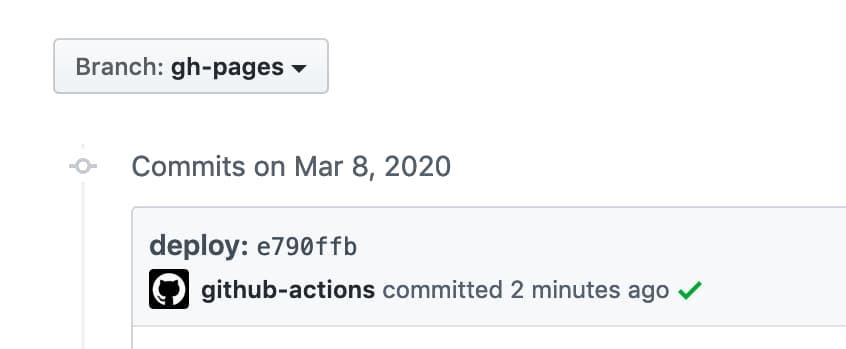
사용자 정의 커밋 메시지를 설정하십시오. 메시지 docs: Update some post 메시지 docs: Update some post ${GITHUB_SHA} .
- name : Deploy
  uses : peaceiris/actions-gh-pages@v4
  with :
    github_token : ${{ secrets.GITHUB_TOKEN }}
    publish_dir : ./public
commit_message : ${{ github.event.head_commit.message }} 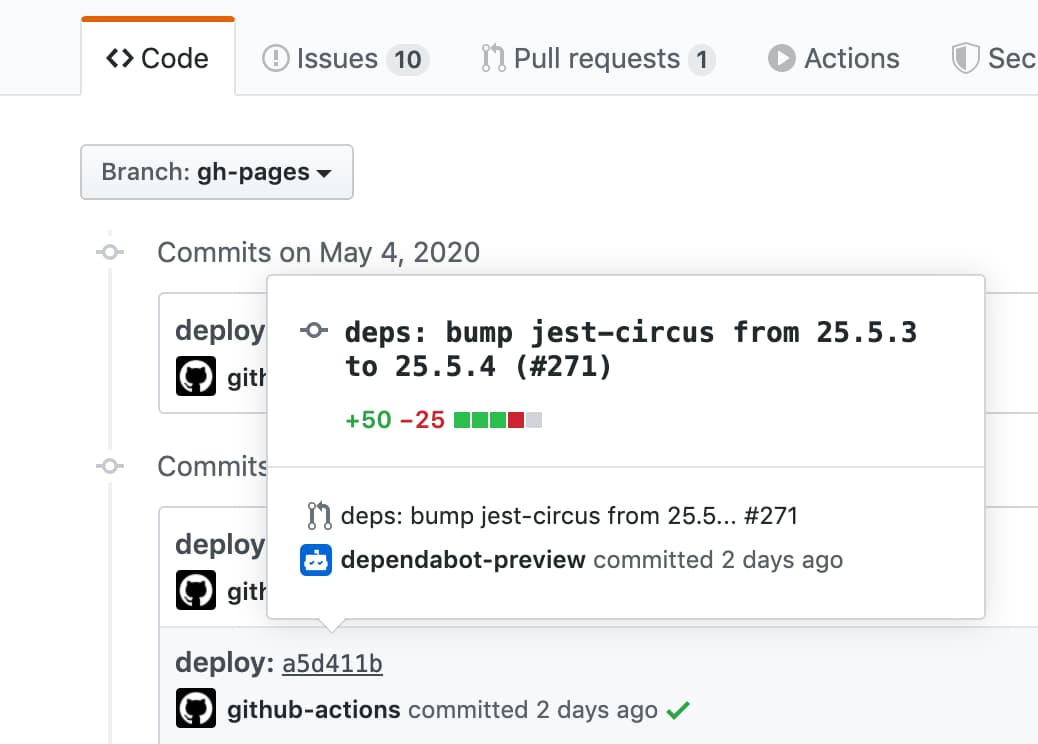
트리거 된 커밋 해시없이 전체 사용자 정의 커밋 메시지를 설정하려면 commit_message 옵션 대신 full_commit_message 옵션을 사용하십시오.
- name : Deploy
  uses : peaceiris/actions-gh-pages@v4
  with :
    github_token : ${{ secrets.GITHUB_TOKEN }}
    publish_dir : ./public
full_commit_message : ${{ github.event.head_commit.message }}예제 워크 플로가 있습니다.
 name : GitHub Pages

on :
  push :
    branches :
      - main
    tags :
      - ' v*.*.* '

jobs :
  deploy :
    runs-on : ubuntu-22.04
    permissions :
      contents : write
    concurrency :
      group : ${{ github.workflow }}-${{ github.ref }}
    steps :
      - uses : actions/checkout@v3

      - name : Some build

      - name : Prepare tag
        id : prepare_tag
        if : startsWith(github.ref, 'refs/tags/')
        run : |
          echo "DEPLOY_TAG_NAME=deploy-${TAG_NAME}" >> "${GITHUB_OUTPUT}"

      - name : Deploy
        uses : peaceiris/actions-gh-pages@v4
        with :
          github_token : ${{ secrets.GITHUB_TOKEN }}
          publish_dir : ./public
          tag_name : ${{ steps.prepare_tag.outputs.DEPLOY_TAG_NAME }}
          tag_message : ' Deployment ${{ github.ref_name }} '
로컬 기계의 명령.
$ # On a main branch
$ git tag -a " v1.2.3 " -m " Release v1.2.3 "
$ git push origin " v1.2.3 "

$ # After deployment
$ git fetch origin
$ git tag
deploy-v1.2.3  # Tag on the gh-pages branch
v1.2.3 # Tag on the main branch다음 명령으로 배포 키를 생성하십시오.
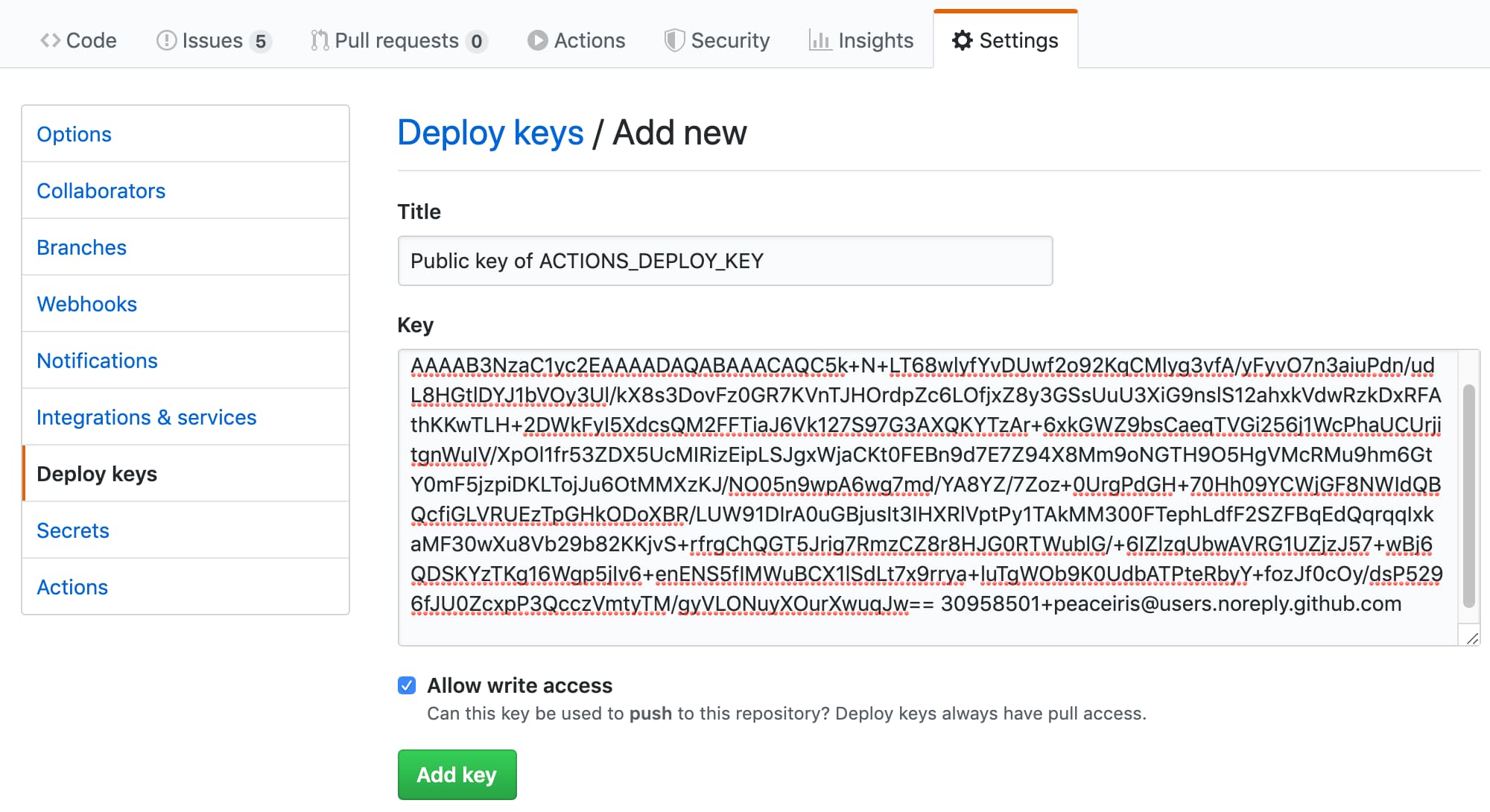
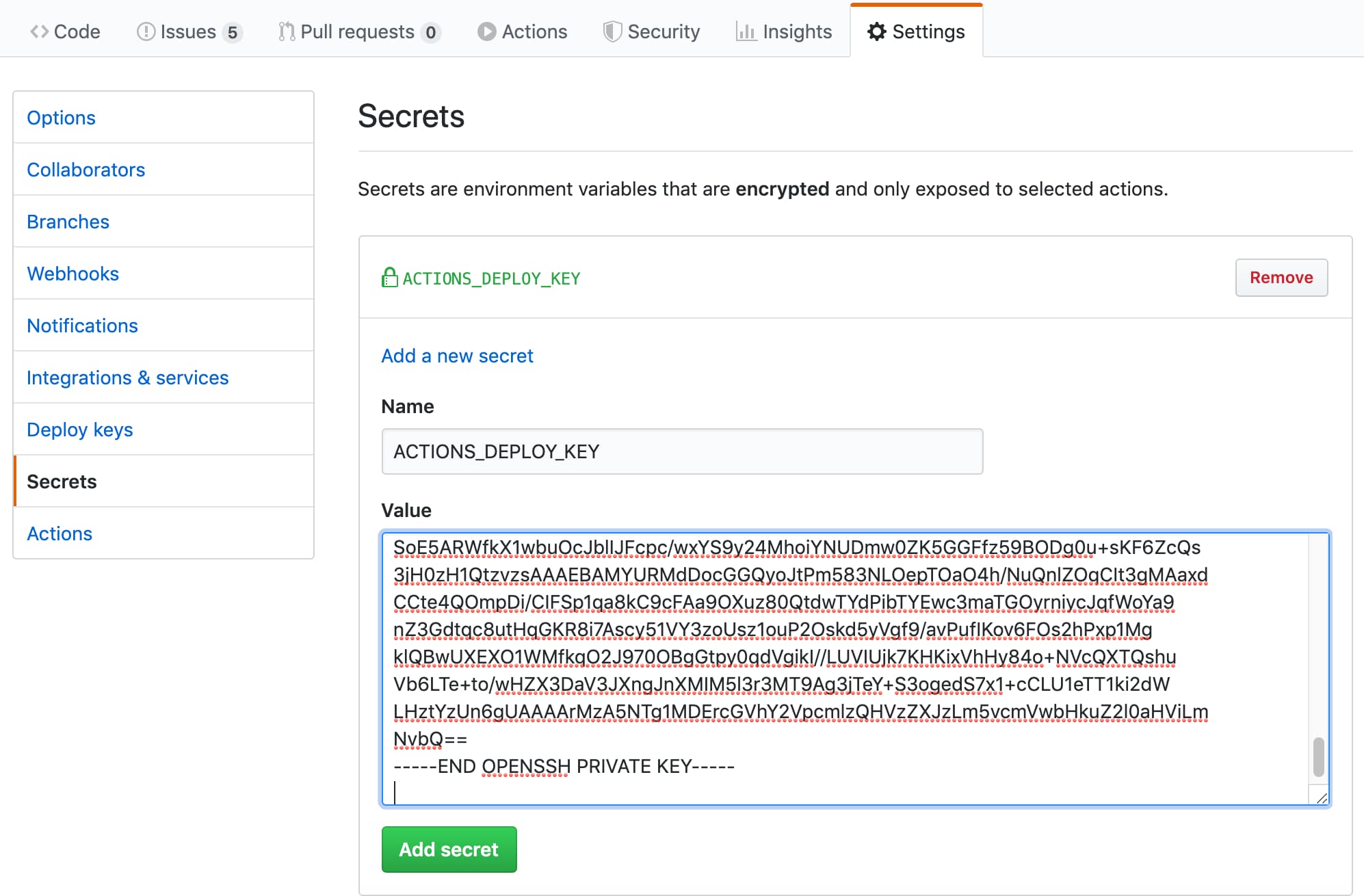
ssh-keygen -t rsa -b 4096 -C " $( git config user.email ) " -f gh-pages -N " "2 개의 파일이 나타납니다.
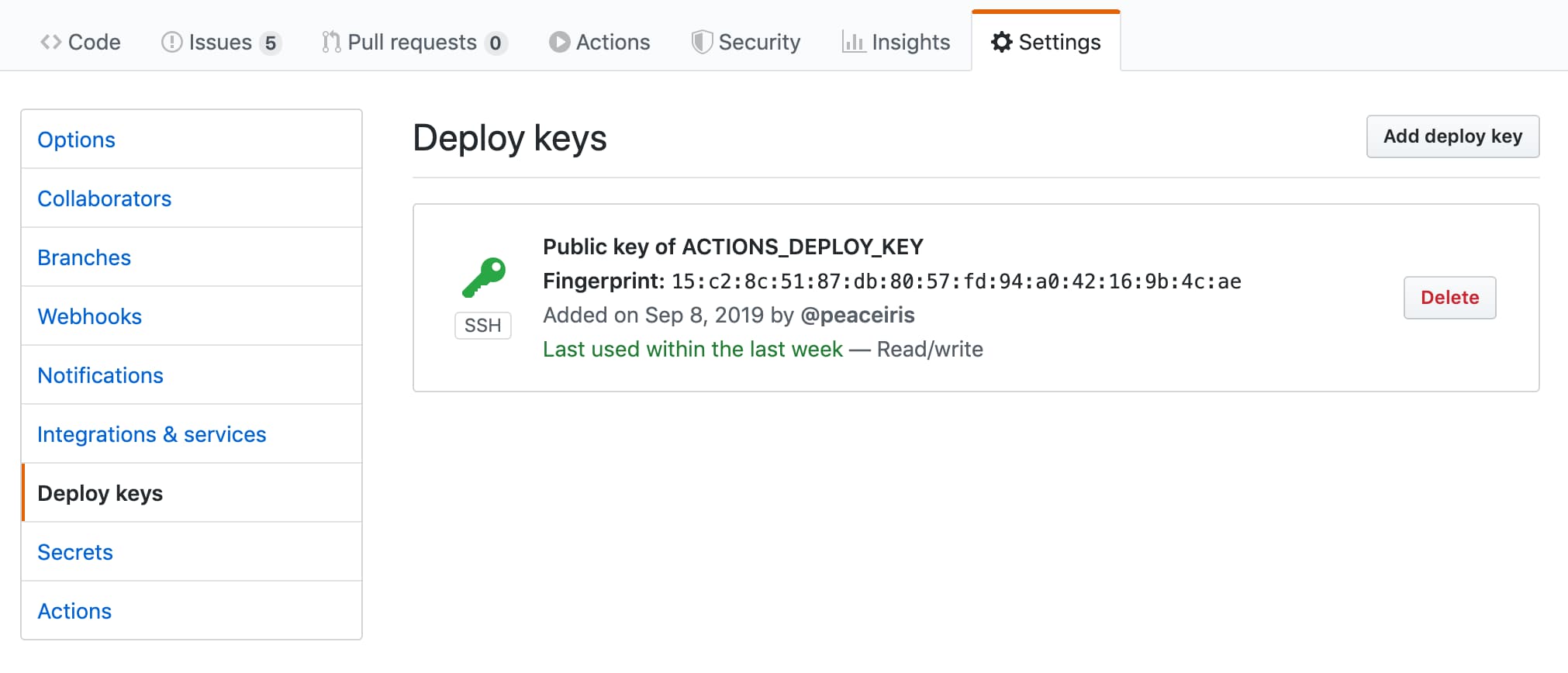
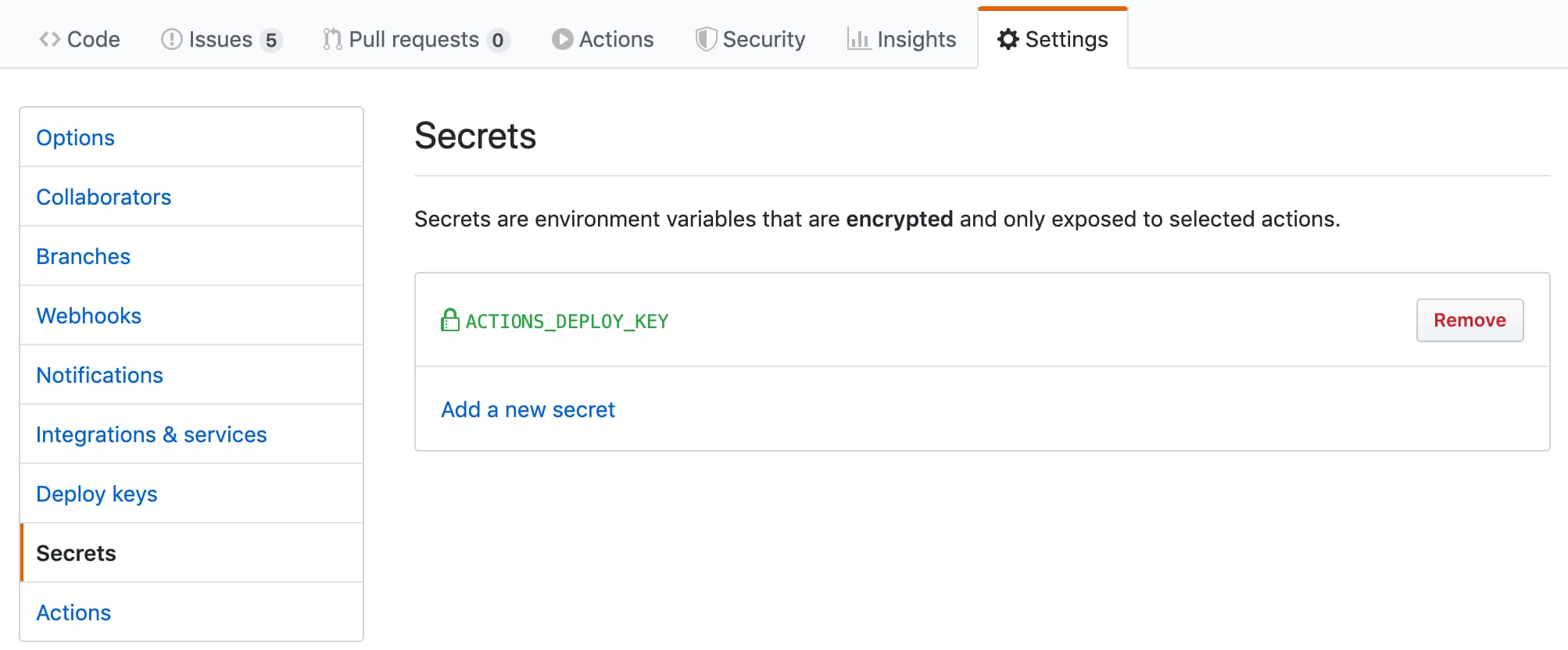
gh-pages.pub 는 공개 키입니다gh-pages 는 개인 키입니다다음으로 저장소 설정 으로 이동하십시오
ACTIONS_DEPLOY_KEY 로 추가하십시오.| 공개 키를 추가하십시오 | 성공 |
|---|---|
 |  |
| 개인 키를 추가하십시오 | 성공 |
|---|---|
 |  |
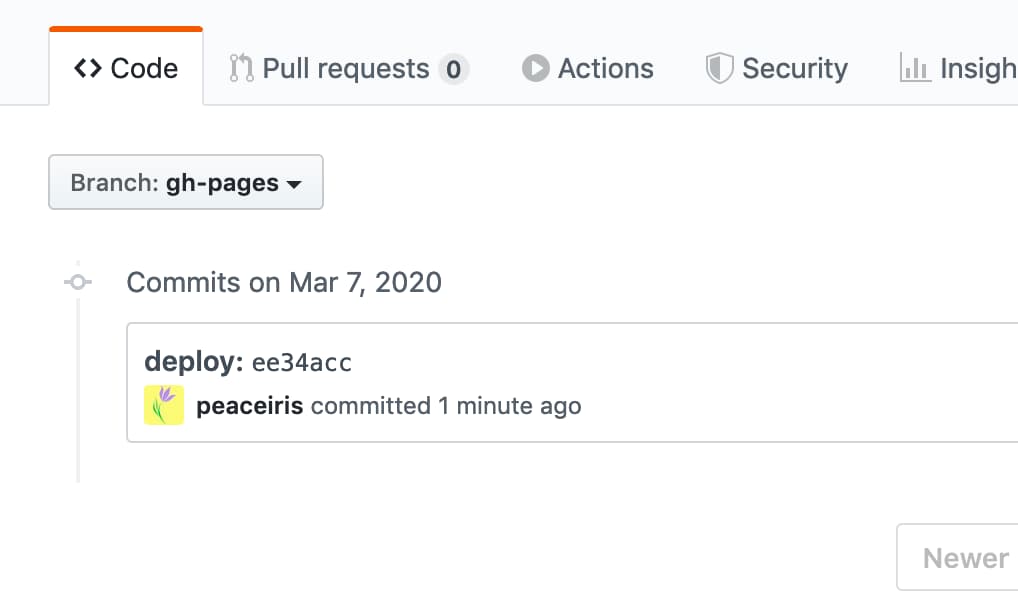
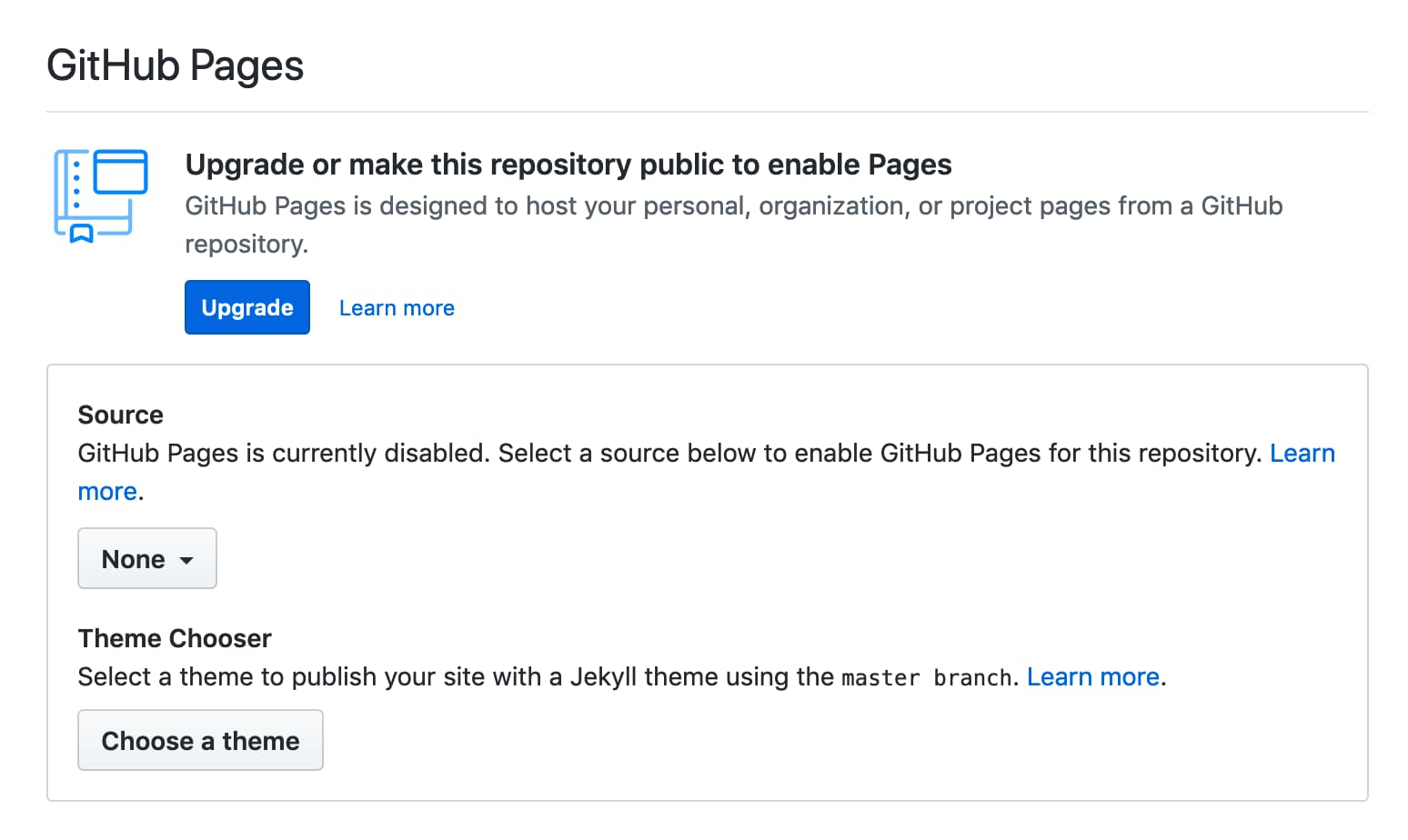
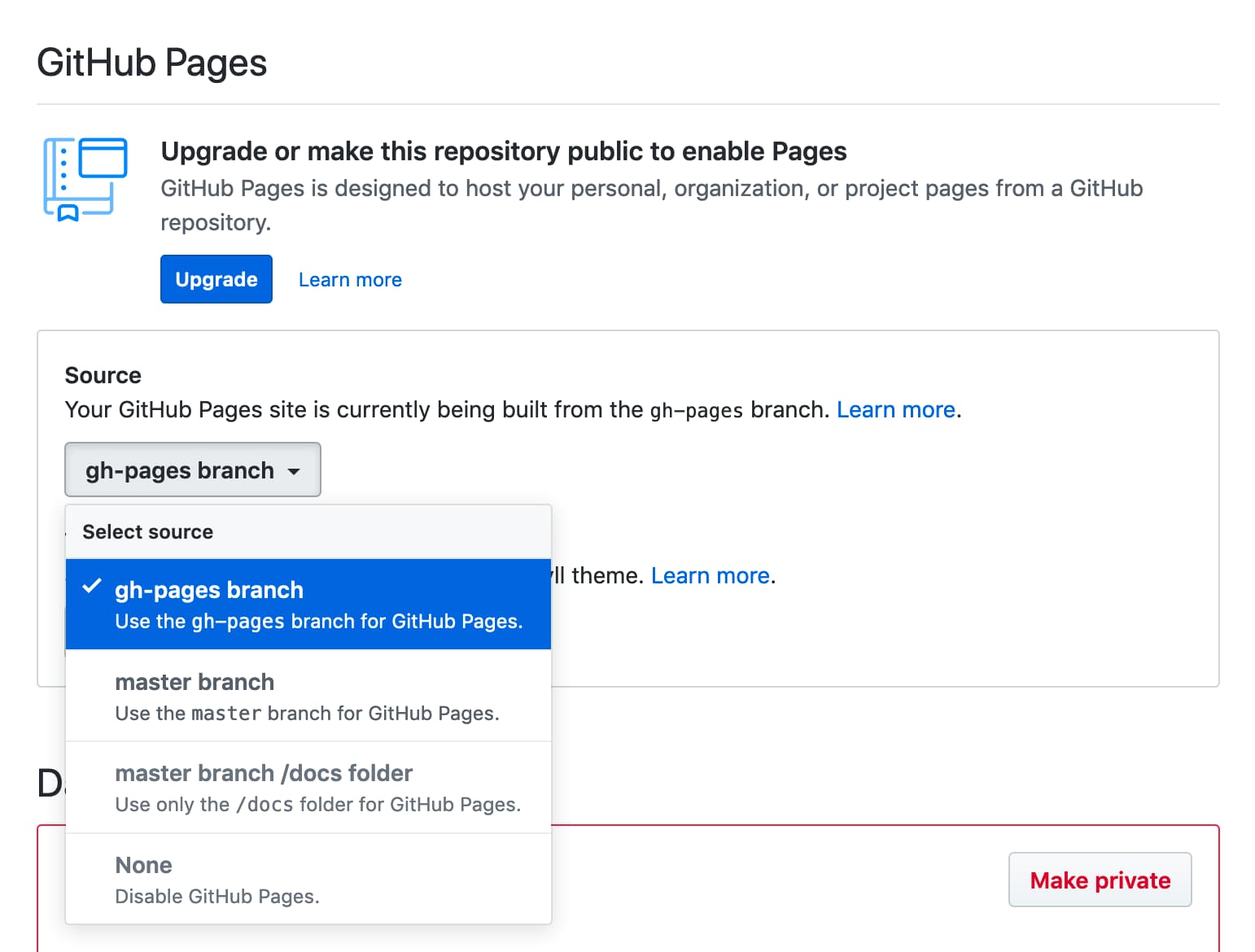
GITHUB_TOKEN 과 함께 첫 번째 배포 GITHUB_TOKEN 첫 번째 배포에 대한 제한이 있으므로 저장소 설정 탭에서 GitHub 페이지 브랜치를 선택해야합니다. 그 후 다음 그림과 같이 두 번째 배포를 수행하십시오.
| 첫 번째 배포에 실패했습니다 | 설정 탭으로 이동하십시오 |
|---|---|
 |  |
| 지점을 선택하십시오 | 다시 배포하고 성공하십시오 |
|---|---|
 | |
작업이 다음 오류로 커밋 또는 태그를 푸시하지 않으면 다음과 같습니다.
/usr/bin/git push origin gh-pages
remote: Write access to repository not granted.
fatal: unable to access 'https://github.com/username/repository.git/': The requested URL returned error: 403
Error: Action failed with "The process '/usr/bin/git' failed with exit code 128"
Workflow/Job의 permissions.contents 에 쓰기 권한을 추가하십시오.
 permissions :
  contents : write
또는 읽기 및 쓰기 권한을 선택하여 기본 GITHUB_TOKEN 권한을 구성 할 수 있습니다.
이 작업의 최신 릴리스를 안정적인 CI/CD에 사용하는 것이 좋습니다. 이 작업의 최신 릴리스를 확인하려면이 저장소 (릴리스 만)를보고 유용합니다.
지속적인 업데이트를 위해 Github 기본 의존을 사용할 수 있습니다. 다음은 봇의 예제 구성입니다. 구성 파일은 .github/dependabot.yml 에 있습니다.
 version : 2
updates :
- package-ecosystem : " github-actions "
  directory : " / "
  schedule :
    interval : " daily "
  labels :
  - " CI/CD "
  commit-message :
    prefix : ci
의존하는 것에 대한 자세한 내용은 공식 문서를 참조하십시오 : 종속성을 자동으로 업데이트 유지 -Github Docs
정기적으로 배포하려면 on.schedule 워크 플로 트리거를 설정할 수 있습니다. 예정된 이벤트를 참조하십시오 | 워크 플로우 트리거 이벤트 -Github Docs
수동으로 배포하려면 on.workflow_dispatch 워크 플로 트리거를 설정할 수 있습니다. 수동 이벤트 workflow_dispatch |를 참조하십시오 워크 플로우 트리거 이벤트 -Github Docs
 name : GitHub Pages

on :
  push :
    branches :
      - main
  schedule :
    - cron : " 22 22 * * * "
  workflow_dispatch :

jobs :
  deploy :
    runs-on : ubuntu-22.04
    permissions :
      contents : write
    concurrency :
      group : ${{ github.workflow }}-${{ github.ref }}
    steps :
...cf. 지원 : Hashref Disabled/Broken vs Github Actions 보안 모범 사례에서 실행? · 문제 #712 · Peaceiris/Action-GH-Pages
우리의 프로젝트는 릴리스를 만들 때만 빌드 자산을 구축하고 제공합니다. 이는 사용자가 특정 지점 (메인) 으로이 작업을 실행하는 것을 방지하기위한 것입니다. 예를 들어, 메인 브랜치에서 빌드 자산을 유지하고 사용자 가이 작업을 다음과 같이 사용하는 경우 변경 사항을 해제하는 것을 포함한 주요 릴리스는 사용자의 CI 워크 플로를 조용히 중단합니다.
- uses : peaceiris/actions-gh-pages@main # Bad example!
  with :
    github_token : ${{ secrets.GITHUB_TOKEN }}
    publish_dir : ./public
이 프로젝트에서는 주요 태그 (예 : V3)에 깨진 변경이 포함되지 않도록 보장됩니다. 그러나 워크 플로의 안정성을 위해 태그 또는 커밋 해시를 사용하는 것이 좋습니다.
- uses : peaceiris/[email protected] # tag: Better
  with :
    github_token : ${{ secrets.GITHUB_TOKEN }}
    publish_dir : ./public
- uses : peaceiris/actions-gh-pages@373f7f263a76c20808c831209c920827a82a2847 # commit hash of v3.9.3: Best!
with :
github_token : ${{ secrets.GITHUB_TOKEN }}
publish_dir : ./public릴리스 자산을 확인하기 위해 다음 명령을 사용할 수 있습니다.
git clone https://github.com/peaceiris/actions-gh-pages.git
cd ./actions-gh-pages
git checkout v3.9.3
nvm install
nvm use
npm i -g npm
npm ci
npm run build
git diff ./lib/index.js # We will get zero exit code Hexo, Vuepress, React-Static, Gridsome, Create-react-App 등. 워크 플로우를 밀기 전에 출력 디렉토리의 위치를 확인하십시오. EG create-react-app publish_dir ./build 로 설정되어야합니다
전제 : 종속성은 package.json 및 package-lock.json 에 의해 관리됩니다
 name : GitHub Pages

on :
  push :
    branches :
      - main
  pull_request :

jobs :
  deploy :
    runs-on : ubuntu-22.04
    permissions :
      contents : write
    concurrency :
      group : ${{ github.workflow }}-${{ github.ref }}
    steps :
      - uses : actions/checkout@v3

      - name : Setup Node
        uses : actions/setup-node@v3
        with :
          node-version : ' 14 '

      - name : Cache dependencies
        uses : actions/cache@v3
        with :
          path : ~/.npm
          key : ${{ runner.os }}-node-${{ hashFiles('**/package-lock.json') }}
          restore-keys : |
            ${{ runner.os }}-node-

      - run : npm ci
      - run : npm run build

      - name : Deploy
        uses : peaceiris/actions-gh-pages@v4
        if : github.ref == 'refs/heads/main'
        with :
          github_token : ${{ secrets.GITHUB_TOKEN }}
publish_dir : ./publicGatsby-Starter-Blog와 함께 Gatsby (Gatsby.js) 프로젝트의 예
 name : GitHub Pages

on :
  push :
    branches :
      - main
  pull_request :

jobs :
  deploy :
    runs-on : ubuntu-22.04
    permissions :
      contents : write
    concurrency :
      group : ${{ github.workflow }}-${{ github.ref }}
    steps :
      - uses : actions/checkout@v3

      - name : Setup Node
        uses : actions/setup-node@v3
        with :
          node-version : ' 14 '

      - name : Cache dependencies
        uses : actions/cache@v3
        with :
          path : ~/.npm
          key : ${{ runner.os }}-node-${{ hashFiles('**/package-lock.json') }}
          restore-keys : |
            ${{ runner.os }}-node-

      - run : npm ci
      - run : npm run format
      - run : npm run test
      - run : npm run build

      - name : Deploy
        uses : peaceiris/actions-gh-pages@v4
        if : github.ref == 'refs/heads/main'
        with :
          github_token : ${{ secrets.GITHUB_TOKEN }}
publish_dir : ./publiccreate-next-app을 사용한 next.js (react.js) 프로젝트의 예입니다
 name : GitHub Pages

on :
  push :
    branches :
      - main
  pull_request :

jobs :
  deploy :
    runs-on : ubuntu-22.04
    permissions :
      contents : write
    concurrency :
      group : ${{ github.workflow }}-${{ github.ref }}
    steps :
      - uses : actions/checkout@v3

      - name : Setup Node
        uses : actions/setup-node@v3
        with :
          node-version : ' 14 '

      - name : Get yarn cache
        id : yarn-cache
        run : echo "YARN_CACHE_DIR=$(yarn cache dir)" >> "${GITHUB_OUTPUT}"

      - name : Cache dependencies
        uses : actions/cache@v3
        with :
          path : ${{ steps.yarn-cache.outputs.YARN_CACHE_DIR }}
          key : ${{ runner.os }}-yarn-${{ hashFiles('**/yarn.lock') }}
          restore-keys : |
            ${{ runner.os }}-yarn-

      - run : yarn install --frozen-lockfile
      - run : yarn build
      - run : yarn export

      - name : Deploy
        uses : peaceiris/actions-gh-pages@v4
        if : github.ref == 'refs/heads/main'
        with :
          github_token : ${{ secrets.GITHUB_TOKEN }}
publish_dir : ./outcreate-nuxt-app을 사용한 nuxt.js (vue.js) 프로젝트의 예입니다
 name : GitHub Pages

on :
  push :
    branches :
      - main
  pull_request :

jobs :
  deploy :
    runs-on : ubuntu-22.04
    permissions :
      contents : write
    concurrency :
      group : ${{ github.workflow }}-${{ github.ref }}
    steps :
      - uses : actions/checkout@v3

      - name : Setup Node
        uses : actions/setup-node@v3
        with :
          node-version : ' 14 '

      - name : Cache dependencies
        uses : actions/cache@v3
        with :
          path : ~/.npm
          key : ${{ runner.os }}-node-${{ hashFiles('**/package-lock.json') }}
          restore-keys : |
            ${{ runner.os }}-node-

      - run : npm ci
      - run : npm test
      - run : npm run generate

      - name : deploy
        uses : peaceiris/actions-gh-pages@v4
        if : github.ref == 'refs/heads/main'
        with :
          github_token : ${{ secrets.GITHUB_TOKEN }}
publish_dir : ./distDocusaurus의 예제 워크 플로.
npx @docusaurus/init@next init website classic 새로운 docusaurus 프로젝트를 만드는 데 유용합니다.
 # .github/workflows/deploy.yml

name : GitHub Pages

on :
  push :
    branches :
      - main
    paths :
      - ' .github/workflows/deploy.yml '
      - ' website/** '
  pull_request :

jobs :
  deploy :
    runs-on : ubuntu-22.04
    permissions :
      contents : write
    concurrency :
      group : ${{ github.workflow }}-${{ github.ref }}
    defaults :
      run :
        working-directory : website
    steps :
      - uses : actions/checkout@v3

      - name : Setup Node
        uses : actions/setup-node@v3
        with :
          node-version : ' 14 '

      - name : Get yarn cache
        id : yarn-cache
        run : echo "YARN_CACHE_DIR=$(yarn cache dir)" >> "${GITHUB_OUTPUT}"

      - name : Cache dependencies
        uses : actions/cache@v3
        with :
          path : ${{ steps.yarn-cache.outputs.YARN_CACHE_DIR }}
          key : ${{ runner.os }}-website-${{ hashFiles('**/yarn.lock') }}
          restore-keys : |
            ${{ runner.os }}-website-

      - run : yarn install --frozen-lockfile
      - run : yarn build

      - name : Deploy
        uses : peaceiris/actions-gh-pages@v4
        if : github.ref == 'refs/heads/main'
        with :
          github_token : ${{ secrets.GITHUB_TOKEN }}
publish_dir : ./website/build펠리컨, MKDocs, 스핑크스 등.
전제 : 종속성은 requirements.txt 에 따라 관리됩니다 .txt
 name : GitHub Pages

on :
  push :
    branches :
      - main
  pull_request :

jobs :
  deploy :
    runs-on : ubuntu-22.04
    permissions :
      contents : write
    concurrency :
      group : ${{ github.workflow }}-${{ github.ref }}
    steps :
      - uses : actions/checkout@v3

      - name : Setup Python
        uses : actions/setup-python@v3
        with :
          python-version : ' 3.8 '

      - name : Upgrade pip
        run : |
          # install pip=>20.1 to use "pip cache dir"
          python3 -m pip install --upgrade pip

      - name : Get pip cache dir
        id : pip-cache
        run : echo "dir=$(pip cache dir)" >> $GITHUB_OUTPUT

      - name : Cache dependencies
        uses : actions/cache@v3
        with :
          path : ${{ steps.pip-cache.outputs.dir }}
          key : ${{ runner.os }}-pip-${{ hashFiles('**/requirements.txt') }}
          restore-keys : |
            ${{ runner.os }}-pip-

      - name : Install dependencies
        run : python3 -m pip install -r ./requirements.txt

      - run : mkdocs build

      - name : Deploy
        uses : peaceiris/actions-gh-pages@v4
        if : github.ref == 'refs/heads/main'
        with :
          github_token : ${{ secrets.GITHUB_TOKEN }}
publish_dir : ./siteGithub 작업 워크 플로우를 예로 들어 Rust-Lang/MDBook 사이트를 GitHub 페이지에 배포합니다.
 name : GitHub Pages

on :
  push :
    branches :
      - main
  pull_request :

jobs :
  deploy :
    runs-on : ubuntu-22.04
    permissions :
      contents : write
    concurrency :
      group : ${{ github.workflow }}-${{ github.ref }}
    steps :
      - uses : actions/checkout@v3

      - name : Setup mdBook
        uses : peaceiris/actions-mdbook@v1
        with :
          mdbook-version : ' 0.4.8 '
          # mdbook-version: 'latest'

      - run : mdbook build

      - name : Deploy
        uses : peaceiris/actions-gh-pages@v4
        if : github.ref == 'refs/heads/main'
        with :
          github_token : ${{ secrets.GITHUB_TOKEN }}
          publish_dir : ./book
힌트 : Rustdocs를 게시하고 싶을 수도 있습니다. MD 문서에서 상대적 링크를 사용하고 mdbook 에서 확인하십시오. 그런 다음 DOC에 따르면, 당신은 mdbook build 전에 ./target/doc/ ./book/src dir에 넣을 수 있습니다. 그러면 ./book/html/ 와 github 페이지에서 끝납니다.
플러터 웹 프로젝트의 예제 워크 플로.
 name : GitHub Pages

on :
  push :
    branches :
      - main
  pull_request :

jobs :
  deploy :
    runs-on : ubuntu-22.04
    permissions :
      contents : write
    concurrency :
      group : ${{ github.workflow }}-${{ github.ref }}
    steps :
      - uses : actions/checkout@v3

      - name : Setup Flutter
        run : |
          git clone https://github.com/flutter/flutter.git --depth 1 -b beta _flutter
          echo "${GITHUB_WORKSPACE}/_flutter/bin" >> ${GITHUB_PATH}

      - name : Install
        run : |
          flutter config --enable-web
          flutter pub get

      - name : Build
        run : flutter build web

      - name : Deploy
        uses : peaceiris/actions-gh-pages@v4
        if : github.ref == 'refs/heads/main'
        with :
          github_token : ${{ secrets.GITHUB_TOKEN }}
publish_dir : ./build/webElm의 예제 워크 플로.
 name : GitHub Pages

on :
  push :
    branches :
      - main
  pull_request :

jobs :
  deploy :
    runs-on : ubuntu-22.04
    permissions :
      contents : write
    concurrency :
      group : ${{ github.workflow }}-${{ github.ref }}
    steps :
      - uses : actions/checkout@v3

      - name : Setup Node
        uses : actions/setup-node@v3
        with :
          node-version : ' 14 '

      - name : Setup Elm
        run : npm install elm --global

      - name : Make
        run : elm make --optimize src/Main.elm

      - name : Move files
        run : |
          mkdir ./public
          mv ./index.html ./public/
        # If you have non-minimal setup with some assets and separate html/js files,
        # provide --output=<output-file> option for `elm make` and remove this step

      - name : Deploy
        uses : peaceiris/actions-gh-pages@v4
        if : github.ref == 'refs/heads/main'
        with :
          github_token : ${{ secrets.GITHUB_TOKEN }}
publish_dir : ./publicJohnsundell/Publish의 예제 워크 플로.
 name : GitHub Pages

on :
  push :
    branches :
      - main
  pull_request :

jobs :
  deploy :
    runs-on : macos-latest
    concurrency :
      group : ${{ github.workflow }}-${{ github.ref }}
    steps :
      - uses : actions/checkout@v3

      - uses : actions/cache@v3
        with :
          path : |
            ~/Publish_build
            .build
          key : ${{ runner.os }}-spm-${{ hashFiles('**/Package.resolved') }}
          restore-keys : |
            ${{ runner.os }}-spm-

      - name : Setup JohnSundell/Publish
        run : |
          cd ${HOME}
          export PUBLISH_VERSION="0.7.0"
          git clone https://github.com/JohnSundell/Publish.git
          cd ./Publish && git checkout ${PUBLISH_VERSION}
          mv ~/Publish_build .build || true
          swift build -c release
          cp -r .build ~/Publish_build || true
          echo "${HOME}/Publish/.build/release" >> ${GITHUB_PATH}

      - run : publish-cli generate

      - name : Deploy to GitHub Pages
        uses : peaceiris/actions-gh-pages@v4
        if : github.ref == 'refs/heads/main'
        with :
          github_token : ${{ secrets.GITHUB_TOKEN }}
          publish_dir : ./Output






