Cod WinRT Notification Manager
1.0.0

Windows 10/11中高級通知的通知管理器
該庫是Codrut的Delphi Windows運行時的一部分,所有單元都可以在此處找到。
注意力!該應用必須在tappRegistration中註冊,以備限定驅散,請查看COD Windows運行時文檔。
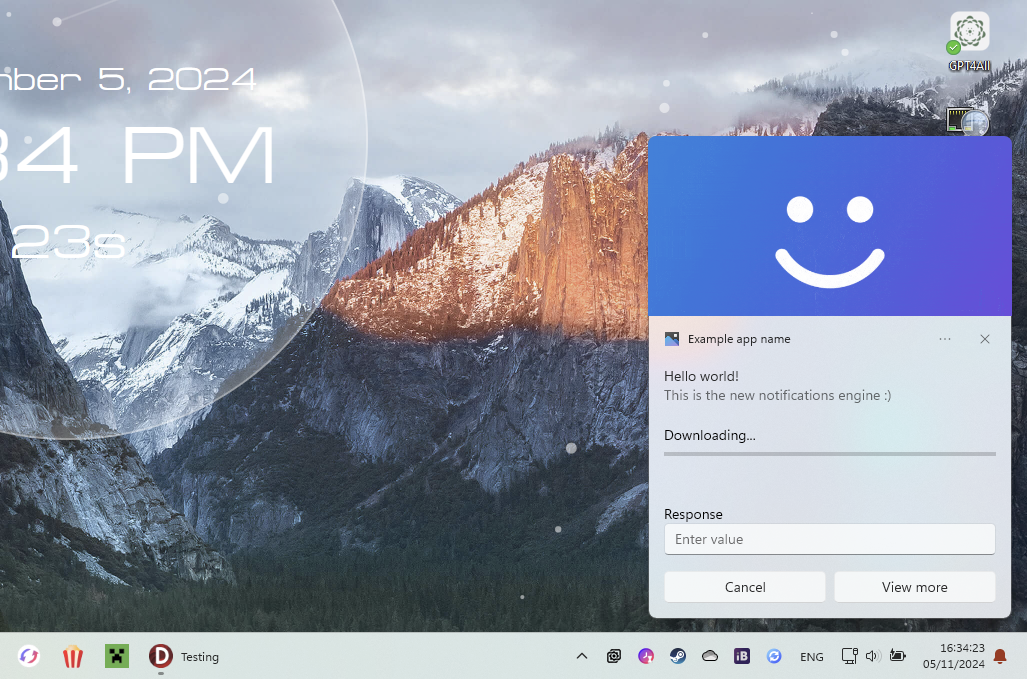
Manager := TNotificationManager.Create;
  with TToastContentBuilder.Create do
    try
      AddText( TToastValueBindable.Create('title') );
      AddText( TToastValueString.Create('This is the new notifications engine :)') );;
      AddAudio(TSoundEventValue.NotificationIM, WinFalse);

      AddHeroImage(TToastValueString.Create('C:[email protected]'));
      AddProgressBar(TToastValueString.Create('Downloading...'), TToastValueBindable.Create('download-pos'));

      AddInputTextBox('editbox-id', 'Enter value', 'Response');

      AddButton('Cancel', TActivationType.Foreground, 'cancel');
      AddButton('View more', TActivationType.Foreground, 'view');

      // Data
      Notif := TNotification.Create(GetXML);

      Notif.Tag := 'notification1';

      // Data binded values
      Notif.Data := TNotificationData.Create;
      Notif.Data['title'] := 'Hello world!';
      Notif.Data['download-pos'] := '0';

      // Events (must be defined in your form class)
      Notif.OnActivated := NotifActivated;
      Notif.OnDismissed := NotifDismissed;
    finally
      Free;
    end;
Manager.ShowNotification(Notif);
Manager.HideNotification(Notif);
  const DownloadValue = Notif.Data['download-pos'].ToSingle+0.1;
  Notif.Data['download-pos'] := DownloadValue.ToString;
  if DownloadValue >= 1 then
    Notif.Data['title'] := 'Download finalised!';

  // Update
  Manager.UpdateNotification(Notif);
 procedure TForm1.NotifActivated(Sender: TNotification; Arguments: string; UserInput: TUserInputMap);
var
  Value: string;
begin
  // Get button id
  if Arguments = 'view' then
    // Get value of edit box (if there is one with this id)
    Value := UserInput.GetStringValue('editbox-id');
end;
TNotificationManager 。Reset()方法重置通知