Cod WinRT Notification Manager
1.0.0

Manajer Pemberitahuan untuk Pemberitahuan Lanjutan di Windows 10/11
Perpustakaan ini adalah bagian dari runtime Windows Codrut untuk Delphi, semua unit dapat ditemukan di sana.
Perhatian! Aplikasi harus didaftarkan dengan tappregistration, untuk letusan yang lebih cepat, lihat dokumen COD Windows Runtime.
Manager := TNotificationManager.Create;
  with TToastContentBuilder.Create do
    try
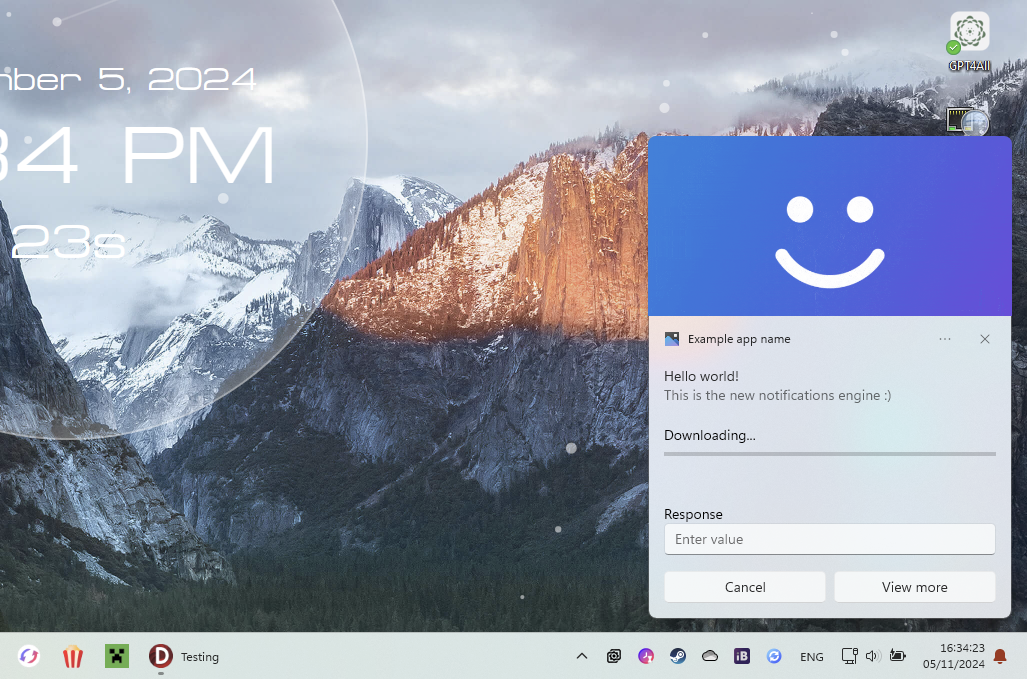
      AddText( TToastValueBindable.Create('title') );
      AddText( TToastValueString.Create('This is the new notifications engine :)') );;
      AddAudio(TSoundEventValue.NotificationIM, WinFalse);

      AddHeroImage(TToastValueString.Create('C:[email protected]'));
      AddProgressBar(TToastValueString.Create('Downloading...'), TToastValueBindable.Create('download-pos'));

      AddInputTextBox('editbox-id', 'Enter value', 'Response');

      AddButton('Cancel', TActivationType.Foreground, 'cancel');
      AddButton('View more', TActivationType.Foreground, 'view');

      // Data
      Notif := TNotification.Create(GetXML);

      Notif.Tag := 'notification1';

      // Data binded values
      Notif.Data := TNotificationData.Create;
      Notif.Data['title'] := 'Hello world!';
      Notif.Data['download-pos'] := '0';

      // Events (must be defined in your form class)
      Notif.OnActivated := NotifActivated;
      Notif.OnDismissed := NotifDismissed;
    finally
      Free;
    end;
Manager.ShowNotification(Notif);
Manager.HideNotification(Notif);
  const DownloadValue = Notif.Data['download-pos'].ToSingle+0.1;
  Notif.Data['download-pos'] := DownloadValue.ToString;
  if DownloadValue >= 1 then
    Notif.Data['title'] := 'Download finalised!';

  // Update
  Manager.UpdateNotification(Notif);
 procedure TForm1.NotifActivated(Sender: TNotification; Arguments: string; UserInput: TUserInputMap);
var
  Value: string;
begin
  // Get button id
  if Arguments = 'view' then
    // Get value of edit box (if there is one with this id)
    Value := UserInput.GetStringValue('editbox-id');
end;
TNotificationManager sampai aplikasi tidak akan lagi mengirim pemberitahuan.Reset()