Cod WinRT Notification Manager
1.0.0

Benachrichtigungsmanager für erweiterte Benachrichtigungen in Windows 10/11
Diese Bibliothek ist Teil der Windows Runtime von Codrut für Delphi, alle Einheiten finden Sie dort.
Aufmerksamkeit! Die App muss bei einer Tappegistration für weitere Detalien in den Cod Windows Runtime -Dokumenten registriert werden.
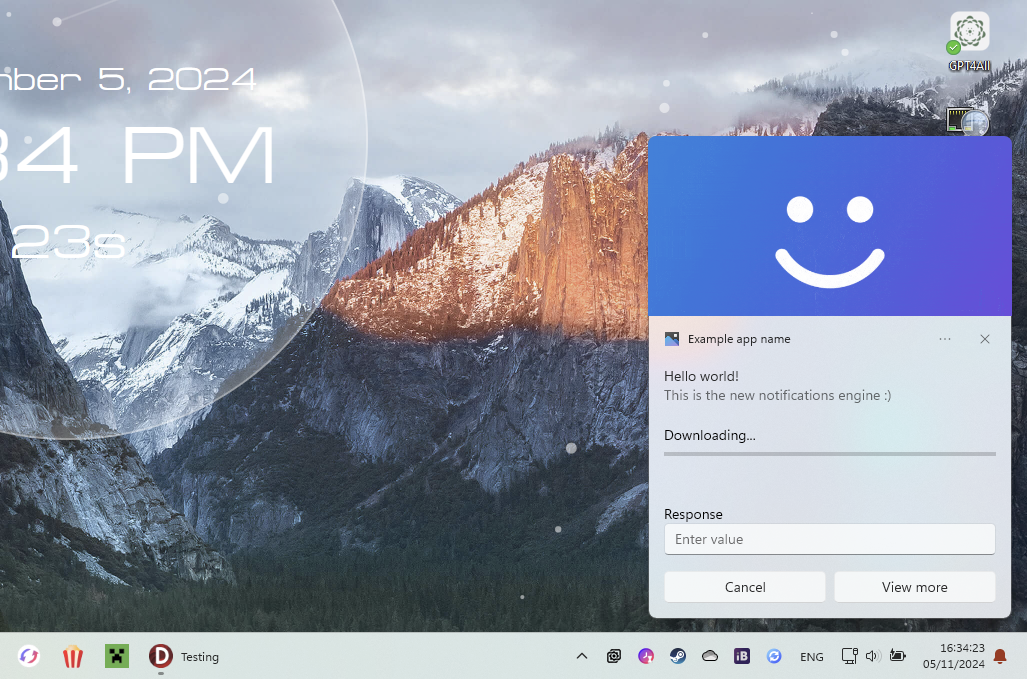
Manager := TNotificationManager.Create;
  with TToastContentBuilder.Create do
    try
      AddText( TToastValueBindable.Create('title') );
      AddText( TToastValueString.Create('This is the new notifications engine :)') );;
      AddAudio(TSoundEventValue.NotificationIM, WinFalse);

      AddHeroImage(TToastValueString.Create('C:[email protected]'));
      AddProgressBar(TToastValueString.Create('Downloading...'), TToastValueBindable.Create('download-pos'));

      AddInputTextBox('editbox-id', 'Enter value', 'Response');

      AddButton('Cancel', TActivationType.Foreground, 'cancel');
      AddButton('View more', TActivationType.Foreground, 'view');

      // Data
      Notif := TNotification.Create(GetXML);

      Notif.Tag := 'notification1';

      // Data binded values
      Notif.Data := TNotificationData.Create;
      Notif.Data['title'] := 'Hello world!';
      Notif.Data['download-pos'] := '0';

      // Events (must be defined in your form class)
      Notif.OnActivated := NotifActivated;
      Notif.OnDismissed := NotifDismissed;
    finally
      Free;
    end;
Manager.ShowNotification(Notif);
Manager.HideNotification(Notif);
  const DownloadValue = Notif.Data['download-pos'].ToSingle+0.1;
  Notif.Data['download-pos'] := DownloadValue.ToString;
  if DownloadValue >= 1 then
    Notif.Data['title'] := 'Download finalised!';

  // Update
  Manager.UpdateNotification(Notif);
 procedure TForm1.NotifActivated(Sender: TNotification; Arguments: string; UserInput: TUserInputMap);
var
  Value: string;
begin
  // Get button id
  if Arguments = 'view' then
    // Get value of edit box (if there is one with this id)
    Value := UserInput.GetStringValue('editbox-id');
end;
TNotificationManager nicht, wenn die App keine Benachrichtigung mehr sendet.Reset() zurückgesetzt werden