Cod WinRT Notification Manager
1.0.0

Administrador de notificaciones para notificaciones avanzadas en Windows 10/11
Esta biblioteca es parte del tiempo de ejecución de Windows de Codrut para Delphi, todas las unidades se pueden encontrar allí.
¡Atención! La aplicación debe estar registrada con un TappRegistration, para más detallas, mire los documentos de tiempo de ejecución de Windows de COD.
Manager := TNotificationManager.Create;
  with TToastContentBuilder.Create do
    try
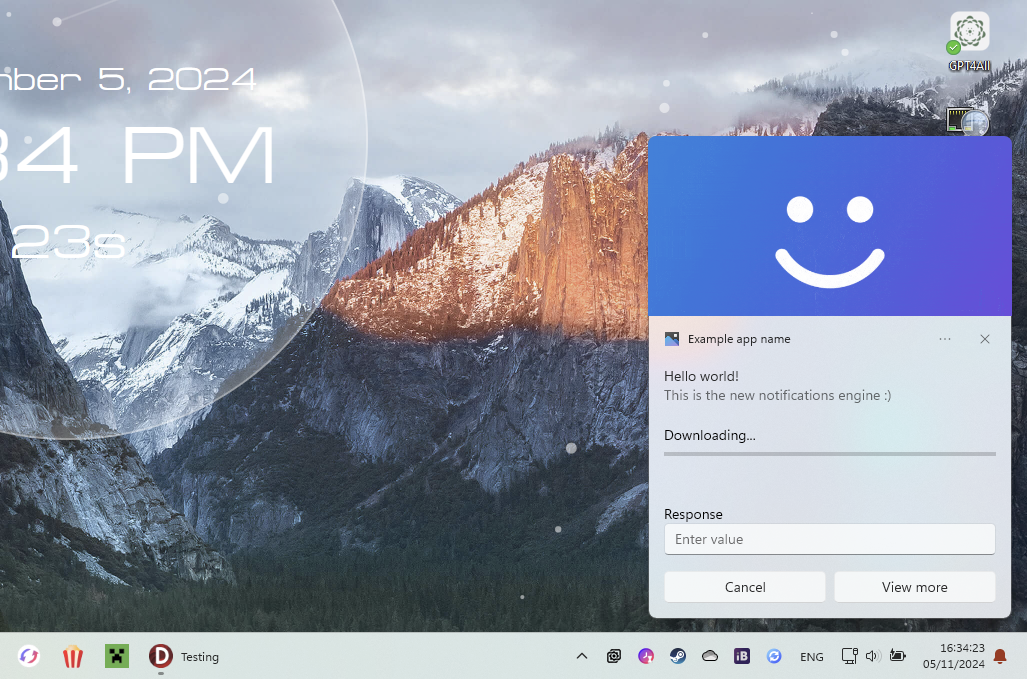
      AddText( TToastValueBindable.Create('title') );
      AddText( TToastValueString.Create('This is the new notifications engine :)') );;
      AddAudio(TSoundEventValue.NotificationIM, WinFalse);

      AddHeroImage(TToastValueString.Create('C:[email protected]'));
      AddProgressBar(TToastValueString.Create('Downloading...'), TToastValueBindable.Create('download-pos'));

      AddInputTextBox('editbox-id', 'Enter value', 'Response');

      AddButton('Cancel', TActivationType.Foreground, 'cancel');
      AddButton('View more', TActivationType.Foreground, 'view');

      // Data
      Notif := TNotification.Create(GetXML);

      Notif.Tag := 'notification1';

      // Data binded values
      Notif.Data := TNotificationData.Create;
      Notif.Data['title'] := 'Hello world!';
      Notif.Data['download-pos'] := '0';

      // Events (must be defined in your form class)
      Notif.OnActivated := NotifActivated;
      Notif.OnDismissed := NotifDismissed;
    finally
      Free;
    end;
Manager.ShowNotification(Notif);
Manager.HideNotification(Notif);
  const DownloadValue = Notif.Data['download-pos'].ToSingle+0.1;
  Notif.Data['download-pos'] := DownloadValue.ToString;
  if DownloadValue >= 1 then
    Notif.Data['title'] := 'Download finalised!';

  // Update
  Manager.UpdateNotification(Notif);
 procedure TForm1.NotifActivated(Sender: TNotification; Arguments: string; UserInput: TUserInputMap);
var
  Value: string;
begin
  // Get button id
  if Arguments = 'view' then
    // Get value of edit box (if there is one with this id)
    Value := UserInput.GetStringValue('editbox-id');
end;
TNotificationManager hasta que la aplicación ya no envíe una notificación.Reset()