kobweb
v0.20.0

KobWeb是一個自以為是的Kotlin框架,用於創建網站和Web應用程序,該框架構建在Compose HTML之上,並受到Next.js和Chakra UI的啟發。
@Page
@Composable
fun HomePage () {
  Column ( Modifier .fillMaxWidth(), horizontalAlignment = Alignment . CenterHorizontally ) {
    Row ( Modifier .align( Alignment . End )) {
      var colorMode by ColorMode .currentState
      Button (
        onClick = { colorMode = colorMode.opposite },
        Modifier .borderRadius( 50 .percent).padding( 0 .px)
      ) {
        // Includes support for Font Awesome icons
        if (colorMode.isLight) FaSun () else FaMoon ()
      }
    }
    H1 {
      Text ( " Welcome to Kobweb! " )
    }
    Row ( Modifier .flexWrap( FlexWrap . Wrap )) {
      SpanText ( " Create rich, dynamic web apps with ease, leveraging " )
      Link ( " https://kotlinlang.org/ " , " Kotlin " )
      SpanText ( " and " )
      Link ( " https://github.com/JetBrains/compose-multiplatform#compose-html/ " , " Compose HTML " )
    }
  }
}
儘管KobWeb仍然是1.0之前,但現在可以使用一段時間了。它為低級API提供了逃生艙口,因此即使KobWeb還不支持它,您也可以完成任何操作。請考慮主演該項目以表明興趣,因此我們知道我們正在創建社區想要的東西。怎麼準備了? ▼
我們的目標是提供:
這是一個演示,我們在不到10秒內從頭開始創建一個從頭開始的撰寫HTML項目,並在10秒內創建。
您可以在Droidcon SF 24上查看我的演講,以了解Kobweb的高水平概述。演講展示了KobWeb可以做的事情,介紹了Compose HTML(它在其頂部建立),並涵蓋了廣泛的前端和後端功能。它的代碼很輕,但很大程度上了解框架的結構和功能。
Kobweb的用戶之一Stevdza-San創建了免費的啟動教程,該教程演示瞭如何使用KobWeb構建項目。
提示
首先從靜態佈局站點開始,然後以後遷移到完整的堆棧站點。 (您可以在下面閱讀有關靜態佈局與完整堆棧站點的更多信息。)
一個名為Skyfish的YouTube頻道創建了一個教程視頻,介紹瞭如何使用Kobweb構建Fullstack網站。
第一步是獲得Kobweb二進制。您可以安裝它,下載並/或構建它,因此我們將提供所有這些方法的說明。
非常感謝Aalmiray和HelperMethod幫助我使這些安裝選項正常工作。如果您需要在自己的項目中進行此操作,請查看Jreleaser!
OS:Mac和Linux
$ brew install varabyte/tap/kobwebOS:Windows
 # Note: Adding buckets only has to be done once.

# Feel free to skip java if you already have it
> scoop bucket add java
> scoop install java/openjdk

# Install kobweb
> scoop bucket add varabyte https://github.com/varabyte/scoop-varabyte.git
> scoop install varabyte/kobwebOS:Windows,Mac和 *Nix
$ sdk install kobweb感謝AKSH1618為此目標增加了支持!
帶有Aur助手,例如:
$ yay -S kobweb
$ paru -S kobweb
$ trizen -S kobweb
# etc.
沒有Aur助手:
$ git clone https://aur.archlinux.org/kobweb.git
$ cd kobweb
$ makepkg -si請參閱:Varabyte/Kobweb-Cli#11,並考慮發表評論!
我們的二進製文物託管在Github上。要下載最新信息,您可以從GitHub獲取zip或焦油文件,也可以從終端獲取它:
$ cd /path/to/applications

# You can either pull down the zip file

$ wget https://github.com/varabyte/kobweb-cli/releases/download/v0.9.18/kobweb-0.9.18.zip
$ unzip kobweb-0.9.18.zip

# ... or the tar file

$ wget https://github.com/varabyte/kobweb-cli/releases/download/v0.9.18/kobweb-0.9.18.tar
$ tar -xvf kobweb-0.9.18.tar
我建議將其直接添加到您的路上:
$ PATH= $PATH :/path/to/applications/kobweb-0.9.18/bin
$ kobweb version # to check it's working
或通過符號鏈接:
$ cd /path/to/bin # some folder you've created that's in your PATH
$ ln -s /path/to/applications/kobweb-0.9.18/bin/kobweb kobweb儘管我們在Github上託管Kobweb文物,但很容易建造自己的工件。
建築KobWeb需要JDK11或更新。我們將首先討論如何添加它。
如果您想完全控制JDK安裝,則可以手動下載是一個不錯的選擇。
JAVA_HOME變量以指向它。 JAVA_HOME=/path/to/jdks/corretto-11.0.12
# ... or whatever version or path you chose對於更自動化的方法,您可以請求為您要求Intellij安裝JDK。
在此處按照他們的說明:https://www.jetbrains.com/help/idea/sdk.html#set-up-jdk
Kobweb CLI實際上保存在單獨的GitHub存儲庫中。設置JDK後,克隆並構建它應該很容易:
$ cd /path/to/src/root # some folder you've created for storing src code
$ git clone https://github.com/varabyte/kobweb-cli
$ cd kobweb-cli
$ ./gradlew :kobweb:installDist
最後,更新您的路徑:
$ PATH= $PATH :/path/to/src/root/kobweb-cli/kobweb/build/install/kobweb/bin
$ kobweb version # to check it's working 如果您以前安裝了KobWeb,並且知道有一個新版本可用,則更新的方式取決於您如何安裝它。
| 方法 | 指示 |
|---|---|
| 自製 | brew updatebrew upgrade kobweb |
| 舀 | scoop update kobweb |
| SDKMAN! | sdk upgrade kobweb |
| Arch Linux | 重新安裝步驟應起作用。如果使用AUR助手,則可能需要查看其手冊。 |
| 從下載 github | 訪問最新版本。您可以在那裡找到一個ZIP和TAR文件。 |
$ cd /path/to/projects/
$ kobweb create app
詢問您設置項目所需的幾個問題。
您無需提前為項目創建根文件夾 - 設置過程將提示您創建一個文件夾。對於本節的剩餘部分,假設您在詢問時選擇“ my-project”。
完成後,您將擁有一個帶有兩個頁面的基本項目 - 一個主頁和一個關於頁面的頁面(用降價上寫的頁面)以及一些組件(這些組件是可重複使用的可重複使用的作品集)。您自己的目錄結構應該看起來像這樣:
 my-project
└── site/src/jsMain
    ├── kotlin.org.example.myproject
    │   ├── components
    │   │   ├── layouts
    │   │   │   ├── MarkdownLayout.kt
    │   │   │   └── PageLayout.kt
    │   │   ├── sections
    │   │   │   ├── Footer.kt
    │   │   │   └── NavHeader.kt
    │   │   └── widgets
    │   │       └── IconButton.kt
    │   ├── pages
    │   │   └── Index.kt
    │   └── AppEntry.kt
    └── resources/markdown
        └── About.md
請注意,任何地方都沒有index.html或路由邏輯!當您運行KobWeb時,我們會自動為您生成。這將我們帶到下一節...
$ cd your-project/site
$ kobweb run
此命令在http:// localhost:8080旋轉Web服務器。如果要配置端口,則可以通過編輯項目的.kobweb/conf.yaml文件來做到這一點。
您可以在Intellij中打開項目並開始編輯它。當KobWeb運行時,它將自動檢測更改,重新編譯和部署更新。
如果您不想在IDE窗口旁邊保留單獨的終端窗口,則可能更喜歡替代解決方案。
您可以使用Intellij終端工具窗口在其中運行kobweb 。如果遇到編譯錯誤,堆棧跟踪線將用鏈接裝飾,從而易於導航到相關源。
kobweb本身會委派Gradle,但沒有什麼可以阻止您自己調用命令。您可以為每個KobWeb命令創建Gradle Run配置。
提示
當您運行委派給Gradle的Kobweb CLI命令時,它將將Gradle命令記錄到控制台。這就是您可以發現本節中討論的Gradle命令的方式。
kobwebStart -t命令。-t參數(或--continuous )告訴Gradle注意文件更改,這為您提供了實時加載行為。kobwebStop命令。kobwebExport -PkobwebReuseServer=false -PkobwebEnv=DEV -PkobwebRunLayout=FULLSTACK -PkobwebBuildTarget=RELEASE -PkobwebExportLayout=FULLSTACK-PkobwebExportLayout=STATIC 。kobwebStart -PkobwebEnv=PROD -PkobwebRunLayout=FULLSTACK-PkobwebRunLayout=STATIC 。您可以在此處閱讀有關Intellij的Gradle集成的全部內容。或直接跳入如何為上面討論的任何命令創建運行配置,請閱讀以下說明。
Kobweb將為您提供越來越多的樣本供您學習。要查看可用的內容,請運行:
$ kobweb list

You can create the following Kobweb projects by typing ` kobweb create ... `

• app: A template for a minimal site that demonstrates the basic features of Kobweb
• examples/jb/counter: A very minimal site with just a counter (based on the Jetbrains tutorial)
• examples/todo: An example TODO app, showcasing client / server interactions
例如, kobweb create examples/todo將在本地實例化todo應用程序。
由KobWeb創建的項目模板所有都包含Gradle版本目錄。
如果您不知道它,它是一個在gradle/libs.versions.toml上存在的文件。如果您發現自己想在最初通過kobweb create創建的項目中調整或添加新版本,那麼您可以找到它們。
例如,這是Libs.versions.toml,我們用於我們自己的著陸點。
要了解有關該功能的更多信息,請查看官方文檔。
KobWeb的最新可用版本在此讀數的頂部聲明。如果新版本出現了,您可以通過編輯gradle/libs.version.toml並在此處更新kobweb版本來更新自己的項目。
重要的
您應該仔細檢查兼容性。 md,以查看是否還需要更新kotlin和jetbrains-compose版本。
警告
它可能會令人困惑,但是KobWeb有兩個版本 - 庫本身的版本(一種適用於這種情況),另一個用於命令行工具。
Kobweb的核心是少數幾個課程,負責修剪構建組合HTML應用程序的大部分樣板,例如路由和配置基本CSS樣式。 KobWeb進一步提供了一個Gradle插件,該插件可以分析您的代碼庫並生成相關的樣板代碼。
Kobweb也是同名的CLI二進製文件,它提供了處理構建和/或運行Compose HTML應用程序的繁瑣部分的命令。我們想避開這些東西,這樣您就可以喜歡專注於更有趣的工作!
(要了解有關撰寫HTML的更多信息,請訪問官方教程)。
創建頁面很容易!這只是一種普通的@Composable方法。要將您的組合升級到一個頁面,您需要做的就是:
jsMain源目錄中的pages包中的某個地方的某個地方,在文件中定義您的合併。@Page註釋它就這樣,KobWeb將為您自動創建一個站點條目。
例如,如果我創建以下文件:
 // jsMain/kotlin/com/mysite/pages/admin/Settings.kt

@Page
@Composable
fun SettingsPage () {
    /* ... */
}這將創建一個頁面,然後我可以訪問mysite.com/admin/settings 。
重要的
URL的最後一部分在這裡settings ,稱為sl 。
默認情況下,slug來自文件名,該文件名已轉換為kebab-case,例如, AboutUs.kt將轉換為about-us 。但是,這可以覆蓋您想要的任何東西(不久之後)。
文件名Index.kt很特別。如果在此文件中定義了一個頁面,則將其視為該URL下的默認頁面。例如,如果用戶訪問mysite.com/admin/ ,將訪問.../pages/admin/Index.kt中定義的頁面。
如果您需要更改頁面生成的路由,則可以設置Page註釋的routeOverride字段:
 // jsMain/kotlin/com/mysite/pages/admin/Settings.kt

@Page(routeOverride = " config " )
@Composable
fun SettingsPage () {
    /* ... */
}以上將創建一個可以訪問mysite.com/admin/config頁面。
routeOverride還可以包含斜線,如果值開始和/或以斜線為單位,則具有特殊的含義。
而且,如果將替代設置為“索引”,則表現與將文件設置為Index.kt 。如上所述。
一些例子可以闡明這些規則(以及它們在合併時的行為)。假設我們在文件a/b/c/Slug.kt中為我們的stite example.com定義頁面:
| 註解 | 由此產生的URL |
|---|---|
@Page | example.com/a/b/c/slug |
@Page("other") | example.com/a/b/c/other |
@Page("index") | example.com/a/b/c/ |
@Page("d/e/f/") | example.com/a/b/c/d/e/f/slug |
@Page("d/e/f/other") | example.com/a/b/c/d/e/f/other |
@Page("d/e/f/index") | example.com/a/b/c/d/e/f/ |
@Page("/d/e/f/") | example.com/d/e/f/slug |
@Page("/d/e/f/other") | example.com/d/e/f/other |
@Page("/d/e/f/index") | example.com/d/e/f/ |
@Page("/") | example.com/slug |
@Page("/other") | example.com/other |
@Page("/index") | example.com/ |
警告
儘管這裡允許靈活性,但您不應經常使用此功能(如果有的話)。 KobWeb項目受益於用戶可以輕鬆將網站上的URL與代碼庫中的文件相關聯,但是此功能使您可以打破這些假設。它主要是為了啟用動態路由(請參閱“動態路由”▼部分)或啟用使用Kotlin文件名中不允許的字符的URL名稱。
當slug從文件名中得出時,路由的早期部分是從文件的軟件包中得出的。
A package will be converted into a route part by removing any leading or trailing underscores (as these are often used to work around limitations into what values and keywords are allowed in a package name, eg site.pages.blog._2022 and site.events.fun_ ) and converting camelCase packages into hyphenated words (so site.pages.team.ourValues generates the route /team/our-values/ ).
如果您想覆蓋為軟件包生成的路由部分,則可以使用PackageMapping註釋。
例如,假設您的團隊更喜歡出於美學原因不使用駱駝包。或者,也許您有意將領先的下劃線添加到您的網站路線部分中以進行某種重點(因為以前我們提到領先的下劃線會自動刪除),例如在路線/team/_internal/contact-numbers中。您可以為此使用軟件包映射。
您可以將包映射註釋應用於當前文件。使用它看起來像這樣:
 // site/pages/team/values/PackageMapping.kt
@file:PackageMapping( " our-values " )

package site.pages.blog.values

import com.varabyte.kobweb.core.PackageMapping在上述包裝映射的情況下,將在site/pages/team/values/Mission.kt /team/our-values/mission values/mission訪問。
每個頁面方法通過rememberPageContext()方法提供對其PageContext的訪問。
至關重要的是,頁面的上下文使其可以訪問路由器,從而使您可以導航到其他頁面。
它還提供有關當前頁面URL的動態信息(在下一節中進行了討論)。
@Page
@Composable
fun ExamplePage () {
    val ctx = rememberPageContext()
    Button (onClick = { ctx.router.navigateTo( " /other/page " ) }) {
        Text ( " Click me " )
    }
}您可以使用頁面上下文檢查傳遞到當前頁面URL的任何查詢參數的值。
因此,如果您訪問site.com/posts?id=12345&mode=edit ,則可以這樣查詢這些值:
 enum class Mode {
    EDIT , VIEW ;

    companion object {
        fun from ( value : String ) {
           entries.find { it.name.equals(value, ignoreCase = true ) }
               ? : error( " Unknown mode: $value " )
        }
    }
}

@Page
@Composable
fun Posts () {
    val ctx = rememberPageContext()
    // Here, I'm assuming these params are always present, but you can use
    // `get` instead of `getValue` to handle the nullable case. Care should
    // also be taken to parse invalid values without throwing an exception.
    val postId = ctx.route.params.getValue( " id " ).toInt()
    val mode = Mode .from(ctx.route.params.getValue( " mode " ))
    /* ... */
}除了查詢參數外,KobWeb還支持直接在URL本身中嵌入參數。例如,您可能需要註冊路徑users/{user}/posts/{post}如果網站訪問者在URL中鍵入諸如users/bitspittle/posts/20211231103156之類的網站訪問者。
我們如何進行設置?值得慶幸的是,這很容易。
但是首先,請注意,在示例中,動態路由users/{user}/posts/{post}實際上有兩個不同的動態零件,一個在中間,一個在尾端。這些可以分別通過PackageMapping和Page註釋來處理。
請注意在映射名稱中使用捲曲括號!這使Kobweb知道這是一個動態的軟件包。
 // pages/users/user/PackageMapping.kt
@file:PackageMapping( " {user} " ) // or @file:PackageMapping("{}")

package site.pages.users.user

import com.varabyte.kobweb.core.PackageMapping如果將一個空的"{}"傳遞到PackageMapping註釋中,它將指示KobWeb使用軟件包本身的名稱(即在此特定情況下user )。
像PackageMapping一樣, Page註釋也可以採用捲曲括號來表示動態值。
 // pages/users/user/posts/Post.kt

@Page( " {post} " ) // Or @Page("{}")
@Composable
fun PostPage () {
   /* ... */
}一個空的"{}"告訴KobWeb使用當前文件的名稱。
請記住, Page註釋使您可以重寫整個路線。該值也接受動態零件,因此您甚至可以做類似的事情:
 // pages/users/user/posts/Post.kt

@Page( " /users/{user}/posts/{post} " ) // Or @Page("/users/{user}/posts/{}")
@Composable
fun PostPage () {
    /* ... */
}
但是強大的力量帶來了巨大的責任。這樣的技巧可能很難找到和/或以後更新,尤其是隨著您的項目變大。在工作時,您只能在絕對需要的情況下使用此格式(也許是在代碼重構之後您必須支持Legacy URL路徑)。
您查詢動態路由值與請求查詢參數完全相同。也就是說,使用ctx.params :
@Page( " {} " )
@Composable
fun PostPage () {
    val ctx = rememberPageContext()
    val postId = ctx.route.params.getValue( " post " )
    /* ... */
}
重要的
您應該避免在動態路徑和查詢參數具有相同名稱的情況下創建URL路徑,與mysite.com/posts/{post}?post=...相同,因為在復雜的項目中調試這可能真的很棘手。如果發生衝突,則動態路由參數將優先。 (您仍然可以在這種情況下通過ctx.route.queryParams訪問查詢參數值。)
如果您有要從網站提供的資源,則可以通過將其放置在網站的jsMain/resources/public Folder中來處理此問題。
例如,如果您有一個徽標,則希望在mysite.com/assets/images/logo.png上使用,您會在jsMain/resources/public/assets/images/logo.png中將其放入KobWeb項目中。
換句話說,您的項目資源下的public/目錄下的任何內容都將自動複製到您的最終站點(不包括public/部分)。
對於那些對Web開發人員的新手,值得了解的是,有兩種方法可以在您的HTML元素上設置樣式:內聯和样式表。
內聯樣式在元素標籤本身上定義。在RAW HTML中,這可能看起來像:
< div style =" background-color:black " >同時,任何給定的HTML頁面都可以引用樣式表的列表,這些樣式表可以定義一堆樣式,其中每種樣式都綁定到選擇器(一項選擇這些樣式應用的元素的規則)。
非常簡短的樣式表的具體示例在這裡可以幫助:
 body {
  background-color : black;
  color : magenta
}
# title {
  color : yellow
}
您可以使用該樣式樣式來樣式以下文檔:
 < body >
  <!-- Title gets background-color from "body" and foreground color from "#title" -->
  < div id =" title " > Yellow on black </ div >
  Magenta on black
</ body >
筆記
當樣式表和內聯聲明中都存在衝突的樣式時,內聯風格就優先。
沒有艱難而快速的規則,但是通常,當手工編寫HTML / CSS時,樣式表通常比內聯樣式更喜歡,因為它可以更好地保持關注點。也就是說,HTML應表示網站的內容,而CSS控制著外觀。
然而!我們不是手工編寫HTML / CSS。我們正在使用撰寫HTML!我們甚至應該在Kotlin關心這個嗎?
事實證明,有時您必須使用樣式表,因為沒有它們,就無法為高級行為(尤其是偽級,偽元素和媒體查詢)定義樣式。例如,如果不使用樣式表方法,您就無法覆蓋訪問的鏈接的顏色。因此,值得認識到存在根本差異。
Finally, it can also be much easier debugging your page with browser tools when you lean on stylesheets over inline styles, as it makes your DOM tree easier to read when your elements are simple (eg <div class="title"> vs. <div style="color:yellow; background-color:black; font-size: 24px; ..."> ).
我們將很快介紹和討論修飾符和CSS樣式塊。但是總的來說,當您將修飾符直接傳遞到絲綢中的可組合小部件中時,這些小部件將導致內聯樣式,而如果使用CSS樣式塊來定義您的樣式,則這些樣式會嵌入到網站的樣式中:
 // Uses inline styles
Box ( Modifier .color( Colors . Red )) { /* ... */ }

// Uses a stylesheet
val BoxStyle = CssStyle {
    base { Modifier . Color ( Colors . Red ) }
}
Box ( BoxStyle .toModifier()) { /* ... */ }
作為初學者,甚至作為高級用戶,在原型製作時,如果您發現自己需要使用偽級,偽元素或媒體查詢,則可以隨意使用內聯修飾符。將內聯樣式遷移到Kobweb中的樣式表非常容易。
在我自己的項目中,我傾向於將內聯樣式用於真正簡單的佈局元素(例如Row(Modifier.fillMaxWidth()) )和CSS樣式塊作為複雜和/或可重複使用的小部件。實際上,將所有樣式組合在一起的小部件本身上方的一個位置將所有樣式組合在一起。
Kobweb介紹了Modifier類,以提供與您在Jetpack Compose中發現的相似的體驗。 (如果您不熟悉這個概念,可以在這裡閱讀更多有關它們的信息)。
在Compose HTML的世界中,您可以將Modifier視為CSS樣式和屬性之上的包裝器。
重要的
如果您不熟悉HTML屬性和/或樣式,請參考官方文檔。
所以這個:
Modifier .backgroundColor( Colors . Red ).color( Colors . Green ).padding( 200 .px)當傳遞到Kobweb提供的小部件時,例如Box :
 Box ( Modifier .backgroundColor( Colors . Red ).color( Colors . Green ).padding( 200 .px)) {
    /* ... */
}
將生成帶有樣式屬性的HTML標籤,例如: <div style="background:red;color:green;padding:200px">
Kobweb提供了一堆修飾符擴展(並且它們正在增長),例如background , color和padding 。但是,每當您遇到丟失的修飾符時,也有兩個逃生艙口: attrsModifier和styleModifier 。
在這一點上,您正在與Compose HTML(Kobweb下方的一層)進行交互。
使用它們看起來像這樣:
 // Modify attributes of an element tag
// e.g. the "a", "b", and "c" in <tag a="..." b="..." c="..." />
Modifier .attrsModifier {
    id( " example " )
}

// Modify styles of an element tag
// e.g. the "x", "y", and "z" in `<tag a="..." b="..." c="..." style="x:...;y:...;z:..." />
Modifier .styleModifier {
    width( 100 .percent)
    height( 50 .percent)
}

// Note: Because "style" itself is an attribute, you can define styles in an attrsModifier:
Modifier .attrsModifier {
    id( " example " )
    style {
        width( 100 .percent)
        height( 50 .percent)
    }
}
// ... but in the above case, you should use a styleModifier for simplicity在偶爾的(希望很少見!)的情況下,KobWeb不提供修飾符並且構成HTML不提供所需的屬性或樣式支持,您可以使用attrsModifier加上attrsmodifier加上attr方法或styleModifier以及property方法。逃生艙內的逃生艙口使您可以提供所需的任何自定義值。
以上情況可以重寫為:
 Modifier .attrsModifier {
    attr( " id " , " example " )
}

Modifier .styleModifier {
    property( " width " , 100 .percent)
    // Or even raw CSS:
    // property("width", "100%")
    property( " height " , 50 .percent)
}
最後,請注意,通過CSS的設計樣式適用於任何元素,而屬性通常與特定的屬性相關。例如, id屬性可以應用於任何元素,但是href只能應用於a標籤。由於修飾符沒有被傳遞到哪個元素的上下文,因此KobWeb僅目的是為全局屬性(例如Modifier.id("example") )提供屬性修飾符,而沒有其他屬性。
因此,在您自己的代碼中使用attrsModifier (或其速記Modifier.attr )以及Modifier.toAttrs (將Modifier轉換為一個可以傳遞到組合html widgets中的attrs塊)以設置屬性值。
但是,如果您最終需要在您自己的代碼庫中使用styleModifier { property(key, value) } ,請考慮向我們提交問題,以便我們可以將丟失的修飾符添加到庫中。至少,鼓勵您定義自己的擴展方法來創建自己的類型安全樣式修飾符。
絲綢是KobWeb中包含的UI層,並建立在組成HTML的基礎上。
雖然撰寫HTML需要您了解基本的HTML / CSS概念,但絲綢試圖將其中的某些內容抽像出來,提供的API更像是您可能會在Android或台式機上開發撰寫應用程序的內容。更少的“ DIV,SPAN,FLEXBOX,ATTRS,樣式,類”,以及更多的“行,列,框和修飾符”。
我們認為絲綢是Kobweb體驗中非常重要的一部分,但值得指出的是它被設計為可選組件。您絕對可以使用無絲綢的Kobweb。 (您也可以在沒有Kobweb的情況下使用絲綢!)。
您也可以將絲綢交織在一起並容易組成HTML組件(因為絲綢只是在構成它們本身)。
@InitSilk方法在進行進一步之前,我們想快速提及您可以用@InitSilk註釋一種方法,該方法將在您的網站啟動時被調用。
此方法必須採用一個InitSilkContext參數。上下文包含允許調整絲綢默認值的各種屬性,這些屬性將在下面的各節中更詳細地進行演示。
@InitSilk
fun initSilk ( ctx : InitSilkContext ) {
  // `ctx` has a handful of properties which allow you to adjust Silk's default behavior.
}
提示
@InitSilk方法的名稱無關緊要,只要它們是公開的,就可以採用一個InitSilkContext參數,並且不要與同一名稱的另一種方法相撞。鼓勵您為可讀性目的選擇一個名稱。
您可以根據需要定義盡可能多的@InitSilk方法,因此請隨意將它們分解成相關的,清晰的碎片,而不是聲明單個,單片,一般命名為fun initSilk(ctx)方法,可以完成所有操作。
使用絲綢,您可以使用CssStyle功能和base塊來定義類似的樣式:
 val CustomStyle = CssStyle {
    base {
        Modifier .background( Colors . Red )
    }
}並使用CustomStyle.toModifier()將其轉換為修飾符。在這一點上,您可以將其傳遞到任何可進行Modifier參數的合併中:
 // Approach #1 (uses inline styles)
Box ( Modifier .backgroundColor( Colors . Red )) { /* ... */ }

// Approach #2 (uses stylesheets)
Box ( CustomStyle .toModifier()) { /* ... */ }
重要的
當您聲明CssStyle時,它必須是公開的。這是因為Kobweb Gradle插件在main.kt文件中生成代碼,並且該代碼需要能夠訪問您的樣式才能進行註冊。
總的來說,無論如何,最好將樣式視為全球,因為從技術上講,它們都生活在全球應用的樣式表中,並且您必須確保樣式名稱在整個應用程序中都是獨一無二的。
如果您添加一些樣板以自己處理註冊:從技術上講,您可以將風格私有化:
@Suppress( " PRIVATE_COMPONENT_STYLE " )
private val ExampleCustomStyle = CssStyle { /* ... */ }
// Or use a leading underscore to automatically suppress the warning
private val _ExampleOtherCustomStyle = CssStyle { /* ... */ }

@InitSilk
fun registerPrivateStyle ( ctx : InitSilkContext ) {
  // Kobweb will not be able to detect the property name, so a name must be provided manually
  ctx.theme.registerStyle( " example-custom " , ExampleCustomStyle )
  ctx.theme.registerStyle( " example-other-custom " , _ExampleOtherCustomStyle )
}
但是,鼓勵您將樣式公開,並讓Kobweb Gradle插件為您處理所有內容。
CssStyle.base您可以使用CssStyle.base聲明來簡化基本樣式的語法:
 val CustomStyle = CssStyle .base {
    Modifier .background( Colors . Red )
}
請注意,如果您發現自己需要支持其他選擇器▼,則可能必須再次解決。
Kobweb Gradle插件會自動檢測您的CssStyle屬性,並為您生成名稱,該名稱源自屬性名稱本身,但使用kebab案例。
例如,如果您編寫val TitleTextStyle = CssStyle { ... } ,則其名稱將為“ title-text”。
通常,您不需要關心此名稱,但是在某些情況下,了解這就是正在發生的事情可能很有用。
如果您需要手動設置名稱,則可以使用CssName註釋來覆蓋默認名稱:
@CssName( " my-custom-name " )
val CustomStyle = CssStyle {
    base {
        Modifier .background( Colors . Red )
    }
}那麼, base塊怎麼了?
沒錯,它本身看起來有點冗長。但是,您可以定義有條件生效的其他選擇器塊。基本樣式將始終首先應用,但是將根據特定選擇器的規則應用任何其他樣式。
警告
定義其他選擇器時訂單很重要,尤其是如果其中有多個同時修改相同的CSS屬性。
在這裡,我們創建了一種默認情況下是紅色的樣式,但是當鼠標徘徊在其上時綠色:
 val CustomStyle = CssStyle {
    base {
        Modifier .color( Colors . Red )
    }

    hover {
        Modifier .color( Colors . Green )
    }
}
為了方便起見,KobWeb為您提供了一堆標準選擇器,但是對於那些精通CSS的人,您始終可以直接定義CSS規則,以啟用KobWeb尚未添加的更複雜的組合或選擇器。
例如,這與上述樣式定義相同:
 val CustomStyle = CssStyle {
    base {
        Modifier .color( Colors . Red )
    }

    cssRule( " :hover " ) {
        Modifier .color( Colors . Green )
    }
}在響應式HTML / CSS設計的世界中,有一個稱為斷點的功能,這與調試斷點無關。相反,當樣式更改時,它們為您的網站指定尺寸邊界。這就是網站在移動電腦與平板電腦與桌面上的不同內容的不同。
KobWeb提供了可以用於項目的四個斷點尺寸,其中包括完全不使用斷點大小,可以在設計網站時可以使用五個存儲桶:
您可以通過在代碼中添加@InitSilk方法並設置ctx.theme.breakpoints :
@InitSilk
fun initializeBreakpoints ( ctx : InitSilkContext ) {
    ctx.theme.breakpoints = BreakpointSizes (
        sm = 30 .cssRem,
        md = 48 .cssRem,
        lg = 62 .cssRem,
        xl = 80 .cssRem,
    )
}要在CssStyle中引用斷點,請調用它:
 val CustomStyle = CssStyle {
    base {
        Modifier .fontSize( 24 .px)
    }

    Breakpoint . MD {
        Modifier .fontSize( 32 .px)
    }
}
提示
在測試斷點條件樣式時,您應該知道瀏覽器開發工具讓您模擬窗口尺寸,以查看網站如何看待不同尺寸。例如,在Chrome上,您可以按照以下說明進行操作:https://developer.chrome.com/docs/devtools/device-mode
您還可以使用Kotlin系列運算符指定樣式僅適用於特定的斷點範圍:
 val CustomStyle = CssStyle {
    // The following three declarations are the same, and ensure their style is only active in mobile / tablet modes

    // Option 1: exclusive upper bound
    ( Breakpoint . ZERO .. < Breakpoint . MD ) { Modifier .fontSize( 24 .px) }

    // Option 2: using `until` for `..<`
    ( Breakpoint . ZERO until Breakpoint . MD ) { Modifier .fontSize( 24 .px)  }

    // Option 3: inclusive upper bound
    ( Breakpoint . ZERO .. Breakpoint . SM ) { Modifier .fontSize( 24 .px) }

    Breakpoint . MD { Modifier .fontSize( 32 .px) }
}如果您不是需要用括號包裹表達式的粉絲,也提供了between方法,這與..< range Operator相同:<range Operator:
 val CustomStyle = CssStyle {
    // Style active in mobile / tablet modes
    between( Breakpoint . ZERO , Breakpoint . MD ) { /* ... */ }
}最後,如果您的範圍中的第一個斷點是Breakpoint.ZERO until
 val CustomStyle = CssStyle {
    // Style active in mobile / tablet modes
    until( Breakpoint . MD ) { /* ... */ }
}實際上,您可以考慮到宣布正常斷點的until 。換句話說, until(Breakpoint.MD) { ... }表示所有斷點大小最高到中等大小,而Breakpoint.MD { ... }表示中等大小及以上。
定義CssStyle時,可以使用稱為colorMode的字段:
 val CustomStyle = CssStyle .base {
    Modifier .color( if (colorMode.isLight) Colors . Red else Colors . Pink )
}絲綢為其所有小部件定義了一堆淺色和深色,如果您想在自己的小部件中重新使用其中任何一個,可以使用colorMode.toPalette()查詢它們:
 val CustomStyle = CssStyle .base {
    Modifier .color(colorMode.toPalette().link.default)
} SilkTheme包含非常簡單的(例如黑白)默認值,但是您可以以@InitSilk方法覆蓋它們,也許是更具品牌意識的東西:
 // Assume a bunch of color constants (e.g. BRAND_LIGHT_COLOR) are defined somewhere

@InitSilk
fun overrideSilkTheme ( ctx : InitSilkContext ) {
  ctx.theme.palettes.light.background = BRAND_LIGHT_BACKGROUND
  ctx.theme.palettes.light.color = BRAND_LIGHT_COLOR
  ctx.theme.palettes.dark.background = BRAND_DARK_BACKGROUND
  ctx.theme.palettes.dark.color = BRAND_DARK_COLOR
}默認情況下,KobWeb將將您網站的顏色模式初始化為ColorMode.LIGHT 。
但是,您可以通過在@InitSilk方法中設置initialColorMode屬性來控制這一點:
@InitSilk
fun setInitialColorMode ( ctx : InitSilkContext ) {
    ctx.theme.initialColorMode = ColorMode . DARK
}如果您想尊重用戶的系統偏好,則可以將initialColorMode設置為ColorMode.systemPreference :
@InitSilk
fun setInitialColorMode ( ctx : InitSilkContext ) {
    ctx.theme.initialColorMode = ColorMode .systemPreference
}如果您支持切換網站的顏色模式,則鼓勵您將用戶的最後選擇設置保存到本地存儲中,然後如果用戶稍後重新訪問您的網站,則將其還原。
修復將發生在您的@InitSilk塊中,而保存顏色模式的代碼應在您的root @App Composable中發生:
@InitSilk
fun setInitialColorMode ( ctx : InitSilkContext ) {
    ctx.theme.initialColorMode =
      ColorMode .loadFromLocalStorage() ? : ColorMode .systemPreference
}

@App
@Composable
fun AppEntry ( content : @Composable () -> Unit ) {
  SilkApp {
    val colorMode = ColorMode .current
    LaunchedEffect (colorMode) {
        colorMode.saveToLocalStorage()
    }

    /* ... */
  }
}您可能會發現自己偶爾想定義一種只能與另一種樣式一起應用的樣式。
實現此目的的最簡單方法是使用extendedBy方法擴展基本CSS樣式塊:
 val GeneralTextStyle = CssStyle {
    base { Modifier .fontSize( 16 .px).fontFamily( " ... " ) }
}
val EmphasizedTextStyle = GeneralTextStyle .extendedBy {
    base { Modifier .fontWeight( FontWeight . Bold ) }
}

// Or, using the `base` methods:
// val GeneralTextStyle = CssStyle.base {
//   Modifier.fontSize(16.px).fontFamily("...")
// }
// val EmphasizedTextStyle = GeneralTextStyle.extendedByBase {
//   Modifier.fontWeight(FontWeight.Bold)
// }一旦擴展,您只需要在擴展樣式上調用toModifier即可自動包含兩種樣式:
 SpanText ( " WARNING " , EmphasizedTextStyle .toModifier())
// You do NOT need to reference the base style, i.e.
// GeneralTextStyle.toModifier().then(EmphasizedTextStyle.toModifier()) 到目前為止,我們已經討論了CSS樣式塊,以定義一般的CSS樣式屬性。但是,有一種方法可以定義鍵入的CSS樣式塊,這使您可以生成與特定基礎樣式相關聯並僅兼容的鍵入變體。
在這種情況下,基本樣式稱為組件樣式,因為在定義小部件組件時該模式有效。實際上,這是絲綢為其小部件中的每個小部件使用的標準模式。
我們將稍後使用組件樣式討論圍繞建築小部件的完整模式,但是要開始,我們將演示如何聲明一個。您可以創建一個實現ComponentKind標記接口,然後將其傳遞到CssStyle聲明塊中。
例如,如果您要創建自己的Button小部件:
 sealed interface ButtonKind : ComponentKind
val ButtonStyle = CssStyle < ButtonKind > { /* ... */ }
請注意有關我們接口聲明的兩個點:
sealed 。從技術上講,這不是必需的,但是我們建議它是一種表達您意圖的一種方式,那就是沒有其他人會進一步群。像普通的CssStyle聲明一樣,關聯名稱源自其屬性名稱。您可以使用@CssName註釋來覆蓋此行為。
組件樣式的力量是使用addVariant方法可以生成組件變體:
val OutlinedButtonVariant : CssStyleVariant < ButtonKind > = ButtonStyle .addVariant { /* ... */ }筆記
推薦的變體命名慣例是採用其相關樣式,並將其名稱用作後綴加上“變體”(例如“ buttonstyle” - >“ OutlinedButtonVariant”和“ textStyle”和“ textStyle” - >“強調textvariant”。
重要的
像CssStyle一樣,您的CssStyleVariant必須公開。這是出於同樣的原因:因為代碼是由Kobweb Gradle插件在main.kt文件中生成的,並且該代碼需要能夠訪問您的變體以進行註冊。
如果您添加一些樣板以自己處理註冊:從技術上講,您可以將變體私有化:
@Suppress( " PRIVATE_COMPONENT_VARIANT " )
private val ExampleCustomVariant = ButtonStyle .addVariant {
  /* ... */
}
// Or, `private val _ExampleCustomVariant`

@InitSilk
fun registerPrivateVariant ( ctx : InitSilkContext ) {
  // When registering variants, using a leading dash will automatically prepend the bast style name.
  // This example here will generate the final name "button-example".
  ctx.theme.registerVariant( " -example " , ExampleCustomVariant )
}
但是,鼓勵您將變體公開,並讓Kobweb Gradle插件為您處理所有內容。
組件變體背後的想法是,它們賦予了小部件作者的能力,以定義基本樣式以及一種或多種常見的調整,用戶可能希望在其上應用這些調整。 (即使小部件作者沒有為樣式提供任何變體,任何用戶始終都可以在自己的代碼庫中定義自己的。)
讓我們重新審視按鈕樣式的示例,將所有內容整合在一起。
 sealed interface ButtonKind : ComponentKind

val ButtonStyle = CssStyle < ButtonKind > { /* ... */ }

// Note: Creates a CSS style called "button-outlined"
val OutlinedButtonVariant = ButtonStyle .addVariant { /* ... */ }

// Note: Creates a CSS style called "button-inverted"
val InvertedButtonVariant = ButtonStyle .addVariant { /* ... */ }
當與組件樣式一起使用時, toModifier()方法(可選)採用變體參數。當傳遞變體時,將應用兩種樣式 - 基本樣式,其次是變體樣式。
例如, ButtonStyle.toModifier(OutlinedButtonVariant)首先在頂部使用主鈕扣樣式,並具有一些其他輪廓樣式。
您可以使用@CssName註釋來註釋樣式變體,就像使用CssStyle一樣。使用領先的破折號將自動預留基本樣式名稱。例如:
@CssName( " custom-name " )
val OutlinedButtonVariant = ButtonStyle .addVariant { /* ... */ } // Creates a CSS style called "custom-name"

@CssName( " -custom-name " )
val InvertedButtonVariant = ButtonStyle .addVariant { /* ... */ } // Creates a CSS style called "button-custom-name" addVariantBase像CssStyle.base一樣,不需要支持其他選擇器的變體可以使用addVariantBase而不是稍微簡化其聲明:
 val HighlightedCustomVariant by CustomStyle .addVariantBase {
    Modifier .backgroundColor( Colors . Green )
}

// Short for
// val HighlightedCustomVariant by CustomStyle.addVariant {
//   base { Modifier.backgroundColor(Colors.Green) }
// } 絲綢在定義小部件時使用組件樣式,您也可以!完整的模式看起來像這樣:
 sealed interface CustomWidgetKind : ComponentKind

val CustomWidgetStyle = CssStyle < CustomWidgetKind > { /* ... */ }

@Composable
fun CustomWidget (
    modifier : Modifier = Modifier ,
    variant : CssStyleVariant < CustomWidgetKind > ? = null,
    @Composable content : () -> Unit
) {
    val finalModifier = CustomWidgetStyle .toModifier(variant).then(modifier)
    /* ... */
}
換句話說:
modifier作為其第一個可選參數。CssStyleVariant參數(輸入到您的唯一ComponentKind實現)@Composable上下文lambda參數結尾(除非該小部件不支持自定義內容)呼叫者可能會將您的小部件稱為幾種方法之一:
 // Approach #1: Use default styling
CustomWidget { /* ... */ }

// Approach #2: Tweak default styling with a variant
CustomWidget (variant = TransparentWidgetVariant ) { /* ... */ }

// Approach #3: Tweak default styling with inline overrides
CustomWidget ( Modifier .backgroundColor( Colors . Blue )) { /* ... */ }

// Approach #4: Tweak default styling with both a variant and inline overrides
CustomWidget ( Modifier .backgroundColor( Colors . Blue ), variant = TransparentWidgetVariant ) { /* ... */ }在CSS中,動畫通過讓您在樣式表中定義鍵框來起作用,然後用名稱以動畫方式引用該框架。您可以在Mozilla的文檔網站上閱讀有關它們的更多信息。
例如,這是滑動矩形動畫的CSS(來自本教程):
 div {
  width : 100 px ;
  height : 100 px ;
  background : red;
  position : relative;
  animation : shift-right 5 s infinite;
}

@keyframes shift-right {
  from { left : 0 px ;}
  to { left : 200 px ;}
} kobweb使您可以使用Keyframes框塊在代碼中定義密鑰幀:
 val ShiftRightKeyframes = Keyframes {
    from { Modifier .left( 0 .px) }
    to { Modifier .left( 200 .px) }
}

// Later
Div (
    Modifier
        .size( 100 .px).backgroundColor( Colors . Red ).position( Position . Relative )
        .animation( ShiftRightKeyframes .toAnimation(
            duration = 5 .s,
            iterationCount = AnimationIterationCount . Infinite
        ))
        .toAttrs()
)
密鑰幀塊的名稱是從屬性名稱自動派生的(在此, ShiftRightKeyframes轉換為"shift-right" )。然後,您可以使用toAnimation方法將關鍵框架的集合轉換為使用它們的動畫,您可以將其傳遞到Modifier.animation中。
重要的
當您聲明Keyframes動畫時,它必須是公開的。這是因為Kobweb Gradle插件在main.kt文件中生成代碼,並且該代碼需要能夠訪問您的變體以進行註冊。
總的來說,最好將動畫視為全球,因為從技術上講它們都生活在全球應用的樣式表中,並且您必須確保在整個應用程序中,動畫名稱在整個應用程序中都是獨一無二的。
如果您添加一些樣板以自己處理註冊:從技術上講,您可以將動畫私有化。
@Suppress( " PRIVATE_KEYFRAMES " )
private val ExampleKeyframes = Keyframes { /* ... */ }
// Or, `private val _ExampleKeyframes`

@InitSilk
fun registerPrivateAnim ( ctx : InitSilkContext ) {
    ctx.stylesheet.registerKeyframes( " example " , ExampleKeyframes )
}
但是,鼓勵您將關鍵框架公開,並讓Kobweb Gradle插件為您處理所有內容。
有時,您可能需要訪問備份剛剛創建的真絲小部件的原始元素。所有絲綢小部件都提供一個可選的ref參數,該參數需要提供此信息的聽眾。
 Box (
    ref = /* ... */
) {
    /* ... */
}所有ref回調(以下更多討論)將收到一個org.w3c.dom.Element子類。您可以查看元素類(及其通常更相關的HTMLELEMENT繼承器),以查看其中可用的方法和屬性。
RAW HTML元素暴露了許多通過高級組成的HTML API獲得的許多功能。
ref對於一個瑣碎但常見的例子,我們可以使用原始元素來捕獲焦點:
 Box (
    ref = ref { element ->
        // Triggered when this Box is first added into the DOM
        element.focus()
    }
)
ref { ... }方法實際上可以採用任何值的一個或多個可選鍵。如果這些鍵中的任何一個都會在隨後的重新分配中更改,則回調將重新運行:
 val colorMode by ColorMode .currentState
Box (
    // Callback will get triggered each time the color mode changes
    ref = ref(colorMode) { element -> /* ... */ }
)disposableRef如果您需要同時知道元素進入並退出DOM時,則可以使用disposableRef 。使用disposableRef ,您的塊中的最後一行必須是呼叫onDispose :
 val activeElements : MutableSet < HTMLElement > = /* ... */

/* ... later ... */

Box (
    ref = disposableRef { element ->
        activeElements.put(element)
        onDispose { activeElements.remove(element) }
    }
) disposableRef方法還可以採用鍵,如果其中任何一個都改變了偵聽器。在這種情況下,由於舊效果被丟棄,因此在這種情況下也將觸發onDispose回調。
refScope最後,您可能希望有多個根據不同鍵獨立於彼此重新創建的聽眾。您可以使用refScope作為一種組合兩個或多個ref和/或disposableRef調用的方式:
 val isFeature1Enabled : Boolean = /* ... */
val isFeature2Enabled : Boolean = /* ... */

Box (
    ref = refScope {
        ref(isFeature1Enabled) { element -> /* ... */ }
        disposableRef(isFeature2Enabled) { element -> /* ... */ ; onDispose { /* ... */ } }
    }
)您有時可能需要普通組成的HTML小部件的背景元素,例如Div或Span 。但是,這些小部件沒有ref回調,因為這是絲綢提供的便利功能。
在這種情況下,您還有一些選擇。
檢索參考的官方方法是在attrs塊中使用ref塊。實際上onDispose此版本的ref與Silk的disposableRef概念更相似,因為它需要一個ref塊:
 Div (attrs = {
    ref { element -> /* ... */ ; onDispose { /* ... */ } }
})
以上片段是根據官方教程改編的。
如果您要終止某些修飾符鏈,則可以將完全相同的邏輯放在Modifier.toAttrs中。
 Div (attrs = Modifier .toAttrs {
  ref { element -> /* ... */ ; onDispose { /* ... */ } }
})與Silk的ref版本不同,Compose HTML的版本不接受密鑰。如果您需要此行為,並且組成的HTML小部件接受內容塊(其中許多都可以),則可以直接調用Silk的registerRefScope方法:
 Div {
  registerRefScope(
    disposableRef { element -> /* ... */ ; onDispose { /* ... */ } }
    // or ref { element -> /* ... */ }
  )
}KobWeb支持CSS變量(也稱為CSS自定義屬性),這是您可以在CSS樣式中聲明的變量中存儲和檢索屬性值的功能。它通過稱為StyleVariable的課程來做到這一點。
筆記
您可以在此處找到CSS自定義屬性的官方文檔。
使用樣式變量非常簡單。您首先聲明一個沒有值的人(但將其鎖定為類型),以後可以使用Modifier.setVariable(...)以樣式將其初始化。
 val dialogWidth by StyleVariable < CSSLengthNumericValue >()

// This style will be applied to a div that lives at the root, so that
// this variable value will be made available to all children.
val RootStyle = CssStyle .base {
  Modifier .setVariable(dialogWidth, 600 .px)
}
提示
組成的HTML提供了CSSLengthValue ,它代表10.px或5.cssRem等具體值。但是,KobWeb提供了CSSLengthNumericValue類型,該類型代表概念,例如中間計算的結果。為所有相關單元提供了CSS*NumericValue類型,建議在聲明樣式變量時使用它們,因為它們在計算中更自然地支持它們。
我們在本文檔稍後將更詳細地討論CSSNUMERICVALUE類型。
您以後可以使用value()方法查詢變量來提取其當前值:
 val DialogStyle = CssStyle .base {
  Modifier .width(dialogWidth.value())
}
您還可以提供一個後備值,如果存在,則在以前尚未設置變量的情況下使用該值:
 val DialogStyle = CssStyle .base {
  // Will be the value of the dialogWidth variable if it was set, otherwise 500px
  Modifier .width(dialogWidth.value( 500 .px))
}
此外,在聲明變量時,您還可以提供默認的後備值:
 // Note the default fallback: 100px
val dialogWidth by StyleVariable < CSSLengthNumericValue >( 100 .px)

val DialogStyle100 = CssStyle .base {
  // Uses default fallback. width = 100px
  Modifier .width(dialogWidth.value())
}
val DialogStyle200 = CssStyle .base {
  // Uses specific fallback. width = 200px
  Modifier .width(dialogWidth.value( 200 .px))
}
val DialogStyle300 = CssStyle .base {
  // Fallback (400px) ignored because variable is set explicitly. width = 300px
  Modifier .setVariable(dialogWidth, 300 .px).width(dialogWidth.value( 400 .px))
}
警告
在DialogStyle300樣式”中的上面示例中,我們設置了一個變量並在同一行中查詢,我們純粹是出於演示目的而進行的。在實踐中,您可能永遠不會這樣做 - 該變量將在其他地方單獨設置,例如內聯樣式或父容器。
為了共同證明這些概念,我們在下面聲明了一個背景顏色變量,創建了一個根容器範圍,該範圍設置了它,一種使用它的兒童樣式,最後是覆蓋它的兒童風格變體:
 // Default to a debug color, so if we see it, it indicates we forgot to set it later
val bgColor by StyleVariable < CSSColorValue >( Colors . Magenta )

val ContainerStyle = CssStyle .base {
    Modifier .setVariable(bgColor, Colors . Blue )
}
val SquareStyle = CssStyle .base {
    Modifier .size( 100 .px).backgroundColor(bgColor.value())
}
val RedSquareStyle = SquareStyle .extendedByBase {
    Modifier .setVariable(bgColor, Colors . Red )
}
以下代碼將上述樣式匯總在一起(在某些情況下,使用內聯樣式進一步覆蓋背景顏色):
@Composable
fun ColoredSquares () {
    Box ( ContainerStyle .toModifier()) {
        Column {
            Row {
                // 1: Read color from ContainerStyle
                Box ( SquareStyle .toModifier())
                // 2: Override color via RedSquareStyle
                Box ( RedSquareStyle .toModifier())
            }
            Row {
                // 3: Override color via inline styles
                Box ( SquareStyle .toModifier().setVariable(bgColor, Colors . Green ))
                Span ( Modifier .setVariable(bgColor, Colors . Yellow ).toAttrs()) {
                    // 4: Read color from parent's inline style
                    Box ( SquareStyle .toModifier())
                }
            }
        }
    }
}
以上呈現以下輸出:

如果您可以訪問備份HTML元素,也可以直接從代碼設置CSS變量。在下面,我們使用ref回調來獲取全屏Box的背景元素,然後使用Button將其從彩虹的顏色中設置為隨機顏色:
 // We specify the initial color of the rainbow here, since the variable
// won't otherwise be set until the user clicks a button.
val bgColor by StyleVariable < CSSColorValue >( Colors . Red )

val ScreenStyle = CssStyle .base {
    Modifier .fillMaxSize().backgroundColor(bgColor.value())
}

@Page
@Composable
fun RainbowBackground () {
    val roygbiv = listOf ( Colors . Red , /* ... */ Colors . Violet )

    var screenElement : HTMLElement ? by remember { mutableStateOf( null ) }
    Box ( ScreenStyle .toModifier(), ref = ref { screenElement = it }) {
        Button (onClick = {
            // You can call `setVariable` on the backing HTML element to set the variable value directly
            screenElement !! .setVariable(bgColor, roygbiv.random())
        }) {
            Text ( " Click me " )
        }
    }
}
以下將導致以下UI:

在大多數情況下,您實際上可以不使用CSS變量來擺脫!您的Kotlin代碼通常比HTML / CSS更自然地描述動態行為。
讓我們從上面重新審視“彩色正方形”示例。請注意,如果我們根本不使用變量,請閱讀要容易得多。
 val SquareStyle = CssStyle .base {
    Modifier .size( 100 .px)
}

@Composable
fun ColoredSquares () {
    Column {
        Row {
            Box ( SquareStyle .toModifier().backgroundColor( Colors . Blue ))
            Box ( SquareStyle .toModifier().backgroundColor( Colors . Red ))
        }
        Row {
            Box ( SquareStyle .toModifier().backgroundColor( Colors . Green ))
            Box ( SquareStyle .toModifier().backgroundColor( Colors . Yellow ))
        }
    }
}
同樣,通過使用kotlin變量( var someValue by remember { mutableStateOf(...) }
 val ScreenStyle = CssStyle .base {
    Modifier .fillMaxSize()
}

@Page
@Composable
fun RainbowBackground () {
    val roygbiv = listOf ( Colors . Red , /* ... */ Colors . Violet )

    var currColor by remember { mutableStateOf( Colors . Red ) }
    Box ( ScreenStyle .toModifier().backgroundColor(currColor)) {
        Button (onClick = { currColor = roygbiv.random() }) {
            Text ( " Click me " )
        }
    }
}即使您很少需要CSS變量,也可能有時它們可以成為工具箱中的有用工具。以上示例是人工場景,用作在相對孤立的環境中展示CSS變量的一種方式。但是,這裡有一些可能從CSS變量中受益的情況:
themePrimary和themeSecondary CSS變量添加CSS變量(在網站的根部應用),然後您可以在整個樣式中引用這些變量。如有疑問,請依靠Kotlin來處理動態行為,並偶爾考慮使用樣式變量,如果您覺得這樣做會清理代碼。
Kobweb提供了silk-icons-fa文物,如果您想訪問所有免費字體Awesome(V6)圖標,則可以在項目中使用。
使用它很容易!搜索字體真棒畫廊,選擇一個圖標,然後使用相關的字體Awesome Icon Composable Composable調用它。
例如,如果我想添加以KobWeb為主題的蜘蛛圖標,我可以在KobWeb代碼中調用此內容:
FaSpider ()就是這樣!
一些圖標可以在固體和輪廓版本之間進行選擇,例如“正方形”(輪廓和填充)。在這種情況下,默認選擇將是一個輪廓模式,但是您可以通過樣式來控制以下方式:
FaSquare (style = IconStyle . FILLED )所有字體Awesome Composable都接受修飾符參數,因此您可以進一步調整:
FaSpider ( Modifier .color( Colors . Red ))筆記
當您使用我們的app模板創建一個項目時,包括字體很棒的圖標。
Kobweb提供了silk-icons-mdi文物,如果您想訪問所有免費材料設計圖標,則可以在項目中使用。
使用它很容易!搜索材料圖標庫,選擇一個圖標,然後使用相關的材料設計圖標合併來調用它。
例如,假設我找到並想使用他們的錯誤報告圖標後,我可以通過將名稱轉換為駱駝案件中的kobweb代碼來調用。
MdiBugReport ()就是這樣!
大多數材料設計圖標都支持多種樣式:概述,填充,圓形,鋒利和兩色調。檢查上面的圖庫搜索鏈接以驗證您的圖標支持哪些樣式。您可以通過將其傳遞到方法的style參數中來識別要使用的一個:
MdiLightMode (style = IconStyle . TWO_TONED )所有材料設計圖標組合都接受修飾符參數,因此您可以進一步調整:
MdiError ( Modifier .color( Colors . Red ))在頁面之外,通常可以創建可重複使用的可複合零件。儘管Kobweb在這裡沒有執行任何特定規則,但我們建議一項慣例,如果遵循,則可能會使您更容易允許代碼庫的新讀者到處走動。
首先,作為頁面的兄弟姐妹,創建一個稱為組件的文件夾。在其中,添加:
@Page頁面的大多數(全部?)將首先調用頁面佈局函數開始。您可能只需要一個單個佈局來為整個網站提供一個佈局。如果您在jsMain/resources/markdown文件夾下創建一個Markdown文件,則將在構建時間為您創建相應的頁面,並使用文件名作為其路徑。
例如,如果我創建以下文件:
// jsMain/resources/markdown/docs/tutorial/Kobweb.md

# Kobweb Tutorial

...這將創建一個我可以訪問的頁面,然後訪問mysite.com/docs/tutorial/kobweb
前提是您可以在文檔開頭指定的元數據,例如:
 ---
title : Tutorial
author : bitspittle
---

...
在下一節中,我們將討論如何將代碼嵌入您的降價中,但是目前,知道可以使用頁面上下文中的代碼查詢這些密鑰 /值對:
@Composable
fun AuthorWidget () {
  val ctx = rememberPageContext()
  // Note: You can use `markdown!!` only if you're sure that
  // this composable is called while inside a page generated
  // from Markdown.
  val author = ctx.markdown !! .frontMatter.getValue( " author " ).single()
  Text ( " Article by $author " )
}
重要的
如果您沒有看到ctx.markdown autocomplete,則需要確保您依賴com.varabyte.kobwebx:kobwebx-markdown trifact在您的項目的build.gradle中。
在您的前提下,有一個特殊的值,如果設置,將使用它來渲染一個root @Composable ,將其餘的Markdown代碼作為其內容添加。這對於指定佈局很有用:例如:
 ---
root : .components.layout.DocsLayout
---

# Kobweb Tutorial
以上將產生以下代碼:
 import com.mysite.components.layout.DocsLayout

@Composable
@Page
fun KobwebPage () {
  DocsLayout {
    H1 {
      Text ( " Kobweb Tutorial " )
    }
  }
}
如果您想在大多數 /所有標記文件中都使用默認根,則可以在構建腳本的Markdown Block中指定它:
 // site/build.gradle.kts

kobweb {
  markdown {
    defaultRoot.set( " .components.layout.MarkdownLayout " )
  }
}Kobweb Markdown Front Matter支持routeOverride鍵。如果存在,則其值將傳遞到生成的@Page註釋中(請參見“路由覆蓋”部分▲有關有效值此處的有效值)。
這使您可以給您的URL一個普通的Kotlin文件名規則不允許的名稱,例如連字符:
# AStarDemo.md
 ---
routeOverride : a*-demo
---
以上將產生以下代碼:
@Composable
@Page( " a*-demo " )
fun AStarDemoPage () { /* ... */
}Kotlin +組成的HTML的功能是交互式組件,而不是靜態文本!因此,KobWeb Markdown支持啟用可用於插入Kotlin代碼的特殊語法。
通常,您將定義屬於自己部分的小部件。只需使用三個三曲括號即可插入一個生活在自己障礙物中的功能:
 # Kobweb Tutorial

...

{{{ .components.widgets.VisitorCounter }}}
會為您生成代碼,例如以下內容:
@Composable
@Page
fun KobwebPage () {
  /* ... */
  com.mysite.components.widgets. VisitorCounter ()
}您可能已經註意到,Markdown文件中的代碼路徑具有a的前綴. 。當您這樣做時,最終路徑將自動使用您的網站的完整包裝備份。
有時,您可能需要將一個較小的小部件插入一個句子的流程中。對於這種情況,請使用${...}內聯語法:
Press ${.components.widgets.ColorButton} to toggle the site's current color.警告
捲曲支架內不允許空間!如果您在那裡有它們,則降級會跳過整件事,並將其作為文本。
您可能希望將導入添加到從降價生成的代碼中。 KobWeb Markdown支持註冊兩個全局導入(將添加到每個生成的文件中的導入)和本地導入(僅適用於單個目標文件的導入)。
要註冊全局導入,您可以在構建腳本中配置markdown Block:
 // site/build.gradle.kts

kobweb {
  markdown {
    imports.add( " .components.widgets.* " )
  }
}
請注意,您可以使用“”開始自己的道路。要告訴Kobweb Markdown插件,以將您的網站的包裝預先添加到其中。以上將確保生成的每個降價文件都將具有以下導入:
import com.mysite.components.widgets.*進口可以幫助您簡化KobWeb呼叫。從上面重新審視一個示例:
 # Without imports

Press ${.components.widgets.ColorButton} to toggle the site's current color.

# With imports

Press ${ColorButton} to toggle the site's current color.本地導入是在您的Markdown的前提中指定的(甚至可能影響其根聲明!):
 ---
root : DocsLayout
imports :
  - .components.sections.DocsLayout
  - .components.widgets.VisitorCounter
---

...

{{{ VisitorCounter }}}Kobweb Markdown支持標註,這是一種突出文檔中信息的一種方式。例如,您可以使用它們來突出顯示筆記,提示,警告或重要消息。
要使用標註,請將某些阻止文本的第一行設置為[!TYPE] ,其中類型是以下內容之一:
 > [ !NOTE ]
> Lorem ipsum...

> [ !QUOTE ]
> Lorem ipsum... 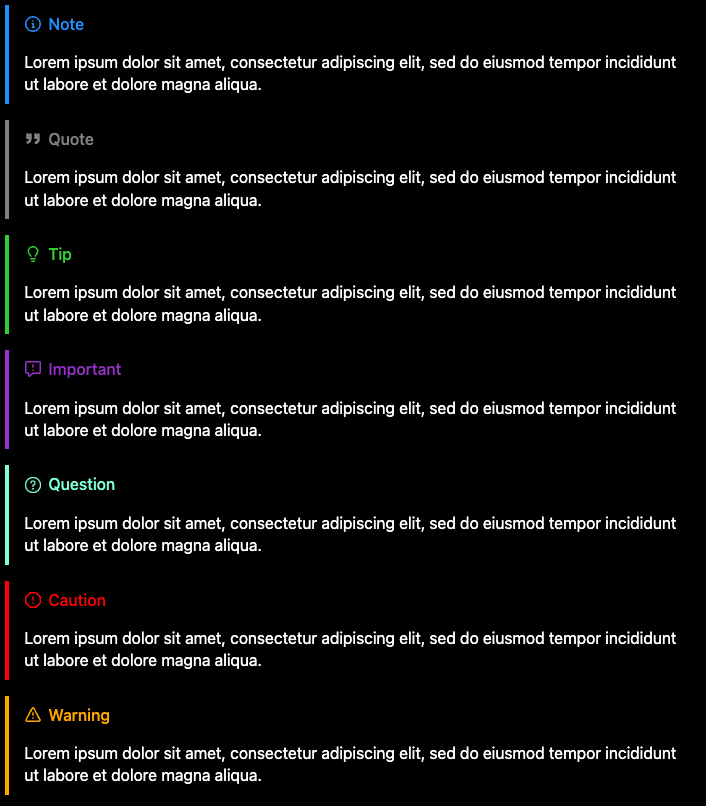
如果您想更改顯示的默認標題的值,則可以在報價中指定它:
> [ !QUESTION "Something to ponder..." ]作為另一個示例,當使用引號時,您可以將其設置為看起來很乾淨的空字符串:
 > [ !QUOTE "" ]
> ... 
如果您想指定應在全球範圍內應用的標籤,則可以使用便利的SilkCalloutBlockquoteHandler在項目構建腳本中覆蓋BlockQuote處理程序來做到這一點:
kobweb {
  markdown {
    handlers.blockquote.set( SilkCalloutBlockquoteHandler (labels = mapOf ( " QUOTE " to " " )))
  }
}
警告
標註由絲綢提供。如果您的項目不使用絲綢,而您覆蓋了BlockQuote處理程序,則它將生成代碼,從而導致編譯錯誤。
絲綢提供了一些用於標註的變體。
例如,概述的變體:

和一個填充的變體:

您還可以將任何標準變體與其他匹配鏈接變體(例如LeftBorderedCalloutVariant.then(MatchingLinkCalloutVariant)) )結合起來,以使其以便在標註中內部的任何超鏈接都可以匹配賭注本身的顏色:
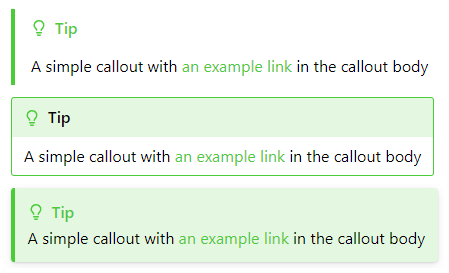
如果您更喜歡這些樣式而不是默認樣式,則可以在SilkCalloutBlockquoteHandler中設置variant參數,例如,我們將其設置為概述的變體:
kobweb {
  markdown {
    handlers.blockquote.set( SilkCalloutBlockquoteHandler (
      variant = " com.varabyte.kobweb.silk.components.display.OutlinedCalloutVariant " )
    )
  }
}
當然,您還可以在自己的代碼庫中定義自己的變體,並將其通過此處。
如果您想註冊自定義標註,則可以分為兩部分完成。
首先,在您的代碼中聲明您的自定義標註設置:
 package com.mysite.components.widgets.callouts

val CustomCallout = CalloutType (
    /* ... specify icon, label, and colors here ... */
)然後在您的構建腳本中註冊它,並將其默認處理程序列表(即SilkCalloutTypes )擴展到您的自定義:
kobweb {
  markdown {
    handlers.blockquote.set(
      SilkCalloutBlockquoteHandler (types =
        SilkCalloutTypes +
          mapOf ( " CUSTOM " to " .components.widgets.callouts.CustomCallout " )
      )
    )
  }
}
筆記
如上所述,通過使用前導. ,您可以省略項目的組(例如com.mysite )。 KobWeb將自動為您準備。
就是這樣!此時,您可以在降價中使用它:
 > [ !CUSTOM ]
> Neat.在網站的構建過程中處理所有Markdown文件可能真的很有用。一個常見的例子是收集所有降價文章並從中生成清單頁面。
您實際上可以使用純Gradle代碼來執行此操作,但是通常,KobWeb通過markdown Block的process回調提供便利性API。
您可以註冊一個將在構建時間觸發的回調,並使用項目中所有Markdown文件的列表。
kobweb {
  markdown {
    process.set { markdownEntries ->
      // `markdownEntries` is type `List<MarkdownEntry>`, where an entry includes the file's path, the route it will
      // be served at, and any parsed front matter.

      println ( " Processing markdown files: " )
      markdownEntries.forEach { entry ->
        println ( " t * ${entry.filePath} -> ${entry.route} " )
      }
    }
  }
}在回調中,您還可以調用generateKotlin和generateMarkdown實用程序方法。這是為網站中所有博客文章創建清單頁面的一個非常粗略的示例(在resources/markdown/blog文件夾中找到):
kobweb {
  markdown {
    process.set { markdownEntries ->
      generateMarkdown( " blog/index.md " , buildString {
        appendLine( " # Blog Index " )
        markdownEntries.forEach { entry ->
          if (entry.filePath.startsWith( " blog/ " )) {
            val title = entry.frontMatter[ " title " ] ? : " Untitled "
            appendLine( " * [ $title ]( ${entry.route} ) " )
          }
        }
      })
    }
  }
}
請參閱我的開源博客網站的構建腳本,並蒐索“ process.set”,以在生產環境中查看此功能。
許多新的Web開發開發人員都聽到了有關CSS的恐怖故事,他們可能希望Kobweb通過利用Kotlin和Jetpack構成風格的API,這意味著他們不必學習它。
值得消除這種幻想! CSS是不可避免的。
也就是說,CSS的聲譽可能比應有的差。它的許多功能實際上相當簡單,有些功能非常強大。例如,您可以有效地聲明您的元素應用薄的邊框包裹,並用圓角包裹,在其下面呈滴陰影,使其具有深度的感覺,並在其背景下塗有梯度效果,並具有振盪,傾斜的效果。
希望一旦您通過Kobweb學到了一些CSS,您會發現自己實際上很喜歡它(有時)!
KobWeb提供了足夠的抽象層,您可以以更加增量的方式學習CSS。
首先,也是最重要的是,KobWeb為您為CSS屬性提供了Kotlin-Idiomic-Safe-Safe API。這是比在運行時默默失敗的文本文件中編寫CSS的重大改進。
接下來,諸如Box , Column和Row的佈局小部件可以通過豐富,複雜的佈局快速啟動並運行,然後才能了解“ flex佈局”是什麼。
同時,使用CssStyle可以幫助您將CSS分解成較小,更易於管理的零件,這些物品生活在實際使用它們的代碼附近,從而避免了一個巨大的,單片的CSS文件。 (此類巨型CSS文件是CSS具有令人生畏的聲譽的原因之一)。
例如,一個很容易看起來像這樣的CSS文件:
 /* Dozens of rules... */

. important {
  background-color : red;
  font-weight : bold;
}

. important : hover {
  background-color : pink;
}

/* Dozens of other rules... */

. post-title {
    font-size : 24 px ;
}

/* A dozen more more rules... */
可以在Kobweb中遷移到這一點:
 // ------------------ CriticalInformation.kt

val ImportantStyle = CssStyle {
  base {
    Modifier .backgroundColor( Colors . Red ).fontWeight( FontWeight . Bold )
  }

  hover {
    Modifier .backgroundColor( Colors . Pink )
  }
}

// ------------------ Post.kt

val PostTitleStyle = CssStyle .base { Modifier .fontSize( 24 .px) }接下來,Silk提供了Deferred組合,可以使您聲明代碼,直到其餘的DOM首先完成,這意味著它將出現在其他所有內容的頂部。這是一種避免設置CSS Z-INDEX值(CSS的另一個方面,聲譽不佳的另一個方面)的干淨方法。
最後,絲綢的目的是為小部件提供默認樣式,這些樣式看起來對許多站點。這意味著您應該能夠快速開發常見的UI,而不會遇到CSS的某些更複雜的方面。
讓我們瀏覽一個對基本元素頂部效果分層效果的示例。
提示
CSS屬性最好的兩個學習資源是https://developer.mozilla.org和https://www.w3schools.com 。當您進行網絡搜索時,請密切注意這些。
我們將創建前面討論的邊界,浮動,振蕩的元素。現在重讀它,這是我們需要弄清楚如何做的概念:
假設我們想在我們的網站上引起“歡迎”小部件的關注。您始終可以從一個空盒子開始,我們將在以下文字中加上一些文字:
 Box ( Modifier .padding(topBottom = 5 .px, leftRight = 30 .px)) {
  Text ( " WELCOME!! " )
}
創建一個邊框
接下來,搜索互聯網以獲取“ CSS邊框”。首要鏈接之一應該是:https://developer.mozilla.org/en-us/docs/web/css/border
瀏覽文檔並播放交互式示例。現在了解邊境屬性,讓我們使用代碼完成來發現API的KobWeb版本:
 Box (
  Modifier
    .padding(topBottom = 5 .px, leftRight = 30 .px)
    .border( 1 .px, LineStyle . Solid , Colors . Black )
) {
  Text ( " WELCOME!! " )
}
圓角
搜索“ CSS圓角”。事實證明,在這種情況下,CSS屬性稱為“邊界半徑”:https://developer.mozilla.org/en-us/docs/web/css/border-radius
 Box (
  Modifier
    .padding(topBottom = 5 .px, leftRight = 30 .px)
    .border( 1 .px, LineStyle . Solid , Colors . Black )
    .borderRadius( 5 .px)
) {
  Text ( " WELCOME!! " )
}
添加陰影
搜索“ CSS影子”。 CSS陰影功能有幾種類型,但是經過一些快速閱讀後,我們意識到我們要使用盒子陰影:https://developer.mozilla.org/en-us/docs/docs/web/css/boxss/box-shadow
在與模糊和傳播價值玩耍之後,我們得到了看起來不錯的東西:
 Box (
  Modifier
    .padding(topBottom = 5 .px, leftRight = 30 .px)
    .border( 1 .px, LineStyle . Solid , Colors . Black )
    .borderRadius( 5 .px)
    .boxShadow(blurRadius = 5 .px, spreadRadius = 3 .px, color = Colors . DarkGray )
) {
  Text ( " WELCOME!! " )
}
添加梯度背景
搜索“ CSS梯度背景”。這不是像以前的情況那樣直接的CSS屬性,因此我們獲得了更一般的文檔頁面,解釋了該功能:https://developer.mozilla.org/en-us/docs/docs/web/css/css/cssss_images/using_gradients
最終找到類型安全等效的Kotlin,這種情況有些棘手,但是如果您將更多內容挖掘到CSS文檔中,您將了解到線性梯度是一種背景圖像。
 Box (
  Modifier
    .padding(topBottom = 5 .px, leftRight = 30 .px)
    .border( 1 .px, LineStyle . Solid , Colors . Black )
    .borderRadius( 5 .px)
    .boxShadow(blurRadius = 5 .px, spreadRadius = 3 .px, color = Colors . DarkGray )
    .backgroundImage(linearGradient( LinearGradient . Direction . ToRight , Colors . LightBlue , Colors . LightGreen ))
) {
  Text ( " WELCOME!! " )
}
添加搖擺動畫
最後,搜索“ CSS動畫”:https://developer.mozilla.org/en-us/docs/web/css/css_animations/using_css_animations
您可以查看上面的動畫部分,以了解Kobweb如何支持此功能的複習,該功能需要聲明頂級Keyframes幀塊,然後在動畫修飾符中引用該功能:
 // Top level property
val WobbleKeyframes = Keyframes {
  from { Modifier .rotate(( - 5 ).deg) }
  to { Modifier .rotate( 5 .deg) }
}

// Inside your @Page composable
Box (
  Modifier
    .padding(topBottom = 5 .px, leftRight = 30 .px)
    .border( 1 .px, LineStyle . Solid , Colors . Black )
    .borderRadius( 5 .px)
    .boxShadow(blurRadius = 5 .px, spreadRadius = 3 .px, color = Colors . DarkGray )
    .backgroundImage(linearGradient( LinearGradient . Direction . ToRight , Colors . LightBlue , Colors . LightGreen ))
    .animation(
      WobbleKeyframes .toAnimation(
        duration = 1 .s,
        iterationCount = AnimationIterationCount . Infinite ,
        timingFunction = AnimationTimingFunction . EaseInOut ,
        direction = AnimationDirection . Alternate ,
      )
    )
) {
  Text ( " WELCOME!! " )
}
我們完成了!
上面的元素不會贏得任何樣式獎項,但我希望這表明CSS只能在幾個聲明的代碼行中為您提供多少功率。而且,由於CSS的性質,加上Kobweb的現場重裝體驗,我們能夠逐步嘗試我們的想法。
我們的主要項目貢獻者之一創建了一個名為CSS 2 KobWeb的站點,該網站旨在簡化將CSS示例轉換為等效的CssStyle和/或Modifier聲明的過程。
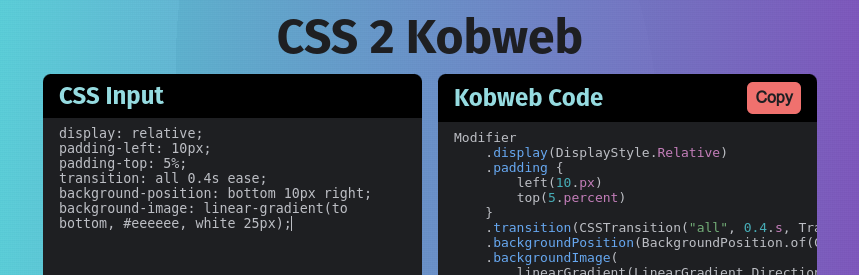
提示
CSS 2 KobWeb還支持指定類名稱選擇器和鍵框。例如,查看粘貼以下CSS代碼時會發生什麼:
. site-banner {
  position : relative;
  padding-left : 10 px ;
  padding-top : 5 % ;
  animation : slide-in 3 s linear 1 s infinite;
  background-position : bottom 10 px right;
  background-image : linear-gradient (to bottom , # eeeeee , white 25 px );
}
. site-banner : hover {
  color : rgb ( 40 , 40 , 40 );
}
@keyframes slide-in {
  from {
    transform : translateX ( -2 rem ) scale ( 0.5 );
  }
  to {
    transform : translateX ( 0 );
    opacity : 1 ;
  }
}
網絡上充斥著有趣的CSS效果的例子。幾乎所有與CSS相關的搜索都將導致大量的Stackoverflow答案,具有Wysiwyg編輯器的交互式操場以及博客文章。其中許多介紹了一些非常新穎的CSS示例。這是了解有關Web開發的更多方法!
但是,正如上一節所表明的那樣,從CSS示例到等效的KobWeb代碼有時可能會很痛苦。我們希望CSS 2 KobWeb可以為此提供幫助。
這個項目已經非常有用,但是仍然是初期。如果您發現不正確的CSS 2 KobWeb案例,請考慮在其存儲庫中提交問題。
希望本節能夠深入了解如何獨自探索CSS API,但是如果您堅持使用效果,請記住,您可以聯繫與我們聯繫的一個選擇之一,社區中的某人可能會有所幫助!
Kobweb在組成HTML之上的主要補充之一是出口過程。
此功能將框架提升從生成單頁應用程序的框架到產生整體可導航站點的框架。導出過程會拍攝每個頁面的快照,從而獲得更好的SEO支持和更快的初始渲染。
普通的開發工作流將使您使用kobweb run來建立您的網站,然後當您準備發布它時, kobweb export生產版本。
讓我們花點時間詳細介紹這個過程,以使其神秘化。
普通組合HTML網站的index.html文件如下:
 <!DOCTYPE html >
< html lang =" en " >
< head >
  < meta charset =" UTF-8 " >
  < title > My Site Title </ title >
</ head >
< body >
< div id =" root " > </ div >
< script src =" mysite.js " > </ script >
</ body >
</ html >
筆記
例如,您可以在官方入門說明中找到此確切的結構。
這樣做的是聲明一個根元素,其內容將在運行時動態填寫。您可以將文件末尾的mysite.js腳本想到,因為種子成長為網站。
這是非常強大的,但是當您使用這種方法構建網站時,您會遇到兩個主要問題:
mysite.js會變得越來越大,這意味著在渲染網站之前需要更大的下載。好的,讓我們將Kobweb添加到混音中。在這裡,我們構建一個非常最小的頁面,並導出我們的網站(使用kobweb export ),以查看會發生什麼。
@Page
@Composable
fun ExampleKobwebPage () {
    Text ( " This is a minimal example to demonstrate exporting. " )
}導出在您的kobweb/.site文件夾下生成以下HTML,我在這裡複製了許多樣式:
 <!doctype html >
< html lang =" en " >
 < head >
  < meta http-equiv =" Content-Type " content =" text/html; charset=UTF-8 " >
  < title > My Site Title </ title >
  < meta content =" Powered by Kobweb " name =" description " >
  < link href =" /favicon.ico " rel =" icon " >
  < meta content =" width=device-width, initial-scale=1 " name =" viewport " >
 </ head >
 < body >
  < div id =" root " style =" ... " >
   < style > ... </ style >
   < div class =" ... " style =" min-height: 100vh; " >
    This is a minimal example to demonstrate exporting.
   </ div >
  </ div >
  < script src =" /mysite.js " > </ script >
 </ body >
</ html >
如您所見,KobWeb填寫了很多額外的信息,儘管它仍然鏈接到文件底部的站點腳本。這很重要,因為如本節前面提到的那樣,它包含了所有必要的信息,而不僅僅是呈現此頁面,而且還包含整個站點。
換句話說,您可以僅下載此頁面,然後繼續在網站周圍導航,而無需下載更多文件。
簡而言之,導出過程將在您的代碼庫中發現所有@Page宣布的方法,並生成每個方法的快照。您可以將每個快照視為對SEO友好的起點,您可以從中訪問其餘的網站。
In order for Kobweb exporting to be able to take a snapshot of your site, it needs to spin up a browser in headless mode. This browser is responsible for loading the simple Compose HTML version of an index.html page and running its JavaScript to fill out the page. The browser will then get queried for the final html which Kobweb saves to disk.
Kobweb delegates much of this task to Microsoft's excellent Playwright framework. Hopefully this will be invisible to almost all users, but for advanced cases, it can be useful to know the technology that's running under the hood.
For custom CI/CD setups, you will at the very least need to be aware that the Kobweb export process requires a browser. For users who would like more information about this, we discuss one example in more detail later, in the GitHub Workflow for exports▼ section.
There are two flavors of Kobweb sites: static and full stack .
A static site (or, more completely, a static layout site) is one where you export a bunch of frontend files (eg html , js , and public resources) into a single, organized folder that gets served directly by a static website hosting provider.
In other words, you don't write a single line of server code. The server is provided for you in this case and uses a fairly straightforward algorithm - it hosts all the content you upload to it as raw, static assets.
The name static does not refer to the behavior of your site but rather that of your hosting provider solution. If someone makes a request for a page, the same response bytes get served every time (even if that page is full of custom code that allows it to behave in very interactive ways).
A full stack site is one where you write both the logic that runs on the frontend (ie on the user's machine) and the logic that runs on the backend (ie on a server somewhere). This custom server must at least serve requested files (exactly the same job that a static web hosting service does) plus it likely also defines endpoints providing custom functionality tailored to your site's needs.
For example, maybe you define an endpoint which, given a user ID and an authentication token, returns that user's profile information.
When Kobweb was first written, it only provided the full stack solution, as being able to write your own server logic enabled a maximum amount of power and flexibility. The mental model for using Kobweb during this early time was simple and clear.
However, in practice, most projects don't need the power afforded by a full stack setup. A website can give users a very clean, dynamic experience simply by writing responsive frontend logic to make it look good, eg with animations and delightful user interactions.
Additionally, many " Feature as a Service" solutions have popped up over the years, which can provide a ton of convenient functionality that used to require a custom server. These days, you can easily integrate auth, database, and analytics solutions all without writing a single line of backend code.
The process for exporting a bunch of files in a way that can be consumed by a static web hosting provider tends to be much faster and cheaper than using a full stack solution. Therefore, you should prefer a static site layout unless you have a specific need for a full stack approach.
Some possible reasons to use a custom server (and, therefore, a full stack approach) are:
If you aren't sure which category you fall into, then you should probably be creating a static layout site. It's much easier to migrate from a static layout site to a full stack site later than the other way around.
Both site flavors require an export.
To export your site with a static layout, use the kobweb export --layout static command, while for full stack the command is kobweb export --layout fullstack (or just kobweb export since fullstack is the default layout as it originally was the only way).
Once exported, you can test your site by running it locally before uploading. You run a static site with kobweb run --env prod --layout static and a full stack site with kobweb run --env prod --layout fullstack (or just kobweb run --env prod ).
Sometimes, you have behavior that should run when an actual user is navigating your site, but you don't want it to run at export time. For example, maybe you offer logged-in users an authenticated experience, but you'll never have a logged-in user at export time.
You can determine if your page is being rendered as part of an export by checking the PageContext.isExporting property. This gives you the opportunity to manipulate the exported HTML or avoid side effects associated with page loading.
@Composable
fun AuthenticatedLayout ( content : @Composable () -> Unit ) {
    var loggedInUser by remember { mutableStateOf< User ?>( null ) }

    val ctx = rememberPageContext()
    if ( ! ctx.isExporting) {
        LaunchedEffect ( Unit ) {
            loggedInUser = checkForLoggedInUser() // <- A slow, expensive method
        }
    }

    if (loggedInUser == null ) {
        LoggedOutScaffold { content() }
    } else {
        LoggedInScaffold (user) { content() }
    }
}
Dynamic routes are skipped over by the export process. After all, it's not possible to know all the possible values that could be passed into a dynamic route.
However, if you have a specific instance of a dynamic route that you'd like to export, you can configure your site's build script as follows:
kobweb {
  app {
    export {
      // "/users/{user}/posts/{post}" has special handling for the "default" / "0" case
      addExtraRoute( " /users/default/posts/0 " , " users/index.html " )
    }
  }
}A static site gets exported into .kobweb/site by default (you can configure this location in your .kobweb/conf.yaml file if you'd like). You can then upload the contents of that folder to the static web hosting provider of your choice.
Deploying a full stack site is a bit more complex, as different providers have wildly varying setups, and some users may even decide to run their own web server themselves. However, when you export your Kobweb site, scripts are generated for running your server, both for *nix platforms ( .kobweb/server/start.sh ) and the Windows platform ( .kobweb/server/start.bat ). If the provider you are using speaks Dockerfile, you can set ENTRYPOINT to either of these scripts (depending on the server's platform).
Going in more detail than this is outside the scope of this README. However, you can read my blog posts for a lot more information and some clear, concrete examples:
By default, Kobweb will automatically root every page to the KobwebApp composable (or, if using Silk, to a SilkApp composable). These perform some minimal common work (eg applying CSS styles) that should be present across your whole site.
This means if you register a page:
 // jsMain/kotlin/com/mysite/pages/Index.kt

@Page
@Composable
fun HomePage () {
    /* ... */
}
then the final result that actually runs on your site will be:
 // In a generated main.kt somewhere...

KobwebApp {
  HomePage ()
}
It is likely you'll want to configure this further for your own application. Perhaps you have some initialization logic that you'd like to run before any page gets run (like logic for updating saved settings into local storage). And for many apps it's a great place to specify a full screen Silk Surface as that makes all children beneath it transition between light and dark colors smoothly.
In this case, you can create your own root composable and annotate it with @App . If present, Kobweb will use that instead of its own default. You should, of course, delegate to KobwebApp (or SilkApp if using Silk), as the initialization logic from those methods should still be run.
Here's an example application composable override that I use in many of my own projects:
@App
@Composable
fun MyApp ( content : @Composable () -> Unit ) {
  SilkApp {
    val colorMode = ColorMode .current
    LaunchedEffect (colorMode) { // Relaunched every time the color mode changes
      localStorage.setItem( " color-mode " , colorMode.name)
    }

    // A full screen Silk surface. Sets the background based on Silk's palette and animates color changes.
    Surface ( SmoothColorStyle .toModifier().minHeight( 100 .vh)) {
      content()
    }
  }
}
You can define at most a single @App on your site, or else the Kobweb Application plugin will complain at build time.
The default styles picked by browsers for many HTML elements rarely fit most site designs, and it's likely you'll want to tweak at least some of them. A very common example of this is the default web font, which if left as is will make your site look a bit archaic.
Most traditional sites overwrite styles by creating a CSS stylesheet and then linking to it in their HTML. However, if you are using Silk in your Kobweb application, you can use an approach very similar to CssStyle discussed above but for general HTML elements.
To do this, create an @InitSilk method. The context parameter includes a stylesheet property that represents the CSS stylesheet for your site, providing a Silk-idiomatic API for adding CSS rules to it.
Below is a simple example that sets the whole site to more aesthetically pleasing fonts than the browser defaults, one for regular text and one for code:
@InitSilk
fun initSilk ( ctx : InitSilkContext ) {
  ctx.stylesheet.registerStyleBase( " body " ) {
    Modifier .fontFamily( " Ubuntu " , " Roboto " , " Arial " , " Helvetica " , " sans-serif " )
      .fontSize( 18 .px)
      .lineHeight( 1.5 )
  }

  ctx.stylesheet.registerStyleBase( " code " ) {
    Modifier .fontFamily( " Ubuntu Mono " , " Roboto Mono " , " Lucida Console " , " Courier New " , " monospace " )
  }
}
提示
The registerStyleBase method is commonly used for registering styles with minimal code, but you can also use registerStyle , especially if you want to add some support for one or more pseudo-classes ( eg hover , focus , active ):
ctx.stylesheet.registerStyle( " code " ) {
  base {
    Modifier
      .fontFamily( " Ubuntu Mono " , " Roboto Mono " , " Lucida Console " , " Courier New " , " monospace " )
      .userSelect( UserSelect . None ) // No copying code allowed!
  }
  hover {
    Modifier .cursor( Cursor . NotAllowed )
  }
}Occasionally you might find yourself with a value at build time that you want your site to know at runtime.
For example, maybe you want to specify a version based on the current UTC timestamp. Or maybe you want to read a system environment variable's value and pass that into your Kobweb site as a way to configure its behavior.
This is supported via Kobweb's AppGlobals singleton, which is like a Map<String, String> whose values you can set from your project's build script using the kobweb.app.globals property.
Let's demonstrate this with the UTC version example.
In your application's build.gradle.kts , add the following code:
 import java.time.LocalDateTime
import java.time.ZoneId
import java.time.format.DateTimeFormatter

plugins {
  /* ... */
  alias(libs.plugins.kobweb.application)
}

kobweb {
  app {
    globals.put(
      " version " ,
      LocalDateTime
          .now( ZoneId .of( " UTC " ))
          .format( DateTimeFormatter .ofPattern( " yyyyMMdd.kkmm " ))
    )
  }
}
You can then access them via the AppGlobals.get or AppGlobals.getValue methods:
val version = AppGlobals .getValue( " version " )In your Kotlin project somewhere, it is recommended that you either add some type-safe extension methods, or you can create your own wrapper object (based on your preference):
 // SiteGlobals.kt

import com.varabyte.kobweb.core.AppGlobals

// Extension method approach ---------------------

val AppGlobals .version : String
  get() = getValue( " version " )

// Wrapper object approach -----------------------

object SiteGlobals {
  val version : String = AppGlobals .getValue( " version " )
}
At this point, you can access this value in your site's code, say for a tiny label that would look good in a footer perhaps:
 // components/widgets/SiteVersion.kt

val VersionTextStyle = CssStyle .base {
  Modifier .fontSize( 0.6 .cssRem)
}

@Composable
fun SiteVersion ( modifier : Modifier = Modifier ) {
  // Extension method approach
  val versionLabel = " v " + AppGlobals .version
  // Wrapper object approach
  val versionLabel = " v " + SiteGlobals .version

  SpanText (versionLabel, VersionTextStyle .toModifier().then(modifier))
}As mentioned earlier, Silk widgets all use component styles▲ to power their look and feel.
Normally, if you want to tweak a style in select locations within your site, you just create a variant from that style:
 val TweakedButtonVariant = ButtonStyle .addVariantBase { /* ... */ }

// Later...
Button (variant = TweakedButtonVariant ) { /* ... */ }
But what if you want to globally change the look and feel of a widget across your entire site?
You could of course create your own composable which wraps some underlying composable with its own new style, eg MyButton which defines its own MyButtonStyle that internally delegates to Button . However, you'd have to be careful to make sure all new developers who add code to your site know to use MyButton instead of Button directly.
Silk provides another way, allowing you to modify any of its declared styles and/or variants in place.
You can do this via an @InitSilk method, which takes an InitSilkContext parameter. This context provides the theme property, which provides the following family of methods for rewriting styles and variants:
@InitSilk
fun replaceStylesAndOrVariants ( ctx : InitSilkContext ) {
  ctx.theme.replaceStyle( SomeStyle ) { /* ... */ }
  ctx.theme.replaceVariant( SomeVariant ) { /* ... */ }
  ctx.theme.modifyStyle( SomeStyle ) { /* ... */ }
  ctx.theme.modifyVariant( SomeVariant ) { /* ... */ }
}
筆記
Technically, you can use these methods with your own site's declared styles and variants as well, but there should be no reason to do so since you can just go to the source and change those values directly. However, this can still be useful if you're using a third-party Kobweb library that provides its own styles and/or variants.
Use the replace versions if you want to define a whole new set of CSS rules from scratch, or use the modify versions to layer additional changes on top of what's already there.
警告
Using replace on some of the more complex Silk styles can be tricky, and you may want to familiarize yourself with the details of how those widgets are implemented before attempting to do so. Additionally, once you replace a style in your site, you will be opting-out of any future improvements to that style that may be made in future versions of Silk.
Here's an example of replacing ImageStyle on a site that wants to force all images to have rounded corners and automatically scale down to fit their container:
@InitSilk
fun replaceSilkImageStyle ( ctx : InitSilkContext ) {
  ctx.theme.replaceStyleBase( ImageStyle ) {
    Modifier
      .clip( Rect (cornerRadius = 8 .px))
      .fillMaxWidth()
      .objectFit( ObjectFit . ScaleDown )
  }
}
and here's an example for a site that always wants its horizontal dividers to fill max width:
@InitSilk
fun makeHorizontalDividersFillWidth ( ctx : InitSilkContext ) {
  ctx.theme.modifyStyleBase( HorizontalDividerStyle ) {
    Modifier .fillMaxWidth()
  }
}Let's say you've decided on creating a full stack website using Kobweb. This section walks you through setting it up as well as introducing the various APIs for communicating to the backend from the frontend.
A Kobweb project will always at least have a JavaScript component, but if you declare a JVM target, that will be used to define custom server logic that can then be used by your Kobweb site.
It's easiest to let Kobweb do it for you. In your site's build script, make sure you've declared configAsKobwebApplication(includeServer = true) :
 // site/build.gradle.kts
import com.varabyte.kobweb.gradle.application.util.configAsKobwebApplication

plugins {
    alias(libs.plugins.kotlin.multiplatform)
    alias(libs.plugins.jetbrains.compose)
    alias(libs.plugins.kobweb.application)
}

/* ... */

kotlin {
    configAsKobwebApplication(includeServer = true )
    /* ... */
}
重要的
configAsKobwebApplication(includeServer = true) declares and sets up both js() and jvm() Kotlin Multiplatform targets for you. If you don't set includeServer = true explicitly, only the JS target will be declared.
The easy way to check if everything is set up correctly is to open your project inside IntelliJ IDEA, wait for it to finish indexing, and check that the jvmMain folder is detected as a module (if so, it will be given a special icon and look the same as the jsMain folder):
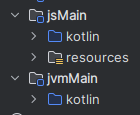
You can define and annotate methods which will generate server endpoints you can interact with. To add one:
suspend able) in a file somewhere under the api package in your jvmMain source directory.ApiContext .@ApiFor example, here's a simple method that echoes back an argument passed into it:
 // jvmMain/kotlin/com/mysite/api/Echo.kt

@Api
suspend fun echo ( ctx : ApiContext ) {
    // ctx.req is for the incoming request, ctx.res for responding back to the client

    // Params are parsed from the URL, e.g. here "/api/echo?message=..."
    val msg = ctx.req.params[ " message " ] ? : " "
    ctx.res.setBodyText(msg)
}
After running your project, you can test the endpoint by visiting mysite.com/api/echo?message=hello
You can also trigger the endpoint in your frontend code by using the extension api property added to the kotlinx.browser.window class:
@Page
@Composable
fun ApiDemoPage () {
  val coroutineScope = rememberCoroutineScope()

  Button (onClick = {
    coroutineScope.launch {
      println ( " Echoed: " + window.api.get( " echo?message=hello " ).decodeToString())
    }
  }) { Text ( " Click me " ) }
}
All the HTTP methods are supported ( post , put , etc.).
These methods will throw an exception if the request fails for any reason. Note that for every HTTP method, there's a corresponding "try" version that will return null instead ( tryPost , tryPut , etc.).
If you know what you're doing, you can of course always use window.fetch(...) directly.
When you define an API route, you are expected to set a status code for the response, or otherwise it will default to status code 404 .
In other words, the following API route stub will return a 404:
@Api
suspend fun error404 ( ctx : ApiContext ) {
}
In contrast, this minimal API route returns an OK status code:
@Api
suspend fun noActionButOk ( ctx : ApiContext ) {
    ctx.res.status = 200
}
重要的
The ctx.res.setBodyText method sets the status code to 200 automatically for you, which is why code in the previous section worked without setting the status directly. Of course, if you wanted to return a different status code value after setting the body text, you could explicitly set it right after making the setBodyText call.例如:
ctx.res.setBodyText( " ... " )
ctx.res.status = 201
The design for defaulting to 404 was chosen to allow you to conditionally handle API routes based on input conditions, where early aborts automatically result in the client getting an error.
A very common case is creating an API route that only handles POST requests:
@Api
suspend fun updateUser ( ctx : ApiContext ) {
    if (ctx.req.method != HttpMethod . POST ) return
    // ...
    ctx.res.status = 200
}
Finally, note that you can add headers to your response. A common endpoint that some servers provide is a redirect (302) with an updated URL location. This would look like:
@Api
suspend fun redirect ( ctx : ApiContext ) {
    if (ctx.req.method != HttpMethod . GET ) return
    ctx.res.headers[ " Location " ] = " ... "
    ctx.res.status = 302
}
簡單的!
Similar to dynamic @Page routes, you can define API routes using curly braces in the same way to indicate a dynamic value that should be captured with some binding name.
For example, the following endpoint will capture the value "123" into a key name called "article" when querying articles/123 :
 // jvmMain/kotlin/com/mysite/api/articles/Article.kt

@Api( " {} " )
suspend fun fetchArticle ( ctx : ApiContext ) {
    val articleId = ctx.req.params[ " article " ] ? : return
    // ...
}
Recall from the @Page docs that specifying a name inside the curly braces defines the variable name used to capture the value. When empty, as above, Kobweb uses the filename to generate it. In other words, you could explicitly specify @Api("{article}") for the same effect.
Once this API endpoint is defined, you just query it as you would any normal API endpoint:
coroutineScope.launch {
  val articleText = window.api.get( " articles/123 " ).decodeToString()
  // ...
}
Finally, astute readers might notice that (like dynamic @Page routes) we use the same property to query dynamic route values as well as query parameters.
Captured dynamic values will always take precedence over query parameters in the params map. In practice, this should never be a problem, because it would be very confusing design to write an API endpoint that got called like articles/123?article=456 . That said, you can also use ctx.req.queryParams["article"] to disambiguate this case if necessary.
@InitApi methods and initializing services Kobweb also supports declaring methods that should be run when your server starts up, which is particularly useful for initializing services that your @Api methods can then use. These methods must be annotated with @InitApi and must take a single InitApiContext parameter.
重要的
If you are running a development server and change any of your backend code, causing a live reloading event, the init methods will be run again.
The InitApiContext class exposes a mutable set property (called data ) which you can put anything into. Meanwhile, @Api methods expose an immutable version of data . This allows you to initialize a service in an @InitApi method and then access it in your @Api methods.
Let's demonstrate a concrete example, imagining we had an interface called Database with a mutable subclass MutableDatabase that implements it and provides additional APIs for mutating the database.
The skeleton for registering and later querying such a database instance might look like this:
@InitApi
fun initDatabase ( ctx : InitApiContext ) {
  val db = MutableDatabase ()
  db.createTable( " users " , listOf ( " id " , " name " )). apply {
    addRow( listOf ( " 1 " , " Alice " ))
    addRow( listOf ( " 2 " , " Bob " ))
  }
  db.loadResource( " products.csv " )

  ctx.data.add< Database >(db)
}

@Api
fun getUsers ( ctx : ApiContext ) {
  if (ctx.req.method != HttpMethod . GET ) return
  val db = ctx.data.get< Database >()
  ctx.res.setBodyText(db.query( " SELECT * FROM users " ).toString())
}Kobweb servers also support persistent connections via streams. Streams are essentially named channels that maintain continuous contact between the client and the server, allowing either to send messages to the other at any time. This is especially useful if you want your server to be able to communicate updates to your client without needing to poll.
Additionally, multiple clients can connect to the same stream. In this case, the server can choose to not only send a message back to your client, but also to broadcast messages to all users (or a filtered subset of users) on the same stream. You could use this, for example, to implement a chat server with rooms.
Like API routes, API streams must be defined under the api package in your jvmMain source directory. By default, the name of the stream will be derived from the file name and path that it's declared in (eg "api/lobby/Chat.kt" will create a channel named "lobby/chat").
Unlike API routes, API streams are defined as properties, not methods. This is because API streams need to be a bit more flexible than routes, since streams consist of multiple distinct events: client connection, client messages, and client disconnection.
Also unlike API routes, streams do not have to be annotated. The Kobweb Application plugin can automatically detect them.
For example, here's a simple stream, declared on the backend, that echoes back any argument it receives:
 // jvmMain/kotlin/com/mysite/api/Echo.kt

val echo = object : ApiStream {
  override suspend fun onClientConnected ( ctx : ClientConnectedContext ) {
    // Optional: ctx.stream.broadcast a message to all other clients that ctx.clientId connected
    // Optional: Update ctx.data here, initializing data associated with ctx.clientId
  }
  override suspend fun onTextReceived ( ctx : TextReceivedContext ) {
    ctx.stream.send(ctx.text)
  }
  override suspend fun onClientDisconnected ( ctx : ClientDisconnectedContext ) {
    // Optional: ctx.stream.broadcast a message to all other clients that ctx.clientId disconnected
    // Optional: Update ctx.data here, removing data associated with ctx.clientId
  }
}
To communicate with an API stream from your site, you need to create a stream connection on the client:
@Page
@Composable
fun ApiStreamDemoPage () {
  val echoStream = rememberApiStream( " echo " , object : ApiStreamListener {
    override fun onConnected ( ctx : ConnectedContext ) {}
    override fun onTextReceived ( ctx : TextReceivedContext ) {
      console.log( " Echoed: ${ctx.text} " )
    }
    override fun onDisconnected ( ctx : DisconnectedContext ) {}
  })

  Button (onClick = {
    echoStream.send( " hello! " )
  }) { Text ( " Click me " ) }
}
After running your project, you can click on the button and check the console logs. If everything is working properly, you should see "Echoed: hello!" for each time you press the button.
提示
The examples/chat template project uses API streams to implement a very simple chat application, so you can reference that project for a more realistic example.
The above example was intentionally verbose, to showcase the broader functionality around API streams. However, depending on your use-case, you can elide a fair bit of boilerplate.
First of all, the connect and disconnect handlers are optional, so you can omit them if you don't need them. Let's simplify the echo example:
 // Backend
val echo = object : ApiStream {
  override suspend fun onTextReceived ( ctx : TextReceivedContext ) {
    ctx.stream.send(ctx.text)
  }
}

// Frontend
val echoStream = rememberApiStream( " echo " , object : ApiStreamListener {
  override fun onTextReceived ( ctx : TextReceivedContext ) {
    console.log( " Echoed: ${ctx.text} " )
  }
})
Additionally, if you only care about the text event, there are convenience methods for that:
 // Backend
val echo = ApiStream { ctx -> ctx.stream.send(ctx.text) }

// Frontend
val echoStream = rememberApiStream( " echo " ) {
  ctx -> console.log( " Echoed: ${ctx.text} " )
}
In practice, your API streams will probably be a bit more involved than the echo example above, but it's nice to know that you can handle some cases only needing a one-liner on the server and another on the client to create a persistent client-server connection!
筆記
If you need to create an API stream with stricter control around when it actually connects to the server, you can create the ApiStream object directly instead of using rememberApiStream :
 val echoStream = remember { ApiStream ( " echo " ) }
val scope = rememberCoroutineScope()

// Later, perhaps after a button is clicked...
scope.launch {
  echoStream.connect( object : ApiStreamListener { /* ... */ })
}When faced with a choice, use API routes as often as you can. They are conceptually simpler, and you can query API endpoints with a CLI program like curl and sometimes even visit the URL directly in your browser. They are great for handling queries of or updates to server resources in response to user-driven actions (like visiting a page or clicking on a button). Every operation you perform returns a clear response code in addition to some payload information.
Meanwhile, API streams are very flexible and can be a natural choice to handle high-frequency communication. But they are also more complex. Unlike a simple request / response pattern, you are instead opting in to manage a potentially long lifetime during which you can receive any number of events. You may have to concern yourself about interactions between all the clients on the stream as well. API streams are fundamentally stateful.
You often need to make a lot of decisions when using API streams. What should you do if a client or server disconnects earlier than expected? How do you want to communicate to the client that their last action succeeded or failed (and you need to be clear about exactly which action because they might have sent another one in the meantime)? What structure do you want to enforce, if any, between a client and server connection where both sides can send messages to each other at any time?
Most importantly, API streams may not horizontally scale as well as API routes. At some point, you may find yourself in a situation where a new web server is spun up to handle some intense load.
If you're using API routes, you're already probably delegating to a database service as your data backend, so this may just work seamlessly.
But for API streams, you many naturally find yourself writing a bunch of broadcasting code. However, this only works to communicate between all clients that are connected to the same server. Two clients connected to the same stream on different servers are effectively in different, disconnected worlds.
The above situation is often handled by using a pubsub service (like Redis). This feels somewhat equivalent to using a database as a service in the API route situation, but this code might not be as straightforward to migrate.
API routes and API streams are not a you-must-use-one-or-the-other situation. Your project can use both! In general, try to imagine the case where a new server might get spun up, and design your code to handle that situation gracefully. API routes are generally safe to use, so use them often. However, if you have a situation where you need to communicate events in real-time, especially situations where you want your client to be continuously directed what to do by the server via events, API streams are a great choice.
筆記
You can also search online about REST vs WebSockets, as these are the technologies that API routes and API streams are implemented with. Any discussions about them should apply here as well.
It is very common to want to set a value on one page that should be made available on other pages. Or maybe you want a value to be restored when a user returns to the page again in the future, even if they've since closed and reopened the browser.
In the world of web development, this is accomplished with web storage, of which there are two flavors: local storage and session storage .
Local storage and web storage have identical APIs, with the key difference being their lifetimes. Local storage values will last until the user clears their browser's cache, while session storage will last until the user closes the current tab.
As you might expect, local storage is useful for values that should stick around indefinitely. User preferences are a common use case here. Many Kobweb sites save the user's last selected color mode in local storage, for example.
Meanwhile, session storage is useful when you want to persist data just as long as the user is interacting with your site but no longer. For example, you might keep track of values typed into text fields that haven't been submitted to the server yet, just in case the user reloads the page by accident (page reloads do not end sessions).
Using the storage APIs in Kotlin is trivial -- just reference the kotlinx.browser.localStorage and kotlinx.browser.sessionStorage objects, which are both of type Storage :
 // Note: Several fields elided for simplicity...
interface Storage {
    fun getItem ( key : String ): String?
    fun setItem ( key : String , value : String )
}
import kotlinx.browser.localStorage
localStorage.setItem( " example-key " , " example-value " )
assert (localStorage.getItem( " example-key " ) == " example-value " )With these APIs, the developer can check if an expected value is present in storage or not when visiting a page and act accordingly, for example by re-routing users to a login page if they detect the user is not logged in.
Kobweb provides the StorageKey utility class to enable the creation and querying of type-safe storage values.
For example, if you want to store an integer value, you can do so like this:
 val BRIGHTNESS_KEY = IntStorageKey ( " brightness " )

localStorage.setItem( BRIGHTNESS_KEY , 100 )
val brightness = localStorage.getItem( BRIGHTNESS_KEY ) ? : 100
The StorageKey class (and all implementors) can take an optional defaultValue parameter, which can help reduce some of the boilerplate in the above code:
 val BRIGHTNESS_KEY = IntStorageKey ( " brightness " , defaultValue = 100 )

val brightness = localStorage.getItem( BRIGHTNESS_KEY ) !!
While typed key support is provided for all primitive types (strings, booleans, ints, floats, etc.) and also enums, you can create your own custom implementations by providing your own to-string and from-string conversion functions:
 class User ( val name : String , val id : String )

class UserStorageKey ( name : String ) : StorageKey<User>(name) {
    override fun convertToString ( value : User ) = " $name : $id "
    override fun convertFromString ( value : String ): User ? = value.split( " : " )
        . takeIf { it.size == 2 }
        ?. let { User (it[ 0 ], it[ 1 ]) }
}

val LOGGED_IN_USER_KEY = UserStorageKey ( " logged-in-user " )

val loggedInUser = localStorage.getItem( LOGGED_IN_USER_KEY )
If you are using Kotlinx serialization in your project, you can use it to simplify the above code:
@Serializable
class User ( val name : String , val id : String )

class UserStorageKey ( name : String ) : StorageKey<User>(name) {
    override fun convertToString ( value : User ): String = Json .encodeToString(value)
    override fun convertFromString ( value : String ): User ? =
        try { Json .decodeFromString(value) } catch (ex : Exception ) { null }
} For simplicity, new projects can choose to put all their pages and widgets inside a single application module, eg site/ .
However, you can define components and/or pages in separate modules and apply the com.varabyte.kobweb.library plugin on them (in contrast to your main module which applies the com.varabyte.kobweb.application plugin.)
In other words, you can split up and organize your project like this:
 my-project
├── sitelib
│   ├── build.gradle.kts # apply "com.varabyte.kobweb.library"
│   └── src/jsMain
│       └── kotlin.org.example.myproject.sitelib
│           ├── components
│           └── pages
└── site
    ├── build.gradle.kts # apply "com.varabyte.kobweb.application"
    ├── .kobweb/conf.yaml
    └── src/jsMain
        └── kotlin.org.example.myproject.site
            ├── components
            └── pages
If you'd like to explore a multimodule project example, you can do so by running:
$ kobweb create examples/chatwhich demonstrates a chat application with its auth and chat functionality each managed in their own separate modules.
Web workers are a standard web technology that allow you to run JavaScript code in a separate thread from your main application. Although JavaScript is famously single-threaded, web workers offer a way for you to run potentially expensive code in parallel to your main site without slowing it down.
A web worker script is entirely isolated from your main site and has no access to the DOM. The only way to communicate between them is via message passing.
筆記
Astute readers may recognize the actor model here, which is an effective way to allow concurrency without worrying about common synchronization issues that plague common lock-based approaches.
A somewhat forced but easy-to-understand example of a web worker is one that computes the first N prime numbers.
While the worker is crunching away on intensive calculations, your site still works as normal, fully responsive. When the worker is finished, it posts a message to the application, which handles it by updating relevant UI elements.
Kobweb aims to make using web workers as easy as possible.
Here's everything you have to do (we'll show examples of these steps shortly):
kotlin { ... } block in your build script with a configAsKobwebWorker() call."com.varabyte.kobweb:kobweb-worker" .WorkerFactory interface, providing a WorkerStrategy that represents the core logic of your worker. import com.varabyte.kobweb.gradle.worker.util.configAsKobwebWorker
plugins {
alias(libs.plugins.kotlin.multiplatform)
alias(libs.plugins.kobweb.worker) // or id("com.varabyte.kobweb.worker")
}
group = " example.worker "
version = " 1.0-SNAPSHOT "
kotlin {
configAsKobwebWorker( " example-worker " )
sourceSets {
jsMain.dependencies {
implementation(libs.kobweb.worker) // or "com.varabyte.kobweb:kobweb-worker"
}
}
} The WorkerFactory interface is minimal:
 interface WorkerFactory < I , O > {
  fun createStrategy ( postOutput : OutputDispatcher < O >): WorkerStrategy < I >
  fun createIOSerializer (): IOSerializer < I , O >
}
This concise interface still captures a lot of information. It declares:
postOutput object that can be used to send output messages back to the application. The WorkerStrategy class represents the core logic your worker does after receiving input from the application, as well as exposes a self parameter that provides useful worker functionality.
 abstract class WorkerStrategy < I > {
  protected val self : DedicatedWorkerGlobalScope
  abstract fun onInput ( inputMessage : InputMessage < I >)
}
The OutputDispatcher is a simple class which allows you to send output messages back to the application.
 class OutputDispatcher < O > {
  operator fun invoke ( output : O , transferables : Transferables = Transferables . Empty )
}

// `postOutput: OutputDispatcher<String>` can be called like a normal method, e.g. `postOutput("hello!")`
筆記
Do not worry about the Transferables parameter for now. Transferable objects are a somewhat niche, performance-related feature, and they will be discussed later. It is not expected that a majority of workers will require them.
Finally, IOSerializer is responsible for marshalling objects between the worker and the application.
 interface IOSerializer < I , O > {
  fun serializeInput ( input : I ): String
  fun deserializeInput ( input : String ): I
  fun serializeOutput ( output : O ): String
  fun deserializeOutput ( output : String ): O
}
This class allows you to use the serialization library of your choice. However, as you'll see later, this can be a one-liner for developers using Kotlinx Serialization.
Once the Kobweb Worker Gradle plugin finds your worker factory implementation, it will generate a simple Worker class that wraps it.
 // Generated code!
class Worker ( val onOutput : WorkerContext .( O ) -> Unit ) {
  fun postInput ( input : I , transferables : Transferables = Transferables . Empty )
  fun terminate ()
}
Applications will interact with this Worker and not the WorkerStrategy directly. In fact, you should make your worker factory implementation internal to prevent applications from seeing anything but the worker.
You should think of the WorkerStrategy as representing implementation details while the Worker class represents a public API. In other words, the WorkerStrategy receives inputs, processes data, and posts outputs, while the Worker allows users to post inputs and get notified when outputs are ready.
An application module (ie one that applies the Kobweb Application Gradle plugin) will automatically discover any Kobweb worker dependencies, extracting its worker script and putting it under the public/ folder of your final site.
The following sections introduce concrete worker factories, which should help solidify the abstract concepts introduced above.
The simplest worker strategy possible is one that blindly repeats back whatever input it receives.
This is never a worker strategy that you'd actually create -- there wouldn't be a need for it -- but it's a good starting point for seeing a worker factory in action.
When you have a worker strategy that works with raw strings like this one does, you can use a one-line helper method to implement the createIOSerializer method, called createPassThroughSerializer (since it just passes the raw strings unmodified).
 // Worker module
internal class EchoWorkerFactory : WorkerFactory < String , String > {
  override fun createStrategy ( postOutput : OutputDispatcher < String >) = WorkerStrategy < String > { input ->
    postOutput(input)
  }
  override fun createIOSerializer () = createPassThroughSerializer()
}
Based on that implementation, a worker called EchoWorker will be auto-generated at compile time. Using it in your application looks like this:
 // Application module
val worker = rememberWorker {
  EchoWorker { message -> println ( " Echoed: $message " ) }
}

// Later
worker.postInput( " hello! " ) // After a round trip: "Echoed: hello!"
就是這樣!
重要的
Note the use of the rememberWorker method. This internally calls a remember but also sets up disposal logic that terminates the worker when the composable is exited. If you just use a normal remember block, the worker may keep running longer than you expect, even if you navigate to another part of your site.
You can also stop a worker yourself by calling worker.terminate() directly.
This next worker strategy will take in an Int value from the user. This number represents how many seconds to count down, firing a message for each second that passes.
This is another strategy that you'd never need in practice -- you'd just use the window.setInterval method yourself in your site script -- but we'll show this anyway to demonstrate two additional concepts on top of the echo worker:
postOutput as often as you want. // Worker module
internal class CountDownWorkerFactory : WorkerFactory < Int , Int > {
override fun createStrategy ( postOutput : OutputDispatcher < Int >) = WorkerStrategy < Int > { input ->
var nextCount = input
var intervalId : Int = 0
intervalId = self.setInterval({ // A
postOutput(nextCount) // B
if (nextCount > 0 ) { -- nextCount } else { self.clearInterval(intervalId) }
}, 1000 )
}
override fun createIOSerializer () = object : IOSerializer < Int , Int > { // C
override fun serializeInput ( input : Int ) = input.toString()
override fun deserializeInput ( input : String ) = input.toInt()
override fun serializeOutput ( output : Int ) = output.toString()
override fun deserializeOutput ( output : String ) = output.toInt()
}
}Notice the three comment tags above.
self.setInterval (and self.clearInterval later) instead of the window object to do this. This is because the window object is only available in the main script and using it here will throw an exception.postOutput any time following an input message, not just in direct response to one.deserialize calls, because you control them! In other words, the only way you'd get a bad string is if you generated it yourself in either of the serialize methods. If a message serializer ever does throw an exception, then the Kobweb worker will simply ignore it as a bad message.Using the worker in your application looks like this:
 // Application module
val worker = rememberWorker {
  CountDownWorker {
    if (it > 0 ) {
      console.log(it + " ... " )
    } else {
      console.log( " HAPPY NEW YEAR!!! " )
    }
  }
}

// Later
worker.postInput( 10 ) // 10... 9... 8... etc.
提示
If you need really accurate, consistent interval timers, creating a worker like this may actually be beneficial. According to this article, web worker timers are slightly more accurate than timers run in the main thread, as they don't have to compete with the rest of the site's responsibilities. Also, it seems that web workers timers stay consistent even if the site tab loses focus.
Finally, we get to the worker idea we introduced in the very first section -- finding the first N primes.
This kind of worker likely looks like one that would actually get used in a real codebase, that being a worker which performs a potentially expensive, UI-agnostic calculation.
We'll also use this example to demonstrate how to use Kotlinx Serialization to easily declare rich input and output message types.
First, add kotlinx-serialization and kobwebx-serialization-kotlinx to your dependencies:
 // build.gradle.kts
kotlin {
  configAsKobwebWorker()
  jsMain.dependencies {
    implementation(libs.kotlinx.serialization.json) // or "org.jetbrains.kotlinx:kotlinx-serialization-json"
    implementation(libs.kobwebx.worker.kotlinx.serialization) // or "com.varabyte.kobwebx:kobwebx-serialization-kotlinx"
  }
}
Then, define the worker factory:
@Serializable
data class FindPrimesInput ( val max : Int )

@Serializable
data class FindPrimesOutput ( val max : Int , val primes : List < Int >)

private fun findPrimes ( max : Int ): List < Int > {
  // Loop through all numbers, taking out multiples of each prime
  // e.g. 2 will take out 4, 6, 8, 10, etc.
  // then 3 will take out 9, 15, 21, etc. (6, 12, and 18 were already removed)
  val primes = ( 1 .. max).toMutableList()
  var primeIndex = 1 // Skip index 0, which is 1.
  while (primeIndex < primes.lastIndex) {
    val prime = primes[primeIndex]
    var maybePrimeIndex = primeIndex + 1
    while (maybePrimeIndex <= primes.lastIndex) {
      if (primes[maybePrimeIndex] % prime == 0 ) {
        primes.removeAt(maybePrimeIndex)
      } else {
        ++ maybePrimeIndex
      }
    }
    primeIndex ++
  }
  return primes
}

internal class FindPrimesWorkerFactory : WorkerFactory < FindPrimesInput , FindPrimesOutput > {
  override fun createStrategy ( postOutput : OutputDispatcher < FindPrimesOutput >) =
    object : WorkerStrategy < FindPrimesInput >() {
      override fun onInput ( inputMessage : InputMessage < FindPrimesInput >) {
        val input = inputMessage.input
        postOutput( FindPrimesOutput (input.max, findPrimes(input.max)))
      }
    }

  override fun createIOSerializer () = Json .createIOSerializer< FindPrimesInput , FindPrimesOutput >()
}
Most of the complexity above is the findPrimes algorithm itself!
The onInput handler is about as easy as it gets. Notice that we pass the input max value back into the output, so that the receiving application can easily correlate the output with the input.
And finally, note the use of the Json.createIOSerializer method call. This utility method comes from the kobwebx-serialization-kotlinx dependency, allowing you to use a one-liner to implement all the serialization methods for you.
提示
It's fairly trivial to write the message serializer yourself if you don't want to pull in the extra dependency (or if you are using a different serialization library):
 object : IOSerializer < FindPrimesInput , FindPrimesOutput > {
  override fun serializeInput ( input : FindPrimesInput ): String = Json .encodeToString(input)
  override fun deserializeInput ( input : String ): FindPrimesInput = Json .decodeFromString(input)
  override fun serializeOutput ( output : FindPrimesOutput ): String = Json .encodeToString(output)
  override fun deserializeOutput ( output : String ): FindPrimesOutput = Json .decodeFromString(output)
}
Using the worker in your application looks like this:
 // Application module
val worker = rememberWorker {
  FindPrimesWorker {
    println ( " Primes for ${it.max} : ${it.primes} " )
  }
}

// Later
worker.postInput( FindPrimesInput ( 1000 )) // Primes for 1000: [1, 2, 3, 5, 7, 11, ..., 977, 983, 991, 997]
The richly-typed input and output messages allow for a very explicit API here, and in the future, more parameters could be added (with default values) to either input or output classes, extending the functionality of your workers without breaking existing code.
We don't show it here, but you could also create sealed classes for your input and output messages, allowing you to define multiple types of messages that your worker can receive and respond to.
Occasionally, you may find yourself with a very large blob of data in your main application that you want to pass to a worker (or vice versa!). For example, maybe your worker will be responsible for processing a potentially large, multi-megabyte image.
Serializing a large amount of data can be expensive! In fact, you may find that even though your worker can run efficiently on a background thread, sending a large amount of data to it can cause your site to experience a significant pause during the copy. This can easily be seconds if the data is large enough!
This isn't just an issue with Kobweb. This was originally a problem with standard web APIs. To support this use-case, web workers introduced the concept of transferable objects.
Instead of an object being copied over, its ownership is transferred over from one thread to another. Attempts to use the object in the original thread after that point will throw an exception.
Kobweb workers support transferable objects in a type-safe, Kotlin-idiomatic way, via the Transferables class. Using it, you can register named objects in one thread and then retrieve them by that name in another.
Here's an example where we send a very large array over to a worker.
 // In your site:
val largeArray = Uint8Array ( 1024 * 1024 * 8 ). apply { /* initialize it */ }

worker.postInput( WorkerInput (), Transferables {
  add( " largeArray " , largeArray)
})

// In the worker:
val largeArray = transferables.getUint8Array( " largeArray " ) !!
And, of course, workers can send transferable objects back to the main application as well.
 // In the worker:
val largeArray = Uint8Array ( 1024 * 1024 * 8 ). apply { /* initialize it */ }
postOutput( WorkerOutput (), Transferables {
  add( " largeArray " , largeArray)
})

// In your site:
val worker = rememberWorker {
  ExampleWorker {
    val largeArray = transferables.getUint8Array( " largeArray " ) !!
    // ...
  }
}
Finally, it's worth noting that not every object can be transferred. In fact, very few can! You can refer to the official docs for a full list of supported transferable objects. When building a Transferables object, the add method is type-safe, meaning you cannot add an object that cannot then be transferred over.
警告
Kotlin/JS does not support a majority of the classes listed here, so neither does Kobweb as a result. If you find yourself needing one of these missing classes, consider filing an issue and we might wrap the JavaScript class into Kobweb directly and update the Transferables API.
Despite official limitations, Kobweb actually offers support for a few additional types, as a convenience. If it is possible to extract transferable content from an object, transfer that , and then build the original object back up on the other end, we are happy to do that for you.
Typed arrays, such as Int8Array , are a great example. They are actually not transferable! Only their internal ArrayBuffer is.
However, when you ask Kobweb to transfer a typed array, it will instead transfer its contents for you and regenerate the outer array seamlessly on the other end. This is just boilerplate code that you would have had to write yourself anyway.
提示
The examples/imageprocessor template demonstrates workers leveraging Transferables to pass image data from the main thread to a worker and back, so you can reference that project for a complete, working example.
Due to the fundamental design of web workers, you can only define a single worker per module. If you need multiple workers, you must create multiple modules, each providing their own separate worker strategy.
The Kobweb Worker Gradle plugin will complain if it finds more than one worker factory implemented in a module.
By default, the Kobweb Worker Gradle plugin requires your worker factory class to be suffixed with WorkerFactory so it has guidance on how to name the final worker (for example, MyExampleWorkerFactory would generate a worker called MyExampleWorker , placing it in the same package as the factory class).
 //  The Kobweb Worker Gradle plugin will complain about this name!
internal class MyWorkerInfoProvider : WorkerFactory < I , O > { /* ... */ }
If you don't like this constraint, you can override the kobweb.worker.fqcn property in your build script to provide a worker name explicitly:
 // build.gradle.kts
kobweb {
  worker {
    fqcn.set( " com.mysite.MyWorker " )
  }
}
at which point, you are free to name your worker factory whatever you like.
If you want to just change the name of your worker, you can omit the package:
 // build.gradle.kts
kobweb {
  worker {
    fqcn.set( " .MyWorker " ) // Uses the same package as the worker factory
  }
}In practice, almost every site can get away without ever using a worker, especially in Kotlin/JS where you can leverage coroutines as a way to mimic concurrency in your single-threaded site.
That said, if you know your site is going to run some logic that is not concerned with the web DOM at all, and which might additionally take a long time to run, separating that out into its own worker can be a sensible approach.
By isolating your logic into a separate worker, you not only keep it from potentially freezing your UI, but you also guarantee that it will be strongly decoupled from the rest of your site, preventing future developers from introducing potential spaghetti code issues in the future.
Another interesting use-case for a worker is isolating some sort of complex state management, where encapsulating that complexity keeps the rest of your site easier to reason about.
For example, maybe you're making a web game, and you decide to create a worker to manage all the game logic. You could of course create a Kobweb library for the same effect, but using a worker has a stronger guarantee that the logic will never interact directly with your site's UI.
警告
You should be aware that, since a web worker is a whole separate standalone script, it needs to include its own copy of the Kotlin/JS runtime, even though your main site already has its own copy.
Even after running a dead-code elimination pass, I found that the trivial echo worker's final output was about 200K (which compressed down to 60K before being sent over the wire).
For most practical use-cases, a 60K download is not a deal-breaker, especially as most images are many multiples larger than that. But developers should be aware of this, and if this is indeed a concern, you may need to avoid using Kobweb workers on your site.
Typically, sites live at the top level. This means if you have a root file index.html and your site is hosted at the domain https://mysite.com then that HTML file can be accessed by visiting https://mysite.com/index.html .
However, in some cases, your site may be hosted under a subfolder, such as https://example.com/products/myproduct/ , in which case your site's root index.html file would live at https://example.com/products/myproduct/index.html .
Kobweb needs to know about this subfolder structure so that it can take it into account in its routing logic. This can be specified in your project's .kobweb/conf.yaml file with the basePath value under the site section:
 site :
  title : " ... "
  basePath : " ... "
where the value of basePath is the part between the origin part of the URL and your site's root. For example, if your site is rooted at https://example.com/products/myproduct/ , then the value of basePath would be products/myproduct .
提示
GitHub Pages is a common web hosting solution that developers use for their sites. By default, this approach hosts your site under a subfolder (set to the project's name).
In other words, if you are planning to host your Kobweb site on GitHub Pages, you will need to set an appropriate basePath value. For a concrete example of setting basePath for GitHub Pages specifically, check out this relevant section from my blog site that goes over it.
Once you've set your basePath in the conf.yaml file, you can generally design your site without explicitly mentioning it, as Kobweb provides base-path-aware widgets that handle it for you. For example, Link("/docs/manuals/v123.pdf") (or Anchor("/docs/manuals/v123.pdf") if you're not using Silk) will automatically resolve to https://example.com/products/myproduct/docs/manuals/v123.pdf .
Of course, you may find yourself working with code external to Kobweb that is not base-path aware. If you find you need to access the base path value explicitly in your own code, you can do so by using the BasePath.value property or by calling the BasePath.prepend companion method.
 // The Video element comes from Compose HTML and is NOT base-path aware.
// Therefore, we need to manually prepend the base path to the video source.
Video (attrs = {
    attr( " width " , 320 .px.toString())
    attr( " height " , 240 .px.toString())
}) {
    Source (attrs = {
        attr( " type " , " video/mp4 " )
        attr( " src " , BasePath .prepend( " /videos/demo.mp4 " ))
    })
}Over the lifetime of a site, you may find yourself needing to change its structure. Perhaps you need to move a handful of pages under a new folder, or you need to rename a page, etc.
However, if your site has been live for a while, you may have a ton of internal links to those pages. Worse, the rest of the web (say, Google search results, or blogs and articles) may be full of links to those old locations, so even if you can find and fix up everything on your end, you can't control what others have done.
The web has long supported the concept of redirects to handle this. By advertising what links you've changed publicly, search indices can be updated and even if someone visits your page at the old location, your server can automatically tell your browser where they should have gone instead.
In Kobweb, you can define redirects in your project's .kobweb/conf.yaml file. You simplify define a series of from and to values in the server.redirects block.
 server :
  redirects :
    - from : " /old-page "
      to : " /new-page "
Kobweb servers will pick up these redirect values from the conf.yaml file and will intercept any matching incoming route requests, sending back a 301 status code to the client.
So, in the above example, if a user tries to visit https://example.com/old-page , they will be redirected to https://example.com/new-page automatically. Any internal links on your site that reference the old page will also be handled -- trying to navigate to the old location will automatically end up at the new one.
The Kobweb redirect feature also supports using regexes in the from value, which can then be referenced in the to section using $1 , $2 , etc. variables which will be substituted with text matches in parentheses.
Group matching can be really useful if you want to redirect a whole section of your site to a new location. For example, the following redirect rule can help if you've moved all pages from an old parent folder into a new one:
 server :
  redirects :
    - from : " /socials/facebook/([^/]+) "
      to : " /socials/meta/$1 "
The last thing to note is that if you have multiple redirects, they will be processed in order and all applied. This should rarely matter in most cases, but you can use it if you need to combine both changing a folder name AND a page name:
 server :
  redirects :
    - from : " /socials/facebook/([^/]+) "
      to : " /socials/meta/$1 "
    - from : " (/socials/meta)/about-facebook "
      to : " $1/about-meta "
重要的
If you are using a third-party static hosting provider to host your site, they will be unaware of the Kobweb conf.yaml file, so you will need to read their documentation to learn how to configure your redirects with them.
In this case, you may be able to skip defining redirects in your own Kobweb configuration file, since it may be redundant at that point. However, it may still be useful to do for documentation purposes and to ensure you won't 404 due to an old, internal link that you forgot to update.
CSS Layers are a very powerful but also relatively new CSS feature, which allow wrapping CSS style rules inside named layers as a way to control their priorities. In short, CSS layers are arbitrary names that you specify the order of. This can be an especially useful tool when dealing with CSS style rules that are fighting with each other.
Compose HTML does not support CSS layers, but Silk does! Even if you never use layers directly in your own project, Silk uses them, so users can still benefit from the feature.
By default, Silk defines six layers (from lowest to highest ordering priority):
The reset layer is useful for defining CSS rules that exist to compensate for browser defaults that are inconsistent with each other or to override values that exist for legacy reasons that modern web design has moved away from.
The base layer is actually not used by Silk (this may change someday), but it is provided so users can home general CSS styles in there if they want to. It is a useful place to define global styles that should get easily overridden by any other CSS rule defined elsewhere in your project, such as inside a CssStyle .
The next four styles are associated with the various flavors of CssStyle definitions:
 interface SomeKind : ComponentKind
val SomeStyle = CssStyle < SomeKind > { /* ... */ } // "component-styles"
val SomeVariant = SomeStyle .addVariant { /* ... */ } // "component-variants"
class ButtonSize ( /* ... */ ) : CssStyle.Base( /* ... */ ) // "restricted-styles"
val GeneralStyle = CssSTyle { /* ... */ } // "general-styles"
We chose this order to ensure that CSS styles are layered in ways that match intuition; for example, a style's variant will always layer on top of the base style itself; meanwhile, a user's declared style will always layer over a component style defined by Silk.
You can register your own custom layers inside an @InitSilk method, using the cssLayers property:
@InitSilk
fun initSilk ( ctx : InitSilkContext ) {
    ctx.stylesheet.cssLayers.add( " theme " , " layout " , " utilities " )
}
When declaring new layers, you can anchor them relative to existing layers. This is useful, for example, if you want to insert layers between Silk's base layer and its CssStyle layers:
@InitSilk
fun initSilk ( ctx : InitSilkContext ) {
    ctx.stylesheet.cssLayers.add( " third-party " , after = SilkLayer . BASE )
}
@CssLayer annotation If you need to affect the layer for a CssStyle block, you can tag it with the @CssLayer annotation:
@CssLayer( " important " )
val ImportantStyle = CssStyle { /* ... */ }
筆記
You should always explicitly register your layers. So, for the code above, you should also declare:
@InitSilk
fun initSilk ( ctx : InitSilkContext ) {
  ctx.stylesheet.cssLayers.add( " important " )
}
If you don't do this, the browser will append add any unknown layer to the end of the CSS layer list (ie the highest priority spot). In many cases this will be fine, but being explicit both expresses your intention clearly and reduces the chance of your site breaking in subtle ways when a future developer adds a new layer in the future.
Silk will print out a warning to the console if it detects any unregistered layers.
layer blocks @InitSilk blocks let you register general CSS styles. You can wrap them insides layers using layer blocks:
@InitSilk
fun initSilk ( ctx : InitSilkContext ) {
    ctx.stylesheet. apply {
        cssLayers.add( " headers " )
        layer( " headers " ) {
            registerStyle( " h1 " ) { /* ... */ }
            registerStyle( " h2 " ) { /* ... */ }
        }
    }
}
Of course, you can associate styles with existing layers, such as the base layer we mentioned a few sections above:
@InitSilk
fun initSilk ( ctx : InitSilkContext ) {
    ctx.stylesheet. apply {
        layer( SilkLayer . BASE ) {
            registerStyle( " div " ) { /* ... */ }
            registerStyle( " span " ) { /* ... */ }
        }
    }
}Finally, if you are working with third party CSS stylesheets, it can be a very useful trick to wrap them in their own layer.
For example, let's say you are fighting with a third party library whose styles are a bit too aggressive and are interfering with your own styles.
First, inside your build script, import the stylesheet using an @import directive:
 // BEFORE
kobweb.app.index.head.add {
  link {
    rel = " stylesheet "
    href = " /highlight.js/styles/dracula.css "
  }
}

// AFTER
kobweb.app.index.head.add {
  style {
    unsafe {
      raw( " @import url( " /highlight.js/styles/dracula.css " ) layer(highlightjs); " )
    }
  }
}
Then, register your new layer in an @InitSilk block.
@InitSilk
fun initSilk ( ctx : InitSilkContext ) {
    // Layer(s) referenced in build.gradle.kts
    ctx.stylesheet.cssLayers.add( " highlightjs " , after = SilkLayer . BASE )
}
You've just tamed some wild CSS styles, congratulations!
Kobweb used to support a feature called legacy routes (you can read more about the feature here using an earlier version of the Kobweb README). This was an emergency feature added to give users time to respond to us fixing a long-standing mistake with our initial route naming algorithm without breaking their existing sites.
As of v0.18.3, we believe enough time has passed, and legacy route support has finally been removed. As a result, users who never migrated away from the feature might be seeing an error pointing them to this section.
If that is you, please follow these steps:
../gradlew kobwebListRoutes and look for any routes that have hyphens in them.redirects section of the conf.yaml file to explicitly redirect from the old route to the new one. See the Redirects▲ section for more information.legacyRouteRedirectStrategy = ... line from the kobweb.app block in your build script. 提示
This target commit demonstrates how I upgraded my blog site (which uses Firebase) to move away from Kobweb legacy route redirecting.
Occasionally, you might find yourself wanting code for your site that is better generated programmatically than written by hand.
The recommended best practice is to create a Gradle task that is associated with its own unique output directory, use the task to write some code to disk under that directory, and then add that task as a source directory for your project.
筆記
The reason to encourage tasks with their own unique output directory is because this approach is very friendly with Gradle caching. You may read more here to learn about this in more detail.
Adding your task as a source directory ensures it will get triggered automatically before the Kobweb tasks responsible for processing your project are themselves run.
You want to do this even if you only plan to generate a single file. This is because associating your task with an output directory is what enables it to be used in place of a source directory.
The structure for this approach generally looks like this:
 // e.g. site/build.gradle.kts

val generateCodeTask = tasks.register( " generateCode " ) {
  group = " myproject "
  // You may not need an input file or dir for your task, and if so, you can exclude the next line. If you do need one,
  // I'm assuming it is a data file or files in your resources somewhere.
  val resInputDir = layout.projectDirectory.dir( " src/jsMain/resources " )
  // $name here to create a unique output directory just for this task
  val genOutputDir = layout.buildDirectory.dir( " generated/ $group / $name /src/jsMain/kotlin " )

  inputs.dir(resInputDir).withPathSensitivity( PathSensitivity . RELATIVE )
  outputs.dir(genOutputDir)

  doLast {
    genOutputDir.get().file( " org/example/pages/SomeCode.kt " ).asFile. apply {
      parentFile.mkdirs()
      // find and parse file out of resInputDir and write generated code here:
      writeText( /* ... */ )

      println ( " Generated $absolutePath " )
    }
  }
}

kotlin {
  configAsKobwebApplication()
  commonMain.dependencies { /* ... */ }
  jsMain {
    kotlin.srcDir(generateCodeTask) // <----- Set your task here
    dependencies { /* ... */ }
  }
} In case you want to generate resources that end up in your final site as files (eg mysite.com/rss.xml ) and not code, the main change you need to make is migrating the line kotlin.srcDir to resources.srcDir :
 // e.g. site/build.gradle.kts

val generateResourceTask = tasks.register( " generateResource " ) {
  group = " myproject "
  // $name here to create a unique output directory just for this task
  val genOutputDir = layout.buildDirectory.dir( " generated/ $group / $name /src/jsMain/resources " )

  outputs.dir(genOutputDir)

  doLast {
    // NOTE: Use "public/" here so the export pass will find it and put it into the final site
    genOutputDir.get().file( " public/rss.xml " ).asFile. apply {
      parentFile.mkdirs()
      writeText( /* ... */ )

      println ( " Generated $absolutePath " )
    }
  }
}

kotlin {
  configAsKobwebApplication()
  commonMain.dependencies { /* ... */ }
  jsMain {
    resources.srcDir(generateResourceTask) // <----- Set your task here
    dependencies { /* ... */ }
  }
}Currently, Kobweb is still under active development, and due to our limited resources, we are focusing on improving the path to creating a new project from scratch. However, some users have shown interest in Kobweb but already have an existing project and aren't sure how to add Kobweb into it.
As long as you understand that this path isn't officially supported yet, we'll provide steps below to take which may help people accomplish this manually for now. Honestly, the hardest part is creating a correct .kobweb/conf.yaml , which the following steps help you work around:
 # In some tmp directory somewhere
kobweb create app
# or `kobweb create app/empty`, if you are already
# experienced with Kobweb and know what you're doingsite subfolder out into your own project. (Once done, you can delete the dummy project, as it has served its usefulness.) cp -r app/site /path/to/your/project
# delete appsettings.gradle.kts file, include the new module and add our custom artifact repository link so your project can find the Kobweb Gradle plugins. // settings.gradle.kts
pluginManagement {
repositories {
// ... other repositories you already declared ...
maven( " https://us-central1-maven.pkg.dev/varabyte-repos/public " )
}
}
// ... other includes you already declared
include( " :site " )build.gradle.kts file, add our custom artifact repository there as well (so your project can find Kobweb libraries) // build.gradle.kts
subprojects {
repositories {
// ... other repositories you already declared ...
maven( " https://us-central1-maven.pkg.dev/varabyte-repos/public " )
}
}
// If you prefer, you can just declare this directly inside the
// repositories block in site's `build.gradle.kts` file, but I
// like declaring my maven repositories globally.gradle/libs.versions.toml [ versions ]
jetbrains-compose = " ... " # replace with actual version, see COMPATIBILITY.md!
kobweb = " ... " # replace with actual version
kotlin = " ... " # replace with actual version
[ libraries ]
kobweb-api = { module = " com.varabyte.kobweb:kobweb-api " , version.ref = " kobweb " }
kobweb-core = { module = " com.varabyte.kobweb:kobweb-core " , version.ref = " kobweb " }
kobweb-silk = { module = " com.varabyte.kobweb:kobweb-silk " , version.ref = " kobweb " }
kobwebx-markdown = { module = " com.varabyte.kobwebx:kobwebx-markdown " , version.ref = " kobweb " }
silk-icons-fa = { module = " com.varabyte.kobwebx:silk-icons-fa " , version.ref = " kobweb " }
[ plugins ]
jetbrains-compose = { id = " org.jetbrains.compose " , version.ref = " jetbrains-compose " }
kobweb-application = { id = " com.varabyte.kobweb.application " , version.ref = " kobweb " }
kobwebx-markdown = { id = " com.varabyte.kobwebx.markdown " , version.ref = " kobweb " }
kotlin-multiplatform = { id = " org.jetbrains.kotlin.multiplatform " , version.ref = " kotlin " }If everything is working as expected, you should be able to run Kobweb within your project now:
 # In /path/to/your/project
cd site
kobweb run
If you're still having issues, you may want to connect with us▼ for support (but understand that getting Kobweb added to complex existing projects may not be something we can currently prioritize).
While you can always export your site manually on your machine, you may want to automate this process. A common solution for this is a GitHub workflow.
For your convenience, we include a sample workflow below that exports your site and then uploads the results (which can be downloaded from a link shown in the workflow summary page):
 # .github/workflows/export-site.yml

name : Export Kobweb site

on :
  workflow_dispatch :

jobs :
  export_and_upload :
    runs-on : ubuntu-latest
    defaults :
      run :
        shell : bash

    env :
      KOBWEB_CLI_VERSION : 0.9.18

    steps :
      - uses : actions/checkout@v4
      - uses : actions/setup-java@v4
        with :
          distribution : temurin
          java-version : 11

      # When projects are created on Windows, the executable bit is sometimes lost. So set it back just in case.
      - name : Ensure Gradle is executable
        run : chmod +x gradlew

      - name : Setup Gradle
        uses : gradle/actions/setup-gradle@v3

      - name : Query Browser Cache ID
        id : browser-cache-id
        run : echo "value=$(./gradlew -q :site:kobwebBrowserCacheId)" >> $GITHUB_OUTPUT

      - name : Cache Browser Dependencies
        uses : actions/cache@v4
        id : playwright-cache
        with :
          path : ~/.cache/ms-playwright
          key : ${{ runner.os }}-playwright-${{ steps.browser-cache-id.outputs.value }}

      - name : Fetch kobweb
        uses : robinraju/[email protected]
        with :
          repository : " varabyte/kobweb-cli "
          tag : " v${{ env.KOBWEB_CLI_VERSION }} "
          fileName : " kobweb-${{ env.KOBWEB_CLI_VERSION }}.zip "
          tarBall : false
          zipBall : false

      - name : Unzip kobweb
        run : unzip kobweb-${{ env.KOBWEB_CLI_VERSION }}.zip

      - name : Run export
        run : |
          cd site
          ../kobweb-${{ env.KOBWEB_CLI_VERSION }}/bin/kobweb export --notty --layout static

      - name : Upload site
        uses : actions/upload-artifact@v4
        with :
          name : site
          path : site/.kobweb/site/
          if-no-files-found : error
          retention-days : 1
You can copy this workflow (or parts of it) into your own GitHub project and then modify it to your needs.
Some notes...
kobweb export needs to download a browser the first time it is run. This workflow sets up a cache that saves it across runs. The cache is tagged with a unique ID so that future Kobweb releases, which may change the version of the browser downloaded, will use a new cache bucket (allowing GitHub to eventually clean up the old one).gh_pages repository. I've included this here (and set the retention days very low) just so you can verify that the workflow is working for your project.For a simple site, the above workflow should take about 2 minutes to run.
StyleVariable s using calc StyleVariable s work in a subtle way that is usually fine until it isn't -- which is often when you try to interact with their values instead of just passing them around.
Specifically, this would compile but be a problem at runtime:
 val MyOpacityVar by StyleVariable < Number >()

// later...

// Border opacity should be more opaque than the rest of the widget
val borderOpacity = max( 1.0 , MyOpacityVar .value().toDouble() * 2 )
To see what the problem is, let's first take a step back. The following code:
 val MyOpacityVar by StyleVariable < Number >()

// later...
Modifier .opacity( MyOpacityVar .value())
generates the following CSS:
opacity : var ( --my-opacity ); However, MyOpacityVar acts like a Number in our code! How does something that effectively has a type of Number generate text output like var(--my-opacity) ?
This is accomplished through the use of Kotlin/JS's unsafeCast , where you can tell the compiler to treat a value as a different type than it actually is. In this case, MyOpacityVar.value() returns some object which the Kotlin compiler treats like a Number for compilation purposes, but it is really some class instance whose toString() evaluates to var(--my-opacity) .
Therefore, Modifier.opacity(MyOpacityVar.value()) works seemingly like magic! However, if you try to do some arithmetic, like MyOpacityVar.value().toDouble() * 0.5 , the compiler might be happy, but things will break silently at runtime, when the JS engine is asked to do math on something that's not really a number.
In CSS, doing math with variables is accomplished by using calc blocks, so Kobweb offers its own calc method to mirror this. When dealing with raw numerical values, you must wrap them in num so we can escape the raw type system which was causing runtime confusion above:
calc { num( MyOpacityVar .value()) * num( 0.5 ) }
// Output: "calc(var(--my-opacity, 1) * 0.5)"
At this point, you can write code like this:
Modifier .opacity(calc { num( MyOpacityVar .value()) * num( 0.5 ) }) It's a little hard to remember to wrap raw values in num , but you will get compile errors if you do it wrong.
Working with variables representing length values don't require calc blocks because Compose HTML supports mathematical operations on such numeric unit types:
 val MyFontSizeVar by StyleVariable < CSSLengthNumericValue >()

MyFontSizeVar .value() + 1 .cssRem
// Output: "calc(var(--my-font-size) + 1rem)"
However, a calc block could still be useful if you were starting with a raw number that you wanted to convert to a size:
 val MyFontSizeScaleFactorVar by StyleVariable < Number >()

calc { MyFontSizeScaleFactorVar .value() * 16 .px }
// Output: calc(var(--my-font-size-scale-factor) * 16px) Many users who create a full stack application generally expect to completely own both the client- and server-side code.
However, being an opinionated framework, Kobweb provides a custom Ktor server in order to deliver some of its features. For example, it implements the logic for handling server API routes▲ as well as some live reloading functionality.
It would not be trivial to refactor this behavior into some library that users could import into their own backend server. As a compromise, some server configuration is exposed by the .kobweb/conf.yaml file, and this has been the main way users could affect the server's behavior.
That said, there will always be some use cases that Kobweb won't anticipate. So as an escape hatch, Kobweb allows users who know what they're doing to write their own plugins to extend the server.
筆記
The Kobweb Server plugin feature is still fairly new. If you use it, please consider filing issues for any missing features and connecting with us▼ to share any feedback you have about your experience.
Creating a Kobweb server plugin is relatively straightforward. You'll need to:
KobwebServerPlugin interface.kobwebServerPlugin dependency in your site's build script..kobweb/server/plugins directory.The following steps will walk you through creating your first Kobweb Server Plugin.
提示
You can download this project to see the completed result from applying the instructions in this section to the kobweb create app site.
settings.gradle.kts file to include the new project.kobweb-server-project library and kotlin JVM plugin in .gradle/libs.versions.toml : [ libraries ]
kobweb-server-plugin = { module = " com.varabyte.kobweb:kobweb-server-plugin " , version.ref = " kobweb " }
[ plugins ]
kotlin-jvm = { id = " org.jetbrains.kotlin.jvm " , version.ref = " kotlin " }demo-server-plugin/ ).build.gradle.kts : plugins {
alias(libs.plugins.kotlin.jvm)
}
group = " org.example.app " // update to your own project's group
version = " 1.0-SNAPSHOT "
dependencies {
compileOnly(libs.kobweb.server.plugin)
}src/main/kotlin/DemoKobwebServerPlugin.kt : import com.varabyte.kobweb.server.plugin.KobwebServerPlugin
import io.ktor.server.application.Application
import io.ktor.server.application.log
class DemoKobwebServerPlugin : KobwebServerPlugin {
override fun configure ( application : Application ) {
application.log.info( " REPLACE ME WITH REAL CONFIGURATION " )
}
}提示
As the Kobweb server is written in Ktor, you should familiarize yourself with Ktor's documentation.
src/main/resources/META-INF/services/com.varabyte.kobweb.server.plugin.KobwebServerPlugin , setting its content to the fully-qualified class name of your plugin.例如: org.example.app.DemoKobwebServerPlugin
筆記
If you aren't familiar with META-INF/services , you can read this helpful article to learn more about service implementations, a very useful Java feature.
The Kobweb Gradle Application plugin provides a way to notify it about your JAR project. Set it up, and Gradle will build and copy your plugin jar over for you automatically.
In your Kobweb project's build script, include the following kobwebServerPlugin line in a top-level dependencies block:
 // site/build.gradle.kts

dependencies {
  kobwebServerPlugin(project( " :demo-server-plugin " ))
}

kotlin { /* ... */ }
重要的
You need to put the kobwebServerPlugin declaration inside a top-level dependencies block, not in one of the ones nested under the kotlin block (such as kotlin.jvmMain.dependencies ).
Once this is set up, upon the next Kobweb server run (eg via kobweb run ), if you check the logs, you should see something like this:
 [main] INFO  ktor.application - Autoreload is disabled because the development mode is off.
[main] INFO  ktor.application - REPLACE ME WITH REAL CONFIGURATION
[main] INFO  ktor.application - Application started in 0.112 seconds.
[main] INFO  ktor.application - Responding at http://0.0.0.0:8080
Despite the simplicity of the KobwebServerPlugin interface, the application parameter passed into KobwebServerPlugin.configure is quite powerful.
While I know it may sound kind of meta, you can create and install a Ktor Application Plugin inside a Kobweb Server Plugin. Once you've done that, you have access to all stages of a network call, as well as some other hooks like ones for receiving Application lifecycle events.
提示
Please read the Extending Ktor documentation to learn more.
Doing so looks like this:
import com.varabyte.kobweb.server.plugin.KobwebServerPlugin
import io.ktor.server.application.Application
import io.ktor.server.application.createApplicationPlugin
import io.ktor.server.application.install
class DemoKobwebServerPlugin : KobwebServerPlugin {
override fun configure ( application : Application ) {
val demo = createApplicationPlugin( " DemoKobwebServerPlugin " ) {
onCall { call -> /* ... */ } // Request comes in
onCallRespond { call -> /* ... */ } // Response goes out
}
application.install(demo)
}
}It's important to note that, unlike other parts of Kobweb, Kobweb Server Plugins do NOT support live reloading. We only start up and configure a Kobweb server once in its lifetime.
If you make a change to a Kobweb Server Plugin, you must quit and restart the server for it to take effect.
You may already have an existing and complex backend, perhaps written with Ktor or Spring Boot, and, if so, are wondering if you can integrate Kobweb with it.
The recommended solution for now is to export your site using a static layout (read more about static layout sites here▲) and then add code to your backend to serve the files yourself, as it is fairly trivial.
When you export a site statically, it will generate all files into your .kobweb/site folder. Then, if using Ktor, for example, serving these files is a one-liner:
routing {
staticFiles( " / " , File ( " .kobweb/site " ))
} If using Ktor, you should also install the IgnoreTrailingSlash plugin so that your web server will serve index.html when a user visits a directory (eg /docs/ ) instead of returning a 404:
embeddedServer( .. .) { // `this` is `Application` in this scope
this .install( IgnoreTrailingSlash )
// Remaining configuration
} If you need to access HTTP endpoints exposed by your backend, you can use window.fetch(...) directly, or you can use the convenience http property that Kobweb adds to the window object which exposes all the HTTP methods ( get , post , put , etc.):
@Page
@Composable
fun CustomBackendDemoPage () {
LaunchedEffect ( Unit ) {
val endpointResponse = window.http.get( " /my/endpoint?id=123 " ).decodeToString()
/* ... */
}
}Unfortunately, using your own backend does mean you're opting out of using Kobweb's full stack solution, which means you won't have access to Kobweb's API routes, API streams, or live reloading support. This is a situation we'd like to improve someday (link to tracking issue), but we don't have enough resources to be able to prioritize resolving this for a 1.0 release.
CSSNumericValue type-aliases Kobweb introduces a handful of type-aliases for CSS unit values, basing them off of the CSSNumericValue class and extending the set defined by Compose HTML:
typealias CSSAngleNumericValue = CSSNumericValue < out CSSUnitAngle >
typealias CSSLengthOrPercentageNumericValue = CSSNumericValue < out CSSUnitLengthOrPercentage >
typealias CSSLengthNumericValue = CSSNumericValue < out CSSUnitLength >
typealias CSSPercentageNumericValue = CSSNumericValue < out CSSUnitPercentage >
typealias CSSFlexNumericValue = CSSNumericValue < out CSSUnitFlex >
typealias CSSTimeNumericValue = CSSNumericValue < out CSSUnitTime >This section explains why they were added and why you should almost always prefer using them.
When you write CSS values like 10.px , 5.cssRem , 45.deg , or even 30.s into your code, you normally don't have to think too much about their types. You just create them and pass them into the appropriate Kobweb / Compose HTML APIs.
Let's discuss what is actually happening when you do this. Compose HTML provides a CSSSizeValue class which represents a number value and its unit.
val lengthValue = 10 .px // CSSSizeValue<CSSUnit.px> (value = 10 and unit = px)
val angleValue = 45 .deg // CSSSizeValue<CSSUnit.deg> (value = 45 and unit = deg)This is a pretty elegant approach, but the types are verbose. This can be troublesome when writing code that needs to work with them:
val lengths : List < CSSSizeValue < CSSUnit .px>>
fun drawArc ( arc : CSSSizeValue < CSSUnit .deg>) Note also that the above cases are overly restrictive, only supporting a single length and angle type, respectively. We usually want to support all relevant types (eg px , em , cssRem , etc. for lengths; deg , rad , grad , and turn for angles). We can do this with the following out syntax:
val lengths : List < CSSSizeValue < out CSSUnitLength >>
fun drawArc ( arc : CSSSizeValue < out CSSUnitAngle >)What a mouthful!
As a result, the Compose HTML team added type-aliases for all these unit types, such as CSSLengthValue and CSSAngleValue . Now, you can write the above code like:
val lengths : List < CSSLengthValue >
fun drawArc ( arc : CSSAngleValue )更好! Seems great. No problems, right?正確的? !
You can probably tell by my tone: Yes problems.
To explain, we first need to talk about CSSNumericValue .
It is common to transform values in CSS using many of its various mathematical functions. Perhaps you want to take the sum of two different units ( 10.px + 5.cssRem ) or call some other math function ( clamp(1.cssRem, 3.vw) ). These operations return intermediate values that cannot be directly queried like a CSSSizeValue can.
This is handled by the CSSNumericValue class, also defined by Compose HTML (and which is actually a base class of CSSSizeValue ).
val lengthSum = 10 .px + 2 .cssRem // CSSNumericValue<CSSUnitLength>
val angleSum = 45 .deg + 1 .turn // CSSNumericValue<CSSAngleLength>These numeric operations are of course useful to the browser, which can resolve them into absolute screen values, but for us in user space, they are opaque calculations.
In practice, however, that's fine! The limited view of these values does not matter because we rarely need to query them in our code. In almost all cases, we just take some numeric value, optionally tweak it by doing some more math on it, and then pass it onto the browser.
Because it is opaque, CSSNumericValue is far more flexible and widely applicable than CSSSizeValue is. If you are writing a function that takes a parameter, or declaring a StyleVariable tied to some length or time, you almost always want to use CSSNumericValue and not CSSSizeValue .
CSSNumericValue type-aliases As mentioned above, the Compose HTML team created their unit-related type-aliases against the CSSSizeValue class.
This decision makes it really easy to write code that works well when you test it with concrete size values but is actually more restrictive than you expected.
Kobweb ensures its APIs all reference its CSSNumericValue type-aliases:
// Legacy Kobweb
fun Modifier. lineHeight ( value : CSSLengthOrPercentageValue ): Modifier = styleModifier {
lineHeight(value)
}
// Modern Kobweb
fun Modifier. lineHeight ( value : CSSLengthOrPercentageNumericValue ): Modifier = styleModifier {
lineHeight(value)
}If you are using style variables in your code, or writing your own functions that take CSS units as arguments, you might be referencing the Compose HTML types. Your code will still work fine, but you are strongly encouraged to migrate them to Kobweb's newer set, in order to make your code more flexible about what it can accept:
// Not recommended
val MyFontSize by StyleVariable < CSSLengthValue >
fun drawArc ( arc : CSSAngleValue )
// Recommended
val MyFontSize by StyleVariable < CSSLengthNumericValue >
fun drawArc ( arc : CSSAngleNumericValue )筆記
Perhaps in the future, the Compose HTML team might consider updating their type-aliases to use the CSSNumericValue type and not the CSSSizeValue type. If that happens, we can revert our changes and delete this section. But until then, it's worth understanding why Kobweb introduces its own type-aliases and why you are encouraged to use them instead of the Compose HTML versions.
A Kobweb project always has a frontend and, if configured as a full stack site, a backend as well. Both require different steps to debug them.
At the moment, attaching a debugger to Kotlin/JS code requires IntelliJ Ultimate. If you have it, you can follow these steps in the official docs.
重要的
Be sure the port in your URL matches the port you specified in your .kobweb/conf.yaml file. By default, this is 8080.
If you do not have access to IntelliJ Ultimate, then you'll have to rely on println debugging. While this is far from great, live reloading plus Kotlin's type system generally help you incrementally build your site up without too many issues.
提示
If you're a student, you can apply for a free IntelliJ Ultimate license here. If you maintain an open source project, you can apply here.
Debugging the backend first requires configuring the Kobweb server to support remote debugging. This is easy to do by modifying the kobweb block in your build script to enable remote debugging:
kobweb {
app {
server {
remoteDebugging {
enabled.set( true )
port.set( 5005 )
}
}
}
}筆記
Specifying the port is optional. Otherwise, it is 5005, a common remote debugging default. If you ever need to debug multiple Kobweb servers at the same time, however, it can be useful to change it.
Once you've enabled remote debugging support, you can then follow the official documentation to add a remote JVM debug configuration to your IDE.
重要的
For remote debugging to work:
jvmMain classpath associated with your Kobweb application, eg app.site.jvmMain . If you've refactored your backend code out to another module, you should be able to use that instead. At this point, start up your Kobweb server using kobweb run .
警告
Remote debugging is only supported in dev mode. It will not be enabled for a server started with kobweb run --env prod .
With your Kobweb server running and your "remote debug" run configuration selected, press the debug button. If everything is set up correctly, you should see a message in the IDE debugger console like: Connected to the target VM, address: 'localhost:5005', transport: 'socket'
If instead, you see a red popup with a message like Unable to open debugger port (localhost:5005): java.net.ConnectException "Connection refused" , please double-check the values in your conf.yaml file, restart the server, and try again.
The easiest way to use a custom font is if it is already hosted for you. For example, Google Fonts provides a CDN that you can use to load fonts directly.
警告
While this is the easiest approach, be sure you won't run into compliance issues! If you use Google Fonts on your site, you may technically be in violation of the GDPR in Europe, because an EU citizen's IP address is communicated to Google and logged. You may wish to find a Europe-safe host instead, or self-host, which you can read about in the next section▼.
The font service should give you HTML to add to your site's <head> tag. For example, Google Fonts suggests the following when I select Roboto Regular 400:
< link rel =" preconnect " href =" https://fonts.googleapis.com " >
< link rel =" preconnect " href =" https://fonts.gstatic.com " crossorigin >
< link href =" https://fonts.googleapis.com/css2?family=Roboto&display=swap " rel =" stylesheet " > This code should be converted into Kotlin and added to the kobweb block of your site's build.gradle.kts script:
kobweb {
app {
index {
head.add {
link(rel = " preconnect " , href = " https://fonts.googleapis.com " )
link(rel = " preconnect " , href = " https://fonts.gstatic.com " ) { attributes[ " crossorigin " ] = " " }
link(
href = " https://fonts.googleapis.com/css2?family=Roboto&display=swap " ,
rel = " stylesheet "
)
}
}
}
}Once done, you can now reference this new font:
Column ( Modifier .fontFamily( " Roboto " )) {
Text ( " Hello world! " )
} Users can flexibly declare a custom font by using CSS's @font-face rule.
In Kobweb, you can normally declare CSS properties in Kotlin (within an @InitSilk block), but unfortunately, Firefox doesn't allow you to define or modify @font-face entries in code (relevant Bugzilla issue). Therefore, for guaranteed cross-platform compatibility, you should create a CSS file and reference it from your build script.
To keep the example concrete, let's say you've downloaded the open source font Lobster from Google Fonts (and its license as well, of course).
You need to put the font file inside your public resources directory, so it can be found by the user visiting your site. I recommend the following file organization:
jsMain
└── resources
└── public
└── fonts
├── faces.css
└── lobster
├── OFL.txt
└── Lobster-Regular.ttf
where faces.css contains all your @font-face rule definitions (we just have a single one for now):
@font-face {
font-family : 'Lobster' ;
src : url ( '/fonts/lobster/Lobster-Regular.ttf' );
}筆記
The above layout may be slightly overkill if you are sure you'll only ever have a single font, but it's flexible enough to support additional fonts if you decide to add more in the future, which is why we recommend it as a general advice here.
Now, you need to reference this CSS file from your build.gradle.kts script:
kobweb {
app {
index {
head.add {
link(rel = " stylesheet " , href = " /fonts/faces.css " )
}
}
}
}Finally, you can reference the font in your code:
Column ( Modifier .fontFamily( " Lobster " )) {
Text ( " Hello world! " )
} When you run kobweb run , the spun-up web server will, by default, log to the .kobweb/server/logs directory.
筆記
You can generate logs using the ctx.logger property inside @Api calls▲.
You can configure logging behavior by editing the .kobweb/conf.yaml file. Below we show setting all parameters to their default values:
server :
logging :
level : DEBUG # ALL, TRACE, DEBUG, INFO, WARN, ERROR, OFF
logRoot : " .kobweb/server/logs "
clearLogsOnStart : true # Warning - if true, wipes ALL files in logRoot, so don't put other files in there!
logFileBaseName : " kobweb-server " # e.g. "kobweb-server.log", "kobweb-server.2023-04-13.log"
maxFileCount : null # null = unbound. One log file is created per day, so 30 = 1 month of logs
totalSizeCap : 10MiB # null = unbound. Accepted units: B, K, M, G, KB, MB, GB, KiB, MiB, GiB
compressHistory : true # If true, old log files are compressed with gzip The above defaults were chosen to be reasonable for most users running their projects on their local machines in developer mode. However, for production servers, you may want to set clearLogsOnStart to false, bump up the totalSizeCap after reviewing the disk limitations of your web server host, and maybe set maxFileCount to a reasonable limit.
Note that most config files assume "10MB" is 10 * 1024 * 1024 bytes, but here it will actually result in 10 * 1000 * 1000 bytes. You probably want to use "KiB", "MiB", or "GiB" when you configure this value.
CORS, or Cross-Origin Resource Sharing , is a security feature built on the idea that a web page should not be able to make requests for resources from a server that is not the same as the one that served the page unless it was served from a trusted domain.
To configure CORS for a Kobweb backend, Kobweb's .kobweb/conf.yaml file allows you to declare such trusted domains using a cors block:
server :
cors :
hosts :
- name : " example.com "
schemes :
- " https " 筆記
Specifying the schemes is optional. If you don't specify them, Kobweb defaults to "http" and "https".
筆記
You can also specify subdomains, eg
- name : " example.com "
subdomains :
- " en "
- " de "
- " es " which would add CORS support for en.example.com , de.example.com , and es.example.com , as well as example.com itself.
Once configured, your Kobweb server will be able to respond to data requests from any of the specified hosts.
提示
If you find that your full-stack site, which was working locally during development, rejects requests in the production version, check your browser's console logs. If you see errors in there about a violated CORS policy, that means you didn't configure CORS correctly.
The Kobweb export feature is built on top of Microsoft Playwright, a solution for making it easy to download and run browsers programmatically.
One of the features provided by Playwright is the ability to generate traces, which are essentially detailed reports you can use to understand what is happening as your site loads. Kobweb exposes this feature through the export block in your Kobweb application's build script.
Enabling traces is easy:
// build.gradle.kts
plugins {
// ... other plugins ...
alias(libs.plugins.kobweb.application)
}
kobweb {
app {
export {
enableTraces()
}
}
} You can pass in parameters to configure the enableTraces method, but by default, it will generate trace files into your .kobweb/export-traces/ directory.
Once enabled, you can run kobweb export , then once exported, open any of the generated *.trace.zip files by navigating to them using your OS's file explorer and drag-and-dropping them into the Playwright Trace Viewer.
提示
You can learn more about how to use the Trace Viewer using the official documentation.
It's not expected many users will need to debug their site exports, but it's a great tool to have (especially combined with the server logs feature) to diagnose if one of your pages is taking longer to export than expected.
In the beginning, Kobweb was only intended to be a thin layer on top of Compose HTML, but the more we worked on it, the more we ran into features that were simply not yet implemented in Compose HTML. In other cases, we found ourselves reaching for utilities that we wished existed in Kotlin/JS browser APIs. As we began adding these features, we realized it would have been a shame to bury them deep inside our framework.
As a result, we created two modules:
compose-html-ext , where we put code that we would be more than happy for the Compose HTML team to fork and migrate over to Compose HTML someday.browser-ext , a collection of general purpose utilities that we think could be useful to any Kotlin/JS project targeting the browser.The features across these modules include (not comprehensive):
calc (especially useful when working with CSS variables), etc.window.fetch (for example, making it easier to use the most common HTTP verbs like GET, POST, etc., as well as providing suspend fun versions of fetch)GenericTag , which is an easy-to-use API wrapping Compose HTML's TagElement composable, with additional namespacing support if needed (for example, required when implementing SVG elements)StyleVariable , allows specifying a default value, provides first-class number/string variable support, and fixes a bug in Compose HTML's CSSStyleVariable class where it can accept invalid values.setTimeout and setInterval methods that are more Kotlin-idiomatic (eg the lambdas are the last parameter) 筆記
Some users have mentioned we should have opened PRs for the Compose HTML team instead of maintaining a separate codebase. However, after observing that JetBrains was focusing more and more of its energy on Compose Multiplatform for Web, we decided to implement the features we needed in our own project. This way, we could maintain our velocity while allowing their team to pick and choose what they agreed with at some point in the future at their leisure. There's so much code here, especially around CSS APIs, that getting mired down in PR discussions would have ground our progress to a halt.
If you want to use Compose HTML but not Kobweb, or Kotlin/JS but not Compose HTML, you can still use and benefit from compose-html-ext or browser-ext in your own project. An example build script could look like this (here, for a non-Kobweb Compose HTML project):
// build.gradle.kts
plugins {
kotlin( " multiplatform " ) version " ... "
}
repositories {
mavenCentral()
google()
maven( " https://us-central1-maven.pkg.dev/varabyte-repos/public " ) // IMPORTANT!!!
}
kotlin {
js().browser()
sourceSets {
jsMain.dependencies {
implementation(compose.html.core)
implementation(compose.runtime)
implementation( " com.varabyte.kobweb:compose-html-ext:... " ) // IMPORTANT!!!
}
}
}筆記
The compose-html-ext dependency automatically exposes the browser-ext dependency.
Jetbrains is working on the "Compose Multiplatform UI Framework", which allows developers to use the same codebase across Android, iOS, Desktop, and the Web. And it may seem like the Kobweb + Silk approach is obsoleted by it.
It's first worth understanding the core difference between the two approaches. With Compose Multiplatform, the framework owns its own rendering pipeline, drawing to a buffer. In contrast, Compose HTML modifies an HTML / CSS DOM tree and leaves it up to the browser to do the final rendering.
This has major implications on how similar the two APIs can get. For example, in Compose Multiplatform, the order you apply modifiers matters. However, in Compose HTML, this action simply sets html style properties under the hood, where order does not matter.
Due to its reputation, ditching HTML / CSS entirely at first can seem like a total win, but this approach has several limitations:
It would also prevent a developer from making use of the rich ecosystem of Javascript libraries out there.
Finally, Kobweb is more than just Kotlin-ifying HTML / CSS. It also provides rich integration with powerful web technologies like web workers▲ and websockets▲.
For now, I am making a bet that there will always be value in embracing the web, providing a framework that sticks to HTML / CSS but offers a growing suite of UI widgets, layouts, and other features that make it a more comfortable experience for the Kotlin developer.
For example, the flexbox layout is a very powerful concept, but it can be very tricky to use. In most cases, you'll find it's much easier to compose Row s and Column s together than trying to remember if you should be justifying your items or aligning your content, even if Row s and Column s are just configuring the correct HTML / CSS for you behind the scenes.
Ultimately, I believe there is room for both Compose Multiplatform and Kobweb. If you want to make an app experience that feels the same on Android, iOS, Desktop, and Web, then Compose Multiplatform could be the right choice for you. However, if you just want to make a traditional website but want to use Kotlin instead of TypeScript, Kobweb can provide an excellent development experience for that case.
Current state: Foundations are in place! You may encounter API gaps.
You may wish to refer to our Kobweb 1.0 roadmap document.
Kobweb is becoming quite functional. We are already using it to build https://kobweb.varabyte.com and https://bitspittle.dev. Several users have created working portfolio sites already, and I'm aware of at least two cases where Kobweb was used in a project for a client.
在此刻:
Modifier builder for a significant number of CSS properties.However, there's always more to do.
I think there's enough there now to let you do almost anything you'd want to do, as either Kobweb supports it or you can escape hatch to underlying Compose HTML / Kotlin/JS approaches, but there might be some areas where it's still a bit DIY. It would be great to get real-world experience to hear what issues users are actually running into.
So, should you use Kobweb at this point? If you are...
On the fence but not sure? Connect with us, and I'd be happy to help you assess your situation.
I'm pleased to mention that Kobweb has received feedback from some satisfied users.這裡有幾個:
Kobweb uses BrowserStack when we need to test its APIs on older browsers.
We appreciate their support for the open source community.
If you're comfortable with it, using Discord is recommended, because there's a growing community of users in there who can offer help even when I'm not around.
It is still early days, and while we believe we've proven the feasibility of this approach at this point, there's still plenty of work to do to get to a 1.0 launch! We are hungry for the community's feedback, so please don't hesitate to:
Thank you for your support and interest in Kobweb!







