bot on anything
1.1.0


[英語] | [中文]
任何東西上的機器人都是功能強大的AI聊天機器人構建器,可讓您快速構建聊天機器人並在任何地方運行它們。
開發人員可以通過選擇具有輕量級配置的各種AI大型模型和應用程序渠道之間的連接來構建和運行智能對話機器人。它支持在單個項目中的多個路徑之間輕鬆切換。該體系結構具有強大的可擴展性。每個應用程序都可以重複使用現有的模型功能,並且每個新模型都可以在所有應用程序渠道上運行。
型號:
應用程式:
必須安裝支持Linux,MacOS和Windows系統,並且必須安裝Python。建議在3.7.1和3.10之間使用Python版本。
克隆項目代碼並安裝依賴項:
git clone https://github.com/zhayujie/bot-on-anything
cd bot-on-anything/
pip3 install -r requirements.txt核心配置文件是config.json ,並且在項目中提供了模板文件config-template.json ,可以復制該文件以生成最終有效config.json文件:
cp config-template.json config.json每個模型和頻道都有自己的配置塊,共同形成一個完整的配置文件。總體結構如下:
{
  " model " : {
    " type " : " openai " ,             # Selected AI model
    " openai " : {
      # openAI configuration
    }
  },
  " channel " : {
    " type " : " slack " ,            # Channel to be integrated
    " slack " : {
        # slack configuration
    },
    " telegram " : {
        # telegram configuration
    }
  }
}配置文件分為model ,並在最外面的級別進行channel部分。模型部分用於模型配置,其中type指定使用哪些模型;頻道部分包含應用程序頻道的配置, type字段指定要集成的應用程序。
使用時,您只需要更改模型和通道配置塊下的type字段即可在任何模型和應用程序之間切換,從而連接不同的路徑。下面,將依次介紹每個模型和應用程序配置和運行過程。
在項目根目錄中運行以下命令,默認頻道是終端:
python3 app.py默認模型是gpt-3.5-turbo 。有關詳細信息,請參閱官方文件。它還支持gpt-4.0 ,只需修改模型類型參數即可。
pip3 install --upgrade openai注意:OpenAI版本需要高於
0.27.0。如果安裝失敗,則可以首先使用pip3 install --upgrade pip。
{
  " model " : {
    " type " : " chatgpt " ,
    " openai " : {
      " api_key " : " YOUR API KEY " ,
      " model " : " gpt-3.5-turbo " ,                         # Model name
      " proxy " : " http://127.0.0.1:7890 " ,                 # Proxy address
      " character_desc " : " You are ChatGPT, a large language model trained by OpenAI, aimed at answering and solving any questions people have, and can communicate in multiple languages. When asked who you are, you should also tell the questioner that entering #clear_memory can start a new topic exploration. Entering draw xx can create a picture for you. " ,
      " conversation_max_tokens " : 1000,                  # Maximum number of characters in the reply, total for input and output
      " temperature " :0.75,     # Entropy, between [0,1], the larger the value, the more random the selected candidate words, the more uncertain the reply, it is recommended to use either this or the top_p parameter, the greater the creativity task, the better, the smaller the precision task
      " top_p " :0.7,            # Candidate word list. 0.7 means only considering the top 70% of candidate words, it is recommended to use either this or the temperature parameter
      " frequency_penalty " :0.0,            # Between [-2,2], the larger this value, the more it reduces the repetition of words in the model's output, leaning towards producing different content
      " presence_penalty " :1.0,             # Between [-2,2], the larger this value, the less restricted by the input, encouraging the model to generate new words not present in the input, leaning towards producing different content
    }
}
api_key :填寫註冊帳戶時創建的OpenAI API KEY 。model :當前支持gpt-3.5-turbo , gpt-4 , gpt-4-32k (GPT-4 API尚未打開)。proxy :代理客戶端的地址,有關詳細信息,請參閱#56。character_desc :此配置保存了您對chatgpt說的文本,它將記住此文本作為其設置;您可以自定義任何個性。max_history_num [可選]:對話的最大內存長度,超過此長度將清除先前的內存。{
" model " : {
" type " : " linkai " ,
" linkai " : {
" api_key " : " " ,
" api_base " : " https://api.link-ai.tech " ,
" app_code " : " " ,
" model " : " " ,
" conversation_max_tokens " : 1000,
" temperature " :0.75,
" top_p " :0.7,
" frequency_penalty " :0.0,
" presence_penalty " :1.0,
" character_desc " : " You are an intelligent assistant. "
},
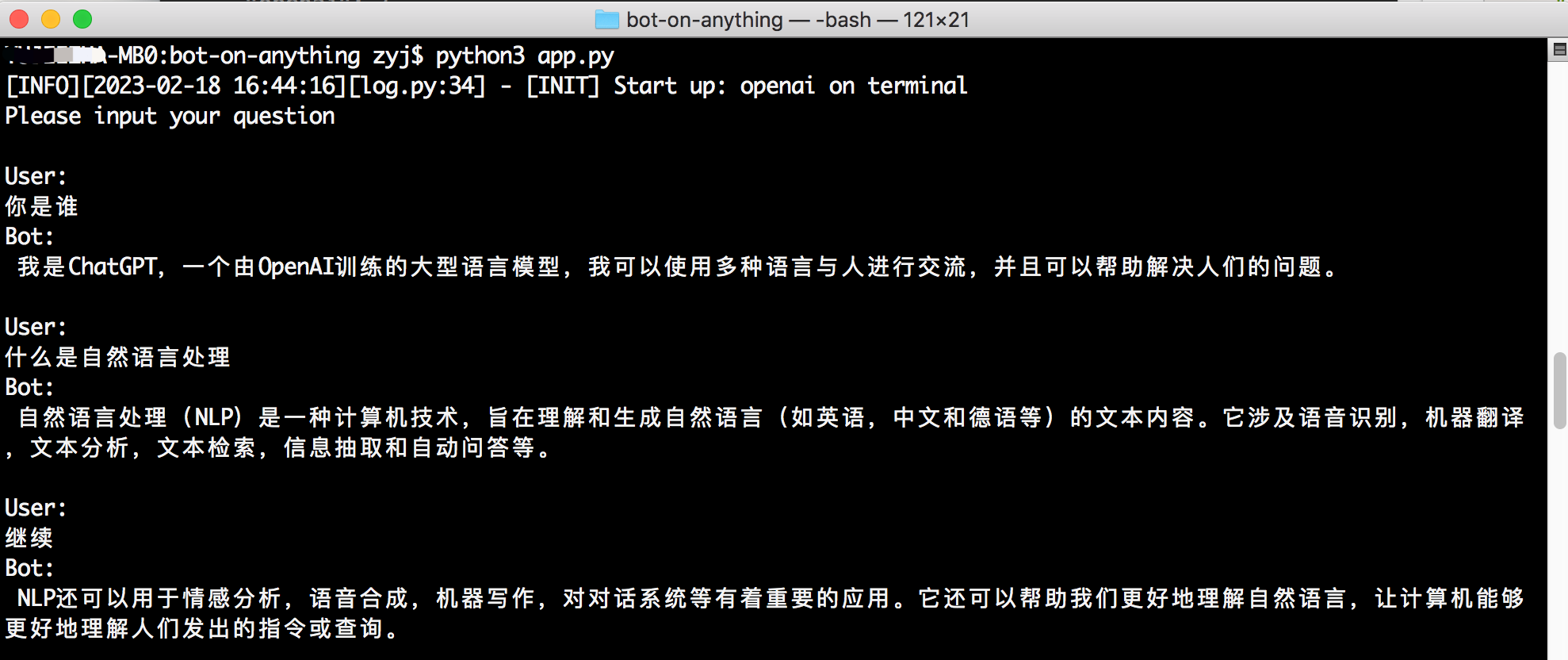
}api_key :調用Linkai服務的鍵,可以在控制台中創建。app_code :Linkai應用程序或工作流的代碼,可選,請參閱應用程序創建。model :支持來自國內和國際來源的通用模型,請參閱模型列表。它可以留為空白,並且可以在Linkai平台中修改應用程序的默認模型。默認情況下,在配置模板中啟動的應用程序是終端,不需要其他配置。您可以直接在項目目錄中執行python3 app.py來啟動程序。用戶通過命令行輸入與對話模型進行交互,並且它支持流響應效果。
貢獻者:治療療法
依賴性
pip3 install PyJWT flask flask_socketio配置
 " channel " : {
    " type " : " http " ,
    " http " : {
      " http_auth_secret_key " : " 6d25a684-9558-11e9-aa94-efccd7a0659b " ,    // JWT authentication secret key
      " http_auth_password " : " 6.67428e-11 " ,        // Authentication password, just for personal use, a preliminary defense against others scanning ports and DDOS wasting tokens
      " port " : " 80 "       // Port
    }
}在本地運行:運行python3 app.py後,訪問http://127.0.0.1:80 。
在服務器上運行:部署後,訪問http://public domain or IP:port 。
要求:服務器和訂閱帳戶。
安裝WeroBot依賴性:
pip3 install werobot " channel " : {
" type " : " wechat_mp " ,
" wechat_mp " : {
" token " : " YOUR TOKEN " , # Token value
" port " : " 8088 " # Port the program listens on
}
}在項目目錄中運行python3 app.py如果終端顯示以下內容,則表示成功的操作:
 [INFO][2023-02-16 01:39:53][app.py:12] - [INIT] load config: ...
[INFO][2023-02-16 01:39:53][wechat_mp_channel.py:25] - [WX_Public] Wechat Public account service start!
Bottle v0.12.23 server starting up (using AutoServer())...
Listening on http://127.0.0.1:8088/
Hit Ctrl-C to quit.
轉到微信官方平台中的個人訂閱帳戶,並啟用服務器配置:
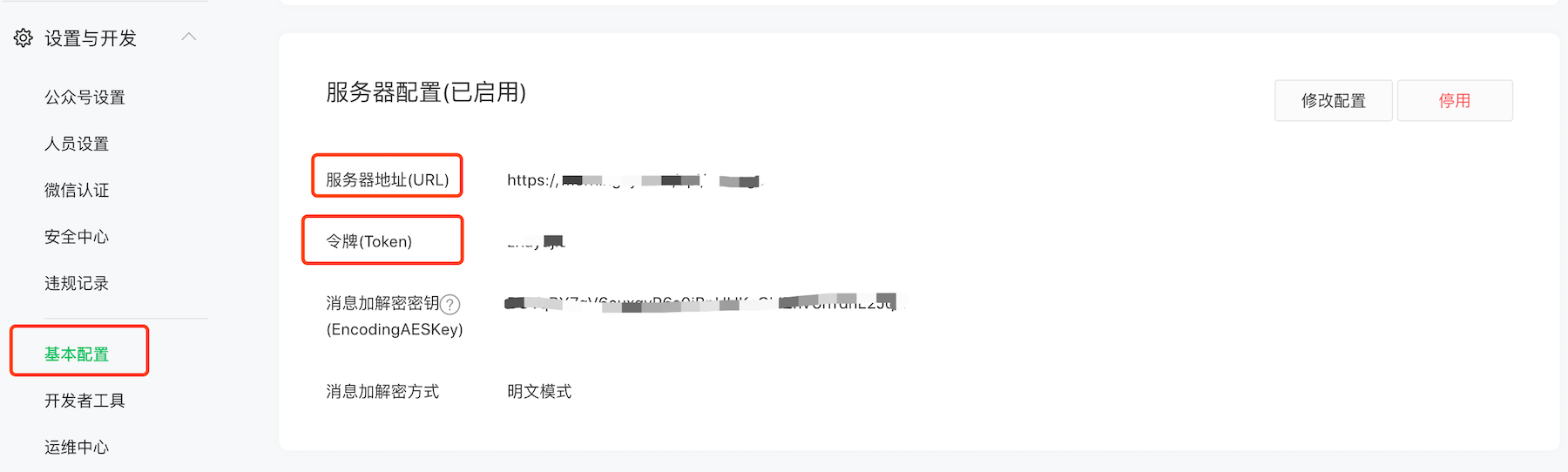
服務器地址(URL)配置:如果您可以通過瀏覽器中的已配置URL訪問服務器上的Python程序(默認收聽端口8088),則表明配置是有效的。由於訂閱帳戶只能配置端口80/443,因此您可以修改配置以直接在端口80上收聽(需要sudo權限)或使用反向代理轉發(例如nginx)。根據官方文檔,您可以在此處填寫公共IP或域名。
令牌配置:必須與config.json配置中的令牌一致。
有關詳細的操作流程,請參閱官方文檔。
用戶遵循訂閱帳戶後,他們可以發送消息。
注意:用戶發送消息後,微信後端將推到配置的URL地址,但是如果在5秒內沒有答复,則該連接將被斷開,並且會重試3次。但是,對OpenAI接口的請求通常需要超過5秒。在這個項目中,異步和緩存方法已將5秒的超時限制優化為15秒,但超過這段時間仍然不允許正常答复。同時,每次連接在5秒後斷開連接時,Web框架將報告一個錯誤,稍後將進行優化。
要求:服務器和經過認證的服務帳戶。
在企業服務帳戶中,通過第一個異步訪問OpenAI界面,然後通過客戶服務界面主動將用戶推向用戶,從而解決了個人訂閱帳戶的15秒超時問題。服務帳戶的開發人員模式配置與訂閱帳戶的配置相似。有關詳細信息,請參閱官方文件。
企業服務帳戶的config.json配置僅需要將類型更改為wechat_mp_service ,但是配置塊仍然重新使用wechat_mp ,此外,您需要添加兩個配置項目: app_id and app_secret 。
 " channel " : {
    " type " : " wechat_mp_service " ,

    " wechat_mp " : {
      " token " : " YOUR TOKEN " ,            # Token value
      " port " : " 8088 " ,                   # Port the program listens on
      " app_id " : " YOUR APP ID " ,          # App ID
      " app_secret " : " YOUR APP SECRET "   # App secret
    }
}
注意:必須在“ IP白名單”中配置服務器IP地址;否則,用戶將不會主動收到被推動的消息。
要求:PC或服務器(國內網絡)和QQ帳戶。
運行QQ機器人需要額外運行一個go-cqhttp程序,該程序負責接收和發送QQ消息,而我們的bot-on-anything程序都負責訪問OpenAI來生成對話內容。
從GO-CQHTTP版本下載相應的計算機程序,解壓縮IT,然後將go-cqhttp二進製文件放置在我們的bot-on-anything/channel/qq目錄中。 config.yml配置文件在這裡已經準備好;您只需要填寫QQ帳戶配置(Account-uin)即可。
使用AIOCQHTTP與GO-CQHTTP進行交互,執行以下命令以安裝依賴關係:
pip3 install aiocqhttp只需將config.json配置文件的通道塊中的type更改為qq :
 " channel " : {
    " type " : " qq "
}首先,轉到bot-on-anything的根目錄,並在1號終端運行:
python3 app.py # This will listen on port 8080在第二步(開放終端2)中,導航到cqhttp所在的目錄並運行:
 cd channel/qq
./go-cqhttp
筆記:
device.json中的protocol值。 JSON文件與GO-CQHTTP相同的目錄中的JOSON文件從5到2,請參閱此問題。撰稿人:Brucelt1993
6.1獲得令牌
可以在Google上輕鬆找到申請電報機器人;重要的是要獲取機器人的令牌ID。
6.2依賴項安裝
pip install pyTelegramBotAPI6.3配置
 " channel " : {
    " type " : " telegram " ,
    " telegram " :{
      " bot_token " : " YOUR BOT TOKEN ID "
    }
}要求:服務器和Gmail帳戶。
貢獻者:西蒙
請按照官方文檔為您的Google帳戶創建應用程序密碼,以下配置,然後加油! ! !
 " channel " : {
    " type " : " gmail " ,
    " gmail " : {
      " subject_keyword " : [ " bot " , " @bot " ],
      " host_email " : " [email protected] " ,
      " host_password " : " GMAIL ACCESS KEY "
    }
}❉不再需要服務器或公共IP
貢獻者: Amaoo
依賴性
pip3 install slack_bolt配置
 " channel " : {
    " type " : " slack " ,
    " slack " : {
      " slack_bot_token " : " xoxb-xxxx " ,
      " slack_app_token " : " xapp-xxxx "
    }
  }
設置機器人令牌範圍 - OAuth&許可
將bot用戶oauth令牌寫入配置文件slack_bot_token 。
 app_mentions:read
chat:write
啟用插座模式 - 插座模式
如果您尚未創建應用程序級令牌,將提示您創建一個。將創建的令牌寫入配置文件slack_app_token 。
事件訂閱(事件訂閱) - 訂閱機器人事件
app_mention
參考文檔
https://slack.dev/bolt-python/tutorial/getting-started
要求:
依賴性
pip3 install requests flask配置
 " channel " : {
    " type " : " dingtalk " ,
    " dingtalk " : {
      " image_create_prefix " : [ " draw " , " draw " , " Draw " ],
      " port " : " 8081 " ,                  # External port
      " dingtalk_token " : " xx " ,          # Access token of the webhook address
      " dingtalk_post_token " : " xx " ,     # Verification token carried in the header when DingTalk posts back messages
      " dingtalk_secret " : " xx "          # Security encryption signature string in the group robot
    }
}參考文檔:
生成機器人
地址:https://open-dev.dingtalk.com/fe/app#/corp/robot添加機器人,在開發管理中設置服務器的出站IP和消息接收地址(配置中的外部地址,例如https://xx.xx.xx.com:8081)。
依賴性
pip3 install requests flask配置
 " channel " : {
    " type " : " feishu " ,
    " feishu " : {
        " image_create_prefix " : [
            " draw " ,
            " draw " ,
            " Draw "
        ],
        " port " : " 8082 " ,                  # External port
        " app_id " : " xxx " ,                 # Application app_id
        " app_secret " : " xxx " ,             # Application Secret
        " verification_token " : " xxx "      # Event subscription Verification Token
    }
}
生成機器人
地址:https://open.feishu.cn/app/
要求:服務器和經認證的企業微信。
Enterprise Wechat的config.json配置只需要將類型更改為wechat_com ,而默認消息接收服務器URL:http:// ip:88888/wechat。
 " channel " : {
    " type " : " wechat_com " ,
    " wechat_com " : {
      " wechat_token " : " YOUR TOKEN " ,            # Token value
      " port " : " 8888 " ,                          # Port the program listens on
      " app_id " : " YOUR APP ID " ,                 # App ID
      " app_secret " : " YOUR APP SECRET " ,          # App secret
      " wechat_corp_id " : " YOUR CORP ID " ,
      " wechat_encoding_aes_key " : " YOUR AES KEY "
    }
}
注意:必須在“企業信任的IP”列表中配置服務器IP地址;否則,用戶將不會主動收到被推動的消息。
參考文檔:
clear_memory_commands :對話內部命令積極清除先前的內存,字符串數組可以自定義命令別名。






