datadog static analyzer
0.5.2

提示
Datadog支持開源項目。在Datadog上了解有關開源項目的更多信息。
Datadog靜態分析儀是用於Datadog靜態分析的靜態分析儀引擎。
datadog-static-analyzer --directory /path/to/directory --output report.csv --format csvdocker run -it --rm -v /path/to/directory:/data ghcr.io/datadog/datadog-static-analyzer:latest --directory /data --output /data/report.csv --format csv有關Docker容器的更多信息,請參見此處的文檔。
如果您遇到問題,請首先閱讀常見問題,它可能包含解決問題的解決方案。
您可以通過創建static-analysis.datadog.yml文件來選擇用於掃描存儲庫的規則。
首先,請確保您遵循文檔並使用要使用的規則集創建項目根部的static-analysis.datadog.yml文件。
所有規則都可以在DataDog文檔上找到。您的static-analysis.datadog.yml可能只包含DataDog文檔中可用的規則集
yaml文件的示例
 schema-version : v1
rulesets :
  - python-code-style
  - python-best-practices
  - python-inclusive
ignore :
- tests您可以使用我們的集成在CI/CD管道中使用它:
如果您在自己的CI/CD管道中使用它,則可以直接集成工具:有關更多信息,請參見DataDog文檔。
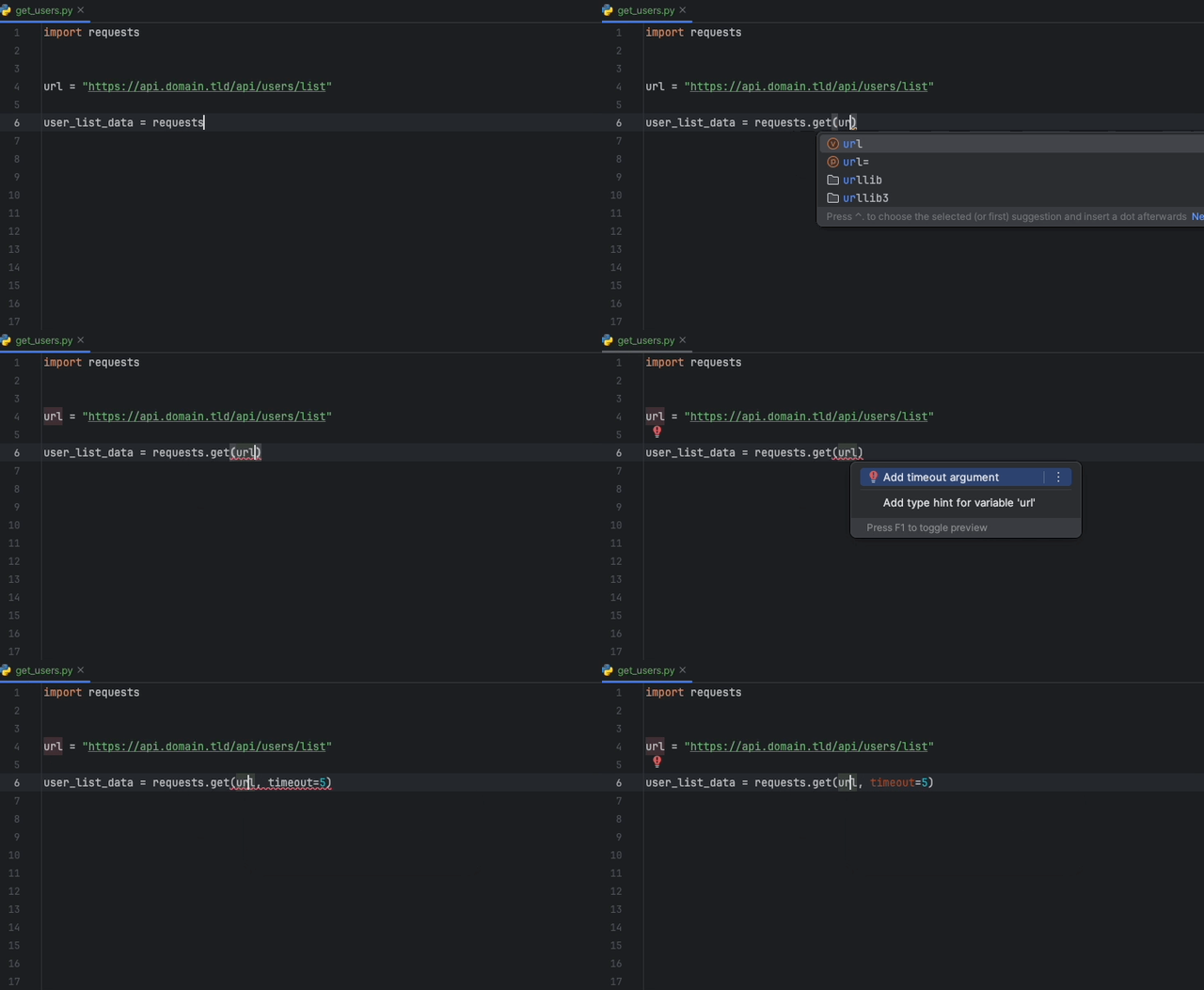
Datadog Intellij擴展程序允許您直接使用所有Jetbrains產品中的靜態分析儀。創建一個static-analysis.datadog.yml文件,下載擴展名,您可以開始使用它。您可以在下面看到一個建議在使用請求模塊獲取數據時添加超時的建議。
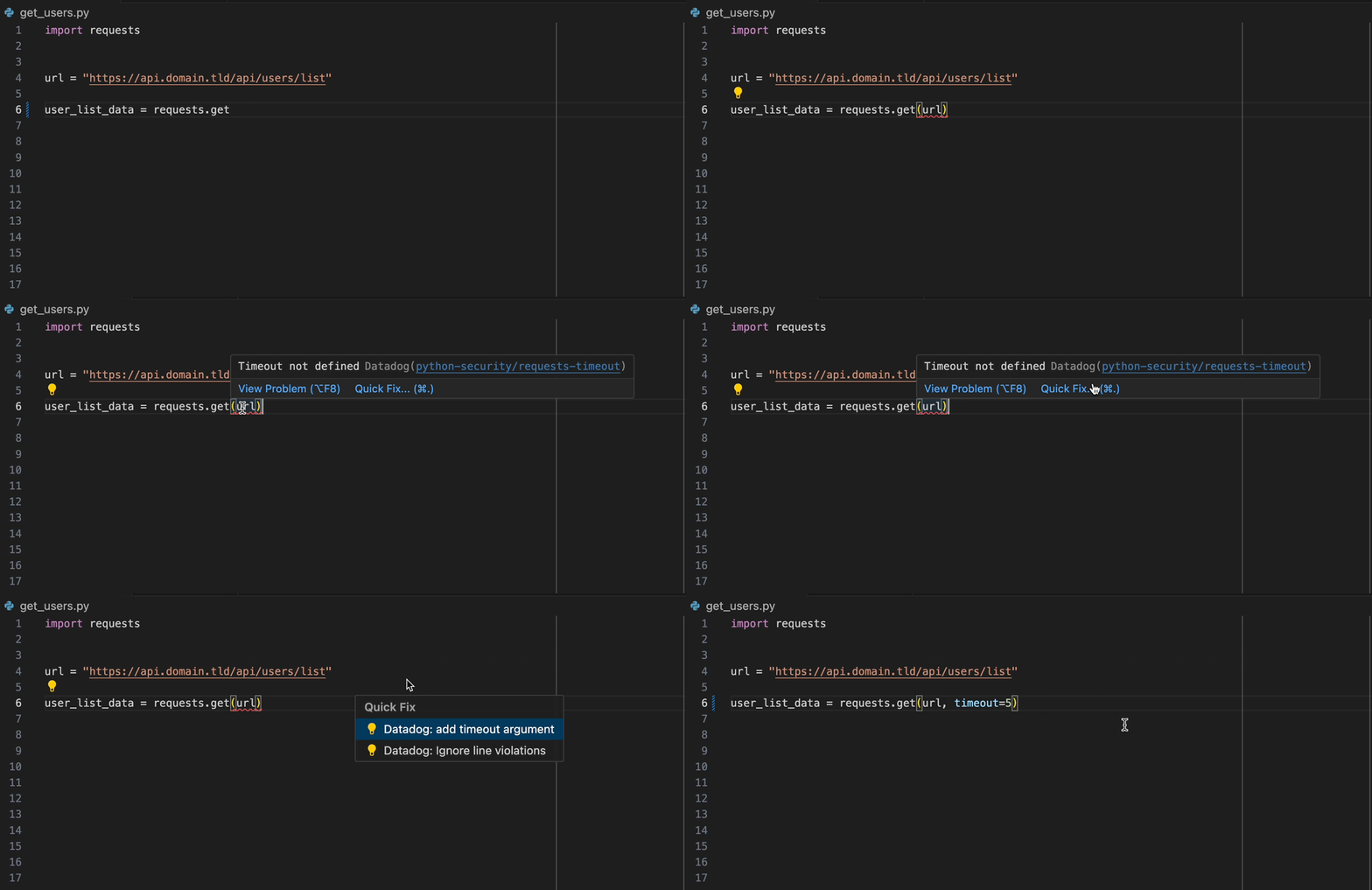
DataDog VS代碼擴展程序允許您直接從VS代碼中使用靜態分析儀。創建一個static-analysis.datadog.yml文件,下載擴展名,您可以開始使用它。
當您加入DataDog產品時,您可以選擇所需/需要的規則集。如果您不直接使用DataDog,則每個語言中可用的Datadog靜態分析產品中可用的常用規則集列表。
完整的列表可在我們的文檔中找到。
規則集列表可在規則集。 md中找到。
從“發行”頁面下載最新版本和架構。
要通過Shell獲得靜態分析儀:
curl -L -O https://www.github.com/DataDog/datadog-static-analyzer/releases/latest/download/datadog-static-analyzer- < target > .zip示例以獲取linux的x86_64二進製文件:
curl -L -O https://www.github.com/DataDog/datadog-static-analyzer/releases/latest/download/datadog-static-analyzer-x86_64-unknown-linux-gnu.zipdatadog-static-analyzer -i < directory > -o < output-file >為了使工具工作,您必須具有<directory>/static-analysis.datadog.yml文件,該文件定義了分析儀的配置。該文件將指示您將用於項目的規則。
您可以在DataDog文檔上獲取有關配置的更多信息。
二進制無法按原樣執行。您需要將二進製文件標記為安全執行以下命令。
xattr -dr com.apple.quarantine datadog-static-analyzer-f或--format :輸出文件的格式。 -f sarif生成一個符合薩里夫的文件-r或--rules :提供一個包含所有規則的文件(可以使用datadog-export-rulesets將規則放入文件中)-c或--cpus :用於分析的內核數(計數約1GB的RAM使用情況)-o或--output :輸出文件-p或--ignore-path :要忽略的路徑(模式/圈);接受多個-x或--performance-statistics :顯示分析儀的性能統計信息-g或--add-git-info :使用-f sarif時,將與GIT相關的信息(SHA等)添加到SARIF報告中--fail-on-any-violation如果至少有一種違反給定嚴重性的行為,則該程序將退出一個非零退出代碼。-w或--diff-aware :啟用差異掃描(請參見下面的專用說明) 設置以下變量以配置分析:
DD_SITE :用於獲取規則的DataDog站點參數(默認值: datadoghq.com ) 可以在存儲庫的根目錄處使用static-analysis.datadog.yml文件進行靜態分析儀。這是一個具有以下條目的YAML文件:
rulesets :(必需)一個列表,其中包含用於此存儲庫的所有規則集(有關完整列表,請參見Datadog文檔)。此列表的元素必須是包含規則集配置的字符串或地圖(如下所述。ignore :(可選)一個路徑前綴和球形模式的列表要忽略。與其任何條目匹配的文件將不會進行分析。only :(可選)要分析的路徑前綴和球形模式列表。如果only指定,則將僅分析匹配其條目之一的文件。ignore-gitignore :默認情況下, .gitignore文件中發現的任何條目都添加到ignore列表中。如果ignore-gitignore選項為true,則不讀取.gitignore文件。max-file-size-kb :(可選)文件大於此尺寸的文件,以千字節為單位,將被忽略。默認值為200 kb。schema-version :(可選)此配置文件如下的架構版本。如果指定,則必須是v1 。 rulesets集列表的條目必須是包含啟用規則集的名稱的字符串,或包含規則集配置的映射。該地圖包含以下字段:
ignore :(可選)一個路徑前綴和全球模式列表,該規則集忽略了。本規則集中的規則集將不會針對與ignore列表中任何條目匹配的任何文件進行評估。only :(可選)一個路徑前綴和球形模式的列表,用於分析此規則集。如果only指定,則僅對與其中一個條目匹配的文件進行評估,將在此規則集中評估規則。rules :(可選)規則配置的地圖。該地圖中未指定的規則仍將被評估,但使用其默認配置進行評估。 rules字段中的地圖將規則的名稱用作其鍵,並且值是帶有以下字段的地圖:
ignore (可選的)路徑前綴和球形模式的列表,該規則忽略了。該規則將不會針對ignore列表中任何條目匹配的任何文件進行評估。only :(可選)一個路徑前綴和球形模式列表,以分析此規則。如果only指定,則僅對匹配其中一個條目的文件進行評估。severity :(可選)如果提供,則覆蓋該規則造成的違規嚴重程度。有效的嚴重性是ERROR , WARNING , NOTICE和NONE 。category :(可選)如果提供,請覆蓋此規則的類別。有效的類別是BEST_PRACTICES , CODE_STYLE , ERROR_PRONE , PERFORMANCE和SECURITY 。arguments :(可選)該規則參數的值地圖。 arguments字段中的地圖使用參數的名稱作為其鍵,值是字符串或地圖:
配置文件的註釋示例:
 # This is a "v1" configuration file.
schema-version : v1
# The list of rulesets to enable for this repository.
rulesets :
  # Enable the `python-inclusive` ruleset with the default configuration.
  - python-inclusive
  # Enable the `python-best-practices` ruleset with a custom configuration.
  - python-best-practices :
    # Do not apply any of the rules in this ruleset to files that match `src/**/*.generated.py`.
    ignore :
      - src/**/*.generated.py
    rules :
      # Special configuration for the `python-best-practices/no-generic-exception` rule.
      no-generic-exception :
        # Treat violations of this rule as errors (normally "notice").
        severity : ERROR
        # Classify violations of this rule under the "code style" category.
        category : CODE_STYLE
        # Only apply this rule to files under the `src/new-code` subtree.
        only :
          - src/new-code
  # Enable the `python-code-style ruleset` with a custom configuration.
  - python-code-style :
    rules :
      max-function-lines :
        # Set arguments for the `python-code-style/max-function-lines` rule.
        arguments :
          # Set the `max-lines` argument to 150 in the whole repository.
          max-lines : 150
      max-class-lines :
        # Set arguments for the `python-code-style/max-class-lines` rule.
        arguments :
          # Set different values for the `max-lines` argument in different subtrees.
          max-lines :
            # Set the `max-lines` argument to 100 by default
            / : 100
            # Set the `max-lines` argument to 75 under the `src/new-code` subtree.
            src/new-code : 75
# Analyze only files in the `src` and `imported` subtrees.
only :
  - src
  - imported
# Do not analyze any files in the `src/tests` subtree.
ignore :
  - src/tests
# Do not add the content of the `.gitignore` file to the `ignore` list.
ignore-gitignore : true
# Do not analyze files larger than 100 kB.
max-file-size-kb : 100
另一個示例顯示了使用的每個選項:
 schema-version : v1
rulesets :
  - python-best-practices
  - python-code-style :
    ignore :
      - src/generated
      - src/**/*_test.py
    only :
      - src
      - imported/**/new/**
    rules :
      max-function-lines :
        severity : WARNING
        category : PERFORMANCE
        ignore :
          - src/new-code
          - src/new/*.gen.py
        only :
          - src/new
          - src/**/new-code/**
        arguments :
          max-lines : 150
          min-lines :
            / : 10
            src/new-code : 0
ignore :
  - dist
  - lib/**/*.py
only :
  - src
  - imported/**/*.py
ignore-gitignore : true
max-file-size-kb : 256 在schema子目錄中有一個static-analysis.datadog.yml的JSON模式定義。
您可以使用它來檢查配置文件的語法:
npm install -g pajv )pajv validate -s schema/schema.json -d path/to/your/static-analysis.datadog.yml在schema/examples/valid和schema/examples/invalid子目錄中,有一些有效和無效配置文件的示例。如果您更改JSON模式,則可以根據我們的示例進行測試:
npm install -g pajv )make -C schema DIFF感知掃描是靜態分析儀的一個功能,僅掃描了最近更改的文件。 DIFF感知掃描使用以前的結果,並僅添加更改文件中的違規行為。
為了使用差異掃描,您必須是DataDog客戶。
使用差異掃描:
DD_SITE環境變量(https://docs.datadoghq.com/getting_started/site/)DD_APP_KEY和DD_API_KEY環境變量使用DataDog應用程序和API鍵--diff-aware使用diff-ware時,靜態分析儀將連接到datadog,並嘗試使用先前的分析。如果發生任何問題並且無法使用差異,則分析儀將輸出以下錯誤,並繼續進行完整掃描。
您可以使用該選項 - 如果需要, --debug true以進一步解決。
$ datadog-static-analyzer --directory /path/to/code --output output.sarif --format sarif --diff-aware

...
diff aware not enabled (error when receiving diff-aware data from Datadog with config hash 16163d87d4a1922ab89ec891159446d1ce0fb47f9c1469448bb331b72d19f55c, sha 5509900dc490cedbe2bb64afaf43478e24ad144b), proceeding with full scan.
...將規則集從API導出到文件中
cargo run --bin datadog-export-rulesets -- -r < ruleset > -o < file-to-export > 有關更多信息和開發,請參見文件貢獻。 md。有關測試和編碼指南的所有詳細信息。







