binary valentine
0.3.1


開源,免費使用可執行文件靜態分析儀。檢測一系列各種問題,這些問題通常無法觸及其他工具(例如靜態代碼分析)。
網站:https://binary-valentine.com
文檔:https://binary-valentine.com/docs
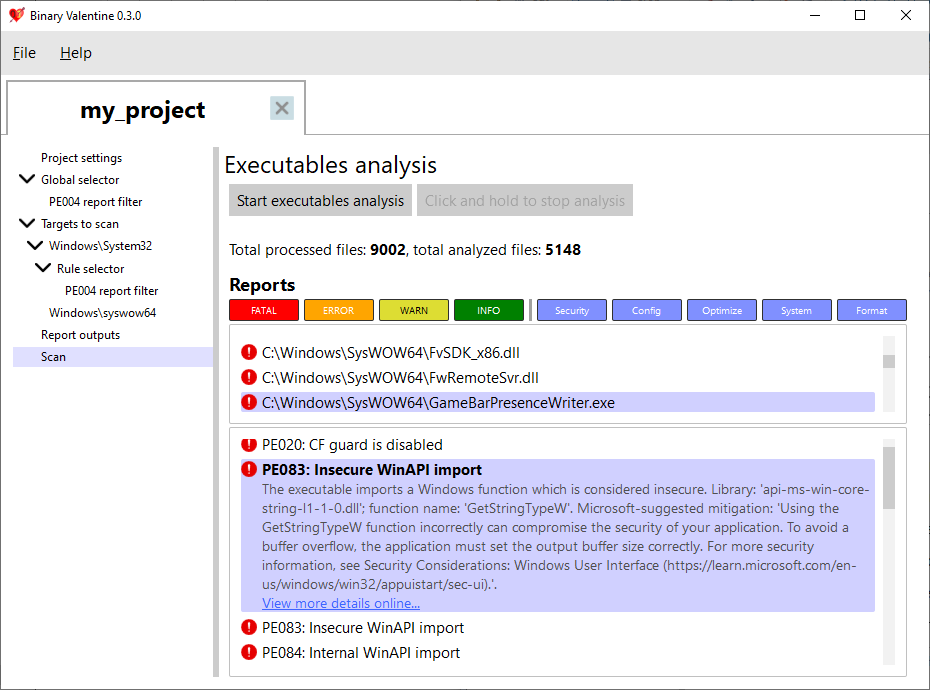
System32文件夾。 二進制Valentine當前僅支持便攜式可執行格式(在Windows,EFI,X-Box上廣泛使用)。對於這種格式,它檢測到各種問題:
對於便攜式可執行文件,目前提供了180多個規則。大多數規則都是可執行的,但是其中一些規則確實結合了掃描(例如,版本INFO,可否定的一致性檢查規則)。
XML項目文件可以提供給二進制情人節,該文件將根據選定的規則和過濾器掃描項目。一個項目可以包含一個或多個文件或目錄來掃描(具有可選的正則表達式以濾波路徑名)。每個路徑或文件都可以使用一組應用的規則,警告級別和類別進行配置。除此之外,XML項目還可以指定輸出格式和執行選項(例如線程計數和最大內存消耗限制)。除了基於項目的執行外,還可以通過向其命令行提供所有參數來調用二進制情人。
二進制情人節支持幾種輸出格式,以簡化與其他系統的集成。除終端和純文本輸出外,它還支持靜態分析結果互換格式(SARIF)2.1.0,這是靜態分析工具輸出的行業標準格式。
除命令行外,二進制Valentine還提供了完整的圖形用戶界面,該界面允許實時執行可執行文件分析!它也是二進制情人節項目編輯器,允許在不手動編寫XML的情況下創建,編輯,保存和加載項目。
可以為帶有一組C ++ 20編譯器的一組平台建造二進制情人節:
截至目前,Windows 10/11和Modern Linux(內核版本5.1或啟用了io_uring的新版本)得到了支持。
有關詳細的命令行文檔,請參見網站:https://binary-valentine.com/docs/usage/command-line
 General options:
  -h [ --help ]                        Print options description
  -c [ --config ] arg                  Path to external XML configuration file.
                                       Can not be used with any other options.
  -r [ --root-path ] arg               Root path. This path will be used as a
                                       root for all relative paths specified.
                                       If absent, current directory will be
                                       used as a root path.
  --threads arg                        Analysis thread count. If absent,
                                       hardware core number will be used.
  --max-loaded-targets-size arg (=1G)  Max loaded targets size. If specified,
                                       the analyzer will preload as many
                                       targets to analyze as possible until
                                       their size in memory is less than the
                                       value specified.Should have a numeric
                                       value together with the suffix (B -
                                       bytes, K - kilobytes, M - megabytes, G -
                                       gigabytes), e.g. 2G for 2 gigabytes.
                                       Can not be used together with
                                       --max-concurrent-tasks.
                                       Default is 1G.
  --max-concurrent-tasks arg           Max concurrent analysis tasks. If
                                       specified, the analyzer will preload at
                                       most max-concurrent-tasks targets for
                                       analysis.
                                       Can not be used together with
                                       --max-loaded-targets-size.
Combined analysis options:
  --do-combined-analysis arg (=1)      Do combined analysis of all specified
                                       targets. Default is true.
Targets options:
  -t [ --target ] arg                  Target file or directory to analyze.
                                       Required.
  --recursive arg (=1)                 Scan and analyze the target directory
                                       recursively. Default is true.
  --include-regex arg                  Analyze only targets with full paths
                                       which match the provided ECMAScript
                                       regex.
  --exclude-regex arg                  Analyze only targets with full paths
                                       which do not match the provided
                                       ECMAScript regex.
Report options:
  --exclude-reports arg                Exclude reports with the IDs listed. Can
                                       not be used together with
                                       --include-reports.
  --include-reports arg                Include only reports with the IDs
                                       listed. Can not be used together with
                                       --exclude-reports.
  --list-reports                       List all supported reports with brief
                                       descriptions.
  --exclude-levels arg                 Exclude report levels (info, warning,
                                       error, critical).
  --exclude-categories arg             Exclude report categories (system,
                                       optimization, security, configuration,
                                       format).
  --with-progress                      Report verbose analysis progress
Output options:
  --silent                             Do not output analysis results to
                                       terminal.
  -S [ --sarif ] arg                   Path to save the output report in SARIF
                                       format.
  -T [ --text ] arg                    Path to save the output report in
                                       plaintext.







