binary valentine
0.3.1


오픈 소스 및 무료 실행 파일 정적 분석기를 무료로 사용할 수 있습니다. 일반적으로 다른 도구에 도달하지 못하는 다양한 다양한 문제를 감지합니다 (예 : 정적 코드 분석).
웹 사이트 : https://biny-valentine.com
문서화 : https://binary-valentine.com/docs
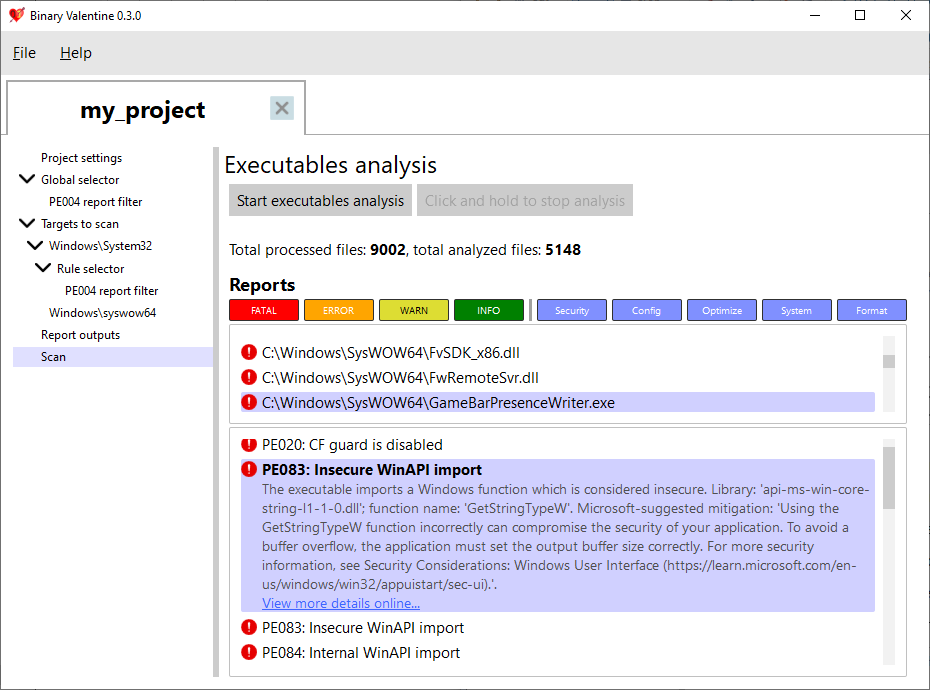
System32 폴더를 10-20 초 안에 스캔합니다. 바이너리 발렌타인은 현재 휴대용 실행 가능 형식 (Windows, EFI, X-Box에서 광범위하게 사용) 만 지원합니다. 이 형식의 경우 다양한 문제를 감지합니다.
휴대용 실행 파일의 경우 현재 180 개 이상의 규칙이 제공되고 있습니다. 대부분의 규칙은 단일 실행 가능이지만 일부 규칙은 스캔을 결합했습니다 (예 : 버전 정보 교차 실행 가능한 일관성 검사 규칙).
XML 프로젝트 파일은 이진 발렌타인에 제공 될 수 있으며, 이는 선택한 규칙 및 필터에 따라 프로젝트를 스캔합니다. 프로젝트에는 하나 이상의 파일 또는 디렉토리를 스캔 할 수있는 디렉토리를 포함 할 수 있습니다 (정규 표현식을 필터 경로 이름으로 선택). 각 경로 또는 파일은 별도의 적용 규칙 세트, 경고 수준 및 범주로 구성 할 수 있습니다. 그 외에도 XML 프로젝트는 출력 형식 및 실행 옵션 (예 : 스레드 수 및 최대 메모리 소비 한계)을 지정할 수 있습니다. 프로젝트 기반 실행 외에도 모든 매개 변수를 명령 줄에 제공하여 바이너리 발렌타인을 호출 할 수 있습니다.
이진 발렌타인은 다른 시스템과의 통합을 쉽게하기 위해 몇 가지 출력 형식을 지원합니다. 터미널 및 일반 텍스트 출력 외에도 정적 분석 도구의 출력을위한 업계 표준 형식 인 SARIF (STATIC Analysis Recets Interchange Format) 2.1.0을 지원합니다.
Binary Valentine은 명령 줄 외에도 완전히 추천 그래픽 사용자 인터페이스를 제공하여 실행 파일 분석을 실시간으로 수행 할 수 있습니다! 또한 바이너리 발렌타인 프로젝트 편집기이며 XML을 수동으로 작성하지 않고 프로젝트를 작성, 편집, 저장 및로드 할 수 있습니다.
이진 발렌타인은 C ++ 20 컴파일러 세트가있는 다양한 플랫폼을 위해 구축 할 수 있습니다.
io_uring
자세한 명령 줄 설명서는 웹 사이트를 참조하십시오 : https://binary-valentine.com/docs/usage/command-line
 General options:
  -h [ --help ]                        Print options description
  -c [ --config ] arg                  Path to external XML configuration file.
                                       Can not be used with any other options.
  -r [ --root-path ] arg               Root path. This path will be used as a
                                       root for all relative paths specified.
                                       If absent, current directory will be
                                       used as a root path.
  --threads arg                        Analysis thread count. If absent,
                                       hardware core number will be used.
  --max-loaded-targets-size arg (=1G)  Max loaded targets size. If specified,
                                       the analyzer will preload as many
                                       targets to analyze as possible until
                                       their size in memory is less than the
                                       value specified.Should have a numeric
                                       value together with the suffix (B -
                                       bytes, K - kilobytes, M - megabytes, G -
                                       gigabytes), e.g. 2G for 2 gigabytes.
                                       Can not be used together with
                                       --max-concurrent-tasks.
                                       Default is 1G.
  --max-concurrent-tasks arg           Max concurrent analysis tasks. If
                                       specified, the analyzer will preload at
                                       most max-concurrent-tasks targets for
                                       analysis.
                                       Can not be used together with
                                       --max-loaded-targets-size.
Combined analysis options:
  --do-combined-analysis arg (=1)      Do combined analysis of all specified
                                       targets. Default is true.
Targets options:
  -t [ --target ] arg                  Target file or directory to analyze.
                                       Required.
  --recursive arg (=1)                 Scan and analyze the target directory
                                       recursively. Default is true.
  --include-regex arg                  Analyze only targets with full paths
                                       which match the provided ECMAScript
                                       regex.
  --exclude-regex arg                  Analyze only targets with full paths
                                       which do not match the provided
                                       ECMAScript regex.
Report options:
  --exclude-reports arg                Exclude reports with the IDs listed. Can
                                       not be used together with
                                       --include-reports.
  --include-reports arg                Include only reports with the IDs
                                       listed. Can not be used together with
                                       --exclude-reports.
  --list-reports                       List all supported reports with brief
                                       descriptions.
  --exclude-levels arg                 Exclude report levels (info, warning,
                                       error, critical).
  --exclude-categories arg             Exclude report categories (system,
                                       optimization, security, configuration,
                                       format).
  --with-progress                      Report verbose analysis progress
Output options:
  --silent                             Do not output analysis results to
                                       terminal.
  -S [ --sarif ] arg                   Path to save the output report in SARIF
                                       format.
  -T [ --text ] arg                    Path to save the output report in
                                       plaintext.







