binary valentine
0.3.1


Un analizador estático de archivo abierto y gratuito para usar. Detecta una variedad de diversos problemas, que generalmente están fuera del alcance de otras herramientas (como el análisis de código estático).
Sitio web: https://binary-valentine.com
Documentación: https://binary-valentine.com/docs
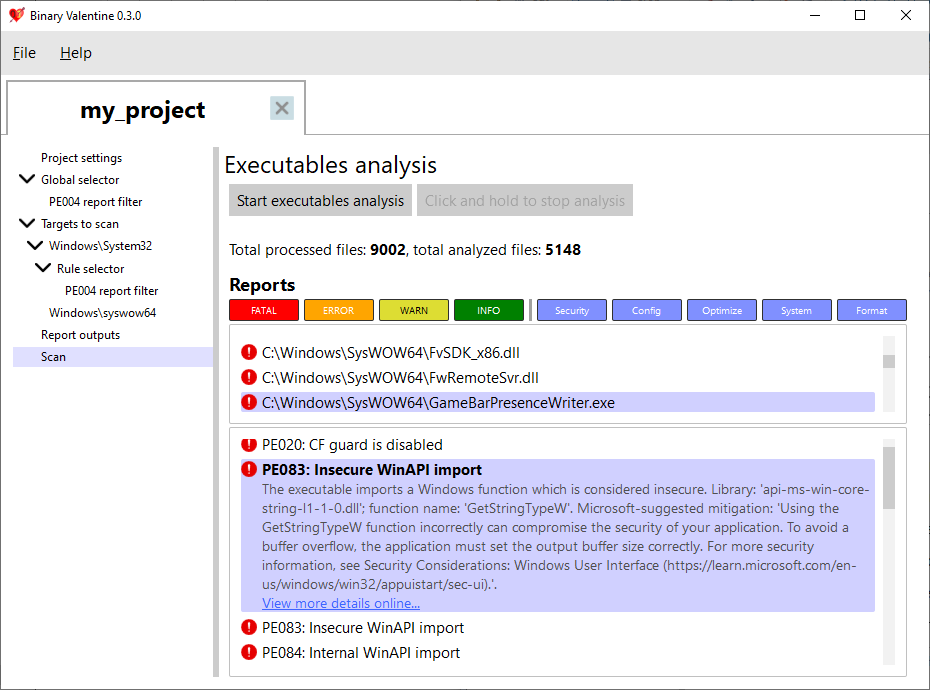
System32 en 10-20 segundos. Binary Valentine actualmente solo admite el formato ejecutable portátil (que se usa ampliamente en Windows, EFI, X-Box). Para este formato, detecta varios problemas:
Para el ejecutable portátil, actualmente se proporcionan más de 180 reglas. La mayoría de las reglas son ejecutables de una sola vez, pero algunas de ellas hacen escaneos combinados (por ejemplo, la versión de la versión Reglas de verificación de consistencia interros ejecutable).
Se puede suministrar un archivo de proyecto XML a Binary Valentine, que escanearía el proyecto de acuerdo con las reglas y filtros seleccionados. Un proyecto puede contener uno o más archivos o directorios para escanear (con expresiones regulares opcionales para filtrar los nombres de las rutas). Cada ruta o archivo se puede configurar con un conjunto separado de reglas aplicadas, niveles de advertencia y categorías. Además de eso, los proyectos XML pueden especificar el formato de salida y las opciones de ejecución (por ejemplo, recuento de subprocesos y límite de consumo de memoria máxima). Además de la ejecución basada en proyectos, Binary Valentine se puede invocar suministrando todos los parámetros a su línea de comando.
Binary Valentine admite varios formatos de salida para aliviar la integración con otros sistemas. Además de la salida de texto terminal y plano, admite el formato de intercambio de resultados de análisis estático (SARIF) 2.1.0, que es el formato estándar de la industria para la salida de herramientas de análisis estático.
Además de la línea de comandos, Binary Valentine proporciona una interfaz gráfica de usuario completa, que permite realizar análisis de archivos ejecutables en tiempo real. También es un editor binario de proyectos de San Valentín, que permite crear, editar, guardar y cargar proyectos sin escribir XML manualmente.
Binario Valentine se puede construir para una gama de plataformas con un conjunto de compiladores C ++ 20:
Windows 10/11 y Modern Linux (Kernel versión 5.1 o más nuevo con io_uring habilitado) son compatibles con a partir de hoy.
Para una documentación detallada de la línea de comandos, consulte el sitio web: https://binary-valentine.com/docs/usage/command-line
 General options:
  -h [ --help ]                        Print options description
  -c [ --config ] arg                  Path to external XML configuration file.
                                       Can not be used with any other options.
  -r [ --root-path ] arg               Root path. This path will be used as a
                                       root for all relative paths specified.
                                       If absent, current directory will be
                                       used as a root path.
  --threads arg                        Analysis thread count. If absent,
                                       hardware core number will be used.
  --max-loaded-targets-size arg (=1G)  Max loaded targets size. If specified,
                                       the analyzer will preload as many
                                       targets to analyze as possible until
                                       their size in memory is less than the
                                       value specified.Should have a numeric
                                       value together with the suffix (B -
                                       bytes, K - kilobytes, M - megabytes, G -
                                       gigabytes), e.g. 2G for 2 gigabytes.
                                       Can not be used together with
                                       --max-concurrent-tasks.
                                       Default is 1G.
  --max-concurrent-tasks arg           Max concurrent analysis tasks. If
                                       specified, the analyzer will preload at
                                       most max-concurrent-tasks targets for
                                       analysis.
                                       Can not be used together with
                                       --max-loaded-targets-size.
Combined analysis options:
  --do-combined-analysis arg (=1)      Do combined analysis of all specified
                                       targets. Default is true.
Targets options:
  -t [ --target ] arg                  Target file or directory to analyze.
                                       Required.
  --recursive arg (=1)                 Scan and analyze the target directory
                                       recursively. Default is true.
  --include-regex arg                  Analyze only targets with full paths
                                       which match the provided ECMAScript
                                       regex.
  --exclude-regex arg                  Analyze only targets with full paths
                                       which do not match the provided
                                       ECMAScript regex.
Report options:
  --exclude-reports arg                Exclude reports with the IDs listed. Can
                                       not be used together with
                                       --include-reports.
  --include-reports arg                Include only reports with the IDs
                                       listed. Can not be used together with
                                       --exclude-reports.
  --list-reports                       List all supported reports with brief
                                       descriptions.
  --exclude-levels arg                 Exclude report levels (info, warning,
                                       error, critical).
  --exclude-categories arg             Exclude report categories (system,
                                       optimization, security, configuration,
                                       format).
  --with-progress                      Report verbose analysis progress
Output options:
  --silent                             Do not output analysis results to
                                       terminal.
  -S [ --sarif ] arg                   Path to save the output report in SARIF
                                       format.
  -T [ --text ] arg                    Path to save the output report in
                                       plaintext.







