binary valentine
0.3.1


Um analisador estático de código aberto e gratuito para usar arquivos executáveis. Detecta uma série de vários problemas, que geralmente estão fora de alcance de outras ferramentas (como análise de código estático).
Site: https://binary-valentine.com
Documentação: https://binary-valentine.com/docs
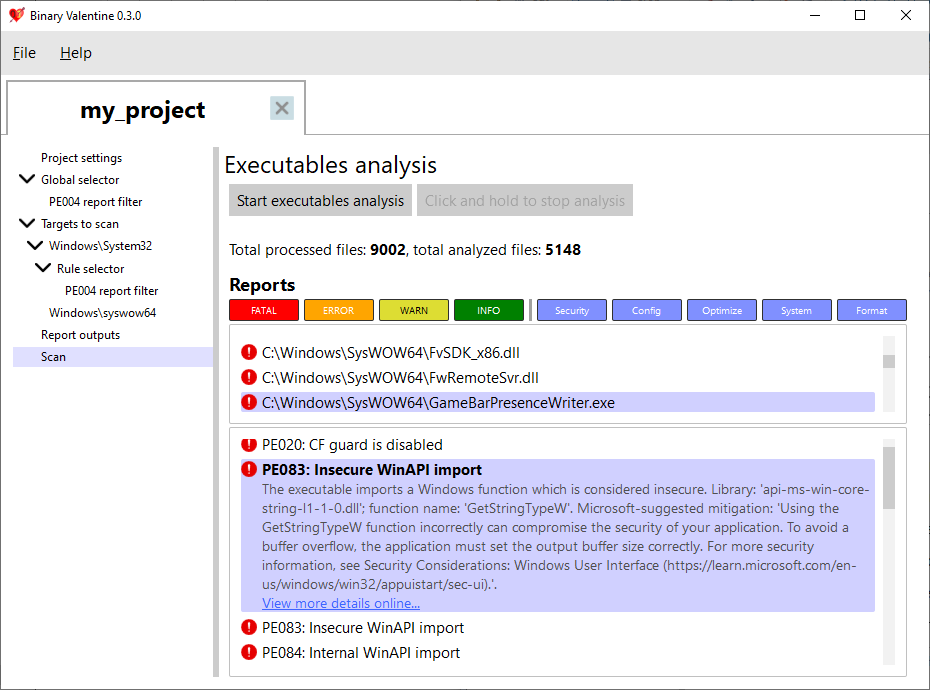
System32 em 10-20 segundos. Atualmente, o Binário Valentine suporta apenas o formato executável portátil (que é usado extensivamente no Windows, EFI, X-Box). Para este formato, ele detecta vários problemas:
Para executáveis portáteis, são fornecidas mais de 180 regras. A maioria das regras é executável única, mas algumas delas fazem varreduras combinadas (por exemplo, informações de verificação de consistência executável da versão executável).
Um arquivo de projeto XML pode ser fornecido ao Binário Valentine, que examinaria o projeto de acordo com regras e filtros selecionados. Um projeto pode conter um ou mais arquivos ou diretórios para digitalizar (com expressões regulares opcionais para filtrar nomes de caminhos). Cada caminho ou arquivo pode ser configurado com um conjunto separado de regras aplicadas, níveis de aviso e categorias. Além disso, os projetos XML podem especificar o formato de saída e as opções de execução (por exemplo, contagem de threads e limite máximo de consumo de memória). Além da execução baseada em projetos, o Binário Valentine pode ser invocado fornecendo todos os parâmetros à sua linha de comando.
O Binário Valentine suporta vários formatos de saída para facilitar a integração com outros sistemas. Além da saída de texto e texto sem formatação, ele suporta os resultados da análise estática Formato de intercâmbio (SARIF) 2.1.0, que é o formato padrão da indústria para a saída de ferramentas de análise estática.
Além da linha de comando, o Binário Valentine fornece uma interface gráfica de usuário totalmente em destaque, que permite executar a análise de arquivos executáveis em tempo real! É também um editor de projetos dos namorados binários, permitindo criar, editar, salvar e carregar projetos sem escrever manualmente XML.
O Binário Valentine pode ser construído para uma variedade de plataformas com um conjunto de compiladores C ++ 20:
Windows 10/11 e Linux Modern (Kernel versão 5.1 ou mais recente com io_uring ativado) são suportados a partir de hoje.
Para documentação detalhada da linha de comando, consulte o site: https://binary-valentine.com/docs/usage/command-line
 General options:
  -h [ --help ]                        Print options description
  -c [ --config ] arg                  Path to external XML configuration file.
                                       Can not be used with any other options.
  -r [ --root-path ] arg               Root path. This path will be used as a
                                       root for all relative paths specified.
                                       If absent, current directory will be
                                       used as a root path.
  --threads arg                        Analysis thread count. If absent,
                                       hardware core number will be used.
  --max-loaded-targets-size arg (=1G)  Max loaded targets size. If specified,
                                       the analyzer will preload as many
                                       targets to analyze as possible until
                                       their size in memory is less than the
                                       value specified.Should have a numeric
                                       value together with the suffix (B -
                                       bytes, K - kilobytes, M - megabytes, G -
                                       gigabytes), e.g. 2G for 2 gigabytes.
                                       Can not be used together with
                                       --max-concurrent-tasks.
                                       Default is 1G.
  --max-concurrent-tasks arg           Max concurrent analysis tasks. If
                                       specified, the analyzer will preload at
                                       most max-concurrent-tasks targets for
                                       analysis.
                                       Can not be used together with
                                       --max-loaded-targets-size.
Combined analysis options:
  --do-combined-analysis arg (=1)      Do combined analysis of all specified
                                       targets. Default is true.
Targets options:
  -t [ --target ] arg                  Target file or directory to analyze.
                                       Required.
  --recursive arg (=1)                 Scan and analyze the target directory
                                       recursively. Default is true.
  --include-regex arg                  Analyze only targets with full paths
                                       which match the provided ECMAScript
                                       regex.
  --exclude-regex arg                  Analyze only targets with full paths
                                       which do not match the provided
                                       ECMAScript regex.
Report options:
  --exclude-reports arg                Exclude reports with the IDs listed. Can
                                       not be used together with
                                       --include-reports.
  --include-reports arg                Include only reports with the IDs
                                       listed. Can not be used together with
                                       --exclude-reports.
  --list-reports                       List all supported reports with brief
                                       descriptions.
  --exclude-levels arg                 Exclude report levels (info, warning,
                                       error, critical).
  --exclude-categories arg             Exclude report categories (system,
                                       optimization, security, configuration,
                                       format).
  --with-progress                      Report verbose analysis progress
Output options:
  --silent                             Do not output analysis results to
                                       terminal.
  -S [ --sarif ] arg                   Path to save the output report in SARIF
                                       format.
  -T [ --text ] arg                    Path to save the output report in
                                       plaintext.







