asp net bootstrap grid initialize combo box column in batch edit mode
1.0.0

此示例演示瞭如何創建組合列的編輯項目模板以將列綁定到過濾的數據源並在批處理模式下配置網格的單元格編輯功能。
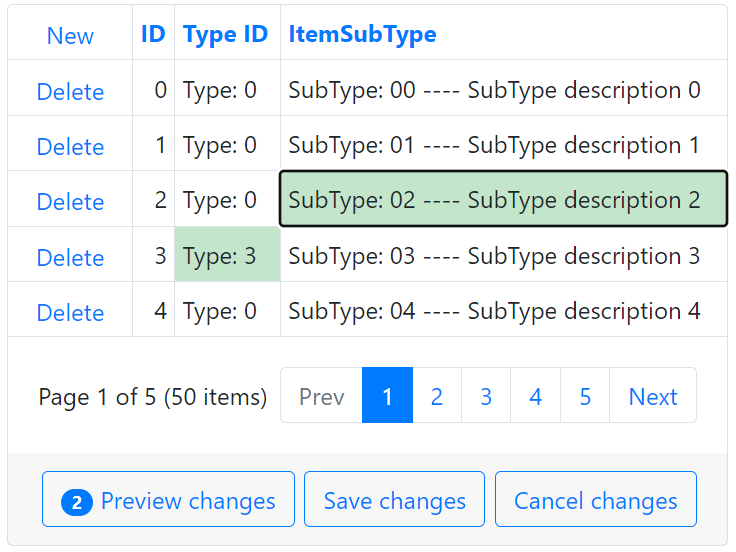
請按照以下步驟在批處理編輯模式下初始化組合框列:
將BootstrapGridView控件添加到您的頁面上,並用列填充它。
創建一個組合框列,並為視圖模式指定其屬性Combobox設置。要將組合框列綁定到數據源,請處理該列的ItemRequestedByValue和ItemRequestedByFilterCondition事件並過濾數據源。
< dx:BootstrapGridViewComboBoxColumn FieldName = " YourFieldName " ... >
    < PropertiesComboBox ValueField = " YourFieldName "	OnItemRequestedByValue = " OnItemRequestedByValue_View "
    OnItemsRequestedByFilterCondition = " OnItemsRequestedByFilterCondition_View " TextFormatString = " {0}|{1}... " >
        < Fields >
        <!-- ... -->
        </ Fields >
    </ PropertiesComboBox >
    <!-- ... -->
</ dx:BootstrapGridViewComboBoxColumn >
protected void OnItemRequestedByValue_View ( object source , ListEditItemRequestedByValueEventArgs e ) {
if ( e . Value == null ) return ;
int subTypeID = ( int ) e . Value ;
BootstrapComboBox editor = source as BootstrapComboBox ;
editor . DataSource = ItemTypeFactory . GetItemSubTypes ( ) . Where ( s => s . SubTypeID == subTypeID ) ;
editor . DataBind ( ) ;
}
protected void OnItemsRequestedByFilterCondition_View ( object source , ListEditItemsRequestedByFilterConditionEventArgs e ) {
BootstrapComboBox editor = source as BootstrapComboBox ;
editor . DataSource = ItemTypeFactory . GetItemSubTypes ( ) . Where ( s => s . SubTypeDescription . Contains ( e . Filter )
|| s . SubTypeName . Contains ( e . Filter )
|| s . SubTypeID . ToString ( ) . Contains ( e . Filter ) ) ;
editor . DataBind ( ) ;
}指定列的EditiTemTemplate屬性,將BootstrapCombobox控件添加到模板中以在編輯模式下使用它,然後啟用其EnableCallbackMode屬性。處理組合框的服務器端項目RequestedByFiltyByFilterCondition和ItemRequestedBy Value事件,並根據其他字段的值過濾數據源。
< dx:BootstrapGridViewComboBoxColumn Caption = " ItemSubType " FieldName = " SubTypeID " VisibleIndex = " 4 " >
    <!-- ... -->
    < EditItemTemplate >
        < dx:BootstrapComboBox ID = " bsCombobox " runat = " server " EnableCallbackMode = " true " ClientInstanceName = " bsCombobox " OnItemRequestedByValue = " OnItemRequestedByValue " OnItemsRequestedByFilterCondition = " OnItemsRequestedByFilterCondition " ValueField = " SubTypeID " TextFormatString = " SubTypeID: {0} ---- Desription: {1} " >
            < Fields >
                <!-- ... -->
            </ Fields >
            < ClientSideEvents LostFocus = " bsCombobox_LostFocus " />
        </ dx:BootstrapComboBox >
    </ EditItemTemplate >
</ dx:BootstrapGridViewComboBoxColumn >
protected void OnItemRequestedByValue ( object source , ListEditItemRequestedByValueEventArgs e ) {
// ...
int typeID = GetCurrentItemTypeID ( ) ;
List < SubType > subTypes ;
if ( typeID > - 1 )
subTypes = ItemTypeFactory . GetItemSubTypes ( ) . Where ( s => s . TypeID == typeID && s . SubTypeID . ToString ( ) == id ) . ToList ( ) ;
// ...
editor . DataSource = subTypes ;
editor . DataBind ( ) ;
}
protected void OnItemsRequestedByFilterCondition ( object source , ListEditItemsRequestedByFilterConditionEventArgs e ) {
BootstrapComboBox editor = source as BootstrapComboBox ;
int typeID = GetCurrentItemTypeID ( ) ;
List < SubType > subTypes ;
if ( typeID > - 1 )
subTypes = ItemTypeFactory . GetItemSubTypes ( ) . Where ( s => s . TypeID == typeID && ( s . SubTypeDescription . Contains ( e . Filter )
// ...
editor . DataSource = subTypes ;
editor . DataBind ( ) ;
}要在客戶端上初始化組合框控件,請處理網格的BatchEditStartEditing和BatchEditEndEditing事件,如以下示例中所示:ASP.NET Web表單的網格視圖 - 如何在批處理模式中實現編輯項目模板。
 function OnBatchEditStartEdit ( s , e ) {
    var currentTypeID = grid . batchEditApi . GetCellValue ( e . visibleIndex , 'TypeID' ) ;
    var cellInfo = e . rowValues [ ColIndexByName ( 'SubTypeID' ) ] ;
    this . setTimeout ( function ( ) {
    bsCombobox . SetValue ( cellInfo . value ) ;
    bsCombobox . SetText ( cellInfo . text ) ;
    } , 0 ) ;
    RefreshData ( currentTypeID ) ;
}
function OnBatchEditEndEdit ( s , e ) {
    var cellInfo = e . rowValues [ ColIndexByName ( 'SubTypeID' ) ] ;
    cellInfo . value = bsCombobox . GetValue ( ) ;
    cellInfo . text = bsCombobox . GetText ( ) ;
    bsCombobox . SetValue ( null ) ;
}要將新的字段值傳遞給服務器,請使用隱藏的字段控件,然後調用組合框的PerformCallback方法。
 function RefreshData ( currentTypeID ) {
    hf1 . Set ( 'currentTypeID' , currentTypeID ) ;
    bsCombobox . PerformCallback ( ) ;
} (您將被重定向到devexpress.com提交您的答复)





