asp net bootstrap grid initialize combo box column in batch edit mode
1.0.0

此示例演示了如何创建组合列的编辑项目模板以将列绑定到过滤的数据源并在批处理模式下配置网格的单元格编辑功能。
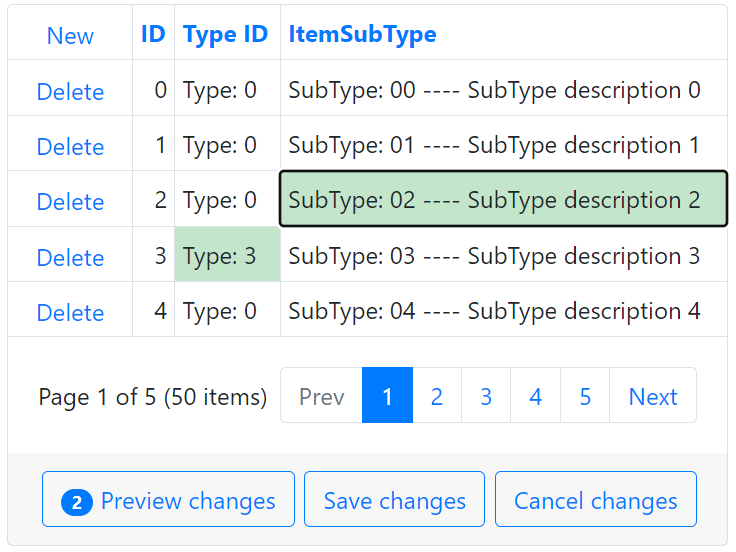
请按照以下步骤在批处理编辑模式下初始化组合框列:
将BootstrapGridView控件添加到您的页面上,并用列填充它。
创建一个组合框列,并为视图模式指定其属性Combobox设置。要将组合框列绑定到数据源,请处理该列的ItemRequestedByValue和ItemRequestedByFilterCondition事件并过滤数据源。
< dx:BootstrapGridViewComboBoxColumn FieldName = " YourFieldName " ... >
    < PropertiesComboBox ValueField = " YourFieldName "	OnItemRequestedByValue = " OnItemRequestedByValue_View "
    OnItemsRequestedByFilterCondition = " OnItemsRequestedByFilterCondition_View " TextFormatString = " {0}|{1}... " >
        < Fields >
        <!-- ... -->
        </ Fields >
    </ PropertiesComboBox >
    <!-- ... -->
</ dx:BootstrapGridViewComboBoxColumn >
protected void OnItemRequestedByValue_View ( object source , ListEditItemRequestedByValueEventArgs e ) {
if ( e . Value == null ) return ;
int subTypeID = ( int ) e . Value ;
BootstrapComboBox editor = source as BootstrapComboBox ;
editor . DataSource = ItemTypeFactory . GetItemSubTypes ( ) . Where ( s => s . SubTypeID == subTypeID ) ;
editor . DataBind ( ) ;
}
protected void OnItemsRequestedByFilterCondition_View ( object source , ListEditItemsRequestedByFilterConditionEventArgs e ) {
BootstrapComboBox editor = source as BootstrapComboBox ;
editor . DataSource = ItemTypeFactory . GetItemSubTypes ( ) . Where ( s => s . SubTypeDescription . Contains ( e . Filter )
|| s . SubTypeName . Contains ( e . Filter )
|| s . SubTypeID . ToString ( ) . Contains ( e . Filter ) ) ;
editor . DataBind ( ) ;
}指定列的EditiTemTemplate属性,将BootstrapCombobox控件添加到模板中以在编辑模式下使用它,然后启用其EnableCallbackMode属性。处理组合框的服务器端项目RequestedByFiltyByFilterCondition和ItemRequestedBy Value事件,并根据其他字段的值过滤数据源。
< dx:BootstrapGridViewComboBoxColumn Caption = " ItemSubType " FieldName = " SubTypeID " VisibleIndex = " 4 " >
    <!-- ... -->
    < EditItemTemplate >
        < dx:BootstrapComboBox ID = " bsCombobox " runat = " server " EnableCallbackMode = " true " ClientInstanceName = " bsCombobox " OnItemRequestedByValue = " OnItemRequestedByValue " OnItemsRequestedByFilterCondition = " OnItemsRequestedByFilterCondition " ValueField = " SubTypeID " TextFormatString = " SubTypeID: {0} ---- Desription: {1} " >
            < Fields >
                <!-- ... -->
            </ Fields >
            < ClientSideEvents LostFocus = " bsCombobox_LostFocus " />
        </ dx:BootstrapComboBox >
    </ EditItemTemplate >
</ dx:BootstrapGridViewComboBoxColumn >
protected void OnItemRequestedByValue ( object source , ListEditItemRequestedByValueEventArgs e ) {
// ...
int typeID = GetCurrentItemTypeID ( ) ;
List < SubType > subTypes ;
if ( typeID > - 1 )
subTypes = ItemTypeFactory . GetItemSubTypes ( ) . Where ( s => s . TypeID == typeID && s . SubTypeID . ToString ( ) == id ) . ToList ( ) ;
// ...
editor . DataSource = subTypes ;
editor . DataBind ( ) ;
}
protected void OnItemsRequestedByFilterCondition ( object source , ListEditItemsRequestedByFilterConditionEventArgs e ) {
BootstrapComboBox editor = source as BootstrapComboBox ;
int typeID = GetCurrentItemTypeID ( ) ;
List < SubType > subTypes ;
if ( typeID > - 1 )
subTypes = ItemTypeFactory . GetItemSubTypes ( ) . Where ( s => s . TypeID == typeID && ( s . SubTypeDescription . Contains ( e . Filter )
// ...
editor . DataSource = subTypes ;
editor . DataBind ( ) ;
}要在客户端上初始化组合框控件,请处理网格的BatchEditStartEditing和BatchEditEndEditing事件,如以下示例中所示:ASP.NET Web表单的网格视图 - 如何在批处理模式中实现编辑项目模板。
 function OnBatchEditStartEdit ( s , e ) {
    var currentTypeID = grid . batchEditApi . GetCellValue ( e . visibleIndex , 'TypeID' ) ;
    var cellInfo = e . rowValues [ ColIndexByName ( 'SubTypeID' ) ] ;
    this . setTimeout ( function ( ) {
    bsCombobox . SetValue ( cellInfo . value ) ;
    bsCombobox . SetText ( cellInfo . text ) ;
    } , 0 ) ;
    RefreshData ( currentTypeID ) ;
}
function OnBatchEditEndEdit ( s , e ) {
    var cellInfo = e . rowValues [ ColIndexByName ( 'SubTypeID' ) ] ;
    cellInfo . value = bsCombobox . GetValue ( ) ;
    cellInfo . text = bsCombobox . GetText ( ) ;
    bsCombobox . SetValue ( null ) ;
}要将新的字段值传递给服务器,请使用隐藏的字段控件,然后调用组合框的PerformCallback方法。
 function RefreshData ( currentTypeID ) {
    hf1 . Set ( 'currentTypeID' , currentTypeID ) ;
    bsCombobox . PerformCallback ( ) ;
} (您将被重定向到devexpress.com提交您的答复)





