mdb openfga
1.0.0

MongoDB Atlas矢量搜索可以根據向量表示實現有效的相似性搜索。在使用非結構化數據(例如文本,圖像或音頻)時,這是特別有益的,這些數據,傳統的基於關鍵字的搜索可能會缺乏。
關鍵優勢:
與OpenFGA集成:
當與OpenFGA結合使用時,MongoDB Atlas Vector Search為安全文檔訪問提供了強大的解決方案。您可以使用矢量搜索根據其內容檢索相關文檔,然後應用OpenFGA的訪問控制規則,以確保只有授權的用戶才能查看結果。
例子:
想像一個文檔管理系統,用戶可以根據其內容搜索文檔。通過使用MongoDB Atlas矢量搜索,您可以有效檢索與用戶查詢在語義上相似的文檔。然後,OpenFGA可用於執行訪問控制,以確保用戶僅查看他們被授權查看的文檔。
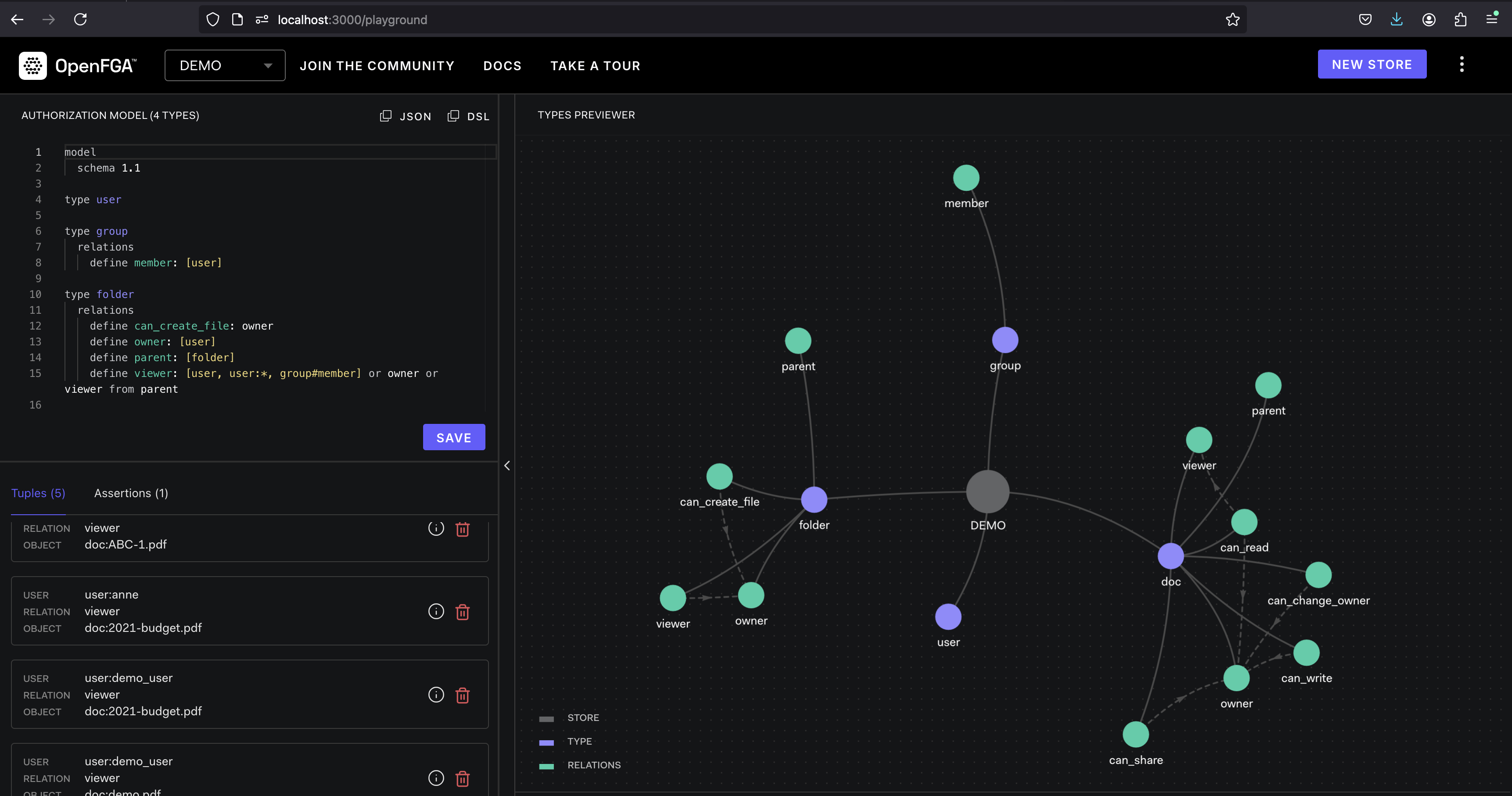
OpenFGA是一個開源的授權平台,旨在為雲本地應用提供細粒度的訪問控制。它提供了一種靈活且可擴展的解決方案,用於管理用戶權限並訪問資源。
OpenFGA在元組的概念上運作。元組代表由用戶,關係(例如“讀”,“寫”)和對象(例如,文件,數據庫)組成的權限。定義策略以指定允許或拒絕哪些元組。當用戶試圖訪問資源時,OpenFGA會根據定義的策略評估相應的元組,以確定訪問是否授予或拒絕。
拉開OpenFGA Docker映像:
docker pull openfga/openfga運行帶有裸露端口的OpenFGA容器:
docker run -p 8080:8080 -p 3000:3000 openfga/openfga run拉動MongoDB Atlas本地Docker圖像:
docker pull mongodb/mongodb-atlas-local運行MongoDB Atlas本地容器:
docker run -p 27017:27017 mongodb/mongodb-atlas-local本節指導您創建矢量搜索索引,以在OpenFGA數據中進行有效的相似性搜索。
使用mongosh連接到本地地圖集:
mongosh " mongodb://localhost/demo?directConnection=true "切換到demo數據庫(如果需要的話,用實際的數據庫名稱替換):
use demo
在“嵌入”字段上創建一個名為“ vector_index”的向量搜索索引:
 db . mdb_fga . createSearchIndex (
    "vector_index" ,
    "vectorSearch" , // index type
    {
        fields : [
            {
                "type" : "vector" ,
                "numDimensions" : 1536 ,
                "path" : "embeddings" ,
                "similarity" : "cosine"
            } ,
        ]
    }
) ;
安裝所需的Python庫
pip install asyncio requests pymongo unstructured openai此命令為運行Python代碼安裝了所有必要的庫( asyncio , requests ,pymongo, pymongo , unstructured和openai )。
非結構化:從文檔中提取含義
非結構化使您能夠將文本文檔分解為較小,更可管理的單元。想像一下研究論文:非結構化可以將其分為部分,段落甚至句子,從而更容易處理和分析。圖書館還可以幫助提取諸如姓名,日期和位置之類的實體,以幫助信息檢索。
OpenFGA:確保訪問提取的數據
您定義基於特定條件來管理用戶權限的策略。當用戶嘗試訪問文檔或其提取的數據時,OpenFGA會根據這些策略評估相應的用戶和文檔,從而授予或拒絕訪問權限。
MongoDB Atlas向量搜索:有效查找類似的文檔
想像一下,您正在搜索文檔集合中的特定概念。基於關鍵字的搜索可能會錯過不包含確切關鍵字的相關文檔。但是,向量搜索分析了文檔內容的向量表示,即使它們使用不同的措辭,您也可以找到語義上相似的文檔。
結合這些工具的力量
通過集成這三個工具,您可以創建一個健壯且安全的文檔管理系統。這是工作流程:
add_tuple添加權限您在代碼段中看到的add_tuple函數在管理MDB-OPENFGA應用程序中的訪問控制方面起著至關重要的作用。它與OpenFGA進行交互,授予用戶權限查看特定資源。
這是add_tuple工作方式的細分:
參數:
USER :這代表您要授予的用戶。代碼將其格式化為"user:"+USER在OpenFGA中的一致性。RESOURCE :這表示用戶被授予訪問權限的資源。在示例中,它的格式為"doc:"+RESOURCE (假設文檔)。API呼叫:
/stores/{store_id}/write )。此終點用於將數據(元組)撰寫到OpenFGA商店。writes :此鍵保持一個對象,指定要添加的元素。tuple_keys :這是一個包含定義權限的元組對象的數組。每個元組對像都有三個屬性:user :前面格式的用戶ID。relation :這定義了授予許可的類型。在這種情況下,它設置為"viewer"以指示閱讀訪問。object :前面格式的資源ID。authorization_model_id :這指定了OpenFGA中使用的授權模型的ID。該模型定義了控制元素的評估方式的訪問控制規則。回覆:
本質上, add_tuple在OpenFGA中創建了一個新的元組,指出特定用戶( USER )有權查看特定資源( RESOURCE )。然後,OpenFGA的訪問控制機制將使用此元組來確定用戶是否有權在以後的請求中訪問資源。
check_authorization check_authorization功能在MDB-OpenFGA應用程序中起著至關重要的作用。它負責確定給定用戶是否有權根據OpenFGA中定義的訪問控制策略訪問特定資源。
它的工作原理:
參數:
tuple_key :這是代表元組的JSON對象。如您所知,元組定義了許可。它通常包含三個屬性:user :用戶ID。relation :許可類型(例如“查看者”,“編輯器”)。object :資源ID。API呼叫:
/stores/{store_id}/check 。該終點用於評估針對定義的授權模型的元組。authorization_model_id :使用的授權模型的ID。tuple_key :您要檢查的元組對象。回覆:
bool值:true :用戶有許可。false :用戶沒有許可。本質上, check_authorization將元組作為輸入和查詢OpenFGA確定元組中指定的用戶是否允許在指定資源(對象)上執行操作(關係)。
運行演示
python3 demo.py
 Starting FGA setup...
FGA setup response: {'code': 'write_failed_due_to_invalid_input', 'message': "cannot write a tuple which already exists: user: 'user:demo_user', relation: 'viewer', object: 'doc:demo.pdf': invalid write input"}
Clearing the db first...
Database cleared.
Starting PDF document partitioning...
PDF partitioning and database insertion completed successfully.
Waiting for index to be updated. This may take a few seconds...
Starting search tool...
Access Granted: User 'demo_user' has permission to read document 'demo.pdf'.
Access Denied: User 'demo_user-denyme' does not have permission to read document 'demo.pdf'.
 import asyncio
import requests
import json
import pymongo
from unstructured . partition . auto import partition
from openai import AzureOpenAI

class FGA_MDB_DEMO :
    def __init__ ( self , azure_endpoint , api_version , api_key , mongo_uri , fga_api_url , fga_store_id , fga_api_token , authorization_model_id , db_name , collection_name ):
        self . az_client = AzureOpenAI ( azure_endpoint = azure_endpoint , api_version = api_version , api_key = api_key )
        self . mongo_client = pymongo . MongoClient ( mongo_uri )
        self . fga_api_url = fga_api_url
        self . fga_store_id = fga_store_id
        self . fga_api_token = fga_api_token
        self . authorization_model_id = authorization_model_id
        self . db_name = db_name
        self . collection_name = collection_name

    def generate_embeddings ( self , text , model = "" ):
        return self . az_client . embeddings . create ( input = [ text ], model = model ). data [ 0 ]. embedding

    def check_authorization ( self , tuple_key ):
        url = f" { self . fga_api_url } /stores/ { self . fga_store_id } /check"
        headers = {
            "Authorization" : f"Bearer { self . fga_api_token } " ,
            "content-type" : "application/json" ,
        }
        data = {
            "authorization_model_id" : self . authorization_model_id ,
            "tuple_key" : tuple_key
        }
        response = requests . post ( url , headers = headers , data = json . dumps ( data ))
        return response . json ()

    def add_tuple ( self , USER , RESOURCE ):
        url = f" { self . fga_api_url } /stores/ { self . fga_store_id } /write"
        headers = {
            "Authorization" : f"Bearer { self . fga_api_token } " ,
            "content-type" : "application/json" ,
        }
        data = {
            "writes" : {
                "tuple_keys" : [
                {
                    "user" : "user:" + USER ,
                    "relation" : "viewer" ,
                    "object" : "doc:" + RESOURCE
                }
                ]
            },
            "authorization_model_id" : self . authorization_model_id
        }
        response = requests . post ( url , headers = headers , data = json . dumps ( data ))
        return response . json ()

    def search_tool ( self , text , USER_ID ):
        response = self . mongo_client [ self . db_name ][ self . collection_name ]. aggregate ([
        {
            "$vectorSearch" : {
                "index" : "vector_index" ,
                "queryVector" : self . az_client . embeddings . create ( model = "text-embedding-ada-002" , input = text ). data [ 0 ]. embedding ,
                "path" : "embeddings" ,
                "limit" : 5 ,
                "numCandidates" : 30
            }
        }, { "$project" :{ "_id" : 0 , "embeddings" : 0 , "metadata" : 0 }}
        ])
        for doc in response :
            tuple_key = { "user" : "user:" + USER_ID , "relation" : "viewer" , "object" : "doc:" + doc [ "source" ]}
            response = self . check_authorization ( tuple_key )
            if response [ 'allowed' ]:
                print ( f"Access Granted: User ' { USER_ID } ' has permission to read document ' { doc [ 'source' ] } '." )
            else :
                print ( f"Access Denied: User ' { USER_ID } ' does not have permission to read document ' { doc [ 'source' ] } '." )

    def partition_pdf ( self , resource ):
        mdb_db = self . mongo_client [ self . db_name ]
        mdb_collection = mdb_db [ self . collection_name ]
        print ( "Clearing the db first..." )
        mdb_collection . delete_many ({})
        print ( "Database cleared." )
        print ( "Starting PDF document partitioning..." )
        elements = partition ( resource )
        for element in elements :
            mdb_collection . insert_one ({
                "text" : str ( element . text ),
                "embeddings" : self . generate_embeddings ( str ( element . text ), "text-embedding-ada-002" ),
                "metadata" : {
                    "raw_element" : element . to_dict (),
                },
                "source" : resource
            })
        print ( "PDF partitioning and database insertion completed successfully." )

    def fga_setup ( self , user , resource ):
        response = self . add_tuple ( user , resource )
        print ( f"FGA setup response: { response } " )

    async def main ( self , user , resource ):
        print ( "Starting FGA setup..." )
        self . fga_setup ( user , resource )
        self . partition_pdf ( resource )
        print ( "Waiting for index to be updated. This may take a few seconds..." )
        await asyncio . sleep ( 15 )
        print ( "Starting search tool..." )
        self . search_tool ( "test" , user )
        self . search_tool ( "test" , user + "-denyme" )
        print ( "Process completed successfully." )

if __name__ == "__main__" :
    fga_mdb_demo = FGA_MDB_DEMO (
        azure_endpoint = "" ,
        api_version = "2024-04-01-preview" ,
        api_key = "" ,
        mongo_uri = "mongodb://localhost:27017/demo?directConnection=true" ,
        fga_api_url = 'http://localhost:8080' ,
        fga_store_id = '01J8VP1HYCHN459VT76DQG0W2R' ,
        fga_api_token = '' ,
        authorization_model_id = '01J8VP3BMPZNFJ480G5ZNF3H0C' ,
        db_name = "demo" ,
        collection_name = "mdb_fga"
    )
    asyncio . run ( fga_mdb_demo . main ( "demo_user" , "demo.pdf" ))




