scalableReactNativeBoilerplate
1.0.0

由Casainnov贊助
歡迎使用可擴展的反應本機樣機盤,這是一個可維護,可擴展和高效的構建本機應用的結構化起點。該樣板遵循組織代碼庫,設置狀態管理,處理API交互,主題等的最佳實踐。我們使用最新的React本機版本,並使所有庫保持最新狀態,從而確保與最新功能和改進的兼容性。
 ├── e2e                     # Detox configuration for different environments
├── Fastlane                # CI/CD configuration using Fastlane for automated builds and deployment
├── src
├── assets                          # Directory for app assets such as images and fonts
│   ├── images                       # Folder for image assets used in the app
│   ├── package.json                # Package file for managing assets if needed
│   └── icons                        # Folder for SVG or other icon assets
│       ├── iconTransactions.svg     # Icon for transactions
│       ├── iconBlocks.svg          # Icon for blocks
│       ├── iconSettings.svg        # Icon for settings
│       ├── iconEyeInactive.svg     # Inactive eye icon
│       └── iconEyeActive.svg       # Active eye icon
│   └── fonts                        # Folder for font files
│       ├── Roboto-Regular.ttf       # Regular weight of Roboto font
│       └── Roboto-Bold.ttf          # Bold weight of Roboto font
├── api                             # Folder for handling API interactions
│   ├── constant.ts                 # Constants used throughout API calls
│   ├── Api.ts                      # Main API configuration and methods
│   ├── types.ts                    # TypeScript types related to API responses
│   ├── package.json                # Package file for API utilities if needed
│   └── customAPI                   # Custom API services for specific endpoints
│       ├── routes.ts               # Routes for custom API calls
│       └── customApi.ts            # Custom API implementation
├── components                      # Reusable UI components organized by Atomic Design
│   ├── package.json                # Package file for component library
│   ├── atoms                       # Atoms: basic UI components (buttons, inputs, etc.)
│   │   ├── LoadingComponent        # Loading spinner or component
│   │   │   └── index.tsx           # Component implementation
│   │   ├── Button                  # Button component
│   │   │   └── index.tsx           # Component implementation
│   │   │   └── tests__             # Unit tests for Button component
│   │   │       └── LoadingScreen.test.tsx
│   │   ├── Text                    # Text component for consistent styling
│   │   │   └── index.tsx           # Component implementation
│   │   └── StyledImage             # Styled image component
│   │       └── index.tsx           # Component implementation
│   ├── molecules                   # Molecules: combinations of atoms (card, form elements, etc.)
│   └── organisms                   # Organisms: complex components made from molecules and atoms
├── container                       # Context and provider components for global states
│   ├── LanguageHelper.tsx          # Language context provider
│   ├── AppThemeProvider.tsx        # Theme context provider
│   └── package.json                # Package file for container components
├── hooks                           # Custom hooks for reusable logic
│   ├── useAppDispatch.ts           # Hook for dispatching actions in Redux
│   ├── useAppSelector.ts           # Hook for selecting state from Redux store
│   ├── useActions.ts               # Hook for using Redux actions
│   ├── package.json                # Package file for hooks
│   ├── index.ts                    # Entry point for hooks
│   └── useTraceUpdate.ts           # Hook for tracing component updates
├── navigation                      # Navigation setup for the app
│   ├── index.tsx                   # Main navigation entry point
│   ├── AppNavigation               # Navigation component
│   │   ├── index.tsx               # Component implementation
│   │   └── AppScreens.tsx          # Screens defined for navigation
│   ├── package.json                # Package file for navigation
│   ├── LinkingConfiguration.ts      # Configuration for deep linking
│   └── types.tsx                   # TypeScript types related to navigation
├── redux                           # Redux store and configuration
│   ├── appConfig                   # App configuration for Redux
│   │   ├── appConfigSelectors.ts    # Selectors for app config
│   │   ├── appConfigModel.ts        # Model for app config state
│   │   └── appConfig.ts             # Main app configuration
│   ├── package.json                # Package file for Redux
│   ├── rootReducer.ts              # Root reducer for combining all reducers
│   └── store.ts                    # Redux store configuration
├── screens                         # Screens or views of the app organized by features
│   ├── package.json                # Package file for screens
│   ├── HomeScreen                  # Home screen component
│   │   └── index.tsx               # Component implementation
│   └── SettingScreen               # Settings screen component
│       └── index.tsx               # Component implementation
├── theme                           # Theming configuration and styling
│   ├── Colors.ts                   # Color definitions used throughout the app
│   ├── Fonts.ts                    # Font definitions and styling
│   ├── Screens.ts                  # Screen-specific styles
│   ├── globalStyling               # Global styling definitions
│   │   ├── cards.ts                # Card component styles
│   ├── package.json                # Package file for theming
│   └── index.ts                    # Entry point for theme
├── i18n                            # Internationalization configuration
│   ├── allLanguages.ts             # List of all available languages
│   ├── en_GB.ts                    # English (UK) translations
│   ├── fr_FR.ts                    # French translations
│   ├── ar_SA                       # Arabic (Saudi Arabia) translations
│   │   └── common.json             # Common phrases in Arabic
│   ├── index.ts                    # Main entry for i18n configuration
│   ├── newLineProcessor.ts         # Helper for processing new lines in translations
│   ├── en_GB                       # English (UK) translations (nested)
│   │   └── common.json             # Common phrases in English (UK)
│   └── fr_FR                       # French translations (nested)
│       └── common.json             # Common phrases in French
└── types                           # TypeScript type definitions for global use
│   ├── i18next.d.ts                # Type definitions for i18next
│    └── declarations.d.ts           # Global declarations
└── __tests__               # Unit and integration tests for components and screens
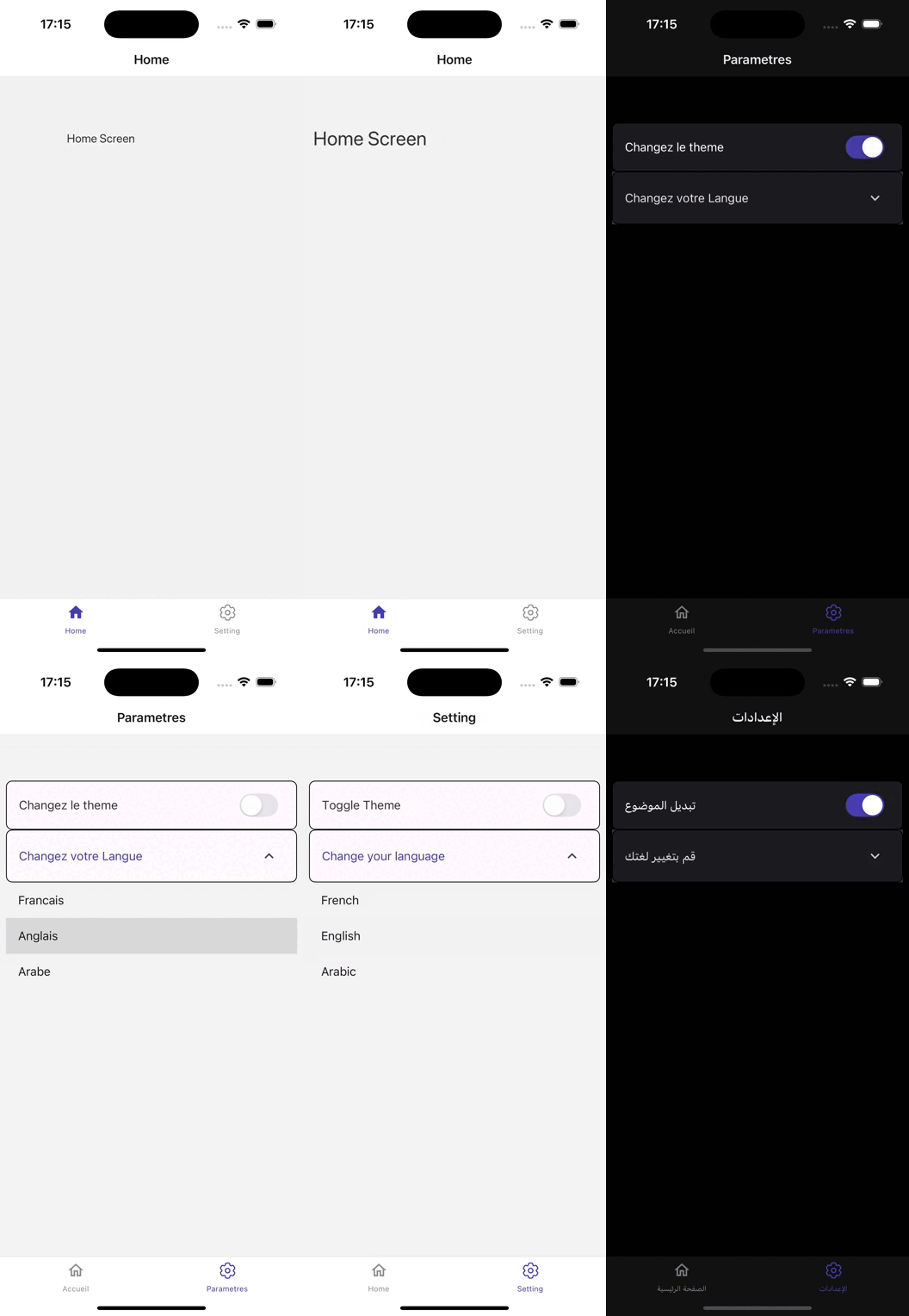
此React本機應用程序(建立在0.75.3版本上)展示了專為無縫用戶體驗設計的強大體系結構。
該應用程序利用React Navigation(V6),該應用程序在各種屏幕上提供直觀的導航,以確保用戶可以輕鬆訪問功能。
使用Redux Toolkit(V2)用於狀態管理,它有效地處理了複雜的應用程序狀態,從而可以平滑數據流和實時更新。
React Native Paper(V5)增強了UI,該紙張提供了一組全面的可自定義組件和主題選項,從而創建了視覺上吸引人的界面。
為了確保質量,該應用程序集成了開玩笑和排毒(V20)進行測試,從而實現了嚴格的自動測試和質量保證。
Fastlane簡化了CI/CD流程,從而促進了有效的部署和更新。
使用Axios對API交互進行管理,從而可以與後端服務進行靈活而穩健的通信。
React I18Next和React Antial局部化實現了國際化(為多種語言和區域設置提供支持,增強了全球受眾的可訪問性。
該應用程序使用React Native配置有效地管理環境變量,以確保敏感數據保持安全和組織。
為了進行最佳的媒體處理,React Antial Fast Image增強了圖像加載性能,而React Native SVG提供了可擴展的矢量圖形支持,從而提供了豐富的視覺內容。
通過視覺上吸引人的過渡,將動畫變成液體和反應,並通過反應的本機復活增強用戶參與度。
此外,反應天然大小問題可確保各種設備尺寸的響應式設計。
總體而言,此應用程序結合了功能強大的庫和結構良好的代碼庫,以創建功能豐富且用戶友好的移動應用程序
確保已安裝以下內容:
克隆存儲庫:
git clone [email protected]:chohra-med/scalableReactNativeBoilerplate.git安裝依賴項:
 cd scalableReactNativeBoilerplate
yarn
啟動開發服務器:
yarn start在iOS上運行該應用:
yarn ios在Android上運行該應用:
yarn android開玩笑進行單元測試:
yarn test用排毒進行端到端測試:
yarn detox build -c ios
yarn detox test -c ios該樣板包括用於自動化,測試和部署的基本齋戒設置。
為Android和iOS構建應用程序:
 cd fastlane
fastlane android beta
fastlane ios beta歡迎捐款!請按照以下步驟操作:
feature/new-feature )。該項目已根據MIT許可獲得許可。
感謝社區維護了令人敬畏的圖書館,這些圖書館使反應的本地開髮變得更加容易。
要進行協作,請在LinkedIn上找到我。
如果您需要任何合作,請訪問Casainnov。





