scalableReactNativeBoilerplate
1.0.0

برعاية كاسينينوف
مرحبًا بكم في BoilerPlate Native React القابل للتطوير ، وهي نقطة انطلاق منظمة لبناء التطبيقات الأصلية التي يمكن الحفاظ عليها وقابلة للتطوير وفعالة. يتبع هذا الغلاية أفضل الممارسات لتنظيم قاعدة البيانات الخاصة بك ، وإعداد إدارة الدولة ، والتعامل مع تفاعلات واجهة برمجة التطبيقات ، والثقة ، وأكثر من ذلك. نحن نستخدم أحدث إصدار من React Native وتبقي جميع المكتبات محدثة ، مما يضمن التوافق مع أحدث الميزات والتحسينات.
 ├── e2e                     # Detox configuration for different environments
├── Fastlane                # CI/CD configuration using Fastlane for automated builds and deployment
├── src
├── assets                          # Directory for app assets such as images and fonts
│   ├── images                       # Folder for image assets used in the app
│   ├── package.json                # Package file for managing assets if needed
│   └── icons                        # Folder for SVG or other icon assets
│       ├── iconTransactions.svg     # Icon for transactions
│       ├── iconBlocks.svg          # Icon for blocks
│       ├── iconSettings.svg        # Icon for settings
│       ├── iconEyeInactive.svg     # Inactive eye icon
│       └── iconEyeActive.svg       # Active eye icon
│   └── fonts                        # Folder for font files
│       ├── Roboto-Regular.ttf       # Regular weight of Roboto font
│       └── Roboto-Bold.ttf          # Bold weight of Roboto font
├── api                             # Folder for handling API interactions
│   ├── constant.ts                 # Constants used throughout API calls
│   ├── Api.ts                      # Main API configuration and methods
│   ├── types.ts                    # TypeScript types related to API responses
│   ├── package.json                # Package file for API utilities if needed
│   └── customAPI                   # Custom API services for specific endpoints
│       ├── routes.ts               # Routes for custom API calls
│       └── customApi.ts            # Custom API implementation
├── components                      # Reusable UI components organized by Atomic Design
│   ├── package.json                # Package file for component library
│   ├── atoms                       # Atoms: basic UI components (buttons, inputs, etc.)
│   │   ├── LoadingComponent        # Loading spinner or component
│   │   │   └── index.tsx           # Component implementation
│   │   ├── Button                  # Button component
│   │   │   └── index.tsx           # Component implementation
│   │   │   └── tests__             # Unit tests for Button component
│   │   │       └── LoadingScreen.test.tsx
│   │   ├── Text                    # Text component for consistent styling
│   │   │   └── index.tsx           # Component implementation
│   │   └── StyledImage             # Styled image component
│   │       └── index.tsx           # Component implementation
│   ├── molecules                   # Molecules: combinations of atoms (card, form elements, etc.)
│   └── organisms                   # Organisms: complex components made from molecules and atoms
├── container                       # Context and provider components for global states
│   ├── LanguageHelper.tsx          # Language context provider
│   ├── AppThemeProvider.tsx        # Theme context provider
│   └── package.json                # Package file for container components
├── hooks                           # Custom hooks for reusable logic
│   ├── useAppDispatch.ts           # Hook for dispatching actions in Redux
│   ├── useAppSelector.ts           # Hook for selecting state from Redux store
│   ├── useActions.ts               # Hook for using Redux actions
│   ├── package.json                # Package file for hooks
│   ├── index.ts                    # Entry point for hooks
│   └── useTraceUpdate.ts           # Hook for tracing component updates
├── navigation                      # Navigation setup for the app
│   ├── index.tsx                   # Main navigation entry point
│   ├── AppNavigation               # Navigation component
│   │   ├── index.tsx               # Component implementation
│   │   └── AppScreens.tsx          # Screens defined for navigation
│   ├── package.json                # Package file for navigation
│   ├── LinkingConfiguration.ts      # Configuration for deep linking
│   └── types.tsx                   # TypeScript types related to navigation
├── redux                           # Redux store and configuration
│   ├── appConfig                   # App configuration for Redux
│   │   ├── appConfigSelectors.ts    # Selectors for app config
│   │   ├── appConfigModel.ts        # Model for app config state
│   │   └── appConfig.ts             # Main app configuration
│   ├── package.json                # Package file for Redux
│   ├── rootReducer.ts              # Root reducer for combining all reducers
│   └── store.ts                    # Redux store configuration
├── screens                         # Screens or views of the app organized by features
│   ├── package.json                # Package file for screens
│   ├── HomeScreen                  # Home screen component
│   │   └── index.tsx               # Component implementation
│   └── SettingScreen               # Settings screen component
│       └── index.tsx               # Component implementation
├── theme                           # Theming configuration and styling
│   ├── Colors.ts                   # Color definitions used throughout the app
│   ├── Fonts.ts                    # Font definitions and styling
│   ├── Screens.ts                  # Screen-specific styles
│   ├── globalStyling               # Global styling definitions
│   │   ├── cards.ts                # Card component styles
│   ├── package.json                # Package file for theming
│   └── index.ts                    # Entry point for theme
├── i18n                            # Internationalization configuration
│   ├── allLanguages.ts             # List of all available languages
│   ├── en_GB.ts                    # English (UK) translations
│   ├── fr_FR.ts                    # French translations
│   ├── ar_SA                       # Arabic (Saudi Arabia) translations
│   │   └── common.json             # Common phrases in Arabic
│   ├── index.ts                    # Main entry for i18n configuration
│   ├── newLineProcessor.ts         # Helper for processing new lines in translations
│   ├── en_GB                       # English (UK) translations (nested)
│   │   └── common.json             # Common phrases in English (UK)
│   └── fr_FR                       # French translations (nested)
│       └── common.json             # Common phrases in French
└── types                           # TypeScript type definitions for global use
│   ├── i18next.d.ts                # Type definitions for i18next
│    └── declarations.d.ts           # Global declarations
└── __tests__               # Unit and integration tests for components and screens
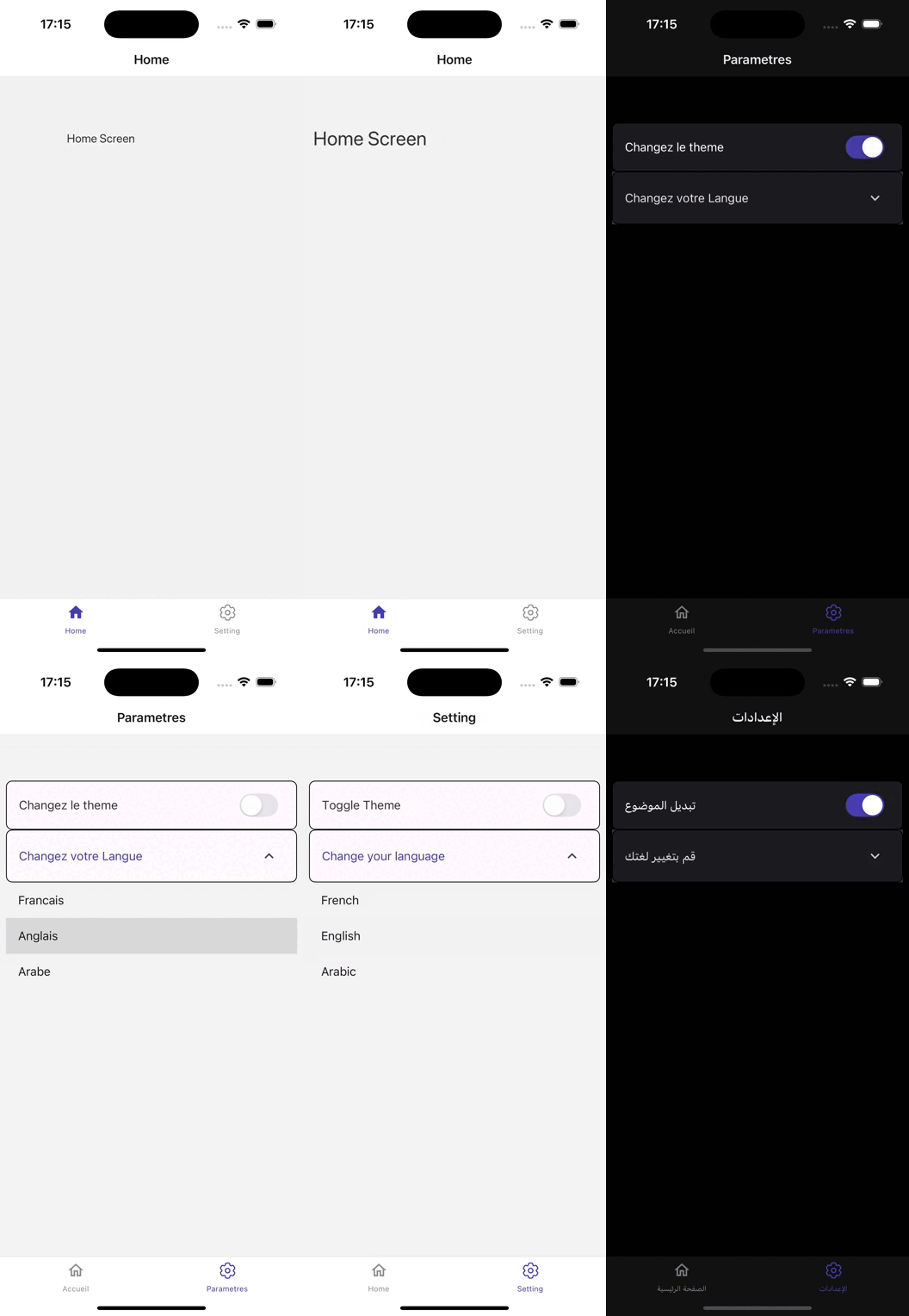
يعرض هذا التطبيق الأصلي React ، المبني على الإصدار 0.75.3 ، بنية قوية مصممة لتجارب المستخدم غير الملحومة.
الاستفادة من React Mavigation (V6) ، يوفر التطبيق التنقل البديهي عبر شاشات مختلفة ، مما يضمن أن يتمكن المستخدمون من الوصول بسهولة إلى ميزات.
مع Redux Toolkit (V2) لإدارة الدولة ، فإنه يتعامل بكفاءة مع حالات التطبيق المعقدة ، مما يسمح بتدفق البيانات السلس والتحديثات في الوقت الفعلي.
يتم تعزيز واجهة المستخدم بواسطة React Native Paper (V5) ، والتي توفر مجموعة شاملة من المكونات القابلة للتخصيص وخيارات العومية ، مما يخلق واجهة جذابة بصريًا.
لضمان الجودة ، يدمج التطبيق Jest و Detox (V20) للاختبار ، مما يتيح اختبارًا تلقائيًا صارمًا وضمان الجودة.
يقوم FastLane بتبسيط عملية CI/CD ، مما يسهل النشر والتحديثات الفعالة.
تتم إدارة تفاعلات API باستخدام AxiOS ، مما يتيح التواصل المرن والقوي مع خدمات الواجهة الخلفية.
يتم تحقيق التدويل من خلال React I18Next و React Native Toldize (، مما يتيح الدعم للغات المتعددة والإعدادات الإقليمية ، مما يعزز إمكانية الوصول إلى جمهور عالمي.
يدير التطبيق بفعالية متغيرات البيئة باستخدام React Native Config ، وضمان أن تظل البيانات الحساسة آمنة ومنظمة.
من أجل معالجة الوسائط المثلى ، يعزز React Native Fast Image أداء تحميل الصور ، بينما يوفر React Native SVG دعم رسومات متجه قابلة للتطوير ، مما يسمح للمحتوى المرئي الغني.
يتم صنع الرسوم المتحركة سائلة وسائلة مع React Native Monitive تعزيز مشاركة المستخدم من خلال التحولات الجذابة بصريًا.
بالإضافة إلى ذلك ، يضمن React Native Matters التصميم المستجيب عبر أحجام الأجهزة المختلفة.
بشكل عام ، يجمع هذا التطبيق بين المكتبات القوية وحمامات الكود منظمة جيدًا لإنشاء تطبيق جوال غني بالميزات وصديق للاستخدام
تأكد من تثبيت ما يلي:
استنساخ المستودع:
git clone [email protected]:chohra-med/scalableReactNativeBoilerplate.gitتثبيت التبعيات:
 cd scalableReactNativeBoilerplate
yarn
ابدأ خادم التطوير:
yarn startقم بتشغيل التطبيق على iOS:
yarn iosقم بتشغيل التطبيق على Android:
yarn androidتشغيل اختبارات الوحدة مع Jest:
yarn testقم بإجراء اختبارات شاملة مع التخلص من السموم:
yarn detox build -c ios
yarn detox test -c iosيتضمن Boilerplate إعداد Fastlane أساسي لأتمتة التصميم والاختبار والنشر.
قم ببناء التطبيق لنظام Android و iOS:
 cd fastlane
fastlane android beta
fastlane ios betaالمساهمات مرحب بها! يرجى اتباع الخطوات هذه:
feature/new-feature ).هذا المشروع مرخص بموجب ترخيص معهد ماساتشوستس للتكنولوجيا.
بفضل المجتمع للحفاظ على المكتبات الرائعة التي تجعل التطوير الأصلي React أسهل.
للتعاون ، تجدني على LinkedIn.
قم بزيارة Casainnov إذا كنت بحاجة إلى أي تعاون.





