scalableReactNativeBoilerplate
1.0.0

Casainnovが後援
スケーラブルなReactネイティブボイラープレートへようこそ。これは、保守可能でスケーラブルで効率的な反応ネイティブアプリケーションを構築するための構造化された出発点です。このボイラープレートは、コードベースを整理し、状態管理の設定、APIインタラクションの処理、テーマなどのベストプラクティスに従います。最新のReactネイティブバージョンを使用し、すべてのライブラリを最新の状態に保ち、最新の機能と改善との互換性を確保します。
 ├── e2e                     # Detox configuration for different environments
├── Fastlane                # CI/CD configuration using Fastlane for automated builds and deployment
├── src
├── assets                          # Directory for app assets such as images and fonts
│   ├── images                       # Folder for image assets used in the app
│   ├── package.json                # Package file for managing assets if needed
│   └── icons                        # Folder for SVG or other icon assets
│       ├── iconTransactions.svg     # Icon for transactions
│       ├── iconBlocks.svg          # Icon for blocks
│       ├── iconSettings.svg        # Icon for settings
│       ├── iconEyeInactive.svg     # Inactive eye icon
│       └── iconEyeActive.svg       # Active eye icon
│   └── fonts                        # Folder for font files
│       ├── Roboto-Regular.ttf       # Regular weight of Roboto font
│       └── Roboto-Bold.ttf          # Bold weight of Roboto font
├── api                             # Folder for handling API interactions
│   ├── constant.ts                 # Constants used throughout API calls
│   ├── Api.ts                      # Main API configuration and methods
│   ├── types.ts                    # TypeScript types related to API responses
│   ├── package.json                # Package file for API utilities if needed
│   └── customAPI                   # Custom API services for specific endpoints
│       ├── routes.ts               # Routes for custom API calls
│       └── customApi.ts            # Custom API implementation
├── components                      # Reusable UI components organized by Atomic Design
│   ├── package.json                # Package file for component library
│   ├── atoms                       # Atoms: basic UI components (buttons, inputs, etc.)
│   │   ├── LoadingComponent        # Loading spinner or component
│   │   │   └── index.tsx           # Component implementation
│   │   ├── Button                  # Button component
│   │   │   └── index.tsx           # Component implementation
│   │   │   └── tests__             # Unit tests for Button component
│   │   │       └── LoadingScreen.test.tsx
│   │   ├── Text                    # Text component for consistent styling
│   │   │   └── index.tsx           # Component implementation
│   │   └── StyledImage             # Styled image component
│   │       └── index.tsx           # Component implementation
│   ├── molecules                   # Molecules: combinations of atoms (card, form elements, etc.)
│   └── organisms                   # Organisms: complex components made from molecules and atoms
├── container                       # Context and provider components for global states
│   ├── LanguageHelper.tsx          # Language context provider
│   ├── AppThemeProvider.tsx        # Theme context provider
│   └── package.json                # Package file for container components
├── hooks                           # Custom hooks for reusable logic
│   ├── useAppDispatch.ts           # Hook for dispatching actions in Redux
│   ├── useAppSelector.ts           # Hook for selecting state from Redux store
│   ├── useActions.ts               # Hook for using Redux actions
│   ├── package.json                # Package file for hooks
│   ├── index.ts                    # Entry point for hooks
│   └── useTraceUpdate.ts           # Hook for tracing component updates
├── navigation                      # Navigation setup for the app
│   ├── index.tsx                   # Main navigation entry point
│   ├── AppNavigation               # Navigation component
│   │   ├── index.tsx               # Component implementation
│   │   └── AppScreens.tsx          # Screens defined for navigation
│   ├── package.json                # Package file for navigation
│   ├── LinkingConfiguration.ts      # Configuration for deep linking
│   └── types.tsx                   # TypeScript types related to navigation
├── redux                           # Redux store and configuration
│   ├── appConfig                   # App configuration for Redux
│   │   ├── appConfigSelectors.ts    # Selectors for app config
│   │   ├── appConfigModel.ts        # Model for app config state
│   │   └── appConfig.ts             # Main app configuration
│   ├── package.json                # Package file for Redux
│   ├── rootReducer.ts              # Root reducer for combining all reducers
│   └── store.ts                    # Redux store configuration
├── screens                         # Screens or views of the app organized by features
│   ├── package.json                # Package file for screens
│   ├── HomeScreen                  # Home screen component
│   │   └── index.tsx               # Component implementation
│   └── SettingScreen               # Settings screen component
│       └── index.tsx               # Component implementation
├── theme                           # Theming configuration and styling
│   ├── Colors.ts                   # Color definitions used throughout the app
│   ├── Fonts.ts                    # Font definitions and styling
│   ├── Screens.ts                  # Screen-specific styles
│   ├── globalStyling               # Global styling definitions
│   │   ├── cards.ts                # Card component styles
│   ├── package.json                # Package file for theming
│   └── index.ts                    # Entry point for theme
├── i18n                            # Internationalization configuration
│   ├── allLanguages.ts             # List of all available languages
│   ├── en_GB.ts                    # English (UK) translations
│   ├── fr_FR.ts                    # French translations
│   ├── ar_SA                       # Arabic (Saudi Arabia) translations
│   │   └── common.json             # Common phrases in Arabic
│   ├── index.ts                    # Main entry for i18n configuration
│   ├── newLineProcessor.ts         # Helper for processing new lines in translations
│   ├── en_GB                       # English (UK) translations (nested)
│   │   └── common.json             # Common phrases in English (UK)
│   └── fr_FR                       # French translations (nested)
│       └── common.json             # Common phrases in French
└── types                           # TypeScript type definitions for global use
│   ├── i18next.d.ts                # Type definitions for i18next
│    └── declarations.d.ts           # Global declarations
└── __tests__               # Unit and integration tests for components and screens
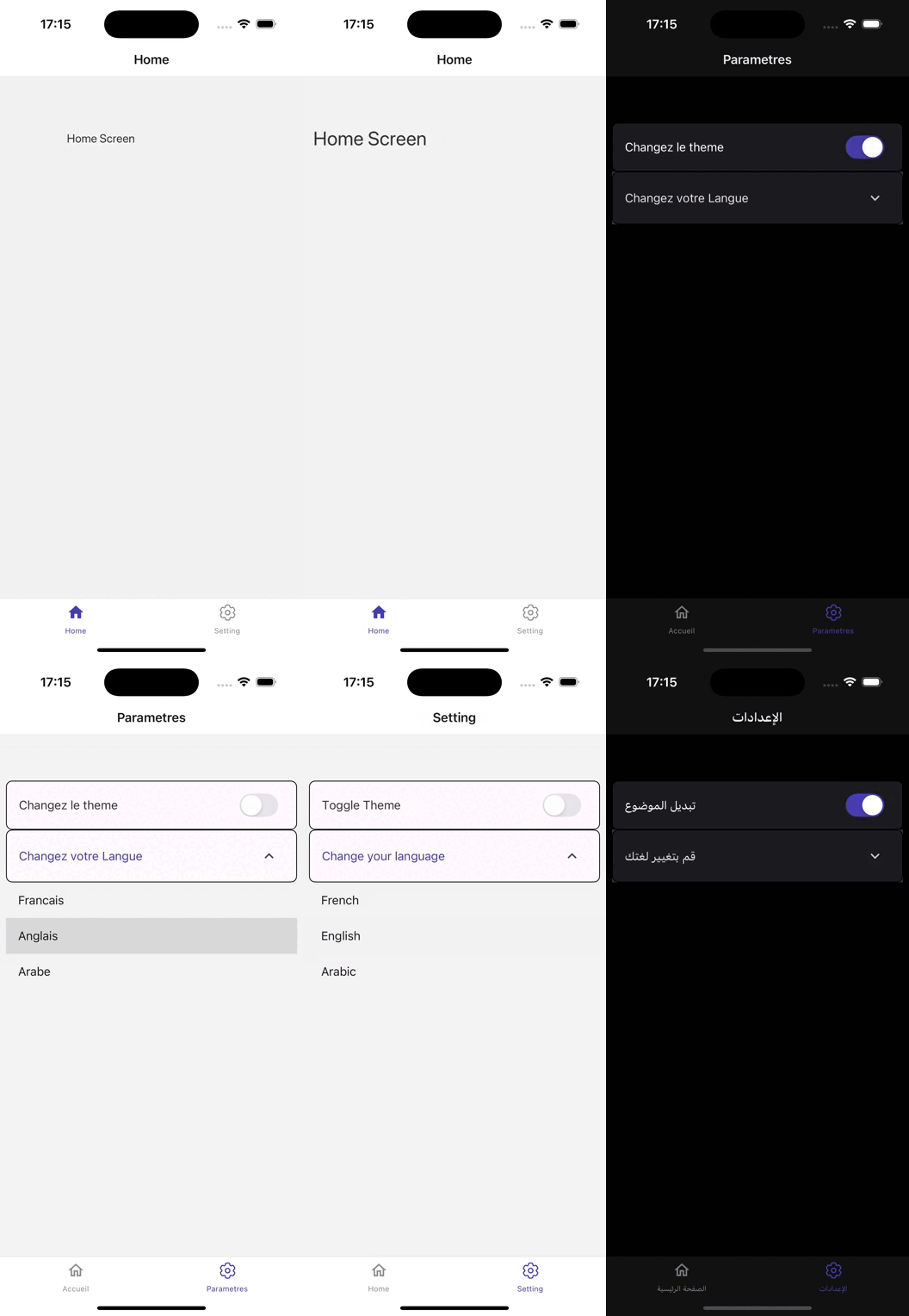
バージョン0.75.3に基づいて構築されたこの反応ネイティブアプリケーションは、シームレスなユーザーエクスペリエンス向けに設計された堅牢なアーキテクチャを紹介します。
React Navigation(V6)を活用すると、アプリはさまざまな画面に直感的なナビゲーションを提供し、ユーザーが機能に簡単にアクセスできるようにします。
州管理用のRedux Toolkit(V2)により、複雑なアプリケーション状態を効率的に処理し、スムーズなデータフローとリアルタイムの更新を可能にします。
UIは、Reactネイティブペーパー(V5)によって強化されており、カスタマイズ可能なコンポーネントとテーマオプションの包括的なセットを提供し、視覚的に魅力的なインターフェイスを作成します。
品質を確保するために、アプリはテストのためにJestとDetox(V20)を統合し、厳密な自動テストと品質保証を可能にします。
FastLaneはCI/CDプロセスを合理化し、効率的な展開と更新を促進します。
APIインタラクションはAxiosを使用して管理され、バックエンドサービスとの柔軟で堅牢な通信が可能になります。
Internationalizationは、React i18NextとReact Nativeのローカライズ(複数の言語と地域設定のサポートを可能にし、グローバルな視聴者のアクセシビリティを強化することで達成されます。
アプリケーションは、React Native Configを使用して環境変数を効率的に管理し、機密データが安全で整理されたままであることを確認します。
最適なメディア処理のために、React Native Fast Imageは画像の読み込みパフォーマンスを向上させ、React Native SVGはスケーラブルなベクターグラフィックスのサポートを提供し、リッチな視覚コンテンツを可能にします。
アニメーションは、視覚的に魅力的なトランジションを通じて、反応ネイティブの蘇生したユーザーエンゲージメントを強化することにより、流動的で反応性があります。
さらに、Reactネイティブサイズの問題により、さまざまなデバイスサイズにわたってレスポンシブな設計が保証されます。
全体として、このアプリは強力なライブラリと適切に構造化されたコードベースを組み合わせて、機能が豊富でユーザーフレンドリーなモバイルアプリケーションを作成します
次のインストールがあることを確認してください。
リポジトリをクローンします:
git clone [email protected]:chohra-med/scalableReactNativeBoilerplate.git依存関係をインストールします。
 cd scalableReactNativeBoilerplate
yarn
開発サーバーを開始します。
yarn startiOSでアプリを実行します:
yarn iosAndroidでアプリを実行します:
yarn android冗談でユニットテストを実行します:
yarn testデトックスでエンドツーエンドテストを実行します:
yarn detox build -c ios
yarn detox test -c iosボイラープレートには、ビルド、テスト、展開を自動化するための基本的なファストレーンセットアップが含まれています。
AndroidとiOSのアプリを構築します:
 cd fastlane
fastlane android beta
fastlane ios beta貢献は大歓迎です!これらの手順に従ってください:
feature/new-feature )。このプロジェクトは、MITライセンスの下でライセンスされています。
React Native Developmentを容易にする素晴らしいライブラリを維持してくれたコミュニティに感謝します。
コラボレーションのために、LinkedInで私を見つけてください。
コラボレーションが必要な場合は、Casainnovにアクセスしてください。





