scalableReactNativeBoilerplate
1.0.0

Casainnov가 후원합니다
확장 가능한 React Native Boilerplate에 오신 것을 환영합니다. 보수가 가능하고 확장 가능하며 효율적 인 React Native Application을 구축하기위한 구조화 된 출발점입니다. 이 보일러 플레이트는 코드베이스 구성, 상태 관리 설정, API 상호 작용 처리, 테마 등을위한 모범 사례를 따릅니다. 우리는 최신 React Native 버전을 사용하고 모든 라이브러리를 최신 상태로 유지하여 최신 기능 및 개선 사항과의 호환성을 보장합니다.
 ├── e2e                     # Detox configuration for different environments
├── Fastlane                # CI/CD configuration using Fastlane for automated builds and deployment
├── src
├── assets                          # Directory for app assets such as images and fonts
│   ├── images                       # Folder for image assets used in the app
│   ├── package.json                # Package file for managing assets if needed
│   └── icons                        # Folder for SVG or other icon assets
│       ├── iconTransactions.svg     # Icon for transactions
│       ├── iconBlocks.svg          # Icon for blocks
│       ├── iconSettings.svg        # Icon for settings
│       ├── iconEyeInactive.svg     # Inactive eye icon
│       └── iconEyeActive.svg       # Active eye icon
│   └── fonts                        # Folder for font files
│       ├── Roboto-Regular.ttf       # Regular weight of Roboto font
│       └── Roboto-Bold.ttf          # Bold weight of Roboto font
├── api                             # Folder for handling API interactions
│   ├── constant.ts                 # Constants used throughout API calls
│   ├── Api.ts                      # Main API configuration and methods
│   ├── types.ts                    # TypeScript types related to API responses
│   ├── package.json                # Package file for API utilities if needed
│   └── customAPI                   # Custom API services for specific endpoints
│       ├── routes.ts               # Routes for custom API calls
│       └── customApi.ts            # Custom API implementation
├── components                      # Reusable UI components organized by Atomic Design
│   ├── package.json                # Package file for component library
│   ├── atoms                       # Atoms: basic UI components (buttons, inputs, etc.)
│   │   ├── LoadingComponent        # Loading spinner or component
│   │   │   └── index.tsx           # Component implementation
│   │   ├── Button                  # Button component
│   │   │   └── index.tsx           # Component implementation
│   │   │   └── tests__             # Unit tests for Button component
│   │   │       └── LoadingScreen.test.tsx
│   │   ├── Text                    # Text component for consistent styling
│   │   │   └── index.tsx           # Component implementation
│   │   └── StyledImage             # Styled image component
│   │       └── index.tsx           # Component implementation
│   ├── molecules                   # Molecules: combinations of atoms (card, form elements, etc.)
│   └── organisms                   # Organisms: complex components made from molecules and atoms
├── container                       # Context and provider components for global states
│   ├── LanguageHelper.tsx          # Language context provider
│   ├── AppThemeProvider.tsx        # Theme context provider
│   └── package.json                # Package file for container components
├── hooks                           # Custom hooks for reusable logic
│   ├── useAppDispatch.ts           # Hook for dispatching actions in Redux
│   ├── useAppSelector.ts           # Hook for selecting state from Redux store
│   ├── useActions.ts               # Hook for using Redux actions
│   ├── package.json                # Package file for hooks
│   ├── index.ts                    # Entry point for hooks
│   └── useTraceUpdate.ts           # Hook for tracing component updates
├── navigation                      # Navigation setup for the app
│   ├── index.tsx                   # Main navigation entry point
│   ├── AppNavigation               # Navigation component
│   │   ├── index.tsx               # Component implementation
│   │   └── AppScreens.tsx          # Screens defined for navigation
│   ├── package.json                # Package file for navigation
│   ├── LinkingConfiguration.ts      # Configuration for deep linking
│   └── types.tsx                   # TypeScript types related to navigation
├── redux                           # Redux store and configuration
│   ├── appConfig                   # App configuration for Redux
│   │   ├── appConfigSelectors.ts    # Selectors for app config
│   │   ├── appConfigModel.ts        # Model for app config state
│   │   └── appConfig.ts             # Main app configuration
│   ├── package.json                # Package file for Redux
│   ├── rootReducer.ts              # Root reducer for combining all reducers
│   └── store.ts                    # Redux store configuration
├── screens                         # Screens or views of the app organized by features
│   ├── package.json                # Package file for screens
│   ├── HomeScreen                  # Home screen component
│   │   └── index.tsx               # Component implementation
│   └── SettingScreen               # Settings screen component
│       └── index.tsx               # Component implementation
├── theme                           # Theming configuration and styling
│   ├── Colors.ts                   # Color definitions used throughout the app
│   ├── Fonts.ts                    # Font definitions and styling
│   ├── Screens.ts                  # Screen-specific styles
│   ├── globalStyling               # Global styling definitions
│   │   ├── cards.ts                # Card component styles
│   ├── package.json                # Package file for theming
│   └── index.ts                    # Entry point for theme
├── i18n                            # Internationalization configuration
│   ├── allLanguages.ts             # List of all available languages
│   ├── en_GB.ts                    # English (UK) translations
│   ├── fr_FR.ts                    # French translations
│   ├── ar_SA                       # Arabic (Saudi Arabia) translations
│   │   └── common.json             # Common phrases in Arabic
│   ├── index.ts                    # Main entry for i18n configuration
│   ├── newLineProcessor.ts         # Helper for processing new lines in translations
│   ├── en_GB                       # English (UK) translations (nested)
│   │   └── common.json             # Common phrases in English (UK)
│   └── fr_FR                       # French translations (nested)
│       └── common.json             # Common phrases in French
└── types                           # TypeScript type definitions for global use
│   ├── i18next.d.ts                # Type definitions for i18next
│    └── declarations.d.ts           # Global declarations
└── __tests__               # Unit and integration tests for components and screens
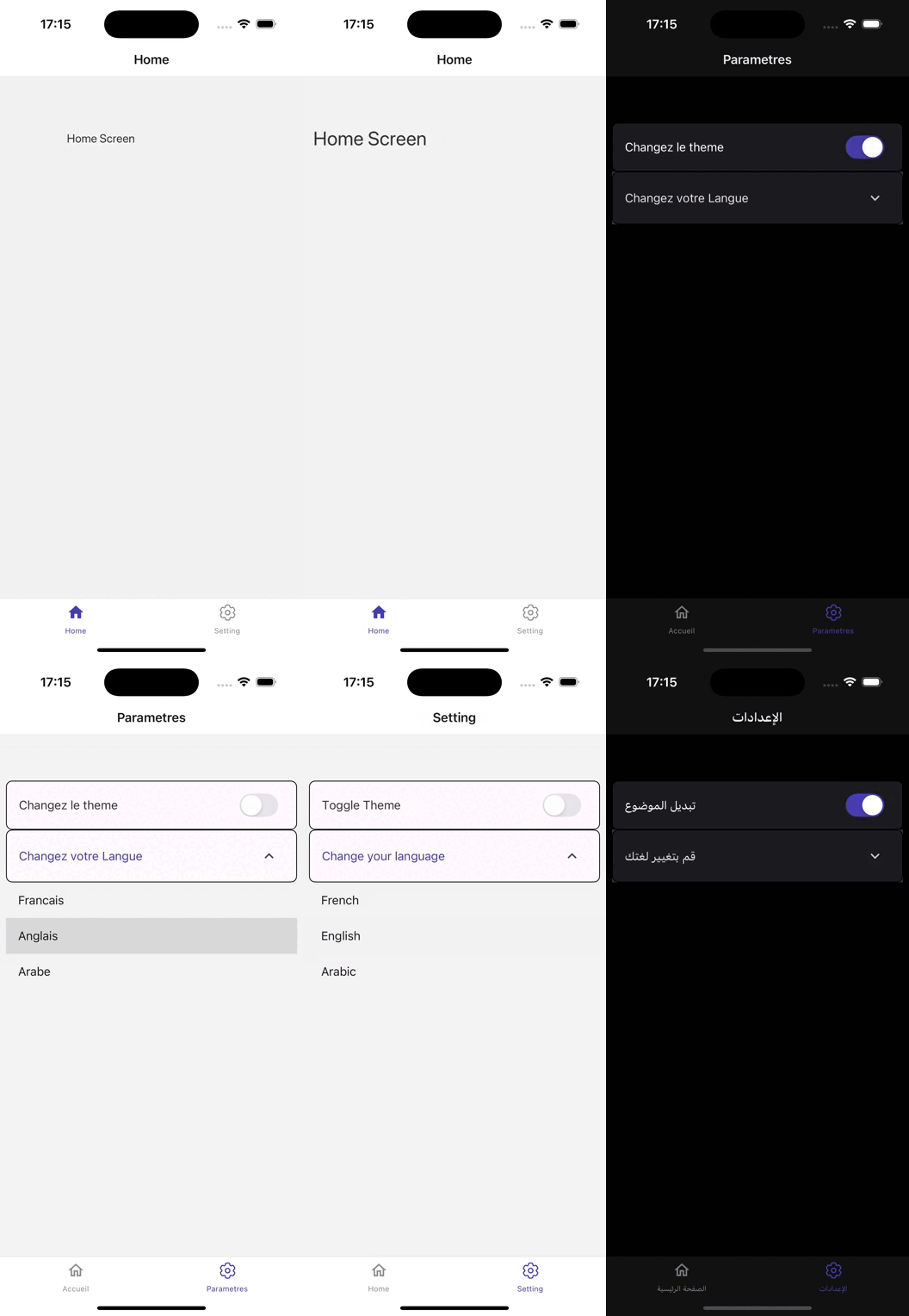
버전 0.75.3에 구축 된이 기본 응용 프로그램은 원활한 사용자 경험을 위해 설계된 강력한 아키텍처를 보여줍니다.
반응 내비게이션 (V6)을 활용하는이 앱은 다양한 화면에서 직관적 인 탐색을 제공하여 사용자가 기능에 쉽게 액세스 할 수 있도록합니다.
상태 관리를위한 Redux Toolkit (v2)을 사용하면 복잡한 응용 프로그램 상태를 효율적으로 처리하여 부드러운 데이터 흐름 및 실시간 업데이트를 허용합니다.
UI는 React Native Paper (V5)에 의해 향상되며, 이는 포괄적 인 사용자 정의 가능한 구성 요소 및 테마 옵션 세트를 제공하여 시각적으로 매력적인 인터페이스를 만듭니다.
품질을 보장하기 위해 앱은 테스트를 위해 Jest 및 Detox (V20)를 통합하여 엄격한 자동 테스트 및 품질 보증을 가능하게합니다.
FastLane은 CI/CD 프로세스를 간소화하여 효율적인 배포 및 업데이트를 용이하게합니다.
API 상호 작용은 Axios를 사용하여 관리되므로 백엔드 서비스와 유연하고 강력한 커뮤니케이션이 가능합니다.
국제화는 React I18Next 및 React Native Localize (여러 언어 및 지역 설정에 대한 지원을 가능하게하여 전 세계 잠재 고객의 접근성을 향상시켜 달성됩니다.
응용 프로그램은 React Native 구성을 사용하여 환경 변수를 효율적으로 관리하여 민감한 데이터가 안전하고 구성되도록합니다.
최적의 미디어 처리를 위해 React Native Fast Image는 이미지 로딩 성능을 향상시키고 React Native SVG는 확장 가능한 벡터 그래픽 지원을 제공하여 풍부한 시각적 컨텐츠를 제공합니다.
애니메이션은 시각적으로 매력적인 전환을 통해 React Native Ranimated 향상 사용자 참여로 유동적이며 반응합니다.
또한 반응 기본 크기 문제는 다양한 장치 크기에 걸쳐 반응 형 디자인을 보장합니다.
전반적 으로이 앱은 강력한 라이브러리와 잘 구조화 된 코드베이스를 결합하여 기능이 풍부하고 사용자 친화적 인 모바일 애플리케이션을 만듭니다.
다음과 같은 설치가 있는지 확인하십시오.
저장소 복제 :
git clone [email protected]:chohra-med/scalableReactNativeBoilerplate.git종속성 설치 :
 cd scalableReactNativeBoilerplate
yarn
개발 서버 시작 :
yarn startiOS에서 앱을 실행하십시오.
yarn iosAndroid에서 앱 실행 :
yarn android농담으로 단위 테스트 실행 :
yarn test해독으로 엔드 투 엔드 테스트를 실행하십시오.
yarn detox build -c ios
yarn detox test -c ios보일러 플레이트에는 빌드, 테스트 및 배포를 자동화하기위한 기본 패스트 레이안 설정이 포함되어 있습니다.
Android 및 iOS 용 앱을 구축하십시오.
 cd fastlane
fastlane android beta
fastlane ios beta기부금을 환영합니다! 다음 단계를 따르십시오.
feature/new-feature ).이 프로젝트는 MIT 라이센스에 따라 라이센스가 부여됩니다.
React Native Development를 더 쉽게 할 수있는 멋진 라이브러리를 유지해 주신 커뮤니티에 감사드립니다.
협업을 위해 LinkedIn에서 나를 찾으십시오.
협업이 필요한 경우 Casainnov를 방문하십시오.





