MTMR
v0.27.0

brew install --cask mtmr首先安裝時,您需要允許MTMR訪問可訪問性,否則按鈕,例如ESC ,音量,亮度和其他系統鍵將無法正常工作。
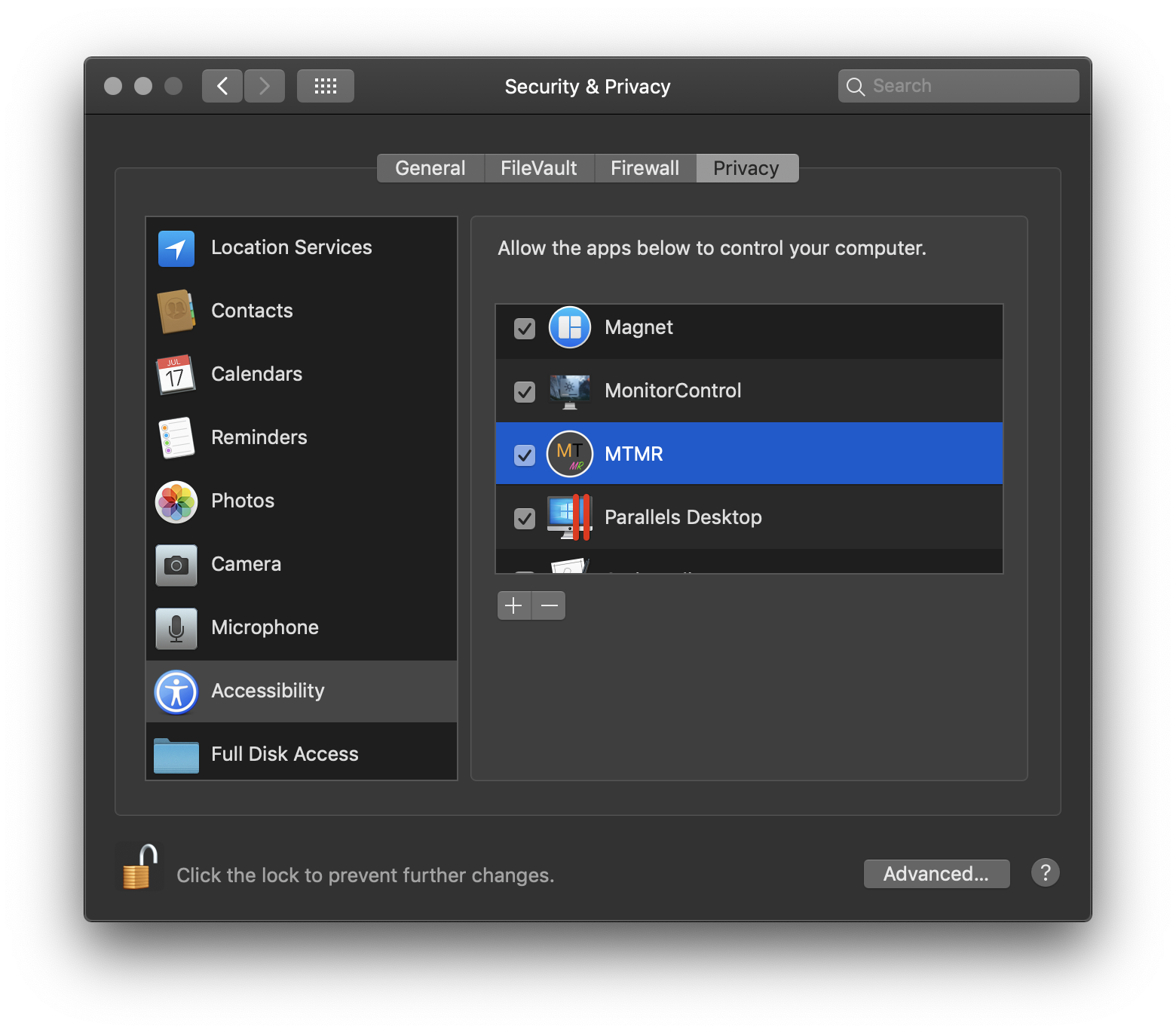
? →系統首選項→安全性和隱私→TAB隱私→可訪問性→MTMR
MTMR預設
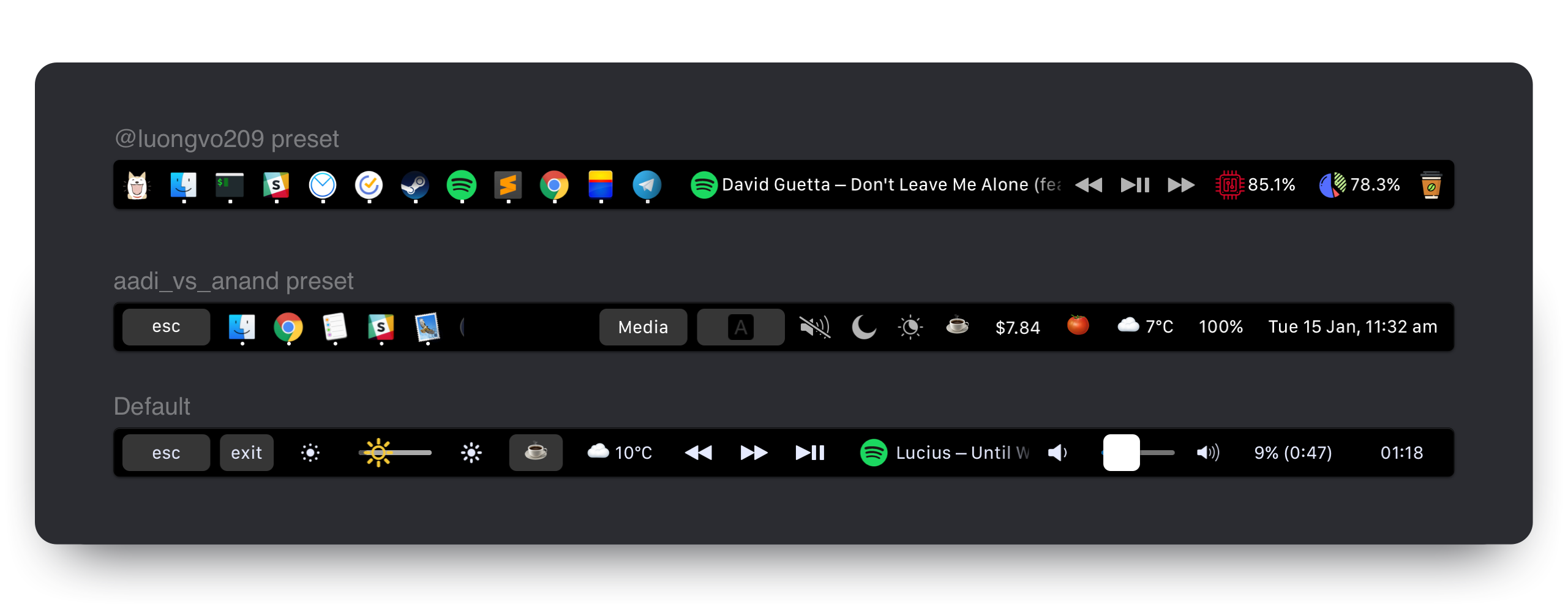
MTMR首選項存儲在~/Library/Application Support/MTMR/items.json中。
預安裝的配置包含的或超過您可能想要的,嘗試配置:
按鈕
本地插件
媒體鑰匙
Applescript插件
自定義按鈕
默認情況下,您可以從應用程序菜單(狀態欄 - > MTMR圖標 - >音量/亮度手勢)啟用基本手勢:
您可以為兩個/三/四指滑動添加自定義操作。為此,您需要使用swipe類型:
    "type" : " swipe " ,
    "fingers" : 2 ,            // number of fingers required (2,3 or 4)
    "direction" : " right " ,    // direction of swipe (right/left)
    "minOffset" : 10 ,          // optional: minimal required offset for gesture to emit event
    "sourceApple" : {         // optional: apple script to run
        "inline" : " beep "
    },
    "sourceBash" : {          // optional: bash script to run
        "inline" : " touch /Users/lobster/test "
}您可以根據需要在預設中創建盡可能多的swipe對象。
staticButton "type" : " staticButton " ,
"title" : " esc " ,appleScriptTitledButton {
"type" : "appleScriptTitledButton" ,
"refreshInterval" : 60 , //optional
"source" : {
"filePath" : "~/Library/Application Support/MTMR/iTunes.nowPlaying.scpt" ,
// or
"inline" : "tell application "Finder"rif not (exists window 1) thenrmake new Finder windowrset target of front window to path to home folder as stringrend ifractivaterend tell" ,
// or
"base64" : "StringInbase64"
} ,
}注意:您可以通過遵循以下步驟來更改AppleScriptTitledButton的圖標:
alternativeImages圖中宣布圖標字典{"TITLE", "IMAGE_LABEL"}IMAGE_LABEL在alternativeImages圖中聲明例子:
  {
    "type" : "appleScriptTitledButton" ,
    "source" : {
      "inline" : "if (random number from 1 to 2) = 1 thenntset val to {"title", "play"}nelsentset val to {"title", "pause"}nend ifnreturn val"
    } ,
    "refreshInterval" : 1 ,
    "image" : {
      "base64" : "iVBORw0KGgoAAAANSUhEUgA..."
    } ,
    "alternativeImages" : {
      "play" : {
        "base64" : "iVBORw0KGgoAAAANSUhEUgAAAAAA..."
      } ,
      "pause" : {
        "base64" : "iVBORw0KGgoAAAANSUhEUgAAAIAA..."
      }
    }
} , shellScriptTitledButton注意:腳本還可以使用逃生序列返回顏色(閱讀https://misc.flogisoft.com/bash/tip_colors_and_formatting以獲取更多信息)“ 16顏色”是當前支持的唯一模式。按鈕將把自己的背景顏色設置為返回的顏色。
“ CPU加載”按鈕的示例,該按鈕還根據加載值更改顏色(注意:本機cpu插件運行效果更好):
 {
  "type" : "shellScriptTitledButton" ,
  "width" : 80 ,
  "refreshInterval" : 2 ,
  "source" : {
    "inline" : "top -l 2 -n 0 -F | egrep -o ' \d*\.\d+% idle' | tail -1 | awk -F% '{p = 100 - $1; if (p > 30) c = "\033[33m"; if (p > 70) c = "\033[30;43m"; printf "%s%4.1f%%\n", c, p}'"
  } ,
  "actions" : [
    {
      "trigger" : "singleTap" ,
      "action" : "appleScript" ,
      "actionAppleScript" : {
        "inline" : "activate application "Activity Monitor"rtell application "System Events"rttell process "Activity Monitor"rtttell radio button "CPU" of radio group 1 of group 2 of toolbar 1 of window 1 to perform action "AXPress"rtend tellrend tell"
      }
    }
  ] ,
  "align" : "right" ,
  "image" : {
    // Or you can specify a filePath here.
    // Images will be resized to 24x24.
    // "filePath": "~/myproject/myimage.jpg" // or "/fixed/path/to/the.png"
    "base64" :
    "iVBORw0KGgoAAAANSUhEUgAAAEAAAABACAMAAACdt4HsAAAABGdBTUEAALGPC/xhBQAAACBjSFJNAAB6JgAAgIQAAPoAAACA6AAAdTAAAOpgAAA6mAAAF3CculE8AAAA/1BMVEUAAADaACbYACfYACfjABzXACjYACfXACjYACfYACfYACfYACfdACLYACfXACjYACfVACv/AADXACjYACfYACfXACjYACfXACjaACXYACfYACfVACvYACfYACfZACbZACbYACfYACfZACb/AADYACfYACfVACrXACjVACu/AEDYACfYACfYACfXACjXACjYACfXACjYACfYACfYACfXACjYACfXACjYACfYACfZACbYACfYACfMADPYACfYACfYACfYACfYACfZACbXACjYACfYACfRAC7XACjYACfZACbWACnXACjXACjYACfTACzZACb/AADYACfYACfYACcAAAA+zneGAAAAU3RSTlMAItK+CVPjh3xUxPwPiGDQGAMtSKmN3Vk+wPQG/e26oIJBnwJCdiuAHgTmw+6BX+IgfaqLUvKOW8VKnagK+vBwYrhlc/urCznvhSyUbOEXPAFjGh/ektAAAAABYktHRACIBR1IAAAACXBIWXMAAA3XAAAN1wFCKJt4AAAAB3RJTUUH4ggWETQWgEDcSgAAAqVJREFUWMPtl4ly2jAQhsUNNlcw5r4SICEHLSQhCQRyX73T/u//LpUlLIyxbMAznWmn/0ywo5U+27tr7ZoQuwLBUJidRKIxPhKLRtgxHAoGiLfiQIKdKFCTxjGpQmEDCSC+BiAFpNlJBsgaxyyQYQNpIPUf8AcAOzktD+iaoQJQNI5FoMAGdCCv5XZclpfKFXiqUi5Jllf1mvdyQzW96gigd4h6o+mhRp1O0x3vvwa1VSWeqrZU1Jyeogy01ggSVQsoO/i/gjq9/u6u+2LDXq2jshqLHNCgdsCVwO0NILdi0oDmuoAmoImhQDzFRPNnb36L7U43NVfc2EH2D9h5t9OePyIF5IU9uIhvkyN7iiXmQUIOj8x/lB6f0bTaQ3ZA+9iaNCH2Lpg6btsBIRJOpJl0E9ABTvof5kqEGeCjMaN/AnRMgM5XJcI2J1J1gf6S48Tb2Ae6JkAjdgmAeJ1XAOJ1Xg8wGJ6elXwAzkeGjy62BgxG3MuXnoCIkmEq8EQyAUPgajyhPxJAga9SIiRqzwMOuAbGZDrDjQRgKkpiqiPgFphM74B7d4BKy2cyy1RcBvSodUb/HiSAIl+VlEfh8cm4wvPL9nnw+gbc+kkkUVioO95etwe8PBuP8vQoBzg7UQAe5t7syZwoCaMA3AN30wlzh3MYJYkkADeYTckYuJYlkiSVBeCKZtSY/gxlqezlxEt+pdFg6zBesPXn1ih8Aj5vkAels9PhYCkPsl++kg0AQu4dyuqmugIQm+qS5Nv6N+D7wm7d1skPc4xu666Fhd6BxU6r+jub8tNaWNxK29EhsdpR/sVn7FlLm0txPdgni+JrFNd3p+K67MQtyrsp3w2G7xbHd5Plv83z3Wj6b3V9N9ssFv7afaa//ZPn3wD4/vje8PP/N7TebS0hgZhEAAAAJXRFWHRkYXRlOmNyZWF0ZQAyMDE4LTA4LTIyVDE3OjUyOjIyKzAyOjAwc2qUYAAAACV0RVh0ZGF0ZTptb2RpZnkAMjAxOC0wOC0yMlQxNzo1MjoyMiswMjowMAI3LNwAAAAZdEVYdFNvZnR3YXJlAHd3dy5pbmtzY2FwZS5vcmeb7jwaAAAAAElFTkSuQmCC"
  } ,
  "bordered" : false
} {
"type" : "group" ,
"align" : "center" ,
"bordered" : true ,
"title" : "stats" ,
"items" : [
{ "type" : "play" } ,
{ "type" : "mute" } ,
...
]
}要關閉組,請使用按鈕:
 {
  "type": "close",
  "width": 64
},
cpu以百分比為單位顯示當前的CPU負載,根據負載值更改顏色。比基於殼的解決方案具有較低的功耗和更高的穩定性。
 {
  "type" : "cpu" ,
  "refreshInterval" : 3 ,
  "width" : 80
} timeButton注意:某些值無法正常工作:https://en.wikipedia.org/wiki/list_of_time_time_zone_abbreviations
formattemplate示例:https://www.datetimeformatter.com/how-to-format-date time-in-swift/
區域示例:https://gist.github.com/jacobbubu/1836273
 {
  "type" : "timeButton" ,
  "formatTemplate" : "dd HH:mm" ,
  "locale" : "en_GB" ,
  "timeZone" : "UTC"
} weather提供者:https://openweathermap.org
注意:在https://openweathermap.org上註冊以獲取您的API密鑰
注意:等待20分鐘左右的OpenWeatherMap激活您的API鍵。
注意:在“安全與隱私”系統偏好中啟用MTMR
  "type" : "weather" ,
  "refreshInterval" : 600 , // in seconds
  "units" : "metric" , // or imperial
  "icon_type" : "text" , // or images
  "api_key" : "" // you can get the key on openweather
yandexWeather (實驗)提供商:https://yandex.ru/pogoda。一鍵打開瀏覽器中的天氣預報。
注意:在“安全與隱私”系統偏好中啟用MTMR
  "type" : "yandexWeather" ,
"refreshInterval" : 600 // in seconds currency提供者:https://coinbase.com
  "type" : "currency" ,
  "refreshInterval" : 600 , // in seconds
  "align" : "right" ,
  "from" : "BTC" ,
  "to" : "USD" ,
  "full" : true // £‣1.29$
music {
"type" : "music" ,
"align" : "center" ,
"width" : 80 , // Optional
"bordered" : false , // Optional
"refreshInterval" : 2 , // in seconds. Optional. Default 5 seconds
"disableMarquee" : true // to disable marquee effect. Optional. Default false
} , pomodoroPomodoro插件。一項點擊啟動了工作計時器,長壓以啟動其餘計時器。點擊程序內計時器以重置。
 {
  "type" : "pomodoro" ,
  "workTime" : 1200 , // set time work in seconds. Default 1500 (25 min)
  "restTime" : 600 // set time rest in seconds. Default 300 (5 min)
} , network網絡插件。顯示網絡用法的插件
 {
  "type" : "network" ,
  "flip" : true ,
  "units" : "dynamic" // or B/s, KB/s, MB/s, GB/s
} , dock碼頭插件
 {
  "type" : "dock" ,
  "filter" : "(^Xcode$)|(Safari)|(.*player)" ,
  "autoResize" : true
} , upnext日曆下一個事件插件將顯示MacOS日曆的即將發生的事件。不顯示當前事件。
 {
  "type" : "upnext" ,
  "from" : 0 , // Lower bound of search range for next event in hours.        Default 0 (current time)(can be negative to view events in the past)
  "to" : 12 , // Upper bounds of search range for next event in hours.        Default 12 (12 hours in the future)
  "maxToShow" : 3 , // Limits the maximum number of events displayed.          Default 3 (the first 3 upcoming events)
  "autoResize" : false // If true, widget will expand to display all events. Default false (scrollable view within "width")
} , "actions" : [
{
"trigger" : "singleTap" ,
"action" : "hidKey" ,
"keycode" : 53
}
]singleTapdoubleTaptripleTaplongTaphidKeyhttps://github.com/aosm/iohidfamily/blob/master/iohidsystem/iokit/hidsystem/ev_keymap.h僅使用數字
 "action" : " hidKey " ,
"keycode" : 53 ,keyPresshttps://eastmanreference.com/complete-list-opplescript-key-codes
 "action" : " keyPress " ,
 "keycode" : 1 ,
appleScript "action" : "appleScript" ,
"actionAppleScript" : {
"inline" : "tell application "Finder"rif not (exists window 1) thenrmake new Finder windowrset target of front window to path to home folder as stringrend ifractivaterend tell" ,
// "filePath" or "base64" will work as well
} ,shellScript "action" : "shellScript" ,
"executablePath" : "/usr/bin/pmset" ,
"shellArguments" : [ "sleepnow" ] , // optionalopenUrl "action" : "openUrl" ,
"url" : "https://google.com" , width限制了特定按鈕需要多少空間 "width" : 34align可以將項目粘貼在側面。默認值是中心 "align" : "left" // "left", "right" or "center"bordered您可以在沒有邊界的情況下進行按鈕 "bordered" : "false" // "true" or "false"background允許指定您的按鈕背景顏色 "background" : "#FF0000" ,通過使用顏色的背景“#000000”和邊框== false您可以創建無灰色背景的按鈕,但是按下按鈕時背景
title指定按鈕標題 "title" : "hello"image指定按鈕圖標 "image" : {
//Can be either of those
"base64" : "iVBORw0KGgoAAAANSUhEUgAAAEAAAABACAMAAACdt4HsAAAABGdB...."
//or
"filePath" : "~/img.png"
}matchAppId才顯示按鈕 "matchAppId" : " Safari " open -a TextEdit ~/Library/Application Support/MTMR/items.json命令,然後按Enter 重新打或檢查tick是否訪問? →系統首選項→安全性和隱私→TAB隱私→可訪問性→MTMR
由@toxblh和@redetection構建。





