MTMR
v0.27.0

brew install --cask mtmrOn first install you need to allow access for MTMR in Accessibility otherwise buttons like Esc, Volume, Brightness and other system keys won't work.
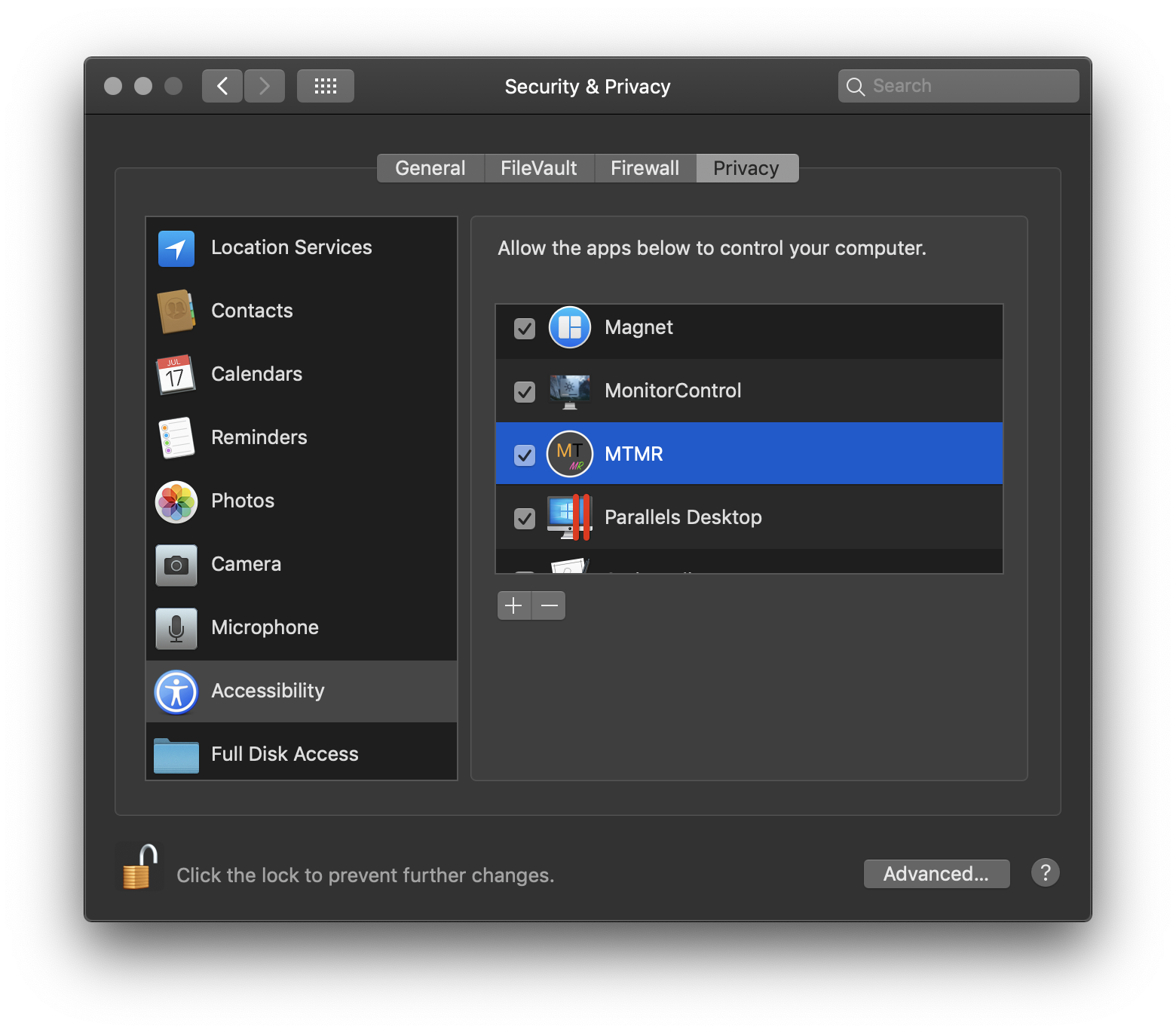
?→ System Preferences → Security and Privacy → tab Privacy → Accessibility → MTMR
MTMR presets
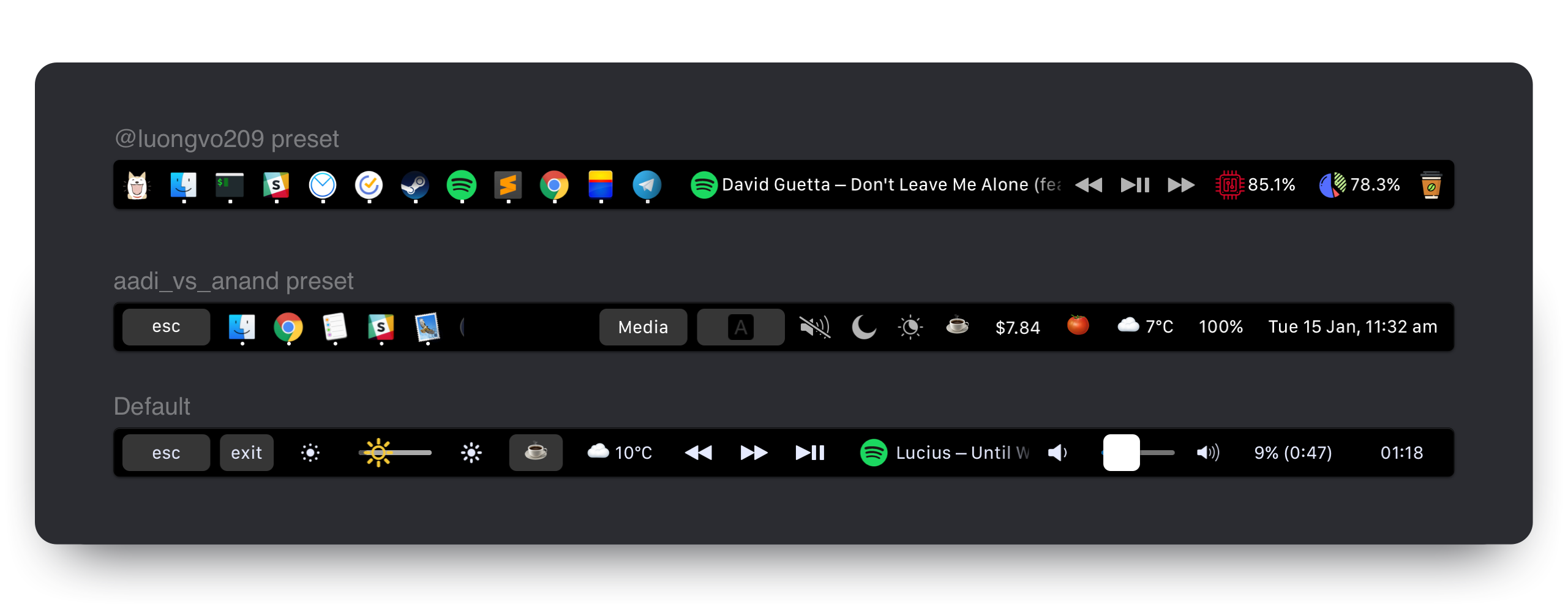
MTMR preferences are stored in ~/Library/Application Support/MTMR/items.json.
The pre-installed configuration contains less or more than you'll probably want, try to configure:
Buttons
Native Plugins
Media Keys
AppleScript plugins
Custom buttons
By default you can enable basic gestures from application menu (status bar -> MTMR icon -> Volume/Brightness gestures):
You can add custom actions for two/three/four finger swipes. To do it, you need to use swipe type:
    "type": "swipe",
    "fingers": 2,            // number of fingers required (2,3 or 4)
    "direction": "right",    // direction of swipe (right/left)
    "minOffset": 10,          // optional: minimal required offset for gesture to emit event
    "sourceApple": {         // optional: apple script to run
        "inline": "beep"
    },
    "sourceBash": {          // optional: bash script to run
        "inline": "touch /Users/lobster/test"
    }
You may create as many swipe objects in the preset as you want.
staticButton "type": "staticButton",
"title": "esc",appleScriptTitledButton {
"type": "appleScriptTitledButton",
"refreshInterval": 60, //optional
"source": {
"filePath": "~/Library/Application Support/MTMR/iTunes.nowPlaying.scpt",
// or
"inline": "tell application "Finder"rif not (exists window 1) thenrmake new Finder windowrset target of front window to path to home folder as stringrend ifractivaterend tell",
// or
"base64": "StringInbase64"
},
}Note: You can change appleScriptTitledButton's icon by following these steps:
alternativeImages field{"TITLE", "IMAGE_LABEL"}IMAGE_LABEL is declared in alternativeImages fieldExample:
  {
    "type": "appleScriptTitledButton",
    "source": {
      "inline": "if (random number from 1 to 2) = 1 thenntset val to {"title", "play"}nelsentset val to {"title", "pause"}nend ifnreturn val"
    },
    "refreshInterval": 1,
    "image": {
      "base64": "iVBORw0KGgoAAAANSUhEUgA..."
    },
    "alternativeImages": {
      "play": {
        "base64": "iVBORw0KGgoAAAANSUhEUgAAAAAA..."
      },
      "pause": {
        "base64": "iVBORw0KGgoAAAANSUhEUgAAAIAA..."
      }
    }
},shellScriptTitledButtonNote: script may also use escape sequences to return colors (read https://misc.flogisoft.com/bash/tip_colors_and_formatting for more information) "16 Colors" is the only mode supported presently. Buttons will set their own background color to the color returned.
Example of "CPU load" button which also changes color based on load value (Note: The native cpu plugin runs runs better):
{
  "type": "shellScriptTitledButton",
  "width": 80,
  "refreshInterval": 2,
  "source": {
    "inline": "top -l 2 -n 0 -F | egrep -o ' \d*\.\d+% idle' | tail -1 | awk -F% '{p = 100 - $1; if (p > 30) c = "\033[33m"; if (p > 70) c = "\033[30;43m"; printf "%s%4.1f%%\n", c, p}'"
  },
  "actions": [
    {
      "trigger": "singleTap",
      "action": "appleScript",
      "actionAppleScript": {
        "inline": "activate application "Activity Monitor"rtell application "System Events"rttell process "Activity Monitor"rtttell radio button "CPU" of radio group 1 of group 2 of toolbar 1 of window 1 to perform action "AXPress"rtend tellrend tell"
      }
    }
  ],
  "align": "right",
  "image": {
    // Or you can specify a filePath here.
    // Images will be resized to 24x24.
    // "filePath": "~/myproject/myimage.jpg" // or "/fixed/path/to/the.png"
    "base64":
    "iVBORw0KGgoAAAANSUhEUgAAAEAAAABACAMAAACdt4HsAAAABGdBTUEAALGPC/xhBQAAACBjSFJNAAB6JgAAgIQAAPoAAACA6AAAdTAAAOpgAAA6mAAAF3CculE8AAAA/1BMVEUAAADaACbYACfYACfjABzXACjYACfXACjYACfYACfYACfYACfdACLYACfXACjYACfVACv/AADXACjYACfYACfXACjYACfXACjaACXYACfYACfVACvYACfYACfZACbZACbYACfYACfZACb/AADYACfYACfVACrXACjVACu/AEDYACfYACfYACfXACjXACjYACfXACjYACfYACfYACfXACjYACfXACjYACfYACfZACbYACfYACfMADPYACfYACfYACfYACfYACfZACbXACjYACfYACfRAC7XACjYACfZACbWACnXACjXACjYACfTACzZACb/AADYACfYACfYACcAAAA+zneGAAAAU3RSTlMAItK+CVPjh3xUxPwPiGDQGAMtSKmN3Vk+wPQG/e26oIJBnwJCdiuAHgTmw+6BX+IgfaqLUvKOW8VKnagK+vBwYrhlc/urCznvhSyUbOEXPAFjGh/ektAAAAABYktHRACIBR1IAAAACXBIWXMAAA3XAAAN1wFCKJt4AAAAB3RJTUUH4ggWETQWgEDcSgAAAqVJREFUWMPtl4ly2jAQhsUNNlcw5r4SICEHLSQhCQRyX73T/u//LpUlLIyxbMAznWmn/0ywo5U+27tr7ZoQuwLBUJidRKIxPhKLRtgxHAoGiLfiQIKdKFCTxjGpQmEDCSC+BiAFpNlJBsgaxyyQYQNpIPUf8AcAOzktD+iaoQJQNI5FoMAGdCCv5XZclpfKFXiqUi5Jllf1mvdyQzW96gigd4h6o+mhRp1O0x3vvwa1VSWeqrZU1Jyeogy01ggSVQsoO/i/gjq9/u6u+2LDXq2jshqLHNCgdsCVwO0NILdi0oDmuoAmoImhQDzFRPNnb36L7U43NVfc2EH2D9h5t9OePyIF5IU9uIhvkyN7iiXmQUIOj8x/lB6f0bTaQ3ZA+9iaNCH2Lpg6btsBIRJOpJl0E9ABTvof5kqEGeCjMaN/AnRMgM5XJcI2J1J1gf6S48Tb2Ae6JkAjdgmAeJ1XAOJ1Xg8wGJ6elXwAzkeGjy62BgxG3MuXnoCIkmEq8EQyAUPgajyhPxJAga9SIiRqzwMOuAbGZDrDjQRgKkpiqiPgFphM74B7d4BKy2cyy1RcBvSodUb/HiSAIl+VlEfh8cm4wvPL9nnw+gbc+kkkUVioO95etwe8PBuP8vQoBzg7UQAe5t7syZwoCaMA3AN30wlzh3MYJYkkADeYTckYuJYlkiSVBeCKZtSY/gxlqezlxEt+pdFg6zBesPXn1ih8Aj5vkAels9PhYCkPsl++kg0AQu4dyuqmugIQm+qS5Nv6N+D7wm7d1skPc4xu666Fhd6BxU6r+jub8tNaWNxK29EhsdpR/sVn7FlLm0txPdgni+JrFNd3p+K67MQtyrsp3w2G7xbHd5Plv83z3Wj6b3V9N9ssFv7afaa//ZPn3wD4/vje8PP/N7TebS0hgZhEAAAAJXRFWHRkYXRlOmNyZWF0ZQAyMDE4LTA4LTIyVDE3OjUyOjIyKzAyOjAwc2qUYAAAACV0RVh0ZGF0ZTptb2RpZnkAMjAxOC0wOC0yMlQxNzo1MjoyMiswMjowMAI3LNwAAAAZdEVYdFNvZnR3YXJlAHd3dy5pbmtzY2FwZS5vcmeb7jwaAAAAAElFTkSuQmCC"
  },
  "bordered": false
}{
"type": "group",
"align": "center",
"bordered": true,
"title": "stats",
"items": [
{ "type": "play" },
{ "type": "mute" },
...
]
}To close a group, use the button:
{
  "type": "close",
  "width": 64
},
cpuShows current CPU load in percent, changes color based on load value. Has lower power consumption and higher stability than the shell-based solution.
{
  "type": "cpu",
  "refreshInterval": 3,
  "width": 80
}timeButtonNOTE: Some values don't work properly: https://en.wikipedia.org/wiki/List_of_time_zone_abbreviations
formatTemplate examples: https://www.datetimeformatter.com/how-to-format-date-time-in-swift/
locale examples: https://gist.github.com/jacobbubu/1836273
{
  "type": "timeButton",
  "formatTemplate": "dd HH:mm",
  "locale": "en_GB",
  "timeZone": "UTC"
}weatherProvider: https://openweathermap.org
Note: Register at https://openweathermap.org to get your API key
Note: Wait for 20 minutes or so for Openweathermap to activate your API key.
Note: Enable MTMR in "Location Services" in the "Security & Privacy" System Preferences pane
  "type": "weather",
  "refreshInterval": 600, // in seconds
  "units": "metric", // or imperial
  "icon_type": "text", // or images
  "api_key": "" // you can get the key on openweather
yandexWeather (experimental)Provider: https://yandex.ru/pogoda. One click to open up weather forecast in your browser.
Note: Enable MTMR in "Location Services" in the "Security & Privacy" System Preferences pane
  "type": "yandexWeather",
"refreshInterval": 600 // in secondscurrencyProvider: https://coinbase.com
  "type": "currency",
  "refreshInterval": 600, // in seconds
  "align": "right",
  "from": "BTC",
  "to": "USD",
"full": true // £‣1.29$music{
"type": "music",
"align": "center",
"width": 80, // Optional
"bordered": false, // Optional
"refreshInterval": 2, // in seconds. Optional. Default 5 seconds
"disableMarquee": true // to disable marquee effect. Optional. Default false
},pomodoroPomodoro plugin. One tap starts the work timer, long-press to start the rest timer. Tap an in-progress timer to reset.
{
  "type": "pomodoro",
  "workTime": 1200, // set time work in seconds. Default 1500 (25 min)
  "restTime": 600 // set time rest in seconds. Default 300 (5 min)
},networkNetwork plugin. The plugin to show network usage
{
  "type": "network",
  "flip": true,
  "units": "dynamic" // or B/s, KB/s, MB/s, GB/s
},dockDock plugin
{
  "type": "dock",
  "filter": "(^Xcode$)|(Safari)|(.*player)",
  "autoResize": true
},upnextCalendar next event plugin Displays upcoming events from macOS Calendar. Does not display current event.
{
  "type": "upnext",
  "from": 0, // Lower bound of search range for next event in hours.        Default 0 (current time)(can be negative to view events in the past)
  "to": 12, // Upper bounds of search range for next event in hours.        Default 12 (12 hours in the future)
  "maxToShow": 3, // Limits the maximum number of events displayed.          Default 3 (the first 3 upcoming events)
  "autoResize": false // If true, widget will expand to display all events. Default false (scrollable view within "width")
},"actions": [
{
"trigger": "singleTap",
"action": "hidKey",
"keycode": 53
}
]singleTapdoubleTaptripleTaplongTaphidKey
https://github.com/aosm/IOHIDFamily/blob/master/IOHIDSystem/IOKit/hidsystem/ev_keymap.h use only numbers
 "action": "hidKey",
 "keycode": 53,
keyPress
https://eastmanreference.com/complete-list-of-applescript-key-codes
 "action": "keyPress",
 "keycode": 1,
appleScript "action": "appleScript",
"actionAppleScript": {
"inline": "tell application "Finder"rif not (exists window 1) thenrmake new Finder windowrset target of front window to path to home folder as stringrend ifractivaterend tell",
// "filePath" or "base64" will work as well
},shellScript "action": "shellScript",
"executablePath": "/usr/bin/pmset",
"shellArguments": ["sleepnow"], // optionalopenUrl "action": "openUrl",
"url": "https://google.com",width restrict how much room a particular button will take "width": 34align can stick the item to the side. default is center "align": "left" // "left", "right" or "center"bordered you can do button without border "bordered": "false" // "true" or "false"background allow to specify you button background color "background": "#FF0000",by using background with color "#000000" and bordered == false you can create button without gray background but with background when the button is pressed
title specify button title "title": "hello"image specify button icon "image": {
//Can be either of those
"base64": "iVBORw0KGgoAAAANSUhEUgAAAEAAAABACAMAAACdt4HsAAAABGdB...."
//or
"filePath": "~/img.png"
}matchAppId displays the button only when active app's id matches given regexp "matchAppId": "Safari"open -a TextEdit ~/Library/Application Support/MTMR/items.json command and press EnterRe-tick or check a tick for access ?→ System Preferences → Security and Privacy → tab Privacy → Accessibility → MTMR
Built by @Toxblh and @ReDetection.





