MTMR
v0.27.0

brew install --cask mtmr 통해첫 번째 설치시 ESC , 볼륨 , 밝기 및 기타 시스템 키와 같은 버튼이 작동하지 않으면 접근성에서 MTMR에 액세스 할 수 있어야합니다.
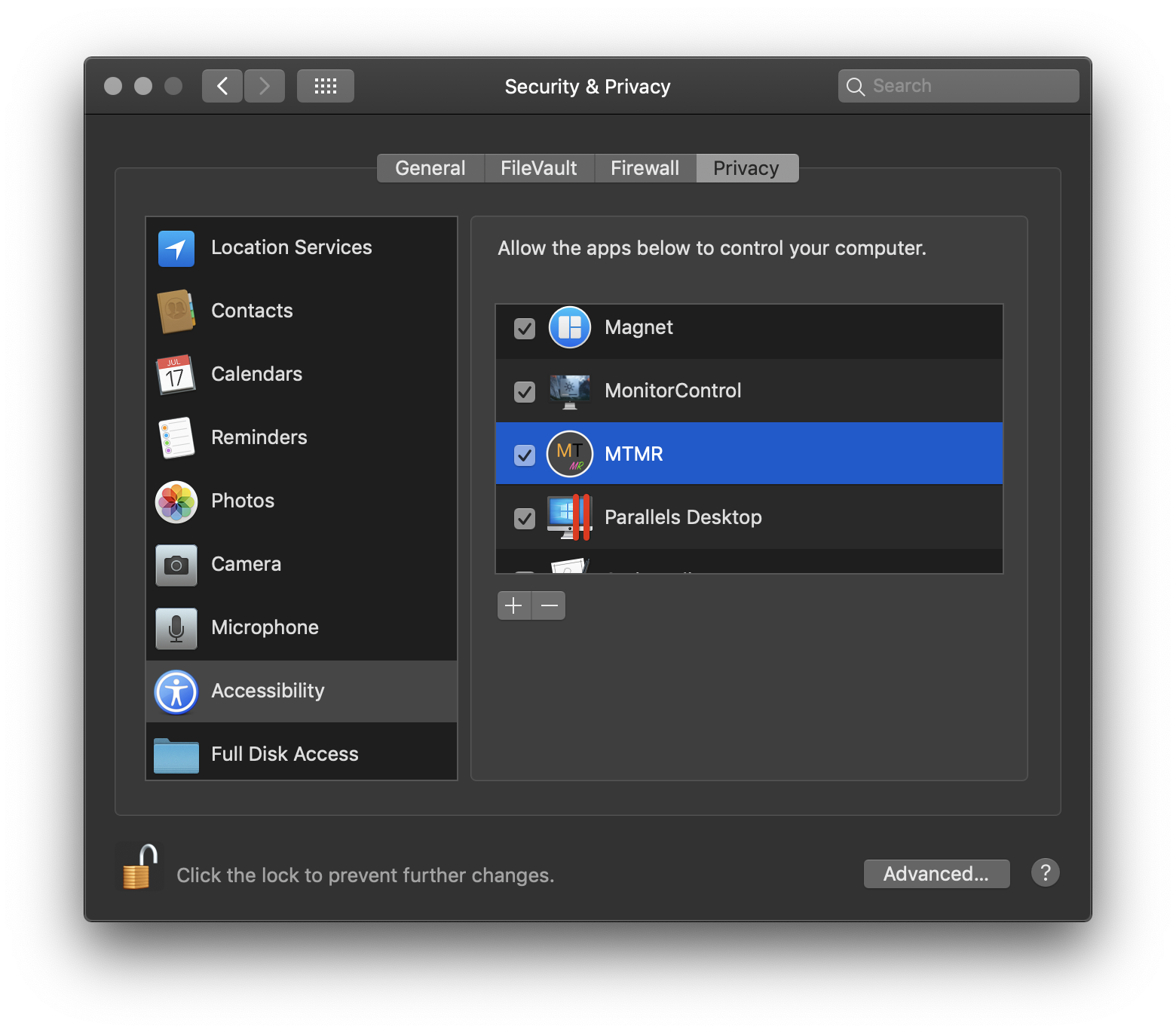
? → 시스템 환경 설정 → 보안 및 개인 정보 → 탭 개인 정보 → 접근성 → MTMR
MTMR 사전 설정
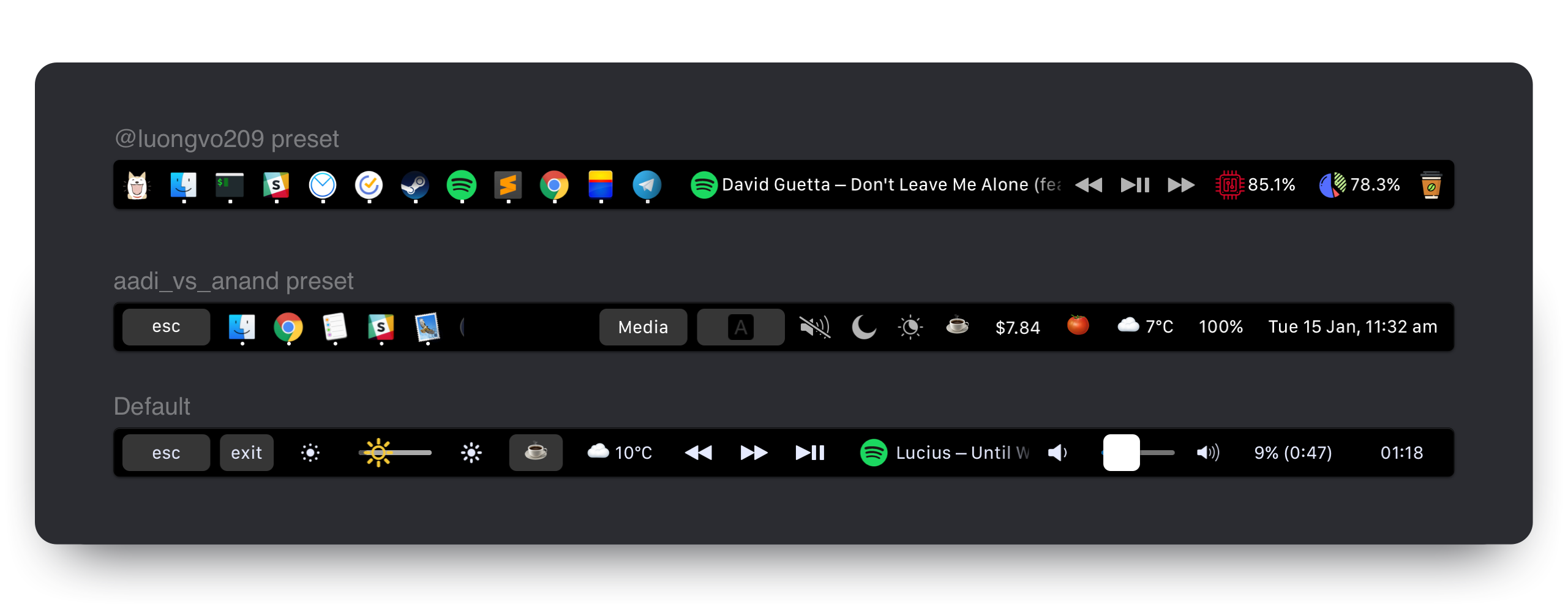
mtmr 기본 설정은 ~/Library/Application Support/MTMR/items.json 에 저장됩니다.
사전 설치된 구성에는 원하는 것보다 적거나 그 이상이 포함되어 있습니다. 구성하십시오.
버튼
기본 플러그인
미디어 키
사과 스크립트 플러그인
사용자 정의 버튼
기본적으로 응용 프로그램 메뉴 (상태 표시 줄 -> MTMR 아이콘 -> 볼륨/밝기 제스처)에서 기본 제스처를 활성화 할 수 있습니다.
2/3/4 개의 손가락 스 와이프에 맞춤 동작을 추가 할 수 있습니다. 그렇게하려면 swipe 유형을 사용해야합니다.
    "type" : " swipe " ,
    "fingers" : 2 ,            // number of fingers required (2,3 or 4)
    "direction" : " right " ,    // direction of swipe (right/left)
    "minOffset" : 10 ,          // optional: minimal required offset for gesture to emit event
    "sourceApple" : {         // optional: apple script to run
        "inline" : " beep "
    },
    "sourceBash" : {          // optional: bash script to run
        "inline" : " touch /Users/lobster/test "
    }
사전 설정에서 원하는만큼 swipe 객체를 만들 수 있습니다.
staticButton "type" : " staticButton " ,
"title" : " esc " ,appleScriptTitledButton {
"type" : "appleScriptTitledButton" ,
"refreshInterval" : 60 , //optional
"source" : {
"filePath" : "~/Library/Application Support/MTMR/iTunes.nowPlaying.scpt" ,
// or
"inline" : "tell application "Finder"rif not (exists window 1) thenrmake new Finder windowrset target of front window to path to home folder as stringrend ifractivaterend tell" ,
// or
"base64" : "StringInbase64"
} ,
}참고 : 다음 단계에 따라 AppleScripttedButton의 아이콘을 변경할 수 있습니다.
alternativeImages 필드에서 아이콘 사전을 선언합니다{"TITLE", "IMAGE_LABEL"}alternativeImages 분야에서 IMAGE_LABEL 선언되었는지 확인하십시오.예:
  {
    "type" : "appleScriptTitledButton" ,
    "source" : {
      "inline" : "if (random number from 1 to 2) = 1 thenntset val to {"title", "play"}nelsentset val to {"title", "pause"}nend ifnreturn val"
    } ,
    "refreshInterval" : 1 ,
    "image" : {
      "base64" : "iVBORw0KGgoAAAANSUhEUgA..."
    } ,
    "alternativeImages" : {
      "play" : {
        "base64" : "iVBORw0KGgoAAAANSUhEUgAAAAAA..."
      } ,
      "pause" : {
        "base64" : "iVBORw0KGgoAAAANSUhEUgAAAIAA..."
      }
    }
} , shellScriptTitledButton참고 : 스크립트는 탈출 시퀀스를 사용하여 색상을 반환 할 수도 있습니다 (자세한 내용은 https://misc.flogisoft.com/bash/tip_colors_and_formatting 읽기) "16 Colors"는 현재 지원되는 유일한 모드입니다. 버튼은 자체 배경색을 반환 된 색상으로 설정합니다.
로드 값에 따라 색상이 변경되는 "CPU로드"버튼의 예입니다 (참고 : 기본 cpu 플러그인이 실행됩니다).
 {
  "type" : "shellScriptTitledButton" ,
  "width" : 80 ,
  "refreshInterval" : 2 ,
  "source" : {
    "inline" : "top -l 2 -n 0 -F | egrep -o ' \d*\.\d+% idle' | tail -1 | awk -F% '{p = 100 - $1; if (p > 30) c = "\033[33m"; if (p > 70) c = "\033[30;43m"; printf "%s%4.1f%%\n", c, p}'"
  } ,
  "actions" : [
    {
      "trigger" : "singleTap" ,
      "action" : "appleScript" ,
      "actionAppleScript" : {
        "inline" : "activate application "Activity Monitor"rtell application "System Events"rttell process "Activity Monitor"rtttell radio button "CPU" of radio group 1 of group 2 of toolbar 1 of window 1 to perform action "AXPress"rtend tellrend tell"
      }
    }
  ] ,
  "align" : "right" ,
  "image" : {
    // Or you can specify a filePath here.
    // Images will be resized to 24x24.
    // "filePath": "~/myproject/myimage.jpg" // or "/fixed/path/to/the.png"
    "base64" :
    "iVBORw0KGgoAAAANSUhEUgAAAEAAAABACAMAAACdt4HsAAAABGdBTUEAALGPC/xhBQAAACBjSFJNAAB6JgAAgIQAAPoAAACA6AAAdTAAAOpgAAA6mAAAF3CculE8AAAA/1BMVEUAAADaACbYACfYACfjABzXACjYACfXACjYACfYACfYACfYACfdACLYACfXACjYACfVACv/AADXACjYACfYACfXACjYACfXACjaACXYACfYACfVACvYACfYACfZACbZACbYACfYACfZACb/AADYACfYACfVACrXACjVACu/AEDYACfYACfYACfXACjXACjYACfXACjYACfYACfYACfXACjYACfXACjYACfYACfZACbYACfYACfMADPYACfYACfYACfYACfYACfZACbXACjYACfYACfRAC7XACjYACfZACbWACnXACjXACjYACfTACzZACb/AADYACfYACfYACcAAAA+zneGAAAAU3RSTlMAItK+CVPjh3xUxPwPiGDQGAMtSKmN3Vk+wPQG/e26oIJBnwJCdiuAHgTmw+6BX+IgfaqLUvKOW8VKnagK+vBwYrhlc/urCznvhSyUbOEXPAFjGh/ektAAAAABYktHRACIBR1IAAAACXBIWXMAAA3XAAAN1wFCKJt4AAAAB3RJTUUH4ggWETQWgEDcSgAAAqVJREFUWMPtl4ly2jAQhsUNNlcw5r4SICEHLSQhCQRyX73T/u//LpUlLIyxbMAznWmn/0ywo5U+27tr7ZoQuwLBUJidRKIxPhKLRtgxHAoGiLfiQIKdKFCTxjGpQmEDCSC+BiAFpNlJBsgaxyyQYQNpIPUf8AcAOzktD+iaoQJQNI5FoMAGdCCv5XZclpfKFXiqUi5Jllf1mvdyQzW96gigd4h6o+mhRp1O0x3vvwa1VSWeqrZU1Jyeogy01ggSVQsoO/i/gjq9/u6u+2LDXq2jshqLHNCgdsCVwO0NILdi0oDmuoAmoImhQDzFRPNnb36L7U43NVfc2EH2D9h5t9OePyIF5IU9uIhvkyN7iiXmQUIOj8x/lB6f0bTaQ3ZA+9iaNCH2Lpg6btsBIRJOpJl0E9ABTvof5kqEGeCjMaN/AnRMgM5XJcI2J1J1gf6S48Tb2Ae6JkAjdgmAeJ1XAOJ1Xg8wGJ6elXwAzkeGjy62BgxG3MuXnoCIkmEq8EQyAUPgajyhPxJAga9SIiRqzwMOuAbGZDrDjQRgKkpiqiPgFphM74B7d4BKy2cyy1RcBvSodUb/HiSAIl+VlEfh8cm4wvPL9nnw+gbc+kkkUVioO95etwe8PBuP8vQoBzg7UQAe5t7syZwoCaMA3AN30wlzh3MYJYkkADeYTckYuJYlkiSVBeCKZtSY/gxlqezlxEt+pdFg6zBesPXn1ih8Aj5vkAels9PhYCkPsl++kg0AQu4dyuqmugIQm+qS5Nv6N+D7wm7d1skPc4xu666Fhd6BxU6r+jub8tNaWNxK29EhsdpR/sVn7FlLm0txPdgni+JrFNd3p+K67MQtyrsp3w2G7xbHd5Plv83z3Wj6b3V9N9ssFv7afaa//ZPn3wD4/vje8PP/N7TebS0hgZhEAAAAJXRFWHRkYXRlOmNyZWF0ZQAyMDE4LTA4LTIyVDE3OjUyOjIyKzAyOjAwc2qUYAAAACV0RVh0ZGF0ZTptb2RpZnkAMjAxOC0wOC0yMlQxNzo1MjoyMiswMjowMAI3LNwAAAAZdEVYdFNvZnR3YXJlAHd3dy5pbmtzY2FwZS5vcmeb7jwaAAAAAElFTkSuQmCC"
  } ,
  "bordered" : false
} {
"type" : "group" ,
"align" : "center" ,
"bordered" : true ,
"title" : "stats" ,
"items" : [
{ "type" : "play" } ,
{ "type" : "mute" } ,
...
]
}그룹을 닫으려면 버튼을 사용하십시오.
 {
  "type": "close",
  "width": 64
},
cpu현재 CPU 부하의 백분율을 보여주고로드 값에 따라 색상이 변경됩니다. 쉘 기반 솔루션보다 전력 소비량이 낮고 안정성이 높습니다.
 {
  "type" : "cpu" ,
  "refreshInterval" : 3 ,
  "width" : 80
} timeButton참고 : 일부 값은 제대로 작동하지 않습니다 : https://en.wikipedia.org/wiki/list_of_time_zone_abbreviations
FormAttemplate 예제 : https://www.datetimeformatter.com/how-to-format-date-time-in-swift/
로케일 예 : https://gist.github.com/jacobbubu/1836273
 {
  "type" : "timeButton" ,
  "formatTemplate" : "dd HH:mm" ,
  "locale" : "en_GB" ,
  "timeZone" : "UTC"
} weather제공자 : https://openweathermap.org
참고 : https://openweathermap.org에 등록하여 API 키를 얻으십시오
참고 : OpenWeatherMap이 API 키를 활성화하려면 20 분 정도 기다립니다.
참고 : "보안 및 개인 정보 보호"시스템 환경 설정 창에서 "위치 서비스"에서 MTMR 활성화
  "type" : "weather" ,
  "refreshInterval" : 600 , // in seconds
  "units" : "metric" , // or imperial
  "icon_type" : "text" , // or images
  "api_key" : "" // you can get the key on openweather
yandexWeather (실험)제공자 : https://yandex.ru/pogoda. 브라우저에서 일기 예보를 열기 위해 한 번의 클릭.
참고 : "보안 및 개인 정보 보호"시스템 환경 설정 창에서 "위치 서비스"에서 MTMR 활성화
  "type" : "yandexWeather" ,
"refreshInterval" : 600 // in seconds currency제공자 : https://coinbase.com
  "type" : "currency" ,
  "refreshInterval" : 600 , // in seconds
  "align" : "right" ,
  "from" : "BTC" ,
  "to" : "USD" ,
  "full" : true // £‣1.29$
music {
"type" : "music" ,
"align" : "center" ,
"width" : 80 , // Optional
"bordered" : false , // Optional
"refreshInterval" : 2 , // in seconds. Optional. Default 5 seconds
"disableMarquee" : true // to disable marquee effect. Optional. Default false
} , pomodoroPomodoro 플러그인. 하나의 탭은 작업 타이머를 시작하고 Long-Press를 시작하여 나머지 타이머를 시작합니다. 진행되지 않은 타이머를 탭하여 재설정하십시오.
 {
  "type" : "pomodoro" ,
  "workTime" : 1200 , // set time work in seconds. Default 1500 (25 min)
  "restTime" : 600 // set time rest in seconds. Default 300 (5 min)
} , network네트워크 플러그인. 네트워크 사용을 표시하는 플러그인
 {
  "type" : "network" ,
  "flip" : true ,
  "units" : "dynamic" // or B/s, KB/s, MB/s, GB/s
} , dock도크 플러그인
 {
  "type" : "dock" ,
  "filter" : "(^Xcode$)|(Safari)|(.*player)" ,
  "autoResize" : true
} , upnext캘린더 다음 이벤트 플러그인은 MACOS 캘린더에서 다가오는 이벤트를 표시합니다. 현재 이벤트가 표시되지 않습니다.
 {
  "type" : "upnext" ,
  "from" : 0 , // Lower bound of search range for next event in hours.        Default 0 (current time)(can be negative to view events in the past)
  "to" : 12 , // Upper bounds of search range for next event in hours.        Default 12 (12 hours in the future)
  "maxToShow" : 3 , // Limits the maximum number of events displayed.          Default 3 (the first 3 upcoming events)
  "autoResize" : false // If true, widget will expand to display all events. Default false (scrollable view within "width")
} , "actions" : [
{
"trigger" : "singleTap" ,
"action" : "hidKey" ,
"keycode" : 53
}
]singleTapdoubleTaptripleTaplongTaphidKeyhttps://github.com/aosm/iohidfamily/blob/master/iohidsystem/iokit/hidsystem/ev_keymap.h 숫자 만 사용하십시오
 "action" : " hidKey " ,
"keycode" : 53 ,keyPresshttps://eastmanreference.com/complete-list-of-applescript-key-codes
 "action" : " keyPress " ,
 "keycode" : 1 ,
appleScript "action" : "appleScript" ,
"actionAppleScript" : {
"inline" : "tell application "Finder"rif not (exists window 1) thenrmake new Finder windowrset target of front window to path to home folder as stringrend ifractivaterend tell" ,
// "filePath" or "base64" will work as well
} ,shellScript "action" : "shellScript" ,
"executablePath" : "/usr/bin/pmset" ,
"shellArguments" : [ "sleepnow" ] , // optionalopenUrl "action" : "openUrl" ,
"url" : "https://google.com" , width 특정 버튼의 얼마나 많은 공간을 제한합니다. "width" : 34align 항목을 측면에 붙일 수 있습니다. 기본값은 센터입니다 "align" : "left" // "left", "right" or "center"bordered 없이 테두리없이 버튼을 낼 수 있습니다 "bordered" : "false" // "true" or "false"background 사용하면 버튼 배경색을 지정할 수 있습니다 "background" : "#FF0000" ,색상 "#000000"및 Pointed == False로 배경을 사용하면 회색 배경이 없지만 버튼을 누르면 배경으로 버튼을 만들 수 있습니다.
title 제목을 지정합니다 "title" : "hello"image 버튼 아이콘을 지정합니다 "image" : {
//Can be either of those
"base64" : "iVBORw0KGgoAAAANSUhEUgAAAEAAAABACAMAAACdt4HsAAAABGdB...."
//or
"filePath" : "~/img.png"
}matchAppId regexp가 주어진 Active App의 ID 일치하는 경우에만 버튼을 표시합니다. "matchAppId" : " Safari " open -a TextEdit ~/Library/Application Support/MTMR/items.json 명령 및 Enter를 누르십시오. 액세스에 대한 진드기를 다시 선택하거나 확인합니까? → 시스템 환경 설정 → 보안 및 개인 정보 → 탭 개인 정보 → 접근성 → MTMR
@toxblh 및 @redetection에 의해 구축되었습니다.





