MTMR
v0.27.0

brew install --cask mtmrEn la primera instalación, debe permitir el acceso para MTMR en accesibilidad, de lo contrario, los botones como ESC , el volumen , el brillo y otras teclas del sistema no funcionarán.
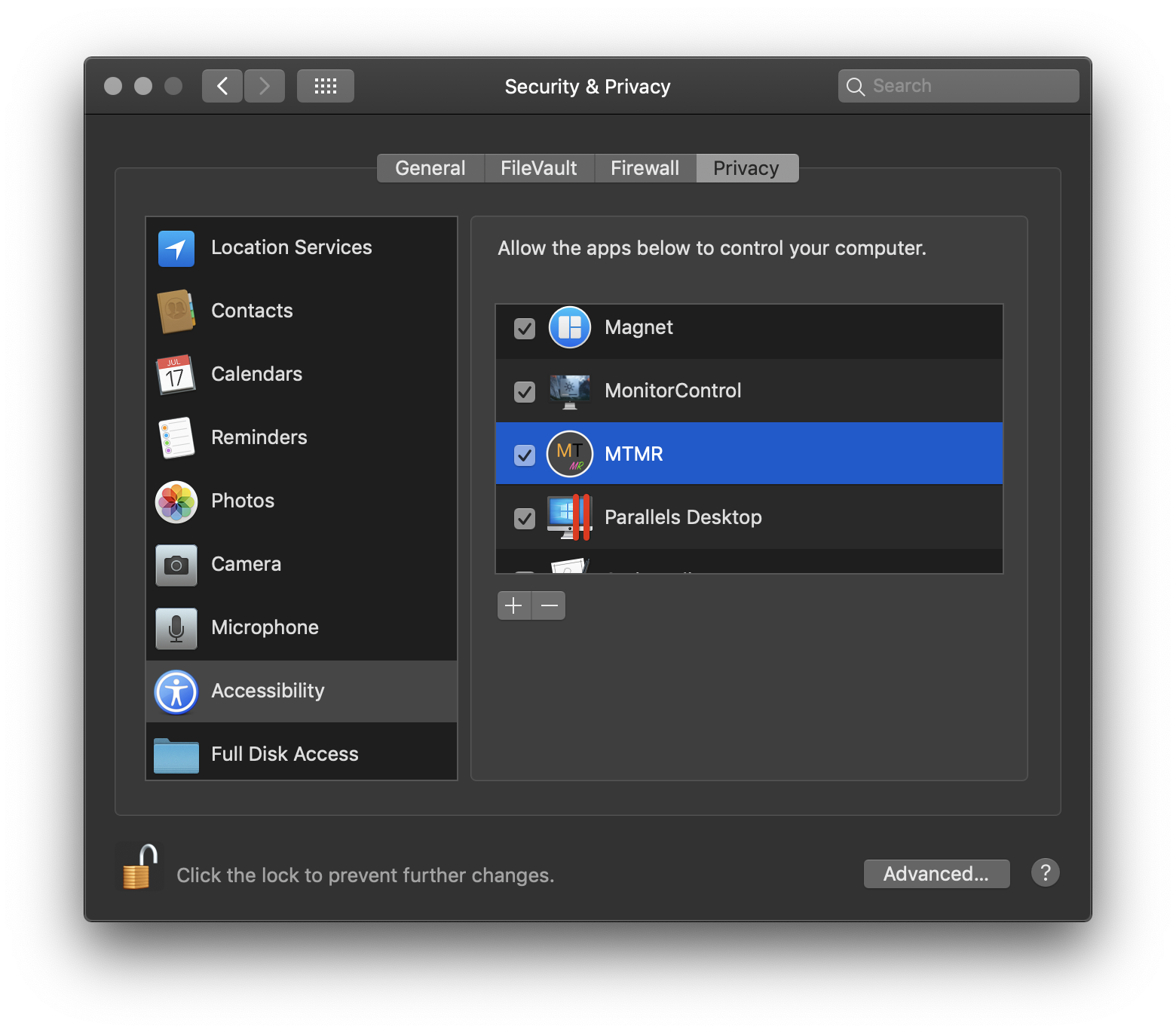
? → Preferencias del sistema → Seguridad y privacidad → Pestaña Privacidad → Accesibilidad → MTMR
MTMR Presets
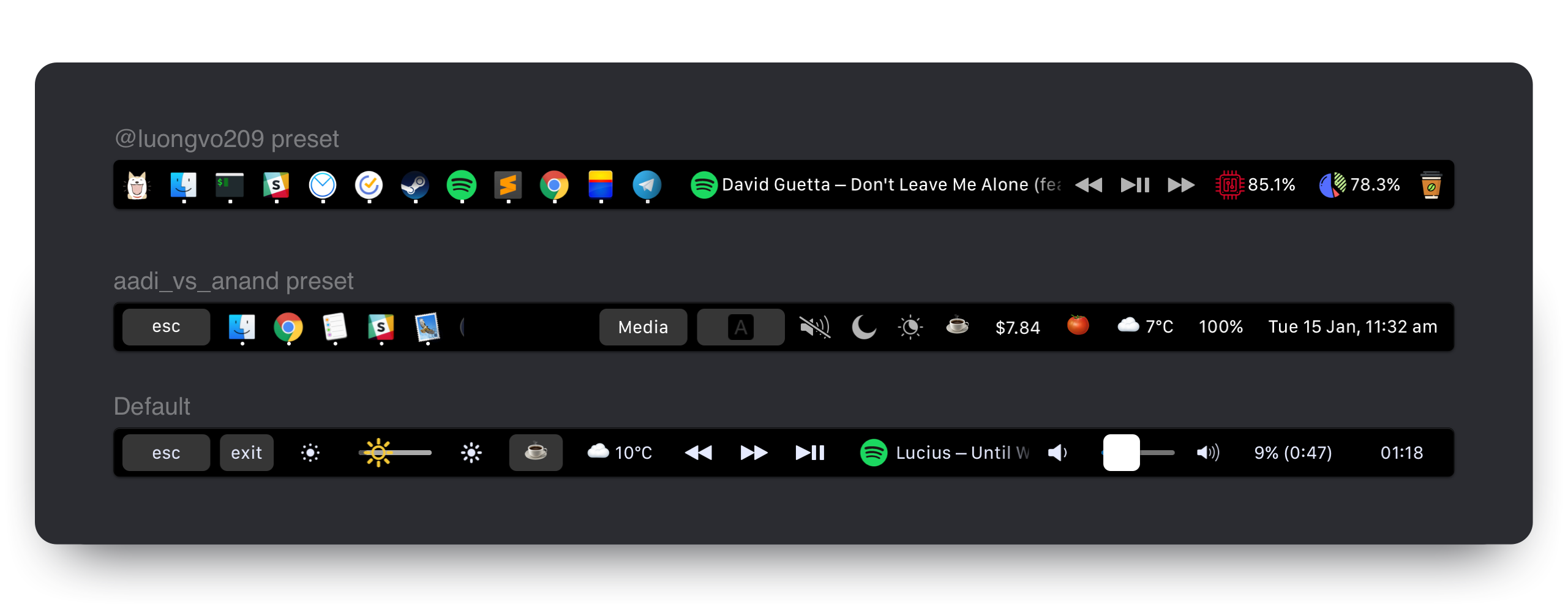
Las preferencias de MTMR se almacenan en ~/Library/Application Support/MTMR/items.json .
La configuración preinstalada contiene menos o más de lo que probablemente desee, intente configurar:
Botones
Complementos nativos
Teclas de medios
Complementos de Applecript
Botones personalizados
De forma predeterminada, puede habilitar gestos básicos desde el menú de aplicaciones (barra de estado -> icono mtmr -> gestos de volumen/brillo):
Puede agregar acciones personalizadas para dos/tres/cuatro golpes de dedo. Para hacerlo, debe usar el tipo de swipe :
    "type" : " swipe " ,
    "fingers" : 2 ,            // number of fingers required (2,3 or 4)
    "direction" : " right " ,    // direction of swipe (right/left)
    "minOffset" : 10 ,          // optional: minimal required offset for gesture to emit event
    "sourceApple" : {         // optional: apple script to run
        "inline" : " beep "
    },
    "sourceBash" : {          // optional: bash script to run
        "inline" : " touch /Users/lobster/test "
    }
Puede crear tantos objetos swipe en el preajuste como desee.
staticButton "type" : " staticButton " ,
"title" : " esc " ,appleScriptTitledButton {
"type" : "appleScriptTitledButton" ,
"refreshInterval" : 60 , //optional
"source" : {
"filePath" : "~/Library/Application Support/MTMR/iTunes.nowPlaying.scpt" ,
// or
"inline" : "tell application "Finder"rif not (exists window 1) thenrmake new Finder windowrset target of front window to path to home folder as stringrend ifractivaterend tell" ,
// or
"base64" : "StringInbase64"
} ,
}Nota: puede cambiar el icono de AppleScriptTitledButton siguiendo estos pasos:
alternativeImages{"TITLE", "IMAGE_LABEL"}IMAGE_LABEL se declare en el campo alternativeImagesEjemplo:
  {
    "type" : "appleScriptTitledButton" ,
    "source" : {
      "inline" : "if (random number from 1 to 2) = 1 thenntset val to {"title", "play"}nelsentset val to {"title", "pause"}nend ifnreturn val"
    } ,
    "refreshInterval" : 1 ,
    "image" : {
      "base64" : "iVBORw0KGgoAAAANSUhEUgA..."
    } ,
    "alternativeImages" : {
      "play" : {
        "base64" : "iVBORw0KGgoAAAANSUhEUgAAAAAA..."
      } ,
      "pause" : {
        "base64" : "iVBORw0KGgoAAAANSUhEUgAAAIAA..."
      }
    }
} , shellScriptTitledButtonNota: El script también puede usar secuencias de escape para devolver los colores (leer https://misc.flogisoft.com/bash/tip_colors_and_formatting para obtener más información) "16 colores" es el único modo admitido actualmente. Los botones establecerán su propio color de fondo en el color devuelto.
Ejemplo del botón "Carga de CPU" que también cambia de color según el valor de carga (nota: el complemento cpu nativo se ejecuta mejor):
 {
  "type" : "shellScriptTitledButton" ,
  "width" : 80 ,
  "refreshInterval" : 2 ,
  "source" : {
    "inline" : "top -l 2 -n 0 -F | egrep -o ' \d*\.\d+% idle' | tail -1 | awk -F% '{p = 100 - $1; if (p > 30) c = "\033[33m"; if (p > 70) c = "\033[30;43m"; printf "%s%4.1f%%\n", c, p}'"
  } ,
  "actions" : [
    {
      "trigger" : "singleTap" ,
      "action" : "appleScript" ,
      "actionAppleScript" : {
        "inline" : "activate application "Activity Monitor"rtell application "System Events"rttell process "Activity Monitor"rtttell radio button "CPU" of radio group 1 of group 2 of toolbar 1 of window 1 to perform action "AXPress"rtend tellrend tell"
      }
    }
  ] ,
  "align" : "right" ,
  "image" : {
    // Or you can specify a filePath here.
    // Images will be resized to 24x24.
    // "filePath": "~/myproject/myimage.jpg" // or "/fixed/path/to/the.png"
    "base64" :
    "iVBORw0KGgoAAAANSUhEUgAAAEAAAABACAMAAACdt4HsAAAABGdBTUEAALGPC/xhBQAAACBjSFJNAAB6JgAAgIQAAPoAAACA6AAAdTAAAOpgAAA6mAAAF3CculE8AAAA/1BMVEUAAADaACbYACfYACfjABzXACjYACfXACjYACfYACfYACfYACfdACLYACfXACjYACfVACv/AADXACjYACfYACfXACjYACfXACjaACXYACfYACfVACvYACfYACfZACbZACbYACfYACfZACb/AADYACfYACfVACrXACjVACu/AEDYACfYACfYACfXACjXACjYACfXACjYACfYACfYACfXACjYACfXACjYACfYACfZACbYACfYACfMADPYACfYACfYACfYACfYACfZACbXACjYACfYACfRAC7XACjYACfZACbWACnXACjXACjYACfTACzZACb/AADYACfYACfYACcAAAA+zneGAAAAU3RSTlMAItK+CVPjh3xUxPwPiGDQGAMtSKmN3Vk+wPQG/e26oIJBnwJCdiuAHgTmw+6BX+IgfaqLUvKOW8VKnagK+vBwYrhlc/urCznvhSyUbOEXPAFjGh/ektAAAAABYktHRACIBR1IAAAACXBIWXMAAA3XAAAN1wFCKJt4AAAAB3RJTUUH4ggWETQWgEDcSgAAAqVJREFUWMPtl4ly2jAQhsUNNlcw5r4SICEHLSQhCQRyX73T/u//LpUlLIyxbMAznWmn/0ywo5U+27tr7ZoQuwLBUJidRKIxPhKLRtgxHAoGiLfiQIKdKFCTxjGpQmEDCSC+BiAFpNlJBsgaxyyQYQNpIPUf8AcAOzktD+iaoQJQNI5FoMAGdCCv5XZclpfKFXiqUi5Jllf1mvdyQzW96gigd4h6o+mhRp1O0x3vvwa1VSWeqrZU1Jyeogy01ggSVQsoO/i/gjq9/u6u+2LDXq2jshqLHNCgdsCVwO0NILdi0oDmuoAmoImhQDzFRPNnb36L7U43NVfc2EH2D9h5t9OePyIF5IU9uIhvkyN7iiXmQUIOj8x/lB6f0bTaQ3ZA+9iaNCH2Lpg6btsBIRJOpJl0E9ABTvof5kqEGeCjMaN/AnRMgM5XJcI2J1J1gf6S48Tb2Ae6JkAjdgmAeJ1XAOJ1Xg8wGJ6elXwAzkeGjy62BgxG3MuXnoCIkmEq8EQyAUPgajyhPxJAga9SIiRqzwMOuAbGZDrDjQRgKkpiqiPgFphM74B7d4BKy2cyy1RcBvSodUb/HiSAIl+VlEfh8cm4wvPL9nnw+gbc+kkkUVioO95etwe8PBuP8vQoBzg7UQAe5t7syZwoCaMA3AN30wlzh3MYJYkkADeYTckYuJYlkiSVBeCKZtSY/gxlqezlxEt+pdFg6zBesPXn1ih8Aj5vkAels9PhYCkPsl++kg0AQu4dyuqmugIQm+qS5Nv6N+D7wm7d1skPc4xu666Fhd6BxU6r+jub8tNaWNxK29EhsdpR/sVn7FlLm0txPdgni+JrFNd3p+K67MQtyrsp3w2G7xbHd5Plv83z3Wj6b3V9N9ssFv7afaa//ZPn3wD4/vje8PP/N7TebS0hgZhEAAAAJXRFWHRkYXRlOmNyZWF0ZQAyMDE4LTA4LTIyVDE3OjUyOjIyKzAyOjAwc2qUYAAAACV0RVh0ZGF0ZTptb2RpZnkAMjAxOC0wOC0yMlQxNzo1MjoyMiswMjowMAI3LNwAAAAZdEVYdFNvZnR3YXJlAHd3dy5pbmtzY2FwZS5vcmeb7jwaAAAAAElFTkSuQmCC"
  } ,
  "bordered" : false
} {
"type" : "group" ,
"align" : "center" ,
"bordered" : true ,
"title" : "stats" ,
"items" : [
{ "type" : "play" } ,
{ "type" : "mute" } ,
...
]
}Para cerrar un grupo, use el botón:
 {
  "type": "close",
  "width": 64
},
cpuMuestra la carga actual de la CPU en el porcentaje, cambia el color según el valor de carga. Tiene un menor consumo de energía y mayor estabilidad que la solución basada en la concha.
 {
  "type" : "cpu" ,
  "refreshInterval" : 3 ,
  "width" : 80
} timeButtonNota: Algunos valores no funcionan correctamente: https://en.wikipedia.org/wiki/list_of_time_zone_abbreviations
Ejemplos de formattemplate: https://www.datetimeformatter.com/how-to-format-date-imeo-in-swift/
Ejemplos locales: https://gist.github.com/jacobbubu/1836273
 {
  "type" : "timeButton" ,
  "formatTemplate" : "dd HH:mm" ,
  "locale" : "en_GB" ,
  "timeZone" : "UTC"
} weatherProveedor: https://openweathermap.org
Nota: Regístrese en https://openweathermap.org para obtener su clave API
Nota: Espere durante aproximadamente 20 minutos para que OpenWeathermap active su clave API.
Nota: Habilite MTMR en "Servicios de ubicación" en el panel de preferencias del sistema "Seguridad y privacidad"
  "type" : "weather" ,
  "refreshInterval" : 600 , // in seconds
  "units" : "metric" , // or imperial
  "icon_type" : "text" , // or images
  "api_key" : "" // you can get the key on openweather
yandexWeather (experimental)Proveedor: https://yandex.ru/pogoda. Un clic para abrir el pronóstico del tiempo en su navegador.
Nota: Habilite MTMR en "Servicios de ubicación" en el panel de preferencias del sistema "Seguridad y privacidad"
  "type" : "yandexWeather" ,
"refreshInterval" : 600 // in seconds currencyProveedor: https://coinbase.com
  "type" : "currency" ,
  "refreshInterval" : 600 , // in seconds
  "align" : "right" ,
  "from" : "BTC" ,
  "to" : "USD" ,
  "full" : true // £‣1.29$
music {
"type" : "music" ,
"align" : "center" ,
"width" : 80 , // Optional
"bordered" : false , // Optional
"refreshInterval" : 2 , // in seconds. Optional. Default 5 seconds
"disableMarquee" : true // to disable marquee effect. Optional. Default false
} , pomodoroComplemento Pomodoro. Un toque inicia el temporizador de trabajo, a largo plazo para iniciar el temporizador de descanso. Toque un temporizador en progreso para reiniciar.
 {
  "type" : "pomodoro" ,
  "workTime" : 1200 , // set time work in seconds. Default 1500 (25 min)
  "restTime" : 600 // set time rest in seconds. Default 300 (5 min)
} , networkComplemento de red. El complemento para mostrar el uso de la red
 {
  "type" : "network" ,
  "flip" : true ,
  "units" : "dynamic" // or B/s, KB/s, MB/s, GB/s
} , dockComplemento de muelle
 {
  "type" : "dock" ,
  "filter" : "(^Xcode$)|(Safari)|(.*player)" ,
  "autoResize" : true
} , upnextCalendario El próximo complemento de eventos muestra los próximos eventos del calendario de MacOS. No muestra evento actual.
 {
  "type" : "upnext" ,
  "from" : 0 , // Lower bound of search range for next event in hours.        Default 0 (current time)(can be negative to view events in the past)
  "to" : 12 , // Upper bounds of search range for next event in hours.        Default 12 (12 hours in the future)
  "maxToShow" : 3 , // Limits the maximum number of events displayed.          Default 3 (the first 3 upcoming events)
  "autoResize" : false // If true, widget will expand to display all events. Default false (scrollable view within "width")
} , "actions" : [
{
"trigger" : "singleTap" ,
"action" : "hidKey" ,
"keycode" : 53
}
]singleTapdoubleTaptripleTaplongTaphidKeyhttps://github.com/aosm/iohidfamily/blob/master/iohidsystem/iokit/hidsystem/ev_keymap.h Use solo números
 "action" : " hidKey " ,
"keycode" : 53 ,keyPresshttps://eastmanreference.com/complete-list-of-applecript-key-codes
 "action" : " keyPress " ,
 "keycode" : 1 ,
appleScript "action" : "appleScript" ,
"actionAppleScript" : {
"inline" : "tell application "Finder"rif not (exists window 1) thenrmake new Finder windowrset target of front window to path to home folder as stringrend ifractivaterend tell" ,
// "filePath" or "base64" will work as well
} ,shellScript "action" : "shellScript" ,
"executablePath" : "/usr/bin/pmset" ,
"shellArguments" : [ "sleepnow" ] , // optionalopenUrl "action" : "openUrl" ,
"url" : "https://google.com" , width restringe la cantidad de espacio que tomará un botón en particular "width" : 34align puede pegar el artículo a un lado. El valor predeterminado es el centro "align" : "left" // "left", "right" or "center"bordered puedes hacer el botón sin borde "bordered" : "false" // "true" or "false"background permitir especificar su botón Color de fondo "background" : "#FF0000" ,Al usar el fondo con el color "#000000" y bordeado == False puede crear el botón sin fondo gris pero con el fondo cuando se presiona el botón
title del botón Especificar Título "title" : "hello"image especificar el icono del botón "image" : {
//Can be either of those
"base64" : "iVBORw0KGgoAAAANSUhEUgAAAEAAAABACAMAAACdt4HsAAAABGdB...."
//or
"filePath" : "~/img.png"
}matchAppId muestra el botón solo cuando la identificación de la aplicación activa coincide con Regexp. "matchAppId" : " Safari " open -a TextEdit ~/Library/Application Support/MTMR/items.json comando y presione Entrar Vuelva a marcar o verifique una marca para el acceso? → Preferencias del sistema → Seguridad y privacidad → Pestaña Privacidad → Accesibilidad → MTMR
Construido por @Toxblh y @REDETECTION.





