tio
v3.8


TIO是一種串行設備工具,具有直接的命令行和配置文件接口,可輕鬆連接到基本I/O操作的串行TTY設備。
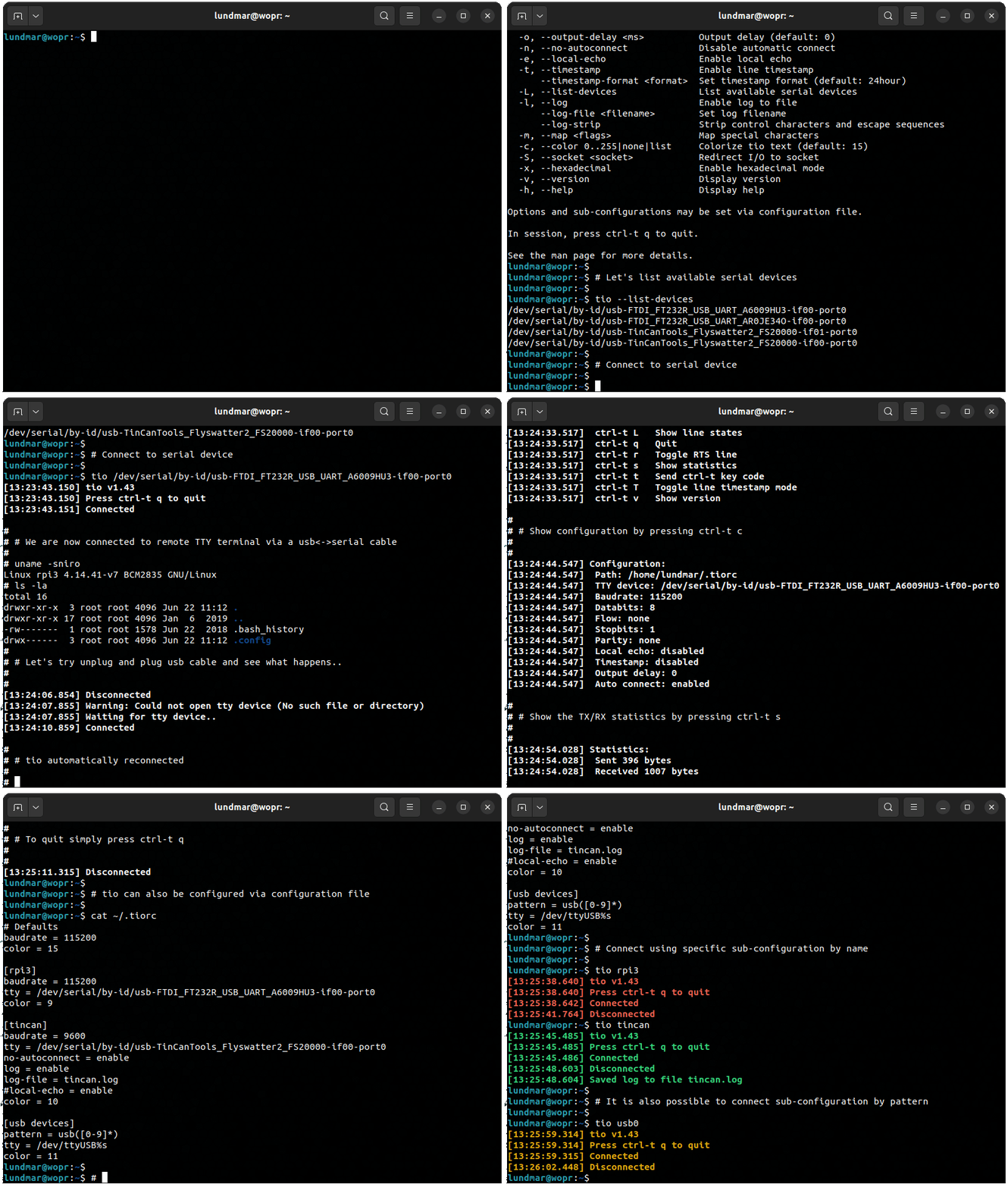
為了製作一個更簡單的串行設備工具,用於使用串行TTY設備,較少關注經典終端/調製解調器功能,並更多地關注嵌入式開發人員和黑客的需求。
TIO最初是作為屏幕的替代方法,用於與TMUX結合使用時連接到串行設備。
有關更多用法詳細信息,請在此處查看MAN頁面文檔。
命令行接口很簡單,如tio --help的輸出所反映:
 Usage: tio [<options>] <tty-device|profile|tid>

Connect to TTY device directly or via configuration profile or topology ID.

Options:
  -b, --baudrate <bps>                   Baud rate (default: 115200)
  -d, --databits 5|6|7|8                 Data bits (default: 8)
  -f, --flow hard|soft|none              Flow control (default: none)
  -s, --stopbits 1|2                     Stop bits (default: 1)
  -p, --parity odd|even|none|mark|space  Parity (default: none)
  -o, --output-delay <ms>                Output character delay (default: 0)
  -O, --output-line-delay <ms>           Output line delay (default: 0)
      --line-pulse-duration <duration>   Set line pulse duration
  -a, --auto-connect new|latest|direct   Automatic connect strategy (default: direct)
      --exclude-devices <pattern>        Exclude devices by pattern
      --exclude-drivers <pattern>        Exclude drivers by pattern
      --exclude-tids <pattern>           Exclude topology IDs by pattern
  -n, --no-reconnect                     Do not reconnect
  -e, --local-echo                       Enable local echo
      --input-mode normal|hex|line       Select input mode (default: normal)
      --output-mode normal|hex|hexN      Select output mode (default: normal)
  -t, --timestamp                        Enable line timestamp
      --timestamp-format <format>        Set timestamp format (default: 24hour)
      --timestamp-timeout <ms>           Set timestamp timeout (default: 200)
  -l, --list                             List available serial devices, TIDs, and profiles
  -L, --log                              Enable log to file
      --log-file <filename>              Set log filename
      --log-directory <path>             Set log directory path for automatic named logs
      --log-append                       Append to log file
      --log-strip                        Strip control characters and escape sequences
  -m, --map <flags>                      Map characters
  -c, --color 0..255|bold|none|list      Colorize tio text (default: bold)
  -S, --socket <socket>                  Redirect I/O to socket
      --rs-485                           Enable RS-485 mode
      --rs-485-config <config>           Set RS-485 configuration
      --alert bell|blink|none            Alert on connect/disconnect (default: none)
      --mute                             Mute tio messages
      --script <string>                  Run script from string
      --script-file <filename>           Run script from file
      --script-run once|always|never     Run script on connect (default: always)
      --exec <command>                   Execute shell command with I/O redirected to device
  -v, --version                          Display version
  -h, --help                             Display help

Options and profiles may be set via configuration file.

In session you can press ctrl-t ? to list available key commands.

See the man page for more details.
默認情況下,TIO會自動連接到提供的TTY設備。如果不存在設備,則TIO將等待它出現,然後連接。如果丟失了連接(例如設備被拔下),則將等待設備重新出現然後重新連接。但是,如果提供了--no-reconnect選項,則如果不存在設備或丟失了已建立的連接,則TIO將退出。
典型的用途是沒有選項:
$ tio /dev/ttyUSB0
對應於常用的默認選項:
$ tio --baudrate 115200 --databits 8 --flow none --stopbits 1 --parity none /dev/ttyUSB0
列表可用串行設備:
 $ tio --list
Device            TID     Uptime [s] Driver           Description
----------------- ---- ------------- ---------------- --------------------------
/dev/ttyS4        BaaB     19526.576 port             16550A UART
/dev/ttyS5        eV0Z     19525.845 port             16550A UART
/dev/ttyUSB1      bCC2      1023.274 ftdi_sio         TTL232R-3V3
/dev/ttyUSB0      SPpw       978.527 ftdi_sio         TTL232RG-VREG3V3
/dev/ttyACM0      i5q4         2.079 cdc_acm          ST-Link VCP Ctrl

By-id
--------------------------------------------------------------------------------
/dev/serial/by-id/usb-FTDI_TTL232R-3V3_FTCHUV56-if00-port0
/dev/serial/by-id/usb-FTDI_TTL232RG-VREG3V3_FT1NELUB-if00-port0
/dev/serial/by-id/usb-STMicroelectronics_STLINK-V3_004900343438510234313939-if02

By-path
--------------------------------------------------------------------------------
/dev/serial/by-path/pci-0000:00:14.0-usb-0:8.1.3.1.4:1.0-port0
/dev/serial/by-path/pci-0000:00:14.0-usbv2-0:8.1.3.1.4:1.0-port0
/dev/serial/by-path/pci-0000:00:14.0-usbv2-0:6.4:1.0-port0
/dev/serial/by-path/pci-0000:00:14.0-usb-0:6.4:1.0-port0
/dev/serial/by-path/pci-0000:00:14.0-usbv2-0:6.3:1.2
/dev/serial/by-path/pci-0000:00:14.0-usb-0:6.3:1.2

Configuration profiles (/home/lundmar/.config/tio/config)
--------------------------------------------------------------------------------
rpi3                stm32               esp32               am64-evm
imx8mp-evk          nucleo-h743zi2      usb-devices
建議通過ID連接串行TTY設備:
$ tio /dev/serial/by-id/usb-FTDI_TTL232R-3V3_FTCHUV56-if00-port0
注意:使用ID串行設備有助於確保重新連接時TIO自動重新連接到同一串行設備,即使它以不同的方式枚舉。
如果沒有可用ID的串行設備,建議通過拓撲ID(TID)連接:
$ tio bCC2
注意:TID是唯一的,只要您的USB串行端口設備插入相同的USB拓撲(相同的端口,相同的集線器,相同的連接等),將保持相同的時間。這樣,TIO可以成功重新連接到同一設備。
自動連接到第一個新的出現串行設備:
$ tio --auto-connect new
自動連接到最新的註冊串行設備:
$ tio --auto-connect latest
可以使用排除選項來影響自動連接策略中涉及哪些串行設備:
$ tio --auto-connect new --exclude-devices "/dev/ttyACM?,/dev/ttyUSB2"
並按模式排除驅動程序:
$ tio --auto-connect new --exclude-drivers "cdc_acm,ftdi_sio"
注意:模式匹配支持'*'和'? '。使用逗號分隔來定義多種模式。
要按特定模式包括驅動程序,只需否定排除選項:
$ tio --auto-connect new --exclude-drivers !("cp2102")
登錄以自動化文件名提交文件:
$ tio --log /dev/ttyUSB0
登錄以特定文件名提交文件:
$ tio --log --log-file my-log.txt
每行啟用ISO8601時間戳:
$ tio --timestamp --timestamp-format iso8601 /dev/ttyUSB0
輸出寬度16的十六進制:
$ tio --output-mode hex16 /dev/ttyUSB0
將I/O重定向到端口4242上的IPv4網絡套接字:
$ tio --socket inet:4242 /dev/ttyUSB0
管道數據到串行設備:
$ cat data.bin | tio /dev/ttyUSB0
連接上操縱調製解調器線:
$ tio --script "set{DTR=high,RTS=low}; msleep(100); set{DTR=toggle,RTS=toggle}" /dev/ttyUSB0
管道命令到串行設備,並在1秒內等待線路響應:
 $ echo "*IDN?" | tio /dev/ttyACM0 --script "expect('rn', 1000)" --mute
KORAD KD3305P V4.2 SN:32475045
支持各種會話密鑰命令。當Tio啟動時,按CTRL-T?列出可用的密鑰命令。
 [15:02:53.269] Key commands:
[15:02:53.269]  ctrl-t ?       List available key commands
[15:02:53.269]  ctrl-t b       Send break
[15:02:53.269]  ctrl-t c       Show configuration
[15:02:53.269]  ctrl-t e       Toggle local echo mode
[15:02:53.269]  ctrl-t f       Toggle log to file
[15:02:53.269]  ctrl-t F       Flush data I/O buffers
[15:02:53.269]  ctrl-t g       Toggle serial port line
[15:02:53.269]  ctrl-t i       Toggle input mode
[15:02:53.269]  ctrl-t l       Clear screen
[15:02:53.269]  ctrl-t L       Show line states
[15:02:53.269]  ctrl-t m       Change mapping of characters on input or output
[15:02:53.269]  ctrl-t o       Toggle output mode
[15:02:53.269]  ctrl-t p       Pulse serial port line
[15:02:53.269]  ctrl-t q       Quit
[15:02:53.269]  ctrl-t r       Run script
[15:02:53.269]  ctrl-t R       Execute shell command with I/O redirected to device
[15:02:53.269]  ctrl-t s       Show statistics
[15:02:53.269]  ctrl-t t       Toggle line timestamp mode
[15:02:53.269]  ctrl-t v       Show version
[15:02:53.269]  ctrl-t x       Send file via Xmodem
[15:02:53.269]  ctrl-t y       Send file via Ymodem
[15:02:53.269]  ctrl-t ctrl-t  Send ctrl-t character
如果需要,可以通過配置文件重新映射前綴密鑰(CTRL-T)。
可以通過列出的順序中的任何一個位置中的任何一個位置中首先在以下任何位置中找到選項:
配置文件使用命名部分支持配置文件,這些部分可以通過名稱或模式通過命令行激活。配置文件指定要連接到哪些TTY設備以及其他選項。
示例配置文件:
 [default]
baudrate = 115200
databits = 8
parity = none
stopbits = 1
color = 10

[rpi3]
device = /dev/serial/by-id/usb-FTDI_TTL232R-3V3_FTGQVXBL-if00-port0
no-reconnect = true
log = true
log-file = rpi3.log
line-pulse-duration = DTR=200,RTS=150
color = 11

[svf2]
device = /dev/ttyUSB0
baudrate = 9600
script = expect("login: "); write("rootn"); expect("Password: "); write("rootn")
color = 12

[esp32]
device = /dev/serial/by-id/usb-0403_6014-if00-port0
script = set{DTR=high,RTS=low}; msleep(100); set{DTR=low,RTS=high}; msleep(100); set{RTS=low}
script-run = once
color = 13

[usb-devices]
pattern = ^usb([0-9]*)
device = /dev/ttyUSB%m1
color = 14
要使用名稱的特定配置文件,只需這樣的啟動TIO:
$ tio rpi3
或按模式匹配:
$ tio usb12
另一個更精緻的配置文件示例此處可用。
Tio Suppots lua腳本可輕鬆自動與TTY設備的交互作用。
除了LUA API TIO之外,還可以提供以下功能:
 expect(string, timeout)
      Expect string - waits for string to match or timeout before continueing.
      Supports regular expressions. Special characters must be escaped with '\'.
      Timeout is in milliseconds, defaults to 0 meaning it will wait forever.

      Returns 1 on successful match, 0 on timeout, or -1 on error.

      On successful match it also returns the match string as second return value.

read(size, timeout)
      Read from serial device. If timeout is 0 or not provided it will wait
      forever until data is ready to read.

      Returns number of bytes read on success, 0 on timeout, or -1 on error.

      On success, returns read string as second return value.

read_line(timeout)
      Read line from serial device. If timeout is 0 or not provided it will
      wait forever until data is ready to read.

      Returns number of bytes read on success, 0 on timeout, or -1 on error.

      On success, returns the string that was read as second return value.
      Also emits a single timestamp to stdout and log file per options.timestamp
      and options.log.

write(string)
      Write string to serial device.

      Returns number of bytes written on success or -1 on error.

send(file, protocol)
      Send file using x/y-modem protocol.

      Protocol can be any of XMODEM_1K, XMODEM_CRC, YMODEM.

tty_search()
      Search for serial devices.

      Returns a table of number indexed tables, one for each serial device
      found.  Each of these tables contains the serial device information accessible
      via the following string indexed elements "path", "tid", "uptime", "driver",
      "description".

      Returns nil if no serial devices are found.

set{line=state, ...}
      Set state of one or multiple tty modem lines.

      Line can be any of DTR, RTS, CTS, DSR, CD, RI

      State is high, low, or toggle.

sleep(seconds)
      Sleep for seconds.

msleep(ms)
      Sleep for miliseconds.

exit(code)
      Exit with exit code.
提供各種GNU/Linux發行版的軟件包。請諮詢您的包裝管理器工具以查找和安裝TIO。
如果您想看到您喜歡的發行版中包含的TIO,請與其包裝維護者團隊聯繫。
安裝最新穩定版本:
$ snap install tio --classic
注意:由於Snapcraft框架的局限性,目前需要經典限制。有關討論,請參見第187期。
如果您安裝了啤酒:
$ brew install tio
如果已安裝MSYS2:
$ pacman -S tio
最新的源版本可以在此處找到。
在運行安裝步驟之前,請確保安裝了GLIB和LUA庫。例如:
$ sudo apt install libglib2.0-dev liblua5.2-dev
安裝步驟:
 $ meson setup build
$ meson compile -C build
$ meson install -C build
有關TIO特定的構建選項,請參見Meson_options.txt。
注意:介子安裝步驟可能會根據您的特定係統而有所不同。
獲得許可訪問錯誤試圖打開串行設備?
將您的用戶添加到允許串行設備永久訪問的組中。例如,要將用戶添加到“撥號”組中:
sudo usermod -a -G dialout < username >切換到“撥號”組,臨時但立即進行本次會議。
newgrp dialout這是一個開源項目 - 歡迎所有貢獻(錯誤報告,代碼,文檔,想法等)。
請使用GitHub問題跟踪器並提取請求功能。
另外,如果您發現此免費的開源軟件有用,請隨時考慮對您的選擇捐款:

通過GitHub提交錯誤報告:https://github.com/tio/tio/issues
訪問tio.github.io
TIO是GPLV2+。有關更多詳細信息,請參見許可證文件。
由Martin Lund <[email protected]>維護
有關貢獻者的完整列表,請參見作者文件。





