tio
v3.8


TIO เป็นเครื่องมืออุปกรณ์อนุกรมที่มีอินเทอร์เฟซบรรทัดคำสั่งและการกำหนดค่าตรงไปตรงมาเพื่อเชื่อมต่อกับอุปกรณ์ TTY แบบอนุกรมสำหรับการดำเนินการ I/O พื้นฐานได้อย่างง่ายดาย
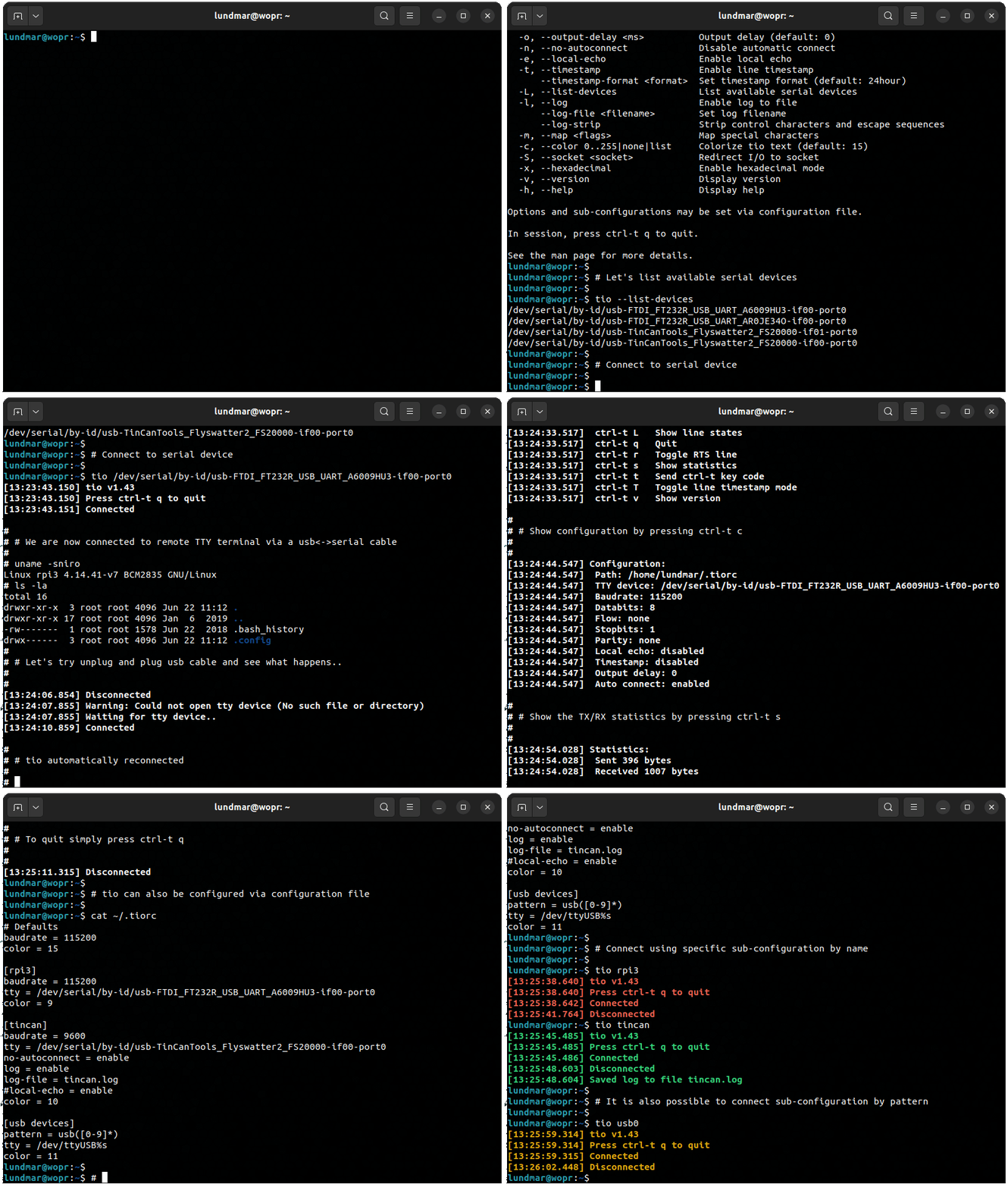
เพื่อสร้างเครื่องมืออุปกรณ์อนุกรมที่ง่ายขึ้นสำหรับการทำงานกับอุปกรณ์ TTY แบบอนุกรมโดยให้ความสำคัญกับคุณสมบัติเทอร์มินัล/โมเด็มคลาสสิกน้อยลงและมุ่งเน้นไปที่ความต้องการของนักพัฒนาและแฮ็กเกอร์ที่ฝังตัว
TIO ถูกสร้างขึ้นเป็นทางเลือกในการคัดกรองสำหรับการเชื่อมต่อกับอุปกรณ์อนุกรมเมื่อใช้ร่วมกับ TMUX
สำหรับรายละเอียดการใช้งานเพิ่มเติมโปรดดูเอกสารหน้า MAN ที่นี่
อินเทอร์เฟซบรรทัดคำสั่งนั้นตรงไปตรงมาตามที่สะท้อนในเอาต์พุตจาก tio --help :
 Usage: tio [<options>] <tty-device|profile|tid>

Connect to TTY device directly or via configuration profile or topology ID.

Options:
  -b, --baudrate <bps>                   Baud rate (default: 115200)
  -d, --databits 5|6|7|8                 Data bits (default: 8)
  -f, --flow hard|soft|none              Flow control (default: none)
  -s, --stopbits 1|2                     Stop bits (default: 1)
  -p, --parity odd|even|none|mark|space  Parity (default: none)
  -o, --output-delay <ms>                Output character delay (default: 0)
  -O, --output-line-delay <ms>           Output line delay (default: 0)
      --line-pulse-duration <duration>   Set line pulse duration
  -a, --auto-connect new|latest|direct   Automatic connect strategy (default: direct)
      --exclude-devices <pattern>        Exclude devices by pattern
      --exclude-drivers <pattern>        Exclude drivers by pattern
      --exclude-tids <pattern>           Exclude topology IDs by pattern
  -n, --no-reconnect                     Do not reconnect
  -e, --local-echo                       Enable local echo
      --input-mode normal|hex|line       Select input mode (default: normal)
      --output-mode normal|hex|hexN      Select output mode (default: normal)
  -t, --timestamp                        Enable line timestamp
      --timestamp-format <format>        Set timestamp format (default: 24hour)
      --timestamp-timeout <ms>           Set timestamp timeout (default: 200)
  -l, --list                             List available serial devices, TIDs, and profiles
  -L, --log                              Enable log to file
      --log-file <filename>              Set log filename
      --log-directory <path>             Set log directory path for automatic named logs
      --log-append                       Append to log file
      --log-strip                        Strip control characters and escape sequences
  -m, --map <flags>                      Map characters
  -c, --color 0..255|bold|none|list      Colorize tio text (default: bold)
  -S, --socket <socket>                  Redirect I/O to socket
      --rs-485                           Enable RS-485 mode
      --rs-485-config <config>           Set RS-485 configuration
      --alert bell|blink|none            Alert on connect/disconnect (default: none)
      --mute                             Mute tio messages
      --script <string>                  Run script from string
      --script-file <filename>           Run script from file
      --script-run once|always|never     Run script on connect (default: always)
      --exec <command>                   Execute shell command with I/O redirected to device
  -v, --version                          Display version
  -h, --help                             Display help

Options and profiles may be set via configuration file.

In session you can press ctrl-t ? to list available key commands.

See the man page for more details.
โดยค่าเริ่มต้น TIO จะเชื่อมต่อกับอุปกรณ์ TTY ที่ให้ไว้โดยอัตโนมัติ หากอุปกรณ์ไม่ปรากฏตัว TIO จะรอให้มันปรากฏขึ้นแล้วเชื่อมต่อ หากการเชื่อมต่อหายไป (เช่นอุปกรณ์ที่ถอดออก) มันจะรอให้อุปกรณ์ปรากฏขึ้นอีกครั้งแล้วเชื่อมต่ออีกครั้ง อย่างไรก็ตามหากมีตัวเลือก --no-reconnect TIO จะออกหากอุปกรณ์ไม่ปรากฏหรือการเชื่อมต่อที่กำหนดจะหายไป
การใช้งานทั่วไปคือไม่มีตัวเลือก:
$ tio /dev/ttyUSB0
ซึ่งสอดคล้องกับตัวเลือกเริ่มต้นที่ใช้กันทั่วไป:
$ tio --baudrate 115200 --databits 8 --flow none --stopbits 1 --parity none /dev/ttyUSB0
รายการอุปกรณ์อนุกรมที่มีอยู่:
 $ tio --list
Device            TID     Uptime [s] Driver           Description
----------------- ---- ------------- ---------------- --------------------------
/dev/ttyS4        BaaB     19526.576 port             16550A UART
/dev/ttyS5        eV0Z     19525.845 port             16550A UART
/dev/ttyUSB1      bCC2      1023.274 ftdi_sio         TTL232R-3V3
/dev/ttyUSB0      SPpw       978.527 ftdi_sio         TTL232RG-VREG3V3
/dev/ttyACM0      i5q4         2.079 cdc_acm          ST-Link VCP Ctrl

By-id
--------------------------------------------------------------------------------
/dev/serial/by-id/usb-FTDI_TTL232R-3V3_FTCHUV56-if00-port0
/dev/serial/by-id/usb-FTDI_TTL232RG-VREG3V3_FT1NELUB-if00-port0
/dev/serial/by-id/usb-STMicroelectronics_STLINK-V3_004900343438510234313939-if02

By-path
--------------------------------------------------------------------------------
/dev/serial/by-path/pci-0000:00:14.0-usb-0:8.1.3.1.4:1.0-port0
/dev/serial/by-path/pci-0000:00:14.0-usbv2-0:8.1.3.1.4:1.0-port0
/dev/serial/by-path/pci-0000:00:14.0-usbv2-0:6.4:1.0-port0
/dev/serial/by-path/pci-0000:00:14.0-usb-0:6.4:1.0-port0
/dev/serial/by-path/pci-0000:00:14.0-usbv2-0:6.3:1.2
/dev/serial/by-path/pci-0000:00:14.0-usb-0:6.3:1.2

Configuration profiles (/home/lundmar/.config/tio/config)
--------------------------------------------------------------------------------
rpi3                stm32               esp32               am64-evm
imx8mp-evk          nucleo-h743zi2      usb-devices
ขอแนะนำให้เชื่อมต่ออุปกรณ์ TTY แบบอนุกรมด้วย ID:
$ tio /dev/serial/by-id/usb-FTDI_TTL232R-3V3_FTCHUV56-if00-port0
หมายเหตุ: การใช้อุปกรณ์อนุกรมโดย ID ช่วยให้แน่ใจว่า TIO เชื่อมต่อกับอุปกรณ์อนุกรมเดียวกันโดยอัตโนมัติเมื่อทำการติดตั้งซ้ำแม้ว่าจะมีการระบุที่แตกต่างกัน
หากไม่มีอุปกรณ์อนุกรมตาม ID ขอแนะนำให้เชื่อมต่อผ่าน Topology ID (TID):
$ tio bCC2
หมายเหตุ: TID นั้นไม่ซ้ำกันและจะยังคงอยู่เท่าที่ใช้กับอุปกรณ์พอร์ต USB Serial Port ของคุณเข้ากับทอพอโลยี USB เดียวกัน (พอร์ตเดียวกันฮับเดียวกันการเชื่อมต่อเดียวกัน ฯลฯ ) วิธีนี้เป็นไปได้ที่ TIO จะเชื่อมต่อกับอุปกรณ์เดียวกันได้สำเร็จ
เชื่อมต่อโดยอัตโนมัติกับอุปกรณ์อนุกรมที่ปรากฏใหม่ครั้งแรก:
$ tio --auto-connect new
เชื่อมต่อโดยอัตโนมัติกับอุปกรณ์อนุกรมที่ลงทะเบียนล่าสุด:
$ tio --auto-connect latest
เป็นไปได้ที่จะใช้ตัวเลือกยกเว้นเพื่อส่งผลกระทบต่ออุปกรณ์อนุกรมที่เกี่ยวข้องในกลยุทธ์การเชื่อมต่ออัตโนมัติ:
$ tio --auto-connect new --exclude-devices "/dev/ttyACM?,/dev/ttyUSB2"
และเพื่อยกเว้นไดรเวอร์ด้วยรูปแบบ:
$ tio --auto-connect new --exclude-drivers "cdc_acm,ftdi_sio"
หมายเหตุ: การจับคู่รูปแบบรองรับ '*' และ '?' ใช้การแยกเครื่องหมายจุลภาคเพื่อกำหนดรูปแบบหลายรูปแบบ
เพื่อรวมไดรเวอร์ด้วยรูปแบบเฉพาะเพียงแค่คัดค้านตัวเลือกยกเว้น:
$ tio --auto-connect new --exclude-drivers !("cp2102")
บันทึกไปยังไฟล์ที่มีชื่อไฟล์ autogenerated:
$ tio --log /dev/ttyUSB0
บันทึกไปยังไฟล์ที่มีชื่อไฟล์เฉพาะ:
$ tio --log --log-file my-log.txt
เปิดใช้งานการประทับเวลา ISO8601 ต่อบรรทัด:
$ tio --timestamp --timestamp-format iso8601 /dev/ttyUSB0
เอาท์พุทไปยังฐานสิบหกด้วยความกว้าง 16:
$ tio --output-mode hex16 /dev/ttyUSB0
เปลี่ยนเส้นทาง I/O ไปยังซ็อกเก็ตเครือข่าย IPv4 บนพอร์ต 4242:
$ tio --socket inet:4242 /dev/ttyUSB0
ข้อมูลท่อไปยังอุปกรณ์อนุกรม:
$ cat data.bin | tio /dev/ttyUSB0
จัดการสายโมเด็มบน Connect:
$ tio --script "set{DTR=high,RTS=low}; msleep(100); set{DTR=toggle,RTS=toggle}" /dev/ttyUSB0
คำสั่งท่อไปยังอุปกรณ์อนุกรมและรอการตอบกลับบรรทัดภายใน 1 วินาที:
 $ echo "*IDN?" | tio /dev/ttyACM0 --script "expect('rn', 1000)" --mute
KORAD KD3305P V4.2 SN:32475045
มีการรองรับคำสั่งคีย์เซสชันที่หลากหลาย เมื่อ Tio เริ่มต้นกด Ctrl-T? เพื่อแสดงรายการคำสั่งคีย์ที่มีอยู่
 [15:02:53.269] Key commands:
[15:02:53.269]  ctrl-t ?       List available key commands
[15:02:53.269]  ctrl-t b       Send break
[15:02:53.269]  ctrl-t c       Show configuration
[15:02:53.269]  ctrl-t e       Toggle local echo mode
[15:02:53.269]  ctrl-t f       Toggle log to file
[15:02:53.269]  ctrl-t F       Flush data I/O buffers
[15:02:53.269]  ctrl-t g       Toggle serial port line
[15:02:53.269]  ctrl-t i       Toggle input mode
[15:02:53.269]  ctrl-t l       Clear screen
[15:02:53.269]  ctrl-t L       Show line states
[15:02:53.269]  ctrl-t m       Change mapping of characters on input or output
[15:02:53.269]  ctrl-t o       Toggle output mode
[15:02:53.269]  ctrl-t p       Pulse serial port line
[15:02:53.269]  ctrl-t q       Quit
[15:02:53.269]  ctrl-t r       Run script
[15:02:53.269]  ctrl-t R       Execute shell command with I/O redirected to device
[15:02:53.269]  ctrl-t s       Show statistics
[15:02:53.269]  ctrl-t t       Toggle line timestamp mode
[15:02:53.269]  ctrl-t v       Show version
[15:02:53.269]  ctrl-t x       Send file via Xmodem
[15:02:53.269]  ctrl-t y       Send file via Ymodem
[15:02:53.269]  ctrl-t ctrl-t  Send ctrl-t character
หากจำเป็นปุ่มนำหน้า (CTRL-T) สามารถนำกลับมาใช้ใหม่ผ่านไฟล์การกำหนดค่า
ตัวเลือกสามารถตั้งค่าผ่านไฟล์กำหนดค่าก่อนพบในสถานที่ใด ๆ ต่อไปนี้ในลำดับที่แสดงรายการ:
ไฟล์การกำหนดค่ารองรับโปรไฟล์โดยใช้ส่วนที่มีชื่อซึ่งสามารถเปิดใช้งานผ่านบรรทัดคำสั่งตามชื่อหรือรูปแบบ โปรไฟล์ระบุว่าอุปกรณ์ TTY ใดที่จะเชื่อมต่อและตัวเลือกอื่น ๆ
ตัวอย่างไฟล์กำหนดค่า:
 [default]
baudrate = 115200
databits = 8
parity = none
stopbits = 1
color = 10

[rpi3]
device = /dev/serial/by-id/usb-FTDI_TTL232R-3V3_FTGQVXBL-if00-port0
no-reconnect = true
log = true
log-file = rpi3.log
line-pulse-duration = DTR=200,RTS=150
color = 11

[svf2]
device = /dev/ttyUSB0
baudrate = 9600
script = expect("login: "); write("rootn"); expect("Password: "); write("rootn")
color = 12

[esp32]
device = /dev/serial/by-id/usb-0403_6014-if00-port0
script = set{DTR=high,RTS=low}; msleep(100); set{DTR=low,RTS=high}; msleep(100); set{RTS=low}
script-run = once
color = 13

[usb-devices]
pattern = ^usb([0-9]*)
device = /dev/ttyUSB%m1
color = 14
หากต้องการใช้โปรไฟล์เฉพาะตามชื่อเพียงเริ่ม tio เช่น So:
$ tio rpi3
หรือโดยการจับคู่รูปแบบ:
$ tio usb12
อีกตัวอย่างไฟล์กำหนดค่าที่ซับซ้อนยิ่งขึ้นมีอยู่ที่นี่
TIO Suppots การเขียนสคริปต์ Lua เพื่อให้การโต้ตอบกับอุปกรณ์ TTY เป็นไปโดยอัตโนมัติ
นอกจาก Lua Api Tio ยังทำให้ฟังก์ชั่นต่อไปนี้พร้อมใช้งาน:
 expect(string, timeout)
      Expect string - waits for string to match or timeout before continueing.
      Supports regular expressions. Special characters must be escaped with '\'.
      Timeout is in milliseconds, defaults to 0 meaning it will wait forever.

      Returns 1 on successful match, 0 on timeout, or -1 on error.

      On successful match it also returns the match string as second return value.

read(size, timeout)
      Read from serial device. If timeout is 0 or not provided it will wait
      forever until data is ready to read.

      Returns number of bytes read on success, 0 on timeout, or -1 on error.

      On success, returns read string as second return value.

read_line(timeout)
      Read line from serial device. If timeout is 0 or not provided it will
      wait forever until data is ready to read.

      Returns number of bytes read on success, 0 on timeout, or -1 on error.

      On success, returns the string that was read as second return value.
      Also emits a single timestamp to stdout and log file per options.timestamp
      and options.log.

write(string)
      Write string to serial device.

      Returns number of bytes written on success or -1 on error.

send(file, protocol)
      Send file using x/y-modem protocol.

      Protocol can be any of XMODEM_1K, XMODEM_CRC, YMODEM.

tty_search()
      Search for serial devices.

      Returns a table of number indexed tables, one for each serial device
      found.  Each of these tables contains the serial device information accessible
      via the following string indexed elements "path", "tid", "uptime", "driver",
      "description".

      Returns nil if no serial devices are found.

set{line=state, ...}
      Set state of one or multiple tty modem lines.

      Line can be any of DTR, RTS, CTS, DSR, CD, RI

      State is high, low, or toggle.

sleep(seconds)
      Sleep for seconds.

msleep(ms)
      Sleep for miliseconds.

exit(code)
      Exit with exit code.
แพ็คเกจสำหรับการแจกแจง GNU/Linux ต่างๆ โปรดปรึกษาเครื่องมือจัดการแพ็คเกจของคุณเพื่อค้นหาและติดตั้ง TIO
หากคุณต้องการเห็น Tio รวมอยู่ในการกระจายที่คุณชื่นชอบโปรดติดต่อทีมผู้ดูแลแพ็คเกจ
ติดตั้งเวอร์ชันที่เสถียรล่าสุด:
$ snap install tio --classic
หมายเหตุ: จำเป็นต้องมีการคุมขังแบบคลาสสิกเนื่องจากข้อ จำกัด ของเฟรมเวิร์ก Snapcraft ดูปัญหา #187 สำหรับการสนทนา
หากคุณติดตั้งชง:
$ brew install tio
หากคุณติดตั้ง MSYS2:
$ pacman -S tio
แหล่งข่าวล่าสุดสามารถพบได้ที่นี่
ก่อนที่จะเรียกใช้ขั้นตอนการติดตั้งตรวจสอบให้แน่ใจว่าคุณติดตั้งไลบรารี GLIB และ LUA ตัวอย่างเช่น:
$ sudo apt install libglib2.0-dev liblua5.2-dev
ติดตั้งขั้นตอน:
 $ meson setup build
$ meson compile -C build
$ meson install -C build
ดู meson_options.txt สำหรับตัวเลือกการสร้างเฉพาะ tio
หมายเหตุ: ขั้นตอนการติดตั้ง Meson อาจแตกต่างกันไปขึ้นอยู่กับระบบเฉพาะของคุณ
รับข้อผิดพลาดในการเข้าถึงการอนุญาตที่พยายามเปิดอุปกรณ์อนุกรมของคุณหรือไม่?
เพิ่มผู้ใช้ของคุณในกลุ่มที่อนุญาตให้เข้าถึงอุปกรณ์อนุกรมได้อย่างถาวร ตัวอย่างเช่นในการเพิ่มผู้ใช้ของคุณในกลุ่ม 'dialout' ทำ:
sudo usermod -a -G dialout < username >เปลี่ยนไปเป็นกลุ่ม "dialout" ชั่วคราว แต่ทันทีสำหรับเซสชันนี้
newgrp dialoutนี่คือโครงการโอเพ่นซอร์ส - การมีส่วนร่วมทั้งหมด (รายงานข้อผิดพลาด, รหัส, เอกสาร, ความคิด ฯลฯ ) ยินดีต้อนรับ
โปรดใช้คุณสมบัติตัวติดตามปัญหาของ GitHub และคำขอดึง
นอกจากนี้หากคุณพบว่าซอฟต์แวร์โอเพนซอร์สฟรีนี้มีประโยชน์โปรดอย่าลังเลที่จะพิจารณาบริจาคที่คุณเลือก:

ส่งรายงานข้อผิดพลาดผ่าน GitHub: https://github.com/tio/tio/issues
เยี่ยมชม tio.github.io
TIO คือ GPLV2+ ดูไฟล์ใบอนุญาตสำหรับรายละเอียดเพิ่มเติม
ดูแลโดย Martin Lund <[email protected]>
ดูไฟล์ผู้เขียนสำหรับรายชื่อผู้สนับสนุนทั้งหมด





