k8sgpt
v0.3.46


k8sgpt是用於掃描Kubernetes群集的工具,以簡單的英語診斷和分類問題。
它已將SRE經驗編纂為分析儀,並有助於提取最相關的信息以使用AI豐富。
與Openai,Azure,Cohere,Amazon Bedrock,Google Gemini和本地型號的開箱即用。
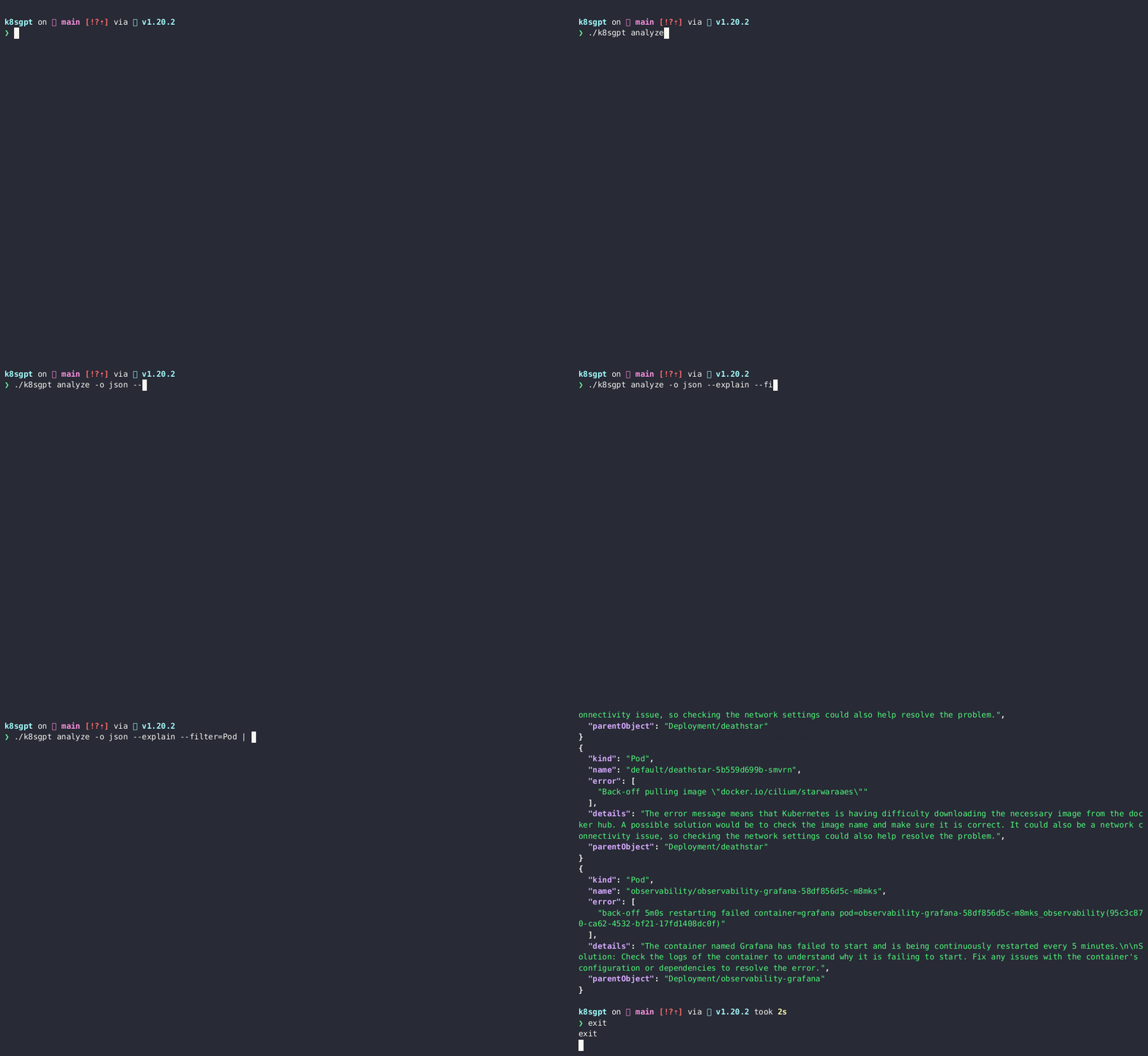
$ brew install k8sgpt或者
brew tap k8sgpt-ai/k8sgpt
brew install k8sgpt32位:
sudo rpm -ivh https://github.com/k8sgpt-ai/k8sgpt/releases/download/v0.3.46/k8sgpt_386.rpm
64位:
sudo rpm -ivh https://github.com/k8sgpt-ai/k8sgpt/releases/download/v0.3.46/k8sgpt_amd64.rpm
32位:
 curl -LO https://github.com/k8sgpt-ai/k8sgpt/releases/download/v0.3.46/k8sgpt_386.deb
sudo dpkg -i k8sgpt_386.deb
64位:
 curl -LO https://github.com/k8sgpt-ai/k8sgpt/releases/download/v0.3.46/k8sgpt_amd64.deb
sudo dpkg -i k8sgpt_amd64.deb
32位:
 wget https://github.com/k8sgpt-ai/k8sgpt/releases/download/v0.3.46/k8sgpt_386.apk
apk add --allow-untrusted k8sgpt_386.apk
64位:
 wget https://github.com/k8sgpt-ai/k8sgpt/releases/download/v0.3.46/k8sgpt_amd64.apk
apk add --allow-untrusted k8sgpt_amd64.apk
 ==> Installing k8sgpt from k8sgpt-ai/k8sgpt Error: The following formula cannot be installed from a bottle and must be
built from the source. k8sgpt Install Clang or run brew install gcc.
如果您按建議安裝GCC,則問題將持續存在。因此,您需要安裝Build-Ender-Ender-nectentable。
   sudo apt-get update
   sudo apt-get install build-essential
要在k8sgpt-operator群集中安裝
這種操作模式非常適合連續監視群集,並且可以與您現有的監視(例如Prometheus和AlertManager)集成。
k8sgpt generate以打開瀏覽器鏈接來生成它來做到這一點k8sgpt auth add以在K8SGPT中設置它。--password標誌直接提供密碼。k8sgpt filters來管理分析儀使用的活動過濾器。默認情況下,所有過濾器均在分析過程中執行。k8sgpt analyze以進行掃描。k8sgpt analyze --explain以對問題進行更詳細的解釋。k8sgpt analyze --with-doc (有或沒有解釋標誌)以獲取Kubernetes的官方文檔。 K8SGPT使用分析儀來分類和診斷群集中的問題。它具有一組內置的分析儀,但是您將能夠編寫自己的分析儀。
使用默認分析儀進行掃描
 k8sgpt generate
k8sgpt auth add
k8sgpt analyze --explain
k8sgpt analyze --explain --with-doc
資源過濾
k8sgpt analyze --explain --filter=Service
通過名稱空間過濾
k8sgpt analyze --explain --filter=Pod --namespace=default
輸出到JSON
k8sgpt analyze --explain --filter=Service --output=json
解釋過程中匿名化
k8sgpt analyze --explain --filter=Service --output=json --anonymize
列表過濾器
k8sgpt filters list
添加默認過濾器
k8sgpt filters add [filter(s)]
k8sgpt filters add Servicek8sgpt filters add Ingress,Pod刪除默認過濾器
k8sgpt filters remove [filter(s)]
k8sgpt filters remove Servicek8sgpt filters remove Ingress,Pod列表配置的後端
k8sgpt auth list
更新已配置的後端
k8sgpt auth update $MY_BACKEND1,$MY_BACKEND2..
刪除配置的後端
k8sgpt auth remove -b $MY_BACKEND1,$MY_BACKEND2..
列表集成
k8sgpt integrations list
激活集成
k8sgpt integrations activate [integration(s)]
使用集成
k8sgpt analyze --filter=[integration(s)]
停用整合
k8sgpt integrations deactivate [integration(s)]
服務模式
k8sgpt serve
使用服務模式分析
 grpcurl -plaintext -d '{"namespace": "k8sgpt", "explain" : "true"}' localhost:8080 schema.v1.ServerAnalyzerService/Analyze
{
  "status": "OK"
}
用自定義標頭分析
k8sgpt analyze --explain --custom-headers CustomHeaderKey:CustomHeaderValue
打印分析統計
 k8sgpt analyze -s
The stats mode allows for debugging and understanding the time taken by an analysis by displaying the statistics of each analyzer.
- Analyzer Ingress took 47.125583ms
- Analyzer PersistentVolumeClaim took 53.009167ms
- Analyzer CronJob took 57.517792ms
- Analyzer Deployment took 156.6205ms
- Analyzer Node took 160.109833ms
- Analyzer ReplicaSet took 245.938333ms
- Analyzer StatefulSet took 448.0455ms
- Analyzer Pod took 5.662594708s
- Analyzer Service took 38.583359166s
診斷信息
要收集診斷信息,請使用以下命令在本地目錄中創建一個dump_<timestamp>_json 。
k8sgpt dump
當您想使用-Explain FLAG EG k8sgpt analyze --explain解釋分析結果時,K8SGPT使用所選的LLM,生成的AI提供商。您可以使用--backend標誌來指定配置的提供商(默認情況下是openai )。
您可以使用k8sgpt auth list列出可用的提供商:
 Default:
> openai
Active:
Unused:
> openai
> localai
> ollama
> azureopenai
> cohere
> amazonbedrock
> amazonsagemaker
> google
> huggingface
> noopai
> googlevertexai
> ibmwatsonxai
有關如何配置和使用每個提供商的詳細文檔,請參見此處。
設置新的默認提供商
 k8sgpt auth default -p azureopenai
Default provider set to azureopenai
使用此選項,將數據匿名化,然後將其發送到AI後端。在分析執行過程中, k8sgpt檢索敏感數據(Kubernetes對象名稱,標籤等)。當發送到AI後端時,將這些數據掩蓋,並替換為可以用來將解決方案返回給用戶的密鑰。
Error: HorizontalPodAutoscaler uses StatefulSet/fake-deployment as ScaleTargetRef which does not exist.Error: HorizontalPodAutoscaler uses StatefulSet/tGLcCRcHa1Ce5Rs as ScaleTargetRef which does not exist.The Kubernetes system is trying to scale a StatefulSet named tGLcCRcHa1Ce5Rs using the HorizontalPodAutoscaler, but it cannot find the StatefulSet. The solution is to verify that the StatefulSet name is spelled correctly and exists in the same namespace as the HorizontalPodAutoscaler.The Kubernetes system is trying to scale a StatefulSet named fake-deployment using the HorizontalPodAutoscaler, but it cannot find the StatefulSet. The solution is to verify that the StatefulSet name is spelled correctly and exists in the same namespace as the HorizontalPodAutoscaler.注意:匿名化當前不適用於事件。
匿名化當前不適用於事件。
在像POD這樣的一些分析儀中,我們向AI後端提供了事件消息,這些消息事先未知,因此我們暫時沒有掩蓋它們。
以下是掩蓋數據的分析儀列表: -
以下是沒有掩蓋數據的分析儀列表: -
*筆記:
K8GPT不會掩蓋上述分析儀,因為除了事件分析儀外,它們不會發送任何識別信息。
如本期所示,預定在不久的將來進行活動分析儀。必須進行進一步的研究以了解模式,並能夠掩蓋事件的敏感部分,例如POD名稱,名稱空間等。
以下是未被掩蓋的字段列表: -
*筆記:
k8sgpt將配置數據存儲在$XDG_CONFIG_HOME/k8sgpt/k8sgpt.yaml文件中。數據以純文本存儲,包括您的OpenAI鍵。
配置文件位置:
| 作業系統 | 小路 |
|---|---|
| macos | 〜/Library/應用程序支持/K8SGPT/K8SGPT.YAML |
| Linux | 〜/.config/k8sgpt/k8sgpt.yaml |
| 視窗 | %localappdata%/k8sgpt/k8sgpt.yaml |
添加遠程緩存
AWS_ACCESS_KEY_ID和AWS_SECRET_ACCESS_KEY需要作為環境變量。k8sgpt cache add s3 --region <aws region> --bucket <name>k8sgpt cache add s3 --bucket <name> --endpoint <http://localhost:9000>k8sgpt cache add s3 --bucket <name> --endpoint <https://localhost:9000> --insecurek8sgpt cache add azure --storageacc <storage account name> --container <container name>GOOGLE_APPLICATION_CREDENTIALS是環境變量。k8sgpt cache add gcs --region <gcp region> --bucket <name> --projectid <project id>列表緩存項目
k8sgpt cache list
從緩存注意清除對象:使用此命令清除對象將刪除上游文件,因此需要適當的權限。
k8sgpt cache purge $OBJECT_NAME
刪除遠程緩存注意:這不會刪除上游S3存儲桶或Azure存儲容器
k8sgpt cache remove
您可能希望在某些情況下用自己選擇的語言編寫自己的分析器。 K8SGPT現在通過遵守模式並為分析儀提供消費來支持這樣做的能力。為此,請在K8SGPT配置中定義分析儀,並將其添加到掃描過程中。除此之外,您還需要在分析上啟用以下標誌:
k8sgpt analyze --custom-analysis
這是Rust的示例本地主機分析儀在localhost:8080 K8SGPT Config可以通過以下添加來將其接收:
 custom_analyzers:
  - name: host-analyzer
    connection:
      url: localhost
      port: 8080
現在,這使得通過Hostos信息(從此分析儀示例)到K8SGPT,並用作正常分析的上下文。
查看有關如何編寫自定義分析儀的文檔
列表配置的自定義分析儀
k8sgpt custom-analyzer list
添加無需安裝的自定義分析儀
k8sgpt custom-analyzer add --name my-custom-analyzer --port 8085
刪除自定義分析儀
k8sgpt custom-analyzer remove --names "my-custom-analyzer,my-custom-analyzer-2"
在此處找到我們的官方文檔
請閱讀我們的貢獻指南。
在懈怠中找到我們





