hexo theme lite
v1.4.1

Keep Calm, Lite and Writing.
light single page blog application theme, using Vue , Vuex , ElementUI and so on.
一款輕量級單頁部落格主題,基於Vue , Vuex和ElementUI構建
Demo | 線上演示
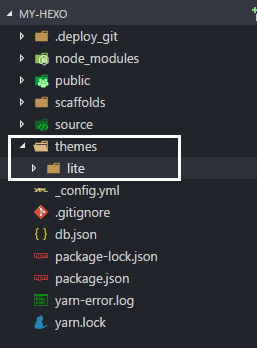
Hexo root directory. The root directory must include themes , node_modules , source and so on.首先進入Hexo根目錄,請確保這個目錄下有themes , node_modules , source等檔案。
 cd my-hexo
ls
# output:
# _config.yml node_modules package.json public scaffolds source themesgit clone使用git clone指令下載最新的發布版本
git clone https://github.com/HeskeyBaozi/hexo-theme-lite themes/lite after git clone , the result is like this:
使用指令後,結果看起來會是這樣
__config.yml in your root directory. modify the field theme into lite .
開啟根目錄的__config.yml文件,將theme欄位設為lite
 # Extensions
theme : litehexo gHexo server hexo s
# output:
# INFO Hexo is running at http://localhost:4000/. Press Ctrl+C to stop.Edit the file lite/__config.yml to customize your theme.
編輯檔案lite/__config.yml來自訂你的主題.
 avatar :
  enable : true
  url : /static/images/kamuyi.jpg # mapping to '<blog root>/source/static/images/kamuyi.jpg'
As usual, / is mapped to your <blog root>/source /source source , not static folder in the theme. 通常這個路徑指的是你博客根目錄下的/source資料夾,而不是主題中的static資料夾
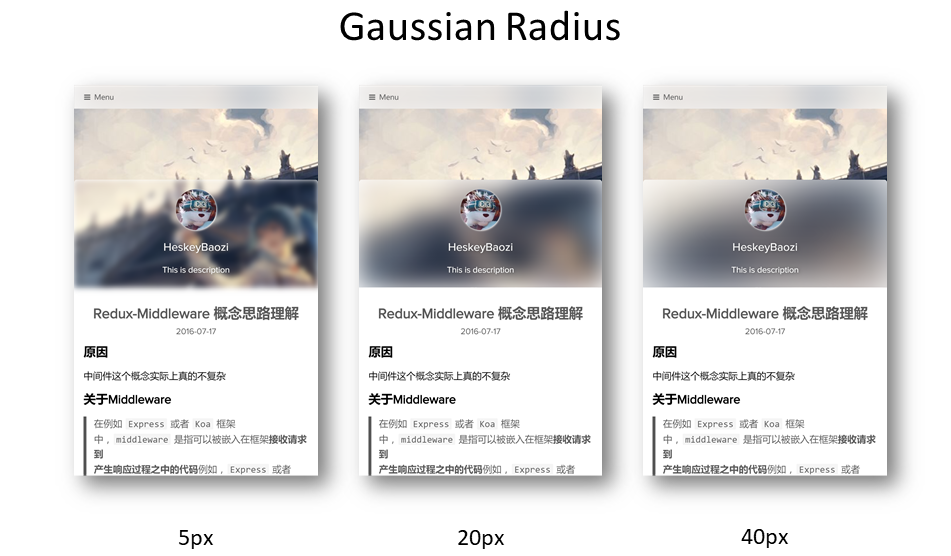
you can set the gaussian radius here.
你可以在這裡設定高斯模糊半徑,效果如下.
 blur :
  background_color : ' #ffffff '

  # 'true' corresponding to css style 'overflow: hidden'
  # 设置为'true'则对应模糊容器'overflow'选项
  hide_overflow : true

  # Alpha Value of the background color
  # 背景颜色透明值, 启用会导致高斯模糊失效
  opacity :
    enable : false # switch to 'true' will make the gaussian blur lose efficacy
    opacity_value : 0.4

  gaussian_radius : # 高斯模糊程度,数值越大越模糊
    top_navigator : 50 # 40+ preferred
    header : 30 # 5 ~ 50 preferred
    footer : 40 # 5 ~ 100 preferred

  font :
    color : ' #ffffff '
Notice that the font.color will only affect the font color in the blur area.
注意,這裡的font.color只會影響模糊區域的字體顏色.
 background :
  background_color : ' #ffffff '

  # Custom Background Picture
  enable_picture : true
  url : /static/images/miku.jpg
  css_size : cover
  css_position : 50%

  # Gradient color
  gradient_color :
    enable : false # switch to 'true' will make custom background picture lose efficacy
    css_value : ' linear-gradient(to right, rgb(74, 135, 193), rgb(179, 177, 251)) '
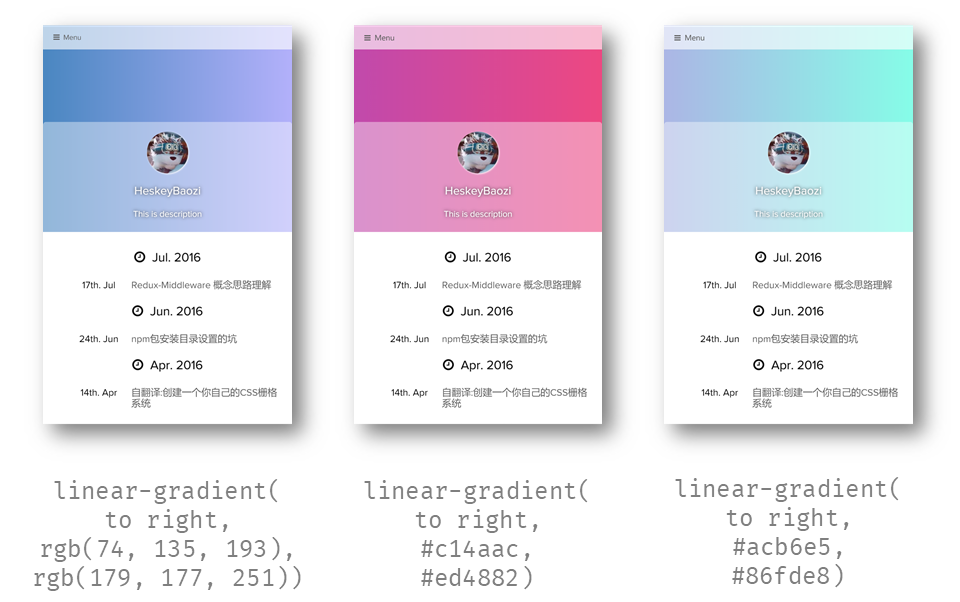
Note that we can use the gradient color, it works by modify the css background-image , so it will make the custom background picture lose efficacy.
注意到這裡可以設定漸層背景,實際上內部實作就是修改了css的background-image ,所以啟用漸層色會讓自訂背景圖片失效。
Example:
 background :
  gradient_color :
    enable : true
    css_value : ' linear-gradient(to right, rgb(74, 135, 193), rgb(179, 177, 251)) ' # options

blur :
  opacity :
    enable : true # switch to 'true' will make the gaussian blur lose efficacy
opacity_value : 0.4insert < <!-- more --> <!-- more -->來進行手動截斷. 例.
 menu :
  # Basic Menu
  Home : true
  Archives : true
  Categories : false
  Tags : false

  # Custom Menu
  # 'About' link to the 'About' page if there exists '/about/index.md' in your 'source' dir.
  # 这里是一个导航到'关于我'的页面,前提是你需要在你的'source'文件夹有'/about/index.md'文件
About : /pages/about/index theme_layout :
dependent_footer : true dependent_footer means that the main body is closely connected with the footer. Setting false will make the footer "full background, padded content".
dependent_footer表明主題的底部資訊欄是連在一起的,如果設定為false ,底部資訊欄將會有"滿幅的背景,定寬的內容"
 social :
  github : https://github.com/heskeybaozi
  weibo : http://weibo.com/52hezhiyu

  # Email link
  email : mailto:[email protected]

social_icons :
  enable : true

  # icon name docs: http://fontawesome.io/icons/
  github : fa-github-alt
  weibo : fa-weibo
  email : fa-envelope
  wechat : fa-weixin
qq : fa-qq powered_by :
text : Hexo Theme Lite
url : https://github.com/HeskeyBaozi/hexo-theme-lite/ # or false to disable link
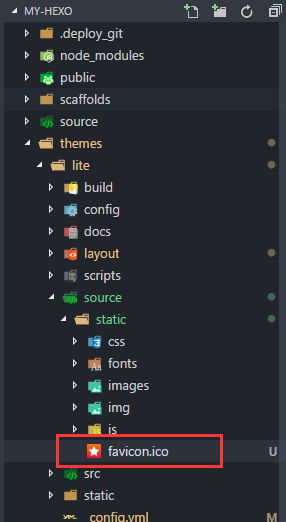
you can use your own .ico file ( 32px * 32px preferred) to replace the original favicon.ico under the directory /themes/lite/source/static/ .
你可以用自己的圖示文件,最好是32px * 32px大小,來取代目錄/themes/lite/source/static/下的favicon.ico檔案。
 page_404 :
  # enable to use custom 404 page
  enable : false
  # filename of .md file path in your source dir
source_path : 404/index.mdWe use Gitment for the comments system.
What's
Gitment?
Gitment is a comment system based on GitHub Issues, which can be used in the frontend without any server-side implementation.
Gitment 是一個使用Github Issues頁面來儲存評論的無'服務端'評論系統
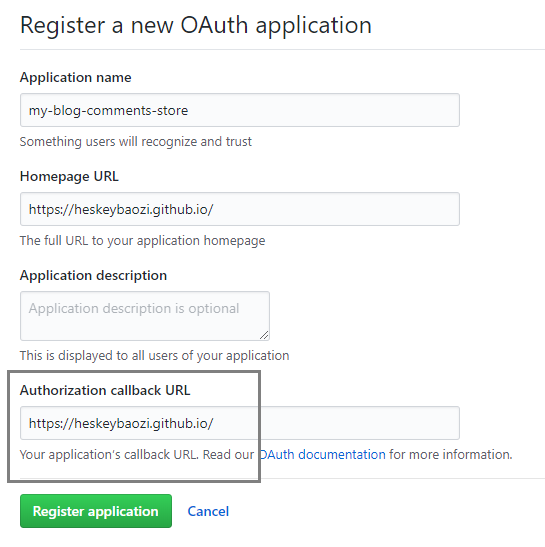
Click here to register an OAuth application, and you will get a client id and a client secret . Make sure the callback URL is right. Generally it's the origin of your site, like https://heskeybaozi.github.io/ .
點擊這裡建立Github OAuth應用, 你就會得到client id和client secret 。一定要確保回呼url回到你的主網域, 例如https://heskeybaozi.github.io/ .
 # https://github.com/imsun/gitment#customize
gitment :
  enable : false
  github_id : # your github id
  repository_name : # your repository name

  # client_id & secret will generated after register an OAuth App
  # reference: https://github.com/settings/applications/new
  client_id :
  client_secret :
  per_page : 8 # comments per page
max_comment_height : 250 # default 250px google_analytics :
enable : false # remember to switch to 'true' when using google analytics
# replace to your track_id. It starts with 'UA-'.
# 这里替换为你的跟踪ID,记得打开`enable: true`
track_id : UA-XXXXXX-X hexo-pagination hexo-pagination npm install --save hexo-pagination # or yarn add hexo-pagination make sure you have turned the highlight plugin on your root __config.yml
請確保你根目錄下的__config.yml檔案是打開highlight插件的
 # example
highlight :
  enable : true
  line_number : true
  auto_detect : true
tab_replace :run the commands in your root hexo dir.
在根目錄下執行這些指令
 cd themes/lite

git pull就是重新刪除主題資料夾再安裝,記得儲存__config.yml檔案。
save your theme __config.yml file.
delete /themes/lite dir
enter your hexo root dir
run command
git clone https://github.com/HeskeyBaozi/hexo-theme-lite themes/lite__config.yml Development Server | 開發者用來debug的伺服器








